
VEIKK VK1200
4.2Editor score
8192 levels pressure sensitivity
Two battery-free pens included
Six customizable shortcut keys
Finding an affordable pen display can transform your digital art journey without breaking the bank. These devices allow you to draw directly on a screen, offering a natural feel similar to traditional paper and pencil work.
We have carefully evaluated ten leading models based on screen quality, pressure sensitivity, compatibility, and overall value. Our goal is to highlight options that deliver professional-grade performance at accessible price points for beginners and pros alike.
Each pick showcases unique strengths like color accuracy, shortcut keys, or portability. Keep in mind that prices and availability change frequently, so check current listings before making your final decision to ensure you get the best deal available.
4.2Editor score

4.4Editor score

4.5Editor score
As an Amazon Associate we earn from qualifying purchases.
The following table provides a side-by-side comparison of all ten models reviewed in this guide. Use this overview to quickly identify key specifications like screen size, resolution, pressure levels, and connectivity options to narrow down your choices.




The XP-PEN Artist12 stands out as a top contender in the affordable pen display market. With a solid 4.4 rating from users, it delivers a reliable experience for digital artists seeking a balance of performance and cost.
We may earn a commission when you buy through this link, at no additional cost to you.
Its 11.6 inch IPS screen offers vivid colors and sharp details thanks to 72 percent NTSC coverage. The battery-free P06 pen provides a comfortable grip and precise control, making long drawing sessions less fatiguing.
While it lacks touch functionality, the eight customizable shortcut keys and programmable touch bar enhance workflow efficiency. Some users note the need for an external power supply, which adds a slight cable management hassle.
This tablet is ideal for students and hobbyists entering digital art. If you need a dependable display that works seamlessly with major creative software, the Artist12 is a highly recommended starting point.
The display presents vivid images with vibrant colors and extreme detail, ensuring your artwork looks accurate on screen.
Six shortcut keys and a slim touch bar can be programmed to zoom, scroll, or execute software commands quickly.
We may earn a commission when you buy through this link, at no additional cost to you.
The VEIKK VK1200 V2 offers impressive value for budget-conscious artists. Its full-laminated design ensures minimal gap between the pen and cursor, providing a more natural drawing experience compared to non-laminated models.
We may earn a commission when you buy through this link, at no additional cost to you.
With two battery-free pens and twenty-eight replacement nibs included, you get ample supplies to start working immediately. The tilt function and 8192 pressure levels allow for expressive strokes and shading techniques.
Although the driver interface might require some initial tweaking, the customizable shortcut keys significantly boost productivity once configured. The only minor drawback is potential glare in very bright environments despite the anti-glare glass.
This model is perfect for beginners who want premium features without the premium price. It is compact enough to carry and sturdy enough for daily use, making it a smart choice for portable creativity.
Seamlessly integrating glass and screen minimizes parallax and ensures cursor accuracy for precise artwork.
Supports single-cable connectivity via USB-C to transmit data, power, and DP signals simultaneously.
We may earn a commission when you buy through this link, at no additional cost to you.
The GAOMON PD1161 excels in customization options with its eight press keys and two programmable pen buttons. This abundance of controls allows you to map frequent actions directly to the device for faster workflow.
We may earn a commission when you buy through this link, at no additional cost to you.
Its 11.6 inch screen delivers vivid color performance with 16.7 million colors and smooth gradation. The pre-installed matte film makes sketching feel like drawing on paper while minimizing uncomfortable glare and reflections.
Users should note that this device must be connected to a computer to function properly. While it supports both Windows and Mac systems, you will need access to both HDMI and USB ports for connection.
Ideal for artists who want extensive control over their software environment, the PD1161 is a robust tool for design work and note-taking. It offers a well-rounded package for those prioritizing workflow efficiency over standalone use.
The pre-installed matte film on display makes it feel like sketching on paper while reducing glare.
Works with PC and Mac plus a wide range of creative softwares and online education platforms.
We may earn a commission when you buy through this link, at no additional cost to you.
The Artisul D16 offers a generous 15.6 inch workspace that accommodates detailed work comfortably. Being a refurbished model, it often comes at a lower price point while maintaining the performance of a full-laminated screen.
We may earn a commission when you buy through this link, at no additional cost to you.
Its anti-glare film reduces scratches and glare, ensuring clear visibility of your artwork. The inclusion of a brightness adjustment button allows you to control screen luminance easily without navigating software settings.
With seven customizable hotkeys and a quick dial, you can adjust brush sizes or scroll pages with ease. The adjustable stand supports six different angles, providing ergonomic comfort for both left and right-handed users.
This display is perfect for artists who need more screen real estate for complex illustrations or animation. It is a practical choice for those willing to consider refurbished options to save money without compromising on size.
The 15.6 inch create area provides a larger space to create animation and graphic design work.
An adjustable monitor stand supports six different angles for a more comfortable posture while creating.
We may earn a commission when you buy through this link, at no additional cost to you.
The HUION Kamvas 13 Gen 3 delivers premium features like 16384 pressure levels and dual dials at a competitive price. Its 4.5 rating reflects high user satisfaction with its color accuracy and build quality.
We may earn a commission when you buy through this link, at no additional cost to you.
The new Canvas Glass 2.0 reduces glare and improves accuracy with a texture that mimics paper. A factory calibration report ensures Avg. Delta E less than 1.5, providing consistent and reliable colors for professional work.
Two customized dial buttons let you scroll through brushes or adjust opacity quickly. While the price is higher than basic models, the enhanced workflow features and superior screen quality justify the investment for serious creators.
This tablet is best suited for designers and illustrators needing high precision and color consistency. If you value a natural drawing feel and efficient shortcuts, the Kamvas 13 Gen 3 is a top-tier choice.
Enhanced color accuracy with 16.7 million display colors and 99 percent sRGB coverage.
Enjoy a USB-C single cable connection and dual dial buttons for a streamlined creative workflow.
We may earn a commission when you buy through this link, at no additional cost to you.
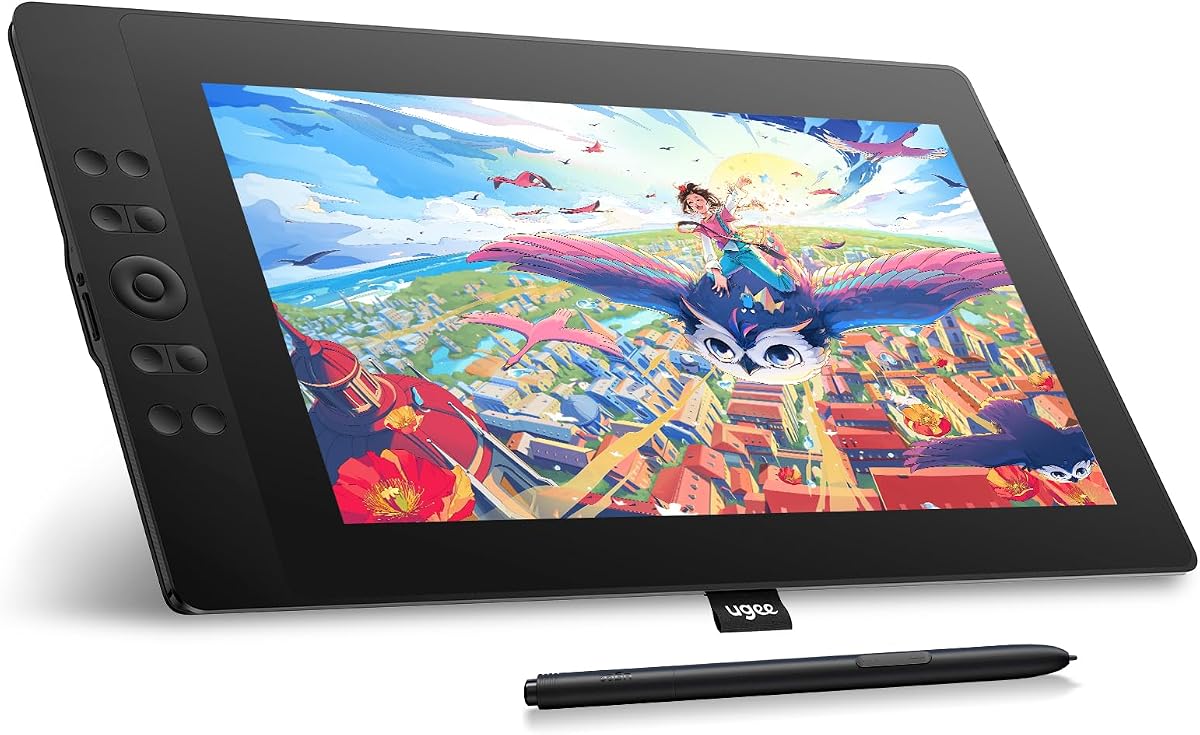
The UGEE UE16 impresses with a massive 143 percent sRGB color gamut, offering exceptional color reproduction. This makes it a standout choice for artists who prioritize vibrant and accurate visuals in their projects.
We may earn a commission when you buy through this link, at no additional cost to you.
It supports four color spaces including sRGB, Adobe RGB, and DCI-P3, allowing seamless transitions between different visual needs. The 16K pressure sensitivity ensures every stroke is translated flawlessly onto the screen.
Eight physical shortcut keys and a digital scroll wheel enhance control over your drawing environment. However, users should be aware that the 3-in-1 cable is packed separately and needs checking before use.
This tablet is ideal for designers working across multiple color profiles and devices. Its compatibility with Android expands its utility, making it a versatile option for hybrid creative workflows requiring high fidelity.
143 percent sRGB ultra-high color gamut showcases ability to reproduce 16.7 million colors.
Options of sRGB, Adobe RGB, DCI-P3, and Black & White mode for seamless transition.
We may earn a commission when you buy through this link, at no additional cost to you.
The VEIKK VK1200 is a straightforward choice for beginners needing a reliable entry-level display. Its simple setup and included accessories make it easy to start drawing right out of the box.
We may earn a commission when you buy through this link, at no additional cost to you.
It includes two battery-free pens and twenty-eight nibs so you always have a spare ready. The six shortcut keys allow quick access to common tools, improving your workflow without steep learning curves.
While it offers tilt function and a clear LED screen, it lacks some advanced features found in higher-end models. This simplicity, however, keeps the device affordable and user-friendly for students.
If you are just starting digital art or need a secondary device for quick sketches, this model is perfect. It balances essential features with accessibility, ensuring a smooth transition from traditional to digital mediums.
Comes with 2 pens and 28 pen nibs for a longer using experience and experimentation.
Includes an artist glove to keep your hand clean and free from smudges while drawing.
We may earn a commission when you buy through this link, at no additional cost to you.
The RubensTab T11 Pro breaks the mold by offering a standalone drawing experience without a computer. This freedom allows artists to create anywhere, from classrooms to coffee shops, with just a single device.
We may earn a commission when you buy through this link, at no additional cost to you.
Its built-in battery provides up to five hours of continuous use, and you can extend this with a power bank. The 10.1 inch screen delivers vibrant colors and sharp details suitable for sketches and notes.
Users benefit from pre-installed professional apps and multi-touch support for intuitive zooming and panning. While the screen is smaller than others on this list, its portability compensates for the reduced workspace.
This tablet is best for students or professionals who need mobility. If drawing directly on a tablet without setup hassles is your priority, the T11 Pro offers a unique and convenient solution.
Designed to be completely independent allowing you to create sketch and design anywhere anytime.
Not just for drawing use it for note-taking during meetings or classroom lectures.
We may earn a commission when you buy through this link, at no additional cost to you.
The upgraded VK1200V2 brings high-end pressure sensitivity to a budget-friendly package. With 16384 levels, you get twice the precision of standard models, allowing for delicate and expressive line work.
We may earn a commission when you buy through this link, at no additional cost to you.
Its 120 percent sRGB gamut ensures vibrant visuals and rich lifelike colors. The full-laminated design fuses glass and display to reduce parallax, ensuring precise cursor positioning for a comfortable creation experience.
Despite being lightweight at just 1.78 lbs, it maintains a durable metal back cover. The tilt support helps create natural lines with varied thickness, mimicking traditional tools effectively.
This model is excellent for artists needing higher precision without spending too much. It offers a solid upgrade path for those who have outgrown basic pens and want more control over their digital strokes.
Newly upgraded to 16384 levels which is twice higher than standard 8192.
Weighs just 1.78 lbs lightweight and highly portable perfect for daily use.
We may earn a commission when you buy through this link, at no additional cost to you.
The XPPen Artist 12 Pro Lite is designed for artists who need a compact and connected drawing solution. Its 3-in-1 cable eliminates the need for adapters, simplifying the setup process for immediate use.
We may earn a commission when you buy through this link, at no additional cost to you.
A fully-laminated display virtually eliminates parallax, offering a distraction-free working environment. The programmable Red Dial and eight shortcut keys allow convenient control over software tools at your fingertips.
While it lacks touch capabilities, its smooth and sensitive strokes support high accuracy for fine sketches. The wide compatibility with various operating systems ensures you can use it with most creative software.
This display is ideal for online classes or presentations where screen sharing is needed. If you value a seamless connection process and a distraction-free workspace, this Lite version is a strong contender.
The portable 11.6-inch drawing display features a 3-in-1 cable design needing no adapter.
Turn your screen into a live canvas for online classes meetings and presentations.
We may earn a commission when you buy through this link, at no additional cost to you.
Selecting the right pen display involves considering several critical factors to ensure it meets your specific artistic needs. We outline the key elements you should evaluate before purchasing a cheap drawing tablet with screen.
Screen size determines your available workspace. Common sizes range from 10 to 15 inches. Larger screens allow for more detailed work but are less portable. Resolution affects sharpness; look for Full HD at least 1920×1080 for clear details.
Choose a size that fits your desk space and portability needs.
Pressure sensitivity determines how well the pen detects varying stroke weights. Standard models offer 8192 levels, while higher-end ones reach 16384. For beginners, 8192 is usually sufficient for natural-looking lines and shading.
Higher levels provide more control for advanced artists seeking subtle variations.
Color accuracy is vital for graphic design and illustration. Look for sRGB coverage of at least 99 percent or NTSC around 72 percent. Better color reproduction ensures your digital art looks true to life when printed or viewed online.
Prioritize models with high color gamut if color fidelity is your main concern.
Battery-free pens are preferred as they never need charging. Check for tilt support if you use shading brushes. Additional features like programmable buttons on the pen can further enhance your workflow efficiency.
A comfortable grip and light weight are also important for long sessions.
Ensure the device supports your operating system like Windows or Mac. Some models offer USB-C single-cable connectivity which simplifies setup. Others may require separate HDMI and USB connections.
Verify port availability on your computer before buying to avoid needing extra adapters.
Customizable shortcut keys allow you to map frequent commands to physical buttons. This reduces reliance on keyboard shortcuts and keeps your focus on the screen. Some models include dials for rapid brush size adjustments.
More keys generally mean a faster and more efficient creative workflow.
Look for sturdy materials like metal bodies or anti-slip backs. A durable device withstands daily travel and desk use. Full-laminated screens are more robust and provide better touch feel than older tech.
A good build ensures longevity and consistent performance over time.
Most tablets work with major apps like Photoshop, Illustrator, and Krita. Check driver availability for your specific OS version. Good software support ensures you can start drawing without complex setup.
Reliable drivers are essential for smooth pressure sensitivity and shortcut functions.
First set up your device by connecting it securely to your computer using the provided cables. Install the latest drivers from the manufacturer's website to ensure full functionality of pressure sensitivity and shortcut keys.
Adjust your pen settings and screen brightness to suit your environment. Use the included artist glove to prevent smudging and keep the screen clean while you work. Regular cleaning with a soft microfiber cloth maintains display clarity.
Avoid placing heavy objects on the screen to prevent scratches or cracks. Store the pen properly in its holder when not in use to protect the nibs. Proper care ensures your device remains in top condition for years of use.
Most of the models listed require a computer connection to function as they lack internal operating systems. However, standalone tablets like the RubensTab T11 Pro exist which can work independently without a PC.
Yes, nearly all models support both Windows and macOS systems. Always check specific version requirements like Windows 10 or macOS 10.12 to ensure full compatibility with your current setup.
Laminated screens minimize the gap between the glass and the display panel. This reduces parallax error making it easier to see exactly where your pen tip touches the screen for higher accuracy.
The majority of these tablets come with battery-free passive pens that do not need charging. This allows for uninterrupted creative sessions without worrying about power levels or finding outlets.
Yes, these displays are designed to work with popular creative applications including Photoshop Illustrator Krita and more. They act as input devices that integrate seamlessly with existing creative software workflows.
Use a soft microfiber cloth to gently wipe the screen surface. Avoid harsh chemicals or abrasive materials that could damage the coating or scratch the glass during your daily cleaning routine.
Most brands offer at least a one-year hardware warranty and technical support. Some even provide lifetime driver updates to ensure long-term performance and compatibility with software changes.
Typically you get the tablet, pen, cables, glove, and extra nibs. Some kits include a stand or cleaning cloth. Always verify the included items list on the product page before purchasing.
We have reviewed ten top models ranging from budget picks to premium options. Whether you need basic functionality for learning or high precision for professional work, there is a suitable choice for every artist.
Prioritize features that matter most to your workflow like color accuracy or portability. Investing in a device that fits your specific needs ensures you get the best value and enjoyment from your purchase.
Remember to check current prices and availability before finalizing your order. Deals change often and keeping an eye on listings helps you secure the best deal on your new creative tool.