
Wireless Keyboard and Mouse Combo Retro Typewriter
4.4Editor score
2.4GHz wireless connection
Retro round keycaps
Auto power-saving mode
Discover the top colorful keyboards for 2026. We compare design, connectivity, and typing experience to help you find the perfect vibrant input device for your
Colorful keyboards bring personality and joy to any desk setup. Whether you prefer retro typewriter styles or modern RGB lighting, vibrant options exist for every taste. These devices transform mundane typing into an engaging experience that reflects your unique style and creativity.
We evaluated ten top-rated models based on build quality, connectivity, and user feedback. Our analysis covers wireless and wired options across various price points. Each product offers distinct aesthetic appeal while maintaining reliable performance for daily computing tasks.
Every selection highlights specific strengths like keycap design or battery life. You will find detailed insights on compatibility and cleaning. Please note that prices change frequently, so verify current offers before purchasing your new colorful keyboard.
4.4Editor score

4.7Editor score
4.6Editor score
This side-by-side comparison highlights the unique features of each model. From wireless convenience to wired reliability, every option provides distinct advantages for different user needs.


The KNOWSQT wireless combo offers a vibrant milk tea aesthetic that stands out on any desk. With a 4.4-star rating, it balances style and function effectively for daily use.
We may earn a commission when you buy through this link, at no additional cost to you.
Its detachable keycaps make maintenance simple, while the floating button design provides a soft, quiet typing feel. The 2.4GHz connection ensures stable performance up to 35 feet.
Battery dependency is a minor trade-off, but the auto-sleep feature extends life significantly. The low battery indicator helps users stay aware without interruptions.
This model suits users seeking a colorful wireless solution without sacrificing comfort. It works well for offices or home setups needing reliable input devices.
Every button can be disassembled and cleaned in water, ensuring long-term hygiene and appearance.
Automatic sleep mode activates after one minute of inactivity, prolonging battery life for extended use.
We may earn a commission when you buy through this link, at no additional cost to you.
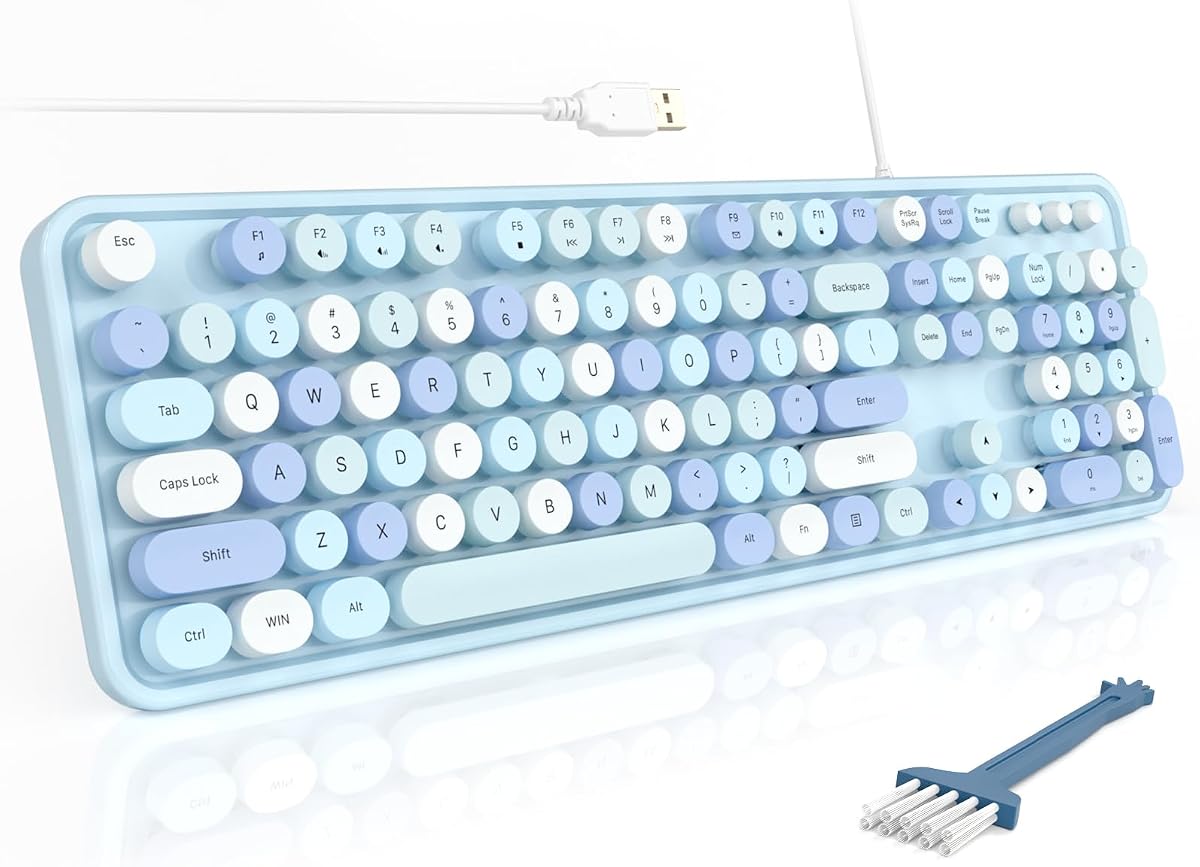
The MOFII wired keyboard brings nostalgic charm with a blue colorful aesthetic. Its 4.6-star rating reflects strong satisfaction with build quality and typing comfort.
We may earn a commission when you buy through this link, at no additional cost to you.
Featuring round keycaps and an ergonomic stand, it reduces strain during long sessions. Plug-and-play simplicity means no drivers are needed for immediate use.
The absence of batteries eliminates recharging hassles, though wired connection limits desk flexibility. This is ideal for stationary desktop setups prioritizing reliability.
Ideal for professionals wanting a unique look without wireless complexity. It delivers consistent performance for work and casual computing tasks.
The stand provides an optimal typing angle, enhancing comfort and reducing wrist fatigue over time.
Powered directly via USB, this keyboard never needs charging or battery replacements for continuous use.
We may earn a commission when you buy through this link, at no additional cost to you.
This retro typewriter combo delivers exceptional value with black colorful styling. Its 4.4-star rating highlights reliable performance for budget-conscious buyers.
We may earn a commission when you buy through this link, at no additional cost to you.
A shared 2.4GHz receiver connects both devices easily, reducing clutter. Multimedia hotkeys enhance productivity by allowing quick access to volume and playback controls.
Battery life extends up to 36 months for the keyboard, though batteries are sold separately. The auto-power save feature ensures minimal energy consumption.
Perfect for students or home offices seeking wireless convenience at low cost. It balances style and utility for everyday typing needs.
One nano receiver connects keyboard and mouse simultaneously, keeping your USB ports organized and clean.
Up to 36 months of battery life means fewer replacements and more uninterrupted typing sessions.
We may earn a commission when you buy through this link, at no additional cost to you.
The UBOTIE purple rainbow combo adds vivid color to your workspace. It features retro keycaps that offer a tactile typing experience reminiscent of classic typewriters.
We may earn a commission when you buy through this link, at no additional cost to you.
With fade-resistant materials, the vibrant design lasts even with daily use. Independent power switches for both devices allow flexible usage patterns to save energy.
Typing may be louder than silent models due to the clicky mechanism. This suits users who enjoy audible feedback during input tasks.
Great for dorm rooms or creative studios needing visual appeal. Its compatibility spans multiple operating systems for versatile integration.
Upgraded materials maintain bright colors over time, keeping the keyboard looking new despite regular use.
Separate switches for keyboard and mouse enable selective use to conserve battery life effectively.
We may earn a commission when you buy through this link, at no additional cost to you.
This green colorful combo enhances desktop vitality with a full-size layout. Its ergonomic design prevents wrist strain during extended typing sessions.
We may earn a commission when you buy through this link, at no additional cost to you.
A folding holder optimizes the typing angle, while anti-slide pads ensure stability. The reliable 2.4GHz connection works up to 33 feet without lag.
Users report 18 months of battery life, though batteries are not included. The auto-sleep mode conserves power effectively when the device is idle.
Well-suited for office workers needing comfort and style. It serves as a thoughtful gift for friends or colleagues.
The adjustable holder maintains an optimal slope, protecting wrists during long work periods.
Stable transmission ensures no dropouts, allowing seamless multitasking across your workspace.
We may earn a commission when you buy through this link, at no additional cost to you.
The FOPETT blue combo features silent technology ideal for quiet environments. Its 4.3-star rating reflects solid performance for home and office use.
We may earn a commission when you buy through this link, at no additional cost to you.
Silent micro-motion technology eliminates disruptive knocking sounds, benefiting shared spaces. Laser-engraved characters ensure durability without fading over time.
A waterproof film protects against spills, extending device longevity. However, some hotkeys may not function fully on macOS systems.
Best for users prioritizing quiet operation and spill resistance. The long warranty provides peace of mind for daily usage.
This innovation minimizes noise, making it suitable for libraries or home offices without disturbance.
Conductive film allows liquids to drain safely, preventing internal damage from accidental spills.
We may earn a commission when you buy through this link, at no additional cost to you.
This purple colorful wired keyboard offers a classic typewriter feel without wireless dependencies. Its 4.6-star rating indicates high user satisfaction with comfort and sound.
We may earn a commission when you buy through this link, at no additional cost to you.
Plug-and-play USB connectivity ensures immediate setup. Detachable caps allow easy cleaning, maintaining a fresh appearance over time.
The lack of batteries removes charging hassles, though the cord limits desk arrangement flexibility. Ideal for fixed workstation setups.
Perfect for users preferring tactile feedback and simplicity. Its elegant packaging also makes it a nice gift option.
Caps can be removed for thorough cleaning, ensuring hygiene and consistent key performance.
Direct USB connection guarantees zero lag and eliminates wireless interference risks during typing.
We may earn a commission when you buy through this link, at no additional cost to you.
The Womier SK80 blends color and tech with a custom GIF display. With a 4.7-star rating, it stands out as a premium mechanical option.
We may earn a commission when you buy through this link, at no additional cost to you.
The screen shows custom images, settings, and system status. Gasket mount design reduces typing noise, enhancing focus and immersion.
Hot-swappable sockets allow easy switch customization without soldering. Windows-only software limits full feature access on other operating systems.
Best for enthusiasts seeking unique visual flair and mechanical precision. It transforms every session into a sensory experience.
The screen visualizes system stats and custom graphics, adding interactivity to your desktop environment.
Swap switches effortlessly to adjust tactile feel, enabling personalized typing experiences without tools.
We may earn a commission when you buy through this link, at no additional cost to you.
This black colorful combo features a unique mirror surface for a modern look. Its 4.3-star rating highlights its blend of aesthetics and reliability.
We may earn a commission when you buy through this link, at no additional cost to you.
The reflective panel adds elegance, while fade-resistant coatings maintain vibrancy. A shared receiver keeps the workspace organized and clutter-free.
Some shortcuts may not work on updated macOS versions. Fingerprints might show on the mirror finish, requiring regular wiping.
Ideal for users wanting a sophisticated yet colorful setup. It suits offices and home desks needing style and function.
The panel subtly reflects key inputs, creating a sleek and modern desktop aesthetic.
Updated technology ensures fast, durable response for all typing and cursor tasks.
We may earn a commission when you buy through this link, at no additional cost to you.
This wired keyboard combines colorful LED backlighting with durable build quality. Its 4.4-star rating reflects satisfaction for both gaming and office use.
We may earn a commission when you buy through this link, at no additional cost to you.
Rainbow lighting modes enhance visibility in dim environments. Anti-sweat keycaps and water resistance protect against wear and accidental spills.
The 26-key non-conflict feature supports rapid typing. Adjusting brightness is possible, though lighting may consume power.
Perfect for gamers and casual users needing robust lighting. Its ergonomic design reduces fatigue during long sessions.
Multiple lighting modes allow you to tailor the ambiance to your environment and preference.
Double-shot injection ensures characters never fade, maintaining clarity throughout the keyboard's lifespan.
We may earn a commission when you buy through this link, at no additional cost to you.
Choosing the right colorful keyboard depends on your style preferences and functional needs.
Colorful keyboards come in various styles like retro typewriter, rainbow LED, or mirror finishes. Select a design that matches your workspace theme and personal taste.
Look for fade-resistant materials to ensure long-term vibrancy.
Decide between wireless and wired options. Wireless offers clutter-free flexibility but requires batteries, while wired provides stable power without replacements.
Ensure your device has the necessary USB ports or wireless adapters for seamless connection.
Full-size models include a number pad for data entry, while compact layouts save desk space. Choose based on whether you need numeric input regularly.
Check key count and arrangement to fit your typing habits.
Round keycaps mimic typewriters and provide comfort, whereas flat ones offer modern ergonomics. Detachable caps allow for easier cleaning and maintenance.
Consider tactile feedback preferences for long typing sessions.
Wireless models vary significantly in battery endurance. Auto-sleep modes help conserve power, but check average duration before purchase.
Prioritize models with indicators to avoid unexpected shutdowns during use.
Verify operating system support like Windows, Mac, or Linux. Some features may be limited on certain systems, affecting functionality.
Ensure the keyboard supports your primary device ecosystem.
Quality materials like ABS plastic and splash resistance extend product life. Look for reinforced bases that prevent sliding or wear.
Invest in durable models to avoid frequent replacements.
Prices vary widely based on features and aesthetics. Set a realistic budget that balances style and essential performance needs.
Compare warranty terms to ensure long-term value.
To begin using a wireless keyboard, insert batteries and connect the USB receiver. Ensure the power switch is on for immediate recognition.
Clean regularly using the included brush or damp cloth to maintain keycap brightness and prevent dust buildup.
Enable auto-sleep features to extend battery life. Store the keyboard in a dry place away from direct sunlight to preserve colors.
Yes, many models use fade-resistant materials like ABS plastic and reinforced bases to maintain vibrancy and structural integrity over time. Regular cleaning also helps preserve appearance.
Most options support macOS, but some specialized hotkeys may require configuration. Always check compatibility details before purchasing to ensure full functionality with your system.
Battery life varies from several months to years depending on usage patterns. Auto-sleep modes help conserve power significantly, reducing the frequency of battery replacements needed.
Some models include silent technology to reduce typing noise, which benefits shared spaces. However, typewriter styles often produce audible clicks by design for tactile feedback.
Certain models feature splash-resistant designs with protective films that allow liquids to drain safely. Always check product specs for specific water resistance claims before use.
Remove keycaps gently and wash them in mild water with a brush. Dry them thoroughly before reattaching to prevent moisture damage to the underlying switches.
We explored ten vibrant models ranging from budget retro combos to premium mechanical displays. Each offers unique aesthetics and features to suit diverse preferences and workspace needs.
Prioritize connectivity, layout, and keycap design based on your daily tasks. A colorful keyboard can significantly enhance both productivity and personal satisfaction.
Remember to check current prices and availability before purchasing. These models provide reliable ways to add personality and flair to your computing setup.