
LGA 1155 Motherboard H61
5.0Editor score
Supports 2nd and 3rd Gen CPUs
Includes M.2 SSD Interface
Dual-channel DDR3 Memory Slots
This guide compares the top Lga 1155 Motherboard options for 2026, reviewing features, compatibility, and performance to help you choose the right board for
Finding the right Lga 1155 Motherboard is crucial for building a reliable system with older Intel processors. These boards support Core i3, i5, and i7 chips from the second and third generations, offering a cost-effective path for budget gaming or office setups.
We evaluated ten top models based on chipset features, expansion slots, memory support, and connectivity options. Our analysis includes both modern budget H61 boards and classic high-end Z77 and H77 models to cover diverse user needs and preferences.
Each pick highlights key strengths and potential trade-offs to guide your decision. Prices and availability change frequently, so verify current stock and costs before purchasing to ensure you get the best value for your specific requirements today.
5.0Editor score

4.1Editor score

4.0Editor score
This side-by-side comparison highlights the key specifications of all ten selected motherboards. Review chipset types, memory limits, and expansion options to find the perfect match for your processor and storage needs.


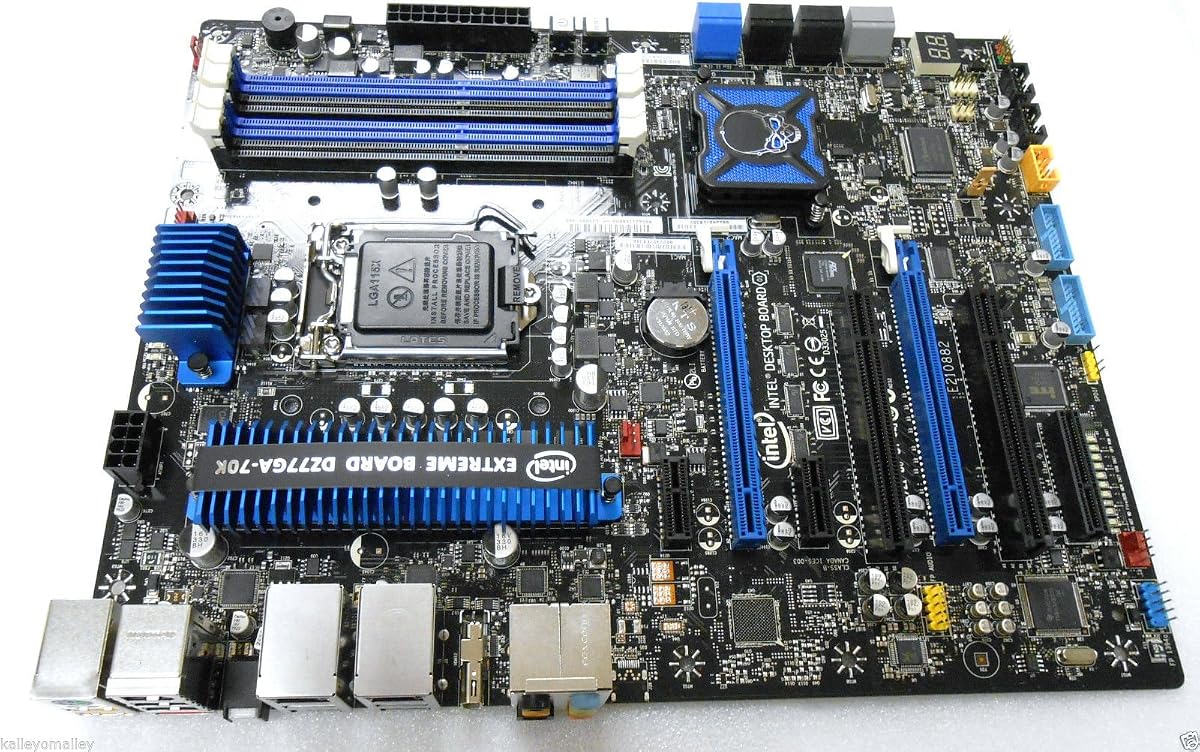

This H61 motherboard offers an affordable entry point for building a system with second or third generation Intel Core processors. It supports DDR3 memory and includes modern conveniences like an M.2 slot for fast storage.
We may earn a commission when you buy through this link, at no additional cost to you.
The board supports a wide range of CPUs including i3 i5 and i7 as well as Xeon processors. It provides dual-channel DDR3 slots and standard interfaces like VGA and HDMI for basic display needs.
While it lacks a physical user manual and battery the board functions reliably with supported hardware. Users should ensure their CPU has integrated graphics for video output or use a dedicated card.
Ideal for budget builders seeking a functional base for older systems this board delivers essential features without unnecessary costs. It remains a solid choice for those prioritizing price and basic compatibility.
The M.2 interface allows for NVMe or NGFF SSDs, providing faster storage speeds than traditional SATA drives.
Support for both consumer and server CPUs makes this board versatile for various use cases and upgrades.
We may earn a commission when you buy through this link, at no additional cost to you.
The MACHINIST H61 provides a cost effective solution for older Intel systems. It features essential connectivity and supports DDR3 memory and M.2 storage for improved performance.
We may earn a commission when you buy through this link, at no additional cost to you.
Users can utilize this board with various processors including Xeon E3 V2 series. The inclusion of HDMI and VGA ports ensures display connectivity for systems without dedicated graphics cards.
While the LAN speed is limited to 100M the board remains functional for general tasks and light gaming. Careful attention to CPU compatibility and driver setup is recommended for optimal results.
This model suits budget focused builds needing basic functionality. It offers reasonable compatibility and modern storage options at a very accessible price point.
Server CPUs like Xeon E3 V2 are supported offering an alternative path for multi-core performance on a budget.
Driver recommendations are provided to assist users in achieving stable performance after installation.
We may earn a commission when you buy through this link, at no additional cost to you.
The Gigabyte Z77-DS3H brings classic Z77 capabilities to budget builds. It enables overclocking and offers robust storage options through RAID support and standard SATA ports.
We may earn a commission when you buy through this link, at no additional cost to you.
With a Gigabit LAN connection and ATX form factor this board fits standard cases well. It supports a wide range of Intel processors from the era for flexible hardware choices.
Users seeking higher performance and traditional expansion slots will find this board suitable. It balances legacy features with enough utility for many home and office systems.
Ideal for those needing overclocking headroom and reliable networking this model provides solid stability. It remains a trusted option for enthusiasts using second or third generation CPUs.
The Z77 chipset allows unlocked multiplier adjustments for increased CPU speeds beyond stock settings.
RAID support enables multiple drives to be combined for performance or data redundancy.
We may earn a commission when you buy through this link, at no additional cost to you.
The ASUS P8Z77-V represents a premium option for enthusiasts needing advanced features. USB BIOS Flashback ensures recovery ease while digital power control enhances system stability.
We may earn a commission when you buy through this link, at no additional cost to you.
Fan management and multimedia tools add convenience for home theater or remote operations. The board supports high-speed DDR3 memory and multiple expansion slots for graphics or storage cards.
While more expensive the included features justify the cost for power users. The TPM header provides enhanced security capabilities suitable for enterprise or sensitive data environments.
Recommended for those needing top tier reliability and features this board excels in performance tuning. It is a strong choice for legacy builds requiring modern utility and security.
USB BIOS Flashback allows system recovery without a CPU installed making troubleshooting significantly easier.
SMART DIGI+ Power Control ensures efficient power delivery reducing heat and improving component lifespan.
We may earn a commission when you buy through this link, at no additional cost to you.
This H61 ATX board targets compact gaming builds needing stable power and storage. All solid capacitors and three phase power ensure reliable operation under moderate loads.
We may earn a commission when you buy through this link, at no additional cost to you.
M.2 NVMe support allows fast boot times while HDMI and VGA output cater to integrated graphics needs. The board is suited for basic systems where size and cost are priorities.
Performance is adequate for everyday tasks and light gaming with proper CPU and GPU pairing. The design prioritizes stability and compatibility over high end features or extensive expansion.
Ideal for small form factor cases this board delivers essential gaming features efficiently. It offers a solid foundation for budget builds aiming for modern storage speeds.
Solid state capacitors contribute to longer component life and consistent electrical performance over time.
Support for M.2 drives significantly improves system responsiveness compared to traditional HDDs.
We may earn a commission when you buy through this link, at no additional cost to you.
The ASUS P8H77-V LE offers balanced features for stable daily use. USB 3.0 support and H77 chipset features improve connectivity and system response compared to older models.
We may earn a commission when you buy through this link, at no additional cost to you.
DIGI+ VRM ensures efficient power delivery while Fan Xpert optimizes cooling based on system load. This combination supports reliable performance for office or multimedia applications.
GPU Boost provides additional graphical enhancements for systems using integrated graphics. The board handles multiple storage devices effectively with SATA 6Gb/s support.
Recommended for those needing dependable connectivity and power management this model fits standard cases well. It is a practical choice for legacy system upgrades requiring USB 3.0.
USB 3.0 Boost modes improve data transfer speeds for external storage devices and peripherals.
DIGI+ VRM technology provides digital control over voltage regulation improving stability and efficiency.
We may earn a commission when you buy through this link, at no additional cost to you.
This P8H77-V model provides full H77 chipset capabilities including Turbo Boost 2.0 support. It accommodates up to 32GB of memory for demanding multitasking applications.
We may earn a commission when you buy through this link, at no additional cost to you.
SATA 6Gb/s ports enable fast storage performance while PCIe slots allow for GPU or capture card expansion. The board is designed for robust home or office workstation needs.
Stability and compatibility are emphasized throughout the design ensuring reliable long term operation. It suits users who need maximum memory capacity on LGA1155 platforms.
Ideal for heavy multitasking or virtualization this board delivers consistent performance. It offers extensive connectivity and memory support suitable for demanding legacy setups.
Support for 32GB memory allows complex workflows like virtual machines or large database handling.
Multiple SATA 6Gb/s ports support fast SSDs and HDDs for optimized data management.
We may earn a commission when you buy through this link, at no additional cost to you.
The P8Z77-V LK offers dual x16 PCIe slots for multi-GPU configurations or expanded connectivity. Z77 features enable overclocking while 32GB memory support handles intensive workloads.
We may earn a commission when you buy through this link, at no additional cost to you.
SATA 6Gb/s ensures fast storage while the board maintains stability with quality power phases. It provides a balanced feature set for users seeking performance without extreme premium pricing.
This board suits builders needing multiple graphics cards or high capacity RAM. It delivers solid overclocking potential with standard expansion options.
Recommended for gamers or workstation users needing flexibility this model supports varied hardware configurations. It remains a capable option for multi-GPU setups on older platforms.
Dual PCIe x16 slots allow for SLI or CrossFire setups for enhanced graphics performance.
Up to 32GB memory capacity supports virtualization and memory-intensive applications.
We may earn a commission when you buy through this link, at no additional cost to you.
This Intel Z77 board features dual Gigabit LAN for advanced networking or link aggregation. It includes Firewire and e-SATA ports for legacy peripheral support.
We may earn a commission when you buy through this link, at no additional cost to you.
The Z77 chipset supports overclocking and high-speed SATA storage for flexible system designs. It is well suited for specialized setups requiring multiple network or storage connections.
While older ports like Firewire are rare today they remain useful for specific professional or legacy devices. The board ensures robust connectivity for niche applications.
Ideal for users needing dual networking or legacy interfaces this model stands out. It delivers solid Z77 performance with unique connectivity options.
Dual Gigabit LAN allows link aggregation or failover configurations for improved reliability.
Firewire and e-SATA support ensure compatibility with older professional peripherals and storage devices.
We may earn a commission when you buy through this link, at no additional cost to you.
The P8B75-M/CSM is designed for business environments with energy saving and security features. EPU technology reduces power consumption while UEFI BIOS simplifies configuration.
We may earn a commission when you buy through this link, at no additional cost to you.
GPU Boost enhances integrated graphics performance for light gaming or multimedia. This board supports stable operation for office workloads with efficient power management.
It balances functionality and efficiency making it suitable for small office builds. The BIOS interface offers intuitive controls for routine system management.
Recommended for energy conscious users needing reliable performance this model fits commercial needs well. It is a practical choice for legacy office upgrades.
EPU technology optimizes power delivery to reduce electricity costs and heat generation.
UEFI BIOS provides a graphical interface making system configuration and updates more intuitive.
We may earn a commission when you buy through this link, at no additional cost to you.
Selecting the right motherboard requires understanding chipsets compatibility and connectivity features. This guide helps you identify key factors to ensure your build meets performance and budget goals.
The chipset determines overclocking support storage capabilities and expansion options. Z77 boards allow CPU overclocking and offer more PCIe lanes while H77 and B75 focus on stability and basic features. H61 models are budget oriented with fewer options but still support essential CPU types.
Choose Z77 for performance tuning or H77/B75 for stable general use depending on your needs.
LGA 1155 boards support DDR3 memory with capacities typically ranging from 16GB to 32GB. Speeds vary by chipset but most support 1333MHz to 1600MHz base frequencies. Dual channel configurations offer better bandwidth for integrated graphics or multi-tasking.
Ensure your chosen board supports the capacity and speed required for your intended applications.
Check the number and type of PCIe slots if you plan to add graphics cards or capture devices. Z77 boards often provide multiple x16 slots for multi GPU setups whereas H61 typically offers one. Additional x1 slots allow for network or sound cards.
Verify slot availability to avoid limitations when expanding your system components.
SATA ports range from 2Gb/s to 6Gb/s which impacts SSD performance. Some models include M.2 slots for modern NVMe drives even on older chipsets. This feature is rare but valuable for faster boot and load times.
Look for boards with SATA 6Gb/s or M.2 support to maximize storage speed.
Integrated graphics require CPU support and functional HDMI or VGA ports on the motherboard. Most boards offer both but verify which ports are available for your specific build. Dedicated GPUs bypass these but onboard outputs simplify basic setups.
Confirm your CPU supports integrated graphics if you plan to use onboard video outputs.
Robust VRM designs ensure stable power delivery for CPUs especially when overclocking. Solid capacitors and adequate phase counts contribute to longer component lifespan and consistent performance under load.
Prioritize boards with quality power phases if stability and performance are critical.
Gigabit Ethernet is standard on most boards providing reliable wired network connections. Dual LAN ports allow failover or link aggregation for specialized networking needs. These features improve throughput and reliability compared to 100M adapters.
Check for Gigabit LAN if network performance matters for your applications.
Most LGA 1155 boards use ATX size fitting standard mid tower cases. Compact builds may require Micro ATX options which limit slot count. Measure your case to ensure physical compatibility before purchasing.
Select ATX for maximum expansion or Micro ATX for smaller enclosures as needed.
Install the board into your case ensuring standoff alignment to prevent shorts. Connect CPU and RAM before installing peripherals to simplify troubleshooting during initial setup.
Apply thermal paste correctly when mounting the CPU cooler to maintain optimal temperatures. Ensure all power cables are firmly seated to avoid instability during use.
Keep the system clean by removing dust regularly and updating drivers as needed. Monitor temperatures and voltages with software tools to detect issues early.
LGA 1155 supports Intel Core second and third generation processors including i3 i5 and i7. It also works with Xeon E3 V2 series Pentium and Celeron chips. Always verify the specific CPU and board compatibility before purchasing.
Most LGA 1155 motherboards work with Windows 10 but require driver downloads. Windows 11 is generally unsupported due to TPM and CPU generation requirements. Check driver availability for your specific model on the manufacturer site.
No LGA 1155 motherboards only support DDR3 memory. DDR4 requires newer sockets and chipsets. Ensure you purchase compatible DDR3 modules matching the supported speeds.
Most standard boards rely on SATA SSDs but some modern budget models include M.2 NVMe slots. Check the product specifications carefully to confirm NVMe support before buying.
Overclocking requires a Z77 chipset and unlocked CPU. H61 H77 and B75 boards do not support CPU multiplier overclocking. Choose Z77 if you plan to push your processor beyond stock speeds.
You need a dedicated GPU only if your CPU lacks integrated graphics. Most Core i3 i5 and i7 chips have built-in graphics. Verify your CPU model supports video output before relying on board ports.
Most boards support up to 16GB or 32GB of DDR3 memory depending on the chipset and BIOS. Check the specific motherboard manual for maximum capacity and slot configurations.
Download drivers and manuals from the manufacturer website using the board model name. Online communities and forums often provide setup guides and tips for older models.
The LGA 1155 platform offers solid value for budget and legacy system builds. Top picks range from affordable H61 models to feature rich Z77 options for various performance needs.
Prioritize chipset features and connectivity options that match your specific use case. Ensure your CPU and memory choices are compatible for smooth system integration.
Verify current prices and availability since these older boards may fluctuate in stock. Check reviews and seller ratings to confirm product condition before purchasing.