
LG 24U411A-B
4.6Editor score
120Hz refresh rate
Ultra slim bezels
HDR10 support
Frameless computer monitors redefine modern workspace aesthetics by minimizing bezels and maximizing screen real estate. These displays offer immersive viewing experiences ideal for multitasking creative work and entertainment setups.
We evaluated ten top models based on panel technology refresh rates eye care features and connectivity options. Our analysis ensures you find a display matching your specific productivity or gaming requirements.
Each pick highlights unique strengths from budget friendly options to high resolution 4K displays. Prices and availability change frequently so verify current details before making your final purchasing decision today.
4.6Editor score

4.7Editor score

4.2Editor score
As an Amazon Associate we earn from qualifying purchases.
This side-by-side comparison highlights key specifications across all ten selected monitors to help you quickly identify the best fit for your desk setup.


The ViewSonic VA2256-MHD stands out as the Editors Choice for users prioritizing eye comfort and color consistency. Its IPS panel delivers reliable visuals while the frameless design ensures seamless integration into larger workstation setups.
We may earn a commission when you buy through this link, at no additional cost to you.
This monitor features integrated Flicker-Free technology and a Blue Light Filter to minimize eye fatigue during extended work sessions. The ViewMode presets allow you to quickly optimize gamma and contrast for tasks ranging from reading text to gaming.
While the 22-inch 1080p resolution may not suit professional photo editing it offers excellent value for general office productivity. The DisplayPort-out technology enables daisy chaining reducing cable clutter on your desk significantly.
Ideal for students and office workers the VA2256-MHD balances performance with affordability. Its reliable connectivity options and ergonomic eye care features make it a standout pick for budget-conscious buyers.
The IPS panel ensures consistent colors across wide viewing angles which is crucial for collaborative work and accurate content consumption.
Daisy chain support via DisplayPort-out allows you to connect multiple monitors with a single cable for a clutter-free workspace.
We may earn a commission when you buy through this link, at no additional cost to you.
The LG 24U411A-B offers exceptional performance for its price making it the Best Budget pick. Its 120Hz refresh rate ensures smooth visuals for gaming and multimedia consumption while the frameless bezels enhance immersion.
We may earn a commission when you buy through this link, at no additional cost to you.
With HDR10 support and 99% sRGB coverage this monitor delivers vivid colors suitable for creative projects. The 1ms Motion Blur Reduction keeps fast-paced gameplay sharp ensuring you never miss a critical moment during action.
While the stand lacks height adjustment the tilt feature helps find a comfortable viewing position. Reader Mode lowers blue light for comfortable document reading making it versatile for both work and leisure.
Users seeking an affordable upgrade without compromising on motion performance should consider this model. It excels in delivering smooth visuals and rich colors at a competitive price point.
The 120Hz refresh rate and 1ms MBR minimize motion blur making it ideal for gaming and fast-paced multimedia tasks.
HDR10 support and wide color coverage provide vibrant visuals that enhance movies and creative content consumption.
We may earn a commission when you buy through this link, at no additional cost to you.
The CRUA 27-inch 4K UHD monitor represents the Best Premium choice for professionals needing sharp visuals. Its high resolution delivers crisp text and detailed images ideal for spreadsheets coding and video calls.
We may earn a commission when you buy through this link, at no additional cost to you.
Featuring an IPS panel with 120% sRGB and 98% DCI-P3 this monitor ensures accurate color reproduction. The USB-C port simplifies connectivity for laptops allowing power and data transfer through a single cable.
While the 60Hz refresh rate suits productivity better than fast-paced gaming the ergonomic stand with height adjustment supports long work sessions. The sleek silver metal housing adds a sophisticated look to any office.
Designers and remote workers will appreciate the screen real estate and professional-grade color accuracy. It is a robust investment for those prioritizing visual clarity and build quality.
With 120% sRGB coverage and over a billion colors this monitor delivers precise visuals for professional creative work.
USB-C allows single-cable connection for power and data making it perfect for modern laptop setups and reducing cable clutter.
We may earn a commission when you buy through this link, at no additional cost to you.
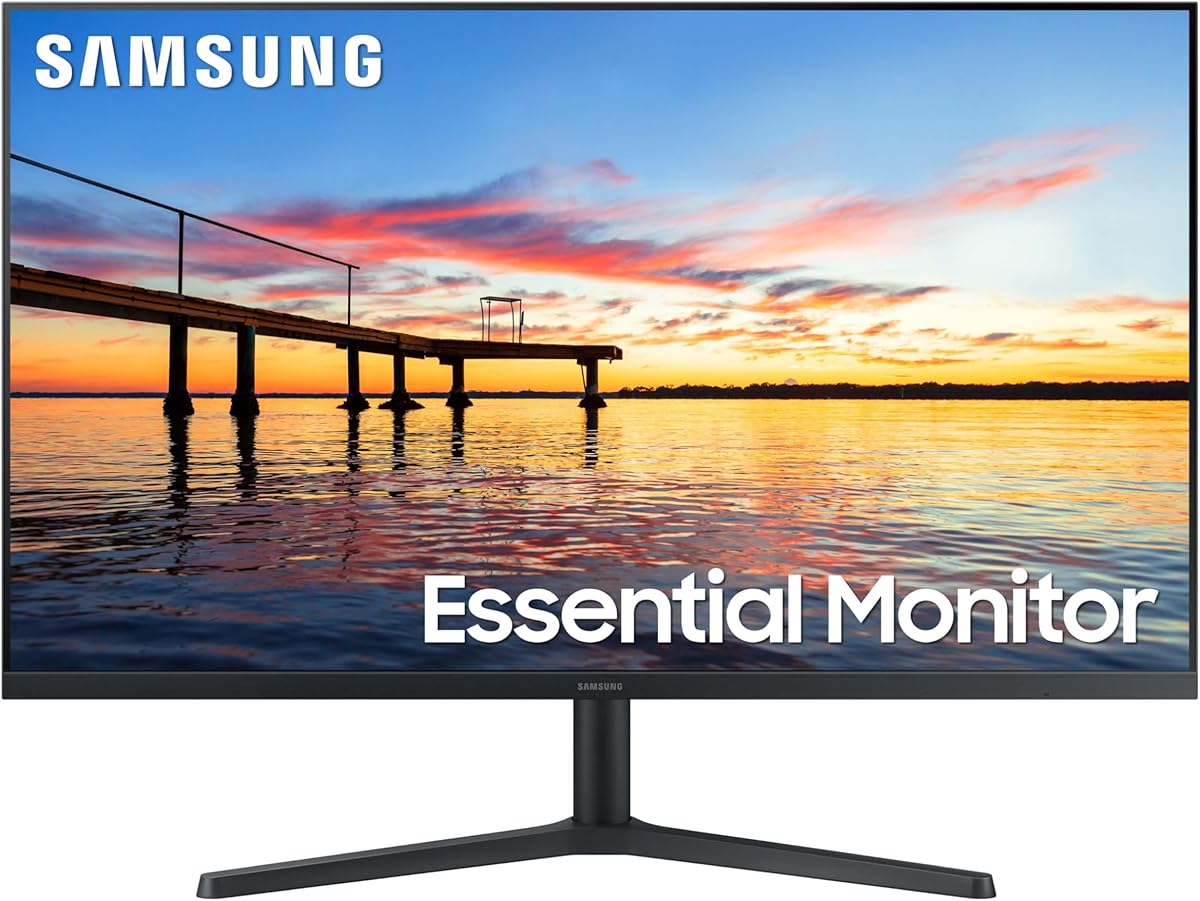
The Samsung 32-inch Flat Monitor delivers immersive viewing with a three-sided borderless design. Its large screen size is ideal for multitasking while the AMD FreeSync technology ensures smooth visuals for gaming.
We may earn a commission when you buy through this link, at no additional cost to you.
Eye comfort features including Flicker Free and Eye Saver Mode reduce strain during extended sessions. Game Mode optimizes contrast and colors to help you spot details in dark game scenes effortlessly.
The 75Hz refresh rate provides smooth motion for general use and casual gaming. While the stand is basic the large viewing area compensates by reducing the need to switch windows frequently.
Users needing a large workspace without multiple displays will find this model compelling. It balances cost effective large display performance with essential gaming and comfort features.
The three-sided bezel design minimizes distractions and creates a nearly gapless look when used in multi-monitor setups.
Flicker Free and Eye Saver Mode minimize fatigue making this suitable for long workdays without compromising visual comfort.
We may earn a commission when you buy through this link, at no additional cost to you.
The ViewSonic VS2725-2K offers a premium QHD resolution at a competitive price. Its 100Hz refresh rate ensures fluid visuals for productivity and light gaming making it versatile for mixed workloads.
We may earn a commission when you buy through this link, at no additional cost to you.
The ultra-thin bezels provide an immersive edge-to-edge experience. Enhanced viewing comfort features like Blue Light Filter and Flicker-Free technology protect your eyes during long study or work sessions.
A notable inclusion is the three-year limited warranty supported by US-based customer service. This commitment to quality adds peace of mind for long-term users investing in a daily driver monitor.
Ideal for users seeking higher resolution without exceeding budget constraints. The combination of sharp visuals smooth performance and warranty coverage makes it a solid choice.
2560×1440 resolution delivers crisp text and detailed images essential for professional productivity and creative tasks.
The three-year warranty provides confidence in the monitor build quality and durability for daily professional use.
We may earn a commission when you buy through this link, at no additional cost to you.
The ASUS BE249QG-R is built for professionals needing reliable color and flexibility. Its 120Hz refresh rate ensures smooth visuals while the wide color gamut supports accurate content creation and consumption.
We may earn a commission when you buy through this link, at no additional cost to you.
Government and enterprise buyers benefit from its Trade Agreements Act compliance. Comprehensive ergonomic adjustments including height and pivot allow customized setups for comfortable all-day use.
A free one-month Adobe Creative Cloud subscription adds immediate value for creatives. The USB hub enhances connectivity allowing easy access to peripherals without cluttering the workspace.
Ideal for corporate environments and professional creative work requiring precise color and compliance. The robust feature set justifies its placement as a top-tier professional option.
95% DCI-P3 and 100% sRGB ensure accurate color reproduction essential for design and media work.
TAA compliance meets government procurement needs while height and pivot adjustments support user health and comfort.
We may earn a commission when you buy through this link, at no additional cost to you.
The Samsung 34-inch ViewFinity provides a wide workspace with its 21:9 Ultra WQHD display. This format maximizes screen real estate for multitasking reducing the need for dual monitors.
We may earn a commission when you buy through this link, at no additional cost to you.
HDR10 delivers over a billion colors enhancing visual depth. PIP and PBP modes allow viewing two sources simultaneously streamlining workflows for reviews and comparisons easily.
An ambient light sensor adjusts brightness automatically to match your environment protecting your eyes. AMD FreeSync keeps gaming and video playback smooth without tearing.
Ideal for power users needing expansive workflows. The wide aspect ratio and split screen capabilities transform this into a powerful productivity tool.
The 21:9 Ultra WQHD format simplifies multitasking by fitting multiple windows on one screen.
PIP and PBP features let you review two projects simultaneously improving efficiency and reducing context switching.
We may earn a commission when you buy through this link, at no additional cost to you.
The BenQ GW2491 tops user ratings for comfort and design. Its 100Hz refresh rate and IPS panel deliver smooth accurate visuals while the slim bezels keep the desk clutter free.
We may earn a commission when you buy through this link, at no additional cost to you.
TUV-certified Flicker-Free and Low Blue Light Plus technologies prioritize eye health. ePaper Mode mimics paper for effortless reading sessions reducing strain during document heavy workflows.
While gaming capabilities are standard the comfort features are exceptional. The design balances aesthetic appeal with functional eye care making it ideal for text-heavy work.
Ideal for readers and students prioritizing eye comfort. Its high rating reflects consistent reliability and effective protective features.
TUV certification ensures industry leading standards for flicker reduction and blue light management.
This mode optimizes contrast and reduces eye strain making it perfect for long text reading sessions.
We may earn a commission when you buy through this link, at no additional cost to you.
The Dell 24 Plus offers high refresh rate performance with convenient audio. Its 144Hz and 1ms response time ensure smooth visuals ideal for gaming and responsive workflows.
We may earn a commission when you buy through this link, at no additional cost to you.
Integrated dual speakers add sound capability without extra desk clutter. The Ash White finish complements modern minimalist setups while the fully adjustable stand supports ergonomic posture.
TUV-certified eye comfort ensures safety during long work periods. The Dell Display and Peripheral Manager app optimizes workspace performance seamlessly across devices.
Ideal for users needing integrated audio and high speed. The combination of speed sound and ergonomics makes it a versatile office choice.
Dual 3W speakers eliminate the need for external audio devices saving space on your desk.
144Hz and 1ms MPRT deliver smooth motion for gaming and fast-paced creative work.
We may earn a commission when you buy through this link, at no additional cost to you.
The Dell 27 Plus QHD combines sharp visuals with high refresh rate performance. The QHD resolution offers extra screen space while the 144Hz ensures smooth motion for gaming and editing.
We may earn a commission when you buy through this link, at no additional cost to you.
Integrated speakers and DisplayPort 1.4 connectivity enhance multimedia experiences. The fully adjustable stand supports comfortable viewing angles and the Ash White finish fits modern offices.
Dell's Management app optimizes workspace workflows ensuring efficiency. TUV-certified eye comfort protects vision during intensive sessions making it suitable for professionals.
Ideal for users needing speed and resolution. The balance of performance audio and ergonomics justifies its placement as a premium option.
QHD and 144Hz combine to offer crisp visuals and smooth motion ideal for demanding tasks.
DisplayPort 1.4 and full stand adjustability support versatile setups and user comfort.
We may earn a commission when you buy through this link, at no additional cost to you.
Selecting the right frameless computer monitor involves evaluating panel technology size refresh rate and eye care features to match your workspace needs.
IPS panels provide consistent colors and wide viewing angles essential for creative work and collaboration. They ensure accuracy across angles which is vital for professional projects.
Look for sRGB or DCI-P3 coverage to ensure vibrant true-to-life visuals in your daily work environment.
Higher refresh rates like 120Hz or 144Hz deliver smooth motion reducing blur and stutter during gaming or video tasks. This fluidity improves responsiveness and overall visual comfort.
For general office work 75Hz to 100Hz is adequate but gamers should prioritize higher rates for better reaction times.
Resolution determines sharpness with Full HD suitable for general tasks and QHD or 4K ideal for spreadsheets and design. Higher resolutions allow more content on screen at once.
Choose higher resolutions if you need to view detailed data or multiple windows simultaneously without scaling.
Ultra-slim bezels create a nearly gapless look especially important for dual monitor setups. This design minimizes distractions and enhances immersion for a modern aesthetic.
Verify that the frameless design is consistent on all sides for seamless alignment with adjacent displays.
Flicker-Free technology and Blue Light Filters are critical for reducing eye strain during long sessions. These features prevent fatigue allowing you to focus longer without discomfort.
Look for certifications like TÜV Rheinland to ensure the eye care features meet industry safety standards.
Adjustable stands allowing tilt swivel pivot and height customization promote better posture and comfort. Proper positioning reduces neck and back strain significantly.
If the stand is fixed consider VESA mount compatibility to add your own ergonomic mounting solution.
Multiple HDMI DisplayPort and USB-C ports offer flexibility connecting various devices. USB-C is particularly valuable for laptop users needing power and data in one cable.
Ensure your monitor supports your computer output requirements to avoid performance bottlenecks or adapter usage.
A solid warranty provides peace of mind for long-term usage. Companies offering three-year coverage and US-based support show confidence in their product quality and reliability.
Check terms regarding dead pixels and replacement services to ensure hassle-free maintenance if issues arise.
Position the monitor at eye level using adjustable stands to reduce neck strain. Ensure the viewing distance is about an arm's length to prevent eye fatigue during prolonged tasks.
Clean the frameless bezels using a microfiber cloth to maintain clear visuals. Avoid harsh chemicals that may damage anti-glare coatings or the sleek metal finish.
Use built-in ViewMode presets to optimize brightness and contrast for your lighting. Calibrate these settings periodically to ensure accurate color and reduced strain over time.
A frameless monitor features ultra-slim bezels minimizing borders for a seamless immersive look. This design reduces distractions and enables nearly gapless multi-monitor setups.
Yes modern frameless monitors use reinforced edges and durable materials. The slim design does not compromise structural integrity when handled with care.
Many models support Daisy chaining or multiple inputs enabling dual setups. The frameless design ensures alignment without visible gaps between displays.
Most include VESA mounting compatibility allowing secure wall installation. Check the specific VESA pattern to ensure the mount fits your model.
IPS panels offer superior color accuracy and wide viewing angles. They are ideal for creative work needing precise and consistent visuals.
Use Flicker-Free settings and blue light filters. Adjust brightness to match your room and take regular breaks to rest your eyes.
Yes HDMI and DisplayPort inputs ensure compatibility with Macs. USB-C models offer single-cable connectivity for modern Apple laptops.
Most offer one to three years. Premium brands provide better coverage and support services for long-term reliability.
Our top picks include the ViewSonic VA2256-MHD for budget reliability the LG 24U411A-B for motion performance and the CRUA 27-inch 4K for premium quality. Each model offers unique strengths for various needs.
Prioritize panel type eye care features and ergonomics based on your daily tasks. Choosing the right balance ensures both productivity and visual comfort.
Always verify current availability and details before purchasing. Prices and stock fluctuate so confirm the latest offers for the best deal.