
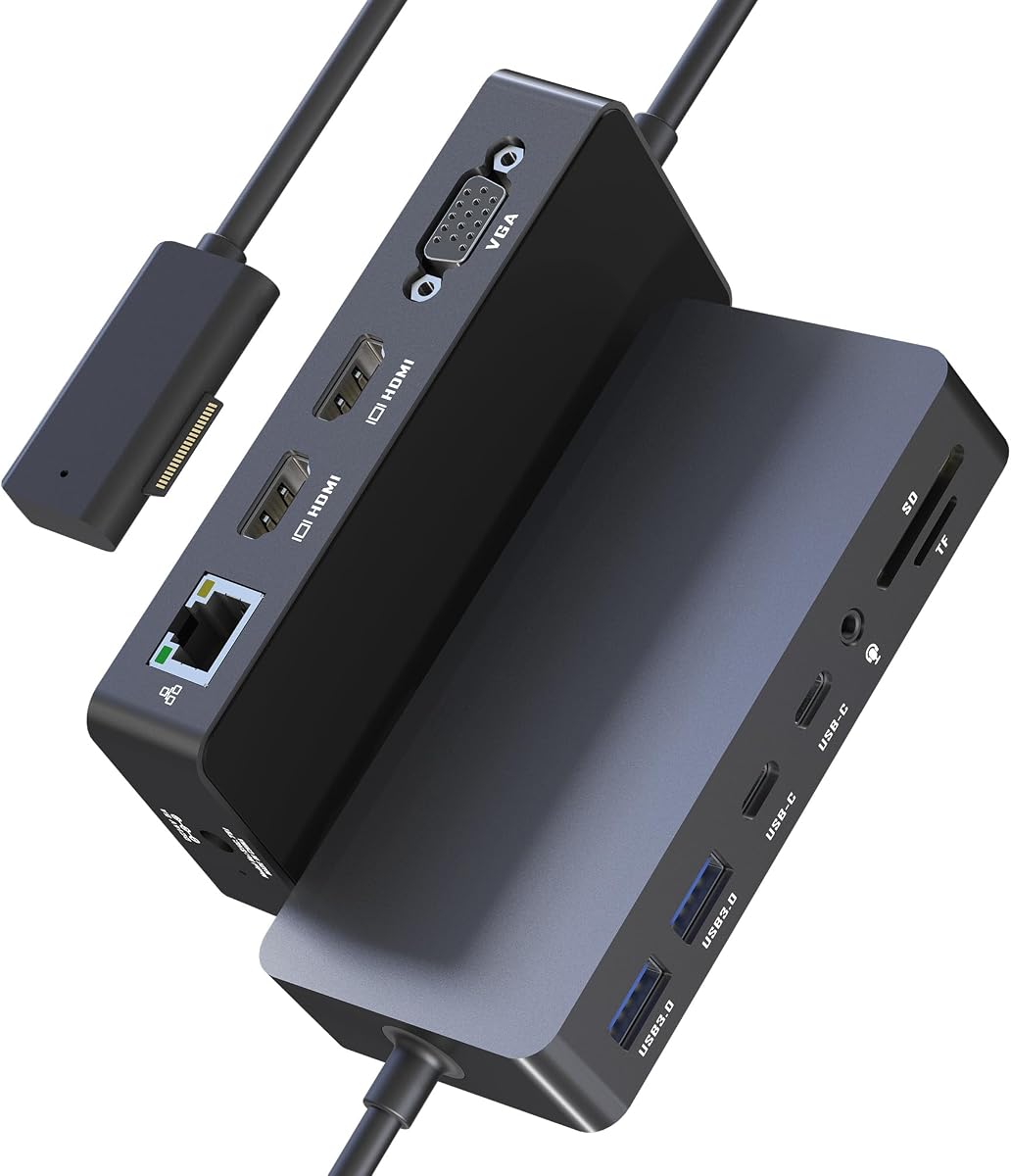
Surface Docking Station Triple Displays
4.8Editor score
Triple display output
72W power supply
SD TF card slots
This guide compares the top docking stations for Surface Pro devices to help you find the right connectivity solution for your desktop setup needs.
Finding the right docking station for your Surface Pro can transform your mobile tablet into a powerful desktop workstation. A good dock provides essential ports like USB, HDMI, and Ethernet while keeping your workspace organized and efficient.
We have analyzed ten top-rated options based on connectivity, build quality, and compatibility. Each product offers unique features ranging from Thunderbolt speeds to budget-friendly multi-port hubs designed specifically for the Surface ecosystem.
Every pick below highlights key specifications and real-world performance to guide your decision. Please note that availability and pricing may change over time so check current details before purchasing your ideal solution.
4.8Editor score

4.4Editor score

4.8Editor score
The following table presents a side-by-side comparison of all ten selected docking stations to help you evaluate their key specifications and features at a glance.




This premium docking station delivers exceptional connectivity with Thunderbolt 4 technology and rapid charging capabilities that keep your workflow uninterrupted.
We may earn a commission when you buy through this link, at no additional cost to you.
Its design features raised tactile indicators for quick port identification and supports dual 4K monitors for expanded workspace options during complex tasks.
While the price is higher than alternatives the speed and build quality justify the investment for professionals who demand reliability and eco-conscious manufacturing standards.
Choose this dock if you need top-tier performance and sustainability features to transform your Surface Pro into a high-powered desktop workstation effectively.
Experience lightning-fast data transfers and media streaming with Thunderbolt 4 ports that streamline your daily productivity tasks significantly.
Made with recycled ocean-bound plastic the dock combines environmental responsibility with user-friendly tactile indicators for easy connection.
We may earn a commission when you buy through this link, at no additional cost to you.
The original Surface Dock transforms your device into a desktop PC with magnetic connectivity and multiple USB ports for essential peripherals.
We may earn a commission when you buy through this link, at no additional cost to you.
It supports a broad range of Surface models and provides stable gigabit ethernet connections for seamless network access during remote work sessions.
Legacy Mini DisplayPort connectors may limit modern monitor usage but the reliability and simplicity of the magnetic connection remain highly valued.
Ideal for users seeking a straightforward and dependable docking solution that integrates smoothly with older Surface devices and accessories.
The magnetic surface connect cable makes attaching and detaching your dock quick and hassle-free for daily mobile use.
Works with multiple Surface models including go laptop and book ensuring versatility across your existing device ecosystem.
We may earn a commission when you buy through this link, at no additional cost to you.
This versatile 12-in-1 dock offers triple display support and SD card readers ideal for creative workflows needing expanded screen real estate.
We may earn a commission when you buy through this link, at no additional cost to you.
It provides HDMI and VGA outputs with quick file transfer speeds and compact body design suitable for both office and home setups.
Ethernet speed is capped at 100Mbps which may not suit heavy data needs but suffices for standard browsing and video calls.
Select this dock for budget-friendly multitasking capabilities and broad Surface compatibility without sacrificing essential connectivity options.
Boost efficiency by connecting up to three screens for extended or mirror mode workflows across your devices.
Integrated SD and TF slots allow direct photo transfers at high speeds for photographers and content creators.
We may earn a commission when you buy through this link, at no additional cost to you.
This budget-friendly dock delivers triple display support and a 72W power supply making it a solid choice for professionals needing multiple screens.
We may earn a commission when you buy through this link, at no additional cost to you.
It offers USB-C and USB-A ports for fast transfers and includes SD TF slots for convenient access to media files directly from cameras.
While network speed is modest the reliable power delivery and wide compatibility ensure stable performance during long work sessions.
Perfect for remote workers and educators seeking affordable yet effective connectivity solutions for their Surface laptops and tablets.
Enhance productivity by running three screens with HDMI and VGA ports for immersive multitasking experiences.
The upgraded adapter charges your device while running peripherals efficiently without downtime for mobile pros.
We may earn a commission when you buy through this link, at no additional cost to you.
This all-in-one dock transforms your Surface into a workstation with dual 4K HDMI outputs and stable wired internet connections for conferences.
We may earn a commission when you buy through this link, at no additional cost to you.
It features 72W fast charging to keep your laptop powered during heavy use and dedicated card slots for efficient photo and video transfers.
Ethernet speed is standard at 100Mbps which meets basic needs but might not suit data-intensive tasks like large cloud backups.
Choose this dock for balanced performance and visual clarity especially if you prioritize screen quality and reliable charging in one device.
Extend or mirror your display across screens with 4K HDMI outputs for high-resolution visual experiences.
72W charging ensures your device stays active while the Ethernet port guarantees stable low-latency connections.
We may earn a commission when you buy through this link, at no additional cost to you.
The Surface Dock 2 brings next-gen ports and dual 4K at 60Hz support for crisp visuals and versatile connectivity options.
We may earn a commission when you buy through this link, at no additional cost to you.
Front and rear USB-C ports allow easy access to peripherals while the longer 80 cm cable provides flexibility for larger desk setups.
Its 199W power supply ensures stable performance under heavy load but may require more robust outlet access than lighter hubs.
Select this dock for modern high-resolution displays and extensive port options if you demand premium performance from your Surface.
Enjoy 60Hz refresh rates on dual 4K monitors for smooth scrolling and enhanced visual clarity.
Front-facing USB-C and rear USB-A ports offer flexible device placement for your setup.
We may earn a commission when you buy through this link, at no additional cost to you.
This premium dock converts your Surface into a desktop PC with seamless connectivity and dual 4K displays for immersive visuals.
We may earn a commission when you buy through this link, at no additional cost to you.
It features a 199W power supply and versatile port options including USB-C and USB-A plus Kensington lock support for security.
The power supply may be a bit heavy but ensures stable operation when multiple high-demand devices are connected simultaneously.
Ideal for professionals requiring robust security and high-resolution display capabilities alongside reliable power for extended usage.
Dual 4K at 60Hz provides high-resolution visuals perfect for design work and media consumption.
Kensington lock support protects your investment while the 199W adapter ensures consistent power delivery.
We may earn a commission when you buy through this link, at no additional cost to you.
This high-performance dock offers triple display setups with 4K clarity and a dedicated 100W DC adapter for charging during intensive tasks.
We may earn a commission when you buy through this link, at no additional cost to you.
Dual USB-C and USB-A ports enable fast file transfers while gigabit ethernet provides a stable connection for video conferencing and downloads.
It supports multiple Surface models without drivers ensuring smooth operation though port configuration may need initial setup attention.
Choose this dock if you need robust multitasking capabilities and reliable charging in one package for your desktop workspace.
Supports three external monitors simultaneously with MST technology to boost workflow efficiency.
Dedicated charging ensures no battery drain while gigabit ethernet supports fast low-latency internet.
We may earn a commission when you buy through this link, at no additional cost to you.
This renewed dock delivers the same features as new including dual 4K displays and powerful USB-C ports at a value-conscious price.
We may earn a commission when you buy through this link, at no additional cost to you.
It includes a 199W power supply and USB-C cable ensuring instant setup with broad compatibility across multiple Surface models.
As a renewed item performance is reliable though physical condition may vary making inspection upon arrival advisable.
Choose this option if you want premium features like high refresh rates and robust connectivity without the full retail cost.
Get top-tier features like 60Hz dual 4K support at a reduced cost for budget-savvy buyers.
Includes original power supply and USB-C cable for a hassle-free and complete installation experience.
We may earn a commission when you buy through this link, at no additional cost to you.
This compact dock uses surface connection technology with four USB 3.0 ports for ample peripheral connectivity and charging options.
We may earn a commission when you buy through this link, at no additional cost to you.
It features a 90W power supply and gigabit network card to ensure stable internet speeds and reliable charging for your device.
MINI DP ports limit resolution options slightly but provide sufficient display support for everyday work and media tasks.
Select this dock for a minimalist tidy setup that prioritizes multiple USB ports and stable wired connections.
Four USB 3.0 ports allow connecting multiple devices like drives keyboards and phones simultaneously.
Gigabit network card port ensures your internet speed remains fast and reliable during work.
We may earn a commission when you buy through this link, at no additional cost to you.
Selecting the right docking station involves evaluating connectivity options power delivery and compatibility to match your specific workflow needs.
Look for a dock that offers the necessary combination of USB-A USB-C HDMI VGA and Ethernet ports based on your peripherals. Having enough ports avoids constant cable swapping and ensures all your devices work simultaneously without dongles.
Prioritize docks with a range of port types to support both modern and legacy devices for maximum flexibility.
Ensure the docking station provides enough wattage to charge your Surface Pro while powering connected peripherals. Lower wattage may result in slower charging or battery drain under heavy load.
Choose a dock with at least 72W or more to maintain consistent battery levels during intensive work.
Check if the dock supports dual or triple display outputs and the maximum resolution refresh rates. Higher refresh rates and resolutions ensure smoother visuals especially for creative tasks or multitasking.
Select a dock with dual 4K 60Hz support if you need crisp high-speed screens for productivity.
A gigabit Ethernet port provides a stable low-latency connection essential for video conferencing and large file transfers. Ethernet is more reliable than Wi-Fi especially in congested environments.
Verify the Ethernet speed is at least gigabit to avoid network bottlenecks during heavy data usage.
Confirm the dock is compatible with your specific Surface model and generation to ensure proper functionality. Some docks support older models while others are optimized for newer devices.
Always check the product description for compatibility with your exact Surface Pro or Laptop version.
Durable docks made with quality materials withstand daily wear and offer better thermal management. Compact designs reduce desk clutter while providing the necessary ports.
Choose a dock with a minimalist design and robust build to ensure longevity and a tidy workspace.
A good docking station should work without requiring complex driver installations or software setup. Plug-and-play functionality saves time and ensures immediate usability across devices.
Prioritize models that emphasize simple connection processes to minimize technical troubleshooting.
Look for manufacturers offering solid warranty coverage and customer support for peace of mind. A longer warranty period indicates confidence in product durability and reliability.
Ensure the dock comes with at least a one-year warranty to protect against defects.
Connect the docking station to your Surface Pro using the appropriate cable and ensure the power adapter is plugged in for stable operation. This initial setup prevents connection issues and ensures all ports function correctly.
Keep the dock in a well-ventilated area to avoid overheating especially during extended use with multiple peripherals. Dust accumulation can impede cooling so gently clean the ports with compressed air periodically.
Unplug the dock when not in use to conserve energy and extend its lifespan. Regularly update your Surface drivers to maintain compatibility with the dock's features and performance.
Most docking stations are designed to be compatible with multiple Surface models but you should verify specific compatibility with your device generation. Some docks support older models while others work best with newer Surface Pro versions.
Yes most docking stations provide power delivery to charge your device while connected. Ensure the dock supplies sufficient wattage to keep your Surface Pro charged during heavy usage.
Commonly essential ports include USB-A USB-C HDMI and Ethernet. Choose a dock with the mix of ports you need for your peripherals and display requirements.
A dock with an Ethernet port can provide a faster and more stable connection compared to Wi-Fi. Gigabit Ethernet ensures reliable data transfers and low latency for streaming or conferencing.
Most modern docks are designed for plug-and-play functionality without requiring drivers. However some specific features may need software updates for optimal performance.
Use a soft dry cloth to wipe the exterior and compressed air to clear dust from ports. Regular cleaning helps maintain proper ventilation and extends the dock's lifespan.
Many docking stations support dual or even triple monitor setups. Check the specifications for supported resolutions and refresh rates to ensure your displays work correctly.
We highlighted the top options from high-performance Thunderbolt docks to budget-friendly triple display solutions catering to diverse needs and preferences.
Prioritize power delivery port variety and display support when selecting a dock to ensure your Surface Pro functions as a seamless desktop workstation.
Always verify current availability and check for the latest model updates before purchasing to guarantee compatibility and value for your investment.