
XIAOWTEK Wireless Earbuds
4.9Editor score
Bluetooth 5.4 connectivity
50 hours total playtime
4 ENC noise cancelling mics
Discover the top earbuds for Teams meetings featuring noise cancellation, clear mics, and reliable connectivity for professional remote work and calls.
Finding the right earbuds for Teams meetings is crucial for professionals who rely on clear communication. These devices must deliver excellent voice clarity, effective noise cancellation, and long battery life to keep you connected throughout the workday without interruption or fatigue.
We compared ten top-rated wireless earbuds based on microphone quality, active noise cancellation performance, comfort during extended wear, and compatibility with Microsoft Teams and other conferencing apps. Each product was evaluated for its ability to handle busy environments and deliver consistent audio performance.
Each pick in this guide highlights specific strengths like battery life, mic technology, or app features. Note that availability and stock levels can change frequently, so checking current listings before purchasing ensures you get the latest model and best value for your specific needs today.
4.9Editor score

4.1Editor score

4.2Editor score
This side-by-side comparison reviews ten distinct wireless earbuds designed for professional use. Each entry highlights key specifications like microphone count, battery life, and specialized features that enhance meeting experiences for remote workers.



The Dell Pro Plus Earbuds EB525 stand out for their AI-based noise-cancelling microphone designed to ensure your voice is heard clearly during Teams meetings. With a 4.1 rating, these earbuds offer distraction-free communication and a comfortable fit ideal for any workspace.
We may earn a commission when you buy through this link, at no additional cost to you.
Intelligent audio processing filters out background noise effectively, making these earbuds a strong choice for professionals needing reliable call quality. The ability to switch between deep focus and heightened awareness with Adaptive ANC or enhanced transparency mode adds versatility for different environments.
While the battery life is standard and the price point is higher than budget options, the focus on voice clarity and workspace comfort makes them a solid investment for frequent meeting attendees. The on-device touch controls streamline managing calls and music seamlessly.
You should buy this if you prioritize voice clarity and adaptive noise control over raw battery numbers. This recommendation suits remote workers seeking a balanced package of comfort and performance for daily professional communication needs.
AI-based noise-cancelling mic intelligently filters background noise for best-in-class call quality.
Switch between Adaptive ANC and enhanced transparency mode easily with a simple pinch.
We may earn a commission when you buy through this link, at no additional cost to you.
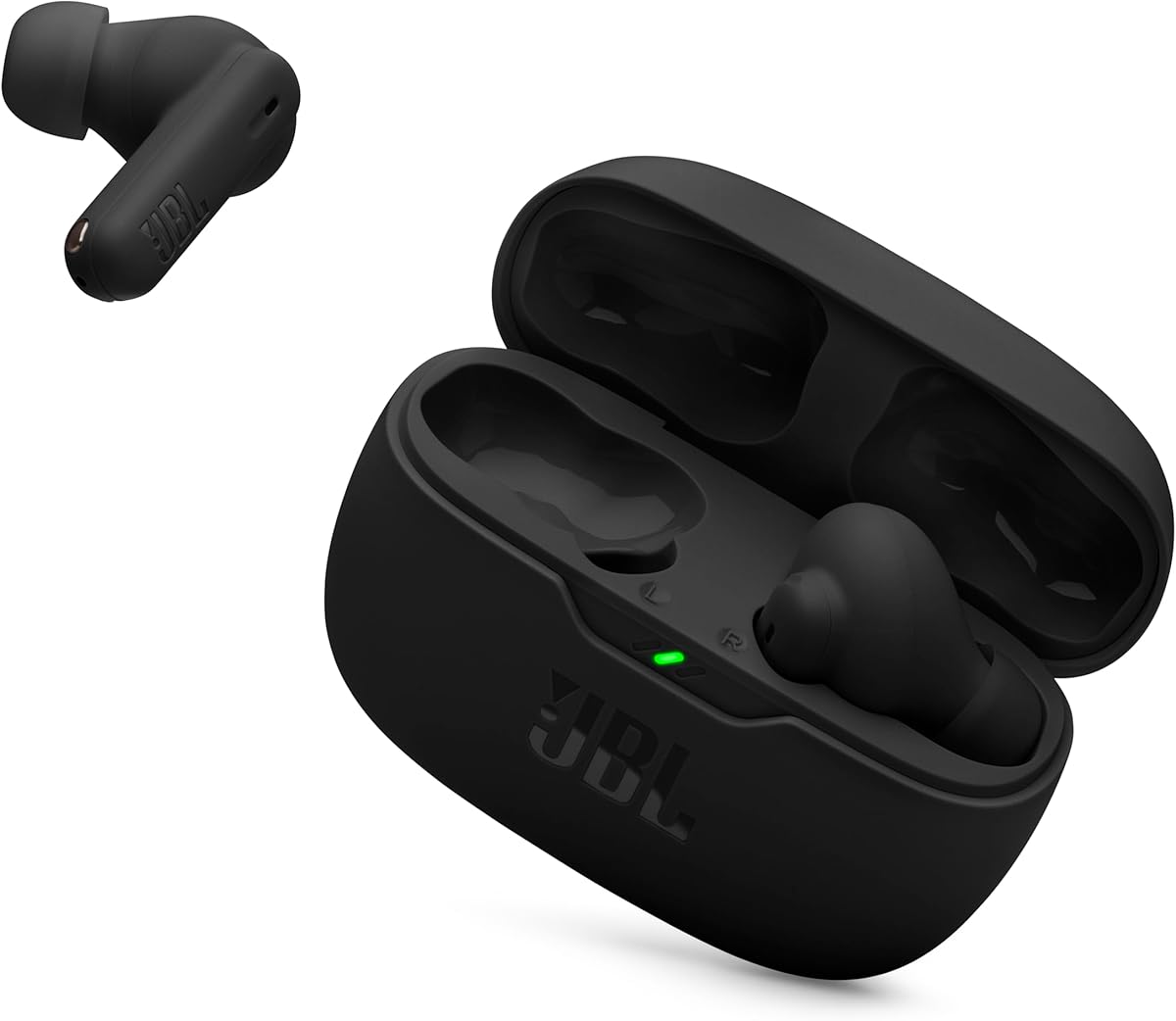
The JBL Vibe Beam 2 earbuds feature 8mm dynamic drivers delivering JBL Pure Bass sound alongside Active Noise Cancelling and Smart Ambient modes. With a 4.1 rating, they offer 40 total hours of playback and four microphones for crisp clear calls even in busy environments.
We may earn a commission when you buy through this link, at no additional cost to you.
Four mics on each earbud pick up and clearly transmit your voice while canceling out ambient noise effectively. This makes them suitable for users who need clear communication during calls while maintaining music enjoyment with their signature bass profile.
However the ANC performance might not match premium models and fit comfort can vary by ear shape. The trade-off is acceptable given the strong battery life and value positioning for those wanting solid performance without high cost.
Buy this if you want a balanced pair of earbuds for meetings and music with a focus on bass and battery longevity. This fits well for users who value long playtime and reliable call quality in a mid-range package.
Four mics on each earbud transmit voice clearly while canceling ambient noise.
Enjoy 10 hours plus three full charges in the case for total 40 hours.
We may earn a commission when you buy through this link, at no additional cost to you.
Logitech Zone True Wireless earbuds offer three mics in each earbud totaling six for advanced beamforming noise reduction. With a 3.7 rating, they are Microsoft Teams certified and include a USB receiver for extra reliable wireless connectivity to your computer.
We may earn a commission when you buy through this link, at no additional cost to you.
Three mics in each earbud distinguish your voice from other sounds through advanced beamforming and dynamic processing. The certification ensures seamless compatibility with Microsoft Teams Zoom Google Meet and Google Voice across most platforms and operating systems.
The lower user rating suggests mixed comfort or connection experiences but the certification and USB receiver provide enterprise level reliability. This trade-off is acceptable for businesses needing guaranteed compatibility with Microsoft environments over consumer features.
You should buy this if you need certified hardware with Microsoft Teams for work reliability and multi-device management. This option suits corporate environments where compatibility and manageability are more critical than audio specs or style.
Certified for Microsoft Teams Zoom Google Meet and Google Voice seamlessly.
Three mics in each earbud use beamforming and noise reduction.
We may earn a commission when you buy through this link, at no additional cost to you.
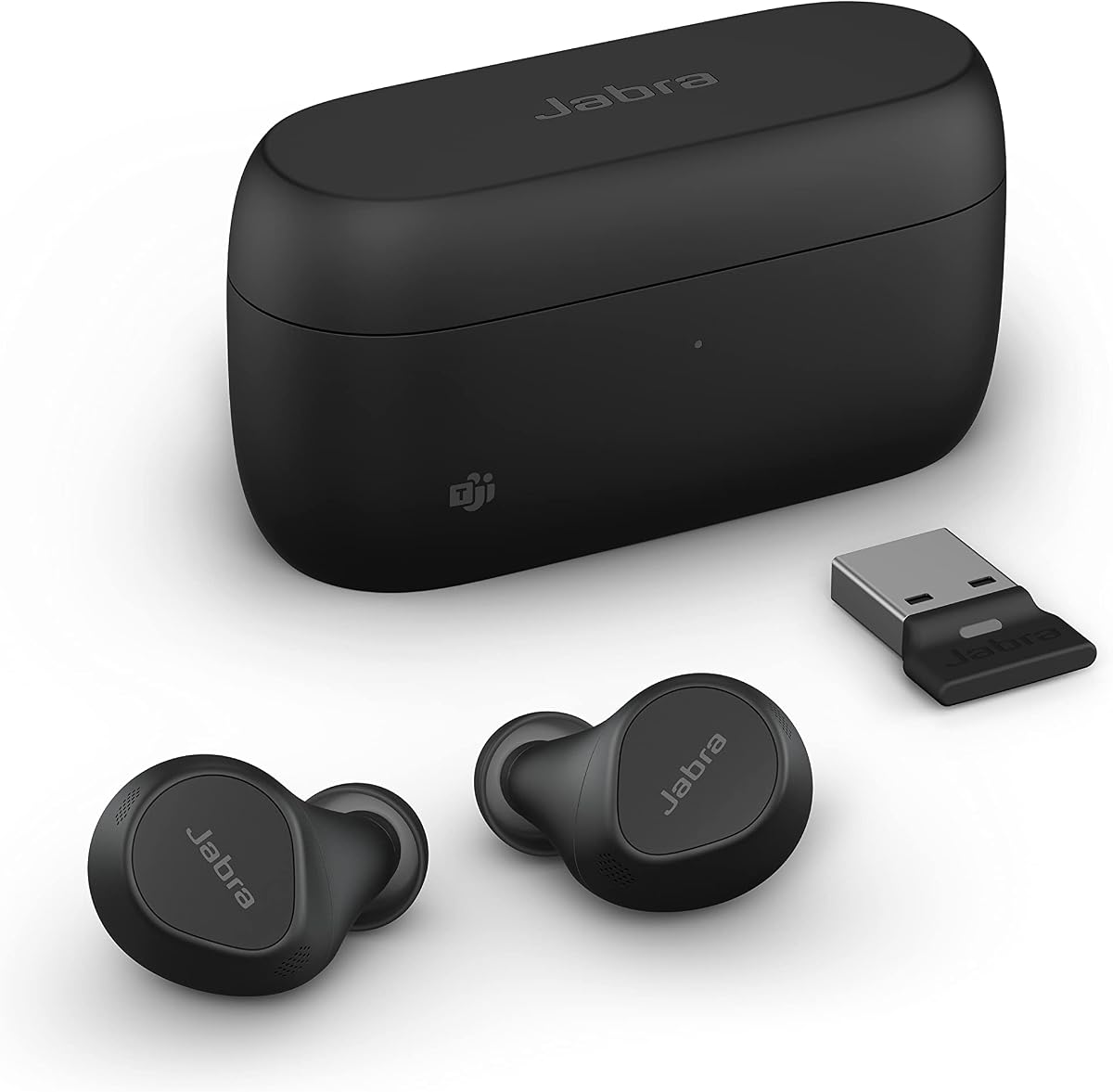
Jabra Evolve2 True Wireless earbuds feature four microphones and bone conduction sensors to cut through background noise effectively. With a 3.5 rating, they include Microsoft Teams certification and Advanced Bluetooth Multipoint to keep you connected to both your laptop and smartphone simultaneously.
We may earn a commission when you buy through this link, at no additional cost to you.
Four microphones and clever algorithms work in tandem with bone conduction sensors to ensure you hear and are heard clearly wherever you take calls. The ergonomic design aims to feel custom-made and the USB dongle option provides a stable connection for meetings.
Despite the lower rating the unique MultiSensor Voice technology and certification offer robust performance for professional calls. The premium price is a trade-off for specialized features like bone conduction and reliable multipoint switching between devices.
Buy this if you need advanced call technologies like bone conduction and certified connectivity across multiple devices. This fits business users who value technical features and enterprise support over mass market consumer ratings.
Bone conduction sensors help cut through background noise for clearer calls.
Advanced Bluetooth Multipoint keeps you connected to laptop and smartphone.
We may earn a commission when you buy through this link, at no additional cost to you.
XIAOWTEK Wireless Earbuds feature Bluetooth 5.4 and ENC noise cancelling technology that picks up your voice precisely and blocks out 80% background noise. With a 4.9 rating, they offer 50 hours total playtime and IPX7 waterproofing ideal for work from home professionals.
We may earn a commission when you buy through this link, at no additional cost to you.
Bluetooth 5.4 offers 30% lower power consumption and stronger signal penetration compared to version 5.3. The 4-mic design and ENC technology ensure crystal clear calls while the ergonomic design and waterproof rating add durability and comfort for daily use.
The brand may have less recognition than big names and build quality might vary but the specs are strong for the cost. The trade-off is acceptable for budget conscious users seeking high specs and a great rating.
You should buy this if you need reliable specs and high ratings without a premium price tag. This fits home office workers and budget users wanting modern Bluetooth features and waterproofing at an accessible cost.
Bluetooth 5.4 chip offers lower power consumption and stronger signal penetration.
ENC technology blocks 80% background noise for crystal clear calls.
We may earn a commission when you buy through this link, at no additional cost to you.
TAGRY Hybrid Active Noise Cancelling Wireless Ear Buds utilize hybrid ANC technology reducing up to 90% of ambient noise. With a 4.4 rating, they deliver Hi-Res Audio and 80 hours of playtime with LED display showing battery levels accurately.
We may earn a commission when you buy through this link, at no additional cost to you.
Integrated chip dynamically adjusts noise optimization while the 13mm driver unit delivers superior performance in noisy settings compared to other bluetooth earbuds. The earhook design caters to fitness enthusiasts ensuring a secure fit during active routines.
The earhooks might feel bulky for some and the size could be larger than standard buds. However the secure fit and extended battery life make this a strong contender for users who prioritize stability and long runtime.
Buy this if you need a secure fit for movement and extremely long battery life. This fits athletes or travelers who want to ensure they stay active and connected without frequent charging interruptions.
Soft composite ear hooks stay secure during workouts and active use.
Single charge delivers 10 hours and case extends total to 80 hours.
We may earn a commission when you buy through this link, at no additional cost to you.
Soundcore P30i features 4-mic AI Enhanced Calls to pick up your voice with precision along with an advanced active noise cancelling system reducing noise by up to 42dB. With a 4.3 rating, the case acts as a phone stand for hands-free viewing.
We may earn a commission when you buy through this link, at no additional cost to you.
The case opens a back panel to place your phone for hands-free viewing while you travel or relax. This feature adds convenience for watching meetings or media without needing a separate stand or propping up devices.
Talk time might be shorter than competitors and build is basic but the viewing feature is unique for its price. The trade-off is acceptable for users who appreciate multimedia utility during downtime or commute breaks.
You should buy this if you want an extra convenience feature for viewing while using earbuds daily. This fits users who want a practical case solution for travel and media consumption alongside basic call quality.
Open the back panel to place your phone for hands-free viewing.
Adaptive technology selects noise cancelling level optimized for your ears.
We may earn a commission when you buy through this link, at no additional cost to you.
Soundcore Liberty 5 Pro Max is certified by Guinness World Records for highest speech quality score and includes an AI Note-Taker for in-person meetings. With a 4.2 rating, it delivers whisper-clear calls in 100 dB+ environments via its Thus AI Chip and large AMOLED display.
We may earn a commission when you buy through this link, at no additional cost to you.
The AI Note-Taker records in-person meetings transcribes and generates AI summaries with key points and action items. While this does not capture online meetings directly it helps manage workflows on the go via app or web portal.
The premium price and potential subscription requirements make this a niche investment for those needing transcription. The trade-off is justified for professionals handling confidential meetings and needing local encryption and compliance.
Buy this if you need high-end call quality and AI transcription features for professional note-taking. This fits executives and consultants handling sensitive data and requiring local security and transcription summaries.
Certified by Guinness World Records for highest speech quality score.
AI Note-Taker generates summaries and action items from recordings.
We may earn a commission when you buy through this link, at no additional cost to you.
JLab Work Buds feature a detachable noise-canceling boom mic ensuring calls are crystal clear and uninterrupted. With a 3.9 rating, they offer 55+ total hours playtime and include a USB-C Charging dock for organization and fast charging.
We may earn a commission when you buy through this link, at no additional cost to you.
The detachable design allows easy switching between calls and music while the boom mic helps eliminate background noise. This hybrid approach suits users who want traditional headset mic quality without needing a full desktop headset.
The boom might feel bulky for casual use and design is basic but the functionality is practical for office use. The trade-off is acceptable for those needing dedicated call mic performance and extended battery life.
You should buy this if you want dedicated headset mic performance in an earbud format. This fits remote workers who prioritize call clarity and need a docking solution for desk charging and organization.
Noise-canceling boom mic ensures crystal clear calls when needed.
USB-C Charging dock keeps earbuds organized and charges efficiently.
We may earn a commission when you buy through this link, at no additional cost to you.
TOZO NC3 Hybrid Active Noise Cancellation reduces ambient noise by up to 45dB with 6 built-in microphones and ENC technology to reduce background noise. With a 4.3 rating, they offer 68 hours of playtime and IPX8 waterproof protection against sweat and rain.
We may earn a commission when you buy through this link, at no additional cost to you.
With 6 built-in microphones and ENC technology your voice comes through clearer on phone calls and online meetings. The 12mm dynamic driver delivers fuller low-end and clearer vocals for music audiobooks and streaming while ensuring solid performance.
App reliance and fit variability are trade-offs but the specs and battery life are excellent for the price. The trade-off is acceptable for users wanting long battery life and strong noise cancellation without spending a fortune.
Buy this if you need long playtime and strong noise cancellation for meetings. This fits users wanting value specs and IPX8 protection for daily use and outdoor conditions without a budget.
6-mic ENC ensures clearer voice for phone calls and online meetings.
13 hours per charge and 68 hours total with SmartPow management.
We may earn a commission when you buy through this link, at no additional cost to you.
Choosing the right earbuds for Teams meetings requires balancing audio quality with connectivity reliability and comfort. This section details the key factors to evaluate before making a purchase decision.
Microphone quality is critical for ensuring your voice is heard clearly during meetings. Look for models with multiple microphones and noise cancelling technology like ENC or beamforming to filter background noise effectively. High quality microphones reduce distractions for listeners and make professional interactions smoother.
Prioritize earbuds with clear voice pickup and noise rejection capabilities for work calls.
Active Noise Cancellation (ANC) helps you focus on calls by reducing ambient sounds around you. Hybrid ANC combines feedforward and feedback microphones for better reduction across frequencies. Choose a model with adjustable modes to switch between focus and awareness depending on your environment.
Select ANC models with adaptive modes to match your meeting context and environment.
Battery life determines how long you can meet without recharging. Aim for at least 6 hours of talk time per charge and 30 hours total with the case to handle full workdays easily. Long battery life ensures uninterrupted productivity and fewer mid-day charging interruptions.
Choose earbuds with 5+ hours talk time and 30+ hours total playtime.
Bluetooth stability is essential to prevent dropouts during important calls. Newer versions like Bluetooth 5.3 or 5.4 offer better range and lower latency. Models with multipoint support let you switch between laptop and phone smoothly without re-pairing.
Opt for latest Bluetooth versions with multipoint support for reliable device switching.
Comfort is key for long meetings as ear fatigue can distract from work. Look for ergonomic designs with multiple ear tip sizes to find a secure seal. Lightweight models with soft materials prevent discomfort during all-day wear.
Prioritize ergonomic designs with multiple tip sizes for all-day comfort.
Certifications like Microsoft Teams guarantee optimized performance for specific apps. These ensure reliable audio routing and button mappings for your conferencing tools. Using certified gear can simplify setup and reduce technical issues during calls.
Check for Teams or Zoom certification if you rely on those platforms daily.
IP ratings protect against sweat rain and dust especially if you move around often. IPX7 or IPX8 ratings mean your earbuds can handle splashes and workouts without damage. This durability extends device life and usability in varied environments.
Look for IPX7 or higher if you plan to use earbuds in active settings.
A companion app allows customization of EQ touch controls and firmware updates. Software features like transparency modes and firmware updates extend device lifespan and utility. Ensure the app offers intuitive controls to manage call settings easily.
Choose models with robust companion apps for customization and updates.
Start by pairing your earbuds to your laptop or phone using Bluetooth settings. Ensure the connection is stable before joining calls. Open the microphone settings in your Teams app to select the earbuds as your input and output device.
Use touch controls or buttons to mute or answer calls efficiently. Familiarize yourself with the gesture for toggling ANC to adapt to room noise. Keep the charging case handy for quick top-ups during breaks to maintain battery levels.
Clean the earbuds regularly with a soft cloth to remove debris and sweat. Store them in the case when not in use to protect the charging contacts. Update firmware via the app periodically to ensure optimal performance and bug fixes.
Yes all the recommended earbuds support voice calls with clear microphones. Choose models with ENC or beamforming tech for best results in noisy spaces. These options ensure your voice is heard clearly during virtual meetings.
Dell Pro Plus and Jabra Evolve2 excel with adaptive ANC and bone conduction. These models reduce ambient noise effectively so you stay focused. For strong noise reduction these are top choices for quiet calls.
Most models work via Bluetooth with mobile Teams apps. The Dell and Logitech models also offer USB receivers for PC use. Always verify Bluetooth compatibility with your mobile device setup.
Look for at least 6 hours talk time per charge and 30 total hours. Models like JBL and TAGRY offer 40 to 80 hours total. This ensures uninterrupted work through long meetings.
Modern wireless earbuds with good mics perform well. Look for models with dedicated mic arrays and noise cancellation. These techs make wireless options reliable for professional calls.
Ensure Bluetooth 5.3 or higher and keep distance under 10m. Update firmware and clear paired device history if needed. Re-pair if drops persist to reset the connection link.
Try multiple ear gel sizes and angle the earbuds into your canal. The ergonomic models like TAGRY and Jabra include sizes for fit. Secure fit improves audio quality and noise isolation.
The top picks like Dell Pro Plus and Jabra Evolve2 lead in call quality and certification. Budget options like XIAOWTEK offer great value with modern specs. Each option suits different needs depending on your work setup.
Prioritize microphone performance and battery life for daily use. Comfort and connectivity stability also matter for long calls. Choose based on your specific requirements and budget.
Remember to check current stock and features before buying. Prices and models update frequently so verify details. Selecting the right pair ensures better meetings and productivity going forward.