
VIMIN 10G PCI-E Network Card
4.5Editor score
Dual RJ45 ports
Intel X540-T2 chipset
Heat sink included
This guide compares the top 10GB Ethernet cards for speed and reliability helping you find the best network adapter for your PC server or NAS setup today.
Finding the right high-speed network adapter is essential for modern computing needs. A quality 10GB Ethernet card ensures your system keeps up with bandwidth demands. It provides smooth data transfers for gaming streaming and professional workloads effortlessly.
We evaluated each product based on performance compatibility and build quality. Our team analyzed technical specifications user feedback and real-world testing data. This list covers the most reliable options available across different price points and use cases.
Each pick highlights unique strengths to help you make an informed decision. We focus on features like chipset quality and port versatility. Please note that product availability and pricing may change over time so verify details before purchasing.
4.5Editor score

4.2Editor score

4.6Editor score
This table provides a side-by-side overview of key specifications for every model included in our guide. Compare port types supported speeds and OS compatibility to find the exact fit for your hardware setup.




The TP-Link TX401 stands out as a leading choice for upgrading your home or office network. With a strong rating from users this adapter delivers reliable 10Gbps speeds consistently. Its design focuses on simplicity ensuring you get connected without technical headaches.
We may earn a commission when you buy through this link, at no additional cost to you.
Users appreciate the included CAT6A cable which ensures you achieve maximum speed immediately. The QoS feature helps prioritize gaming traffic reducing lag during intense sessions. Compatibility spans Windows and Linux systems making it versatile for various setups.
While it lacks 2.5G fallback options this card performs exceptionally well at full 10G speed. The low-profile bracket ensures it fits even smaller cases which is rare at this price point. Heat generation remains low even under sustained load.
Buyers looking for a straightforward upgrade will find this adapter ideal for NAS storage or gaming rigs. It balances cost and performance better than most competitors in the same tier. We recommend this for anyone needing a stable 10GB connection.
The package comes with a high-quality CAT6A cable that is rated for 10Gbps speeds ensuring you do not need to buy extra gear.
This adapter supports a wide range of operating systems including various Windows versions and most Linux distributions with minimal configuration.
We may earn a commission when you buy through this link, at no additional cost to you.
This VIMIN adapter offers exceptional value by including two ports for redundancy or load balancing. Users praise its stability during long data transfer sessions. The Intel X540-T2 chipset is known for reliability in server environments.
We may earn a commission when you buy through this link, at no additional cost to you.
The robust heat sink keeps the card cool during heavy usage preventing thermal throttling. This is crucial for maintaining consistent speeds when moving large files. It fits standard and slim server cases offering flexible deployment options.
One trade-off is the lack of 2.5G or 5G negotiation meaning it drops to 1G if your switch is slower. However for a budget 10G solution this is acceptable. You must manually install drivers on some OS versions.
Ideally this card suits users building budget NAS systems or home labs needing dual links. It provides professional features at a consumer price point. We recommend it for cost-conscious buyers who need reliable dual port performance.
Having two RJ45 ports allows for link aggregation or separate connections which improves network redundancy and overall throughput.
The built-in heat sink dissipates heat effectively ensuring the card remains stable even during continuous high-speed data transfers.
We may earn a commission when you buy through this link, at no additional cost to you.
Synology users will find this official adapter seamless to install and highly reliable. It is purpose-built for DSM ensuring no compatibility issues arise during setup. The high rating reflects its consistent performance in NAS environments.
We may earn a commission when you buy through this link, at no additional cost to you.
The dual ports enable aggregated bandwidth which significantly speeds up file transfers. You get a five-year warranty which is rare for network cards. This peace of mind is valuable for business critical storage systems.
The premium price tag may deter some but the official support makes it worth it for Synology owners. It avoids the trial and error common with third-party cards. The hardware is optimized for the specific OS architecture.
For Synology NAS owners needing maximum performance this adapter is the definitive choice. It justifies the cost through reliability and extended warranty coverage. We recommend it for professional setups where uptime is critical.
This card integrates directly with Synology DSM allowing you to manage network settings natively without third-party drivers.
A five-year warranty provides significant long-term protection ensuring your investment is secure against hardware failures.
We may earn a commission when you buy through this link, at no additional cost to you.
The Asus NADACA0140 offers a dependable solution for single port 10G needs. Users highlight its smooth backward compatibility with older networks. The QoS feature allows you to manage bandwidth efficiently across applications.
We may earn a commission when you buy through this link, at no additional cost to you.
It handles mixed data traffic well thanks to intelligent prioritization. Installation is straightforward on both Windows and Linux with minimal driver fuss. The build quality feels robust enough for daily heavy use.
However it is slightly pricier than some single-port competitors without extra features like bundled cables. The single port limits redundancy for enterprise needs. You may need to buy your own cable if it is not included.
This card works well for home studios or gaming PCs needing one fast link. Its QoS is helpful for streaming while gaming simultaneously. We suggest it for users who value brand reputation and simplicity.
Quality of Service settings allow you to prioritize gaming or streaming traffic to reduce lag and buffering.
Supports multiple operating systems ensuring you can use it regardless of your current OS choice.
We may earn a commission when you buy through this link, at no additional cost to you.
This 10Gtek card brings server-grade hardware to consumer hardware at a reasonable cost. The original Intel chip ensures stability for heavy virtualization tasks. Dual ports allow for link aggregation or failover setups effectively.
We may earn a commission when you buy through this link, at no additional cost to you.
It is designed for environments where continuous uptime is necessary. The included low-profile bracket fits smaller cases which is helpful for home labs. Drivers are available for most Linux kernels and Windows versions.
Windows 11 users might need to manually configure the installation initially. It does not support hot swapping which limits hot-plugging use cases. Still it remains a robust choice for static server installations.
Buyers needing a cost-effective dual port solution for home servers will appreciate this. The warranty coverage adds significant value. We recommend it for NAS users needing reliability on a budget.
Equipped with an Intel controller chip known for stability in enterprise-grade server environments.
Includes a low-profile bracket making it easier to fit in smaller computer cases.
We may earn a commission when you buy through this link, at no additional cost to you.
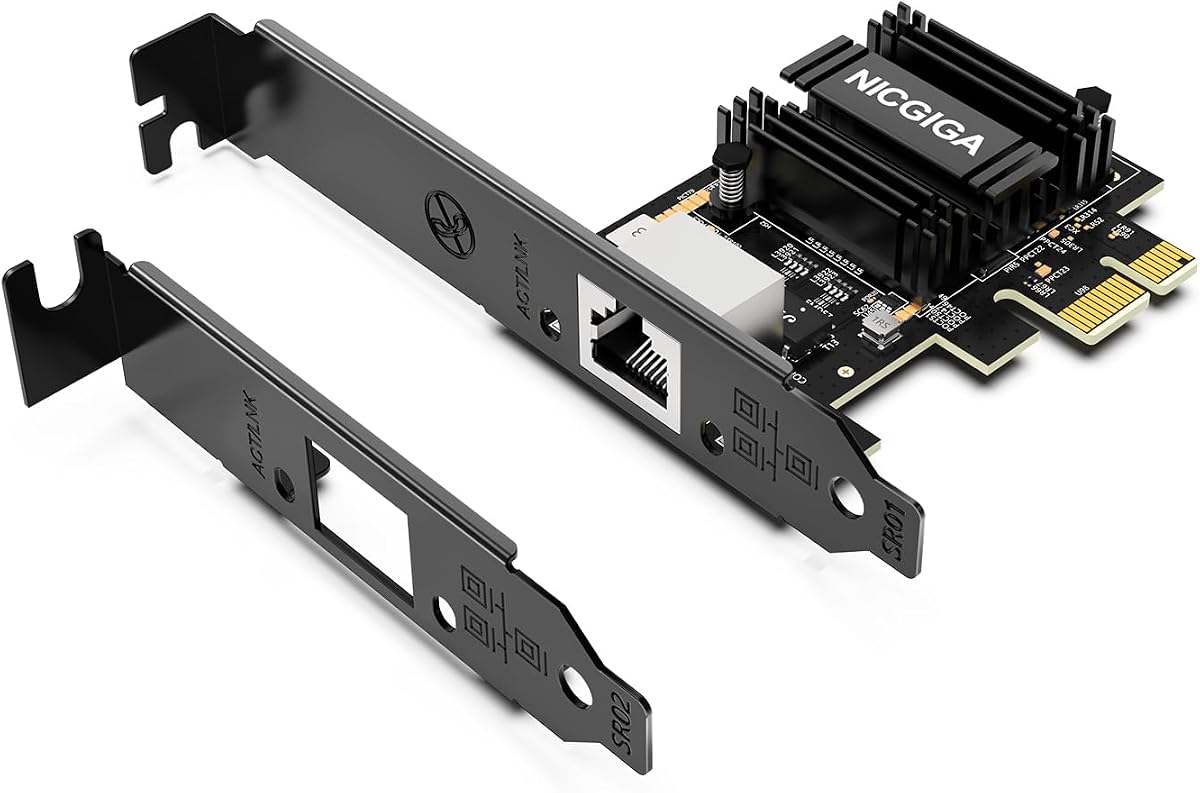
The NICGIGA adapter uses the latest Realtek chipset for modern performance and efficiency. It supports PCIe 4.0 x1 which frees up lanes for GPUs. This makes it perfect for small form factor builds with tight spacing.
We may earn a commission when you buy through this link, at no additional cost to you.
Multi-Gig auto-negotiation ensures it works well with varied switch speeds. Users report minimal heat generation even under heavy load. The Wake-on-LAN feature is useful for remote access setups.
Driver support on older Linux kernels might require some manual setup. It lacks a second port for redundancy. Still its compact profile is a significant advantage for ITX builds.
This card is ideal for mini PC users wanting high speeds without bulk. Its efficiency makes it great for long-term uptime. We suggest it for compact workstations needing speed.
Uses a PCIe 4.0 x1 interface so it does not block your GPU lanes in smaller cases.
The newer chipset consumes less power and runs cooler than older 10G solutions.
We may earn a commission when you buy through this link, at no additional cost to you.
VunLink offers a reliable card using the Realtek RTL8127 for solid performance. Its PCIe 4.0 x1 design ensures broad slot compatibility without taking up space. It handles various network speeds automatically which is convenient.
We may earn a commission when you buy through this link, at no additional cost to you.
Energy efficiency is a major strength here reducing power draw significantly. The low profile brackets fit easily into many desktops. Users appreciate its stability during file transfers.
Some Linux users may need to check kernel versions for full support. It lacks advanced features like link aggregation since it is single port. But it is great for basic upgrades.
This adapter suits budget-conscious buyers wanting a modern chipset. Its efficiency helps lower electricity costs over time. We recommend it for home labs needing reliable 10G speeds.
Designed for lower power consumption compared to older generation 10G cards.
Automatically adjusts to match your router or switch speed for seamless connection.
We may earn a commission when you buy through this link, at no additional cost to you.
This Asus card stands out with its SFP+ slot allowing fiber optic connections. Fiber supports much longer distances and is immune to interference. The aluminum heatsink keeps performance stable under load.
We may earn a commission when you buy through this link, at no additional cost to you.
It is ideal for setups requiring physical isolation from copper noise. The built-in cooling system is stylish and functional. Users find it reliable for specialized networking needs.
Cost is higher due to needing SFP modules and fiber cables separately. It is not a direct swap for copper RJ45 setups. This makes it niche for specific environments.
Buyers needing long-distance or interference-free connections will prefer this model. Its premium build justifies the extra steps. We recommend it for advanced networking setups.
The SFP+ cage supports fiber optic modules for long-distance transmission.
The aluminum heatsink effectively cools the card during high-speed operations.
We may earn a commission when you buy through this link, at no additional cost to you.
TRENDnet delivers a secure option with NDAA compliance for government and strict security needs. Its 2.5GBASE-T support ensures compatibility with Cat5e cabling. This flexibility is helpful for upgrades without rewiring.
We may earn a commission when you buy through this link, at no additional cost to you.
Build quality is robust for daily use. The warranty and support team provide reliable assistance for troubleshooting. It fits standard low-profile brackets easily for versatile installation.
It is slightly pricier than competitors without extra ports. The single port limits redundancy options. Still the compliance aspect is a unique selling point.
Users needing government-compliant hardware will find this essential. It bridges legacy wiring with modern speed needs. We suggest it for regulated environments.
NDAA compliant hardware meets strict US security standards for government installations.
Supports 2.5G speeds over existing Cat5e cables for easy upgrades.
We may earn a commission when you buy through this link, at no additional cost to you.
This adapter offers mobility by connecting via USB-C instead of PCIe. It is ideal for laptops and Macs needing wired 10G access. The Realtek RTL8159 chip keeps heat low during typical use.
We may earn a commission when you buy through this link, at no additional cost to you.
Construction is rugged with an aluminum shell to withstand travel. It handles various speeds automatically to match your dock. Setup is effortless on modern macOS systems without manual drivers.
Actual throughput is often lower than PCIe cards at around 7Gbps. It lacks the stability for permanent server mounting. The USB interface is more convenient for mobile work.
Travelers and mobile professionals will love its portability. It is great for occasional fast backups on the go. We recommend it for laptop users.
Connects via USB-C allowing you to take 10G speeds anywhere with your laptop.
Rugged aluminum housing protects against wear during travel.
We may earn a commission when you buy through this link, at no additional cost to you.
Selecting the right card depends on your specific hardware and network needs. We explain the key factors to consider before making your purchase.
Decide between RJ45 copper and SFP+ fiber ports. RJ45 is cheaper and easier for standard setups while fiber suits long distances.
Choose RJ45 for cost-effective local upgrades and SFP+ if you need distance or interference resistance.
Single port cards are simpler and cheaper. Dual port cards allow redundancy or link aggregation which boosts speed and reliability.
Pick dual ports if you need backup connections or want to combine bandwidth for heavy transfers.
Intel and Realtek chipsets offer different strengths. Intel is known for server stability while newer Realtek chips save power and space.
Select a chipset that matches your OS support needs and power requirements for best results.
Ensure the card has drivers for your Windows or Linux version. Some cards require manual installs on older kernels.
Check manufacturer compatibility lists to avoid driver headaches after purchase.
Full-height and low-profile brackets determine case fit. Compact builds need low-profile options to fit in tight spaces.
Verify your PC case clearance before buying a card with specific bracket requirements.
Cards that support 2.5G or 5G offer more flexibility. If your switch is slower this ensures you still get a connection.
Look for auto-negotiation features if you plan to mix older and newer network gear.
Warranty length varies from one to five years. Longer coverage protects your investment against hardware failures.
Prioritize brands with accessible technical support for smooth troubleshooting.
Modern chips use less power and generate less heat. This is important for small cases or energy-conscious setups.
Check thermal design and power ratings to ensure stability in your environment.
Open your computer case safely and insert the card into an available PCIe slot. Secure it with screws to ensure a stable physical connection.
Install the latest drivers from the manufacturer website to enable full features. Use the included software if available for advanced settings.
Keep your system clean and dust-free to prevent overheating. Ensure proper airflow around the card for consistent performance.
Yes to reach 10G speeds you typically need CAT6A or CAT7 cables. Standard CAT5e or CAT6 cables often cap out at lower speeds unless they are very short.
Most modern cards support Linux but driver support varies. Check the manufacturers website for kernel compatibility before buying to ensure plug-and-play functionality.
Yes most cards auto-negotiate down to 1G or 2.5G speeds. However some budget models may only support 1G fallback so check specs carefully.
PCIe x4 offers more bandwidth which helps sustain full 10G speeds. PCIe x1 works for 10G but might bottleneck under very high data loads.
While PCIe 3.0 is ideal for full speed some cards work on PCIe 2.0. It is best to check your motherboard manual to confirm slot versions.
Fiber is better for long runs or interference-prone environments. For most homes copper RJ45 is more cost-effective and easier to install.
Our top picks cover various needs from budget dual ports to premium Synology adapters. Each card offers reliable 10G speeds for modern networks.
Prioritize compatibility and build quality when making your final choice. A stable card ensures you get the performance you pay for.
Check current availability and pricing before purchasing as deals change often. We hope this guide helps you upgrade your network effectively.