
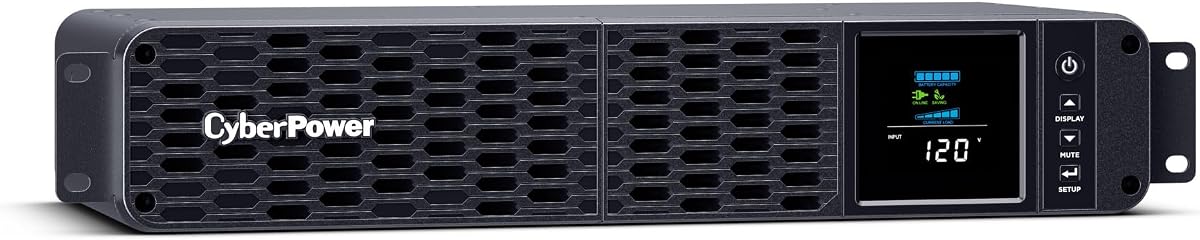
CyberPower AVRG900LCD
4.6Editor score
Simulated sine wave
Line protection included
Automatic voltage regulation
Discover the top battery backup for gaming laptop solutions to protect your setup. This guide compares UPS units and inverters for power stability.
Gaming laptops require stable power to prevent data loss and hardware damage during outages. A reliable backup system ensures seamless gameplay and protects your investment from sudden surges.
We evaluated leading models based on output capacity, waveform quality, and outlet versatility. Our analysis focuses on units suitable for high-performance rigs and essential peripherals.
Each selection highlights key specifications and real-world performance notes. Prices and availability fluctuate frequently, so verify current details before purchasing your preferred model.
4.6Editor score

4.5Editor score

4.7Editor score
The following table provides a side-by-side overview of all ten selected models. Each entry highlights critical specifications to help you identify the right capacity and features.




This unit stands out as a top choice due to its pure sine wave output and high capacity. It supports active PFC power supplies found in modern gaming rigs effectively.
We may earn a commission when you buy through this link, at no additional cost to you.
The ten outlets provide ample space for your laptop, monitor, and peripherals. The color LCD gives clear feedback on power conditions and battery health at a glance.
While it is physically larger than some alternatives, the robust build justifies the size. Users appreciate the comprehensive software for managing power events remotely.
It is ideal for serious gamers who need reliable power for high-end systems. The protection and connectivity options make it a complete solution for home setups.
This feature ensures compatibility with active PFC power supplies common in gaming laptops. It prevents potential damage caused by imperfect power waveforms.
With ten outlets, you can connect multiple devices without needing extra strips. This centralizes your power backup needs efficiently.
We may earn a commission when you buy through this link, at no additional cost to you.
This model focuses on energy efficiency with its ECO mode feature. It automatically cuts power to peripherals when the main device sleeps, reducing waste.
We may earn a commission when you buy through this link, at no additional cost to you.
The eight outlets are sufficient for standard setups including a monitor and speakers. The LCD keeps you informed about voltage and battery status clearly.
It is a great option for users concerned about power consumption during idle times. The cost is reasonable compared to higher capacity models.
Consider this if you prioritize energy saving and standard protection. It works well for mid-range systems that do not require massive wattage.
ECO mode turns off outlets when the computer goes to sleep. This helps lower overall energy usage and costs over time.
It offers solid surge protection and basic battery backup capabilities. This is enough for casual gaming sessions without heavy loads.
We may earn a commission when you buy through this link, at no additional cost to you.
This unit offers a massive number of outlets for your setup. It is designed to handle multiple devices simultaneously without running out of space.
We may earn a commission when you buy through this link, at no additional cost to you.
The automatic voltage regulation helps stabilize power without draining the battery often. This extends the lifespan of the internal cells significantly.
Although it uses a simulated sine wave, it remains compatible with most standard power supplies. The display provides useful data at a glance easily.
Choose this if you have many peripherals to connect at once. It provides plenty of flexibility for complex gaming station configurations.
AVR adjusts power levels without using battery energy. This keeps the battery fresh for actual outages rather than minor fluctuations.
Twelve outlets allow you to plug in everything at once. This includes routers and speakers alongside your computer gear.
We may earn a commission when you buy through this link, at no additional cost to you.
This model is an excellent entry point for those needing basic backup. It delivers reliable protection at a very accessible price point.
We may earn a commission when you buy through this link, at no additional cost to you.
The data line protection is a unique feature for this price range. It shields your internet connection from surges traveling through phone lines.
While it has less wattage than larger units, it suits smaller laptops well. The design is straightforward and easy to use for everyone.
It is perfect for students or casual gamers on a budget. You get essential protection without paying for unnecessary extra features.
This protects modems from electrical surges on phone lines. It is a rare feature in this specific price category.
The unit takes up less space under your desk. This is helpful if you have limited room for extra equipment.
We may earn a commission when you buy through this link, at no additional cost to you.
This unit focuses on core functionality with strong voltage regulation. It stabilizes power to keep your equipment running smoothly.
We may earn a commission when you buy through this link, at no additional cost to you.
The LED lights give basic status updates without a complex display. This simplifies the experience if you do not need detailed graphs.
It offers a large capacity suitable for desktops and laptops alike. The build quality ensures it will last for many years of use.
Pick this if you prefer simplicity over advanced features. It delivers steady power without unnecessary electronic complexity or noise.
Lights show power state and wiring issues clearly. This avoids confusion for users who do not need a digital screen.
The AVR ensures your laptop gets steady electricity always. This helps maintain consistent performance during gameplay.
We may earn a commission when you buy through this link, at no additional cost to you.
APC is a well-known name in power protection technology. This set provides flexible coverage for multiple devices with ease.
We may earn a commission when you buy through this link, at no additional cost to you.
The ability to replace batteries yourself saves money long term. It keeps the unit usable for many years after initial purchase.
USB-C charging is a modern touch for keeping phones powered. The separate units allow you to distribute power where it is needed.
This is a smart choice for those who value brand reliability. You get proven performance with convenient maintenance features included.
You can swap out old cells easily to extend life. This reduces the need to buy a whole new unit later.
The USB-C ports support current charging standards for phones. This ensures your mobile devices stay charged too.
We may earn a commission when you buy through this link, at no additional cost to you.
This unit is designed for users who need rack mounted storage. It fits into shallow racks while offering high power capacity.
We may earn a commission when you buy through this link, at no additional cost to you.
The pure sine wave output protects sensitive electronics effectively. You can trust it to run expensive gaming gear without risk.
The eight outlets are sufficient for dedicated server or rack setups. The LCD panel keeps you informed of battery health clearly.
Choose this if you have a rack or need compact vertical storage. It balances power needs with space saving design well.
Designed for short depth racks in tight spaces. It fits into cabinets where standard units cannot go.
Delivers clean power for active PFC supplies easily. This prevents issues with sensitive components inside your PC.
We may earn a commission when you buy through this link, at no additional cost to you.
This inverter is useful for off-grid power with a DC source. It provides high continuous wattage suitable for larger devices.
We may earn a commission when you buy through this link, at no additional cost to you.
The cooling system ensures it runs efficiently without overheating. This makes it reliable for use over longer periods of time.
Keep in mind it needs a separate DC battery bank to work. It is not a plug-in UPS but an active power converter.
Consider this if you have a solar or DC battery setup. It converts that energy to standard AC for your laptop.
The capacity supports power-hungry devices easily. This allows running laptops and monitors without issues.
It transforms DC battery power to standard AC plugs. This requires a compatible DC battery system first.
We may earn a commission when you buy through this link, at no additional cost to you.
This model offers a premium warranty length that stands out. It provides extra peace of mind for your investment.
We may earn a commission when you buy through this link, at no additional cost to you.
The high user rating suggests strong satisfaction among owners. People appreciate the reliability and build quality it offers.
It supports remote management cards for advanced control. This is ideal for users who want monitoring capabilities.
Choose this if you value long-term protection and features. It is a solid choice for professional or heavy home use.
Five years of coverage covers the battery and unit. This is longer than the standard three year offers.
Supports cards for network monitoring and alerts. You can track power issues remotely with this option.
We may earn a commission when you buy through this link, at no additional cost to you.
This variant offers similar high power capacity as others. It is suitable for outdoor setups or emergency portable power.
We may earn a commission when you buy through this link, at no additional cost to you.
The smart screen gives visual feedback on its status. This helps you monitor the load and battery level easily.
It includes multiple protection types to keep devices safe. Overload and thermal protection ensure reliable operation always.
Select this for portable needs with a DC power source. It provides robust conversion for high wattage laptop use.
The display shows critical operational data clearly. You can see status without needing external tools.
Includes protections for heat and overload conditions. This keeps the inverter running safely for longer.
We may earn a commission when you buy through this link, at no additional cost to you.
Selecting the right backup system involves understanding output capacity and waveform needs. These factors determine how well your gaming setup will be protected.
The wattage rating indicates how much power the backup can deliver. A higher capacity is needed for gaming laptops with external monitors.
Look for units that exceed your laptop's total power draw to ensure stability.
Pure sine wave outputs mimic the clean power from the grid. This is crucial for modern power supplies with active PFC.
Simulated sine wave is cheaper but may not work with sensitive equipment.
Gaming setups often require multiple plugs for routers and speakers. Ensure the unit has enough ports for all peripherals.
More outlets reduce the need for extra power strips.
Batteries degrade over time and eventually need replacement. Some models allow you to swap them easily yourself.
User replaceable designs extend the total life of the device.
Advanced units come with software to shut down safely during outages. This prevents data loss if you cannot reach the laptop.
Check for connectivity options that match your operating system.
A longer warranty often indicates better build quality and durability. Look for guarantees that cover both the battery and the unit.
Reliable support helps resolve issues quickly if they arise.
Larger units provide more power but take up floor space. Consider your available room when choosing a model.
Compact designs are better for desks with limited space.
Surge protection shields electronics from sudden voltage spikes. It should be included with the battery backup for full safety.
Verify the joule rating to ensure adequate protection levels.
Plug your gaming laptop and monitor into the battery backup outlets. Ensure the unit is connected to a wall outlet to charge the internal battery.
Test the system regularly by disconnecting power to confirm it works. This verifies the battery holds a charge for actual emergencies.
Keep the unit in a cool, dry place to prolong battery life. Avoid direct sunlight and extreme heat sources for best results.
Yes, pure sine wave is recommended for laptops with active PFC power supplies. It ensures clean power delivery and prevents potential hardware issues.
Run time depends on your laptop's power draw and the backup capacity. A typical unit might offer 10 to 20 minutes of backup time.
Most modern units allow user replacement via accessible panels. Check the model manual to confirm if it supports user service.
AVR regulates voltage to prevent surges without using battery power. A UPS includes a battery to provide power when the main source fails.
Test your unit every few months to ensure reliability. This confirms the internal battery is holding a charge properly.
Yes, they are designed to be left plugged in for long periods. Ensure they have proper ventilation to prevent overheating.
Selecting the right backup protects your gaming investments from power interruptions. The top picks offer a mix of high capacity and practical features.
Prioritize pure sine wave models if your hardware requires clean power. Ensure the capacity matches your total setup power draw.
Always check current prices and availability before making a purchase. Specifications and offers may vary slightly over time.