
8Bitdo M30 Wired Controller
4.2Editor score
6-button layout switch
USB-C wired connection
3 profile switch button
Discover the top fightpads for Xbox Series X and S consoles with this comprehensive guide comparing ten licensed controllers for fighting game enthusiasts.
Finding the right fightpad for Xbox can transform your competitive gaming experience significantly. Whether you prefer traditional controllers or arcade-style layouts, the right hardware ensures precision and comfort during intense matches.
We evaluated ten officially licensed controllers based on build quality, button layout, and platform compatibility. Our analysis covers wired and wireless options designed specifically for Xbox Series X and S consoles.
Each selection highlights unique features tailored to different play styles and budgets. Keep in mind that pricing fluctuates frequently so verify current costs before making your final purchasing decision.
4.2Editor score
3.5Editor score

4.6Editor score
This table provides a side-by-side overview of all ten controllers to help you quickly identify the best fit for your specific gaming needs and preferences.


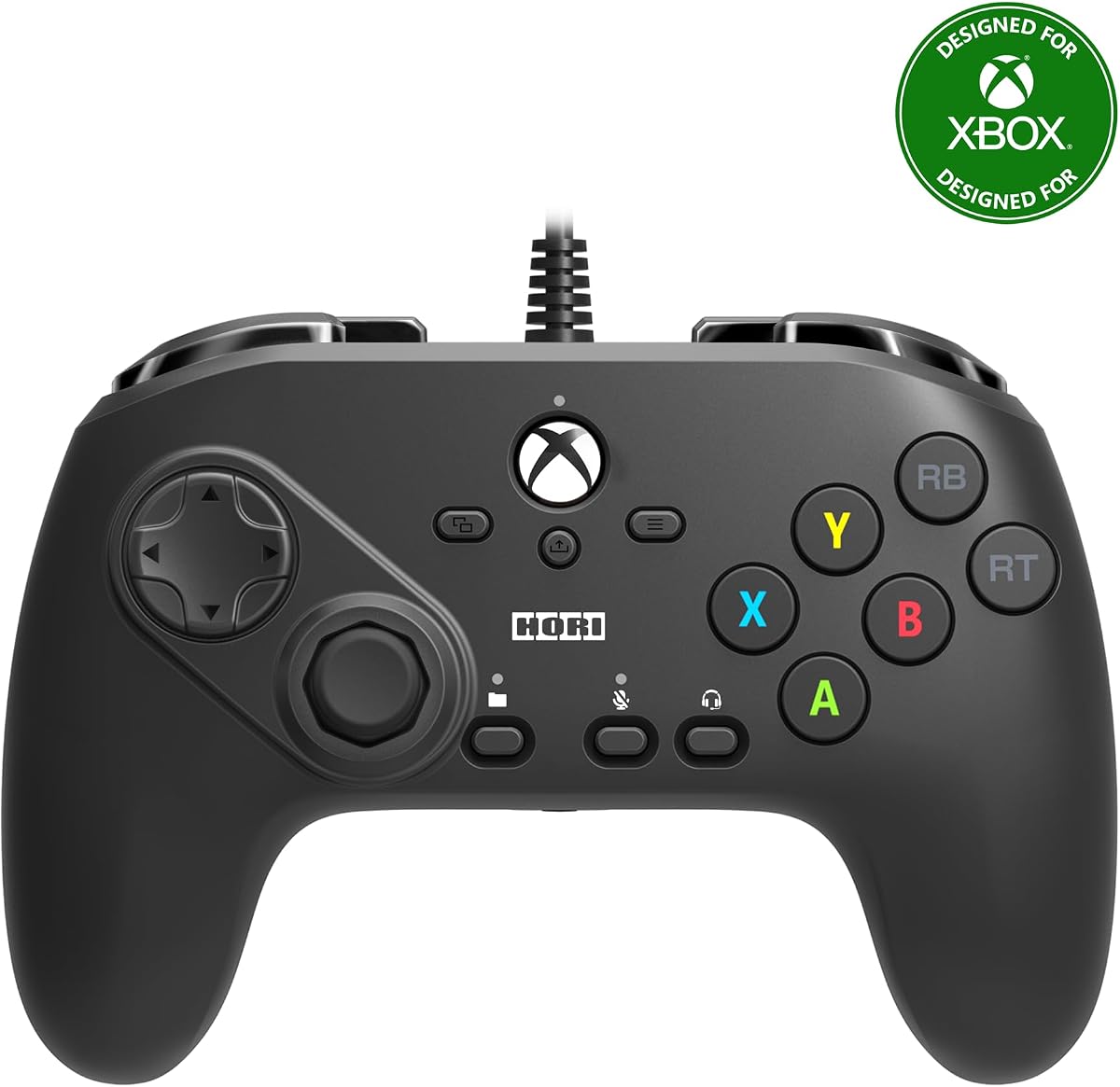
The HORI Fighting Commander Octa is a wired controller optimized for fighting games with official Microsoft licensing. It features a six-button layout and micro switch buttons for rapid input execution.
We may earn a commission when you buy through this link, at no additional cost to you.
Its adjustable d-pad and short throw analog stick with an 8-way Gate provide increased accuracy during complex combos. Users can customize and save up to four profiles using the companion app.
While the profile button is convenient for switching setups quickly some players might find the layout takes time to get used to. The wired connection ensures zero latency but limits movement distance.
This controller is ideal for dedicated fighters seeking precision on Xbox Series X or S. Its official licensing guarantees compatibility while the micro switches offer a responsive tactile experience.
The 8-way Gate on the analog stick prevents diagonal input errors which are common in competitive fighting games.
Saving up to four profiles allows quick transitions between Street Fighter and Tekken without needing to navigate deep menus.
We may earn a commission when you buy through this link, at no additional cost to you.
This retro fightpad features an enlarged circular 8-way floating D-Pad and 6-button layout with additional multi-speed Turbo functionality. It was originally designed for Xbox 360 but retains nostalgic appeal.
We may earn a commission when you buy through this link, at no additional cost to you.
The 3-way switch enables the D-Pad to also function as a left or right analog stick offering versatile input methods. An integrated headset port supports use with Xbox LIVE voice chat.
However compatibility with modern Xbox Series X systems might require additional adapters since this unit was built for legacy hardware. The long cable provides flexibility but adds potential clutter.
Collectors or fans of classic designs may appreciate its unique layout and themed artwork. It serves as a historical artifact in controller evolution though modern alternatives offer better native support.
The Turbo feature allows rapid-fire attacks with a single press reducing finger strain during long sessions.
Direct headset connectivity simplifies audio routing for players who want to coordinate with teammates during ranked matches.
We may earn a commission when you buy through this link, at no additional cost to you.
The 8Bitdo M30 Wired Controller offers official Xbox licensing with a USB-C wired connection for virtually lag-free performance. It features 2 bumpers 2 triggers and 2 button layout switches.
We may earn a commission when you buy through this link, at no additional cost to you.
Users can leverage 8BitDo Ultimate Software to tailor settings while a custom profile switch button enables instant transitions between three saved profiles. This flexibility supports diverse game preferences.
While the wired design ensures stability it restricts movement distance compared to wireless options. Button layout switches require initial configuration but provide significant customization once set up properly.
This budget-friendly option delivers essential competitive features without high costs. It suits players needing reliable performance on Xbox Series X or S with modern USB-C connectivity.
Using USB-C ensures a durable and stable connection compatible with the latest Xbox hardware standards.
The Ultimate Software allows deep tuning of sensitivity and mapping to suit specific character or game requirements.
We may earn a commission when you buy through this link, at no additional cost to you.
This leverless controller features an all-button arcade layout with quad-movement design for unmatched accuracy and ultra-fast inputs. It connects via 2.4G Wireless on Xbox and Windows PC.
We may earn a commission when you buy through this link, at no additional cost to you.
The Ultra Thin and Compact form factor makes it nearly the size of an A4 sheet and as thin as 1.6 cm. Hot-swappable PCB allows you to customize with other switches that fit your needs.
Two programmable buttons with fast mapping and replaceable lock caps enhance practicality. The independent control panel and built-in audio jack add convenience for audio management.
This premium option offers superior precision for competitive play. It suits serious gamers willing to invest in cutting-edge ergonomics and customizable switch mechanics.
Removing the joystick reduces mechanical resistance allowing faster directional changes essential for high-level combos.
The slim profile fits easily into travel cases making it ideal for LAN parties or gaming tournaments.
We may earn a commission when you buy through this link, at no additional cost to you.
The HORI PAD Pro allows you to fine tune the sensitivity for the analog stick dead zone and LR Trigger. It comes equipped with the Share Button and adjustable vibration feedback.
We may earn a commission when you buy through this link, at no additional cost to you.
Like other licensed models it lets you customize and save up to four profiles using the Companion App with easy switching via the Profile Button. Compatibility includes Xbox Series X and S.
While versatile for general gaming it lacks specialized fightpad features like micro switches or specific layouts. Users prioritizing precise analog control might prefer this over standard stock controllers.
This is a solid choice for players seeking enhanced customization within a standard controller form factor. It balances versatility with official licensing for consistent Xbox performance.
Saving up to four profiles allows quick transitions between game settings without deep system menus.
Tuning vibration levels provides feedback without overwhelming noise or distraction during competitive matches.
We may earn a commission when you buy through this link, at no additional cost to you.
The Nacon Daija arcade stick is officially licensed for XBOX Series X and S and was developed in collaboration with professional gamers. It features SANWA JOYSTICK and ACTION BUTTONS for durability.
We may earn a commission when you buy through this link, at no additional cost to you.
Full button mapping allows configuration using the Nacon Daija Arcade Stick software on XBOX or PC. Textured palm rest provides sturdy and comfortable support so you can remain at the top of your game.
Switch between two different joystick heads to choose the best solution for perfect control and precision. A 3 meter detachable USB-A to USB-C cable ensures reach without tangling issues.
This full-size option suits tournament-style play and home setups where space allows. It offers professional-grade components tailored for serious fighting game enthusiasts.
SANWA parts are industry standards for durability ensuring consistent input during intense matches.
Swapping heads lets you match joystick tension and height to your personal grip style preferences.
We may earn a commission when you buy through this link, at no additional cost to you.
This wireless arcade stick stands out as the first Xbox-licensed wireless arcade stick worldwide. It connects via Wireless 2.4G or wired USB with full compatibility for Xbox Series X and S.
We may earn a commission when you buy through this link, at no additional cost to you.
It supports 8BitDo Ultimate Software for customizable button mapping and includes fast-mapping and profile setting buttons. Users enjoy up to 30 play hours with 4 hours charging time.
Wireless convenience reduces cable clutter though charging downtime must be planned. The white finish looks clean but may show marks if used frequently in dirty environments.
Ideal for players seeking mobility without sacrificing official Xbox support. It balances modern wireless tech with traditional arcade functionality for streamlined home setups.
Eliminating cables reduces trip hazards and allows greater seating flexibility during extended sessions.
Thirty hours of play time ensures multi-day usage without interruption during travel or tournaments.
We may earn a commission when you buy through this link, at no additional cost to you.
The HORI Fighting Stick alpha features a chassis that opens for easy maintenance and customization. Users can switch out top housing artwork with their own designs easily.
We may earn a commission when you buy through this link, at no additional cost to you.
Assignable buttons Share Button Profile Button and Key Lock Mode offer extensive functional control. Compatibility includes Xbox Series X and S with official Microsoft licensing for reliability.
While it requires some assembly knowledge the customization potential outweighs the effort. The key lock mode prevents accidental presses during intense fights enhancing competitive focus.
This stick is perfect for modders and enthusiasts who want a personalized setup. It combines durability with user-friendly modification options for a unique fighting experience.
Quick access to internals simplifies switch replacements or repairs without voiding official warranty terms.
Swapping housing designs lets you match your controller aesthetic to your gaming room style or theme.
We may earn a commission when you buy through this link, at no additional cost to you.
This controller uses Next‑Generation Hall Effect Switches with Zero Wear which eliminate physical friction and debris buildup so they never wear out over time. It features Rapid Trigger fully adjustable from 0.1mm to 2.8mm.
We may earn a commission when you buy through this link, at no additional cost to you.
A built‑in 2‑inch full‑color LCD acts as a control hub for settings testing inputs and uploading standby animations. Replacing menus with a premium satin‑finished aluminum dial offers instant access to parameters on the fly.
Though highly customizable the browser-based driver adds setup complexity. However the precision gained justifies the effort for competitive players needing millisecond-level response adjustments.
It is ideal for enthusiasts seeking next-gen switch tech. Its SOCD management ensures tournament compliance while offering deep customization for personal playstyles.
Adjusting trigger points to 0.1mm lets you execute moves with minimal finger movement for maximum speed.
Displaying custom animations or settings on the screen allows personalization beyond physical button color options.
We may earn a commission when you buy through this link, at no additional cost to you.
The HyperX Clutch Gladiate features Dual Trigger Locks allowing you to set short pulls for faster actions or longer pulls for finesse. Gain The Advantage with rear Programmable Buttons for quicker access.
We may earn a commission when you buy through this link, at no additional cost to you.
It offers immersive Dual Rumble Motors for vivid feedback. Convenient Textured Grips keep a firm grasp. A detachable USB-C cable helps prevent damage from abrupt snags or pulls during gameplay.
Wired-only design ensures low latency but limits mobility. While triggers locks suit racing titles they may not help pure fighters needing full range motion.
This controller balances standard gaming comfort with specific tactical tweaks. It suits players valuing durability and tactile control on Xbox and PC platforms.
Shortening trigger travel reduces input time essential for rapid-fire combos in shooter or fighting genres.
Rough grips prevent slippage during sweaty sessions ensuring consistent input accuracy during intense moments.
We may earn a commission when you buy through this link, at no additional cost to you.
Selecting the right fightpad requires balancing form factor build quality and compatibility. Understanding key factors ensures you get a controller that supports your gaming style effectively.
Fightpads come in standard pad or arcade stick forms. Pads offer portability while sticks provide physical levers for precision movement.
Choose a pad if space is limited or travel often. Sticks suit home setups needing tactile feedback.
Wired controllers guarantee zero latency and consistent power without charging interruptions. Wireless units free you from cable clutter but require battery management.
Prioritize wired for competitive play. Wireless fits casual home use where latency tolerance is higher.
Traditional layouts use 4 face buttons while custom layouts use 6 face buttons like on many fighting pads. Ensure buttons match your favorite games requirements.
Select layouts with micro-switches if you need rapid input speeds. Standard rubber contacts may wear faster over time.
Officially licensed products guarantee full compatibility with Xbox Series X and S firmware. Unlicensed devices may require adapters or fail to work.
Always check the official Microsoft license logo. This ensures you receive necessary firmware updates.
Look for textured grips and comfortable palm rests to prevent fatigue during long sessions. Durability depends on switch type and material quality.
High-quality plastics and reinforced cables extend lifespan. Metal plates add weight but improve stability on desks.
Software support allows mapping custom profiles and adjusting sensitivity. Hot-swappable components let you change switches without soldering.
Choose controllers with companion apps if you play multiple titles. Profile switching features save time during tournaments.
A built-in 3.5mm audio jack allows direct headset connection. This ensures clear chat audio without relying on console settings.
Check if volume control is accessible on the device. Quick adjustments prevent missing voice calls during gameplay.
Fightpads range from budget models to premium sticks with advanced tech. Evaluate if features justify the cost based on your play frequency.
Higher-priced options offer longevity but budget picks suffice for casual use. Invest more if you compete regularly online.
To use your fightpad simply connect it via USB cable or pair via wireless adapter. Navigate to the Xbox settings to confirm controller recognition before playing games.
Customize button mapping using the provided companion app. Save profiles to the controller so you do not lose settings during power cycles.
Store the controller in a dry cool place away from direct sunlight. Dust off buttons regularly using compressed air to prevent input latency issues.
All listed controllers are officially licensed and fully compatible with Xbox Series X and S consoles. They work with Xbox One and Windows PC as well for maximum versatility.
Yes wireless models require charging via USB before use. Charging times vary but typically range from two to four hours for full battery life.
Standard controllers work but lack specialized layouts like 6-button setups. Dedicated fightpads offer better precision and ergonomics tailored to competitive needs.
Wired controllers have virtually zero latency which is critical for competitive play. Wireless models have minor delay but are generally acceptable for most players.
Factory reset usually involves holding the profile or sync button for several seconds. Refer to your specific model manual for exact reset instructions.
Some models like the 8BitDo All-Button support hot-swappable PCBs for switch replacement. Others require soldering which is not beginner friendly.
Yes most listed controllers are compatible with Windows PC for titles like Street Fighter and Tekken. Official licensing ensures seamless driver integration.
Unresponsive D-pads often result from dust buildup or wear. Compressed air cleaning helps. Older models may need part replacement if internal sensors degrade.
The top picks highlight the HORI Fighting Commander Octa 8Bitdo M30 and 8BitDo All-Button Controller. Each offers distinct advantages tailored to different budgets and play styles.
Prioritize features like micro switches or wireless connectivity based on your specific needs. Ensure the controller fits your grip and input preferences for comfort.
Always check current prices before buying since costs fluctuate. Compare models against your gaming goals to ensure you invest wisely in your setup.