
TP-Link TL-SG105
4.7Editor score
Five Gigabit ports
Fanless metal design
Plug and play setup
This guide compares the top Eero Ethernet Switch options to help you find the perfect network expansion solution for your home or office wired setup.
Finding the right network expansion tool is crucial for modern connectivity. An Eero Ethernet Switch allows you to connect multiple wired devices efficiently. It ensures stable speeds and reduces Wi-Fi congestion throughout your entire home environment.
We analyzed ten top-rated products to create this comprehensive list. Our comparison focuses on port count, speed capabilities, and ease of setup. Each selection offers unique benefits tailored to different networking needs and budgets.
Each pick highlights key features and performance metrics for clarity. You will see how these devices integrate with your existing ecosystem. Please note that availability and costs may change frequently over time.
4.7Editor score

4.8Editor score

4.4Editor score
This side-by-side comparison showcases the distinct capabilities of each model. Review the specifications to identify which switch aligns best with your specific networking requirements and physical space limitations.




The Amazon eero PoE Gateway stands out as a powerful networking hub designed for robust home environments. With a rating of 4.4, it offers a unique combination of routing and switching capabilities in a single unit. Its standout quality lies in the ability to power multiple devices directly without extra injectors.
We may earn a commission when you buy through this link, at no additional cost to you.
This device features two 10 GbE ports supporting speeds up to 9.4 Gbps for reliable wired connections. It also provides eight 2.5 GbE PoE ports, allowing you to connect and power compatible access points efficiently. The included 140W power supply ensures you have ample power to run your entire network infrastructure smoothly.
While it offers immense power and speed, the price reflects its premium status in the market. You might find the cost higher than standard switches, but the elimination of third-party hardware justifies the expense for many users. The setup is straightforward using the app, though you should ensure compatibility with your existing gear.
This unit is ideal for users seeking a unified solution to simplify their network wiring. If you plan to deploy multiple access points and want to minimize clutter, this is an excellent investment. We recommend it for those who prioritize speed and seamless integration over initial cost savings.
The pooled power system ensures all connected PoE devices receive consistent energy without individual adapters.
Supporting 10 GbE ports means your network is ready for high-speed internet plans and data transfer needs.
We may earn a commission when you buy through this link, at no additional cost to you.
The TP-Link TL-SG105 is a fantastic choice for those needing a simple and reliable network extension. With a high rating of 4.7, it delivers consistent performance for connecting wired devices without breaking the bank. Its standout quality is the ease of use, requiring no configuration or software installation.
We may earn a commission when you buy through this link, at no additional cost to you.
This switch features five Gigabit ports that support auto negotiation for optimal speeds on connected devices. The metal design ensures durability and helps dissipate heat without needing a fan, which keeps noise levels low. Energy efficient technology helps reduce power consumption while maintaining high-speed data transfer capabilities.
While it is incredibly reliable, the lack of managed features means you cannot control traffic or configure VLANs. The five-port limit might not suffice for larger setups, but it is perfect for small offices or home use. The warranty provides peace of mind regarding long-term reliability and support.
This product is best suited for users who want a straightforward way to add wired connections. If you need to connect a few computers or consoles to your network quickly, this is the tool. We recommend it for budget-conscious buyers who value simplicity and dependability.
The sturdy metal casing protects internal components and allows for wall mounting options in tight spaces.
Traffic optimization features ensure high priority data like voice or video gets through without interruption.
We may earn a commission when you buy through this link, at no additional cost to you.
The NETGEAR GS308EP is highly rated at 4.8 for its ability to manage power and data efficiently. It features eight PoE+ ports with a total power budget of 62W, making it suitable for running multiple access points or cameras. Its standout quality is the balance between easy management and robust performance.
We may earn a commission when you buy through this link, at no additional cost to you.
This switch allows you to configure VLANs and prioritize traffic with QoS to ensure smooth data transmission. The auto-negotiating ports detect the best speed for each connected device, optimizing overall network efficiency. You can control power delivery per port, which is useful for maintenance and troubleshooting specific devices.
While the interface is intuitive, it requires some time to learn the managed features compared to unmanaged switches. The metal design is compact and supports wall mounting, but you need to ensure your cables are properly rated for Gigabit speeds. The fanless design keeps it silent in any environment.
This unit is perfect for small businesses or tech savvy homes needing more control over their network. If you need to prioritize traffic or segment networks, this offers the right level of customization. We recommend it for users who want professional features without complex enterprise gear.
Uninterrupted PoE and per-port controls allow you to reboot devices remotely without physical access.
Managed features help secure your network by controlling access and monitoring port activity effectively.
We may earn a commission when you buy through this link, at no additional cost to you.
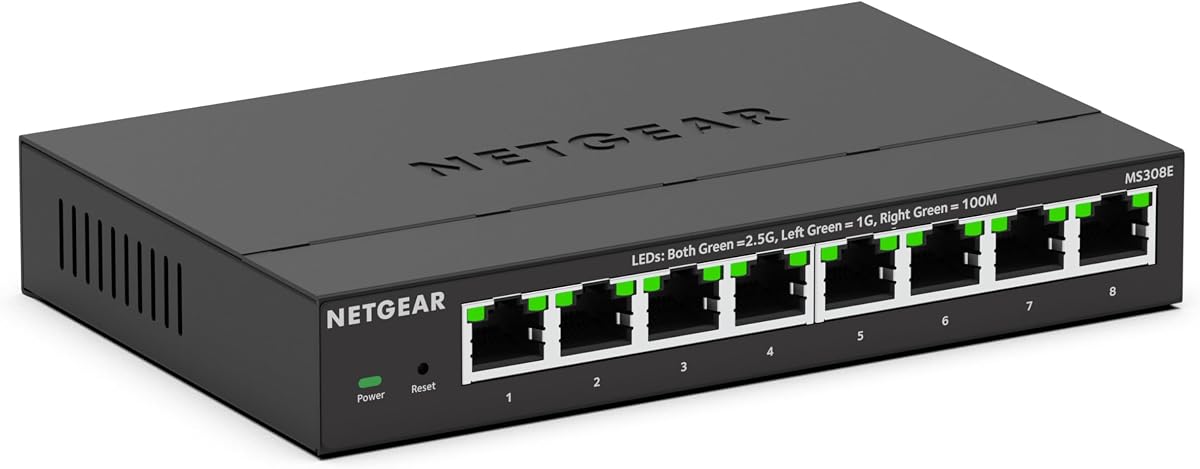
The NETGEAR MS308E is a specialized switch designed for high speed networking needs. With a rating of 4.3, it supports 2.5Gbps Multi-Gig Ethernet ports, offering faster connections than standard Gigabit switches. Its standout quality is the ability to handle higher bandwidth requirements without complex fiber optics.
We may earn a commission when you buy through this link, at no additional cost to you.
This switch includes intuitive software for configuring VLANs and managing security for small business environments. The auto-negotiating ports work with existing Cat5e or Cat6 cables to deliver improved speeds over standard setups. You can prioritize traffic to ensure video or voice data is transmitted with high quality.
While the speeds are impressive, you will need compatible devices to fully utilize the 2.5Gbps capacity. The regional compatibility is limited to the US and Canada, which might restrict availability elsewhere. The price is higher than standard switches, but it is justified by the performance upgrade.
This product is ideal for power users who have high speed internet and devices to support it. If you need to transfer large files quickly or run multiple streams simultaneously, this switch is a great fit. We recommend it for those looking to future-proof their wired network infrastructure.
Multi-Gig technology bridges the gap between standard Gigabit and expensive 10G solutions effectively.
The software interface helps maintain network performance through easy monitoring and control tools.
We may earn a commission when you buy through this link, at no additional cost to you.
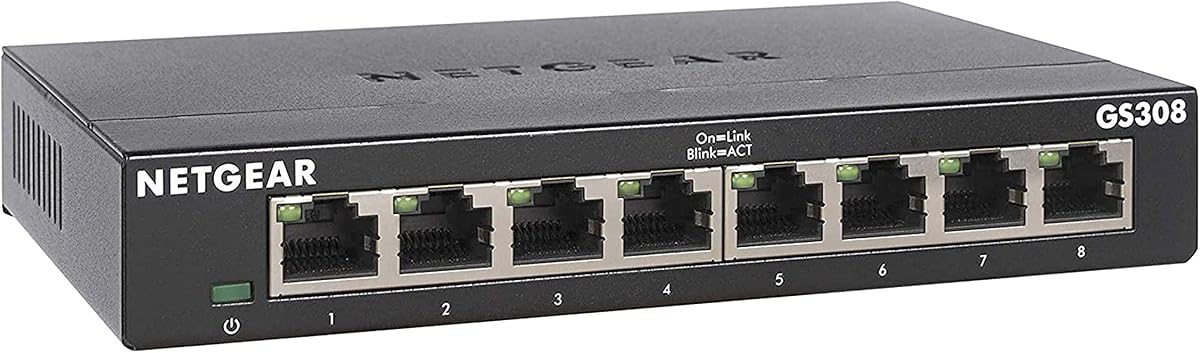
The NETGEAR GS308 is a solid choice for users who want reliable connectivity without complexity. Rated 4.8, it offers eight Gigabit ports for high speed connections in a plug-and-play package. Its standout quality is the simplicity of setup, requiring no software or technical knowledge.
We may earn a commission when you buy through this link, at no additional cost to you.
This switch works with existing Cat5e or Cat6 cables and detects optimal speeds automatically for connected devices. The compact metal design supports desktop or wall mounting, making it flexible for various installation locations. Energy efficient technology reduces power usage without compromising performance or speed.
While it is very reliable, it lacks advanced features like VLANs or traffic control found in managed units. It is purely a connection tool, so you cannot customize settings beyond basic plug-in functionality. The fanless design ensures it remains silent even during heavy data usage periods.
This product is best for homes or small offices needing simple wired network expansion. If you have multiple devices like consoles or PCs to connect, this provides ample ports. We recommend it for anyone who values ease of use and dependability over advanced control.
Standard Gigabit ports ensure fast and stable transfers for typical household or office needs.
The metal case allows for secure mounting on walls or desks to keep cables organized.
We may earn a commission when you buy through this link, at no additional cost to you.
The NETGEAR GS305E brings managed features to a compact and affordable package. With a rating of 4.7, it offers five Gigabit ports for high speed connectivity in small spaces. Its standout quality is the inclusion of Easy Smart features that allow basic network configuration.
We may earn a commission when you buy through this link, at no additional cost to you.
This switch allows you to prioritize traffic using QoS and manage network security for better performance. The auto-negotiating ports detect the best speed for each device connected to ensure optimal throughput. The compact metal design supports desktop or wall mounting to keep your setup tidy.
While it offers management, it is limited to basic features and five ports which might not suit larger needs. The software is simple, but you still need to access the interface to configure settings. It is a great middle ground between basic unmanaged switches and complex enterprise gear.
This product is suitable for small offices needing traffic control in a small space. If you need to separate traffic or prioritize specific devices, this offers that capability affordably. We recommend it for users who want a bit of control without a large footprint.
Prioritize video or voice data to ensure critical applications run smoothly without delays.
The fanless operation keeps noise low while maintaining high performance for daily use.
We may earn a commission when you buy through this link, at no additional cost to you.
The Amazon eero Pro 6E is a router that integrates wired connectivity into a mesh system. With a rating of 4.3, it supports internet plans up to 2.5 Gbps and features TrueMesh technology. Its standout quality is the ability to serve as a central gateway for both wired and wireless devices.
We may earn a commission when you buy through this link, at no additional cost to you.
This device includes Ethernet ports to connect wired devices, though it is not a dedicated switch. It covers up to 2,000 sq. ft. and can support 100+ connected devices for robust home networking. The setup is guided by an app to ensure you manage the network from anywhere.
While it offers connectivity, it has limited Ethernet ports compared to a dedicated switch. If you need many wired connections, you may still need an external unit attached to this router. The price reflects the premium Wi-Fi 6E technology and ease of management it provides.
This product is ideal for users wanting a unified mesh solution with some wired capability. If you prioritize wireless coverage and want a few wired connections, it works well. We recommend it as a gateway rather than a primary switch for heavy wired loads.
The mesh technology routes traffic intelligently to reduce dead spots and improve signal strength.
Supporting 2.5 Gbps plans ensures you get the most out of your high speed internet connection.
We may earn a commission when you buy through this link, at no additional cost to you.
The Amazon eero 6 is a versatile mesh router that includes basic wired connectivity options. With a rating of 4.4, it supports plans up to 900 Mbps and covers 1,500 sq. ft. effectively. Its standout quality is the built-in Zigbee hub that simplifies smart home device connections.
We may earn a commission when you buy through this link, at no additional cost to you.
This unit connects via Ethernet to support wired devices while managing your wireless network. It supports 75+ connected devices and offers automatic updates to keep your network safe and secure. The app guides you through setup so you can manage settings from anywhere in the house.
While it provides Ethernet ports, it does not replace a dedicated switch for many wired devices. The coverage is good for average homes but may need extenders for larger spaces. The pricing is competitive for a router that doubles as a smart home hub effectively.
This product is great for homes needing smart home integration and decent wired options. If you want to simplify your network and smart home setup, this is a strong choice. We recommend it for those prioritizing smart home features alongside reliable internet access.
Built-in Zigbee support reduces the need for separate hubs for various smart devices.
The router manages traffic efficiently to ensure streaming and gaming run without interruption.
We may earn a commission when you buy through this link, at no additional cost to you.
The Amazon eero PoE 7 is a powerful access point designed for cutting edge Wi-Fi 7 performance. With a rating of 4.1, it delivers wireless speeds up to 3.9 Gbps and supports 200+ connected devices. Its standout quality is the high speed wired ports that reduce congestion effectively.
We may earn a commission when you buy through this link, at no additional cost to you.
This access point uses Power over Ethernet to simplify installation without needing separate power cables. It includes two 10 GbE ports that provide high throughput for data intensive tasks. The tri-band Wi-Fi boosts backhaul speeds to ensure smooth video conferencing and smart home operation.
While the performance is exceptional, it is quite expensive and requires a compatible gateway to function. The cost reflects the premium technology and speed capabilities it offers to advanced users. Setup is streamlined with the app, ensuring optimal performance once connected to the network.
This product is ideal for users upgrading to the latest Wi-Fi standards. If you need high capacity and speed for a dense device environment, it is a great fit. We recommend it for those willing to invest in future-proof network infrastructure.
TrueChannel software helps you stay connected to the most reliable signal across the home.
PoE support eliminates power cables for a cleaner and more professional looking setup.
We may earn a commission when you buy through this link, at no additional cost to you.
The Amazon eero 7 offers advanced Wi-Fi 7 performance at a more accessible price point. With a rating of 4.4, it supports plans up to 2.5 Gbps and covers 2,000 sq. ft. well. Its standout quality is the combination of modern speed and affordability for early adopters.
We may earn a commission when you buy through this link, at no additional cost to you.
This router includes two 2.5 GbE ports for wired connections alongside robust wireless performance. It supports 120+ devices and uses TrueMesh software to keep you on the optimal connection. The design is backward compatible with previous eero devices to help expand your existing system easily.
While it has Ethernet ports, it is a router not a full switch so wired capacity is limited. The value is high for those wanting next-gen features without a premium price tag. You still may need extra hardware if you require many physical connections.
This product is perfect for those wanting to future-proof their network affordably. If you want Wi-Fi 7 features and decent wired options, this is a strong choice. We recommend it for users upgrading their main gateway for speed and reliability.
Multi-link operation ensures you get the most out of your high speed internet plan today.
Backward compatibility lets you add new units to an existing system without a full overhaul.
We may earn a commission when you buy through this link, at no additional cost to you.
Selecting the right switch depends on your specific wired needs and budget. Consider these factors to find the ideal match for your network setup.
Determine how many devices you need to connect to ensure you have enough ports. Look for models that offer the speeds you need such as Gigabit or multi-gigabit.
Choose a switch with enough ports to avoid overcrowding and ensure optimal performance.
Unmanaged switches are plug and play and ideal for simple setups. Managed switches allow traffic control and VLANs but require more technical knowledge.
Pick unmanaged for simplicity or managed for detailed network control.
PoE allows you to power devices like access points via the cable. Check the total budget to ensure it supports your connected hardware.
Select a PoE switch if you plan to power devices directly.
Desktop units sit on a table while rack mount models fit in server closets. Consider the space you have for the hardware.
Choose the size that fits your physical environment.
Ensure the switch supports the speeds of your internet plan and devices. Gigabit is standard but multi-gigabit is needed for faster plans.
Match the switch speed to your network requirements.
Some models integrate better with existing Wi-Fi systems. Ensure the switch works well with your current hardware.
Verify compatibility to avoid connectivity issues.
Check the length of the warranty and available support channels. Reliable support can be crucial for troubleshooting.
Look for longer warranties for peace of mind.
Set a budget that aligns with your needs and performance goals. Higher prices often bring more features but may not be necessary.
Balance cost with the features you actually need.
Start by connecting the switch to your main router using a good quality Ethernet cable. Ensure you use the correct port such as the uplink port if required.
Plug in your devices to the available ports and wait for the lights to stabilize. Check the connection status on your devices to confirm they are online.
Keep the switch in a well ventilated area to prevent overheating. Dust the unit regularly to maintain proper airflow and performance.
A router connects your network to the internet while a switch connects devices within your network. Using both allows for more wired connections and better data flow. Many devices combine these functions but a dedicated switch offers more ports.
Most homes do not need a managed switch as unmanaged options are sufficient. Managed switches are useful if you need to separate traffic or prioritize specific applications. It depends on how much control you want over your network.
You need PoE if you plan to power devices like cameras or access points directly. If all devices have their own power adapters a standard switch works fine. Check the device requirements to decide.
Yes you can connect your Eero router to any standard Ethernet switch. This setup allows you to expand your wired connections easily. Just ensure the switch supports the speeds you require.
Yes using Cat5e or Cat6 cables is essential for Gigabit speeds. Poor quality cables can limit your network to slower speeds. Always use certified cables for best results.
A typical Gigabit switch can handle dozens of devices without issues. Performance depends on the data load and switch quality. Larger setups may require multiple switches.
Most Eero devices work with standard Ethernet switches of all brands. Compatibility is generally high across different models and generations. Check specific model docs if unsure.
The top picks in this guide offer a range of options from budget friendly to premium solutions. Each device has unique strengths depending on your networking needs and setup.
Prioritize speed and port count to ensure your network can handle your current and future devices. Choose managed features only if you need traffic control or specific configurations.
Remember to verify current availability and costs before purchasing. The market changes rapidly so check the latest options to find the best fit.