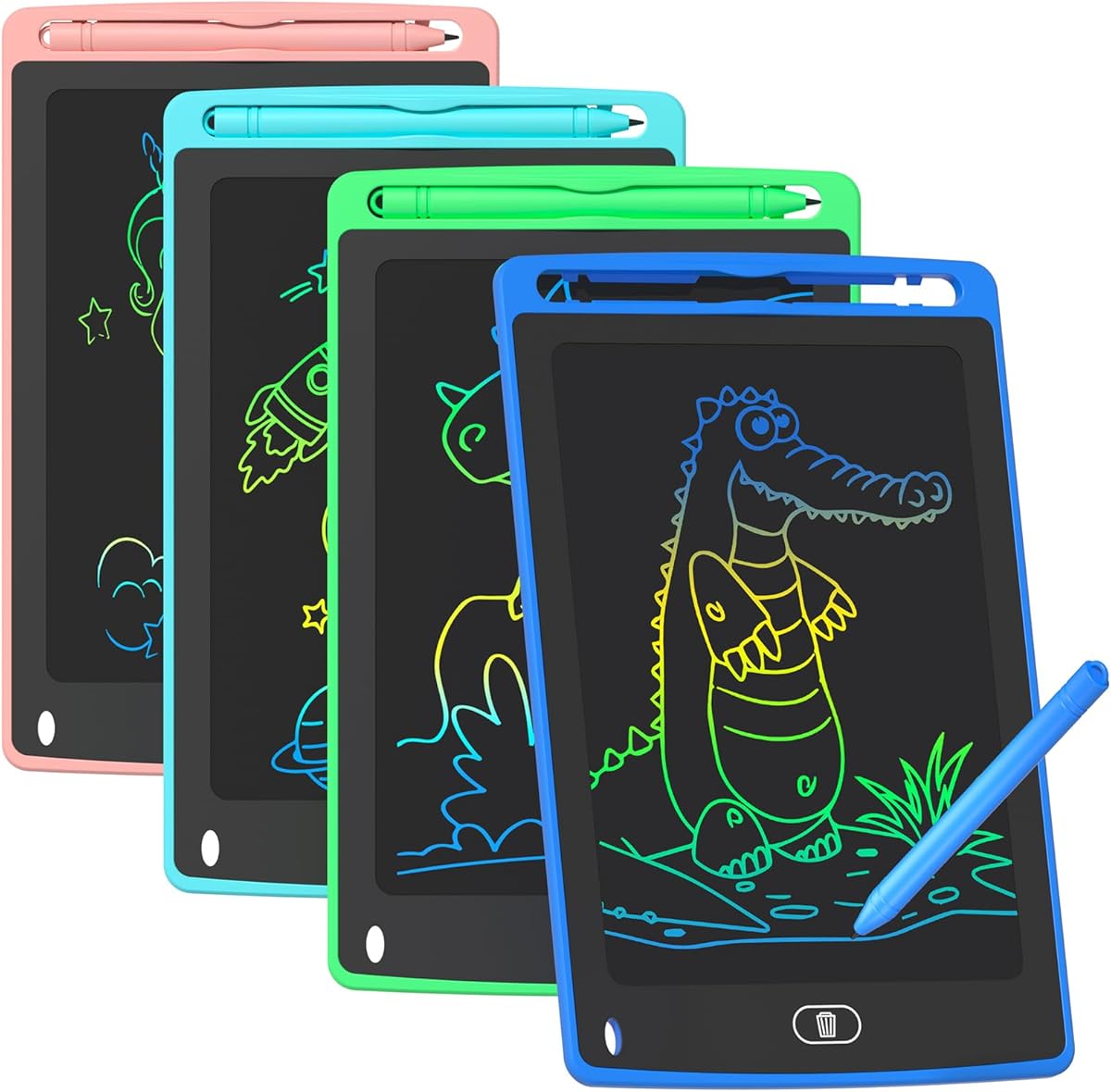
4 Pack LCD Writing Tablet for Kids
4.5Editor score
4 Pack Value Set
8.5 Inch Colorful Screen
Erase and Lock Buttons
Discover the top 10 LCD Writing Tablet for Kids Doodle Board options for 2026. We compare features, sizes, and durability to help you choose the perfect
Finding the right creative tool for young artists can be challenging. LCD writing tablets offer a mess-free way for children to draw and write without wasting paper. These digital doodle boards are perfect for travel and quiet time at home.
We evaluated ten top-rated products based on screen size, battery life, durability, and ease of use. Our comparison includes options for various ages and budgets. Each model offers unique benefits for fostering creativity and learning in kids.
This guide highlights key features to consider before buying. You will see detailed reviews of each tablet to help you make an informed decision. Prices and availability may change, so check current listings before purchasing.
4.5Editor score

4.5Editor score

4.6Editor score
This side-by-side comparison outlines the key specifications of each featured product. You can easily see screen sizes, battery types, and special features to find the right match for your child.


This 4-pack set offers an affordable way to introduce kids to digital doodling. With a 4.5-star rating, parents appreciate the value and versatility for multiple children. The bright colorful screens make drawing fun and engaging for young ages.
We may earn a commission when you buy through this link, at no additional cost to you.
Each tablet uses pressure-sensitive technology to create different line thicknesses based on how hard the stylus presses. The front erase button clears the screen quickly, while the lock switch saves artwork. The stylus snaps on top to prevent loss during play.
The screen size is compact at 8.5 inches, which might feel small for older kids. The battery is not rechargeable, so you will need to replace it when it runs out. These trade-offs are acceptable given the low cost per unit.
Families looking for a budget-friendly gift should consider this set. It is ideal for sharing among siblings or for classroom use. The portable design makes it great for travel and quiet time at home.
Buying a pack ensures each child has their own tablet without fighting over one device.
The lightweight build fits easily in bags for on-the-go entertainment during trips.
We may earn a commission when you buy through this link, at no additional cost to you.
Kayoubi offers a huge 14.5-inch screen that gives kids plenty of room to create. Rated 4.5 stars, it is praised for its eye-friendly display and zero blue light. The large canvas supports detailed drawings and longer storytelling sessions.
We may earn a commission when you buy through this link, at no additional cost to you.
The one-click erase button makes clearing the board instant, saving time between drawings. The reusable nature reduces paper waste and keeps messes at bay. It is a great alternative to traditional drawing pads for young artists.
The pink color might not suit all preferences, and the battery type is not detailed in the description. These are minor issues compared to the benefit of a large screen. The design focuses on simplicity and safety.
Kids who need space to spread out will love this tablet. It is perfect for classrooms or home use where a larger drawing area is helpful. The eye protection features make it safe for extended use.
Designed without blue light, this tablet is safer for little eyes during long sessions.
Say goodbye to paper stacks and ink stains with this reusable doodle option.
We may earn a commission when you buy through this link, at no additional cost to you.
This 16-inch tablet stands out with its massive screen and rechargeable battery. With a 4.5-star rating, it balances size and features well. The colorful screen is 60% brighter than many competitors, making lines vivid and clear.
We may earn a commission when you buy through this link, at no additional cost to you.
The built-in lithium battery lasts months on a single charge, reducing waste from disposable cells. The stylus comes with a stretch rope to prevent it from getting lost. The ABS shell is impact-resistant for rough handling by kids.
While it costs more than smaller tablets, the rechargeable design and size justify the price. The weight is manageable but heavier than compact options. Overall, it is a robust choice for long-term use.
Parents seeking a durable and large-screen option should choose this model. It is excellent for travel and creative play. The combination of features makes it a standout product in its category.
A full charge can last up to six to nine months of regular use.
The huge screen allows kids to draw detailed scenes without running out of space.
We may earn a commission when you buy through this link, at no additional cost to you.
KOKODI provides a large 16-inch screen for focused creativity. Rated 4.5 stars, this tablet helps kids concentrate on drawing without small screen limits. The eye protection features make it safe for long use without glare.
We may earn a commission when you buy through this link, at no additional cost to you.
The one-click clear button is convenient for quick resets. It saves paper by allowing hundreds of drawings without waste. The battery is replaceable but requires screws, which prevents young children from accessing it.
The fixed battery design adds safety but makes replacement slightly harder for adults. The larger screen is a clear advantage over standard models. It suits both kids and teens for drafts or notes.
If you want a large screen without rechargeable tech, this is a good option. It is ideal for home or school use. The eco-friendly aspect appeals to parents looking to reduce paper consumption.
Screws secure the battery, keeping it away from curious hands.
Replace paper with this reusable pad to save trees and reduce clutter.
We may earn a commission when you buy through this link, at no additional cost to you.
This rechargeable tablet offers up to nine months of playtime on one charge. With a 4.5-star rating, it is built for durability and longevity. The flexible LCD tech ensures sharp bright lines that are easy to see.
We may earn a commission when you buy through this link, at no additional cost to you.
Parents can enjoy two styluses included, so sharing is easy. The child-safe sealed body protects the battery from little hands. It is lightweight and perfect for carrying on trips or to school.
The screen is not luminous, which can make contrast lower in bright light. The color is limited to blue, which might not match all decor. These points are minor compared to the battery life and quality.
For families needing a reliable tablet for daily use, this is a strong choice. The long battery life reduces maintenance. It is a practical gift for kids who love to draw.
Say goodbye to stained clothes and walls with this clean drawing solution.
Its lightweight design fits in bags easily for road trips and flights.
We may earn a commission when you buy through this link, at no additional cost to you.
BUKEBU offers a tested eye protection screen that is safe for kids. Rated 4.6 stars, it is lightweight and portable for daily use. The 10.5-inch size fits well in small hands and bags.
We may earn a commission when you buy through this link, at no additional cost to you.
The rounded corners and drop-resistant shell protect it from falls. A lock key keeps drawings safe from accidental erasing. The 18-month replacement service adds extra security for buyers.
Pink is the main color, which may not suit all kids. The battery needs replacing after use, adding long-term cost. These are small downsides for the safety and weight benefits.
If portability and safety are priorities, this model is a great fit. It works well for young toddlers. The eye protection features make it a trusted choice for parents.
At only 200 grams, it is easy for children to carry anywhere.
Premium ABS material ensures it withstands bumps and drops.
We may earn a commission when you buy through this link, at no additional cost to you.
FLUESTON delivers a simple 10-inch drawing board. Rated 4.5 stars, it is thin and light for easy carrying. The pressure-sensitive tech creates clear lines like writing on paper.
We may earn a commission when you buy through this link, at no additional cost to you.
The CR2025 battery can last up to 12 months, reducing maintenance. It works for notes or doodles. The one-click clear and lock buttons make it user-friendly for all ages.
The standard size means less room for big drawings. The battery is replaceable but adds future cost. These are normal trade-offs for a lightweight model.
This tablet is good for quick trips or small bags. It is reliable for daily use. The multi-purpose design fits both play and learning needs.
Up to a year of use on one battery saves time and money.
Use it for drawing, notes, or communication messages.
We may earn a commission when you buy through this link, at no additional cost to you.
KOKODI offers a huge 20-inch screen for big creations. Rated 4.5 stars, it is a top choice for artists who need space. The colorful display keeps drawings vivid and engaging for kids.
We may earn a commission when you buy through this link, at no additional cost to you.
Its reusable design reduces waste and is perfect for learning. The large size allows detailed drawings without feeling cramped. It supports educational activities and creative play.
The size makes it less portable for travel. The price is higher than smaller options. These are acceptable for a unique large format.
If space is not an issue, this is the best pick. It is ideal for home or classroom walls. The size encourages big imagination and storytelling.
Kids can draw detailed scenes without running out of space.
Large enough for group viewing during teaching or play.
We may earn a commission when you buy through this link, at no additional cost to you.
ORSEN features a top-rated eye-protection screen with no glare. Rated 4.6 stars, it is extremely light and durable. The 10-inch size is comfortable for daily use.
We may earn a commission when you buy through this link, at no additional cost to you.
The stylus comes with a lanyard so it never gets lost. The anti-shock case protects against drops. Battery lasts months and is easy to change.
Pink may not suit all tastes. The battery is not rechargeable but is simple to swap. These are minor issues for the build quality.
For premium feel and safety, choose this model. It is ideal for frequent use. The lanyard and eye protection make it a reliable tool.
Lanyard keeps the pen attached to the board at all times.
Weighs only 150 grams for easy carrying in pockets.
We may earn a commission when you buy through this link, at no additional cost to you.
KOKODI provides a smart 12-inch tablet with a secure stylus lanyard. Rated 4.6 stars, it is tough and waterproof. The 12-inch size offers balance between portability and screen area.
We may earn a commission when you buy through this link, at no additional cost to you.
Anti-drop and rounded corners make it resilient. The stylus stays attached so it does not get lost. It is ideal for car trips and school.
Color options are limited to blue. The battery needs replacement but is standard. These are small cons for the robust design.
If you need a durable travel tablet, this is the one. It protects against mishaps. The lanyard adds practical value.
Anti-lost lanyard ensures the stylus is always with the tablet.
Waterproof and drop-proof design stands up to active kids.
We may earn a commission when you buy through this link, at no additional cost to you.
Selecting the right tablet involves comparing size, battery type, and durability. This guide helps you understand key features to ensure you pick a product that fits your needs.
Screen size impacts how much space kids have to draw. Larger screens like 16 or 20 inches are better for detailed work. Smaller screens are more portable for travel.
Choose a size that fits your child's age and intended use.
Some tablets use replaceable button batteries while others have rechargeable ones. Rechargeable models reduce waste and long-term costs. Replaceable batteries are easy to swap but need buying new ones.
Decide if you prefer convenience or long-term savings.
Kids can be rough on toys, so durable shells are important. Look for drop-resistant designs or anti-shock materials. Rounded corners help prevent damage from drops.
A sturdy build ensures the tablet lasts longer.
Many tablets are non-luminous with no blue light. This protects eyes from strain during long sessions. Check for eye-safe features if your child uses it often.
Safety for vision is a priority for parents.
One-click erase clears the board instantly. Lock buttons save drawings so they are not deleted by accident. These controls make the tablet easy to use for young kids.
Ensure the tablet has these basic functions.
A good stylus should not get lost. Some include lanyards or storage slots. A secure stylus prevents interruptions during creative play.
Look for anti-loss features for convenience.
Lightweight models are easier to carry in bags. Consider weight if you plan to use it on trips. A portable tablet becomes a go-to travel buddy.
Check the weight and dimensions before buying.
Prices vary by size and features. Multi-pack sets offer better value for multiple kids. Compare features to find the best balance of quality and cost.
Set a budget but prioritize key features.
Start by turning on the tablet and using the stylus to draw. Apply different pressure to create varied line thicknesses. Press the erase button to clear the screen when done.
Keep the stylus in its slot or use the lanyard to prevent loss. Clean the screen with a dry cloth to avoid scratches. Avoid exposing the tablet to water unless it is waterproof.
If using a battery-powered model, check the battery life and replace when needed. For rechargeable ones, charge the device before the battery dies completely. Store the tablet in a safe place when not in use.
Most LCD tablets are non-luminous and do not emit blue light. They use passive technology similar to e-readers. This makes them safer for children's eyes compared to backlit screens.
Battery life depends on the model and usage. Some rechargeable tablets last up to nine months on one charge. Replaceable button batteries can last several months before needing a swap.
Yes, most models come with a stylus pen. Some even include extra styluses or lanyards to keep them secure. Always check the product details for specifics.
Most tablets have a lock button to save the current drawing. This prevents accidental erasure. Once saved, the image stays on the screen until erased or locked again.
Yes, most tablets are made with non-toxic materials. Batteries are often hidden to prevent access. Always supervise young children to ensure safe use.
Most tablets are non-luminous, so they may be hard to see in dark rooms. A light source is needed for clear visibility. Some models have slightly brighter screens but still require ambient light.
We reviewed ten top LCD writing tablets for kids, highlighting their unique features. The best budget option offers great value, while the premium pick ensures durability. Choose based on screen size and battery needs.
Consider your child's age and how much they will use the tablet. Portable models are great for travel, while larger screens suit home use. Look for eye protection and lock features for safety.
Prices and availability change, so check current listings before buying. This guide helps you find the right tool to spark creativity. With the right choice, kids can enjoy endless fun without the mess.