
UGREEN Ethernet Coupler 10Gbps
4.7Editor score
10Gbps High Speed
PoE Support Included
Compact Passive Design
This guide compares the top 10 Ethernet Line Extender options for 2026 to help you find the best solution for extending your network over long distances.
Finding the right Ethernet Line Extender is crucial for maintaining a stable and fast network connection throughout your home or business. Whether you need to reach a remote office or an attic, these devices bridge the gap effectively.
We evaluated ten top-rated products based on speed, distance capabilities, ease of setup, and overall reliability. Our goal is to provide a clear comparison that helps you choose the best fit for your specific networking needs today.
Each pick highlights key features and potential limitations so you can make an informed decision. Please note that availability and pricing may vary over time, so check the latest details before purchasing your device.
4.7Editor score

4.2Editor score

4.8Editor score
The following table offers a side-by-side comparison of the ten leading Ethernet Line Extender solutions available in the market today. Review the key specifications to identify which device matches your range and speed requirements.



The TP-Link AV1000 is a versatile powerline adapter kit designed to extend Ethernet connections through electrical wiring. It holds a solid rating from users and offers reliable connectivity for most standard home environments.
We may earn a commission when you buy through this link, at no additional cost to you.
This kit uses HomePlug AV2 technology to deliver speeds up to AV1000 across distances reaching 750 feet. The included gigabit port ensures that your desktops and smart TVs get the full benefit of your internet plan without bottlenecks.
While performance depends on the quality of your electrical wiring, the device includes a power-saving mode to reduce energy consumption significantly. It is best used on the same circuit and avoids interference from large appliances.
Ideal for multi-story homes or areas blocked by thick walls, this adapter is a top recommendation for anyone seeking a wired connection where Wi-Fi falls short. It provides a stable backbone for gaming and streaming.
The gigabit port ensures high-speed data transfer for bandwidth-heavy devices like consoles and desktops.
Plug-and-play pairing allows you to set up the network in minutes without needing technical software.
We may earn a commission when you buy through this link, at no additional cost to you.
The NETGEAR PLP2000 is a high-performance powerline adapter kit that delivers up to 2000 Mbps speeds. It is rated well for reliability and is excellent for streaming 4K HD content or lag-free gaming.
We may earn a commission when you buy through this link, at no additional cost to you.
Equipped with MIMO technology and beamforming, this device directs signals where needed to improve coverage through existing household wiring. The built-in noise filtered outlet ensures top performance by reducing electrical interference.
The setup process is straightforward with no software configuration needed. However, users should note that it is designed for use in the US only and may consume slightly more power than other options.
This kit is ideal for households requiring fast Ethernet connections in multiple rooms without running new cables. Its robust design ensures stable connectivity for smart TVs and game consoles.
Beamforming technology optimizes signal strength for better coverage across different electrical circuits.
The built-in noise filtered outlet helps maintain stable speeds by minimizing electrical interference.
We may earn a commission when you buy through this link, at no additional cost to you.
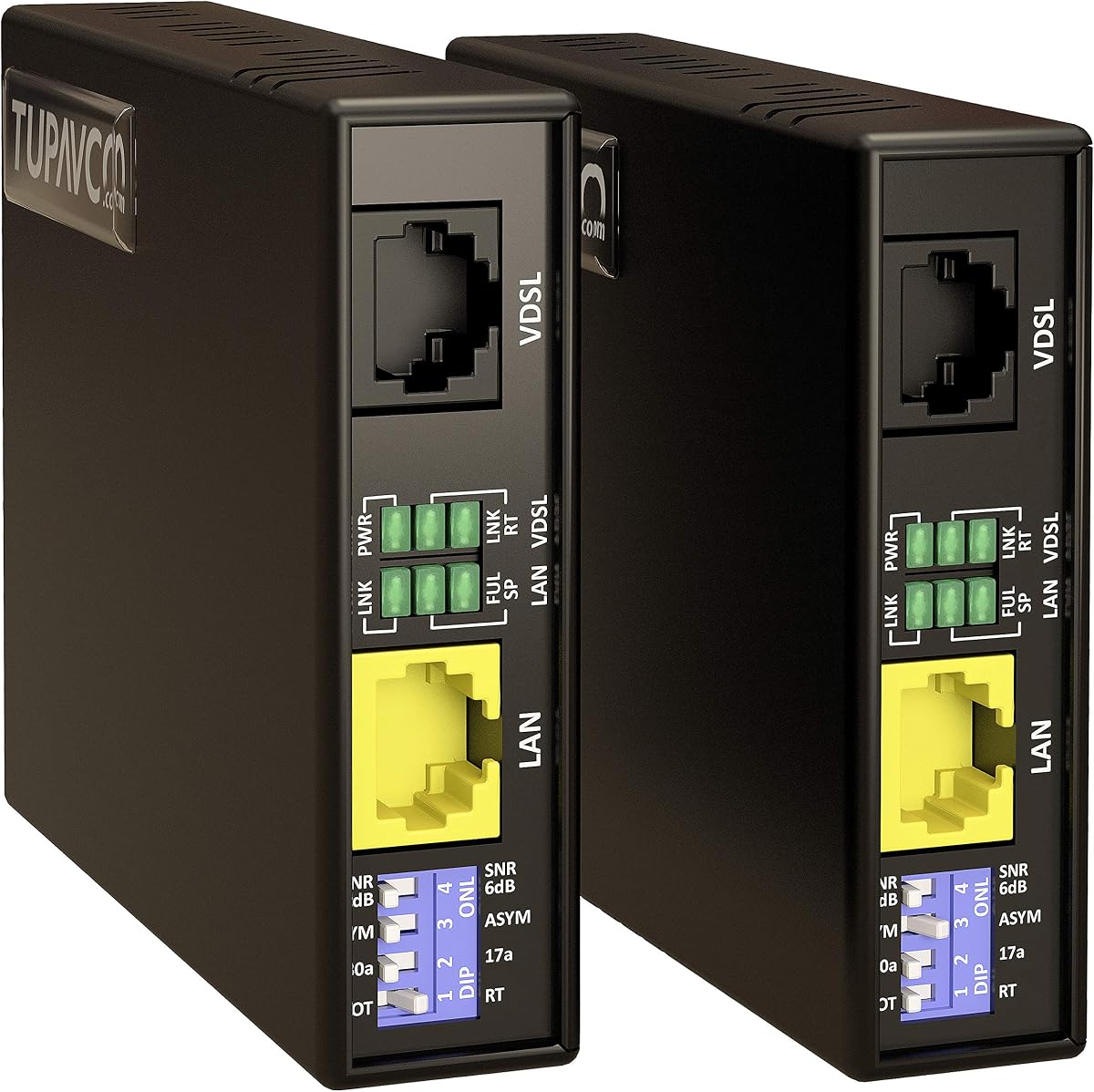
This Ethernet Extender Kit is designed to dramatically increase the range of standard network cabling. It extends the limit from 328 feet to up to 7000 feet, making it perfect for large properties or industrial settings.
We may earn a commission when you buy through this link, at no additional cost to you.
The kit can utilize existing CAT5 through CAT8 cables or phone lines to transmit signals to remote locations. It comes in a pair with presets for central and remote locations, ready for use out of the box.
Setup is effortless with no drivers or software installation needed. It ensures stable connections for devices like cameras, VoIP phones, and computers located far from the main router.
Users needing to bridge large distances without new cabling will find this product highly effective. It is a robust solution for extending LAN networks over twisted copper wire efficiently.
The VDSL technology allows signal transmission over up to 7000 feet using existing copper wiring.
Supports a wide range of cable types including CAT5, CAT6, CAT7, and CAT8 for flexibility.
We may earn a commission when you buy through this link, at no additional cost to you.
The StarTech Ethernet Extender is a professional-grade device designed for remote network access. It supports distances up to 0.5 miles, exceeding the typical limits of standard copper Ethernet cables significantly.
We may earn a commission when you buy through this link, at no additional cost to you.
This extender kit acts as a transparent network device, passing through VLAN tags and other protocols seamlessly. It includes DIP switches for configuration and LED indicators to help administrators monitor connectivity status effectively.
Although the speed is capped at 100 Mbps, the range and reliability make it a premium choice for surveillance and remote management. It supports both CAT5 and phone line cabling for versatile deployment.
For IT administrators managing remote sites or security cameras, this tool provides a dependable extension solution. Its compliance and robust build quality justify the higher price point.
Extending Ethernet signals up to 0.5 miles ensures connectivity even in remote industrial settings.
Transparent device design allows VLAN tags and protocols to pass through without modification.
We may earn a commission when you buy through this link, at no additional cost to you.
The TP-Link AV600 offers a reliable way to extend wired connections without complex wiring. It uses AV600 technology to deliver speeds up to 750 feet across electrical wiring efficiently.
We may earn a commission when you buy through this link, at no additional cost to you.
This kit includes a 100 Mbps port which is sufficient for standard browsing and streaming on devices like smart TVs. It features a power-saving mode to reduce energy consumption by up to 85 percent.
Security is a core requirement in its design, adhering to the Secure-by-Design pledge. It is compatible with other TP-Link powerline adapters for expanding networks easily.
Best for users needing basic connectivity in areas where Wi-Fi fails, this kit is straightforward. It is ideal for desktops and gaming consoles requiring a stable wired link.
Automatic power-saving mode reduces energy consumption when the adapter is idle.
Designed with advanced security features to protect your wired network infrastructure.
We may earn a commission when you buy through this link, at no additional cost to you.
This TP-Link kit combines powerline Ethernet with Wi-Fi 6 to extend both wired and wireless connections. It provides AV1000 powerline speeds and AX1500 Wi-Fi 6 dual-band speeds for versatile coverage.
We may earn a commission when you buy through this link, at no additional cost to you.
The device allows you to create a mesh network with EasyMesh compatible routers. It features a WiFi clone button to instantly copy network settings, simplifying the setup process significantly.
Users can connect up to 64 devices simultaneously, making it suitable for modern smart homes. The gigabit Ethernet port supports high-bandwidth devices like game consoles directly.
Ideal for those needing both wired and wireless coverage in blocked areas, this kit is powerful. It is best for upgrading old networks to Wi-Fi 6 standards effectively.
Combines powerline wired reliability with modern Wi-Fi 6 wireless speeds for total coverage.
EasyMesh compatibility allows seamless whole-home coverage when connected to a compatible router.
We may earn a commission when you buy through this link, at no additional cost to you.
The TP-Link AV1000 Passthrough extends connections using HomePlug AV2 technology. It offers both wired and wireless connectivity for areas where routers and range extenders do not work.
We may earn a commission when you buy through this link, at no additional cost to you.
This kit delivers AV1000 powerline speeds over existing electrical wiring. The passthrough design allows you to plug in other devices into the integrated power socket, saving outlet space.
It features AC1200 dual-band Wi-Fi speeds ensuring seamless HD streaming and gaming. One-click Wi-Fi configuration simplifies setup by cloning your router's network settings easily.
This is an excellent choice for expanding network coverage in thick-walled rooms. The reliable wired and wireless options make it a versatile addition to any home network setup.
The integrated power passthrough allows you to maintain access to your wall outlet.
One-click configuration clones your existing network settings for a quick and easy start.
We may earn a commission when you buy through this link, at no additional cost to you.
The UGREEN Ethernet Coupler is a passive device that joins two Ethernet cables to extend your network. It supports speeds up to 10Gbps and offers PoE support for cameras needing power over Ethernet.
We may earn a commission when you buy through this link, at no additional cost to you.
This coupler extends connections effectively up to 328 feet. It features a unique structure design for stable data transmission and works with Cat8 down to Cat5 cables universally.
While it does not regenerate signals like active extenders, it is perfect for short extensions where you need extra length. The 2-pack ensures you have the necessary connections for immediate use.
Budget-conscious users looking for a simple cable extension will find this product highly effective. It eliminates the need for longer specific cables and keeps your setup flexible.
Supports data transfer speeds up to 10Gbps for modern high-performance network needs.
Compatible with a wide range of Ethernet cables from Cat5 to Cat8 for easy integration.
We may earn a commission when you buy through this link, at no additional cost to you.
This Ethernet Range Extender Kit extends connections up to 600m over 2-wire twisted pair or coax. Both units are mains powered to actively regenerate the signal, ensuring stability over long distances.
We may earn a commission when you buy through this link, at no additional cost to you.
The kit supports flexible wiring options like spare pairs inside existing Cat5e or coax lines. It acts as a transparent Layer 1 segment, allowing VLAN tags and DHCP to pass unaltered.
Setup is straightforward with no software or drivers needed. Each unit consumes less than 2W of power and is robustly built for consistent performance.
Ideal for industrial surveillance or remote sensor networks, this kit bridges the gap effectively. It provides a reliable active extension solution without complex configuration steps.
Active units regenerate the signal at each end to maintain stability over long distances.
Supports various wire types including twisted pair and coax with supplied adapters for ease.
We may earn a commission when you buy through this link, at no additional cost to you.
The VDSL Network Extension Kit extends Ethernet range up to 5000 feet with speeds up to 300Mbps. It uses existing phone or network cabling, removing the need for expensive upgrades.
We may earn a commission when you buy through this link, at no additional cost to you.
Equipped with a 4-position DIP switch, it offers 8 different profile settings to adapt to your needs. The G.INP feature makes the broadband signal less sensitive to noise and interference.
This kit is ready out of the box with no software installation needed. Standard RJ45 ports include LED indicators for status monitoring, making it easy to assess connectivity.
Best for large properties needing high-speed connections over existing wires, this kit is efficient. It provides a reliable high-speed solution for remote access and video surveillance.
DIP switch settings allow you to adjust profiles to match your specific line conditions.
Supports G.INP to ensure the signal remains clean and less sensitive to interference.
We may earn a commission when you buy through this link, at no additional cost to you.
Selecting the right Ethernet Line Extender depends on your specific needs regarding distance, speed, and installation type. This guide outlines key factors to consider before making a purchase.
First determine how far you need to extend your network. Powerline adapters typically cover 750 feet while dedicated VDSL extenders can reach 5000 feet or more.
Always choose a device that exceeds your required distance by a margin to ensure stability.
Consider the bandwidth your devices require for streaming or gaming. Powerline adapters range from AV600 to AV2000 speeds and dedicated extenders offer up to 300Mbps.
Match the speed rating to your internet plan to avoid bottlenecks in your network performance.
Check if the extender supports your existing cabling such as Cat5e or phone lines. Some passive couplers require specific Ethernet cables for proper function.
Select a device compatible with your current wiring infrastructure to minimize extra costs.
Decide between active units needing power or passive plugs fitting into outlets. Active extenders provide longer range but require power at both ends.
Passive couplers are easier to install but are limited to shorter distances effectively.
If you plan to connect cameras or other devices needing power, look for PoE support. This feature allows devices to receive both data and electricity over the same cable.
Ensure the extender supports PoE if your devices require power through the network connection.
Some professional extenders require DIP switches or software configuration which might be complex. Consumer kits usually offer plug-and-play simplicity for quick setup.
Choose a configuration level that matches your technical comfort and network management skills.
Consider where the device will be located such as attics or basements with temperature variations. Industrial units often have better build quality for harsher environments than consumer models.
Select a device rated for the environment where it will be installed for long-term reliability.
To set up an active extender, connect the master unit to your router and plug both units into electrical outlets. Ensure they are on the same circuit to allow signal transmission effectively.
For passive couplers simply join two Ethernet cables together to extend the reach. Use high quality cables to minimize signal loss and maintain data speeds.
Keep devices away from large appliances to avoid electrical interference. Regularly check connections and replace worn cables to maintain optimal network performance.
Ethernet extenders send data signals over existing copper wiring using modulation techniques. They allow signals to travel much farther than the standard 328 feet limit of a cable.
Some extenders work with standard Cat5e cables while others require specific types like phone lines. Always check the compatibility list before purchasing to avoid needing extra adapters.
Most powerline adapters must be plugged directly into wall outlets. Using power strips can interfere with the signal and significantly reduce performance and speed.
Yes many active extenders provide stable low latency connections suitable for gaming. Avoid passive couplers if you need consistent high speeds for competitive play.
Distances vary by model but standard powerline adapters reach about 750 feet. Advanced VDSL extenders can transmit signals up to 5000 feet or more depending on wiring.
Consumer kits are usually plug and play and need no configuration. Professional units might need DIP switches to adjust speed and distance settings properly.
The TP-Link AV1000 stands out as a top choice for home users needing reliability. The StarTech extender offers a premium solution for long-range enterprise needs.
Prioritize the range and speed requirements of your specific setup before purchasing. Ensure the device matches your existing wiring to avoid compatibility issues.
Always check the latest availability and pricing before finalizing your order. Network needs evolve so selecting a flexible solution helps future-proof your infrastructure.