
4K AI-Powered Conference Webcam with Microphones Speakers
4.1Editor score
120 degree wide angle
AI auto framing
Physical lens cover
This guide compares the top auto tracking conference camera systems for 2026 focusing on AI framing video quality audio performance and ease of setup.
Choosing the right auto tracking conference camera can transform how your team collaborates remotely. Modern systems use artificial intelligence to follow speakers automatically ensuring every participant stays in frame without manual adjustments. This technology saves time and keeps meetings professional.
We evaluated ten leading models based on resolution tracking accuracy audio clarity and connectivity options. Our analysis covers devices suitable for small huddle rooms as well as larger conference spaces. Each product was assessed for ease of setup compatibility with major platforms and overall value.
Every pick in this list highlights specific strengths like optical zoom range microphone quality or unique features such as NDI support. Please note that prices and availability may fluctuate over time. Check current listings for the most accurate information before making your final decision.
4.1Editor score

4.8Editor score

4.6Editor score
The following table provides a side-by-side comparison of all ten models reviewed in this guide. It highlights key specifications such as zoom capability output types and unique features to help you find the perfect match for your meeting space requirements.




This system earns our top spot for its robust all-in-one design that delivers professional quality for small to medium meeting spaces. With a rating of 4.8 out of 5 it consistently impresses users with its ability to capture clear 4K video and reliable audio simultaneously.
We may earn a commission when you buy through this link, at no additional cost to you.
The standout feature is its Smart AI auto-tracking algorithm which uses precise humanoid and face recognition to keep the speaker centered without manual input. The 3x optical zoom allows you to frame participants effectively even if they move around the room while the 93 degree wide angle ensures no one is left out.
While the Bluetooth speakerphone offers great flexibility with multiple connection options its battery life of six to eight hours might require recharging during very long conference days. Additionally capturing full 4K requires an HDMI connection whereas USB outputs at 1080P which may affect users relying solely on USB.
Organizations seeking a plug-and-play solution that supports Zoom Teams and Google Meet will find this kit invaluable. It is especially recommended for worship centers or clinics needing reliable streaming and conferencing without complex IT configurations.
The advanced algorithm distinguishes between faces and bodies ensuring smooth transitions even when speakers move across the room.
The omnidirectional microphones pick up voices clearly across a fifteen foot range making it ideal for roundtable discussions.
We may earn a commission when you buy through this link, at no additional cost to you.
For smaller offices or startups working with tighter budgets this webcam offers essential AI features without the cost of full rack systems. It is designed specifically for small conference rooms ensuring every participant remains visible without the need for manual camera adjustments.
We may earn a commission when you buy through this link, at no additional cost to you.
The 120 degree wide angle is a major advantage as it captures the entire meeting space allowing everyone to be seen clearly. AI auto framing detects and frames all attendees automatically which is perfect for team meetings where multiple people speak throughout the session.
However the 4.1 rating indicates some users may experience issues with audio clarity or tracking consistency compared to premium models. The microphones work well for table conversations but might struggle in larger rooms or noisy environments requiring external audio solutions for bigger groups.
This device is an excellent entry-level choice for teams needing a Zoom certified camera with privacy protection. The physical lens cover adds a layer of security crucial for shared office environments and the plug-and-play setup gets you running instantly.
The included physical lens cover provides immediate security without needing software toggles.
The wide angle lens ensures no participant sits outside the frame during collaborative sessions.
We may earn a commission when you buy through this link, at no additional cost to you.
This system prioritizes smooth motion over maximum resolution by delivering a hundred and eight ten P video at sixty frames per second. This fluidity is particularly beneficial for meetings with frequent movement ensuring that gestures and transitions appear natural to remote attendees.
We may earn a commission when you buy through this link, at no additional cost to you.
The AI auto-tracking capability locks onto subjects with precision using improved algorithms for both facial and humanoid recognition. It maintains a perfect view of the speaker during movement which is critical for professional presentations and interactive training sessions where engagement is key.
One limitation is that it outputs Full HD rather than 4K which may not satisfy users requiring ultra high definition for large screens. Additionally while the Bluetooth speakerphone is robust it is a separate unit meaning cable management can be slightly more involved than all-in-one boxes.
Teams that value fluid video quality and reliable tracking will appreciate this configuration. It works seamlessly with major platforms and offers extensive mounting options making it suitable for wall or ceiling installations in dedicated conference rooms.
Sixty frames per second ensures that fast movements do not appear choppy during video calls.
The hands-free speakerphone design allows for natural conversation flow without holding microphones.
We may earn a commission when you buy through this link, at no additional cost to you.
This model stands out for its intuitive gesture control feature allowing you to start or stop tracking using hand signals. It brings a dynamic interactive element to meetings which can be particularly useful for presenters who want to avoid touching devices during sessions.
We may earn a commission when you buy through this link, at no additional cost to you.
The 4K resolution ensures sharp detail while the 120 degree wide angle captures the full room context. Users can set up to nine preset positions via the remote control which is helpful for recurring meeting layouts where specific camera angles are preferred.
The digital zoom lacks the optical clarity of physical lenses meaning image quality may degrade significantly when zoomed in. Also the menu navigation on the remote can be intricate for less technical users leading to a steeper learning curve during initial setup.
Innovative teams looking for hands-free interaction will find this system exciting. It is a strong choice for education or interactive workshops where physical contact with devices should be minimized while maintaining high video quality.
Simple hand gestures allow presenters to control tracking modes without touching any hardware.
Remote control presets enable quick switching between views for different meeting segments.
We may earn a commission when you buy through this link, at no additional cost to you.
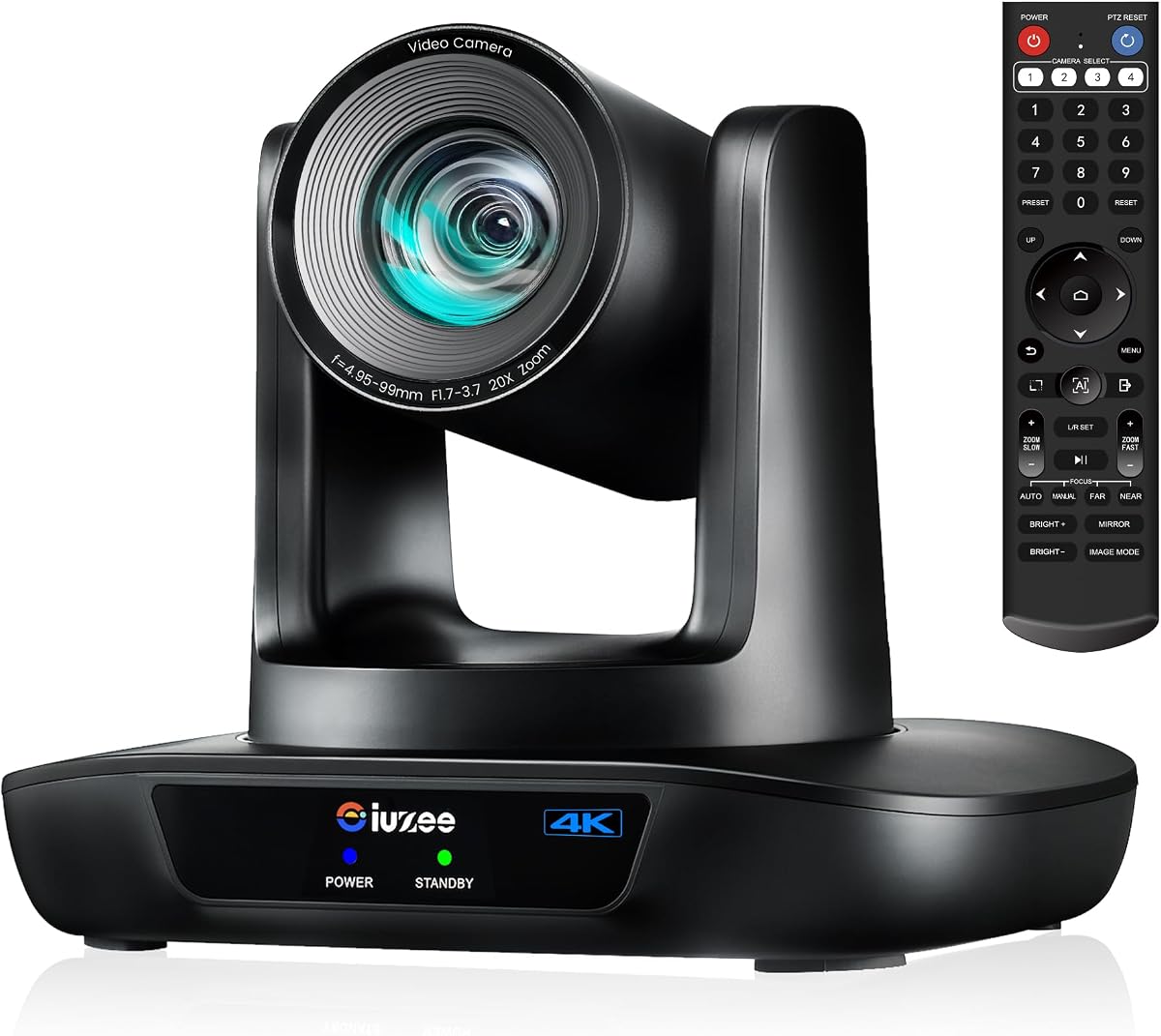
For larger venues like churches or auditoriums this camera offers a massive twenty times optical zoom that brings distant speakers into clear view. The tracking system automatically follows presenters across stages ensuring they stay framed even when moving far from the camera.
We may earn a commission when you buy through this link, at no additional cost to you.
The inclusion of LAN and HDMI alongside USB provides professional flexibility for streaming workflows that require stable network connections. Power over Ethernet support simplifies installation by reducing cable clutter which is a significant benefit for permanent setups in high ceilings.
The price point is higher than standard webcams reflecting its advanced optical capabilities. While it includes a speakerphone option some professional setups might prefer separate audio systems for superior sound quality in very large spaces.
Churches and schools needing long reach zoom and robust streaming capabilities will find this system indispensable. It bridges the gap between consumer webcams and professional broadcast equipment making high quality streaming accessible.
Twenty times optical zoom allows clear visibility from the back of large halls.
LAN and PoE support enable clean cabling for permanent installations in large venues.
We may earn a commission when you buy through this link, at no additional cost to you.
This camera is engineered for professional broadcast scenarios where IP streaming and high fidelity are critical. Its ability to output via LAN alongside USB and HDMI makes it versatile for complex setups involving multiple recording devices or switchers.
We may earn a commission when you buy through this link, at no additional cost to you.
The advanced AI tracking uses two and three dimensional noise reduction to ensure image clarity even in challenging lighting. It supports RTMP and RTSP protocols allowing direct streaming to platforms like YouTube without needing an intermediate computer.
Users must purchase a separate microphone since this unit does not include one which is a crucial consideration for audio planning. The web browser control interface provides deep customization but may require network configuration skills compared to simpler plug-and-play options.
Broadcasters and production studios looking for a cost-effective alternative to expensive broadcast cameras will appreciate this model. It delivers professional features like SDI and NDI support at a fraction of the cost of enterprise gear.
Support for RTMP and RTSP enables direct streaming to platforms without extra software.
Noise reduction technologies keep the image clean even in low-light environments.
We may earn a commission when you buy through this link, at no additional cost to you.
This camera offers official NDI integration which is a game changer for professional live production workflows. It allows seamless video transmission over standard networks enabling multi-camera setups without dedicated video cables or expensive switchers.
We may earn a commission when you buy through this link, at no additional cost to you.
The SDI output provides reliability for long cable runs up to three hundred feet making it suitable for large event venues. The AI tracking system distinguishes between presenters and groups ensuring that the active speaker is always captured with precision.
The price reflects its professional capabilities which might be overkill for simple conference rooms. Setup involves understanding network configurations and NDI settings which may require technical expertise not present in standard office environments.
Studios and event production teams needing high fidelity and network flexibility will find this camera essential. It brings broadcast quality tools to affordable pricing levels supporting complex streaming productions with ease.
Network video transmission simplifies multi-camera setups by using standard ethernet cables.
Robust construction supports long cable runs and high-stakes live production events.
We may earn a commission when you buy through this link, at no additional cost to you.
This camera balances high resolution with extensive zoom capabilities making it ideal for capturing distant speakers in large rooms. The twenty times optical zoom ensures that facial expressions remain clear even from the back of a classroom or auditorium.
We may earn a commission when you buy through this link, at no additional cost to you.
Multiple connection options including USB HDMI and LAN allow integration into existing network infrastructures. The PoE support simplifies power delivery making it easier to install ceiling mounted cameras without needing separate power supplies near the device.
Some users report that default output settings may need adjustment for compatibility with certain monitors or software. The lack of built-in audio means an additional microphone system is required which adds to the total cost and setup time.
Educational institutions and churches needing long reach and reliable streaming will benefit from this unit. It offers professional control options via software and remote ensuring that operators can manage complex meeting environments efficiently.
Twenty times optical zoom captures details from a distance without losing image clarity.
Versatile mounting supports ceiling or wall installation for optimal room coverage.
We may earn a commission when you buy through this link, at no additional cost to you.
Designed for medium and large conference rooms this system integrates camera microphones and speakers into a single unit. This reduces cable clutter and simplifies the meeting experience by eliminating the need for separate audio devices.
We may earn a commission when you buy through this link, at no additional cost to you.
The AI auto framing feature adjusts framing in real time to keep everyone centered. It uses a 4-mic array with noise reduction to ensure voices are clear even when background noise is present which is vital for professional client meetings.
Because audio is built-in users cannot upgrade the speakers or microphones separately if their room grows or requires specialized audio. The price is higher than standalone units reflecting the convenience of an integrated solution.
Businesses seeking a streamlined setup with minimal IT intervention will value this all-in-one approach. It is particularly effective for hybrid work environments where clarity and ease of use are top priorities for all attendees.
Built-in speakers and microphones remove the need for external audio hardware.
Auto framing adjusts to group size ensuring every participant remains visible.
We may earn a commission when you buy through this link, at no additional cost to you.
This compact unit is perfect for individual workstations or small huddle spaces where a full PTZ system is unnecessary. It combines a 4K sensor with built-in microphones and speakers to provide a complete audio and video experience in a small form factor.
We may earn a commission when you buy through this link, at no additional cost to you.
The adjustable field of view allows users to switch between wide medium and narrow angles via the remote control. This flexibility lets you tailor the view for solo presentations or group calls without moving the physical device.
Digital zoom is used instead of optical which can reduce image sharpness when zooming in significantly. The lower user rating suggests occasional inconsistency in tracking or audio pickup compared to more robust models.
Remote workers or small offices needing a simple plug-and-play solution will appreciate its convenience. It offers essential features like privacy covers and voice tracking to keep meetings personal and efficient without complex installations.
The compact design fits easily on any desktop without occupying valuable workspace.
Adjustable FOV keys allow users to switch views quickly via remote control.
We may earn a commission when you buy through this link, at no additional cost to you.
Selecting the right auto tracking conference camera involves evaluating several technical and practical factors. This guide breaks down the key specifications to help you make an informed decision that fits your meeting space needs.
Optical zoom is superior to digital zoom because it maintains image quality while bringing distant subjects closer. For rooms larger than twelve feet consider models with at least five times optical zoom to ensure clarity without pixelation.
Always prioritize optical zoom for professional presentations to avoid blurry images when focusing on speakers at the far end of the room.
Look for cameras that use both facial and body recognition to track speakers reliably. Advanced AI should handle temporary obstructions smoothly ensuring the camera does not lose focus when a speaker moves or gestures.
Test the camera's reaction time during your setup to ensure it follows movement naturally without jarring jumps.
Audio is as important as video for successful meetings. Check if the system includes high-quality microphones with noise reduction and a pickup range that covers your entire table or room.
If the camera lacks built-in audio plan for a dedicated conference speakerphone to ensure everyone is heard clearly.
Consider your existing infrastructure when choosing output types. USB is simplest for direct PC connection but HDMI or LAN may be necessary for dedicated displays or network streaming setups.
Ensure the camera supports the resolution and refresh rate required by your display systems to avoid compatibility issues.
Verify that the camera works seamlessly with your primary conferencing software like Zoom Microsoft Teams or Google Meet. Most modern models are certified but checking specific driver requirements can save time.
A camera that supports UVC standard works on most operating systems without needing custom software or drivers.
Think about where you plan to place the camera. Wall or ceiling mounts require specific brackets while tripod or desktop mounts offer portability. Ensure the package includes necessary hardware.
A versatile mounting kit allows you to adapt the camera to different room configurations as your needs change.
Evaluate whether you need Wi-Fi Bluetooth or wired connections. Wired connections generally offer more stability while wireless options provide flexibility for portable meetings.
Prioritize wired connections for permanent setups to avoid latency or disconnection issues during critical meetings.
Physical privacy covers or software shutter controls are essential for sensitive environments. These features give you instant control over video transmission when the camera is not in use.
Look for cameras with hardware privacy switches to ensure security is always under your direct control.
Begin by positioning the camera at eye level or slightly above the seated height of participants to ensure natural framing. Use a stable surface or mount to prevent vibrations that might interfere with tracking algorithms.
Keep the lens clean by using a microfiber cloth regularly to remove dust and smudges. Avoid using harsh chemicals that could damage the sensor or coating and store the device in a dust-free environment when not in use.
Update firmware periodically through the manufacturer's software to benefit from performance improvements and bug fixes. Regular updates also ensure compatibility with new versions of conferencing platforms and operating systems.
Many models come with built-in speakers and microphones but for larger rooms external audio is often better. Check the package details to see if a speakerphone is included or if you need to buy one separately for optimal sound quality.
Some advanced models support multi-human tracking and auto framing to keep everyone in view. However most focus on tracking a single active speaker to provide a clearer view of the person talking at any given moment.
Most cameras are plug and play and work without additional drivers on modern operating systems. However you may need a companion app or web browser interface to adjust settings like zoom levels or tracking sensitivity.
4K resolution is ideal for crisp detailed images but 1080P is sufficient for standard video calls. Ensure your internet bandwidth and meeting software support the chosen resolution for smooth performance.
Most units include wall mounts and screws but you may need to drill holes and use anchors depending on your wall material. Use a level to ensure the camera is straight before securing it firmly.
Physical lens covers and software privacy modes are effective ways to secure your camera. Always check that your conferencing software settings also disable video when not in use for added security.
We highlighted ten excellent options ranging from budget webcams to professional broadcast grade systems. The TONGVEO 4K system stands out for its all-in-one design while the NDI model offers unmatched flexibility for production needs.
Prioritize optical zoom and accurate tracking if you host regular meetings in rooms larger than ten feet. For smaller spaces focus on ease of setup and audio quality to keep conversations clear and engaging.
Always verify current pricing and stock before purchasing as these models are updated frequently. Check official product pages for the latest features and warranties to ensure you get the best value.