
VOYEE PC Controller
4.3Editor score
Enhanced trigger buttons
Rumble control
Ergonomic grips
Discover the top rated joysticks for Windows 11 including flight sticks and game controllers for immersive gaming simulation and precision control today.
Finding the right joystick for your Windows 11 PC can transform your gaming experience from standard button presses to immersive simulation control. Whether you are piloting virtual aircraft or commanding heavy machinery, the right peripheral matters deeply for comfort and accuracy.
We compared ten top models based on compatibility, build quality, and features like programmable buttons and ergonomic designs. Each pick was evaluated for how well it integrates with modern flight simulators and action games available on the platform today.
Every entry highlights key strengths and potential limitations so you can match a device to your specific gaming needs. Please note that product availability and pricing may fluctuate over time so verify details before making your final decision.
4.3Editor score

4.4Editor score

4.0Editor score
This side by side comparison lists all ten recommended joysticks with their key specifications to help you quickly identify the model that best fits your simulation or arcade gaming setup on Windows 11.






The PXN 2113PRO offers an accessible entry point into flight simulation on Windows 11. It carries a modest rating yet includes enough controls for basic piloting tasks without breaking the bank.
We may earn a commission when you buy through this link, at no additional cost to you.
Its standout qualities include twelve programmable buttons and an eight way hat switch which allow for flexible mapping across titles like Microsoft Flight Simulator or War Thunder. The vibration function adds tactile feedback when activated properly through the driver settings.
Some users may find the build quality less rigid than premium options and the driver installation process can be slightly cumbersome for new users. These trade-offs are acceptable considering the low cost and feature set offered for beginner pilots.
This controller is ideal for gamers testing the waters of flight simulation or those needing a budget friendly backup stick. We recommend it for casual players who value functionality over premium feel.
Twelve programmable buttons ensure you can assign essential flight controls without relying on the keyboard during critical maneuvers.
The vibration switch at the bottom allows you to feel in game events once you adjust the strength settings correctly in the driver.
We may earn a commission when you buy through this link, at no additional cost to you.
The Thrustmaster T-Flight Hotas One delivers a balanced mix of performance and versatility for Windows 11 users. With a high rating it stands out for its detachable throttle design which allows flexibility in how you arrange your cockpit space.
We may earn a commission when you buy through this link, at no additional cost to you.
Key strengths include responsive triggers and an adjustable resistance system that accommodates different aircraft types from commercial jets to combat planes. The plug and play feature means minimal setup time while the expandable ecosystem supports adding rudder pedals later.
The main drawback is the higher cost compared to simpler joysticks and the separate throttle unit requires extra desk space or lap use. These issues are minor given the overall quality and long term usability for serious enthusiasts.
We recommend this model for pilots who want room to grow into a more complex setup over time. It is perfect for those valuing ergonomic design and brand reliability in their flight gear.
You can use the stick and throttle together on a desk or separate them for lap flying depending on your available space.
Compatible with additional rudder pedals via the S.M.A.R.T rail system to enhance steering control during takeoffs and landings.
We may earn a commission when you buy through this link, at no additional cost to you.
The V-one Wired USB Controller brings a low cost option for casual gaming and basic flight tasks on Windows 11. It earns solid marks for supporting multiple platforms including Android and PS3 alongside standard PC setups.
We may earn a commission when you buy through this link, at no additional cost to you.
Its key strengths include plug and play functionality and vibration feedback that enhance immersion during action sequences. The multi-mode switch allows you to toggle between Xinput and Dinput modes for wider game compatibility without technical hassle.
The build quality is adequate but the cable may not stand up to heavy wear and it lacks specialized flight controls like throttles. These limitations are acceptable given the budget friendly price and broad compatibility across genres.
This product is perfect for gamers needing a simple reliable controller for a variety of titles. We recommend it for casual players or students who want value without sacrificing basic quality.
Beyond Windows it works with Android devices and PS3 systems offering flexibility if you switch between different gaming ecosystems.
Just connect the USB cable and start playing without installing drivers unless you are using an older Windows XP system.
We may earn a commission when you buy through this link, at no additional cost to you.
The Thrustmaster USB Joystick provides a straightforward solution for users needing basic flight control on Windows 11. It holds a decent rating and is known for its Point of View button which simplifies camera management in combat games.
We may earn a commission when you buy through this link, at no additional cost to you.
Standout qualities include the ergonomic handle with an enlarged rest that supports long sessions and three axis control for smooth movement. The simple layout ensures you can focus on gameplay rather than fiddling with complex settings.
However it lacks advanced features like programmable macros or a throttle which limits its appeal for complex simulations. This trade-off is acceptable if you prefer minimalism or only need occasional flight mode access.
We recommend this joystick for hobbyists or users who prioritize ease of use over extensive customization. It serves well for entry level pilots needing reliable camera and movement control.
This dedicated button allows instant camera changes without needing to map a keyboard key for better immersion during dogfights.
The handle is shaped to fit comfortably in hand reducing fatigue during extended gaming sessions or training flights.
We may earn a commission when you buy through this link, at no additional cost to you.
The Microsoft Sidewinder Precision 2 remains a reliable classic for Windows 11 flight enthusiasts seeking solid control. It holds a steady rating and is praised for its rotating handle which offers precise rudder control during maneuvers.
We may earn a commission when you buy through this link, at no additional cost to you.
Its standout features include a massive 146 degree throttle range and sixteen programmable functions that let you tailor every command. The USB connection ensures stable plug and play performance without latency issues during intense play.
Modern gamers may find the design dated compared to newer models with LED indicators or advanced sensors. This trade-off is worth it if you value mechanical durability and a familiar form factor from past gaming eras.
We recommend this stick for veterans of flight sims who appreciate traditional layouts and reliable hardware. It is ideal for those seeking a robust controller without needing extra digital features.
Rotating the stick twists the rudder axis allowing natural foot pedal control without needing extra hardware for banking.
The large throttle range gives you fine control over speed which is essential for precision landings and combat scenarios.
We may earn a commission when you buy through this link, at no additional cost to you.
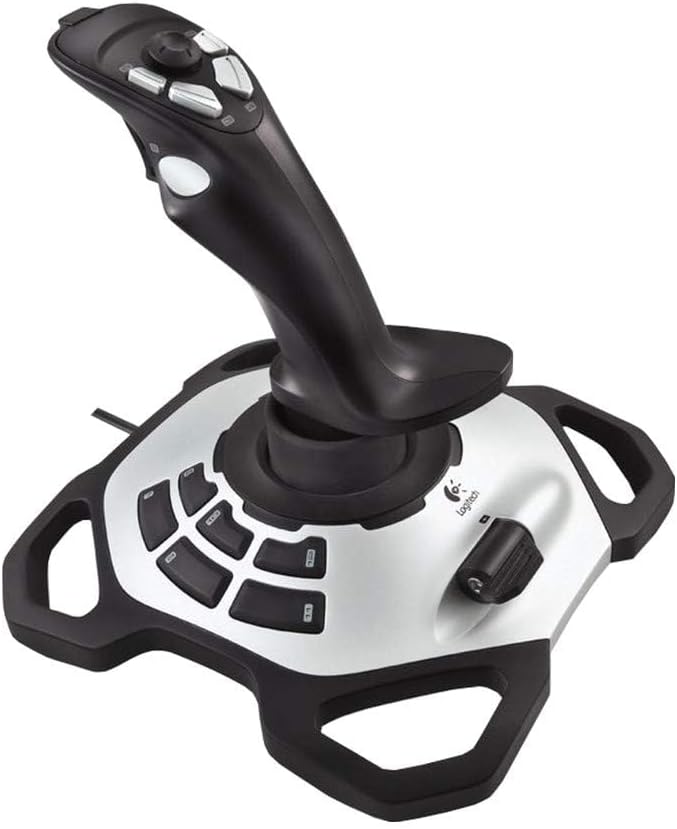
The Logitech Extreme 3D Pro delivers dependable performance for Windows 11 users focused on air combat simulations. It scores well for its durable construction and ease of use which keeps you in the game without technical interruptions.
We may earn a commission when you buy through this link, at no additional cost to you.
Key strengths include a sturdy base and responsive controls that handle aggressive maneuvers without slipping. The software support allows for profile mapping which helps manage different aircraft setups efficiently during multi game sessions.
It lacks a dedicated throttle unit and may feel simple for users wanting complex cockpit layouts. However this is acceptable if you prioritize reliability and budget-friendly pricing over modular add-ons.
We recommend this model for pilots seeking a durable stick that works right out of the box. It is perfect for those who value Logitech brand reliability and straightforward usability.
The robust base keeps the stick steady during aggressive maneuvers ensuring consistent input accuracy even after hours of use.
Software tools let you create specific profiles for different games so settings switch automatically when you launch a new title.
We may earn a commission when you buy through this link, at no additional cost to you.
The VOYEE PC Controller is a cost effective choice for Windows 11 users preferring an Xbox style layout for general gaming. It holds a solid rating and offers good ergonomic grips for comfortable long sessions without breaking the bank.
We may earn a commission when you buy through this link, at no additional cost to you.
Standout features include enhanced trigger buttons and automatic vibration feedback that respond to in game events. The wide compatibility ensures it works with various titles and offers a familiar layout for console gamers migrating to PC.
Flight simulation enthusiasts may find it lacking specialized flight controls like rudder or throttle. However for general action games or basic simulation this trade-off is acceptable given the low price and reliable feedback.
We recommend this controller for casual gamers or budget conscious players needing a reliable backup device. It is ideal for those who prioritize comfort and value over advanced simulation features.
Contoured grips fit naturally in your hands reducing strain during extended play sessions even on demanding titles.
Automatic vibration feedback adds realism to explosions or crashes enhancing your immersion without needing manual settings.
We may earn a commission when you buy through this link, at no additional cost to you.
The Thrustmaster SimTask FarmStick is a specialized controller designed for Farming Simulator on Windows 11. It carries a high rating and uses Hall effect sensors to provide ultra precise control for operating tractors and heavy machinery.
We may earn a commission when you buy through this link, at no additional cost to you.
Key strengths include thirty three programmable inputs and a robust design that ensures long term accuracy without drift. The ambidextrous nature allows flexibility in how you place it alongside steering wheels for a full cockpit experience.
While excellent for farming its niche focus means it lacks general aviation features found in other models. This trade-off is acceptable if your main interest is agricultural simulation where precise lever control matters.
We recommend this stick for dedicated farming sim players seeking professional grade control. It is perfect for those needing reliable handling for complex machinery interactions without keyboard reliance.
Magnetic sensing ensures your controls remain accurate over time without the wear typical of mechanical potentiometers.
Buttons triggers and switches let you manage complex farm equipment without reaching for your keyboard constantly.
We may earn a commission when you buy through this link, at no additional cost to you.
The Logitech G X56 H.O.T.A.S delivers an immersive flight experience for Windows 11 enthusiasts seeking maximum control. It features a high level of customization with 189 programmable controls and RGB lighting to match your setup.
We may earn a commission when you buy through this link, at no additional cost to you.
Standout features include mini analog sticks for weapon control and a 4 spring system for customizable resistance. The VR optimization ensures controls are perfectly placed for head tracking setups which enhances immersion during complex maneuvers.
The high price and large desk footprint may be prohibitive for casual users or those with limited space. However these trade-offs are justified for serious pilots wanting every possible command at their fingertips.
We recommend this system for professional simmers and enthusiasts willing to invest in top tier hardware. It is ideal for those prioritizing precision and full cockpit customization over budget constraints.
These separate sticks let you manage pitch roll and yaw independently while still controlling weapons simultaneously.
Use software to set lighting colors to match your rig enhancing immersion and making button identification easier at night.
We may earn a commission when you buy through this link, at no additional cost to you.
The Thrustmaster T.16000M FCS is a top rated joystick for Windows 11 users valuing long term precision. It uses H.E.A.R.T technology to ensure controls remain accurate without drifting over time.
We may earn a commission when you buy through this link, at no additional cost to you.
Its key strengths include sixteen action buttons with braille style identification and an ambidextrous design for flexible setup. The separate software allows you to create game specific profiles enhancing usability across multiple simulation titles.
It does not include a throttle unit and relies on software for advanced mapping which might frustrate simple plug and play fans. This trade-off is worth it for the reliability and customization offered by the hardware.
We recommend this controller for serious pilots seeking precision and flexibility. It is perfect for those who value durability and want a joystick that ages well without performance degradation.
This magnetic sensor system ensures perfect accuracy that does not degrade over time unlike traditional mechanical components.
Removable parts allow you to switch the base for left or right handed use ensuring comfort for every player.
We may earn a commission when you buy through this link, at no additional cost to you.
Selecting the right joystick requires balancing compatibility, control features, and budget to match your specific gaming needs.
Ensure the device explicitly supports Windows 11 to avoid driver conflicts and connection errors during installation. Check if the manufacturer provides up to date software that works with current system updates.
Always verify the product page for Windows 11 tags before purchasing to guarantee smooth operation.
Different games require different layouts so decide if you need a simple gamepad style or a full HOTAS system with separate throttles. The number of programmable buttons affects how many in game actions you can access quickly.
Choose a stick with enough buttons to cover your most frequent commands without relying on keyboard shortcuts.
Flight controllers undergo heavy use so look for sturdy materials and a weighted base to prevent sliding during intense maneuvers. Durable joints and cables extend the lifespan of the device over years of gaming.
Investing in quality construction reduces the need for frequent replacements and ensures stable performance.
Since sessions can last hours comfort features like padded grips and adjustable resistance reduce hand strain significantly. The shape should fit naturally in your hand to prevent fatigue during complex flying scenarios.
Prioritize models that offer adjustable or ergonomic grips if you plan on playing for long periods.
Advanced users benefit from software that allows profile creation per game ensuring you never lose critical mappings. Features like macros and force feedback adjustments add depth to your control experience.
Select a device with reliable software tools to manage your specific gameplay settings efficiently.
Hall Effect sensors provide consistent accuracy and eliminate drift issues that plague cheaper potentiometer based controllers. Vibration feedback enhances immersion by physically reacting to in game events like explosions or terrain changes.
Look for Hall Effect sensors if long term precision is a priority for your simulation setup.
Prices range widely so determine how much you can spend while still meeting your core requirements for buttons and build. Sometimes a mid range stick offers better value than a cheap one that lacks critical features.
Balance your budget against the necessary features to get the best performance for your money.
Some sticks support adding rudder pedals or second throttles later allowing you to upgrade without replacing the whole unit. Check if the manufacturer has a modular ecosystem if you plan to grow your cockpit setup.
Choose a model with expandable options if you foresee adding more hardware in the future.
Always plug the joystick into a USB port before launching your game to ensure the operating system recognizes the device. Check that vibration settings are enabled in the driver if you expect tactile feedback.
Calibrate the device using the built in Windows calibration tool or the manufacturer software to ensure neutral positions are accurate. Reset settings if you notice drift or lag during gameplay to maintain control precision.
Keep the joystick clean by wiping surfaces with a dry cloth and avoid exposing it to moisture or excessive dust. Store it in a cool dry place to prevent internal electronics from overheating or degrading over time.
Most modern joysticks support Windows 11 but always check the product specifications before buying to ensure compatibility. Older models may require drivers that are no longer updated for the new OS. Verify with the manufacturer if unsure.
This often happens because the device was plugged in after the game launched. Close the game plug in the joystick and then launch the game again. If issues persist check the USB port or reinstall the manufacturer software.
Hall Effect sensors use magnetism to track stick movement rather than physical contact which prevents wear over time. They ensure long term precision and accuracy especially for flight simulators requiring high detail. They are ideal for durability.
Yes any USB powered joystick can work with a laptop as long as you have available USB ports. Wireless versions may require Bluetooth but wired options avoid battery concerns. Just ensure the laptop has enough power to run the game.
Most devices use plug and play but installing official drivers ensures you get vibration support and advanced features. Older hardware may lack specific drivers for Windows 11 so check the manufacturer support site first. Always try drivers if needed.
A joystick is a single stick while HOTAS stands for Hands On Throttle And Stick which combines both into one system. HOTAS allows separate control for speed and direction which is vital for realistic flight sims. It offers more immersion.
Quality joysticks can last several years if cared for properly avoiding moisture and physical drops. Sensors degrade faster in cheaper models so investing in Hall Effect options extends life. Regular calibration also maintains performance over time.
Yes you can map the axis to steering but it is less ergonomic than a dedicated wheel. Flight sticks are optimized for pitch and yaw which differ from car controls. A wheel is better suited for realistic driving simulation.
The top picks from this guide offer a range of options from budget friendly controllers to premium HOTAS systems suitable for any Windows 11 setup. Each model brings unique strengths whether you value precision customization or general gaming comfort.
Prioritize what matters most to your gameplay style such as button count or ergonomics to narrow down your choice effectively. Matching the device to your favorite genres ensures you get the most enjoyment out of your investment.
Remember to check current availability and details before buying as specifications can change over time. We hope this guide helps you find the perfect controller for your next flight or simulation adventure on Windows 11.