
VSD M18 Macro Pad
4.4Editor score
18 programmable keys
LCD visual keys
RGB surround light ring
This guide compares the top macro pads for streaming to help you find the best deck for OBS, Twitch, and content creation workflows.
Macro pads for streaming are essential tools for content creators who need quick access to commands during live broadcasts. These devices replace complex keyboard shortcuts with customizable buttons that streamline your workflow and reduce errors on air.
We analyzed ten leading models based on key customization, software compatibility, and build quality. Each product offers unique features like LCD screens, RGB lighting, or dedicated audio controls to suit different streaming needs and budgets.
Every pick includes detailed reviews, pros, cons, and specifications to help you decide. Remember that availability and offers change frequently, so verify current details before making your final purchase decision today.
4.4Editor score

4.8Editor score

4.9Editor score
This side-by-side comparison highlights the key specifications and capabilities of each model to help you identify the right stream controller for your specific setup needs.



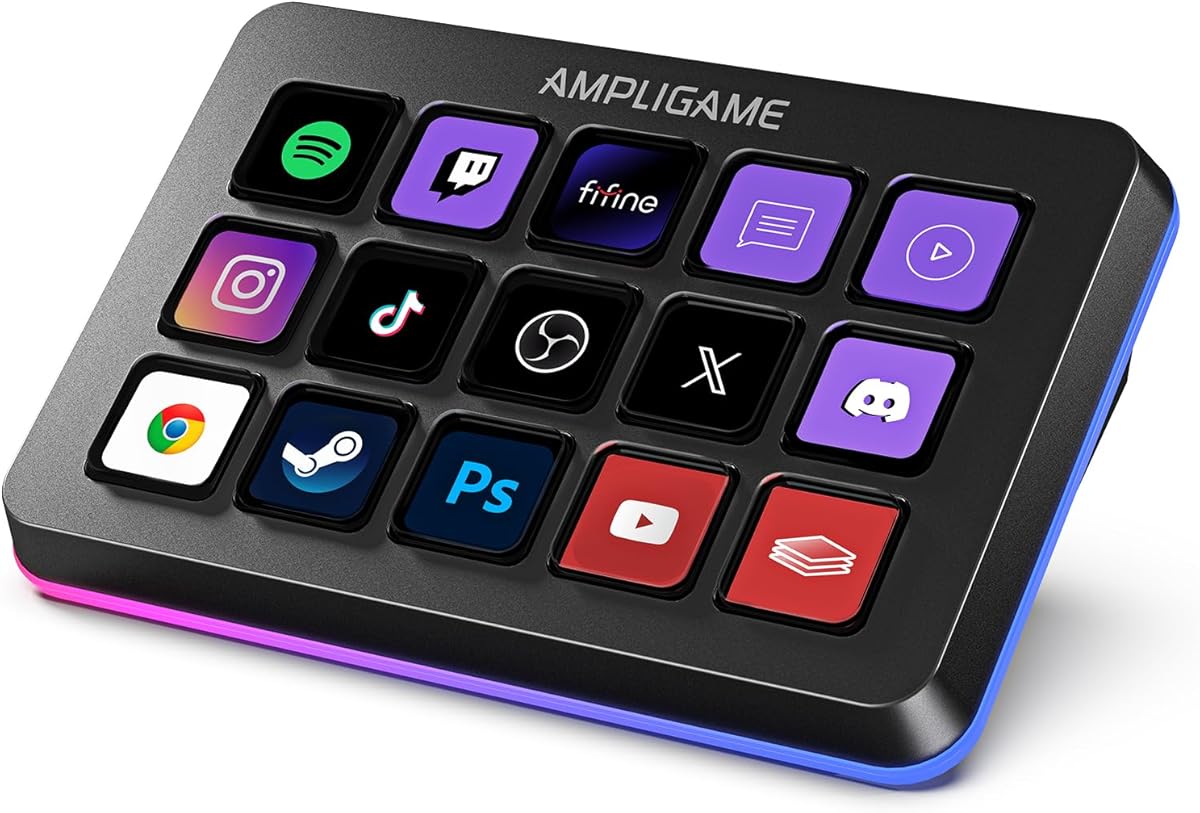


The VSD M18 Macro Pad is a strong entry-level option for streamers seeking customizable control without breaking the bank. With a 4.4 rating, it balances cost and functionality effectively for daily broadcasting tasks.
We may earn a commission when you buy through this link, at no additional cost to you.
It features 18 programmable keys including 15 LCD visual keys that allow JPG PNG and GIF images for clear function identification. The single tap control enables quick triggering of macros text input or scene switches in OBS.
While it offers RGB lighting and plugin support for weather or calendars, it lacks native Linux support. However, for Windows and Mac users, the USB-C connectivity ensures stable performance during long streaming sessions.
Budget-conscious creators who need visual feedback will find this deck reliable. Its balance of features and cost makes it a top choice for those starting their streaming journey today.
The 15 LCD keys accept images and animations so you can visually identify every function instantly.
Execute complex macro sequences with a single tap to keep your stream flowing without interruption.
We may earn a commission when you buy through this link, at no additional cost to you.
The Stream Dock N1 stands out with its unique vertical layout and three operation modes including calculator and numeric keypad. This design saves desk space while offering versatile utility beyond standard streaming controls.
We may earn a commission when you buy through this link, at no additional cost to you.
Users rate it highly at 4.7 stars due to its ergonomic left-hand shortcut keyboard mode and 15 customizable LCD keys. The drag-and-drop file functionality simplifies app launching and reduces manual searching during broadcasts.
While the three modes require initial setup, they provide significant efficiency gains for multitasking. The 24-month warranty adds peace of mind for long-term use in professional content creation environments.
Streamers who value desk space and multi-functionality will appreciate this model. Its unique features justify the setup time for those needing more than just macro keys.
The vertical layout preserves valuable desk space for monitors and other essential streaming equipment.
Switch between shortcut calculator and numeric modes to handle different tasks efficiently.
We may earn a commission when you buy through this link, at no additional cost to you.
The VSD M18 Stream Controller emphasizes visual customization with 18 programmable keys including 15 LCD visual buttons. A 4.5 rating reflects its reliability for launching macros and controlling media instantly.
We may earn a commission when you buy through this link, at no additional cost to you.
One-tap operation streamlines complex workflows like video editing or game combos. The surrounding RGB light ring adds ambiance that enhances the visual experience for both creator and viewers.
While it integrates well with OBS and Photoshop, Linux users face limitations without native plug-and-play support. However, Windows and Mac users benefit from stable long-term performance and free software updates.
Creators who prioritize visual cues and aesthetic integration will find this deck compelling. Its high-quality construction ensures durability for demanding daily streaming sessions.
The surrounding RGB ring offers automatic cycling or custom colors to match your stream theme.
Assign multi-step actions to single keys to reduce clicks and maintain broadcast momentum.
We may earn a commission when you buy through this link, at no additional cost to you.
The VSD Mini Macro Pad offers a compact solution with 6 fully customizable LCD visual keys. Its portable size makes it ideal for streamers with limited desk space or those who travel to events.
We may earn a commission when you buy through this link, at no additional cost to you.
Despite its small footprint, it supports multi-step macro execution and offers side RGB light bars for aesthetic appeal. The USB-powered design ensures continuous power without needing battery replacements during long sessions.
Users should note that full functionality requires installing the VSD Craft software. While Linux adaptation is possible via SDK, the plug-and-play convenience is less than larger models on the market.
Minimalists who need essential shortcuts without bulk will find this pad effective. It balances portability with enough functionality for light to moderate streaming needs today.
The mini size saves desk real estate while retaining full macro customization capabilities.
Custom RGB bars on both sides add style without increasing the physical dimensions significantly.
We may earn a commission when you buy through this link, at no additional cost to you.
The VSD N4 Pro Stream Controller targets audio production with 10 LCD keys 4 RGB knobs and an interactive touch bar. A 4.4 rating highlights its utility for sound triggering and scene management in studios.
We may earn a commission when you buy through this link, at no additional cost to you.
It acts as a professional USB soundboard allowing sound effects and audio atmosphere adjustments via tap. The dynamic RGB visuals sync with audio files adding a visual layer to your production environment.
While it lacks built-in speakers it sends control commands to your computer for seamless integration. The passive USB dock adds extra ports making it a hub for your peripherals.
Audio engineers and podcasters needing precise control will benefit from its knobs and stand. Its design prioritizes tactile feedback for adjustments during recording sessions.
Trigger play and pause commands instantly to manage background tracks and sound effects.
The foldable stand provides a 60-degree angle for comfortable viewing during long sessions.
We may earn a commission when you buy through this link, at no additional cost to you.
The fifine D6 RGB Macro-Keyboard features 15 customizable macro keys with vivid RGB lighting that enhances your setup. With a 4.6 rating it delivers reliable performance for launching apps and controlling OBS scenes.
We may earn a commission when you buy through this link, at no additional cost to you.
Visual feedback lets you see the application on the touchscreen before pressing to control directly. This reduces window switching and improves work efficiency during complex multi-tasking scenarios.
Users must ensure firmware and software are updated before initial use for optimal stability. However the extensive plugin store offers icons and themes to personalize your streaming environment fully.
Streamers seeking high compatibility and visual clarity will find this deck useful. Its robust feature set supports a variety of tasks from gaming to office work seamlessly.
See applications on the screen before triggering them for a safer user experience.
Organize commands into folders for distinct workflows like gaming or music creation.
We may earn a commission when you buy through this link, at no additional cost to you.
The TreasLin VSDinside Stream Controller offers 18 customizable macro keys including 15 visual LCD buttons. A 4.4 rating reflects its utility for creating dedicated shortcut scenarios for work or live streaming.
We may earn a commission when you buy through this link, at no additional cost to you.
It features three modes including calculator and numeric keypad to compensate for compact keyboard limitations. Key icons can be customized by drag drop and screenshots to unleash unlimited personalization possibilities.
Dynamic icons support animated GIFs making the interface more vibrant than static images on other devices. The marketplace provides thousands of free and premium options for controlling apps like Discord and Twitch.
Creators who need multi-scenario controls will appreciate its versatility. The rotary knob adds tactile precision for volume or scroll adjustments during broadcasts.
Animated GIFs bring your key labels to life with motion and personality.
Switch between daily work and live modes instantly to match your current activity.
We may earn a commission when you buy through this link, at no additional cost to you.
The Streonor S15 Stream Controller provides 15 customizable LCD keys alongside three non-touch status display panels. A 4.6 rating indicates solid performance for displaying real-time info like CPU temperature and weather.
We may earn a commission when you buy through this link, at no additional cost to you.
These panels keep you informed while working editing or streaming without opening separate apps. Preset control pages allow you to build dedicated layouts for streaming editing office or gaming scenarios.
Action flows enable triggering multiple commands with one key to simplify complex tasks. However Linux is not supported and users must uninstall similar software to avoid conflicts during setup.
Streamers who need system stats visible at all times will benefit from its unique display. Its flexibility makes it a strong tool for maintaining broadcast quality.
View system performance and environment data without switching away from your streaming software.
Chain multiple steps together to automate tasks with a single press of a button.
We may earn a commission when you buy through this link, at no additional cost to you.
The Streonor S10 Stream Controller brings together 10 customizable LCD keys and 4 programmable rotary knobs in a premium console. A 4.9 rating reflects its top-tier performance for demanding workflows and precise adjustments.
We may earn a commission when you buy through this link, at no additional cost to you.
Use the touchscreen for supported controls and assign knobs to volume microphone levels and timeline adjustments. Build faster multi-action workflows by assigning several actions to one key to reduce repetitive steps.
It is designed for creators needing both instant commands and precise control. The plugin ecosystem offers over 100 options to control apps and customize scenes efficiently.
Professionals seeking a flagship device for editing and streaming will find its value. Its high-quality construction ensures it meets the rigorous demands of daily production work.
Access supported controls and information directly through the integrated touchscreen interface.
Rotary knobs allow fine-tuned adjustments for audio levels and timeline scrolling.
We may earn a commission when you buy through this link, at no additional cost to you.
The Elgato Stream Deck MK.2 Studio Controller offers 15 customizable LCD keys that let you control apps tools and platforms instantly. A 4.8 rating confirms its status as a leading choice for creators worldwide.
We may earn a commission when you buy through this link, at no additional cost to you.
One-touch operation triggers single or multiple actions like launching posts adjusting audio or turning on lights. Powerful plugins including Elgato 4KCU OBS Twitch YouTube and Philips Hue streamline your entire workflow.
Visual feedback ensures you know your command has been executed without checking your screen constantly. Hotkey actions help streamline film editing music production and photography workflows effectively.
Content creators who want the most reliable ecosystem will find this deck unmatched. Its simplicity and robust plugin support make it a favorite for professionals and enthusiasts alike.
Access thousands of third-party integrations to extend functionality beyond basic controls.
Execute complex commands with a single tap to maintain your stream flow.
We may earn a commission when you buy through this link, at no additional cost to you.
Selecting the right macro pad involves balancing features, compatibility, and budget. This guide highlights key factors to consider before making your decision.
The number of keys determines how many shortcuts you can program simultaneously. More keys allow for deeper customization but may take up more desk space.
Choose based on how many frequent actions you perform during streaming.
LCD keys let you assign icons or GIFs to each button for quick visual recognition. This is crucial when managing many macros in OBS or other production software.
Look for models supporting JPG PNG and GIF formats for maximum flexibility.
Quality software with plugins ensures your deck integrates smoothly with OBS or Twitch or Discord. Some brands offer vast plugin stores while others rely on community scripts.
Check if plugins are free or premium and verify compatibility with your OS.
Durable construction ensures your device withstands daily use over long sessions. Sturdy materials and reliable switches prevent accidental misinputs during live broadcasts.
Prioritize brands with warranties and positive long-term performance reviews.
RGB lighting adds aesthetic appeal to your desk setup without impacting performance. While not essential for function it enhances the viewer experience on camera.
Choose models with customizable colors to match your stream branding.
Comfortable height and layout reduce strain during extended use sessions. Some models offer stands or angled designs to keep hands relaxed while reaching keys.
Test ergonomic features before purchasing to ensure long-term comfort.
Ensure your device supports your operating system whether Windows or macOS. Some models lack native support for Linux which may limit advanced developer users.
Verify OS requirements on the product page to avoid installation issues.
Prices vary significantly based on features like key count and built-in sound capabilities. Determine how much you need before choosing between entry-level and premium models.
Balance cost with necessary functionality to find the best value.
Begin by installing the official software for your model on your computer system. Connect the device via USB to ensure it recognizes the connection immediately before starting any customization.
Use the software to assign actions like launching apps or switching OBS scenes to individual buttons. Save layouts or scenes so you can switch between different tasks without reprogramming each time.
Keep the buttons clean by wiping them gently with a dry cloth to avoid dust buildup. Update the software regularly to ensure compatibility with your current operating system and new plugins.
Yes most macro pads designed for streaming are fully compatible with OBS Studio. You can assign scene switching or mute commands directly to buttons using the provided software or plugins.
Most top models support macOS including recent versions like macOS Big Sur or newer. Always check the system requirements listed by the manufacturer before purchasing your device.
Yes most LCD macro pads allow you to upload JPG PNG or GIF images for each key. This visual feedback helps you identify functions quickly during high-pressure streaming moments.
While some plug-and-play models exist most require installing dedicated software for full functionality. This software is necessary to configure macros and customize icons for your buttons.
Yes these devices support launching DAWs like Ableton or controlling media playback. Assigning transport controls or preset commands can streamline your audio mixing workflow significantly.
Yes some premium controllers include rotary knobs alongside LCD keys for precise volume or timeline control. Look for models specifically marketed as audio or studio controllers for this feature.
Firmware updates are usually managed through the manufacturer's official software. Check the settings section for update options and follow the prompts to ensure your device runs the latest version.
The Elgato Stream Deck MK.2 offers the best software support for most streamers, while the VSD M18 delivers excellent value for tighter budgets.
Prioritize LCD customization and plugin support to ensure you can adapt the device to your unique workflow needs effectively.
Prices and availability change quickly so verify current details and features before finalizing your purchase decision today.