
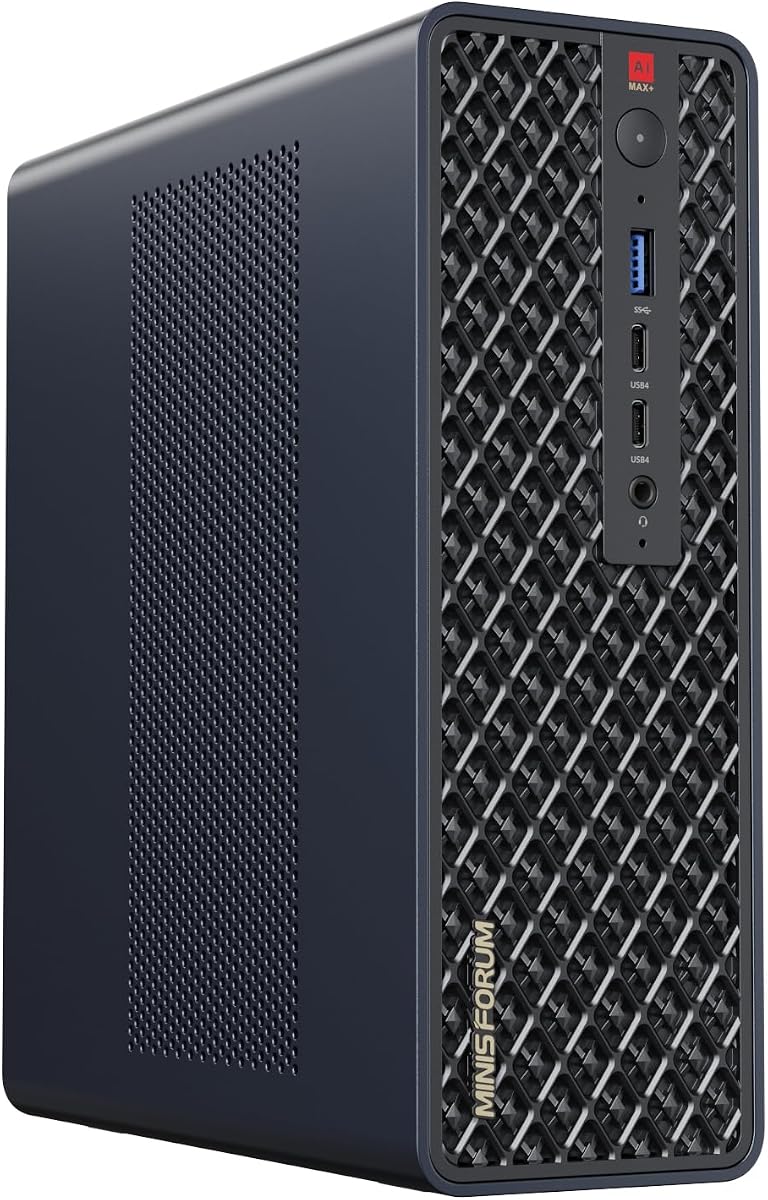
MINISFORUM MS-S1 MAX Mini AI Workstation
4.5Editor score
128GB unified LPDDR5x memory
126 TOPS total system output
Cluster design for distributed computing
This guide compares the top ten dual GPU AI setups for local model inference, highlighting VRAM capacity, power efficiency, and performance benchmarks.
Finding the right dual GPU AI setup is crucial for running large language models locally without relying on cloud services. These systems offer significant VRAM and compute power to handle complex inference tasks efficiently.
We evaluated ten leading workstation configurations based on processor speed, memory bandwidth, and cooling solutions. Each entry balances raw performance with practical usability for developers and researchers.
Every pick showcases unique strengths for specific workloads like fine-tuning or real-time rendering. Prices fluctuate frequently so check current listings before finalizing your hardware investment today.
4.5Editor score


This side-by-side comparison outlines the key specifications of every reviewed system to help you identify the best fit for your specific AI development needs and budget constraints.


This unique dual-GPU card combines two Arc Pro B60 chips into a single physical unit offering massive VRAM capacity for local AI inference. It stands out by eliminating complex multi-card configurations usually required for large models.
We may earn a commission when you buy through this link, at no additional cost to you.
Each GPU delivers 197 TOPS for a total of 394 TOPS enabling high-concurrency inference without cloud dependencies. The 48GB unified memory allows you to run 70B-class models like DeepSeek-R1 directly on the card.
The PCIe 5.0 x8 plus x8 interface works well with standard consumer motherboards supporting lane bifurcation reducing total system cost significantly. However users must ensure their motherboard supports this specific lane configuration for full bandwidth.
This setup is ideal for researchers and developers who need reliable local inference power without building a full server rack. Its robust cooling ensures sustained performance during long training or inference sessions.
The combined 48GB VRAM removes bottlenecks typically faced when splitting models across two separate cards requiring careful memory management.
Native support for IPEX-LLM and vLLM ensures seamless integration with existing open-source AI pipelines without major code changes.
We may earn a commission when you buy through this link, at no additional cost to you.
This prebuilt workstation delivers enterprise-grade performance for professional environments where reliability and speed are paramount. It arrives fully tested and ready to deploy immediately upon unboxing.
We may earn a commission when you buy through this link, at no additional cost to you.
The dual RTX PRO 6000 Blackwell GPUs provide massive compute power suitable for deep learning training and complex simulations. The 256GB DDR5 RAM ensures smooth handling of large datasets during processing.
Liquid cooling keeps temperatures stable even under heavy loads extending hardware lifespan and maintaining consistent performance levels. However the system is large and requires adequate physical space in your workspace.
It is perfect for businesses needing immediate deployment of high-performance AI tools without time spent on assembly and configuration. The warranty and support add significant value for critical workflows.
Custom built and stress tested by APC ensures every component works together seamlessly reducing potential compatibility issues during setup.
The 360mm liquid cooler prevents thermal throttling allowing the GPUs to sustain boost clocks during extended inference or training runs.
We may earn a commission when you buy through this link, at no additional cost to you.
Built around the powerful GeForce RTX 5090 this workstation offers incredible raw performance for enthusiasts and researchers alike. The dual GPU setup allows significant parallel processing capabilities.
We may earn a commission when you buy through this link, at no additional cost to you.
Each GPU features 64GB of GDDR7 memory enabling the handling of extremely large models locally. The 256GB DDR5 RAM supports complex multi-tasking environments without bottlenecks.
The 1600W power supply is necessary to support both high-end GPUs under load ensuring stable operation. While powerful the system requires a robust electrical setup and sufficient cooling in the room.
This system suits users who demand maximum consumer GPU performance for local LLM deployment. Its custom build quality ensures reliability for intensive daily workloads.
The GDDR7 memory on the 5090 offers significantly higher bandwidth than previous generations speeding up model loading and inference times.
The 8TB RAID NVMe SSD setup ensures data ingestion and model loading occur at blistering speeds reducing wait times.
We may earn a commission when you buy through this link, at no additional cost to you.
This package brings supercomputer capabilities directly to your desk in an energy-efficient compact form factor. It is designed for enterprise-scale AI work without needing a full data center.
We may earn a commission when you buy through this link, at no additional cost to you.
The unified memory architecture allows both CPU and GPU to access the full 128GB pool enabling efficient handling of massive datasets. This removes bottlenecks common in traditional PC architectures.
Its Grace Blackwell chip delivers up to one petaFLOP of AI performance accelerating time-to-solution for researchers. However the cost reflects enterprise-level engineering which may not fit all budgets.
It is ideal for companies needing local high-performance computing resources for prototyping and testing. The secure environment ensures data remains within your control at all times.
With 128GB unified memory models can be loaded entirely into memory reducing the need for complex memory swapping strategies.
Seamless integration with the full NVIDIA AI software stack makes deployment faster compared to custom-built consumer hardware.
We may earn a commission when you buy through this link, at no additional cost to you.
This server is built for high-performance computing clusters demanding immense multi-threaded processing power. It is the ultimate choice for training massive local LLMs at scale.
We may earn a commission when you buy through this link, at no additional cost to you.
The configuration supports up to eight RTX PRO 6000 GPUs providing staggering VRAM capacity for complex neural network training. The 192-core EPYC processors handle data preprocessing without delays.
Hot-swap storage and toolless design streamline maintenance reducing downtime in critical environments. However the 4U rackmount form factor limits it to dedicated server rooms.
It is perfect for organizations running large-scale AI clusters where uptime and security are paramount. The enterprise-grade features ensure long-term reliability and control.
With support for multiple GPUs and vast storage the system grows with your computational needs without replacing the entire unit.
Hardware-level Root-of-Trust solutions protect your sensitive AI models and data from unauthorized access or tampering.
We may earn a commission when you buy through this link, at no additional cost to you.
Designed specifically for demanding applications like PIX4Dsurvey this workstation balances raw power with specialized workflows. It handles complex geospatial and AI tasks efficiently.
We may earn a commission when you buy through this link, at no additional cost to you.
The 32-core Threadripper processor provides ample headroom for rendering and data processing. The ECC RAM ensures data integrity during critical operations where errors are unacceptable.
Networking includes 10G plus 2.5G options for fast data transfer essential in enterprise environments. The system is large and requires a stable power setup to function correctly.
It is best suited for professionals needing a powerful desktop that can also handle heavy AI inference loads. Its targeted design offers unique value for specific industries.
Error-correcting RAM prevents data corruption ensuring model training results remain accurate even during long calculation periods.
The onboard 10GbE LAN allows rapid transfer of large datasets to local servers or cloud storage.
We may earn a commission when you buy through this link, at no additional cost to you.
This workstation delivers unmatched multi-threaded processing power ideal for training massive local LLMs locally. It removes reliance on cloud services for heavy AI workloads.
We may earn a commission when you buy through this link, at no additional cost to you.
Equipped with three RTX PRO 6000 GPUs it offers significant VRAM capacity for running complex simulations. The 768GB RAM pool handles large datasets with ease.
Designed for mission-critical uptime the system arrives ready to deploy with Windows 11 Pro. It operates best on a 240V outlet to unlock full performance potential.
It is perfect for organizations investing in permanent infrastructure rather than temporary solutions. The extensive warranty ensures peace of mind for your investment.
The system comes pre-installed with drivers and software so you can start working immediately upon arrival.
768GB of error-correcting RAM ensures you can load massive datasets into memory for faster processing.
We may earn a commission when you buy through this link, at no additional cost to you.
This mini workstation packs impressive AI capabilities into a tiny chassis making it ideal for limited desk space. It delivers high performance through unified memory and a powerful APU.
We may earn a commission when you buy through this link, at no additional cost to you.
The 128GB LPDDR5x memory acts as a unified pool for both CPU and GPU eliminating traditional VRAM bottlenecks. This enables efficient inference of large models locally.
Multiple units can be clustered together to handle even larger models like 235B parameter Q4 models. The cluster feature allows scalable compute power in a small footprint.
It is perfect for developers needing portable AI power without sacrificing too much capability. The cluster design makes it a unique entry in the AI workstation market.
Linking two units allows you to run significantly larger models locally that would otherwise require a much larger server.
Despite its small size the aerospace-grade aluminum chassis ensures efficient cooling during continuous operation.
We may earn a commission when you buy through this link, at no additional cost to you.
This workstation GPU offers a massive 96GB of next-gen GDDR7 ECC memory making it a standout for local LLM inference. It removes VRAM bottlenecks common in standard setups.
We may earn a commission when you buy through this link, at no additional cost to you.
Delivering over 3500 TOPS of AI performance it handles complex simulations and datasets efficiently. The Max-Q design caps power at 300 watts allowing multi-GPU scaling without overwhelming cooling.
Its 512-bit bus width ensures high bandwidth for data transfer reducing latency during training. The OEM packaging means you get the hardware directly without retail overhead.
It is best for teams building custom workstations needing enterprise-level stability. The GPU bridges the gap between raw calculation and visual output efficiently.
At 300 watts this card offers high performance without excessive heat output allowing easier dual-GPU setups.
Nearly 1800 GB/s bandwidth ensures fast data movement crucial for large language model inference.
We may earn a commission when you buy through this link, at no additional cost to you.
This mini workstation is ideal for multi-monitor setups requiring high performance in a compact form factor. It handles computing and multimedia tasks efficiently.
We may earn a commission when you buy through this link, at no additional cost to you.
The five 8K video outputs enable extensive workspace configurations useful for engineering and trading. The thermal design maintains quiet operation even under sustained loads.
Memory is fixed at 128GB ensuring optimal bandwidth stability without user intervention. The system supports multiple monitors without needing extra docking stations.
It is perfect for professionals needing a small footprint with professional output capabilities. The integrated connectivity removes the need for external adapters.
Five display ports allow massive productivity setups making this ideal for multitasking workflows.
Advanced phase change cooling keeps the system quiet even during intensive rendering tasks.
We may earn a commission when you buy through this link, at no additional cost to you.
Selecting the right dual GPU AI setup requires understanding your specific workload needs and budget constraints.
VRAM determines how large a model you can run locally. Aim for at least 48GB to handle 70B class quantized models efficiently.
Prioritize systems with unified or high VRAM to prevent bottlenecks during inference.
High bandwidth ensures data moves quickly between memory and GPU. Look for GDDR7 or high-speed DDR5 RAM.
Fast memory reduces latency and speeds up processing times significantly.
Dual GPU setups require robust power. Ensure your PSU can handle the combined TDP of both cards.
A high-wattage PSU with efficient ratings ensures stability under load.
Extended inference generates significant heat. Liquid cooling or industrial fans are ideal for sustained workloads.
Proper cooling prevents throttling and extends hardware lifespan.
Verify compatibility with frameworks like PyTorch and vLLM before purchasing.
Native ISV support reduces setup time and configuration headaches.
Choose between desktop workstations or rackmount servers based on your space.
Compact designs offer flexibility but may limit cooling capacity.
Ensure the system allows future upgrades for storage or memory.
Scalable systems protect your investment as your needs grow.
Enterprise-grade systems often come with better support for critical workloads.
Check warranty terms to ensure coverage for hardware failures.
Proper setup involves connecting all cables securely and ensuring the PSU is rated for the load. Always install drivers before running heavy workloads to avoid conflicts.
Maintain clean airflow around the system and dust filters regularly. Dust accumulation can reduce cooling efficiency and lead to overheating.
Monitor thermal metrics during long inference sessions. Using software to track GPU temperatures helps detect issues early.
Yes, models with high enough VRAM like 48GB can run 70B class models in 4-bit quantization. This eliminates the need for multi-card setups.
Most modern boards support PCIe lane bifurcation needed for dual GPUs. Ensure your motherboard supports x16 lane splitting for full bandwidth.
Liquid cooling or high-performance tower air coolers are recommended. They maintain stable temperatures during long inference sessions.
ECC memory prevents data corruption which is vital for training models. It ensures results remain accurate over long periods.
Dual GPU systems often require over 1600W. Ensure your electrical setup can handle this load safely.
Linux distributions like Ubuntu are preferred for deep learning. However Windows is supported by many vendors for inference.
Workstations often allow adding more storage or RAM. Check the specific model limits before purchasing.
Most professional GPUs support PyTorch. Ensure drivers are installed for optimal performance.
The WEELIAO MAXSUN card offers a unique balance of cost and capability for entry-level setups. It simplifies deployment without needing complex multi-card configurations.
For professionals needing raw power, the ASUS Dual EPYC server is unmatched in performance. It provides enterprise-grade reliability for critical tasks.
Remember to check current prices before buying as hardware costs fluctuate regularly. Ensure your power and cooling environments meet the system requirements.