
HDMI to Component Converter
4.0Editor score
Affordable entry level option
Supports 1080p input
Easy plug and play setup
This guide compares the top HDMI to Component Converter models for 2026 to help you connect modern devices to older TVs with YPbPr inputs easily.
Connecting modern gaming consoles and streaming devices to older televisions can be challenging without the right adapter. An HDMI to Component Converter allows you to bridge this gap by converting digital signals into analog formats that legacy screens can display effectively.
We evaluated ten leading models based on resolution support, audio handling, and ease of use. Our analysis focuses on reliability, compatibility with various source devices, and the ability to maintain image quality during conversion.
Each pick highlights specific strengths like scaler functions or compact designs. Note that prices fluctuate frequently so check current listings before purchasing to ensure you get the best value for your setup needs.
4.0Editor score

4.2Editor score

4.3Editor score
The following table provides a side-by-side comparison of all ten reviewed models to help you quickly identify the best fit for your specific display and source requirements.


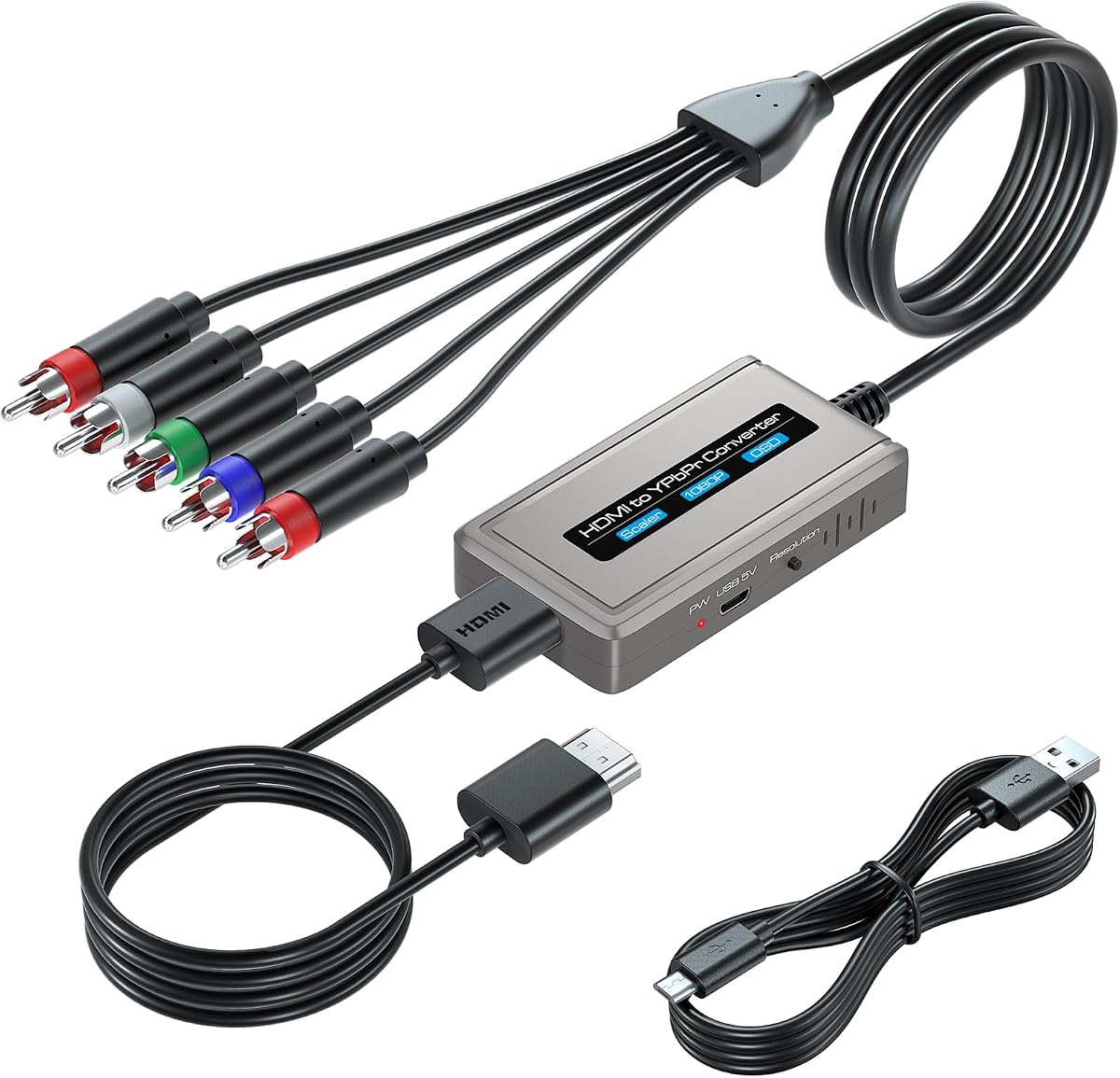


This model stands out as our top pick due to its comprehensive package and built-in scaler. It holds a solid rating and offers the versatility needed for many legacy TV setups without requiring extra purchases.
We may earn a commission when you buy through this link, at no additional cost to you.
The inclusion of both HDMI and Component cables saves time and money. The scaler function allows you to adjust output resolution to match your old TV capabilities ensuring stable images even if the source is high definition.
One trade-off is the dependency on external USB power which adds a small cable to your setup. However this ensures stable signal conversion without glitches which is critical for analog displays.
Ideal for users connecting Blu-ray players or consoles to older TVs. If you need reliability and ease of use this converter delivers consistent performance for home theater retro setups.
You receive HDMI and Component cables in the box so you can start using it immediately without searching for compatible wires.
The scaler engine lets you choose the best output resolution for your specific display reducing compatibility issues with older screens.
We may earn a commission when you buy through this link, at no additional cost to you.
For budget conscious buyers this converter offers essential functionality without extra bells and whistles. It maintains a decent rating and handles standard 1080p inputs effectively for basic viewing needs.
We may earn a commission when you buy through this link, at no additional cost to you.
The OSD feature helps verify that your input and output resolutions match which prevents black screen issues. It is straightforward to install and works well with devices like laptops and game consoles.
Lack of scaling means your source must match your display capabilities or you must adjust settings manually. This is a minor inconvenience for those who understand resolution settings on their source device.
Best suited for users needing a simple solution for occasional use. If you are on a tight budget this model provides reliable conversion for connecting modern sources to older component TVs.
The On-Screen Display lets you see input and output resolution instantly so you know the connection is active and correct.
Its small footprint makes it easy to hide behind a TV or mount discreetly while keeping cables organized.
We may earn a commission when you buy through this link, at no additional cost to you.
This aluminum model combines build quality with advanced features like a robust scaler engine. Its higher rating reflects strong performance in handling resolution mismatches and maintaining signal integrity.
We may earn a commission when you buy through this link, at no additional cost to you.
The metal casing helps dissipate heat which is beneficial for long viewing sessions. You can switch output resolutions easily using the dedicated button on the unit ensuring compatibility with various old TVs.
The premium price may be a consideration for casual users but the durability justifies the cost for frequent use. It handles both up and down scaling effectively to preserve image quality.
Perfect for enthusiasts who want a durable and versatile adapter. If you value build quality and need reliable scaling for older monitors this converter is a solid investment.
The aluminum body provides better heat management and protection compared to plastic alternatives ensuring longer lifespan.
A physical switch button allows quick changes between resolutions like 480i or 720p without navigating complex menus.
We may earn a commission when you buy through this link, at no additional cost to you.
This device serves users needing to connect older component sources to new HDMI displays. It maintains a solid rating and supports essential standards like HDCP 1.4 for secure content playback.
We may earn a commission when you buy through this link, at no additional cost to you.
It handles inputs from 480i up to 1080p allowing you to display legacy content on modern screens. The setup is straightforward requiring no software installation or driver updates.
Important to note it only works from Component to HDMI so reverse use will not function. Ensure your source has YPbPr output rather than standard RCA cables to avoid connection issues.
Best for retro gamers connecting old consoles to new TVs. If your goal is to display PS2 or Xbox 360 games on an HDTV this adapter bridges the gap effectively.
HDCP 1.4 compliance ensures you can play protected content without signal rejection from the display device.
The converter supports multiple resolutions including 720p and 1080p ensuring clear images on modern monitors.
We may earn a commission when you buy through this link, at no additional cost to you.
Portta offers a reliable converter that prioritizes audio fidelity through LPCM support. It holds a decent rating and is known for stable signal transmission without noticeable lag or distortion.
We may earn a commission when you buy through this link, at no additional cost to you.
The wide resolution support ensures compatibility with various older devices from DVD players to game consoles. Users appreciate the five year warranty which indicates manufacturer confidence in durability.
Lack of scaling means you must match your source output to the TV input manually. This is acceptable for users who have control over their source device settings.
Ideal for those valuing audio quality in analog conversions. If you need clean audio for retro gaming or DVD watching this model provides consistent performance.
Support for 2 Channel LPCM ensures audio remains uncompressed and clear during the conversion process.
The five year coverage offers peace of mind against defects ensuring long term usability.
We may earn a commission when you buy through this link, at no additional cost to you.
This package adds value by including a HDMI cable for immediate use. It shares similar specs to the standard Portta model but offers convenience for those lacking existing cables.
We may earn a commission when you buy through this link, at no additional cost to you.
It handles 1080p output efficiently ensuring smooth visuals for connected consoles. The consistent rating reflects dependable performance for basic component to HDMI conversion tasks.
Like other models it lacks scaling which limits flexibility if source and display resolutions differ. However for standard setups this is not a major drawback.
Best for users needing a ready-to-use kit. If you want to avoid buying extra cables this bundle provides everything needed to connect legacy devices to HDTVs.
The included HDMI cable means you can connect your source directly without sourcing extra accessories separately.
Portta ensures consistent transmission with minimal interference for uninterrupted viewing sessions.
We may earn a commission when you buy through this link, at no additional cost to you.
This adapter is engineered for devices with female component ports which is a specific niche. It holds a high rating and maintains original video quality without unnecessary processing or scaling.
We may earn a commission when you buy through this link, at no additional cost to you.
Its compact design makes it easy to carry for travel or temporary setups. It ensures vibrant colors and smooth playback matching the source intent closely.
The male connector limits compatibility to devices with specific ports so check your source carefully before buying. This specificity ensures a snug fit but reduces versatility for other connector types.
Ideal for users with specific DVD players or set-top boxes. If you need a small reliable adapter for a specific port setup this model delivers precision.
Designed specifically for female component outputs ensuring a secure connection for compatible devices.
The small size fits easily in a bag for connecting devices to different displays on the go.
We may earn a commission when you buy through this link, at no additional cost to you.
This model simplifies setup by providing all necessary cables in the box. It holds a solid rating and uses a scaler to match source and display resolutions automatically.
We may earn a commission when you buy through this link, at no additional cost to you.
The OSD helps you confirm the output resolution quickly which reduces troubleshooting time. It works with various HDMI sources like Fire Stick and consoles effectively.
The price reflects the inclusion of cables and scaler which may be higher than basic adapters. However the convenience and functionality justify the cost for many users.
Best for those seeking a complete solution without extra purchases. If you value having everything included and need resolution flexibility this is a great option.
HDMI and component cables are in the package allowing immediate connection without extra shopping.
The OSD shows current status so you know the resolution settings are correct instantly.
We may earn a commission when you buy through this link, at no additional cost to you.
This adapter targets composite video sources connecting VCRs or old consoles to HDMI. It holds the highest rating in the list and supports various TV standards like NTSC and PAL.
We may earn a commission when you buy through this link, at no additional cost to you.
The USB power requirement ensures stable conversion for analog signals which often need more power. Installation is simple with no drivers needed for immediate use.
It does not support 4K and is limited to 1080p output but that is typical for composite conversion. The one year warranty provides assurance for its durability.
Ideal for connecting VHS or older DVD players. If you need to digitize analog footage this model handles the task with reliable performance.
Support for multiple TV formats ensures compatibility with devices from different regions or manufacturers.
Plug and play design means you can start watching without complex configuration.
We may earn a commission when you buy through this link, at no additional cost to you.
This adapter combines aluminum build quality with scaling capabilities for older displays. It holds a decent rating and allows users to switch output resolutions easily.
We may earn a commission when you buy through this link, at no additional cost to you.
The switch button simplifies resolution changes which is helpful for non technical users. It ensures stable signals for high definition sources on lower resolution displays.
The cost is higher than basic models due to the scaler and housing. However it offers better long term value for those needing frequent conversion.
Best for users with high definition sources needing to connect to component TVs. If you want durability and resolution flexibility this is a strong contender.
A dedicated button allows quick changes between output resolutions without menu navigation.
Aluminum casing provides durability and better heat dissipation for stable operation.
We may earn a commission when you buy through this link, at no additional cost to you.
Selecting the right converter requires understanding your source and display devices along with key technical features.
Ensure you choose the correct direction HDMI to Component or Component to HDMI. Some devices only work one way and using them backwards will result in no signal.
Always verify the input and output ports on your source and display before purchasing.
Models with a scaler engine allow you to adjust output resolution to match your display. This is vital when connecting 1080p sources to older 480i TVs.
Look for units with a switch button or OSD to make resolution changes easily.
Check for uncompressed audio support like LPCM to ensure clear sound without distortion. Some cheaper models may compress audio or lack audio outputs entirely.
Prioritize converters that handle stereo audio well for better home theater experiences.
Some packages include HDMI and Component cables while others require you to buy them separately. This affects the total cost and convenience of setup.
If you lack cables choose a bundle to save money and time.
Many converters need external USB power to function correctly. Ensure you have a USB port or adapter nearby to power the unit.
Plug-in power ensures stable conversion and prevents signal drops.
Aluminum housings offer better heat dissipation and durability than plastic models. This is useful for long viewing sessions.
Consider the build quality if you plan to use the device frequently.
Look for products with a solid warranty period to protect against defects. Some brands offer five years while others offer one year.
A longer warranty indicates manufacturer confidence and provides peace of mind.
On-Screen Display helps you verify input and output resolution instantly. This feature simplifies troubleshooting connection issues.
Choose models with OSD if you are unfamiliar with resolution settings.
Start by connecting your source device to the converter input and the converter output to your TV using the appropriate cables. Ensure all connections are tight to prevent signal loss.
Power the converter using the included USB cable connected to a power source. Wait for the device to initialize before turning on your display.
Use the resolution switch or OSD menu to select the best output resolution for your TV. If you see no image lower the source resolution to match the display capabilities.
No most converters do not support 4K because older TVs cannot display that resolution. They typically max out at 1080p input and lower output resolutions.
Check that the converter is powered on and the source resolution matches the display. Ensure cables are connected correctly and the TV input is set to component.
Yes you need an HDMI cable to connect the source to the converter input. Some bundles include it but others require you to buy it separately.
No these adapters are plug and play and do not require driver installation. Simply connect the cables and power the device to start using it.
RCA uses a single video cable while Component uses three video cables for better quality. Ensure your TV has the correct ports before buying a converter.
External power ensures the converter processes the signal properly without draining power from your source. It prevents signal drops and ensures stable video conversion.
Yes you can connect consoles like Xbox or PS3 to an old TV. Just ensure the console output resolution matches what the TV supports.
It will not enhance quality but it allows older displays to show modern content. It maintains the original resolution as long as it matches the display capabilities.
We reviewed ten top models with the Scaler Function leading our choices for versatility and ease of use. These adapters bridge the gap between modern digital sources and legacy displays effectively.
Prioritize converters with scaler functions if your source resolution differs from your TV. A durable build and included cables add significant value to the overall purchase.
Remember to check current prices before buying as they change often. Selecting the right adapter ensures your retro setup delivers stable and clear visuals.