
Zobirez 420W Charging Station
4.5Editor score
Ten ports for devices
Includes mixed cables included
Sturdy one piece slots
This guide compares the top 10 charging stations for multiple devices to help you find the best organizer for your home office or family needs.
Finding the right charging station for multiple devices can transform your workspace from cluttered to organized. With so many options available, choosing one that fits your needs requires careful consideration of port types and power output.
We analyzed ten leading models based on total wattage, port variety, safety features, and build quality. Each product was evaluated for its ability to handle modern gadgets like laptops, tablets, and smartphones efficiently without overheating or slowing down.
Every pick below highlights key strengths and potential trade-offs to help you decide quickly. Keep in mind that pricing and availability can change frequently, so verify current details before making your final purchase decision for your setup.
4.5Editor score

4.6Editor score

4.7Editor score
This side-by-side comparison highlights the key specifications and capabilities of each model to help you identify the right fit for your specific device mix and charging demands.




The Anker Prime Charging Station stands out as a powerful solution for users who need to charge multiple high demand devices at once. With a total output of 200 watts and six ports, it handles laptops and phones efficiently while maintaining a compact footprint on your desk.
We may earn a commission when you buy through this link, at no additional cost to you.
Its standout feature is the ability to deliver up to 100 watts per USB-C port when used together, allowing you to charge two MacBook Pros quickly. The GaN technology ensures the charger stays cool even under heavy loads, and the built-in safety system monitors temperature continuously.
While it is not designed for travel due to its weight, it is ideal for a permanent desktop setup. The only trade-off is the higher price compared to basic models, but the reliability and speed justify the investment for power users.
This charger is best for professionals or families who need a central charging hub that can handle both laptops and smaller devices without sacrificing speed. It is a solid choice for anyone prioritizing performance and safety over cost.
Each USB-C port supports up to 100 watts when used in pairs, making it capable of charging high performance laptops like the MacBook Pro at full speed.
Anker's proprietary system continuously monitors temperature and adjusts power delivery to protect your devices from overheating and electrical risks during extended charging sessions.
We may earn a commission when you buy through this link, at no additional cost to you.
The Zobirez 420W Charging Station offers exceptional value for users who need to charge many devices simultaneously without breaking the bank. It features ten ports including five USB-C, and comes with a kit of mixed cables to get you started immediately.
We may earn a commission when you buy through this link, at no additional cost to you.
Its key strength lies in its versatility and capacity, allowing you to organize ten devices in one place. The one piece slot design prevents wobbling, and the flame retardant material adds a layer of safety for your electronics and workspace.
While it delivers high total wattage, individual port speeds vary, and some slower devices may not get dedicated high power. The size is larger than compact models, so ensure you have enough desk space before purchasing.
This station is perfect for families or shared offices where cost and capacity are top priorities. It is a great choice for anyone who wants a complete solution with cables included and reliable performance.
The package includes eight short mixed charging cables covering iPhone, Type-C, and Micro-USB needs, saving you the hassle of buying separate accessories for each device.
Unlike models with fragile removable dividers, this station uses a solid one-piece slot design made from flame-retardant ABS to ensure long-lasting durability and stability.
We may earn a commission when you buy through this link, at no additional cost to you.
The Anker Desktop Charger combines a power strip and charging station into one robust unit, offering surge protection alongside multiple USB ports. It is ideal for users who want to plug in both AC devices and phones without needing multiple wall outlets.
We may earn a commission when you buy through this link, at no additional cost to you.
Its premium build includes a 300-joule surge protector and an eight-point safety system, providing peace of mind for expensive electronics. The two 100-watt USB-C ports ensure laptops get fast charging when used individually.
It does have fewer USB ports compared to dedicated hubs, and the weight makes it less portable. However, the combination of AC outlets and USB charging makes it a versatile centerpiece for a home office setup.
This model is best suited for professionals who need a reliable desk hub with added electrical protection. It is an excellent choice for those prioritizing safety and multi-functionality over sheer port count.
Built with a 300-joule surge protector and an eight-point safety system to shield your connected devices from power surges and electrical hazards.
With three AC outlets and four USB-C ports, this charger eliminates the need for a separate power strip, consolidating multiple charging needs into one compact unit.
We may earn a commission when you buy through this link, at no additional cost to you.
The Zobirez 750W Charging Station pushes power limits with up to 120 watts per USB-C port, making it suitable for high-performance laptops and large tablets. It offers a massive total output, allowing you to run multiple heavy devices at full speed simultaneously.
We may earn a commission when you buy through this link, at no additional cost to you.
One unique benefit is its case-friendly slots that accommodate tablets with protective covers, which is rare in this category. The included cable kit covers both legacy and modern standards, ensuring compatibility with almost any device you own.
However, the high price and physical size may not fit all budgets or spaces. It is best reserved for users who genuinely need that level of power for professional workflows rather than casual home use.
This station is ideal for power users or creative professionals who rely on fast charging for multiple laptops and accessories. It delivers premium performance where standard models might fall short on speed.
All five USB-C ports support up to 120 watts each, allowing you to charge high-performance laptops like MacBook Pros at their maximum supported speed.
Two wide center bays are designed to fit tablets or laptops even with thick protective cases, ensuring devices stay upright and secure during charging.
We may earn a commission when you buy through this link, at no additional cost to you.
The Anker MagGo 3-in-1 Charging Station is designed specifically for Apple users who value wireless convenience. It provides full 15W MagSafe charging for iPhones, certified fast charging for Apple Watch, and a spot for AirPods on a small footprint.
We may earn a commission when you buy through this link, at no additional cost to you.
Its standout feature is the official certification for Apple Watch charging, ensuring safe and fast power delivery. You can adjust the viewing angle up to 45 degrees to use StandBy mode, turning your phone into a clock or media display.
While it is limited to Apple devices, it excels at decluttering a nightstand or desk for iPhone owners. The trade-off is that it is not versatile for Android or USB-C laptops, but it is perfect for focused Apple setups.
This station is best for iPhone users who want a seamless wireless experience. It is a great choice for anyone who values design and convenience over universal compatibility.
The station includes official certification to power your Apple Watch from zero to fully charged in about one hour and thirteen minutes safely and reliably.
Adjust the vertical angle up to forty-five degrees to find your preferred position for viewing notifications or using StandBy mode while charging.
We may earn a commission when you buy through this link, at no additional cost to you.
This USB Fast Charger Block is designed for portability and simplicity, offering six ports in a footprint that is fifty percent smaller than standard chargers. It is ideal for travelers or anyone with limited desk space who needs to charge phones and accessories.
We may earn a commission when you buy through this link, at no additional cost to you.
Its key strength is its compact size, fitting easily into a bag or pocket. The included detachable five-foot extension cord provides flexibility to reach outlets behind furniture without needing extension wires.
The total power is limited to 100 watts, and it is not designed for high-demand laptops. This makes it less suitable for heavy workloads but perfect for everyday mobile device charging on the go.
This station is best for students or travelers who want a lightweight solution. It is a great choice for anyone who prioritizes portability over raw power.
Measuring just 3.27 x 2.36 x 1.1 inches, this lightweight hub easily fits into your bag or pocket for convenient travel use.
The included five-foot detachable AC extension cord gives you flexibility to reach wall outlets behind desks or nightstands easily.
We may earn a commission when you buy through this link, at no additional cost to you.
The MSTJRY 5 Port Charging Station is a classic organizer that relies on USB-A ports to charge standard devices. It comes with seven cables, making it a ready-to-use solution for older phones and tablets without extra purchases.
We may earn a commission when you buy through this link, at no additional cost to you.
Its removable dividers allow you to customize slots for larger tablets, and the smart detection adjusts voltage to match device needs. The design is simple and affordable, making it accessible for most households.
The main trade-off is the lack of USB-C support, which limits compatibility with newer laptops and phones. It is best suited for environments where most devices still rely on USB-A connections.
This station is best for families with older devices or for use in shared spaces where simplicity is valued. It is a practical choice for basic charging needs.
The station includes seven cables designed for iPhone, iPad, Samsung, and other electronics so you can start using it immediately.
Removable dividers can hold large tablets even with thick cases, allowing you to adjust slots based on the device you need to charge.
We may earn a commission when you buy through this link, at no additional cost to you.
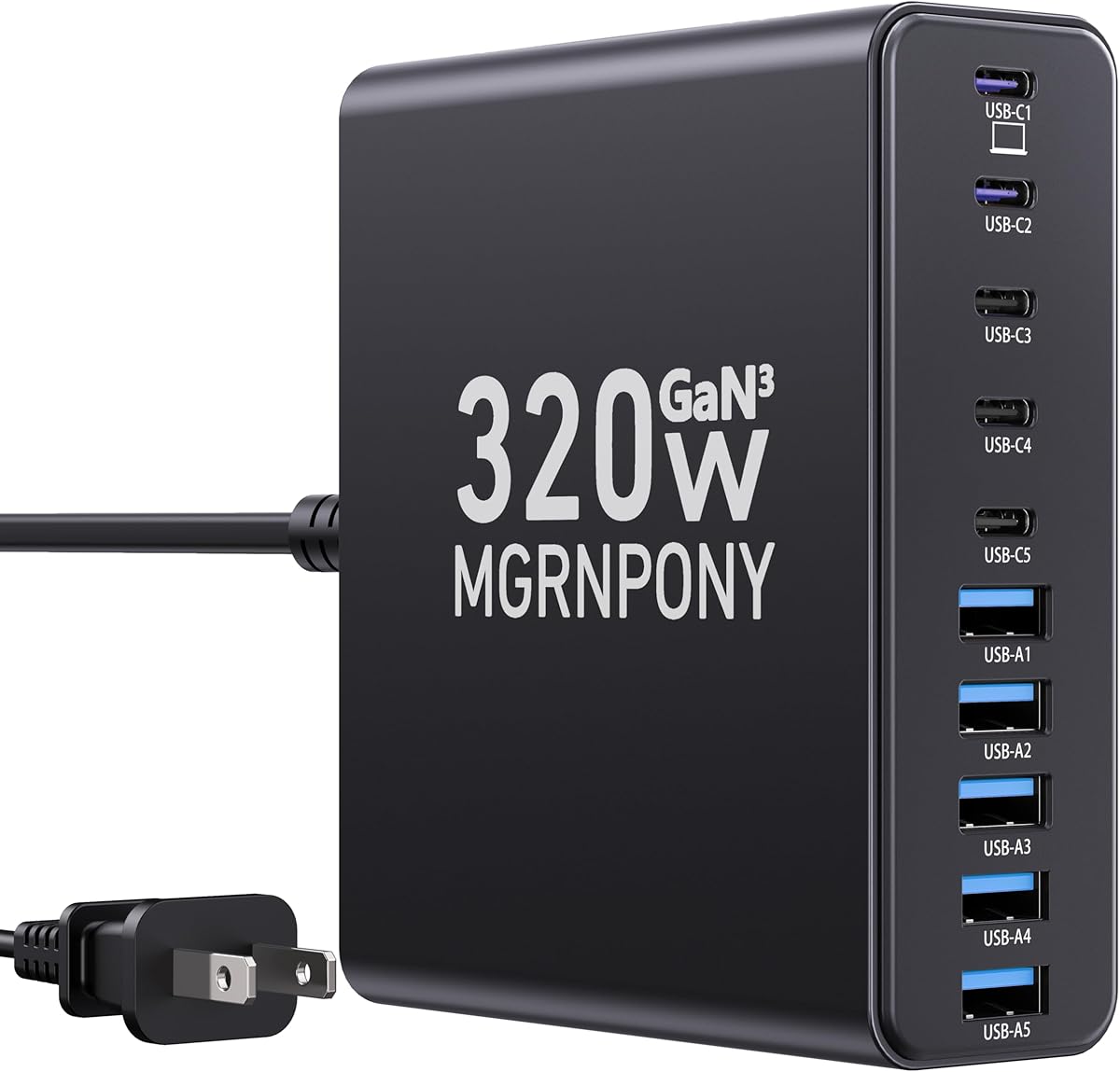
The MGRNPONY 320W Charging Station uses GaN technology to stay cool and efficient while charging up to ten devices. It offers a strong balance of port count and power, making it a versatile option for home and office use.
We may earn a commission when you buy through this link, at no additional cost to you.
Its IceShield 3.0 system includes over 3 million daily temperature checks to ensure safety during heavy use. You can place it vertically or horizontally to save space, and the five-foot cord gives decent reach.
While it supports fast charging, some ports share power when many devices are plugged in. The build is solid but not premium, fitting the mid-range market well for users who want value.
This station is best for tech-savvy users who want high port counts at a reasonable price. It is a great choice for those who need flexibility and efficiency.
Powered by GaN technology with IceShield 3.0 safeguards against overcharging and overheating, monitoring temperature constantly for safety.
You can place the station horizontally or vertically to save space depending on your desk layout and storage needs.
We may earn a commission when you buy through this link, at no additional cost to you.
The 8-in-1 Retractable Charger solves cable clutter with built-in retractable cords that extend up to eighty centimeters. It is designed for those who want a clean setup without the mess of tangled wires on their desk.
We may earn a commission when you buy through this link, at no additional cost to you.
Its GaN technology delivers 105 watts total, ensuring fast charging for phones and tablets. The design is compact, and the retractable feature means you only pull out the cables you need for each session.
However, the fixed cable length may not reach larger devices on bigger desks, and mechanical reels can wear over time. It is best for small desks where tidiness is the main goal.
This station is best for users who value a tidy workspace. It is a great choice for anyone who wants to avoid cable management.
This retractable charger features four eighty-centimeter retractable cords, allowing you to charge up to eight devices while keeping wires neat.
Featuring cutting-edge GaN technology, this station delivers superior performance and faster charging speeds with enhanced safety for your devices.
We may earn a commission when you buy through this link, at no additional cost to you.
The Lcssio 300W Charging Station focuses on durability with a solid housing that cannot be disassembled, preventing flimsy parts from breaking. It includes dual 65-watt ports to power laptops alongside smaller ports for phones and tablets.
We may earn a commission when you buy through this link, at no additional cost to you.
Its anti-slip rubber pads protect your desk and keep the unit stable during heavy use. The included cables cover daily needs, making it a convenient all-in-one solution for a home office or nightstand.
While it lacks USB-A variety and premium features, it is reliable for daily use. The trade-off is fewer ports compared to ten-port models, but the build quality is robust for the price.
This station is best for users who want a reliable and stable charger. It is a great choice for those who prioritize build quality over port count.
The housing body is all together with solid construction and cannot be disassembled to ensure a longer lifespan and prevent cheap parts from breaking.
Four anti-slip rubber pads protect your desk from scratches and prevent the charging station from sliding around during use.
We may earn a commission when you buy through this link, at no additional cost to you.
Selecting the right charging station depends on your device mix and space constraints. We break down the key factors to help you find a model that fits your needs.
Total wattage determines how much power the station can deliver to all ports combined. If you plan to charge laptops or large tablets, look for stations offering at least 200 watts total to ensure fast speeds.
Prioritize higher wattage if you have high-demand devices to avoid slow charging times.
Modern stations offer USB-C ports for faster data and power transfer, but some still include USB-A for legacy devices. Check the mix of ports against your device inventory.
Ensure the station has enough ports of the correct type for all your devices.
Gallium Nitride (GaN) technology allows chargers to be smaller and cooler than traditional silicon models. It improves efficiency and reduces heat buildup during heavy use.
Choose GaN models for better efficiency and a smaller footprint.
Some stations come with a variety of cables, saving you the cost and hassle of buying them separately. This is especially useful for families with mixed device brands.
Look for stations that include cables to simplify your setup.
A stable base with non-slip pads prevents the station from sliding. Look for sturdy slots that can hold devices securely without wobbling.
Choose models with solid construction to protect your devices from falls.
Advanced safety systems protect against overheating, overcharging, and short circuits. These features are critical for protecting expensive electronics from damage.
Verify the station has built-in safety certifications before purchase.
Compact designs are essential if you have limited desk space. Measure your available area to ensure the station fits comfortably alongside other equipment.
Choose a size that matches your available workspace.
Prices vary based on features and brand reputation. A longer warranty indicates the manufacturer stands behind their product quality.
Compare prices and warranty terms to find the best value.
Place the station on a flat, dry surface away from direct sunlight or heat sources. Ensure the power cord is fully inserted into the outlet and the station to maintain a stable connection.
Plug your devices into the appropriate ports based on their requirements. Use the included cables for best results and avoid forcing connectors that do not fit naturally.
Clean the station with a dry cloth to remove dust and avoid using liquids. Periodically check cables for wear and replace them to prevent electrical hazards.
Yes, most modern stations with sufficient wattage can charge both simultaneously. Just ensure the total power demand does not exceed the station's output limit.
Most quality stations have built-in safety features to prevent overcharging. However, it is best practice to unplug devices once they reach full charge.
Check your device requirements. Use USB-C ports for laptops and modern phones, and USB-A for older devices or accessories that need less power.
Some stations include wireless pads, but most rely on cables. If you need wireless, look for a model that specifically includes wireless charging options.
Yes, most stations use standard cables that can be replaced with third-party ones. However, using the included cables ensures compatibility and optimal speed.
GaN chargers are more efficient and generate less heat than traditional ones. They are worth the extra cost if you need compact size and reliable performance.
The Anker Prime and Zobirez models offer excellent performance for different budgets, while the Anker Desktop Charger provides added safety for professional needs.
Prioritize wattage and port types based on your current device list to ensure you get the best charging experience without unnecessary costs.
Remember to check current prices and availability before buying as these factors can change frequently depending on market demand.