
Logitech G502 Hero
4.7Editor score
Adjustable weight system
Mechanical switch tensioning
11 programmable buttons
This guide compares the top ten blue gaming mice for precision performance and comfort helping gamers choose the right ergonomic device for their setup.
Finding the right blue gaming mouse can transform your gameplay experience by offering precise tracking and ergonomic comfort for long sessions. These devices are designed to meet the demands of competitive gaming while maintaining a stylish aesthetic that fits any setup.
We evaluated ten top models based on sensor accuracy build quality ergonomic design and customization options to help you find the perfect match. Our analysis focuses on real world performance metrics and user feedback to ensure you get reliable recommendations for your needs.
Each pick highlights unique strengths whether it is rapid response times durable construction or advanced programmable features for tailored gaming styles. Keep in mind that prices and availability change frequently so check current listings before making your final purchase decision today.
4.7Editor score
4.6Editor score

4.5Editor score
Here is a side by side comparison of all ten products highlighting their key specifications and standout features to help you decide quickly.


The Razer Basilisk V3 stands out as a top contender in the blue gaming mouse category with its exceptional precision and ergonomic design. It features a Focus Pro 30K sensor that delivers industry-leading tracking accuracy for both competitive and casual gamers alike.
We may earn a commission when you buy through this link, at no additional cost to you.
Its standout qualities include the HyperScroll tilt wheel which offers two scroll modes and eleven programmable buttons that can be customized to fit your specific workflow. The optical mouse switches ensure fast actuation and eliminate debounce delay for crisp responses.
While it lacks a wireless variant and sits at a higher price point the build quality and performance justify the investment for serious users. The customizable RGB lighting adds a stylish touch that complements any gaming setup aesthetic effectively.
This mouse is ideal for gamers who prioritize precision and customization without compromising on comfort during long sessions. We recommend it for those seeking a reliable wired option that delivers consistent performance across various game genres.
The Focus Pro 30K sensor provides unmatched accuracy allowing players to execute precise movements without tracking errors.
Designed with a right handed grip the mouse reduces hand fatigue ensuring comfort during extended gaming marathons.
We may earn a commission when you buy through this link, at no additional cost to you.
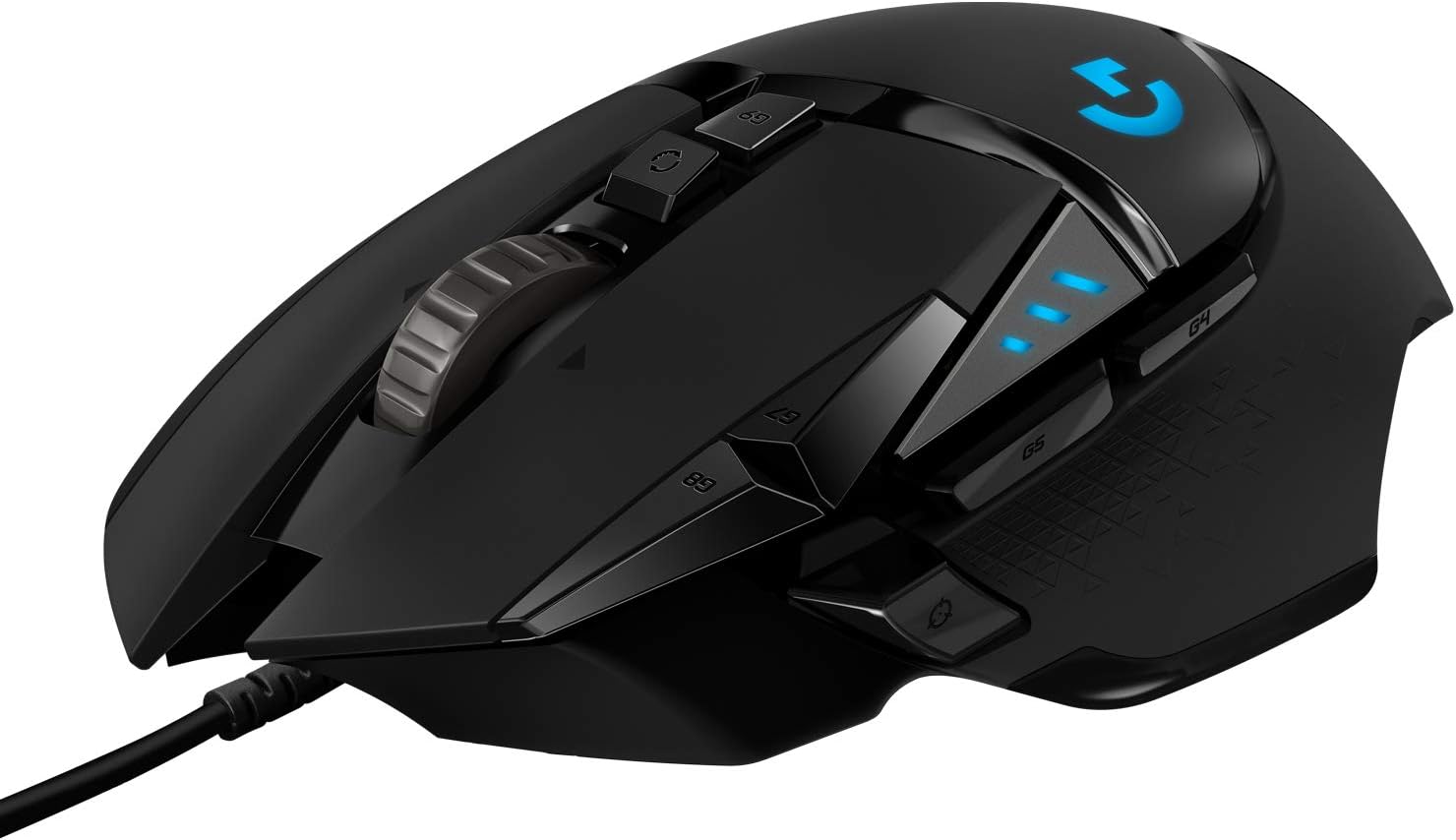
The Logitech G502 Hero offers exceptional value for budget conscious gamers seeking a high performance blue gaming mouse without breaking the bank. Its Hero 25K sensor delivers precise tracking up to 25600 DPI ensuring smooth and accurate cursor movements.
We may earn a commission when you buy through this link, at no additional cost to you.
Key strengths include an adjustable weight system that lets users customize the feel of the mouse to their preference. The mechanical switch tensioning ensures a satisfying click feel while reducing actuation force for faster response times during gameplay.
The larger form factor and weight might not suit everyone especially those with smaller hands or who prefer lightweight mice. However the durability and extensive button layout make it a versatile choice for MMOS and strategy games that require many inputs.
This model is perfect for gamers who need a reliable tool with extensive customization options at an accessible price. We recommend it for users prioritizing performance features over ultra lightweight designs in their daily gaming routine.
Adjustable weights allow users to fine tune the balance and heft of the mouse for optimal control and comfort.
The Hero 25K sensor ensures flawless tracking even at high speeds making it ideal for competitive first person shooters.
We may earn a commission when you buy through this link, at no additional cost to you.
The SteelSeries Rival 650 represents a premium option for those seeking a wireless blue gaming mouse with uncompromising performance and features. Its TrueMove3+ dual sensor system ensures lift off distance tracking and consistent accuracy across different surfaces effortlessly.
We may earn a commission when you buy through this link, at no additional cost to you.
Quantum wireless technology guarantees a connection with no noticeable latency which is crucial for competitive gaming scenarios. The weight tuning system allows users to adjust the feel of the mouse to match their grip style and personal preference accurately.
The fast charging feature provides a quick power boost ensuring minimal downtime during intense gaming sessions. While the cost is higher and the design is heavier the wireless freedom and build quality justify the investment for enthusiasts.
This mouse is ideal for gamers who value wireless convenience without sacrificing precision or customization capabilities. We recommend it for users willing to invest in a high end device that delivers top tier performance and reliability.
Quantum wireless ensures a stable connection that rivals wired performance making it perfect for competitive play.
The secondary sensor tracks when the mouse is lifted preventing cursor drift and ensuring precise movements.
We may earn a commission when you buy through this link, at no additional cost to you.
The Corsair M65 RGB Elite is designed for durability and precision with its aluminum frame and high performance sensor tailored for FPS gamers. It features an 18000 DPI sensor that delivers accurate tracking ensuring every movement is translated effectively on screen.
We may earn a commission when you buy through this link, at no additional cost to you.
A dedicated sniper button allows for instant DPI reduction which is highly beneficial for precise aiming in tactical shooter games. The tunable weight system adds versatility allowing users to adjust the balance to suit their playstyle comfortably.
The dynamic RGB lighting enhances the visual appeal of the device though the scroll wheel can feel stiff to some users. Despite the right handed shape limitations the build quality and performance make it a solid choice for long gaming sessions.
This mouse is best suited for gamers who prioritize build quality and precision features over lightweight designs. We recommend it for users seeking a robust peripheral that combines style with functional performance elements.
The dedicated sniper button provides instant DPI reduction for precise aiming without disrupting your workflow.
An aluminum frame ensures long lasting durability protecting the internal components from wear over time.
We may earn a commission when you buy through this link, at no additional cost to you.
The HyperX Pulsefire Haste excels in providing an ultralight blue gaming mouse experience without sacrificing sensor accuracy or build quality. It features a HyperX 26K sensor that ensures smooth and precise tracking essential for fast paced competitive gameplay scenarios.
We may earn a commission when you buy through this link, at no additional cost to you.
The hex shell structure reduces weight significantly while maintaining structural integrity making it ideal for rapid movements. Virgin grade PTFE skates provide a smooth glide across mouse pads enhancing control and reducing friction during use.
Limited programmable buttons and lack of RGB lighting are minor trade-offs for the focus on speed and agility. The low latency wireless connection ensures that wireless use does not compromise performance during critical moments in games.
This mouse is perfect for gamers who prioritize weight and speed above all else in their setup. We recommend it for competitive players looking to minimize hand strain and maximize movement efficiency effectively.
The reduced weight allows for faster flicks and less fatigue enabling more agile movements during gameplay.
Virgin grade PTFE skates ensure a smooth glide across any surface enhancing precision and control significantly.
We may earn a commission when you buy through this link, at no additional cost to you.
The Roccat Kone Pure focuses on ergonomic comfort making it a strong choice for users seeking a blue gaming mouse that reduces strain. Its OwlEye 16K sensor delivers consistent performance ensuring accurate cursor movement and responsiveness during gameplay tasks.
We may earn a commission when you buy through this link, at no additional cost to you.
The ergonomic grip shape is designed to fit naturally in the hand reducing fatigue during extended usage periods significantly. Phantom Flex cable ensures minimal drag allowing for smooth movements without the resistance typical of rigid cables.
EasyShift technology doubles the functionality of buttons providing more options without cluttering the device layout. While it is wired and has limited RGB the focus on comfort and simplicity appeals to users prioritizing function over flash.
This mouse is ideal for gamers who need a comfortable and reliable tool for long sessions. We recommend it for users seeking ergonomic benefits without sacrificing core performance metrics in their daily use.
The design fits naturally in the hand reducing strain and allowing for longer comfortable gaming sessions.
The Phantom Flex cable minimizes drag providing a more natural and unencumbered movement experience.
We may earn a commission when you buy through this link, at no additional cost to you.
The Glorious Model O is a popular blue gaming mouse known for its lightweight honeycomb shell and smooth performance. It features a Pixart 3360 sensor that ensures high accuracy and consistency for various gaming styles and preferences.
We may earn a commission when you buy through this link, at no additional cost to you.
The Ascended cable bra is flexible and durable reducing drag while maintaining longevity over time. Customizable RGB lighting adds a touch of style making it easy to match the mouse with the rest of your setup.
While the honeycomb design reduces weight it can also accumulate dust which requires regular cleaning. However the affordable pricing and solid performance make it a highly recommended option for those new to competitive gaming.
This mouse is perfect for gamers looking for a lightweight and stylish option without a high price tag. We recommend it for users wanting a balance of performance and aesthetics in their gaming peripherals.
The honeycomb design significantly reduces weight allowing for faster and more agile movements during play.
Flexible RGB options allow users to personalize their setup and match their preferred visual aesthetic easily.
We may earn a commission when you buy through this link, at no additional cost to you.
The Finalmouse Starlight Pro is an ultra premium blue gaming mouse offering exceptional weight reduction through its magnesium alloy chassis. It utilizes a Pixart 3370 sensor for precise tracking ensuring that every movement is translated accurately on screen.
We may earn a commission when you buy through this link, at no additional cost to you.
The ultralight build reduces fatigue during intense sessions making it ideal for competitive players who demand speed. Infinity skins allow for customization of the look keeping the device unique and personalized to user preferences.
High cost and limited availability are challenges for those seeking this specific model today. However the build quality and performance justify the investment for enthusiasts looking for top tier hardware in their setup.
This mouse is designed for serious gamers who value lightweight design above all else in their gear. We recommend it for users seeking a premium experience with unique features and exceptional durability.
The magnesium alloy chassis provides a rigid yet incredibly light frame ideal for fast movements.
Infinity skins offer a unique way to personalize the look of the mouse ensuring it stands out.
We may earn a commission when you buy through this link, at no additional cost to you.
The ASUS TUF Gaming M3 is a reliable blue gaming mouse that focuses on durability and versatility with its tri mode connectivity. It features a 6200 DPI sensor which is sufficient for general gaming and everyday tasks with consistent accuracy.
We may earn a commission when you buy through this link, at no additional cost to you.
Military grade durability ensures the device can withstand tough conditions making it a long lasting choice for users. Aura Sync lighting allows for seamless integration with other ASUS components in your gaming setup easily.
The sensor is basic compared to high end models but it delivers consistent results for casual and entry level gamers. The lightweight design and flexible connectivity options make it a versatile tool for various usage scenarios.
This mouse is ideal for users who need a durable and versatile option without spending too much. We recommend it for those looking for reliable performance with a touch of aesthetic customization.
Built to withstand tough conditions the mouse ensures long term reliability for daily heavy use.
Flexible connectivity options allow users to switch between wired and wireless modes as needed.
We may earn a commission when you buy through this link, at no additional cost to you.
The Fnatic Bolt Wireless is designed for competitive play offering a pro-grade wireless experience with minimal latency. It features a Pixart 3370 sensor that ensures precision and reliability during fast-paced gaming scenarios.
We may earn a commission when you buy through this link, at no additional cost to you.
The battery life of 50 hours allows for extended use without frequent recharging which is essential for long sessions. Fnatic hub support provides advanced customization options allowing users to tweak settings to their exact preferences.
While the cost is higher and RGB is limited the focus on performance and reliability makes it a strong contender for serious gamers. The lightweight build ensures that agility is not compromised by the wireless functionality.
This mouse is perfect for competitive players seeking a wireless solution without performance trade-offs. We recommend it for users prioritizing accuracy and speed in their gaming setup.
The wireless technology ensures zero latency providing a seamless experience comparable to wired options.
With 50 hours of battery life you can game for days without worrying about frequent recharging.
We may earn a commission when you buy through this link, at no additional cost to you.
Selecting the right blue gaming mouse involves evaluating several key factors to ensure it meets your gaming needs.
The sensor is the heart of any gaming mouse determining how accurately it tracks your movements. Look for high DPI sensors that offer smooth and consistent tracking across different surfaces to enhance your gameplay experience.
Always check for sensor specifications to ensure precision and reliability during intense gaming sessions.
Comfort is crucial for long gaming sessions so consider the shape and grip style of the mouse. Ergonomic designs reduce hand fatigue allowing you to play longer without discomfort or strain on your wrists.
Choose a mouse that fits your hand size and grip style for the best comfort and performance.
A durable mouse withstands the demands of frequent use and high intensity gaming. Look for materials like aluminum or reinforced plastics that ensure longevity and resilience over time.
Invest in a mouse with robust construction to ensure it lasts through years of heavy use.
Decide between wired and wireless options based on your preferences. Wireless mice offer freedom of movement but ensure they have low latency technology to avoid lag during gameplay.
Prioritize models with high-quality wireless tech if you want the freedom of a wireless setup.
Programmable buttons and software support allow you to tailor the mouse to your specific gaming style. Look for options that let you remap buttons and adjust sensitivity on the fly.
Ensure the mouse supports robust software for extensive customization to suit your workflow.
For wireless models battery life is critical to avoid interruptions during critical moments. Aim for models that offer long usage times on a single charge to keep you gaming without breaks.
Choose a wireless mouse with ample battery life to ensure consistent performance throughout your sessions.
Weight impacts speed and fatigue so choose based on your preference. Lighter mice are great for fast movements while heavier ones offer stability for precise aiming in tactical games.
Consider your playstyle when selecting weight to optimize comfort and performance during games.
Set a budget to narrow down your options while ensuring quality. Prices vary widely so determine what features are essential to you before making a purchase decision.
Balance cost with performance to get the best value for your specific gaming needs.
Regularly clean the sensor and feet of your mouse to maintain smooth movement and accuracy. Use a soft cloth and mild cleaner to remove dust and debris without damaging the components.
Adjust the DPI settings and button configurations to match your specific gaming style and preferences. This ensures that the mouse feels comfortable and responsive to your personal needs.
For wireless models monitor battery levels and charge the device before it runs out to avoid interruptions. Store the mouse in a safe place when not in use to prevent accidental damage or wear.
A blue gaming mouse typically features higher precision sensors faster response times and ergonomic designs tailored for gaming. These mice also offer customizable buttons and software integration to enhance your gaming experience.
Most blue gaming mice are compatible with Windows and Mac operating systems. However check the software requirements to ensure full functionality on your specific device setup.
Yes modern wireless gaming mice offer low latency connections that are reliable for competitive play. Look for models with advanced wireless tech to ensure a smooth and lag-free experience.
Use a soft microfiber cloth to wipe the surface and sensor. Avoid harsh chemicals and use compressed air to remove dust from crevices for best results.
Most blue gaming mice come with software that allows you to remap buttons and adjust DPI settings. This customization helps tailor the mouse to your specific gaming needs and preferences.
Not necessarily as higher DPI allows for faster cursor movement but it is about finding the right balance for your playstyle. Lower DPI can offer more precision for certain games.
We hope this guide helped you identify the perfect blue gaming mouse for your needs. From budget options to premium picks each model offers unique features tailored to different preferences.
Remember to prioritize sensor accuracy ergonomics and build quality when making your decision. These factors ensure that you get a reliable tool that enhances your gameplay significantly.
Prices and availability change so check current listings before purchasing. This ensures you get the best deal and the latest version of your chosen mouse today.