
NIMO 15.6'' AI Ready Laptop
4.8Editor score
Quiet Intel N150 Processor
180 Degree Lay Flat Hinge
Physical Webcam Shutter Included
Finding the right laptop for karaoke gear requires more than just basic computing power. You need a device that can handle audio mixing software, stream high-quality tracks, and connect to various microphones and mixers without lag.
We evaluated ten top models based on processor speed, RAM capacity, display clarity, and port availability. Each option was chosen to ensure seamless integration with your favorite karaoke apps and external audio equipment for any setting.
Every pick highlights specific strengths like battery life, screen size, or wireless connectivity. Please note that availability and pricing fluctuate frequently so always verify current details before making your final decision today.
4.8Editor score

4.5Editor score

4.5Editor score
As an Amazon Associate we earn from qualifying purchases.
This side by side comparison breaks down the key specifications of each laptop to help you quickly identify which model best fits your specific karaoke setup needs and performance requirements.






This laptop stands out as the top recommendation for hosting karaoke sessions at home or in small venues. With a 17.3 inch display and powerful Ryzen 5 processor it handles streaming and mixing effortlessly without skipping beats.
We may earn a commission when you buy through this link, at no additional cost to you.
The generous 16GB RAM ensures you can run browser based karaoke apps alongside communication tools and background processes smoothly. The large screen provides ample room to display song lists and track progress clearly during performances.
While it weighs more than ultrabooks the durability and performance justify the trade off for stationary or semi mobile setups. The numeric keypad helps when using software mixers that require rapid key inputs for effects or volume control.
It is the best choice for users needing a reliable workstation for entertainment and work. Its balance of screen real estate and processing power makes it ideal for consistent high quality karaoke experiences.
The 17.3 inch FHD screen ensures text remains legible even from across a room during dim lighting conditions.
With 16GB RAM you can switch between karaoke software chat apps and media players without lag or freezing issues.
We may earn a commission when you buy through this link, at no additional cost to you.
The NIMO laptop offers an incredible price to performance ratio for entry level karaoke enthusiasts. It runs quiet enough for intimate gatherings and provides all the essential ports needed to connect external speakers or mixers.
We may earn a commission when you buy through this link, at no additional cost to you.
Its 180 degree lay flat hinge allows easy screen sharing when sitting around a table with friends. The full stack I/O suite means you do not need extra dongles to connect your microphone receiver or display devices.
Although storage is modest it is sufficient for system files and a few apps. You can expand via SD cards if you need to store local media files for offline karaoke nights without relying on internet speed.
This model is perfect for students or casual users who want reliable performance without overspending. Its lightweight design also makes it easy to carry between different locations for impromptu singing sessions.
The efficient N150 processor runs silently which prevents fan noise from interfering with vocal recording or playback clarity.
Multiple USB and HDMI ports ensure you can connect any microphone or display without needing additional adapters or hubs.
We may earn a commission when you buy through this link, at no additional cost to you.
This model features a stunning 2K touchscreen that adds a modern interactive layer to your setup. You can scroll through playlists or adjust settings directly on the screen making it intuitive for tech savvy users hosting parties.
We may earn a commission when you buy through this link, at no additional cost to you.
Advanced AI noise reduction is a standout feature that helps filter background noise during video calls if you stream your sessions online. This ensures your voice comes through clearly when connecting with remote friends.
The battery life supports long sessions without constant plug in power. While the price is higher than basic models the superior display quality and build materials justify the investment for frequent users.
It is ideal for those who want a sleek device that doubles as a work and play machine. The combination of high resolution and touch input provides a premium experience for managing your audio visual setup.
The 2K resolution ensures song graphics and lyrics appear sharp and vibrant enhancing the visual experience for all guests.
Built in AI tools help clean up audio during video calls which is useful if you broadcast performances to remote audiences.
We may earn a commission when you buy through this link, at no additional cost to you.
The Dell Pro brings a fast 120Hz display refresh rate to this category which makes scrolling and animation smoother. This is especially helpful when using interactive karaoke apps that rely on quick visual feedback for timing.
We may earn a commission when you buy through this link, at no additional cost to you.
It comes with 16GB DDR5 RAM which is faster than standard RAM allowing for snappier system responsiveness. This ensures that switching between tracks or adjusting mixer levels happens instantly without stuttering.
The inclusion of an SD card slot adds flexibility for transferring media from cameras or external drives. This is useful if you have local files to upload for a custom playlist or backup your recording sessions easily.
It is a solid option for users who value speed and portability over raw storage. The lightweight chassis makes it easy to move around while maintaining enough power to run modern applications smoothly.
The 120Hz refresh rate ensures that on screen elements move fluidly enhancing the overall responsiveness of your setup.
DDR5 RAM provides higher bandwidth for data access which improves multitasking capabilities during busy entertainment sessions.
We may earn a commission when you buy through this link, at no additional cost to you.
This model offers a large 17.3 inch screen at a competitive price point making it accessible for more users. The screen real estate is perfect for viewing lyrics and video clips simultaneously without cluttering the desktop.
We may earn a commission when you buy through this link, at no additional cost to you.
It includes 512GB storage which is double the entry level capacity found in many budget models. This allows you to store a significant library of local songs and videos without relying heavily on internet connectivity.
The AI noise reduction helps keep audio clean during calls and is useful for virtual karaoke events. Additionally the dedicated Copilot key gives quick access to help features if you get stuck on settings.
It is a great balance of size and affordability for home entertainment. While RAM is limited to 8GB it is sufficient for most standard applications and browsing tasks during your sessions.
With 512GB of storage you can keep your favorite tracks and videos locally ready for offline entertainment anytime.
The wide screen ensures everyone in the room can see the text clearly which encourages more participation from guests.
We may earn a commission when you buy through this link, at no additional cost to you.
The HP 255 G10 delivers solid performance with a capable Ryzen 3 processor and generous 16GB RAM. This combination ensures that running streaming services and mixer software simultaneously remains smooth and efficient.
We may earn a commission when you buy through this link, at no additional cost to you.
Its thin and light design makes it easy to carry to different rooms or locations. The big screen to body ratio provides a modern look and maximizes the viewing area for a given laptop size.
AMD Radeon graphics provide decent performance for basic video playback and light media tasks. While not a gaming powerhouse it handles 1080p streaming well which is sufficient for most karaoke video tracks.
This is a practical choice for those needing reliable multitasking without extra bulk. The efficient processor also helps maintain better battery life during extended use without needing constant charging.
16GB RAM ensures multiple apps stay open and responsive so you never have to close a window during a set.
The lightweight chassis makes it simple to move the device between setups without straining your hands or back.
We may earn a commission when you buy through this link, at no additional cost to you.
This Ultrabook stands out due to the included bundle of accessories like earbuds and external storage. It offers a complete package for users who want everything they need in one box without extra shipping costs.
We may earn a commission when you buy through this link, at no additional cost to you.
The 14 inch display is compact but the anti glare coating helps in bright environments. This ensures that text remains readable even if you are near a window or under strong indoor lights during performances.
It supports Windows 11 Pro which provides additional security features useful if you handle sensitive data. The inclusion of Lifetime Office also adds value for long term productivity use beyond entertainment.
It is a great value for users seeking a versatile machine. While the screen is smaller the portability and included gear make it a convenient option for various use cases.
The included accessories reduce the need for extra purchases making this a comprehensive solution right out of the box.
The anti glare display reduces reflections helping maintain clear visibility of content regardless of lighting conditions.
We may earn a commission when you buy through this link, at no additional cost to you.
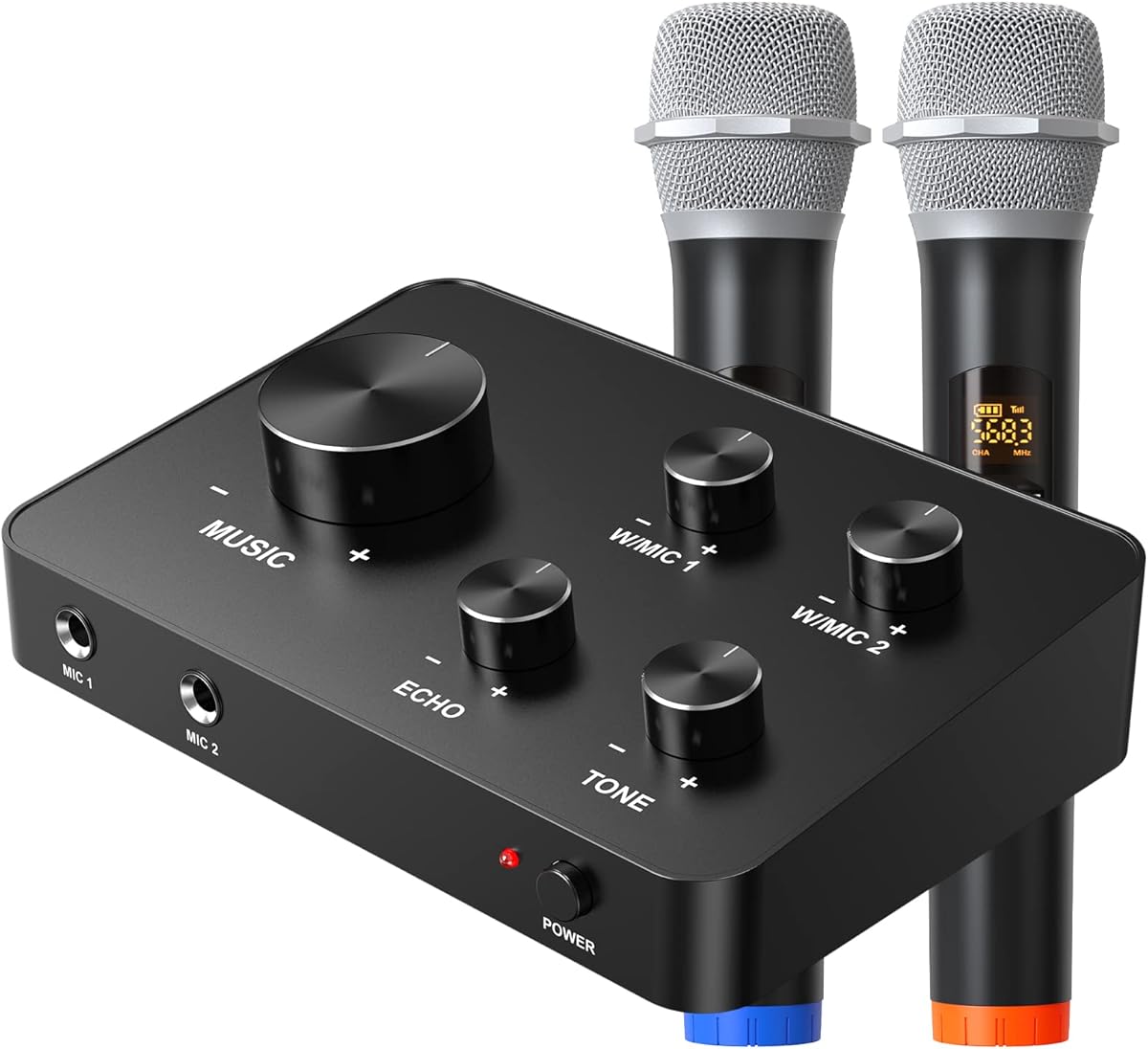
The Rybozen system is an excellent addition for anyone needing better audio control than a laptop alone can provide. It allows you to mix mic and music levels independently for a balanced sound output.
We may earn a commission when you buy through this link, at no additional cost to you.
It features dual handheld microphones that support a wide operating range. This lets performers move around the room freely without worrying about dropping the signal or losing voice clarity.
The dedicated echo and volume controls allow quick tweaks between songs. This is essential for adapting to different singers and room acoustics on the fly during a party.
It is a practical solution for improving sound quality easily. While the setup requires some manual tuning the control it gives you over the final audio mix is worth the effort.
Separate dials for mic and music let you balance vocals perfectly without relying on software settings or computer volume.
A 100ft wireless range ensures singers can move across the room without losing connection to the mixer system.
We may earn a commission when you buy through this link, at no additional cost to you.
This mixer offers advanced connection options like HD ARC and Optical inputs which integrate well with modern TVs. It ensures high quality audio signal transfer from your source devices to the amplifier.
We may earn a commission when you buy through this link, at no additional cost to you.
With 16 frequency selections it handles multiple devices with less interference. This is beneficial in crowded wireless environments where other signals might otherwise disrupt your microphone connection.
The vocal cut mode is a unique feature that allows you to remove vocals from a track for practice. This turns any video file into a karaoke version instantly without needing separate software.
It is suitable for users wanting more professional audio routing capabilities. The variety of inputs ensures it can grow with your setup as you add more equipment over time.
This feature allows you to strip vocals from standard tracks instantly making it easy to create a backup library.
HD ARC and Optical ports ensure that audio signals remain clean and free of distortion before amplification.
We may earn a commission when you buy through this link, at no additional cost to you.
This microphone is a fun portable choice for casual or children events where setup is minimal. It works directly with smartphones or TVs removing the need for a dedicated laptop or mixer hardware entirely.
We may earn a commission when you buy through this link, at no additional cost to you.
It features dynamic lights and voice effects that add a playful element to singing. This keeps guests engaged and entertained with visual and audio feedback that standard mics do not provide.
With a 10 hour battery life it can last through a full day of use or multiple parties. This means you do not need to worry about finding outlets during the middle of a long event.
It is ideal for small groups or impromptu fun. While not a replacement for professional gear it delivers great entertainment value for home parties and family gatherings.
A 10 hour charge means you can use it for a full day of events without needing to find a power outlet.
Fun sound effects and lights make singing more engaging especially for kids or casual users who enjoy interactive audio.
We may earn a commission when you buy through this link, at no additional cost to you.
Selecting the right device involves looking at several key factors that affect audio and visual performance during your sessions.
A fast processor ensures smooth playback of video tracks and real time audio processing. For karaoke look for at least a quad core chip that can handle multiple apps without lag.
Choose a processor with higher clock speeds to avoid stuttering during high quality video playback or streaming.
RAM determines how many apps you can run simultaneously. Since you may need browsers music players and chat apps open together aim for 16GB for best performance.
Higher RAM helps maintain system responsiveness when switching between tasks during a busy party or event.
Larger screens make lyrics and video clips easier to read from a distance. A 17 inch or larger screen is recommended for room wide visibility.
Ensure the screen has anti glare coating to maintain visibility under bright indoor lighting conditions.
Verify that the laptop has enough HDMI and USB ports to connect mixers speakers and other gear. Missing ports may force you to carry extra adapters.
Look for HDMI audio support to ensure sound routes correctly to external speakers without quality loss.
Strong Wi Fi is essential for streaming tracks if you do not store files locally. Bluetooth 5.0 or newer helps connect wireless mics or speakers reliably.
Check for Bluetooth 5.3 or Wi Fi 6 support to ensure stable connections in crowded wireless environments.
While most users rely on external speakers built in audio processing can affect initial sound quality. Look for models with noise cancellation for calls if streaming.
High quality integrated audio helps when testing mixes before connecting to larger external speaker systems.
Long battery life ensures you can run the laptop without plugging into a wall for hours. Aim for at least 8 to 10 hours of real world use.
A strong battery prevents interruptions if power outlets are unavailable or overloaded during a long party.
Local storage allows you to keep song files ready without relying on internet speed. At least 512GB is ideal for building a personal library.
Choose a model with SSD storage for faster boot times and quicker access to local media files.
Start by connecting your microphone and mixer to the laptop using the appropriate cables. Ensure all volume levels are set to minimum before powering on the system to prevent sudden loud noise.
Install any necessary drivers or software for your audio interface. Run a test recording to check levels and ensure there is no latency or delay in voice playback.
Keep your device clean by wiping the screen and keyboard regularly. Avoid placing food or drinks near the setup to prevent spills that could damage the hardware.
A moderately powerful laptop with at least 8GB RAM and a quad core processor is sufficient for most needs. This ensures smooth streaming and mixing without lag during playback.
HDMI for video output and multiple USB ports for microphones and mixers are essential. These ensure you can connect all your hardware without needing extra dongles.
Yes if your laptop supports Bluetooth or you use a USB receiver dongle. Ensure your Bluetooth version is at least 5.0 for stable low latency connections.
A 17 inch or larger screen is recommended so lyrics remain legible from a distance. This helps guests read along without straining their eyes in dim lighting.
Use low latency drivers and avoid heavy background processes. Ensure your audio interface supports ASIO or similar protocols for better real time performance.
It can be useful for scrolling through playlists quickly but is not strictly necessary. Most users rely on a keyboard and mouse for precise control during settings.
Choosing the right laptop depends on your specific needs whether it is screen size processing power or budget. The top picks balance these factors to deliver smooth reliable entertainment experiences.
Prioritize display quality and RAM for the best visual and performance experience. Ensure you have enough ports to connect your mixers speakers and microphones without hassle.
Always verify current availability before making a purchase as models change frequently. Selecting the right device ensures your karaoke setup runs smoothly for years of enjoyment.