ARCTIC P8 PWM PST
4.7Editor score
5 Pack value
PWM sharing tech
High static pressure
This expert guide compares the top 80mm case fans for cooling, noise, and value to help you choose the right compact fan for your PC build.
Finding the right 80mm case fan is essential for maintaining optimal airflow in compact PC builds. Whether you are building a small form factor system or replacing an old unit, quality matters for silence and cooling performance.
We compared ten highly rated fans based on speed, noise levels, bearing type, and static pressure capabilities. Each option offers unique strengths for different use cases like server racks, NAS devices, or desktop towers.
Each pick highlights key features and real-world performance traits to simplify your decision. Note that availability and pricing fluctuate frequently, so verify current stock before making a final purchase decision.
4.7Editor score

4.9Editor score

4.8Editor score
The following table provides a side-by-side look at the key technical specifications and features of each fan to help you identify the best fit for your specific cooling requirements.


The Noctua NF-A8 PWM stands out as a top-tier choice for users prioritizing silence and reliability. With a rating of 4.9 out of 5, it delivers premium cooling performance in a compact format.
We may earn a commission when you buy through this link, at no additional cost to you.
Its Flow Acceleration Channels and Advanced Acoustic Optimisation frame ensure superior quiet cooling. The 4-pin PWM version allows automatic speed control ranging from 450 to 2200 RPM for optimal thermal management.
While the price is higher than budget options, the included accessories like the Low-Noise Adaptor and extension cable justify the cost. The trade-off is mainly for those who prefer colorful designs over classic aesthetics.
This fan is ideal for ITX builds, NAS devices, or anyone needing reliable airflow without noise. Its 150000-hour MTTF ensures long-term durability for critical cooling applications.
Advanced frame design minimizes resonance and turbulence noise effectively.
Includes screws and anti-vibration mounts for secure installation in various cases.
We may earn a commission when you buy through this link, at no additional cost to you.
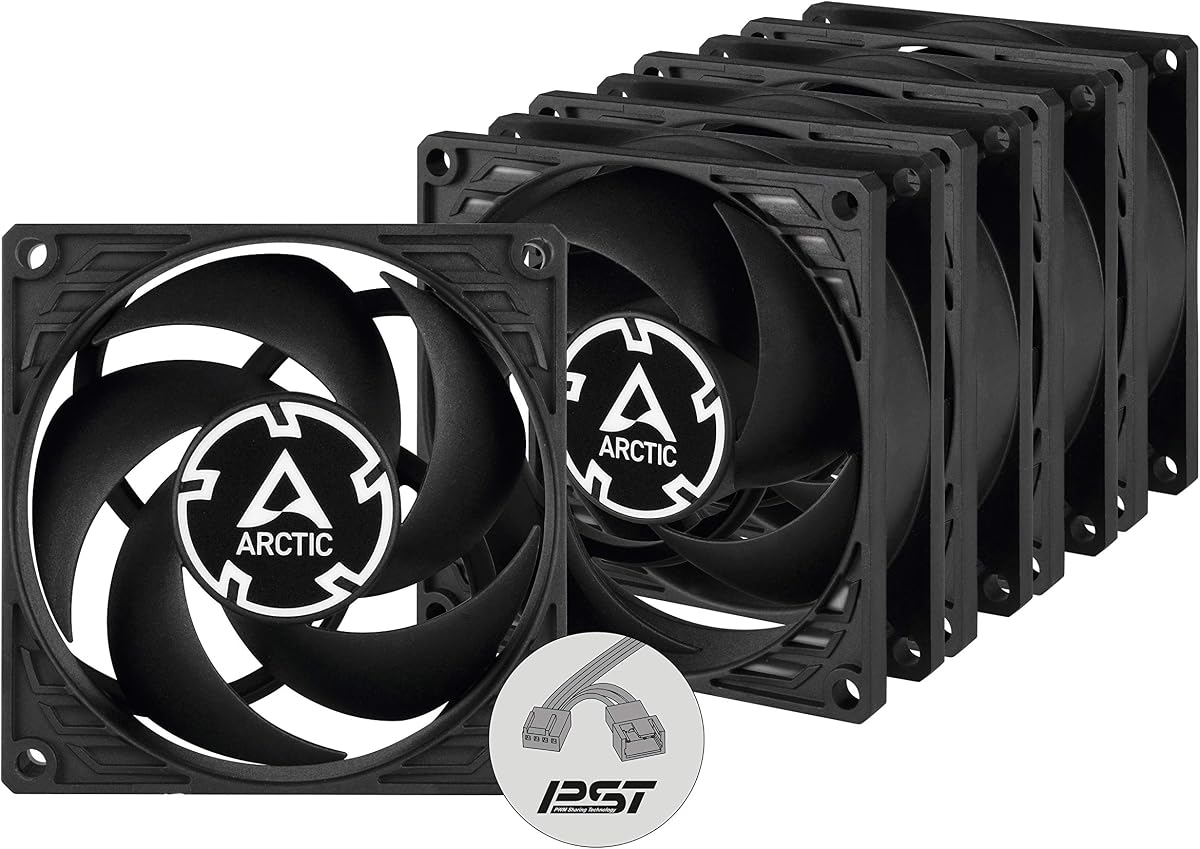
The ARCTIC P8 PWM PST 5 Pack offers incredible value for those needing multiple fans for a large build. Rated 4.7 out of 5, it combines affordability with robust performance features like PWM sharing.
We may earn a commission when you buy through this link, at no additional cost to you.
Optimized for static pressure, these fans excel on heatsinks and radiators. The 4-pin connector supports speeds from 200 to 3000 RPM, ensuring efficient cooling even under high air resistance conditions.
While the motor can be noticeable at maximum RPM, it remains quiet at lower speeds. The main trade-off is less premium finish compared to higher-end models, but functionality remains high.
This pack is perfect for server racks or extensive case setups requiring consistent airflow. The efficient technology reduces power consumption while maintaining strong cooling capabilities.
Allows synchronized speed control across multiple fans via a single header.
Designed to push air through dense radiators and heatsinks effectively.
We may earn a commission when you buy through this link, at no additional cost to you.
The Noctua NF-A8 PWM chromax.Black.swap combines top performance with a sleek all-black design. Rated 4.8 out of 5, it is a favorite for gamers wanting high-end silence and aesthetics.
We may earn a commission when you buy through this link, at no additional cost to you.
Its award-winning A-series fan features Flow Acceleration Channels to reduce turbulence. The chromax.black.swap edition includes swappable anti-vibration pads for custom color accents on any system.
Performance matches the original NF-A8 PWM with similar RPM and noise levels. The only drawback is the premium price, which reflects the superior materials and color customization options provided.
This fan is a top pick for ITX cases or builds where visual style matters. It delivers reliable cooling for NAS and chassis ventilation while blending seamlessly with dark internals.
Swap red, blue, or green pads to match your specific build theme.
Advanced acoustic optimization keeps noise below 17.7 dB(A) even under load.
We may earn a commission when you buy through this link, at no additional cost to you.
This 5-pack of ARCTIC P8 fans provides a budget-friendly way to ventilate large systems. With a rating of 4.6 out of 5, it focuses on delivering strong airflow without high costs.
We may earn a commission when you buy through this link, at no additional cost to you.
Optimized for static pressure, these fans work well on radiators and heatsinks. The Fluid Dynamic Bearing with an oil capsule ensures low noise and a long service life even during constant use.
The trade-off is the lack of PWM support, limiting speed control to fixed connectors. This makes them less versatile for dynamic thermal management but perfect for constant cooling needs.
Ideal for mining rigs or server racks requiring bulk fans for airflow. The redesigned blades ensure efficient cooling even with increased air resistance in tight spaces.
Alloy lubricant combination reduces friction for efficiency and lifespan.
Delivers 23.4 CFM at 3000 RPM for effective heat dissipation.
We may earn a commission when you buy through this link, at no additional cost to you.
The Noctua NF-R8 redux-1800 is a streamlined edition of a classic design. With a 4.8 rating, it offers high-performance cooling at a more accessible price point than the main series.
We may earn a commission when you buy through this link, at no additional cost to you.
Highly optimized for low-noise operation, it balances static pressure and airflow effectively. The 1800rpm PWM version supports automatic motherboard speed control for silent idle and powerful cooling.
The trade-off is fewer included accessories compared to the full retail box. Still, the performance remains excellent for chassis ventilation and replacement for NAS devices needing reliability.
This fan is best for users needing dependable cooling without the extra cost of premium extras. Its wide range of optional accessories allows customization if you need specialized cables or adapters.
Offers a balance of performance and quietness without compromising reliability.
Proven quality at an attractive price point compared to standard editions.
We may earn a commission when you buy through this link, at no additional cost to you.
The Kingwin 80mm Silent Fan is a straightforward solution for basic cooling needs. Rated 4.5 out of 5, it is designed for silent operation in office desktops and home servers.
We may earn a commission when you buy through this link, at no additional cost to you.
Optimized blade design delivers excellent ventilation and airflow to reduce system heat buildup. It is compatible with standard 80mm mounts, making it a versatile replacement for existing PC cases.
Trade-offs include basic documentation and lack of advanced speed control. However, for budget-conscious users or mining rigs needing simple airflow, it offers consistent cooling and longevity.
Ideal for office workstations where noise reduction is critical. Its long life bearing ensures extended lifespan and consistent cooling without complex wiring requirements.
Designed specifically for low noise levels in quiet environments.
Compatible with standard mounts for easy replacement in various cases.
We may earn a commission when you buy through this link, at no additional cost to you.
The ARCTIC P8 Silent focuses entirely on minimizing noise while maintaining airflow. With a 4.6 rating, its motor is designed to be virtually silent even when running at maximum speed.
We may earn a commission when you buy through this link, at no additional cost to you.
Virtually silent motor technology ensures friction and noise are kept low. It is particularly effective when used on heatsinks and radiators where high air resistance requires static pressure.
The trade-off is lower max RPM and fixed 3-pin control. This limits dynamic speed adjustments but ensures the fan stays whisper-quiet at all times.
Best for HTPC builds or offices where silence is the primary concern. Its alloy lubricant combination reduces friction to improve overall efficiency and service life.
Developed in Germany with enhanced bearing for minimal noise.
Effective at high air resistance points like CPU coolers.
We may earn a commission when you buy through this link, at no additional cost to you.
This 5-pack of ARCTIC P8 Silent fans provides bulk cooling for extensive systems. Rated 4.4 out of 5, it maintains the quiet characteristics of the single unit at a lower cost per fan.
We may earn a commission when you buy through this link, at no additional cost to you.
Optimized for static pressure, it guarantees efficient cooling even with high air resistance. The motor remains virtually silent, making it ideal for environments where noise levels must be kept low.
The trade-off is limited speed options compared to PWM models. Still, the consistency across all five units ensures uniform cooling performance across multiple zones in a case.
Perfect for NAS setups or server racks requiring multiple silent units. It balances performance with cost-effectiveness for large-scale installations needing reliability.
Affordable 5-pack solution for extensive cooling setups.
Uniform silent performance ensures even cooling distribution.
We may earn a commission when you buy through this link, at no additional cost to you.
The ARCTIC P8 Max is designed for users needing extreme cooling performance in a small space. With a 4.7 rating, it delivers powerful airflow and static pressure for high heat loads.
We may earn a commission when you buy through this link, at no additional cost to you.
Fluid Dynamic Bearing technology ensures silent operation at low speeds and powerful performance at maximum RPM. Below 5% PWM the fan stands still, above it varies infinitely between 500 and 5000 RPM.
Trade-offs include potential noise at full speed. This makes it less ideal for quiet builds but perfect for server racks and high-density component environments.
Best for 2U server racks and demanding server racks. It effectively dissipates heat in cases with high component density ensuring stability under heavy loads.
Infinitely variable between 500 and 5000 RPM for precise control.
Guarantees efficient cooling even with increased air resistance.
We may earn a commission when you buy through this link, at no additional cost to you.
The Thermalright TL-8015 CPU Fan offers a slim 15mm profile for tight cooling spaces. Rated 4.5 out of 5, it combines high performance with a low-noise design for specific CPU coolers.
We may earn a commission when you buy through this link, at no additional cost to you.
With a maximum speed of 2200RPM and wind pressure of 1.25mm H2O, it delivers improved cooling performance. S-FDB V2 bearings keep noise to a minimum while providing maximum cooling performance.
The trade-off is the thin profile which may limit airflow volume compared to standard 25mm fans. However, its fit for downward coolers makes it a specialized solution for tight chassis.
Best for downward CPU coolers and ultra-slim cases needing compact airflow. It maximizes heat dissipation performance while ensuring durability through carefully developed bearings.
80x80x15mm size fits tight spaces like CPU coolers.
Noise level of 23.3dBA ensures quiet operation under load.
We may earn a commission when you buy through this link, at no additional cost to you.
Selecting the right 80mm case fan requires understanding key technical factors that impact airflow, noise, and longevity.
PWM (4-pin) fans allow your motherboard to adjust speeds dynamically based on temperature. This results in quieter operation at idle compared to 3-pin fans which typically run at a fixed speed unless manually throttled.
Always choose PWM if your motherboard supports it for better power efficiency and noise control.
Static pressure measures how well a fan pushes air through resistance like radiators or dense heatsinks. Airflow measures raw volume. High static pressure is essential for radiators and intakes with filters.
For open cases, prioritize airflow. For radiators, prioritize static pressure fans to ensure heat is pushed out effectively.
Bearing type determines lifespan and noise. Fluid Dynamic Bearings (FDB) and Sleeve bearings are common. FDB typically offers longer life and higher resistance to wear compared to standard sleeve bearings.
Opt for Fluid Dynamic Bearings in critical applications like server racks to ensure years of silent operation.
Noise is measured in decibels (dB) or Sone. Lower dB values mean quieter operation. Generally, fans under 20 dB(A) are considered quiet for office environments.
Check the dB(A) rating on product pages to compare noise levels directly between models.
80mm fans typically come in 15mm or 25mm thickness. The 25mm model is standard for chassis while the 15mm fits tight CPU coolers or slim cases.
Measure your available clearance before buying to ensure the fan fits without obstruction.
Buying fans in packs reduces cost per unit. A 5-pack is economical if you need multiple exhaust or intake fans for a large case.
Consider bulk packs for multi-fan systems to save money and ensure consistent performance across zones.
Mean Time To Failure (MTTF) indicates expected lifespan. Higher MTTF values like 150,000 hours suggest robust engineering and reliable long-term performance.
Prioritize brands with high MTTF ratings for critical systems to avoid frequent replacements.
While performance matters, color matters for builders. Black or all-black fans blend well with dark cases, while brown or grey might stand out.
Check if the fan offers swappable parts or specific color variants to match your build's theme.
Ensure the fan is oriented correctly for intake or exhaust. Air should flow away from components for exhaust and towards them for intake.
Secure the fan tightly using screws or anti-vibration mounts to prevent rattling noises during high-speed operation.
Periodically clean dust from the fan blades using compressed air to maintain airflow efficiency and prevent motor strain.
Generally, 80mm fans need higher RPM to move the same air volume as larger fans, which can increase noise. However, high-quality 80mm models use optimized blade designs to keep noise levels low even at high speeds.
The standard thickness is 25mm, but 15mm variants exist for tight CPU coolers or slim chassis. Always check the dimensions on the product page before purchasing to ensure fit.
You can reduce noise by installing the fan on anti-vibration mounts to dampen vibration. Additionally, using PWM control to lower speeds during idle periods will significantly reduce operational sound.
Yes, PWM fans allow your motherboard to adjust speed based on temperature. This saves power and reduces noise when full speed is not needed, making them a smart investment for thermal management.
Yes, many 80mm fans are specifically designed for CPU coolers. Ensure you check thickness compatibility as standard 25mm fans might not fit ultra-thin coolers.
Use compressed air to blow dust out of the blades. Avoid spinning the blades with your finger as this can damage the bearing. Holding the blades still while cleaning prevents accidental damage.
High-quality fans with Fluid Dynamic Bearings can last over 50,000 hours. Cheaper models may have shorter lifespans depending on usage intensity and dust accumulation.
Yes, most PC cases support 80mm fans in multiple locations. Always verify your specific case model supports this size before purchasing to ensure proper installation.
We have reviewed ten exceptional 80mm case fans ranging from budget multi-packs to premium silent models. The Noctua NF-A8 PWM stands out for its quiet performance and reliability in compact builds.
Prioritize PWM control and static pressure if you need to cool radiators or dense components. For general case ventilation, the ARCTIC P8 PWM PST offers excellent value with its 5-pack pricing.
Remember that specific needs vary based on your build type. Always verify current pricing and stock levels as these factors change frequently in the market before making your purchase.