
SteelSeries Apex 3 Gaming Keyboard – Black
4.6Editor score
IP32 water resistant design
Whisper quiet gaming switches
Dedicated multimedia controls
This guide compares the top Mac gaming keyboards for performance and comfort, reviewing wireless and wired options tailored to macOS users in October 2026.
Finding the right Mac gaming keyboard can transform your setup and enhance your gameplay significantly. You need reliable connectivity, responsive switches, and a layout that fits your workflow without compromising on style or durability.
We compared ten top-rated mechanical and membrane keyboards designed for Mac users. Our analysis focused on wireless stability, switch quality, software compatibility, and ergonomic features to help you find the perfect match for your needs.
Each pick showcases unique strengths from budget-friendly options to premium models with advanced customization. Keep in mind that stock and pricing may vary over time, so check the latest details before making your final purchase decision today.
4.6Editor score
4.3Editor score

4.7Editor score
This side-by-side comparison highlights the key specifications and unique features of the top ten Mac gaming keyboards available today.




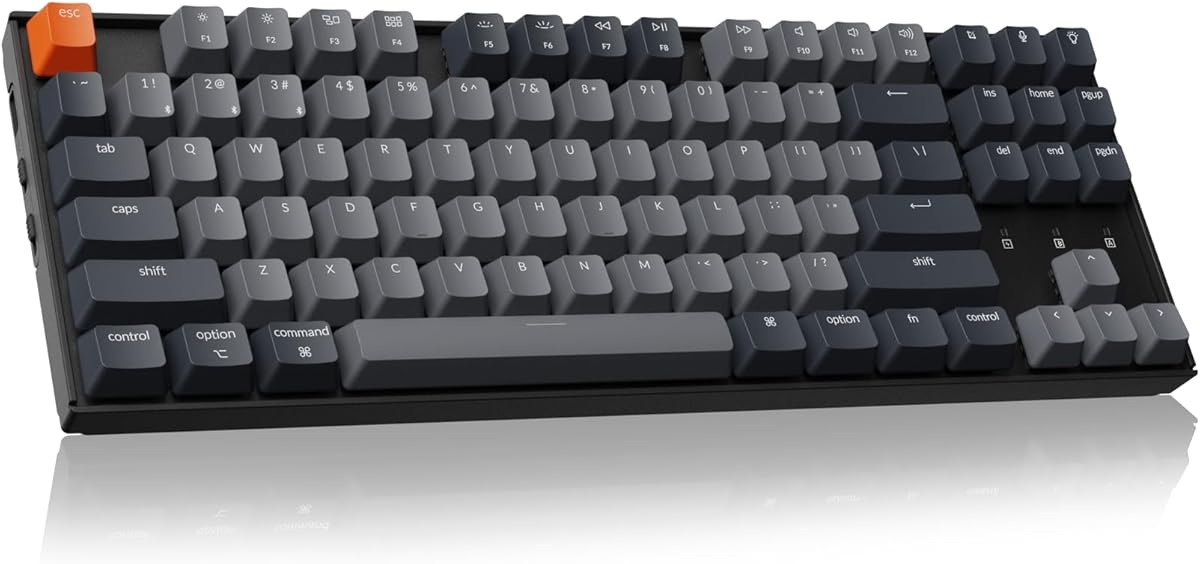
The Keychron K8 is a standout wireless mechanical keyboard built for seamless Mac and Windows usage. Its rating reflects strong user satisfaction with its versatile connectivity and tactile typing experience.
We may earn a commission when you buy through this link, at no additional cost to you.
It features a tenkeyless layout that saves desk space while retaining essential navigation keys. The dual Bluetooth 5.1 support allows switching between devices effortlessly, making it ideal for hybrid work setups.
While the wireless mode has slight latency, it remains acceptable for most gaming needs. The battery life is impressive, lasting up to 200 hours without backlighting for extended use.
This keyboard is perfect for users wanting a reliable wireless option that respects macOS shortcuts. We recommend it for those prioritizing comfort and multi-device functionality.
Switch between your Mac, phone, and tablet instantly using the dedicated keys on the top row.
The brown switches offer a satisfying bump without excessive noise, suitable for shared spaces.
We may earn a commission when you buy through this link, at no additional cost to you.
The SteelSeries Apex 3 offers incredible value for budget-conscious gamers needing Mac compatibility. Its water resistance ensures longevity against spills, a crucial feature for casual users.
We may earn a commission when you buy through this link, at no additional cost to you.
The quiet switches are designed for minimal noise, making it suitable for shared environments. RGB lighting adds style without overwhelming complexity, fitting into various room aesthetics.
While it lacks true mechanical switches, the tactile feedback remains adequate for entry-level gaming. The magnetic wrist rest provides comfort during long sessions without additional cost.
We suggest this model for users seeking durability and style on a strict budget. It is a reliable choice for casual gaming and daily tasks alike.
The IP32 rating prevents liquid damage from spills, ensuring your keyboard survives accidental mishaps.
Enjoy gaming without disturbing others nearby thanks to the whisper quiet switch technology.
We may earn a commission when you buy through this link, at no additional cost to you.
The GravaStar Mercury K1 stands out with its premium aluminum alloy exoskeleton and modern aesthetic. It delivers a high-end typing experience with robust build quality suited for serious setups.
We may earn a commission when you buy through this link, at no additional cost to you.
Its gasket mount design ensures a soft, consistent typing feel with reduced noise. The tri-mode connectivity allows flexible switching between devices via Bluetooth or wired connections.
While the price is higher than average, the quality justifies the investment for enthusiasts. The unique design may not suit every desk style but offers distinct visual appeal.
We recommend this keyboard for users wanting a premium build and versatile connectivity. It is ideal for those who value aesthetics and performance equally.
The aluminum alloy frame provides durability and a sleek, professional look for your desk.
Switch seamlessly between USB-C wired, Bluetooth, and 2.4GHz wireless for maximum flexibility.
We may earn a commission when you buy through this link, at no additional cost to you.
The EPOMAKER F75 MAX offers unique features like a TFT screen and volume knob. It appeals to enthusiasts who want deep customization beyond standard keyboards.
We may earn a commission when you buy through this link, at no additional cost to you.
Its hot-swappable nature allows easy switch changes without soldering. The gasket mount provides a premium feel with reduced vibration during intense typing.
While the software adds functionality, it may confuse beginners. The layout is compact yet functional, balancing space-saving with essential keys for Mac users.
We suggest this for tech-savvy users wanting customization. It serves well for those who enjoy tuning their gear to perfection.
The TFT screen shows battery status and animations, adding a high-tech touch to your setup.
Swap out switches quickly to change your typing sound and feel without permanent changes.
We may earn a commission when you buy through this link, at no additional cost to you.
The Logitech G915 X brings low-profile mechanical performance to a full-size layout. It prioritizes speed and precision with advanced switch technology for competitive play.
We may earn a commission when you buy through this link, at no additional cost to you.
Its aluminum build and PBT keycaps ensure durability over time. The LIGHTSYNC RGB integration allows vibrant customization across Logitech G peripherals.
Being wired limits flexibility but ensures zero-latency performance. The price is steep, reflecting the premium engineering and design quality.
This keyboard suits users wanting top-tier wired reliability. It is recommended for dedicated gamers focused on performance.
Short travel distance and fast actuation boost your reaction speed during critical moments.
Sand-blasted aluminum and PBT keycaps resist wear and maintain a premium look long-term.
We may earn a commission when you buy through this link, at no additional cost to you.
The Logitech G413 TKL SE delivers dependable performance with tactile switches and durable keycaps. Its aluminum-magnesium alloy top case offers robust protection against wear and flex.
We may earn a commission when you buy through this link, at no additional cost to you.
Designed for gamers, it includes anti-ghosting for reliable inputs during intense gameplay. The TKL design saves space while keeping essential navigation keys.
While it lacks RGB, the white LED lighting is functional and subtle. Media controls via FN keys add convenience without needing extra software.
We recommend this for users seeking a no-fuss mechanical keyboard. It is a solid choice for practical gaming needs.
The aluminum-magnesium alloy top case ensures minimal flex during heavy typing and gaming.
Heat and wear-resistant keycaps maintain texture and legends even after extensive use.
We may earn a commission when you buy through this link, at no additional cost to you.
The Redragon K742 is a versatile wireless keyboard featuring tri-mode connectivity. Its hot-swappable design allows easy customization of switches for personal preference.
We may earn a commission when you buy through this link, at no additional cost to you.
It supports QMK/VIA, enabling deep customization for advanced users. The gasket structure provides a quiet, comfortable typing experience suitable for daily tasks.
While software setup may be involved, the flexibility offers great control. The build quality is strong, fitting well in modern minimalist setups.
We suggest this for users wanting high customization at a fair price. It is ideal for hybrid work and gaming setups.
Use VIA software to remap keys and create macros for enhanced productivity and workflow.
Switch between Bluetooth, 2.4GHz wireless, and wired modes to match your immediate needs.
We may earn a commission when you buy through this link, at no additional cost to you.
The Keychron K4 combines a number pad with a compact 96% layout. It is designed for productivity and light gaming with multi-device connectivity support.
We may earn a commission when you buy through this link, at no additional cost to you.
Bluetooth 5.1 allows connecting up to three devices seamlessly. The battery life is impressive, lasting up to 240 hours without backlighting.
While key spacing is tight, it saves valuable desk space. Mac-specific function keys ensure compatibility with macOS shortcuts out of the box.
We recommend this for users wanting a compact full-function keyboard. It suits both work and light gaming environments effectively.
The 96% layout keeps essential number pad keys without taking up excessive desk space.
A massive 4000mAh battery ensures weeks of usage between charges for minimal downtime.
We may earn a commission when you buy through this link, at no additional cost to you.
The Logitech MX Mechanical focuses on productivity with quiet tactile switches. Its smart illumination adjusts to lighting conditions automatically for a seamless typing experience.
We may earn a commission when you buy through this link, at no additional cost to you.
Multi-device connectivity via Bluetooth or Logi Bolt ensures easy switching between computers. Low-profile keys reduce strain during long typing sessions.
While costly, it enhances workflow for professionals. The Flow feature lets you copy paste across devices effortlessly.
We recommend this for professionals prioritizing comfort and workflow efficiency. It is a top choice for office and home productivity.
Backlit keys light up as your hands approach, adjusting brightness to match the room.
Seamlessly move your cursor and clipboard between different computers with one click.
We may earn a commission when you buy through this link, at no additional cost to you.
The Logitech G213 offers essential RGB customization at an entry-level price. It features anti-ghosting for reliable gaming and a built-in palm rest for comfort.
We may earn a commission when you buy through this link, at no additional cost to you.
Five lighting zones allow personalization without full RGB complexity. The spill-resistant design adds practical protection against daily accidents and liquids.
While not mechanical, the keys deliver responsive feedback. Media controls are easily accessible, simplifying playback and volume adjustments.
We suggest this for casual gamers seeking style and comfort. It is a great starter option for new setups.
Comfortable wrist support reduces strain during long sessions without buying extra accessories.
Built-in drainage channels protect the keyboard from liquid damage and simplify cleanup.
We may earn a commission when you buy through this link, at no additional cost to you.
Selecting the ideal Mac gaming keyboard involves understanding several critical factors that impact performance, comfort, and compatibility.
Ensure the keyboard supports macOS shortcuts natively. Look for Mac-specific keycaps or switch options to avoid mapping issues.
Prioritize keyboards explicitly labeled as Mac-compatible to ensure smooth operation.
Mechanical switches offer better feedback than membrane. Choose tactile for feedback or linear for smoothness based on preference.
Match the switch type to your typing style for optimal comfort.
Wireless keyboards provide flexibility but check for latency. Wired options ensure zero latency for competitive gaming.
Select Bluetooth or 2.4GHz wireless for seamless multi-device connectivity.
Full-size layouts include number pads, while TKL saves space. Choose based on your desk space and gaming needs.
Compact layouts are ideal for minimalist setups.
Wireless keyboards require battery power. Look for models with at least 200 hours of usage without charging.
Rechargeable options with USB-C ensure minimal downtime.
Software support allows macro programming and RGB customization. Ensure the software supports macOS effectively.
Prioritize brands offering robust cross-platform tools.
Materials like aluminum provide sturdiness. Check for water resistance to protect against spills.
High-quality keycaps like PBT last longer than ABS.
Balance features with your budget. Higher prices often bring better build quality but budget options exist.
Determine which features matter most before spending.
Connect your keyboard via USB or Bluetooth by enabling Bluetooth in System Settings. If wireless, ensure you install any required drivers or software for full functionality.
Clean your keyboard regularly using compressed air and soft cloths to remove dust. Avoid liquid cleaners directly on the keys to prevent damage.
Store your wireless keyboard in a safe place when not in use to protect the battery. Update firmware periodically to maintain optimal performance and compatibility.
Yes, mechanical keyboards work exceptionally well with Mac. Ensure the model explicitly supports macOS to avoid key mapping issues.
The Keychron K8 is widely regarded as the best wireless option due to its native Mac support and excellent battery life.
Modern wireless keyboards with 2.4GHz connectivity offer reliable performance similar to wired ones for most users.
Many keyboards include physical keycaps for Mac. Use the provided stickers to swap command and function keys.
Tactile or linear silent switches are best for low noise. Look for 'silent' variants to minimize disturbance.
Absolutely. Many gaming keyboards offer durable switches and ergonomic designs suitable for both gaming and office tasks.
Mechanical switches typically last for millions of keystrokes. High-quality models often offer a lifespan of 50 million presses.
Most RGB keyboards include software for customization. Ensure the software is compatible with macOS before purchasing.
We explored ten top Mac gaming keyboards ranging from budget picks to premium models. Each option provides unique strengths to suit different preferences and needs.
Prioritize features like Mac-specific layout and wireless stability based on your daily tasks. Balancing comfort and performance is key to finding the right keyboard.
Remember that availability may change over time. Always verify current listings to ensure you get the best value today.