
Laptop Monitor Light Bar with Clip
4.6Editor score
Easy clip-on installation
Three color temperatures
USB powered memory
Finding the right lighting for your workspace can significantly impact your eye health and overall productivity. A Laptop Monitor Light Bar offers a sleek solution to illuminate your desk without causing screen glare or taking up valuable space. These devices are designed to provide even, comfortable lighting that reduces eye strain during long hours of work or study.
We have carefully evaluated ten top-rated models based on their optical design, brightness options, and ease of installation. Each product was chosen for its ability to deliver high-quality light while maintaining a compact footprint. Our analysis covers key features like color temperature control, USB power compatibility, and build quality to help you make an informed decision.
Each pick in this list highlights specific strengths such as budget-friendliness, premium features, or specialized design for curved screens. Keep in mind that product availability and pricing can fluctuate over time. We recommend checking the current listings for the most up-to-date information before making your final purchase.
4.6Editor score

4.6Editor score

4.7Editor score
As an Amazon Associate we earn from qualifying purchases.
The following table provides a side-by-side comparison of all ten models, highlighting their key specifications to help you quickly identify the best fit for your needs.






The Quntis Computer Monitor Lamp stands out as our top pick due to its advanced ambient light sensor and superior color rendering capabilities. With a rating of 4.6 stars, it is highly regarded by users who prioritize eye comfort and lighting quality. This model effectively eliminates harmful blue light while providing a stable and flicker-free illumination that is gentle on the eyes.
We may earn a commission when you buy through this link, at no additional cost to you.
Its standout feature is the auto-dimming capability, which continuously monitors the surroundings and adjusts the light intensity to prevent visual fatigue. The ultra-high Ra98 Color Rendering Index ensures that colors appear vibrant and true to life, which is essential for professionals working on design or color-sensitive tasks. The asymmetrical optical design directs light only to the desk area, ensuring no glare reaches the screen.
While the price is higher than budget options, the investment is justified by the premium features and build quality. The stepless dimming and color temperature adjustments allow for precise control to suit any time of day or task. The weighted clip ensures it stays securely in place without damaging the monitor, making it a reliable addition to any workspace.
This lamp is ideal for designers, office workers, and students who spend long hours in front of a screen. If you are looking for a high-performance light bar that combines eye care with professional-grade lighting accuracy, this is the best choice. We recommend it for those who value comfort and precision in their daily work environment.
The IEC certified blue light filter and flicker-free design work together to reduce eye strain significantly during extended use sessions.
With an Ra98 Color Rendering Index, this light bar ensures that the colors on your screen and desk are rendered with exceptional precision.
We may earn a commission when you buy through this link, at no additional cost to you.
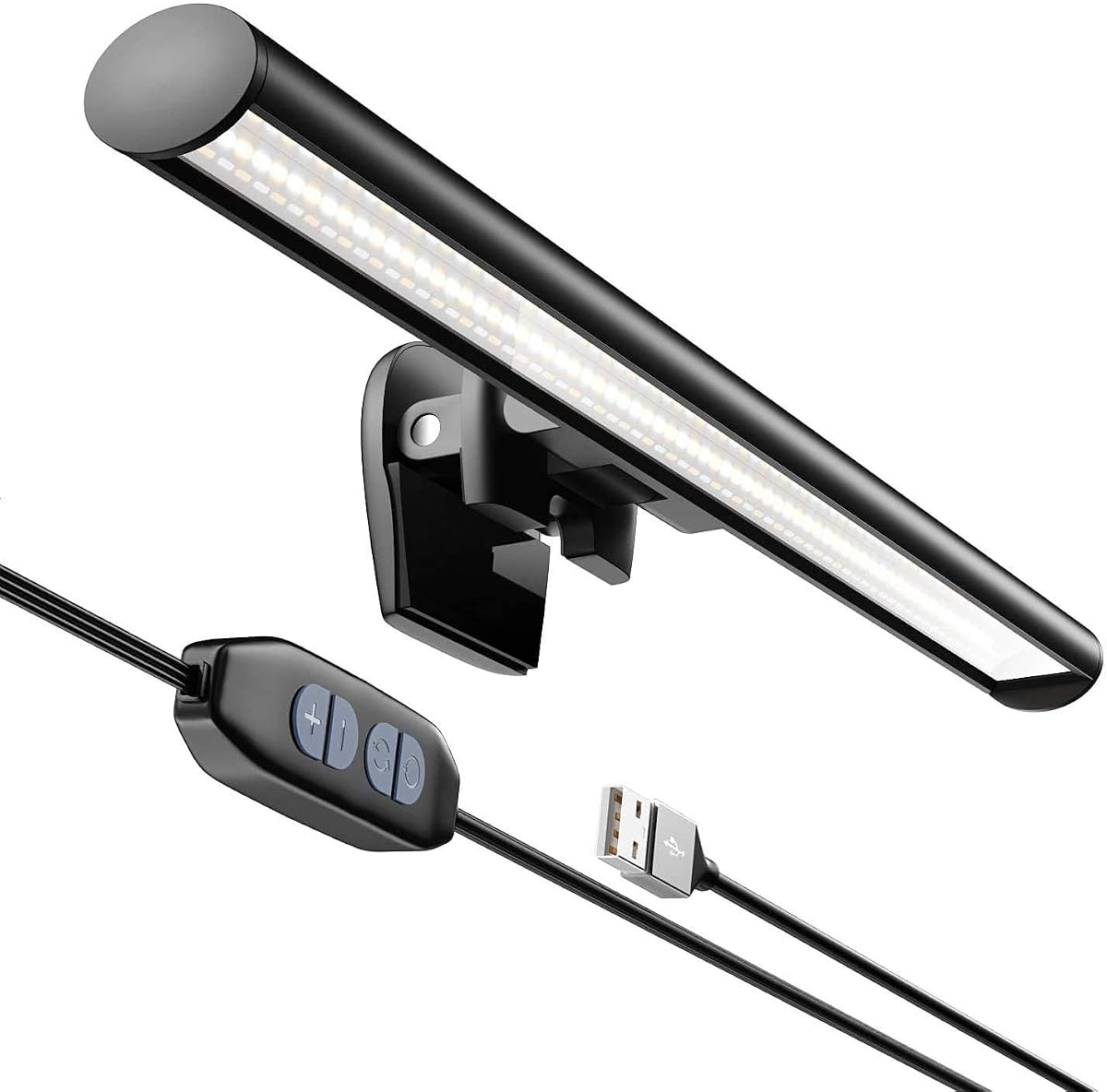
This Laptop Monitor Light Bar offers an exceptional value proposition for those seeking effective task lighting without breaking the bank. It features a simple clip-on design that makes setup quick and hassle-free without the need for tools or screws. The asymmetrical optical design ensures that light is directed onto the desk rather than the screen, helping to reduce reflections and glare.
We may earn a commission when you buy through this link, at no additional cost to you.
Users can choose from three color temperatures ranging from warm to cool to suit their current needs, whether it is relaxing or focusing. The built-in memory function is a convenient feature that remembers your last brightness and color temperature settings, so you do not have to adjust them every time. It is powered via USB, making it compatible with various devices like computers and power banks.
The main trade-off is the lack of advanced sensors like auto-dimming, which is found in more expensive models. However, for the price point, it delivers consistent performance and a space-saving design that fits well on small desks. The clip is designed to fit most monitors with a specific thickness range ensuring a secure fit.
This model is perfect for students or anyone working in a compact home office who needs reliable lighting on a budget. It provides the essential features of a high-end light bar without the premium cost. If you need a straightforward and effective solution to improve your workspace lighting, this is a highly recommended option.
The clip-on mechanism allows for instant installation that requires no tools, and the USB power source offers versatile connectivity options.
Three distinct color temperature settings allow you to customize the light to match your mood or task requirements easily.
We may earn a commission when you buy through this link, at no additional cost to you.
The Quntis Curved Monitor Light Bar is a top-tier option designed specifically for users with large ultrawide or curved monitors. It features a foldable dual light design that allows for flexible lighting angles to cover a wider area. With a rating of 4.7 stars, it is praised for its ability to illuminate desks without causing screen glare or eye strain.
We may earn a commission when you buy through this link, at no additional cost to you.
This model offers an impressive 1400 lux at the center and includes 15 RGB backlight modes to create a dynamic ambiance for gaming or movies. The front light supports stepless dimming and color temperature adjustment, giving you precise control over your environment. A built-in ambient light sensor automatically adjusts the brightness based on the room conditions to maintain optimal visibility.
While it is designed for curved monitors over 34 inches, it also works well with large flat screens thanks to its adjustable clamp system. The premium features come with a higher price tag, but the versatility and performance justify the investment for serious users. The design contours the monitor curve for a seamless fit that does not obstruct the webcam.
This light bar is ideal for gamers, content creators, and professionals who use large displays and need versatile lighting. It combines functionality with aesthetic appeal, making it a standout addition to any high-end desk setup. If you have a large monitor and want top-notch lighting, this model is the definitive choice.
The dual light system with RGB modes adds a layer of customization and immersion that enhances the overall user experience.
Smart sensors ensure that the light level is always appropriate for the current environment without manual intervention.
We may earn a commission when you buy through this link, at no additional cost to you.
The Wodgreat Laptop Monitor Lamp is a solid choice for those looking for reliable eye care lighting at an accessible price. It features an asymmetrical optical design that illuminates the desk and keyboard while eliminating reflective glare from the screen. The 54 LED beads provide a soft and even lighting source that is comfortable for prolonged use.
We may earn a commission when you buy through this link, at no additional cost to you.
This model includes a memory function that recalls your last brightness and color mode settings, adding convenience to daily use. The clip-on design ensures it sits securely on top of your laptop without blocking the camera, which is great for video communication. It is lightweight and stylish, making it easy to carry between different workspaces.
While it has a slightly lower rating compared to top picks, it remains a strong contender for students and office staff who need a budget-friendly solution. The USB power connectivity ensures it works with most devices without requiring extra adapters. The matte black frame design adds a touch of elegance to any desk setup.
This lamp is best suited for casual users who need consistent lighting without complex features. It offers a balance of functionality and affordability that appeals to a wide range of users. If you value simplicity and portability, this model is a worth considering for your workspace needs.
The sleek matte finish and slim profile make it easy to transport and integrate into various office environments.
The unique fixing structure ensures the light stays stable without obstructing the view of your laptop camera.
We may earn a commission when you buy through this link, at no additional cost to you.
The CATPOWER Portable Laptop Monitor Light Bar is designed for users who value mobility and simplicity in their lighting setup. It offers a flicker-free design that reduces eye strain during long hours of work or study. The light is soft and gentle on the eyes, making it suitable for reading and tasks requiring focus.
We may earn a commission when you buy through this link, at no additional cost to you.
This model features a flexible and lightweight design that makes it easy to carry and use in different places like a bedroom or study room. The three color modes and ten brightness levels allow you to create the perfect atmosphere for any situation. It mounts directly onto your monitor to save valuable desk space.
The durability of the materials ensures that the light can withstand daily wear and tear. It is a reliable option for those who need a consistent light source that can travel with them. The USB power supply makes it convenient to use with various devices without the need for extra outlets.
If you need a light that you can take with you or adjust to different angles, this model is a great fit. It balances portability with functionality to provide a quality lighting experience. For students or remote workers who move around often, this light bar is a practical and efficient choice.
The slim and lightweight profile allows for easy transport and adjustment to suit different desk setups.
The combination of multiple brightness and color settings ensures you have the right light for any task.
We may earn a commission when you buy through this link, at no additional cost to you.
This 11.8 Inch LED Light Bar is designed to provide bright and wide illumination for larger desks or multiple monitor setups. It delivers up to 800 lux of central brightness for a significant coverage area, ensuring a well-lit workspace. The light is dimmable and has three color temperatures to suit different needs from reading to gaming.
We may earn a commission when you buy through this link, at no additional cost to you.
The stepless dimming and memory function allow for smooth adjustments and consistent settings. The patented counterweight clip makes installation instant and ensures it fits screens from thin to thick. The light is designed to illuminate just the screen and desk to minimize eye strain and reflections.
While the wider size might not fit smaller setups, it is excellent for those who need more coverage area. The USB power compatibility makes it easy to connect to various devices. The mechanical switch on the side offers reliable control for power and brightness adjustments.
This model is ideal for users who need extra brightness and width for their workspace. It provides a uniform light that eliminates dark spots effectively. If you work on a large desk or use multiple screens, this light bar is a practical solution to improve visibility.
The ultrawide design ensures that your entire workspace is evenly lit without dark spots or uneven shadows.
The counterweight clip design ensures the light stays firmly in place without damaging the screen surface.
We may earn a commission when you buy through this link, at no additional cost to you.
This Monitor Light Bar Backlight offers a minimalist approach to desk lighting that fits well with modern setups. The 45 degree asymmetric optical structure ensures light is cast solely on the desktop and keyboard. It boosts concentration and eliminates reflective glare on the screen for a comfortable visual experience.
We may earn a commission when you buy through this link, at no additional cost to you.
The dual control modes allow you to toggle settings without touching the bar directly. It features a max brightness of 800 lux and works with nearly all monitors including curved screens. The physical control button sits on the right side for easy access to power and brightness functions.
While it lacks color temperature adjustment, the focused lighting is effective for late shifts or editing sessions. The heavy-duty parts ensure consistent performance over time without fading or flickering. It is designed to save space and reduce clutter on your desk.
This light bar is perfect for users who prefer a simple and effective lighting solution. It provides bright and even illumination that improves focus and reduces fatigue. If you value a clean look and reliable performance, this model is a strong option.
The asymmetric design ensures light is directed exactly where needed without creating distractions on the screen.
The physical button layout makes it easy to adjust settings without interrupting your workflow.
We may earn a commission when you buy through this link, at no additional cost to you.
This Laptop Keyboard LED Light is designed for people who carry on computer office or study with laptops in the evening. It is a smart eye protection lamp that provides illumination for the keyboard area and eliminates reflected glare on the screen. The housing is made of ABS material which is simple and light to handle.
We may earn a commission when you buy through this link, at no additional cost to you.
The 4 key controller allows you to regulate brightness and color temperature according to actual needs. It is powered by a safe low voltage USB interface which makes it compatible with many devices. The unique structure of the fixture can be adjusted to facilitate computer office or study.
This lamp saves a lot of space for your desktop and is very suitable for use on the desk in your office or at home. The packaging includes a color box making it a practical gift for relatives and friends. It focuses on eye health care and is portable for travel.
If you need a compact and affordable light for your laptop specifically, this is a good option. It offers the essential features to reduce eye strain while keeping your setup clean. For frequent travelers or users with limited space, this model is a handy addition.
The lightweight design and USB power make it easy to pack and use in different locations.
The optical design ensures the light is focused on the keyboard to avoid screen glare entirely.
We may earn a commission when you buy through this link, at no additional cost to you.
The YEELIGHT Monitor Light Bar protects your vision with an RG0 rating and filters out harmful blue light. It features a full-metal body for durability and effective heat conduction. The ultra-high Color Rendering Index of Ra95 ensures vibrant and true-to-life colors for your workspace.
We may earn a commission when you buy through this link, at no additional cost to you.
It offers seamless stepless dimming and color temperature adjustment from 2700K to 6500K. The retractable clip adapts to monitors from 0.3 to 1.1 inches thick. The low-profile design avoids webcam obstruction enabling seamless video calls and multitasking.
This model is ideal for daily life and work with uniform lighting for even surface illumination. The touch controls allow for intuitive adjustment of brightness and color. It is a premium addition for professional desktop setups that value accurate color representation.
For programmers and designers, this light bar provides the accuracy and comfort needed. The metal body ensures it stays cool during prolonged use. If you want a durable and stylish light bar that offers precise control, this is an excellent choice.
The full-metal body not only looks sleek but also dissipates heat efficiently for longer lifespan.
The RG0 rating and flicker-free technology work together to provide the highest standard of blue light safety.
We may earn a commission when you buy through this link, at no additional cost to you.
The OOWOLF Screen Light Bar is inspired by computer users with its ultra-high color rendering index and dual light system. It features a New Technology for two special rear ambient lights to reduce pressure and irritation of the dark surroundings around the eyes. This offers the highest level of lighting comfort when reading or working.
We may earn a commission when you buy through this link, at no additional cost to you.
It emits warm light to neutralize Blue-Ray to the greatest extent to prevent myopia and protect the eyes. With three color modes for both front and back light each mode features 10 brightness levels adjusted by touch button. It has a memory function that remembers settings after power disconnect.
The Type C power line and silicone mount base can suit for all kinds of computers. Ready to use with no installation required. It has passed multiple tests and reports for quality and safety. The lifespan is over 35,000 hours for long-term use.
This model is perfect for those who want extra features like a backlight and high CRI. The dual light system enhances the viewing experience and reduces eye fatigue significantly. If you value premium color accuracy and additional ambient light options, this is a great choice.
The combination of front and rear ambient lights ensures comfortable viewing without harsh contrasts in dark environments.
With a lifespan exceeding 35,000 hours and multiple safety certifications, this light bar is built to last.
We may earn a commission when you buy through this link, at no additional cost to you.
Choosing the right Laptop Monitor Light Bar requires understanding a few key factors that impact your daily comfort and productivity.
The most critical factor is the optical design. A good light bar should have an asymmetrical design that directs light onto your desk and keyboard rather than the screen. This prevents screen glare and reflections which can be distracting and strain your eyes. Look for models that explicitly mention screen glare reduction features.
Always check for asymmetrical optics to ensure your screen remains clear while your workspace is well lit.
Adjustable brightness is essential to match the lighting in your room. Models with stepless dimming or multiple brightness levels allow you to fine-tune the light to your preference. Auto-dimming sensors are a premium feature that adjusts the light based on ambient conditions automatically.
Look for stepless dimming or auto-dimming features to adapt to changing light conditions effortlessly.
Different tasks require different color temperatures. Cool light helps with focus while warm light is better for relaxing. A good light bar offers multiple color temperature settings or adjustable ranges from warm to cool. This allows you to customize the environment for work or leisure.
Ensure the model offers multiple color temperature settings to suit your mood and tasks.
The clip mechanism should be sturdy enough to hold the light securely without damaging your monitor. A space-saving design that mounts directly to the monitor is ideal for small desks. Check if the clip fits your monitor thickness and whether it blocks the webcam.
Choose a light bar with a counterweight or silicone clip that fits your screen securely without blocking the camera.
Most light bars are USB powered which makes them compatible with computers and power banks. Check the cable length to ensure it reaches your power source easily. Some models offer Type-C ports for faster charging or better connectivity options.
Look for USB powered models with a cable long enough to reach your power source comfortably.
If you work with images or design, a high Color Rendering Index is important. Models with an Ra90 or higher render colors more accurately which helps in maintaining screen calibration. This reduces the strain on your eyes when adapting to color shifts.
Select a model with an Ra90 or higher if color accuracy is important for your work.
Materials like metal or high-quality ABS ensure the device lasts longer. Check for certifications regarding blue light safety and flicker-free performance. A durable build ensures the light can withstand daily wear and tear without losing performance.
Opt for a model with metal construction and safety certifications to ensure long-term reliability and eye safety.
To install your light bar, attach it to the top center of your monitor or laptop screen. Ensure the clip is secure and not blocking the webcam. Plug the USB cable into a powered USB port on your computer or a wall adapter to turn on the light.
Adjust the brightness and color temperature settings to suit your environment. Use auto-dimming features if available to let the sensor adjust automatically. Remember to use the memory function if supported so settings are restored when you turn it on again.
For maintenance, wipe the light surface gently with a dry cloth to remove dust. Avoid using harsh chemicals that might damage the coating. Regularly check the clip for signs of wear to ensure it continues to hold the light securely in place.
Yes, these light bars are designed to reduce screen glare and provide even lighting which minimizes eye strain. By directing light onto the desk instead of the screen, they reduce the contrast between the bright display and a dark room.
Most modern light bars are designed with a low-profile design that avoids obstructing the webcam. However, it is always good to check the dimensions and clip design of the specific model you are considering to ensure it fits your laptop.
Yes, many models are designed to fit curved monitors. Look for clips that are adjustable or specifically mention compatibility with curved screens to ensure a secure fit without damaging the display.
No, most Laptop Monitor Light Bars are USB powered. You can plug them into your computer, a USB wall adapter, or a power bank. This makes them easy to use without needing extra outlets.
Absolutely. Most models offer sufficient brightness for reading and tasks. Adjustable brightness levels allow you to increase the light output as needed for detailed work.
Yes, but it is recommended to set it to a warm low brightness setting if you are using it overnight. Some models have auto-off or sensor features to help manage this automatically.
LED light bars typically have a long lifespan often exceeding 30,000 hours. This means you can use them for years without needing to replace the bulb.
Yes, look for certifications like IEC/TR 62778 for blue light safety or flicker-free certifications. These ensure the light is safe for your eyes during extended use.
We have reviewed ten top options ranging from budget-friendly to premium models. The Quntis Computer Monitor Lamp offers advanced features for professionals while the basic clip-on bars provide essential lighting at a lower cost.
Prioritize models that offer asymmetrical optical design and adjustable brightness to protect your eyes. A good light bar should enhance your workspace without adding clutter or complexity to your setup.
Prices and availability may change so check current listings before making a decision. Investing in the right lighting can improve your comfort and productivity significantly over time.