
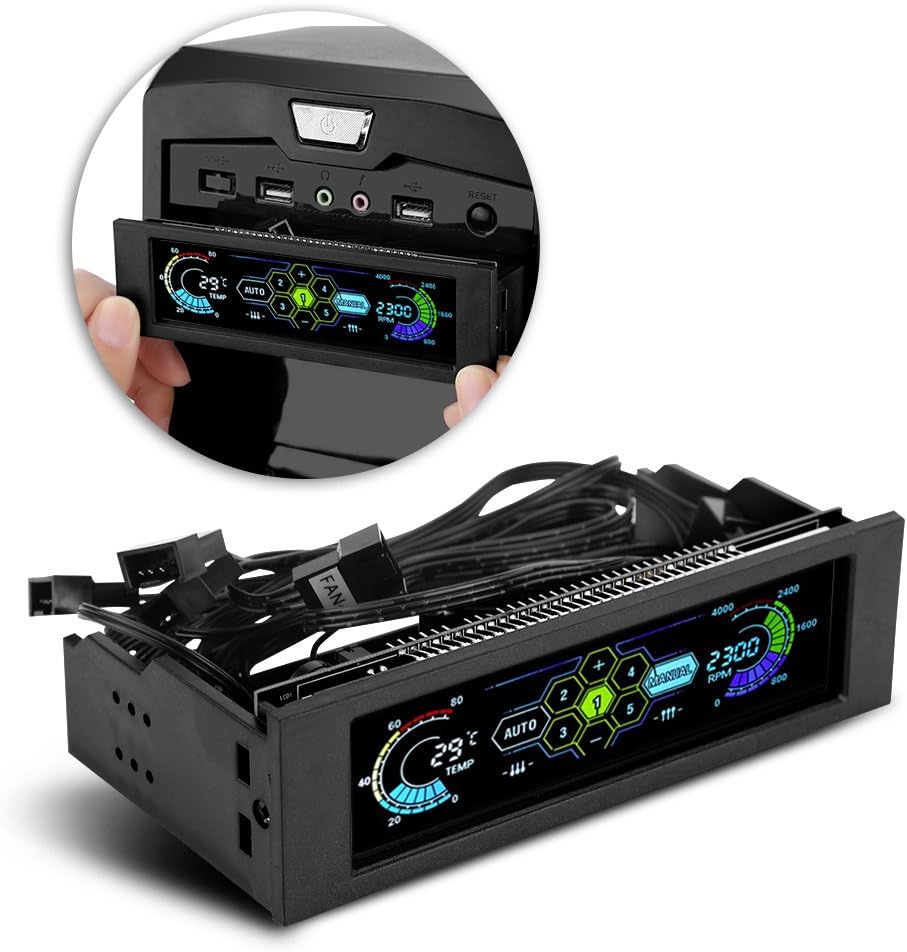
SaiDian 1Pcs 5.25 inch Fan Speed Controller
3.9Editor score
Affordable price point
Basic LCD temperature readout
Three fan control groups
This guide compares the top front panel fan controller models for PC cooling, featuring LCD displays, PWM control, and temperature monitoring to optimize
Finding the right front panel fan controller helps manage airflow and reduce noise in your PC build. A good unit offers precise speed control and real-time temperature monitoring to keep hardware safe.
We evaluated ten top models based on display quality, control options, and build durability. Each product was analyzed for compatibility with standard fans and ease of installation in most computer cases.
Each pick highlights unique strengths like LCD screens or PWM support to help you choose. Prices and availability may change, so check current listings before making your final purchasing decision.
3.9Editor score

5.0Editor score

4.2Editor score
The following table provides a side-by-side comparison of all ten models reviewed in this guide. Each entry lists key specifications to help you quickly identify which controller fits your specific cooling needs and case layout.


This controller stands out with its clear LCD display and robust safety features. It earns a top rating due to its reliable performance and precise fan speed control options.
We may earn a commission when you buy through this link, at no additional cost to you.
The wide LCD screen shows four sets of fan speeds and temperatures at once. This visibility helps you monitor system health without opening software interfaces on your desktop.
While it is limited to four channels, the PWM circuit reduces high frequency noise effectively. This trade-off ensures quiet operation while maintaining strong cooling performance for standard builds.
Anyone seeking a reliable way to manage case fans should consider this unit. It balances functionality and ease of use perfectly for most computer case layouts.
The display shows multiple fan speeds and temperatures simultaneously for total system visibility.
An alarm sounds when temperatures exceed safe limits to protect your hardware from overheating.
We may earn a commission when you buy through this link, at no additional cost to you.
This unit offers a flexible mix of automatic and manual control modes for varied user needs. The large LCD screen provides constant updates on system conditions without needing software.
We may earn a commission when you buy through this link, at no additional cost to you.
You can manage up to five fans and set alarm temperatures between forty and ninety degrees. This flexibility makes it suitable for users who want detailed control over their cooling setup.
The hard disk state monitor is a unique feature that helps track storage health alongside cooling data. However, the setup process may take more time than simpler models.
Ideal for those needing extensive fan control and disk monitoring in one panel. It supports diverse cooling needs with its adaptable interface and strong monitoring capabilities.
Switch between automatic and manual modes to suit different performance or noise preferences.
Track hard disk status alongside fan speed for a complete view of system health.
We may earn a commission when you buy through this link, at no additional cost to you.
This model delivers essential control features at a budget-friendly price. It includes a large screen for temperature readouts and handles three fan groups effectively for basic cooling needs.
We may earn a commission when you buy through this link, at no additional cost to you.
Users can manually or automatically adjust fan speeds and set alarm temperatures to prevent hardware damage. The fan jam alarm ensures immediate alerts if a fan stops working unexpectedly.
While it lacks advanced features like hard disk monitoring, it covers core cooling tasks well. The trade-off is lower cost and simplicity, which suits entry-level builders perfectly.
Best for those needing basic fan control without spending extra on advanced features. It provides reliable performance and essential safety alerts for standard PC cooling setups.
Get essential temperature and speed monitoring without breaking your budget on advanced features.
Fan jam alarms help prevent overheating by alerting you to potential hardware failures immediately.
We may earn a commission when you buy through this link, at no additional cost to you.
This controller stands out for its RGB LCD screen and extensive six channel control options. It offers premium features like six temperature sensors and short circuit protection for advanced builds.
We may earn a commission when you buy through this link, at no additional cost to you.
You can control up to six fans independently and even manage LED strips for added visual flair. This level of customization makes it ideal for users focused on aesthetics and performance.
While the price is higher, the added control and safety features justify the cost for enthusiasts. It is a robust choice for complex builds needing detailed thermal and visual management.
Ideal for users wanting maximum fan control and RGB integration in one panel. It combines advanced safety and monitoring features with premium design elements for top-tier setups.
Control compatible LED strips alongside fan speed for a fully customized system look.
Six sensors allow precise thermal monitoring across multiple zones of your computer case.
We may earn a commission when you buy through this link, at no additional cost to you.
This controller offers four independent channels with clear LCD display options for monitoring. It features robust safety functions like acoustic alarms and fan monitoring to ensure reliable operation.
We may earn a commission when you buy through this link, at no additional cost to you.
Users can choose between manual or automatic regulation to optimize cooling based on temperature sensors. The panel is built from aluminum alloy with multiple matte finishes for durability and style.
The double safety function adds extra reliability by detecting possible fan standstills automatically. This design helps prevent overheating issues even if a fan fails unexpectedly during operation.
Best for users needing four channels with reliable safety features at a moderate price. It balances build quality with functional controls for a consistent cooling performance experience.
Adjust four separate fans individually to target hotspots while maintaining system balance.
Acoustic alarms and standstill detection provide timely alerts to prevent hardware damage.
We may earn a commission when you buy through this link, at no additional cost to you.
This model provides ten individual PWM ports for extensive fan management in large builds. It supports both Windows and Linux systems, offering driver compatibility for advanced users.
We may earn a commission when you buy through this link, at no additional cost to you.
You can manage every fan independently without relying on motherboard limitations. The design centralizes cable management, reducing clutter and making installation cleaner and more efficient.
While it lacks an onboard LCD, the software control offers precise tuning options. This makes it suitable for users who prefer digital monitoring over physical display panels.
Ideal for complex builds needing ten or more PWM fans without clutter. It provides robust current output and driver support for flexible system cooling solutions.
Ten ports allow extensive fan setups without needing additional hubs or splitters.
Native driver support lets you use your preferred monitoring tools on multiple OS platforms.
We may earn a commission when you buy through this link, at no additional cost to you.
This compact controller is perfect for manual control of standard 4-pin PWM fans. It includes a useful no stop mode to prevent BIOS errors by maintaining a minimum fan speed.
We may earn a commission when you buy through this link, at no additional cost to you.
The package includes a three-way splitter cable allowing you to control up to three fans at once. Its small design makes it easy to fit inside a case without using a drive bay.
While it lacks a display or auto modes, the six year warranty speaks to its high quality. This trade-off ensures long-term reliability for users who prioritize simplicity and durability.
Best for users needing a simple reliable way to manage PWM fans manually. Its compact build and long warranty make it a great value for basic cooling needs.
Small size fits inside the case without requiring an optical drive bay installation slot.
Six years of coverage ensures peace of mind regarding long term reliability and performance.
We may earn a commission when you buy through this link, at no additional cost to you.
This kit includes a fan hub and temperature probe for versatile control in various setups. It supports both auto and manual modes with a digital display showing temperature and fan speed.
We may earn a commission when you buy through this link, at no additional cost to you.
It accepts a wide voltage range and offers over voltage protection for safe long term use. The memory feature keeps settings even after power cycles, ensuring consistent performance.
While it requires some setup effort, the flexibility makes it great for projects beyond PCs. This includes aquariums, greenhouses, or server cabinets needing thermal regulation.
Ideal for users needing adaptable control across different projects beyond standard PCs. Its wide voltage support and protective features ensure safe operation in varied environments.
Beyond PCs, it can regulate temperature in greenhouses or aquariums effectively.
Built-in protection against reverse polarity and over current ensures safe operation.
We may earn a commission when you buy through this link, at no additional cost to you.
This controller provides four channels and an LCD display for standard temperature monitoring. It features a high temperature alarm and alloy panel construction suitable for most chassis types.
We may earn a commission when you buy through this link, at no additional cost to you.
Users can adjust fan speeds using PWM circuits to reduce noise while maintaining performance. The display shows four sets of temperatures allowing for quick status checks during operation.
While it may have basic features compared to premium models, it covers essential cooling tasks. This makes it a practical choice for users prioritizing core functions over advanced features.
Best for users needing basic four channel control with essential safety alerts. Its standard design fits most cases and offers reliable performance at an affordable price point.
Core features like LCD displays and alarms provide essential thermal oversight without complexity.
PWM circuits adjust speed to reduce high frequency noise effectively during operation.
We may earn a commission when you buy through this link, at no additional cost to you.
This unit supports five groups of fans with a big LCD screen for easy monitoring. It includes auto manual mode switches and hard disk status display for comprehensive system oversight.
We may earn a commission when you buy through this link, at no additional cost to you.
You can set alarm temperatures between forty and ninety degrees to prevent hardware overheating. When fans break down, the system alerts you immediately to ensure continued protection.
While it has a lower rating, it offers standard features suitable for basic cooling needs. This makes it a functional option for users managing multiple fans without complex control needs.
Ideal for users needing five fan control with basic alarm monitoring features. It balances essential functionality with standard design for typical computer case cooling requirements.
Control five separate fan groups to ensure all case areas stay cool during use.
Real-time alerts notify you instantly when a fan fails or temperatures rise dangerously.
We may earn a commission when you buy through this link, at no additional cost to you.
Choosing the right controller depends on your case layout and cooling needs. This guide explains the key factors to consider before making your final decision.
Ensure the controller supports enough fan channels for your build. Most models handle three to six fans, but some offer ten or more for larger setups. Check if the ports support 3-pin or 4-pin PWM fans.
Match the number of ports to your fan count to avoid overloading channels. A good fit ensures balanced airflow without needing extra splitters.
Look for an LCD display that shows fan speeds and temperatures clearly. Some units offer larger screens with detailed readouts, while others keep it simple for basic monitoring.
A clear display helps you spot overheating issues immediately without relying on software. This visual feedback is crucial for quick adjustments during heavy use.
Decide whether you prefer manual knobs or automatic temperature-based adjustments. Automatic modes adjust fan speed based on sensor data, while manual knobs give you full control over RPM.
Automatic modes are easier for passive cooling, while manual modes suit performance tuning. Some controllers offer both options for maximum flexibility.
Prioritize units with built-in temperature alarms and fan failure detection. These features protect your hardware by alerting you before damage occurs from overheating.
An alarm system is essential for long-term reliability in high-performance builds. It acts as a fail-safe when software monitoring isn't running.
Confirm the controller fits your case bay, typically 5.25 inches. Some compact units can be mounted internally without using a visible slot, which saves space.
Proper fit ensures the controller is secure and does not interfere with drive mounts. Measure your bay before purchasing to avoid compatibility issues.
Look for aluminum alloy panels with matte finishes for durability and better heat dissipation. High-quality capacitors and components extend the lifespan of the unit inside the case.
A robust build ensures the controller withstands heat over time without failure. This adds value to your overall cooling system investment.
Check the current output per port and total power limits. Standard fans usually require less than 1A, but high-performance models may demand more per channel.
Matching power limits prevents overloading the controller and ensures stable fan speeds. This is critical for maintaining consistent cooling performance.
Budget models offer basic features while premium units add advanced controls like RGB or software support. Always compare warranty terms to protect your purchase from manufacturing defects.
A longer warranty indicates manufacturer confidence in the product's quality. This is a key factor when spending more on high-end controllers.
Install the controller in a 5.25-inch drive bay or mount it internally according to the manual. Connect the fan power leads to the matching channels and plug the sensor probes into the designated ports for accurate temperature readings.
Adjust fan speeds using knobs or automatic settings to balance noise and cooling. Regularly check the display for temperature spikes or warning alarms that indicate fan failures or overheating issues.
Keep the panel clean and dust-free to maintain clear visibility. If you notice wiring issues, ensure connectors are secure and cables are not pinched near sharp case edges.
A front panel fan controller allows you to manage case fan speeds directly without software. It helps reduce noise, monitor temperatures in real time, and alerts you to potential cooling failures before they damage hardware.
Most controllers support standard 3-pin and 4-pin PWM fans, but compatibility depends on the model. Check the product specs to ensure your fan type matches the controller's input requirements for proper operation.
Standard controllers handle between three and six fans independently, while some high-end models support up to ten or more. The exact number depends on the number of channels provided by the specific unit.
No, most panel controllers operate independently without software installation. They feature physical knobs or buttons on the display for direct control, though some models may include optional software features.
Most models are designed for 5.25-inch bays, but some compact versions can be mounted inside the case without a visible slot. Always check the dimensions and mounting options before buying.
Look for units with temperature alarms, fan failure detection, and short circuit protection. These features help prevent overheating and hardware damage by alerting you to issues immediately.
Yes, some versatile controllers with adjustable voltage ranges are suitable for aquariums, greenhouses, or server cabinets. Check the voltage requirements and port types to ensure compatibility with your project needs.
Reset options vary by model, so check the manual for specific steps. Some units allow simple manual overrides, while others may require a reset button or reconnecting power to clear settings.
This guide reviewed ten models ranging from budget-friendly options to premium controllers with RGB displays. The STW-6041 stands out as the top pick for its clear display and reliable safety features.
Prioritize your needs by balancing channel count with display clarity and safety alerts. Manual control suits performance tuning while automatic modes help maintain quiet cooling without constant adjustments.
Check current listings for availability and compatibility with your specific case before buying. Prices may vary, so comparing options ensures you get the best value for your system.