
ORICO 5.25 Trayless Hot Swap Mobile Rack
4.1Editor score
Affordable stainless steel construction
Tool-free mounting process
Supports hot swapping easily
Hot Swap SATA Mobile Racks provide a reliable way to manage storage drives in servers and workstations without opening the chassis. They allow technicians to insert and remove drives quickly while the system runs, which is essential for data centers and media production environments.
We evaluated ten top-rated models based on build materials, connector durability, cooling features, and ease of installation. Our analysis focuses on trayless versus tray-based designs, bay compatibility, and the reliability of hot-swap mechanisms under frequent use.
Each pick highlights key strengths and trade-offs to help you choose the right rack for your specific needs. Prices fluctuate often, so check current listings before purchasing to ensure you get the best value for your configuration requirements.
4.1Editor score

4.4Editor score

5.0Editor score
As an Amazon Associate we earn from qualifying purchases.
This comparison table lists all ten models side by side so you can quickly check bay compatibility and key features.




The StarTech 3.5in SATA Trayless Mobile Rack stands out as a top choice for its simple yet reliable design. It earns a strong rating for allowing users to insert and remove 3.5 inch drives without tools or trays, which speeds up maintenance tasks significantly.
We may earn a commission when you buy through this link, at no additional cost to you.
Its internal rubber shock absorbers and solid aluminum construction protect your drives from physical damage during frequent swapping. The lockable drive bay ensures that only authorized personnel can access the storage, making it suitable for shared work environments where security matters.
While it lacks activity LEDs, the mechanical reliability and high insertion rating of over 50,000 cycles make up for this minor omission. Technicians who prioritize durability and speed over visual indicators will find this rack performs consistently under heavy use.
This model is ideal for IT professionals or home server users who need a quick and secure way to manage 3.5 inch SATA drives. It delivers excellent value for its price and remains a trusted option in professional data management setups.
The trayless design allows you to slide drives directly into the connector without mounting screws, saving time during hot swaps.
Rubber shock absorbers absorb vibrations and impacts, reducing the risk of drive failure during insertion and removal cycles.
We may earn a commission when you buy through this link, at no additional cost to you.
The ICY DOCK Dual 2 Bay 2.5 SSD & HDD Dock is built to handle compact storage solutions with ease. It supports both SATA and SAS interfaces, making it versatile for users who mix traditional HDDs with faster SSDs in a single bay.
We may earn a commission when you buy through this link, at no additional cost to you.
Its door-less design and individual eject buttons make drive swapping intuitive. The built-in activity lights tell you at a glance if a drive is active, which is helpful when managing multiple drives in a server rack or workstation environment.
Active Power Technology ensures LEDs only power up when a drive is present, reducing unnecessary power draw. The three-year warranty adds confidence for businesses relying on this rack for daily operations without worrying about premature failure.
This dock is perfect for system builders or IT admins who need to test or swap 2.5 inch drives frequently. It offers a balanced mix of features and reliability that suits both industrial automation and standard server setups.
Compatible with both SATA and SAS drives up to 12Gbps, allowing you to mix and match storage types as needed.
Active Power Technology only powers LEDs when drives are installed, helping to save energy and reduce heat.
We may earn a commission when you buy through this link, at no additional cost to you.
The StarTech.com 2 Drive 2.5in Trayless Hot Swap backplane is designed to maximize space efficiency by fitting two drives into a single bay. It works seamlessly with SATA I, II, and III drives, providing broad compatibility for older or newer storage systems.
We may earn a commission when you buy through this link, at no additional cost to you.
Its open-top design and vented slot divider promote passive heat dissipation, which helps maintain optimal drive temperatures during heavy workloads. The inclusion of SATA power and data cables simplifies installation, so you do not need to source extra parts.
Individual power and activity LEDs for each slot make monitoring simple. While the lack of a door may expose drives to dust, the aluminum body provides strong structural support, making this a reliable choice for enclosed server cabinets.
This backplane suits technicians and IT professionals who need to expand storage density without adding extra chassis bays. It delivers reliable performance and solid build quality for environments where space is limited but capacity matters.
Converts a single 3.5 inch bay into two hot-swappable 2.5 inch slots, effectively doubling your storage density.
Vented slot dividers and open-top construction allow air to flow freely, preventing overheating during continuous use.
We may earn a commission when you buy through this link, at no additional cost to you.
The Kingwin Tray-Less Hot Swap Mobile Rack Cage combines durability with practical security through its key lock feature. It supports both SATA and SAS interfaces, giving users flexibility when selecting drives for enterprise systems or personal storage projects.
We may earn a commission when you buy through this link, at no additional cost to you.
Its construction uses high quality ABS and metal materials to maintain ideal operating temperatures. The cage design holds drives securely while allowing easy access, and the LED indicators confirm power and activity status without opening the chassis.
While the cage may slightly restrict airflow, its sturdy build ensures drives stay stable during movement. This makes it a good option for portable or mobile computing setups where physical shock resistance is critical alongside hot swap capability.
Ideal for professional users who need secure and reliable drive management in cloud computing or media backup systems. The combination of security, performance, and build quality makes it a trusted choice for demanding server applications.
Built-in key lock allows you to secure drives against unauthorized physical access in shared environments.
Metal and ABS materials help dissipate heat effectively, extending drive life under continuous operation.
We may earn a commission when you buy through this link, at no additional cost to you.
The ICY DOCK MB326SP-1B 6-Bay Mobile Rack delivers exceptional storage density by fitting six 2.5 inch drives into a single 5.25 inch bay. Its perfect rating reflects outstanding build quality and the effectiveness of its active cooling and power management systems.
We may earn a commission when you buy through this link, at no additional cost to you.
Dual 40mm fans ensure drives stay cool even when all six bays are populated. Active Power Technology only energizes LEDs when drives are present, reducing power waste. The ExpressTray mounting system allows tool-less installation without compromising stability.
Though more expensive than simpler racks, the performance and density justify the cost for enterprise users. Individual LED indicators help you monitor each drive's status instantly, making it easier to maintain large storage arrays without confusion.
This rack is best suited for data centers, media servers, or cloud computing setups that need high capacity and reliability. It sets a premium standard for hot-swap enclosures with its comprehensive feature set and robust design.
Six drive bays in a single 5.25 inch slot maximize your available space for critical storage needs.
Dual fans and active power management ensure optimal drive temperatures while reducing unnecessary energy use.
We may earn a commission when you buy through this link, at no additional cost to you.
The ICY DOCK ExpressCage MB324SP-1B 4 Bay model offers a practical balance between capacity and build quality. It supports four 2.5 inch drives in a single bay, making it a strong choice for workstations that need moderate storage density without extra chassis expansion.
We may earn a commission when you buy through this link, at no additional cost to you.
Its durable metal enclosure and ABS trays provide sturdy protection for drives during insertion. The locking latch design ensures secure connector contact, while individual blue LEDs let you monitor each bay's activity status independently and effectively.
Three-speed fan control gives you flexibility between performance and noise levels. While it lacks SAS 12Gbps support, it handles standard SATA 6Gbps speeds well, which is sufficient for most backup or media streaming applications requiring hot-swap functionality.
This enclosure is ideal for users who want reliable four-bay access with solid cooling and easy tool-less mounting. It delivers consistent performance and durability that meets professional and enthusiast needs alike.
Locking latches keep SATA connectors firmly in place, preventing accidental disconnections during hot swaps.
Adjustable fan speeds let you balance cooling performance with noise levels depending on your environment.
We may earn a commission when you buy through this link, at no additional cost to you.
The ORICO 5.25 Trayless Hot Swap Mobile Rack is designed for budget-conscious users who need a quick and reliable way to swap drives. It supports standard 3.5 inch SATA drives and allows tool-free mounting, which simplifies installation for home or office use.
We may earn a commission when you buy through this link, at no additional cost to you.
Its stainless steel construction helps dissipate heat efficiently, protecting your drives during operation. The on/off button on the front lets you control the connection state easily, and it supports hot swapping without slowing down your running system.
Though it lacks advanced features like LEDs or locks, it provides solid performance at a low price. This makes it a practical choice for occasional use or for systems that do not require enterprise-grade durability or high frequency swapping.
This rack is recommended for casual users or small offices that need a cost-effective drive expansion solution. It meets basic hot-swap needs reliably without unnecessary complexity or added cost.
No screws or trays are needed to mount your drive, so you can swap it in minutes.
Stainless steel body conducts heat away from the drive, helping to prevent overheating.
We may earn a commission when you buy through this link, at no additional cost to you.
The Rosewill Internal Hard Drive Enclosure expands storage capacity by converting three 5.25 inch bays into four 3.5 inch drive slots. It supports SATA and SAS interfaces, allowing flexible drive options for systems needing large capacity HDDs with hot-swap capability.
We may earn a commission when you buy through this link, at no additional cost to you.
Its engineered cooling system includes a rear 120mm exhaust fan that produces effective airflow to keep drives cool. The steel and ABS construction ensures long-term durability, and the hot-swap functionality lets you replace drives without shutting down your system.
While it consumes three optical drive bays, this trade-off is acceptable for users needing multiple large drives. The rugged design makes it suitable for servers or media centers where physical protection and reliable cooling are critical.
This enclosure is best for systems that need high capacity storage in a compact form factor. It offers dependable performance and robust construction for demanding storage configurations.
Turns three optical bays into four 3.5 inch drive slots for maximum storage density.
A dedicated 120mm exhaust fan ensures consistent cooling across all installed drives.
We may earn a commission when you buy through this link, at no additional cost to you.
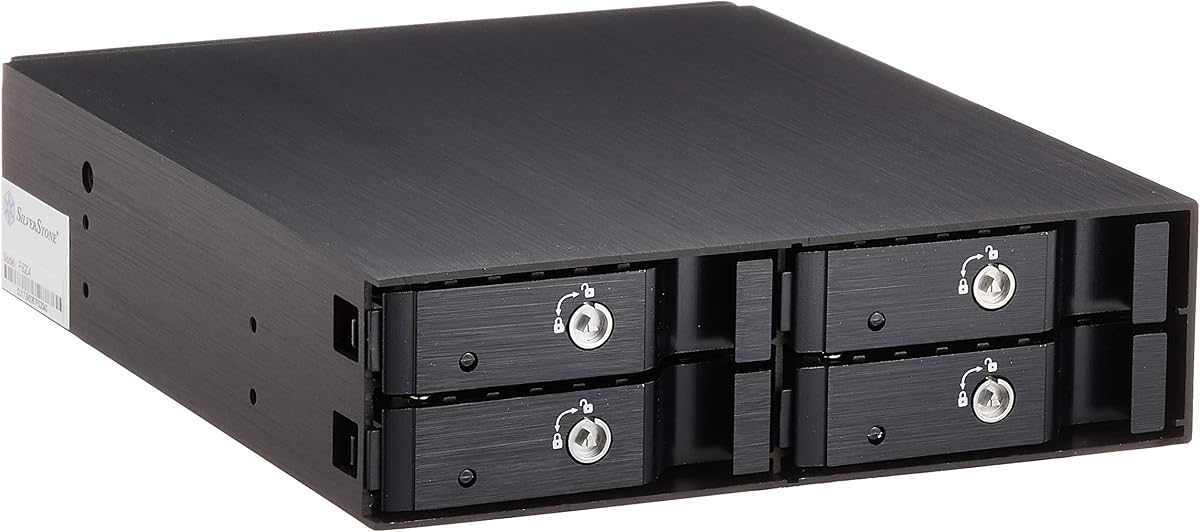
The Silverstone SST-FS204B combines premium aesthetics with functionality through its all aluminum construction and individual metal key locks. It fits four 2.5 inch SAS or SATA drives in a single 5.25 inch bay, making it suitable for high-end workstations or small server builds.
We may earn a commission when you buy through this link, at no additional cost to you.
Its built-in cooling fan ensures excellent heat dissipation even when all slots are filled. Independent drive status LEDs provide clear monitoring, and the brushed aluminum finish offers a polished look that matches professional server hardware.
While it is more expensive, the security and build quality justify the cost for users who value reliability and appearance. Each drive can be locked individually, which is valuable in shared or public computing environments.
This rack is ideal for professionals who need secure, stylish, and efficient drive management. It delivers a premium experience with solid cooling and protection for your valuable data drives.
Each bay has its own metal key lock, giving you precise control over drive access.
Brushed aluminum body complements high-end server hardware and looks great in open chassis builds.
We may earn a commission when you buy through this link, at no additional cost to you.
The LYNICESHOP 5-Bay Mobile Rack Backplane offers a unique solution by creating five drive positions from three standard optical drive bays. Its aluminum alloy and plastic construction ensures durability while the cooling fan maintains stable operating temperatures for connected drives.
We may earn a commission when you buy through this link, at no additional cost to you.
Dual power supply design adds safety and stability, reducing risks of power failures during operation. It supports both 3.5 and 2.5 inch drives with SATA interfaces, giving you flexibility when configuring your storage setup for different drive types.
Though less common than other models, its high rating reflects customer satisfaction with performance and design. The compact footprint makes it ideal for systems where space is limited but you still need multiple hot-swap drive slots.
This backplane is recommended for enthusiasts and professionals looking for efficient space usage. It delivers reliable operation and strong build quality for those who value innovative storage design.
Uses three optical bays to create five drive slots, maximizing storage without expanding the case.
Dual power supplies reduce failure risks, ensuring stable operation for your storage array.
We may earn a commission when you buy through this link, at no additional cost to you.
Choosing the right Hot Swap SATA Mobile Rack depends on your specific storage needs and system configuration. Here are the key factors to consider before making your decision.
Check whether the rack supports 2.5 inch or 3.5 inch drives. Some models are designed exclusively for one size, while others offer adapters to handle both. Ensure your existing drives match the rack specifications to avoid installation issues.
Always verify compatibility with your drive size before purchasing to prevent fitting problems.
Determine how many drive bays you need. Single-bay racks are simple and space-efficient, while multi-bay options allow multiple drives per slot. Consider how many drives you plan to swap regularly and the available drive bays in your chassis.
Choose a bay count that matches your typical storage requirements without wasting space.
Trayless racks let you slide bare drives directly into the connectors for faster swaps. Tray-based designs require mounting drives in trays first, which adds steps but offers more protection. Select based on how often you swap drives and whether security matters.
Trayless is faster, while tray-based offers more protection for sensitive drives.
Look for racks made from aluminum or steel for better heat dissipation and durability. Plastic models may be cheaper but can deform under heat or heavy use. High-quality materials help protect your drives from physical damage and extend the rack's lifespan.
Metal builds last longer and manage heat better than plastic alternatives.
Some racks include fans or vented designs to keep drives cool during heavy use. Others rely on passive cooling which may not be enough for all drivesays. Ensure the rack has adequate airflow to prevent drive overheating.
Active cooling is recommended for multi-bay or high-performance drives.
Hot-swap racks undergo many insertion cycles, so connectors must be robust. Look for ratings like 50,000 insertion cycles to ensure long-term reliability. Weak connectors can fail prematurely and cause data loss.
Prioritize models with high insertion ratings for frequent swapping needs.
If your drives contain sensitive data, choose a rack with locking mechanisms. Key locks on individual bays prevent unauthorized physical access. This is essential for public or shared systems.
Use racks with locks to protect drives in shared environments.
Ensure the rack supports the SATA version your drives use. Most modern racks support SATA III but older models may only handle SATA I or II. Compatibility with SAS interfaces may also be important for server setups.
Confirm interface support matches your drive speed to avoid bottlenecks.
To use your rack, install it into a compatible 5.25 inch or 3.5 inch bay in your computer chassis. Connect the SATA data and power cables to the motherboard and power supply before inserting drives.
Insert or remove drives only when the system is powered on to use hot-swap functionality. Press the eject button if available, slide the drive out gently, and wait for the activity light to stop before removing a drive completely.
Clean the rack periodically to remove dust that could block cooling vents. Check connectors for damage and ensure the tray locks are secure to prevent accidental removal during operation.
A Hot Swap SATA Mobile Rack lets you insert or remove SATA hard drives without shutting down your computer. This is useful for servers, backup systems, and workstations where quick drive access is needed without interrupting operations.
Yes, many desktops have 5.25 inch or 3.5 inch bays that can accommodate these racks. You need to connect the rack to your motherboard via SATA data cables and to your power supply with a SATA power connector.
Most modern racks do, but you must ensure your system supports hot plugging. Check that your motherboard and operating system allow drive insertion while running to avoid errors or data corruption.
Trayless racks allow direct drive insertion without mounting trays, which is faster. Tray-based racks require mounting the drive in a tray first, offering more protection but taking more time to swap drives.
Most single bay racks hold one drive, while multi-bay versions can hold two to six drives in a single 5.25 inch slot. Capacity depends on the model and whether it supports 2.5 or 3.5 inch drives.
No, most racks are plug and play and do not need drivers. The operating system should recognize the drive automatically once it is connected via SATA interface and power.
Removing a drive during active write operations can corrupt data. Always wait for the activity light to indicate the drive is idle before ejecting it, and use safe removal features in your operating system.
Some racks can fit in NAS units that have optical drive bays, but dedicated NAS bays are usually preferred. Check your NAS model specifications to ensure physical and electrical compatibility before purchasing.
The ten models reviewed here offer a range of options from budget-friendly single-bay racks to premium multi-bay solutions with advanced cooling. The StarTech trayless design and ICY DOCK multi-bay enclosures stand out for reliability and features.
Prioritize build quality, cooling, and connector durability when choosing a rack. Your selection should align with how often you swap drives and the physical space available in your computer case.
Prices change often, so verify current listings and availability before purchasing. This ensures you get the best value for your specific storage management needs.