
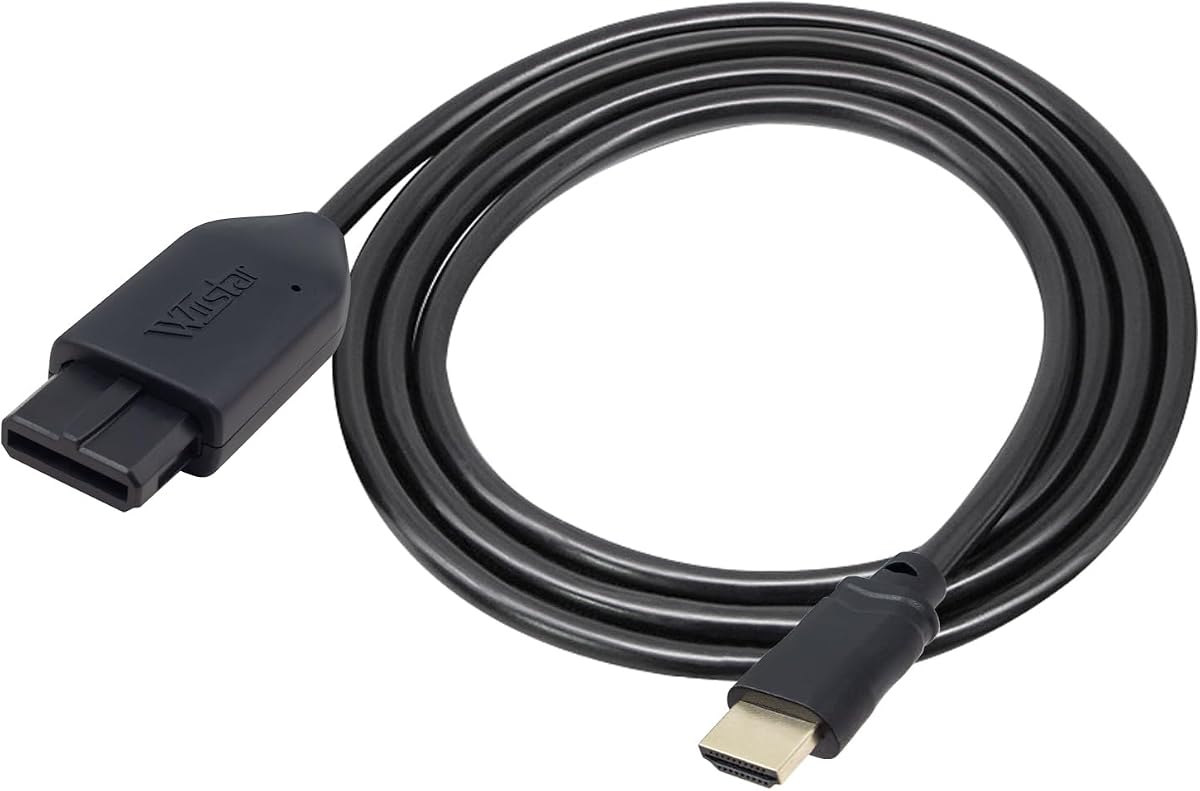
HDMI Adapter for N64 Game Cube SNES
4.2Editor score
Includes HDMI cable
Supports 720p 1080p
No power adapter needed
This guide compares the top GameCube HDMI adapters for modern TVs, evaluating compatibility, signal quality, and ease of use to help you choose the right one.
Finding the right GameCube HDMI adapter can transform your retro gaming experience on modern displays. These devices convert analog signals to digital, ensuring compatibility with today's high-definition televisions and monitors without sacrificing visual fidelity.
We evaluated ten leading adapters based on compatibility with DOL-001 consoles, signal processing quality, and ease of setup. Our analysis focuses on real-world performance, firmware support, and additional features like scanlines or aspect ratio switching.
Each pick highlights specific strengths such as budget friendliness or advanced customization options. Note that prices and availability may change frequently, so verify current listings before purchasing to ensure you get the best value for your setup.
4.2Editor score

4.6Editor score

4.4Editor score
The following table provides a side-by-side comparison of all ten selected adapters. Review each specification carefully to determine which model aligns best with your console version and display requirements.



The Kaico GameCube HDMI Adapter stands out as the top choice for enthusiasts seeking high fidelity and convenience. It offers superior image clarity compared to standard AV cables and supports resolutions up to 480p. Its integrated GCVideo OS allows deep customization without requiring extra power.
We may earn a commission when you buy through this link, at no additional cost to you.
This adapter enhances picture quality with Line Doubling and Scanlines features accessible via a programmed remote. The USB port simplifies firmware updates ensuring you always have the latest improvements. A 3D printed shelf reduces strain on the digital connector improving overall durability and functionality significantly.
While it is limited to DOL-001 consoles with a Digital Port the setup is simple plug-and-play with no difficult installations. The remote might require battery replacement which is a minor inconvenience. These trade-offs are acceptable given the level of control and image quality provided.
This model is ideal for serious retro gamers who want the best visual experience on modern TVs. It balances performance and ease of use perfectly making it our editor's choice. If you own a compatible console this adapter delivers exceptional results worth the investment.
The remote allows quick selection of Line Doubling and Scanlines to match your TV preferences easily.
The included 3D printed shelf protects the digital connector from strain and potential damage over time.
We may earn a commission when you buy through this link, at no additional cost to you.
This adapter is a budget-friendly option that supports N64 GameCube and SNES consoles effectively. It converts analog signals to 720p or 1080p for HDTV display without noticeable lag. The included HDMI cable simplifies the setup process significantly for new users.
We may earn a commission when you buy through this link, at no additional cost to you.
Its easy-to-use design ensures that legacy systems run smoothly on newer TVs providing a better gaming experience overall. However an external power supply is required to function which adds slight complexity compared to passive adapters. This is a common trade-off for broader compatibility.
If the screen shows no sound or blue screen checking the connection is recommended. The manufacturer states they have undergone strict testing to ensure normal use which builds trust. For budget-conscious buyers this unit delivers reliable performance at a lower cost.
Choose this adapter if you need a simple multi-console solution without spending much. It is particularly useful for casual gamers who prioritize ease of use over advanced tuning options. The value proposition here is strong for basic retro gaming needs.
Works well with N64 GameCube and SNES so you can use one adapter for multiple retro systems.
Everything needed is included in the box including the HDMI cable for a quick start.
We may earn a commission when you buy through this link, at no additional cost to you.
The BITFUNX adapter delivers premium performance with full digital HDMI format and zero transmission loss. It supports all NGC display modes including 240p and 480p ensuring compatibility with various game types. The GC2SD Gen2 feature allows storage expansion and homebrew software support.
We may earn a commission when you buy through this link, at no additional cost to you.
Video and audio quality benefit from advanced signal processing resulting in great precision colors and resolution. A small black bracket protects the adapter enhancing its durability during use. This model is perfect for users who want both visual clarity and system capabilities.
While it cannot be used as a standalone memory card it offers significant advantages when paired with a GameCube console. The USB port facilitates easy firmware updates keeping the device current with the latest improvements. This level of detail justifies the higher price point.
Enthusiasts seeking the ultimate retro setup should consider this adapter for its robust feature set. It bridges the gap between legacy hardware and modern display standards effectively. Your games will look and perform better than ever before with this high-end solution.
Supports homebrew software like Swiss and allows game backups via microSD cards for safety.
Advanced signal processing ensures colors and resolution are precise for a crisp gaming image.
We may earn a commission when you buy through this link, at no additional cost to you.
This converter is designed to handle analog composite input from various legacy systems and output 1080p HDMI. It supports multiple TV formats including PAL NTSC and SECAM making it versatile for international use. Setup is straightforward with plug and play functionality requiring no complex configuration steps.
We may earn a commission when you buy through this link, at no additional cost to you.
The device requires a 5V 1A power source via USB which is included but the power supply itself is not. This external power ensures stable operation when connected to modern displays. It is suitable for PS2 PS3 Xbox and other devices with standard AV inputs.
If you are not satisfied with the product the one-year warranty provides peace of mind. Customer support is accessible to resolve any issues that may arise during use. This unit is a solid choice for those needing a universal AV to HDMI solution.
Consider this adapter if you have multiple consoles or devices that use RCA connections. Its flexibility and broad compatibility make it a useful addition to any retro gaming setup. The clear picture quality ensures your games look good on modern screens.
Compatible with a wide range of devices including consoles and media players for broad utility.
Outputs 1080p HDMI to ensure your modern TV receives a high-quality signal directly.
We may earn a commission when you buy through this link, at no additional cost to you.
This all-in-one cable design simplifies the connection process by integrating the console port and HDMI plug. It converts analog RGB signals to digital HDMI with S-Video output for better picture quality than standard AV. The setup is clean and requires no extra power to work normally.
We may earn a commission when you buy through this link, at no additional cost to you.
Users report brighter and sharper images with small teeth removed providing a stunning gaming experience. The HDMI output supports 1080p60hz which ensures smooth motion for fast-paced games. However there is no support for 720p60hz which might limit some display options.
If you experience a blue screen check your connection method again to ensure proper setup. Reconnecting may resolve sound issues if they occur during gameplay. This model is great for those seeking simplicity without sacrificing too much visual quality.
Buy this adapter if you value a tidy and straightforward setup for your retro console. It effectively bridges the gap between older hardware and modern displays with minimal fuss. The balance of features and simplicity makes it a reliable choice.
Built-in console-specific ports eliminate the need for extra cables ensuring a clean and tidy setup.
S-Video signal output provides a cleaner image than standard composite cables for better clarity.
We may earn a commission when you buy through this link, at no additional cost to you.
This adapter supports NGC N64 and SNES consoles converting S-Video signals to digital HDMI for modern displays. The detachable design allows you to use high-end or extended HDMI cables if needed. It offers support for 4:3 and 16:9 aspect ratios via a toggle switch.
We may earn a commission when you buy through this link, at no additional cost to you.
The unnoticeable lag ensures responsive gaming which is crucial for competitive play. Precision in colors and resolution is maintained at this price point providing awesome image quality overall. Replacement without asking within 365 days is offered for added customer confidence.
Ensure you have the correct cables ready before starting to avoid confusion. The well-prepared cables included help streamline the initial setup process effectively. This model is ideal for users who want to play multiple systems with one device.
Opt for this adapter if you own N64 SNES or GameCube and want a unified solution. Its versatility and aspect ratio control make it a practical choice for varied gaming libraries. You get reliable performance without needing multiple converters.
Detachable design allows for using longer or higher-quality HDMI cables depending on your TV setup.
Toggle switch allows easy switching between 4:3 and 16:9 formats to match your TV.
We may earn a commission when you buy through this link, at no additional cost to you.
This adapter converts analog signals into crisp digital HDMI signals supporting resolutions up to 1080p. It connects seamlessly to modern displays including HDTVs monitors and projectors with an HDMI port. The design is user-friendly requiring no drivers or complicated software for operation.
We may earn a commission when you buy through this link, at no additional cost to you.
Users can switch between 4:3 and 16:9 aspect ratios easily to match display preferences. It ensures color accuracy and responsive performance which is critical for fast games. The upgraded power design allows normal operation without extra power though accessories may need it.
While there is no rating available the description promises stable signal transmission and lag-free gaming. It is designed to bring retro gaming to life on modern displays effectively. This model is suitable for those who need a reliable plug-and-play solution.
Choose this adapter if you want a simple way to display retro games on new TVs. Its broad compatibility and ease of use make it a strong contender for general retro needs. The upscaling helps ensure sharp visuals on high-resolution screens.
No drivers or software needed so you can connect and start playing in seconds easily.
1080P upscaler brings retro content to modern displays for a sharper and clearer picture.
We may earn a commission when you buy through this link, at no additional cost to you.
This adapter provides passthrough HDMI support for N64 SNES and GameCube consoles using analog ports. It does not need any additional power to work simplifying the setup process significantly. The all-in-one design ensures that all three consoles work well without messy cables.
We may earn a commission when you buy through this link, at no additional cost to you.
It supports SVideo and Composite outputs which offers flexibility in how you connect your devices. Plug and play functionality means you do not need to install additional software or hardware. A 12 months support warranty is included for added assurance.
Packaging may vary so be prepared for different box styles depending on supply chain. This unit is reliable for basic HDMI conversion needs without requiring complex configurations. It is a solid option for casual users who want quick results.
Buy this if you want a no-fuss adapter that handles multiple Nintendo consoles. The simplicity and warranty make it a safe choice for everyday gaming. You can focus on playing without worrying about setup complexity.
The all-in-one design avoids messy cables allowing you to connect directly to your console easily.
Support for SVideo and Composite outputs ensures compatibility with various console configurations.
We may earn a commission when you buy through this link, at no additional cost to you.
This adapter converts N64 GameCube and SNES signals to HDMI with a cable included for convenience. It supports 16:9 aspect ratio on HDTV providing a better gaming experience on modern screens. The design is simple to use with no external power required.
We may earn a commission when you buy through this link, at no additional cost to you.
If sound or blue screen appears check the connection to ensure success. The manufacturer provides 30 days return and refund along with 1 year replacement if problems arise. Customer service is available to solve issues quickly for buyers.
The lack of external power makes this adapter easy to set up anywhere. However you should test sound and video outputs to confirm proper connection. This unit is a good choice for standard retro gaming on HDTVs.
Choose this adapter if you want a straightforward solution with included cables. The return policy and support options add confidence to your purchase. It is effective for displaying classic games on newer televisions.
An HDMI cable is included in the package so you can connect your console immediately.
Supports 16:9 conversion for HDTVs allowing for a wider and more immersive viewing experience.
We may earn a commission when you buy through this link, at no additional cost to you.
This adapter converts S-Video signals from AV Multi-Out ports into HDMI for cleaner output than RCA. It does not upscale to HD resolutions but maintains original console resolution for fidelity. Includes a 1.5m HDMI cable with nickel-plated connectors to resist oxidation.
We may earn a commission when you buy through this link, at no additional cost to you.
No external power is required for normal use as the console provides sufficient power. Micro USB port is available for backup power in rare unstable situations. This ensures signal stability even if your display fluctuates slightly during gameplay.
The nickel-plated connectors help maintain stable signal transmission over time improving longevity. It is a simple plug-and-play solution for those who prefer unmodified output. This is ideal for purists who want original visuals without digital processing.
Select this adapter if you prioritize clean signal extraction over modern enhancement. The included cable and connector quality ensure a reliable connection for long term use. It bridges the gap between legacy ports and modern displays effectively.
Extracts S-Video signal path from AV Multi-Out port for a cleaner image than standard RCA composite.
Nickel-plated connectors resist oxidation and help maintain stable signal transmission for years.
We may earn a commission when you buy through this link, at no additional cost to you.
Selecting the right adapter involves understanding your console model and display needs. This section outlines critical factors to consider before purchasing.
Ensure the adapter supports your specific console model. Some require DOL-001 with a Digital Port while others work with standard AV ports. Mismatched compatibility can result in no signal.
Check the product specs carefully to confirm it fits your console version before buying.
Adapters vary between composite and S-Video signal handling. S-Video generally provides clearer images than composite. Choose based on the best signal your console can output.
Prioritize adapters that support S-Video if your console allows it.
Modern TVs expect higher resolutions. Some adapters upscale to 1080p while others maintain original resolution. Consider if you need upscaling or native fidelity.
Upscaling adapters work better on large screens but may lose subtle details.
Some models need external USB power while others draw from the console. External power adds stability but adds cables. Passive designs are simpler to set up.
Choose external power if you experience signal drops without it.
Adapters with USB ports allow firmware updates for better compatibility. This keeps the device working with new TVs over time. Check if updates are free and easy.
Update capability extends the adapter's lifespan significantly.
Look for features like scanlines or aspect ratio switches. These help mimic original CRT look on modern TVs. Such features improve the retro experience visually.
Choose adapters with these if you value authenticity.
Build quality affects long-term use. Look for reinforced connectors or protective brackets. Cheap plastic housings may fail quickly with heavy use.
Inspect product images for build robustness before buying.
A good warranty protects your investment. Check for repair or replacement options. Support availability ensures you can fix issues if they arise.
Prioritize brands with clear warranty policies.
Start by verifying your console's compatibility with the adapter. Ensure you have the right cables and connections ready for the setup process.
Connect the adapter to the console's AV port and plug the HDMI cable into your display. Turn on both devices and select the correct HDMI input on your TV.
Adjust display settings using any included remote or menu options. Clean connectors gently to prevent signal issues over time for better longevity.
Some adapters require DOL-001 consoles with a Digital Port for best results. Others work with standard AV ports but may need extra setup. Always verify compatibility before purchase.
Not all adapters need external power. Some draw sufficient energy from the console while others require USB power. Check product specs to see if a power source is needed.
Most adapters output up to 1080p which is sufficient for standard TVs. True 4K upscaling is rare and usually not supported by retro adapters directly. Check specs for resolution limits.
S-Video adapters provide cleaner and sharper images than composite ones. Composite combines color and brightness while S-Video separates them. Choose S-Video if your console supports it for best clarity.
Good adapters have minimal or no lag for responsive gameplay. Some budget models may add slight delay. Read reviews to confirm performance before buying.
Most adapters with USB ports allow updates via software on a PC. Connect to your computer and follow manufacturer instructions. Updates improve compatibility with newer displays.
We highlighted the Kaico and BITFUNX adapters as top choices for quality and features. Budget buyers may prefer simpler models like the N64 HDMI Adapter.
Prioritize compatibility and signal quality when deciding which adapter fits your needs best. Ensure your console and display work together seamlessly with the selected model.
Remember to check current prices and availability before purchasing to get the best deal. Retro gaming setups vary so choose the adapter that best suits your goals.