
Noctua NF-A9 PWM
4.8Editor score
Premium quiet fan design
Advanced acoustic optimization
Long lifespan rating
This guide compares the top 92mm case fans for quiet cooling and performance in small form factor builds and NAS systems.
Finding the right airflow solution for compact systems requires careful selection of size and noise levels. A good 92mm case fan balances static pressure with acoustic comfort to ensure stable temperatures without disturbing your workspace.
We evaluated ten leading models based on bearing technology, PWM control options, and real-world cooling efficiency. Each product was chosen for its reliability and ability to fit tight spaces like ITX cases or network storage units.
Every pick below highlights specific strengths such as low decibel operation or high RPM ranges for demanding heatsinks. Please note that stock availability and pricing may shift frequently across online retailers.
4.8Editor score

4.8Editor score

4.5Editor score
This table provides a side-by-side overview of key specifications and features for every model featured in this guide.


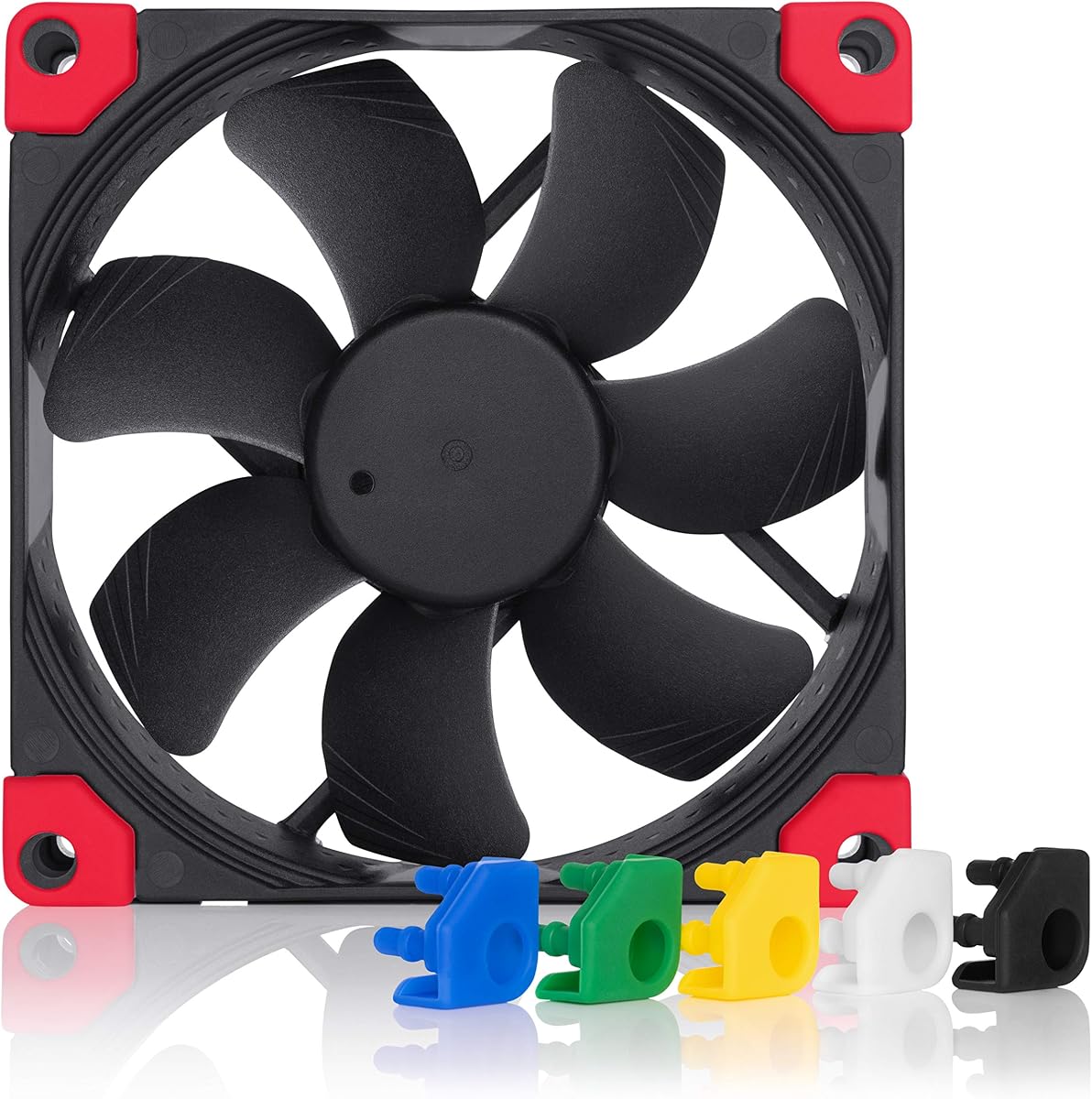


This premium fan delivers top-tier silence and cooling efficiency for compact builds. Its rating reflects strong user satisfaction with thermal management and noise levels.
We may earn a commission when you buy through this link, at no additional cost to you.
Key strengths include Flow Acceleration Channels and an optimized frame that reduce turbulence. The four pin connector allows precise speed control via motherboard headers.
Trade-offs involve a higher cost compared to budget alternatives. This investment is justified by its longevity and consistent performance over time.
Ideal for builders seeking a quiet upgrade for ITX cases or NAS units. We recommend it for those prioritizing acoustic comfort above all.
The frame design minimizes air turbulence to lower operational noise significantly.
Included mounts and adaptors ensure easy installation and flexible connectivity options.
We may earn a commission when you buy through this link, at no additional cost to you.
An exceptional value choice for budget conscious builders needing reliable airflow. It balances cost with effective cooling performance in small enclosures.
We may earn a commission when you buy through this link, at no additional cost to you.
The wide RPM range allows for flexible control from standstill to full speed. High static pressure ensures it works well on radiators or dense heatsinks.
Build quality is functional but not premium. Users should expect decent durability for the price without high-end materials.
Great for secondary cases or NAS upgrades where noise is a priority. Choose this if you need solid performance without spending much.
Passive Speed Control enables daisy chaining multiple fans through a single cable.
Friction reducing design maintains quiet operation across the full speed range.
We may earn a commission when you buy through this link, at no additional cost to you.
This model stands out for low profile CPU coolers requiring slim dimensions. Its ability to stop completely at zero percent PWM makes it a favorite.
We may earn a commission when you buy through this link, at no additional cost to you.
Performance remains strong due to AAO frame and flow acceleration features. The chromax black swap edition adds visual customization options via colored pads.
Limited to 14mm thickness may reduce airflow slightly versus standard models. This is a fair trade-off for fitting tight spaces without obstruction.
Perfect for SFF builds needing a quiet front intake or CPU exhaust. We endorse it for its unique blend of flexibility and performance.
The 14mm height avoids blocking nearby heatsink fins in compact cases.
Fans stop spinning at zero PWM for silent idle operation when loads are low.
We may earn a commission when you buy through this link, at no additional cost to you.
A dependable option for users needing a slim fan for cooler compatibility. It maintains the reputation of high quality and low noise operation.
We may earn a commission when you buy through this link, at no additional cost to you.
Features SSO2 bearing technology for smooth rotation and long service life. Blade geometry optimizes airflow for efficient cooling in restricted areas.
Lacks the color swap accessories of the chromax variant but offers similar performance. This simplicity helps reduce cost while keeping core functionality intact.
Recommended for replacing old stock fans in tight spaces. Choose this for stable cooling with minimal maintenance requirements.
This bearing design reduces friction to extend operational life significantly.
Blade shape ensures steady airflow without creating excessive noise.
We may earn a commission when you buy through this link, at no additional cost to you.
This fan offers a compelling mix of performance and value for desktop cooling. It works well as a case intake or CPU exhaust component.
We may earn a commission when you buy through this link, at no additional cost to you.
S-FDB bearings minimize friction while soft silicone feet reduce vibration. A seven blade design maximizes airflow while keeping noise levels low.
Build quality is solid but less refined than top tier brands. Expect minor frame flex that does not impact functional performance in practice.
Suitable for budget builds seeking effective cooling. It fits well in standard 92mm slots without issues.
Soft feet isolate vibration to prevent case resonance.
Fan design pushes warm air away from hot components efficiently.
We may earn a commission when you buy through this link, at no additional cost to you.
Designed for users needing quiet airflow without speed modulation. This model runs at a fixed speed to simplify control setups.
We may earn a commission when you buy through this link, at no additional cost to you.
High static pressure ensures efficiency when pushing air through radiators. Alloy lubricant bearings reduce heat buildup for stable operation.
Lack of PWM limits dynamic response to thermal demands. This trade-off ensures predictable performance with reduced control complexity.
Ideal for systems where constant quiet cooling is preferred. Use this if you do not require variable speeds.
Steady 1900 RPM provides consistent cooling without adjustments.
Fan design pushes air through dense components effectively.
We may earn a commission when you buy through this link, at no additional cost to you.
This edition combines standard performance with an all black aesthetic. Swappable pads allow users to match case colors easily.
We may earn a commission when you buy through this link, at no additional cost to you.
Maintains the high acoustic standards of the A series with low noise. Flow acceleration channels boost airflow efficiency without added sound.
Premium cost reflects quality materials and included accessories. Users get top tier reliability and a sleek look in one package.
Recommended for builds needing style and substance. It fits well in standard 92mm cases or CPU coolers.
All black components create a sleek unified look.
Multiple color options allow custom mounting styles.
We may earn a commission when you buy through this link, at no additional cost to you.
A slim profile model ideal for low clearance CPU coolers. High speed performance ensures aggressive cooling when thermal demands increase.
We may earn a commission when you buy through this link, at no additional cost to you.
Dimensions allow it to fit where standard 25mm fans cannot. Vibration damping pads keep noise low despite higher speeds.
Noise levels remain below 22dB even at full operation. This balance offers strong cooling without sacrificing quietness too much.
Great for compact builds needing maximum airflow in tight spaces. Use this for efficient heat dissipation.
15mm thickness avoids interference with tall components.
2700RPM provides strong cooling power for hot components.
We may earn a commission when you buy through this link, at no additional cost to you.
A classic choice for systems using 3-pin headers. It offers reliable airflow with simplified installation steps.
We may earn a commission when you buy through this link, at no additional cost to you.
Includes adaptors to reduce speed for quieter operation. This allows manual tuning without needing complex controllers.
Lacks the auto control of PWM but provides consistent performance. Adaptors are useful for fine-tuning noise levels easily.
Suitable for older motherboards or passive systems. Choose this if PWM is not available.
These adaptors allow users to lower speed and noise manually.
Standard 3-pin connection fits older systems perfectly.
We may earn a commission when you buy through this link, at no additional cost to you.
This model offers the widest speed range available in its category. It delivers high static pressure for demanding cooling scenarios.
We may earn a commission when you buy through this link, at no additional cost to you.
Fluid Dynamic Bearing ensures smooth operation across the range. Airflow is strong enough for dense radiator setups.
Noise increases significantly at top speeds but remains acceptable for most users. This flexibility allows tuning for performance or silence.
Great for high performance systems needing aggressive cooling. Use this for challenging thermal management tasks.
This bearing provides silent operation at low speeds.
Fan pushes air through dense heat exchangers effectively.
We may earn a commission when you buy through this link, at no additional cost to you.
Selecting the right fan involves balancing size, noise, and airflow needs for your specific case or cooler.
Look for fans with low decibel ratings to ensure a quiet workspace. Models with optimized frames often reduce unwanted turbulence.
Prioritize noise figures under 25dB for silent builds in shared spaces.
PWM fans offer four pin control for automatic speed adjustments based on system load. FLX fans use adaptors for manual speed reduction.
Choose PWM if you want automated cooling; FLX works for simpler setups.
High static pressure is vital when the fan pushes air through radiators or heat sinks. This prevents airflow blockage in tight spots.
Check mmH2O values to ensure the fan can overcome resistance.
Ensure the fan thickness matches your clearance limits. Standard 25mm fans are common but 14mm or 15mm models fit low profile coolers.
Measure available space before purchasing to avoid physical conflicts.
Fluid dynamic or SSO2 bearings reduce friction and extend lifespan. These designs also lower noise compared to sleeve bearings.
Select high quality bearings for reliable long term operation.
Some models offer chromax swaps or black designs for visual customization. Others use standard brown or beige frames for minimalism.
Pick a style that matches your build theme or color scheme.
Budget fans provide adequate performance for standard cases. Premium models offer better noise and durability but cost more.
Decide if acoustic comfort justifies the extra expense.
Included accessories like rubber mounts or y-cables simplify installation. Ensure the package has screws and adaptors for your headers.
Check accessory lists to avoid buying extra parts separately.
Install fans securely using rubber mounts to reduce vibration. Proper mounting ensures smooth operation and less noise during use.
Connect PWM fans to appropriate headers on the motherboard. This allows the system to manage speed automatically based on temperature sensors.
Clean dust from blades and frames regularly to maintain performance. Accumulated dust can unbalance the fan and increase acoustic output.
PWM fans have four pin connectors for automated speed control via motherboard headers. FLX fans use three pin connectors and physical adaptors to lower speed manually. PWM is more flexible for dynamic cooling.
Not necessarily. While 92mm fans are compact, they often require higher RPM to achieve similar airflow. This can lead to increased noise if not optimized properly for the application.
Yes, many low profile CPU coolers are designed for 92mm fans. Just verify the thickness matches the cooler's clearance to avoid obstruction.
Static pressure is the fan's ability to push air against resistance like filters or fins. High static pressure is essential for radiators or dust filters.
Chromax swap fans include colored rubber pads that can be swapped out manually. This lets you customize the visual look of the mounting points.
Yes, quiet 92mm fans are ideal for NAS enclosures where low noise is a priority. They provide enough airflow to cool storage drives effectively.
The top three picks offer distinct advantages depending on your budget and space needs. From premium quiet models to affordable high performance options, there is a fit for everyone.
Prioritize noise levels and static pressure based on where the fan will be used. Thin designs matter for low profile coolers while PWM adds smart control.
Prices and availability change often so check current listings before ordering. Ensure compatibility with your motherboard and case dimensions before purchase.