
Air Mouse Remote MX3 Pro
3.8Editor score
Compact mini keyboard design
Plug and play connection
Motion sensor cursor control
Discover the top air mouse for Android TV Box options compared for navigation speed, voice control, and compatibility with smart streaming devices.
Finding the right air mouse for Android TV Box transforms your viewing experience into a seamless interactive journey. These devices combine cursor control with remote functions for effortless navigation. A good model offers precise motion sensing, wireless connectivity, and universal compatibility across various smart devices. Selecting the correct remote ensures smooth operation without technical frustrations during daily use.
Our team evaluated ten leading products based on motion accuracy, connectivity stability, and feature richness. We examined user feedback, technical specifications, and real-world performance metrics to curate this definitive list. Each entry represents a unique solution tailored to different user needs and budget ranges. This comparison helps you identify which air mouse aligns best with your specific entertainment setup requirements.
Each pick below highlights distinct strengths such as voice input, backlighting, or dual wireless modes. We provide detailed insights into how each remote performs with Android TV boxes and smart TVs. Prices fluctuate frequently so check current listings before making your final purchase decision. Use this guide to streamline your search for the perfect wireless navigation tool today.
3.8Editor score

4.5Editor score
4.3Editor score
This side-by-side comparison highlights key specifications and unique features across all ten reviewed air mouse models. Use this table to quickly identify which device matches your connectivity preferences and functionality needs.


This BOXPUT Android Universal Remote stands out as the top recommendation for users seeking versatility and precision. With a rating of 4.5 stars it delivers reliable performance across most Android TV boxes and streaming devices. The combination of dual wireless modes and advanced motion sensing makes it a powerhouse in modern smart home control.
We may earn a commission when you buy through this link, at no additional cost to you.
Its standout feature is the ability to switch between Bluetooth and 2.4G RF connectivity. This flexibility ensures compatibility with a wide range of smart TV boxes and laptops. The 6-axis gyroscope provides smooth cursor control allowing you to navigate menus with natural wrist movements. Additionally the IR learning function supports all buttons enabling you to control multiple devices with one remote.
While the device is highly capable it does have some limitations. It does not support Fire Stick or Roku devices which limits its universal appeal for some users. Voice search is also restricted to specific apps rather than system-wide functionality. These trade-offs are acceptable given the overall robust feature set and connectivity options.
We recommend this remote for anyone managing a complex entertainment setup with multiple devices. It is ideal for users who need precise cursor control and reliable wireless connectivity. The included USB receiver ensures easy setup without requiring technical knowledge. Overall this air mouse offers the best balance of features and performance in this category.
Switching between Bluetooth and 2.4G ensures you can connect to any device without compatibility issues. This dual mode approach future proofs your investment against changing device standards.
Supporting IR learning on all buttons means you can consolidate control of your TV and streaming box into one device. This simplifies your remote setup and reduces clutter.
We may earn a commission when you buy through this link, at no additional cost to you.
The Air Mouse Remote MX3 Pro offers a budget-friendly entry point into the world of air mice for Android TV boxes. With a rating of 3.8 it provides core functionalities like motion sensing and wireless connectivity without a high price tag. This makes it an ideal choice for casual users who need basic navigation capabilities.
We may earn a commission when you buy through this link, at no additional cost to you.
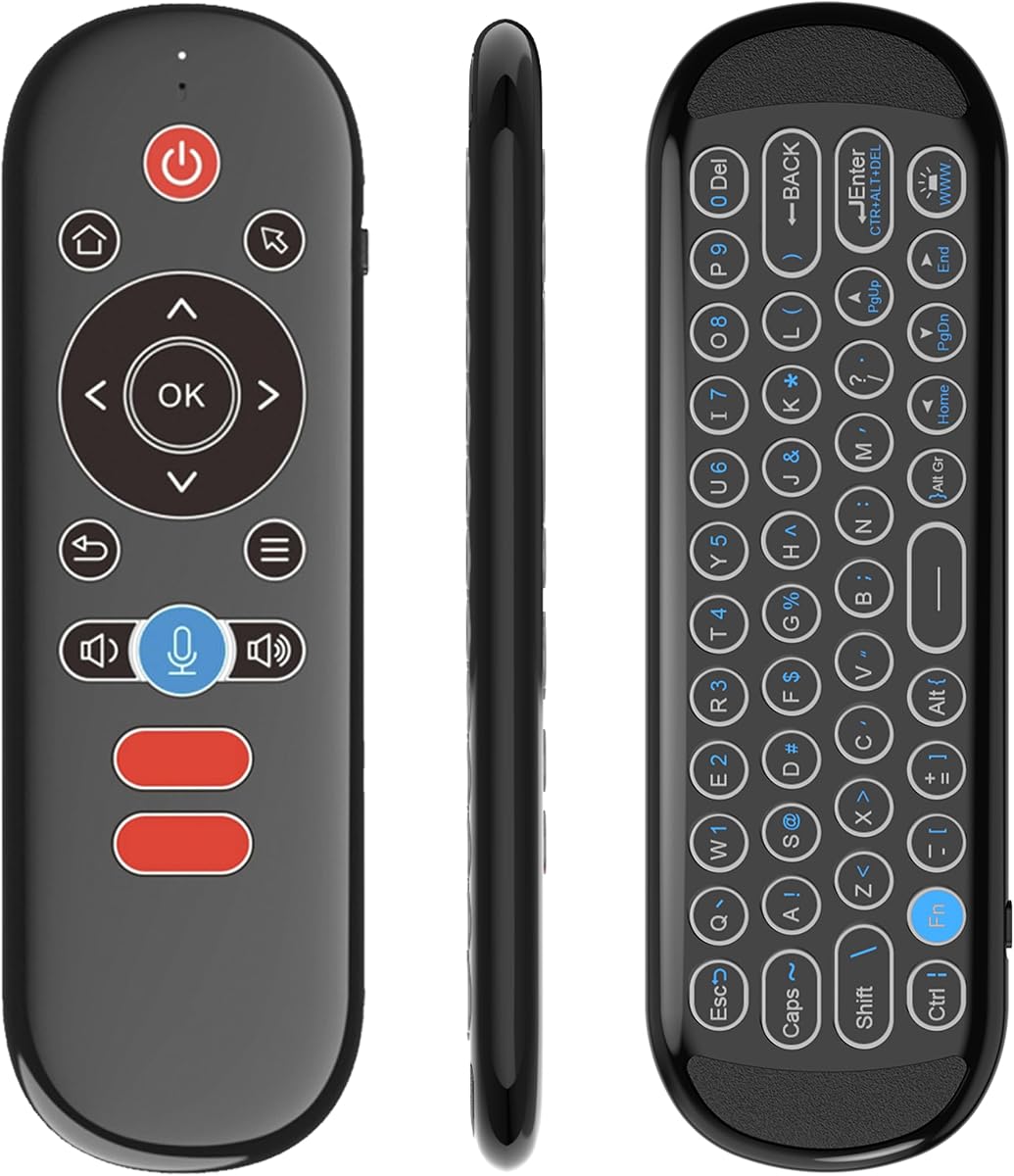
Its design focuses on simplicity and ease of use. The 2.4G wireless connection requires no drivers ensuring immediate plug and play operation. The motion sensor allows for intuitive cursor control simply by moving your wrist. Additionally the mini keyboard on the back makes typing search queries much faster than using an on-screen keyboard.
However the lower rating suggests some inconsistencies in build quality or performance. It only supports 5 programmable IR learning keys which limits its ability to control all TV functions. Users may find it less reliable for advanced navigation compared to more expensive alternatives. These factors should be weighed against the cost savings.
This remote is best suited for users on a tight budget or those needing a secondary remote. It works well with Android TV boxes and projectors where basic navigation is sufficient. The keyboard feature adds significant value for input-heavy tasks. Consider this option if affordability is your primary concern and premium features are not essential.
Despite the lower price this remote delivers essential air mouse functionality effectively. It is a cost-effective solution for basic navigation needs without compromising on core features.
The mini keyboard design significantly reduces the time needed to type search terms. This is a crucial advantage over standard remotes that rely on tedious arrow key navigation.
We may earn a commission when you buy through this link, at no additional cost to you.
This dual mode air mouse stands as a premium option designed for users who demand the best features and flexibility. With a rating of 4.3 it excels in providing a comprehensive control solution for Android TV boxes and smart devices. The combination of backlighting and voice control sets it apart from standard remotes.
We may earn a commission when you buy through this link, at no additional cost to you.
The 7-color backlit keyboard ensures you can type comfortably even in low-light environments. This feature is particularly useful for nighttime browsing or searching for content without turning on lights. The rechargeable battery offers convenience and environmental benefits by eliminating the need for constant battery replacements. Voice control adds another layer of convenience for smart search.
The main trade-off is the higher price which may not be justified for casual users. The feature set is extensive which could be overwhelming for those who only need basic navigation. However for power users these advanced capabilities provide significant value. The build quality and connectivity options justify the investment for most.
We recommend this remote for users who value typing comfort and advanced features. It is perfect for smart home enthusiasts who want a single device for all navigation needs. The dual wireless modes ensure it works with almost any device. If you want the best experience without compromise this is the top choice.
The RGB backlighting makes typing easy in dark environments. This is a premium touch that significantly improves usability for movie nights and evening browsing.
Voice control allows for hands-free search which is faster than manual typing. This feature transforms how you interact with streaming content on your TV.
We may earn a commission when you buy through this link, at no additional cost to you.
The BOXPUT BPR1S Plus Air Mouse Remote is designed to streamline your control setup with advanced voice capabilities. With a rating of 4.2 it offers a robust solution for users seeking both traditional and modern control methods. This remote excels in integrating voice search with standard air mouse navigation.
We may earn a commission when you buy through this link, at no additional cost to you.
Voice input is a key feature that enhances the user experience significantly. You can search for TV programs without typing which is faster and more convenient. The remote supports IR learning across most AOSP devices ensuring it works with a wide range of TVs and boxes. The dual firmware support allows you to switch between TV and PC modes easily.
Despite its strengths there are limitations regarding device compatibility. It does not work with Fire Stick or Roku devices which restricts its universal appeal. Voice commands are also dependent on app support meaning not all services may respond. These factors should be considered if you own multiple device types.
This remote is ideal for users who prioritize voice control in their entertainment setup. It works seamlessly with supported Smart TVs and Android TV boxes. The ability to switch modes makes it versatile for different devices. If voice search is important to you this is a strong contender to consider.
Voice search allows you to find content faster without typing. This improves the flow of your entertainment experience significantly.
Switching between TV and PC modes makes this remote suitable for multiple environments. This versatility adds value for multi-device users.
We may earn a commission when you buy through this link, at no additional cost to you.
The EASYTONE Air Mouse Remote Control offers broad system compatibility making it useful across various devices. With a rating of 3.8 it provides essential features like voice input and IR learning for basic navigation. This remote is designed for users who need a versatile control option across multiple operating systems.
We may earn a commission when you buy through this link, at no additional cost to you.
Its main strength lies in supporting Linux Android Windows and Mac OS. This makes it suitable for HTPCs and laptops as well as Android TV boxes. The built-in microphone enables voice input which simplifies search tasks. IR learning ensures you can control essential functions like volume without switching remotes.
However the voice search is limited to specific built-in search boxes rather than universal apps. The keyboard layout is also compact which may be challenging for users with large hands. These limitations mean it is best for users with specific OS needs rather than universal use. The performance is adequate for basic tasks.
We recommend this remote for users working across different operating systems. It works well for PC media centers and Android TV boxes alike. The plug and play setup ensures no technical barriers to entry. If you need cross-platform functionality this is a reliable option to consider.
Compatibility with multiple OS ensures this remote works in diverse computing environments. This is ideal for users with both PC and TV setups.
Plug and play design removes the need for drivers or software. This simplifies the initial setup process for all users.
We may earn a commission when you buy through this link, at no additional cost to you.
The iPazzPort Mini Air Mouse Remote Keyboard combines essential navigation features with a vibrant backlight. With a rating of 3.7 it offers solid performance for users needing both typing and cursor control. The RGB backlight is a standout feature for dark room usage.
We may earn a commission when you buy through this link, at no additional cost to you.
Its dual wireless modes ensure compatibility with Smart TVs laptops and projectors. The rechargeable battery eliminates the need for disposable batteries which is convenient and eco-friendly. The 6-axis gyroscope allows for smooth cursor movement. The compact design makes it easy to store when not in use.
However compatibility issues may arise with proprietary TV software requiring initial testing. The IR learning process also requires manual setup which can be time-consuming. These factors may deter users seeking a purely plug-and-play experience. The overall performance remains decent for the price point.
We recommend this remote for users who need backlighting for nighttime viewing. It works well with most Android TV boxes and PCs. The rechargeable power adds value for long-term use. If you prioritize visibility and portability this is a good option.
The RGB backlight ensures keys are visible even in complete darkness. This feature greatly improves usability for night entertainment sessions.
The rechargeable battery design reduces waste and saves money over time. This makes it a sustainable choice compared to battery-only remotes.
We may earn a commission when you buy through this link, at no additional cost to you.
The Rii MX3 is a classic option known for its reliable wireless performance. With a rating of 4.0 it offers a straightforward solution for navigating Android TV boxes. The motion sensor allows for intuitive control which is essential for a mouse-like experience.
We may earn a commission when you buy through this link, at no additional cost to you.
Its 2.4GHz wireless technology ensures a stable connection up to 10 meters. IR learning enables you to control essential TV functions like power and volume. The device is compatible with Google Android Smart TVs and IPTV. The included support team adds a layer of security for your purchase.
However some keys might not work depending on the specific device you use. This limits its functionality if your TV requires specialized commands. Additionally the IR learning is limited to five keys which may not cover all functions. These factors make it a standard but not exceptional choice.
We recommend this remote for users needing a reliable basic control tool. It works well for standard Android TV boxes and HTPCs. The motion sensor provides a nice touch for cursor control. If you want a no-fuss solution this is a solid pick.
The motion sensor allows you to control the cursor by waving the remote. This mimics natural mouse behavior for a more intuitive experience.
IR learning for five keys covers essential functions. This simplifies control for common tasks without needing multiple remotes.
We may earn a commission when you buy through this link, at no additional cost to you.
This Air Mouse MX3 Pro Backlit Mini Keyboard Remote offers a solid balance of features for general use. With a rating of 3.9 it provides essential functionality with a convenient backlight. The design focuses on practical navigation and input capabilities for TV users.
We may earn a commission when you buy through this link, at no additional cost to you.
The LED backlight is a key feature for typing in dark rooms. The 38 keys ensure you can input all characters efficiently. Motion sensor functionality adds precision to navigation. IR learning keys let you control common TV functions. It is compatible with many systems including Raspberry Pi.
However compatibility with major TV brands like LG Samsung or TCL is limited. This restricts its universal appeal across all streaming devices. Also batteries are not included which adds to the initial cost. These limitations should be checked before purchase to avoid issues.
We recommend this remote for users with compatible Android TV boxes. The backlight feature is a plus for nighttime viewing. It offers good value for the price. Check compatibility first if you own a specific TV brand.
The backlight keyboard ensures typing is easy even in darkness. This improves the experience for content search significantly.
The motion sensor with Gyro and G sensor allows accurate control. This enhances the mouse-like experience for users.
We may earn a commission when you buy through this link, at no additional cost to you.
This replacement remote offers specialized support for Android systems with gyroscopic precision. Without a rating it relies on technical features to demonstrate value. The anti-tremor algorithm ensures smooth control even during fast movements. This focus on stability makes it suitable for interactive navigation.
We may earn a commission when you buy through this link, at no additional cost to you.
The gyroscope core compensation algorithm reduces shake which enhances accuracy. Single-sided design simplifies handling for users. Function arrangement is optimized for ease of use. The durable buttons ensure longevity over time. It is a practical choice for dedicated Android users.
However Bluetooth mode is restricted to Android systems which limits versatility. The lack of user ratings makes it harder to assess real-world reliability. You may need to rely on manufacturer claims. These factors make it a risky choice compared to rated options.
We recommend this remote for Android users who prioritize anti-shake technology. It is best used in environments where stability is crucial. The durable design suggests it will last longer. Consider it if you specifically need Android Bluetooth integration.
The gyro core reduces shaking for smoother cursor movement. This improves accuracy during fast navigation tasks.
Bluetooth mode optimization ensures better performance on Android TVs. This makes it a specialized tool for this ecosystem.
We may earn a commission when you buy through this link, at no additional cost to you.
This Rock&Rown MX3 Pro offers reliable performance for Android TV boxes at a competitive price. With a rating of 4.0 it provides essential features like motion sensing and a mini keyboard. It is designed to simplify your navigation across multiple devices.
We may earn a commission when you buy through this link, at no additional cost to you.
Its 6-Axis motion sensor ensures smooth cursor movement. The mini keyboard makes typing efficient for searching. Key learning allows control of essential TV functions. Compatibility with Raspberry Pi and Xbox expands its use cases. The plug and play setup ensures easy activation.
However the POWER key must be learned from your original remote which adds setup time. The return policy is also shorter than many competitors. These factors slightly reduce convenience for some users. The overall value remains strong for the price.
We recommend this remote for users needing a basic and affordable solution. It works well for standard TV boxes and mini PCs. The motion sensor provides a nice upgrade from traditional remotes. If you want a budget option with decent features this is a good choice.
The 6-Axis sensor enables natural cursor control. This improves navigation efficiency significantly.
The mini keyboard keeps the device portable and easy to hold. This is ideal for couch use.
We may earn a commission when you buy through this link, at no additional cost to you.
Selecting the right air mouse involves evaluating connectivity options features and compatibility with your specific devices. This guide breaks down key factors to help you make an informed decision.
Connectivity is the first major factor to consider when choosing an air mouse. Options include 2.4G RF Bluetooth or dual-mode solutions. 2.4G RF offers stable plug and play performance ideal for streaming devices. Bluetooth provides seamless pairing with smart TVs and laptops but may require more setup. Dual-mode remotes offer flexibility by supporting both connection types ensuring you can switch between devices easily. Choose the type that best fits your primary usage scenario.
Ensure your TV box or PC supports the required receiver or Bluetooth pairing for optimal performance.
Motion sensor accuracy determines how smoothly the cursor follows your hand movements. High-quality air mice use 6-axis gyroscope systems which detect tilt and rotation more precisely. Look for features like anti-tremor algorithms that reduce jitter during movement. A responsive sensor ensures menus are navigated quickly without lag or unintended clicks. Test user reviews for feedback on precision to avoid cheap models that drift.
A reliable motion sensor transforms your navigation from clunky to intuitive.
Keyboard features are essential if you plan to search for content frequently. Mini keyboards vary in layout and key count so ensure they include enough characters for efficient typing. Backlit keys are highly recommended for users who watch TV in dark rooms. This feature allows you to type without turning on lights improving the viewing experience. Check if the keyboard is double-sided or single-sided based on your preference.
Prioritize a keyboard layout that feels natural to your typing habits.
IR learning allows your air mouse to replicate signals from your original TV remote. This feature is critical for consolidating control into one device. Look for models that support learning multiple keys like power volume and input. Some remotes allow learning of all buttons while others are limited to five. This versatility reduces clutter and simplifies your entertainment setup significantly.
Confirm that the remote supports learning functions for your specific TV brand before buying.
Voice control is a modern feature that enables hands-free searching. Some remotes include built-in microphones that work with assistants like Google Assistant or Alexa. This reduces the need for typing long search queries and speeds up content discovery. Ensure the voice function works with your specific Android TV or streaming device. Compatibility varies by model so verify system support.
Voice control adds significant convenience for users who prioritize speed.
Power sources vary between disposable batteries and rechargeable options. Battery-powered remotes are easy to replace but create waste over time. Rechargeable models often come with USB-C ports and last longer between charges. Consider the convenience of a charging cable versus swapping batteries. If you use the remote frequently a rechargeable battery reduces long-term costs and hassle.
Evaluate the battery life to ensure you do not face interruptions during use.
Device compatibility is crucial to ensure the remote works with your specific hardware. Check if the remote supports your Android TV box brand or smart TV operating system. Some remotes are incompatible with Fire Stick or Roku devices so verify this before purchasing. Additionally ensure it works with your PC if you plan to use it as a computer mouse. Universal compatibility ensures you do not face connection issues.
Review the product listing for supported systems to avoid buying an incompatible remote.
Build quality affects how long the remote lasts and how comfortable it feels. Look for models with durable buttons and a sturdy housing. Comfort is key if you use the remote for long gaming or viewing sessions. Ergonomic designs reduce hand fatigue and improve usability. Check user feedback on button durability to ensure the device withstands regular use.
Investing in a durable build saves money and frustration over the years.
To start using your air mouse connect the USB receiver to your Android TV box or PC. Turn on the device and allow a few seconds for the connection to establish. Test cursor movement by waving your hand to ensure the motion sensor is active. If using Bluetooth pair the device through the settings menu on your TV for wireless control.
For optimal motion tracking keep the device within a range of 10 meters from the receiver. Avoid obstacles between the remote and the device to prevent signal loss. Clean the surface of the remote regularly with a soft cloth to remove dust and grime. This maintenance ensures the motion sensors continue to function accurately.
Manage battery life by replacing disposable batteries when the signal weakens. If using a rechargeable model charge it fully before first use to ensure battery health. Store the remote in a dry place when not in use to prevent moisture damage. Following these care tips extends the lifespan of your device significantly.
Most air mice are not compatible with Amazon Fire Stick due to proprietary software restrictions. Some models may work with limited functionality if they support Fire OS. Check the product compatibility list before purchasing to ensure support. It is safer to choose remotes specifically designed for Android TV boxes.
Most modern air mice use plug and play technology requiring no driver installation. They connect via a USB receiver or Bluetooth directly to your device. Drivers are only needed for advanced customization features on some computers. Check the product details to confirm if software is required for basic use.
To pair a Bluetooth air mouse put the remote into pairing mode by holding specific buttons. Access the Bluetooth settings on your TV and select the remote from the list. Confirm the pairing code if prompted to complete the process. Once paired the remote should connect automatically in the future.
2.4G requires a USB receiver for connection while Bluetooth connects directly without it. 2.4G offers more stable connections with less interference for streaming. Bluetooth offers convenience by removing the need for a receiver. Both options are viable depending on your device ports and preferences.
Cursor movement issues can stem from low batteries or signal interference. Ensure the remote is charged or has fresh batteries installed. Check for obstacles between the remote and the receiver that may block the signal. Recalibrating the motion sensor via settings may also improve performance.
Yes many air mice support Windows and Mac systems for mouse control. They function as wireless peripherals allowing you to navigate your computer. Check compatibility details to ensure support for your operating system. Some models offer specific PC modes for enhanced functionality.
We have reviewed ten top air mouse options for Android TV boxes offering various features and price points. Our top picks include the BOXPUT Android Universal Remote for its versatility and dual connectivity. The Air Mouse Remote MX3 Pro stands out as the best budget choice for essential functionality.
When choosing prioritize connectivity stability motion accuracy and compatibility with your devices. Features like voice control and backlighting add convenience but may not be necessary for everyone. Evaluate your specific needs such as typing frequency to decide which features matter most.
Prices and availability change frequently so check current listings before making your purchase. Use this guide to simplify your decision and find the right remote for your needs. Investing in the right air mouse enhances your smart home experience significantly.