
GuileKeys GK-18 Leverless Arcade Stick
4.3Editor score
Eighteen button leverless design
Hot-swappable switches and caps
Less than one millisecond latency
This comprehensive guide compares the top 10 arcade stick for PS5 options available in October 2026, evaluating performance, compatibility, build quality, and
Finding the right arcade stick for PS5 can transform your fighting game experience from casual to competitive. A quality fightstick offers precision, durability, and tactile feedback that controllers cannot match for serious players.
We analyzed ten top-rated arcade sticks based on official licensing, component quality, connectivity options, and user reviews. Our comparison covers budget-friendly models and premium tournament-grade devices to help you choose wisely.
Each pick highlights unique strengths, specifications, and ideal use cases for different players. Note that availability and pricing fluctuate, so verify current details before purchasing your new fighting stick setup today.
4.3Editor score

4.6Editor score

4.6Editor score
The following comparison table outlines key specifications for all ten arcade sticks to help you quickly identify differences in compatibility, connectivity, and included features across models.




The HORI PlayStation 5 Fighting Stick Alpha stands out as the premier choice for serious fighting game enthusiasts seeking a tournament-grade controller. With an impressive rating of 4.6 stars from verified buyers, this officially licensed peripheral delivers professional-grade performance directly out of the box. Its design focuses on reliability and precision, making it a trusted choice for both casual players and competitive competitors looking to elevate their gameplay experience significantly.
We may earn a commission when you buy through this link, at no additional cost to you.
At the heart of this stick are HORI’s proprietary Hayabusa buttons and joystick, which provide exceptional tactile feedback and rapid response times. The construction allows the unit to open easily for maintenance, ensuring longevity even after extensive use. The top panel artwork is replaceable, giving users the freedom to customize aesthetics without compromising structural integrity. Official licensing by Sony guarantees seamless integration with PS5, PS4, and PC systems without compatibility hiccups.
While the price reflects its premium status, the trade-off is justified by the build quality and component reliability. Some users may find the lack of native software mapping on consoles a minor inconvenience, but this is often outweighed by the plug-and-play convenience on PS5. For those willing to invest in a tool that respects their input, this stick offers a solid foundation for improving technique and winning matches.
This product is ideal for players who prioritize official support and high-end components over cost savings. Whether you are a Street Fighter veteran or a Tekken newcomer, the Alpha provides a professional environment to practice moves. We recommend this stick for anyone serious about transitioning from gamepad to arcade stick in a reliable way.
The proprietary Hayabusa joystick and buttons offer a distinct feel that reduces input lag and enhances movement accuracy during complex combos.
Built to withstand intense sessions, the stick’s internal structure remains stable and secure even when used aggressively during high-pressure matches.
We may earn a commission when you buy through this link, at no additional cost to you.
The Nacon Daija Arcade Fight Stick is designed in collaboration with professional gamers to meet the demands of top fighting games. With a solid 4.2 rating, this stick offers a balance of features and value, particularly for those who rely on software configuration. Its official licensing for PS5 and PS4 ensures it works seamlessly with major titles like Street Fighter and Tekken.
We may earn a commission when you buy through this link, at no additional cost to you.
Key features include Sanwa joystick and action buttons, which are industry standards for durability and performance. The stick allows full button mapping using dedicated software on PC and Mac, enabling deep customization of control schemes. It includes two different joystick heads, allowing players to switch between styles for better precision. A textured palm rest provides stability, and the package includes tools for customization, making it a versatile option for enthusiasts.
While the reliance on software for advanced mapping might be a hurdle for console-only users, the flexibility it offers is significant for PC players. The additional weight of the unit ensures it stays put during intense fights, but some may find it less portable. Overall, it is a strong contender for those who value configurability and professional-grade components in their setup.
We recommend the Nacon Daija for players who enjoy tinkering with software settings to optimize their inputs. It is particularly well-suited for those transitioning from console to PC gaming or those who prefer having granular control over their stick's layout before starting a match.
The intuitive software allows users to create and save specific game profiles, making it easy to switch between titles without manual reconfiguration.
Having two joystick heads and tools included means you can test different styles immediately without buying extra parts or spending extra money.
We may earn a commission when you buy through this link, at no additional cost to you.
The MAYFLASH Arcade Stick F700 Elite represents a high-end evolution of the popular F700 line, focusing on wireless freedom without sacrificing performance. With a 4.6 rating, users appreciate its ability to connect via Bluetooth, 2.4G, or wired USB. This versatility makes it a top choice for players who want to reduce cable clutter while maintaining precision control in fighting games like Tekken 8.
We may earn a commission when you buy through this link, at no additional cost to you.
This model comes equipped with premium Sanwa components, ensuring that every button press and joystick movement is responsive and durable. The inclusion of a full-size anti-slip rubber mat helps keep the stick firmly in place on any surface during intense sessions. It also supports Switch 2 connectivity after firmware updates, future-proofing your investment against newer hardware releases.
While the wireless capabilities are a major plus, users should note the specific limitations regarding Xbox compatibility. Additionally, the need to update firmware can be a minor hurdle for those less tech-savvy. However, for PC and PlayStation users seeking a robust wireless experience, the trade-offs are minimal compared to the convenience gained.
This stick is recommended for players who prioritize a clean setup and want the flexibility to move around their room while gaming. It serves as a perfect bridge between traditional wired sticks and modern wireless needs, delivering consistent performance across a wide range of gaming systems.
The inclusion of both Bluetooth and 2.4G modes ensures stable connections with minimal latency, even in environments with many wireless devices.
The dedicated anti-slip mat ensures the stick does not slide around during heavy input, which is crucial for maintaining accurate directional movements.
We may earn a commission when you buy through this link, at no additional cost to you.
The MAYFLASH Arcade Stick F700 is a versatile and cost-effective choice for players wanting wireless freedom without the premium price tag. With a 4.5 rating, it appeals to those who value compatibility across multiple systems, including PS5, PS4, and Switch. The inclusion of three connection methods ensures you can adapt to different gaming environments easily.
We may earn a commission when you buy through this link, at no additional cost to you.
Key features include support for the latest Switch 2 hardware after updating the firmware, making it a future-ready option. The stick allows turbo functions with different speed settings, which can help with rapid-fire moves in specific games. It also supports wired headsets for online chat on PS5 and PC, enhancing the social aspect of competitive gaming.
While the wireless capability is a strong selling point, users must note the compatibility limitations with Xbox consoles. Additionally, the need for firmware updates to support newer consoles can be a minor inconvenience. However, for the price, the features provided offer excellent value for casual and semi-serious players alike.
We recommend this model for players who want a versatile stick that works across various consoles and prefer wireless connectivity. It is a great starting point for those new to fighting sticks who do not want to commit to a high-end wired-only solution.
The broad range of supported systems means you can use one stick for your PC, console, and even retro gaming setups without buying multiple controllers.
Built-in turbo functions allow players to set automatic rapid presses for certain moves, which can be useful in games that support such mechanics.
We may earn a commission when you buy through this link, at no additional cost to you.
The Qanba N3 Drone 2 Wired Joystick offers a reliable entry point into fighting sticks while maintaining official Sony compatibility. With a 4.5 rating, it delivers consistent performance for PS5 and PS4 users looking for a straightforward, no-nonsense controller. The focus on authenticity and official licensing makes it a trustworthy option for those who want guaranteed functionality.
We may earn a commission when you buy through this link, at no additional cost to you.
This stick features authentic Qanba buttons and lever, which are known for their durability and tactile feedback. The control panel includes a touchpad, adding versatility for game navigation and menu interactions. A 3.5mm microphone input with mute button control is included, facilitating clear communication during online matches. These features make it a comprehensive tool for both playing and communicating.
While it lacks wireless connectivity, the wired connection ensures zero latency, which is critical for competitive play. The price point makes it accessible, though it does not offer the customization features found in more expensive models. For players who prioritize simplicity and reliability over advanced features, this stick is a solid choice.
We recommend the N3 Drone 2 for budget-conscious players who need an official PS5 controller. It is particularly suitable for those who prefer a traditional wired setup and do not require extensive customization options.
Using authentic Qanba parts ensures the buttons and lever have a professional feel that can withstand heavy use over time.
The included microphone input means you do not need an external adapter to chat with friends while playing on the console.
We may earn a commission when you buy through this link, at no additional cost to you.
The MAYFLASH F500 Arcade FightStick Bundle is designed for players who own multiple consoles and want a single stick to cover them all. With a 4.0 rating, it offers broad compatibility across Xbox, PlayStation, and PC systems. The inclusion of Magic Boots simplifies setup, allowing plug-and-play functionality without needing a controller plugged in.
We may earn a commission when you buy through this link, at no additional cost to you.
This model supports both X input and D input on PC, ensuring compatibility with various fighting game platforms. It also supports turbo functions, which can help players execute complex moves more easily. The bundle includes everything needed to connect to Xbox and PlayStation systems, making it a convenient choice for multi-platform gamers.
While the versatility is appealing, the lower user rating compared to other options suggests potential issues with build quality or ease of use. Some users may find the setup process for Xbox consoles slightly cumbersome. However, for those who prioritize compatibility over premium features, this bundle offers a practical solution.
We recommend the F500 for players who want a single stick that works with both Xbox and PlayStation. It is best suited for casual players who do not require tournament-grade precision and want a versatile controller.
The Magic Boots accessory acts as a translator, allowing the stick to work seamlessly with PS5 and PS4 without additional adapters.
Turbo settings allow for rapid button presses, which can be particularly useful in fighting games that require fast combo execution.
We may earn a commission when you buy through this link, at no additional cost to you.
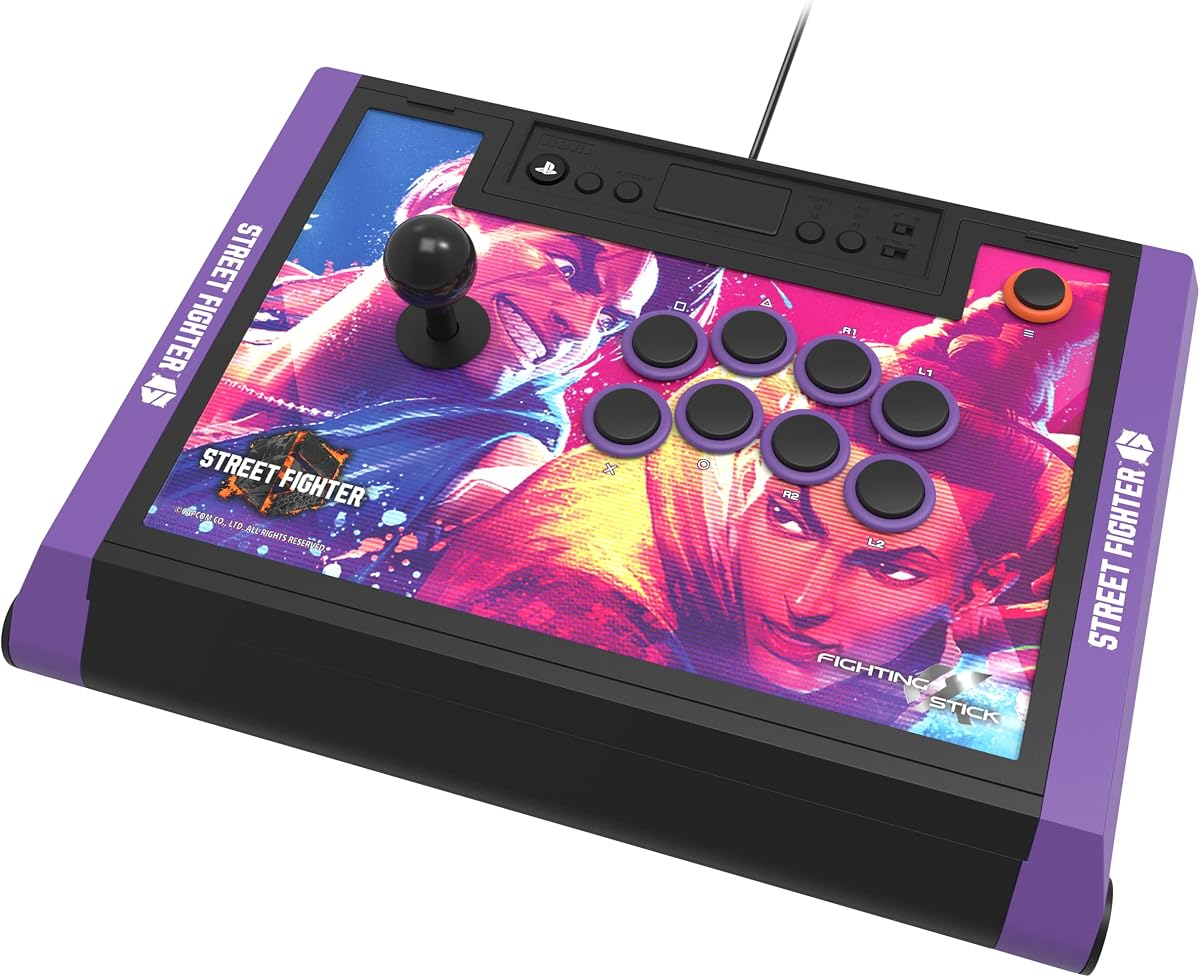
The HORI PlayStation 5 Fighting Stick Alpha (Street Fighter 6 Edition) brings the thrill of SF6 directly to your fighting setup with officially licensed artwork. With a 4.5 rating, it combines the proven performance of the Alpha model with the immersive aesthetics of the latest game. This edition appeals strongly to fans who want their hardware to reflect their favorite title.
We may earn a commission when you buy through this link, at no additional cost to you.
Key features include a link to 18 downloadable hi-res images of characters for top-panel customization, allowing for personal expression. The internal components remain high-end, with Hayabusa buttons and joystick for precision. Official licensing by both Sony and Capcom ensures authenticity and reliability. The tournament-ready build means it is durable enough for serious play.
While the theme may not appeal to all players, the value for SF6 fans is clear. The price reflects the licensing and special edition nature, but the build quality remains consistent with the standard Alpha. It is an excellent choice for those looking to support the game while upgrading their controller.
We recommend this edition for dedicated Street Fighter 6 fans who want a thematic and functional stick. It offers the same performance as the standard model but with the added bonus of official game art.
The SF6 artwork on the top panel is not just visual; it is officially licensed, ensuring high-quality printing and durability.
Downloadable high-resolution images allow you to refresh the look of your stick without buying a new physical panel.
We may earn a commission when you buy through this link, at no additional cost to you.
The Qanba Q7 Obsidian 2 Wired Joystick focuses on modularity and official compatibility, offering a robust experience for PS5 users. With a 4.3 rating, it is a strong choice for those who value the ability to customize their joystick feel. The official licensing ensures it works well with the latest console titles.
We may earn a commission when you buy through this link, at no additional cost to you.
This stick features swappable Sanwa JLF joystick tops, allowing you to choose the feel that best suits your play style. The OBSF buttons are designed for durability and responsiveness, ensuring long-term use. A dedicated switch allows you to change between PS5, PS4, and PC modes easily. The control panel includes a touchpad, adding versatility for menu navigation.
While it is wired only, the reliability of the connection is a plus for competitive play. The ability to swap joystick tops is a significant advantage over sealed units, as it extends the life of the product. However, the price is higher than basic models, reflecting the modular features.
We recommend the Q7 Obsidian 2 for players who want a high-quality stick with room to customize. It is ideal for those who appreciate the tactile differences between different Sanwa parts and want a controller that can evolve with their preferences.
The ability to swap joystick tops means you can tailor the grip to your hand size without buying a new stick.
A dedicated hardware switch simplifies the process of switching between consoles and PC, reducing software dependencies.
We may earn a commission when you buy through this link, at no additional cost to you.
The HORI PlayStation 5 Fighting Stick Alpha (TEKKEN 8 Edition) is designed for fans of the latest Tekken title who want a professional fighting controller. With a 4.6 rating, it delivers the same reliable performance as the standard Alpha but with official branding. This edition ensures your setup is ready for high-level Tekken 8 play.
We may earn a commission when you buy through this link, at no additional cost to you.
This stick features Tekken 8 top panel artwork and downloadable alternate artwork to print, giving you creative flexibility. The internal components include Hayabusa buttons and joystick, ensuring precision and durability. Official licensing by Sony and Bandai Namco Entertainment guarantees seamless compatibility with the game. The tournament-grade build is essential for serious competitors.
While the specialized theme may not appeal to everyone, Tekken fans will find the value in the official support. The price is higher than the standard model, but the build quality remains consistent. It is an excellent choice for those who want to show support for the franchise.
We recommend this edition for Tekken enthusiasts who want a thematic and functional stick. It offers the same performance as the standard model but with the added bonus of official game art.
The Tekken 8 artwork is officially licensed, ensuring high-quality visuals that do not fade quickly under lighting or use.
Alternate artwork files allow you to print your own custom designs, keeping the stick fresh and personalized.
We may earn a commission when you buy through this link, at no additional cost to you.
The GuileKeys GK-18 Leverless Arcade Stick offers a unique approach to fighting games with its all-button layout. With a 4.3 rating, it appeals to players who want the precision of a joystick without the physical stick. This leverless design reduces input errors and offers smooth, precise button actions.
We may earn a commission when you buy through this link, at no additional cost to you.
Key features include hot-swappable switches and keycaps, making customization and repair incredibly easy. The stick offers RGB lighting customization with multiple modes and colors to match your setup. An integrated OLED screen displays input modes, ensuring you know your current configuration at a glance. A web configurator allows for deep customization without installing software.
While the leverless design is innovative, it requires an adapter for PS5 compatibility, which can be a slight hurdle. The learning curve for a button-only layout is also real, but the low latency ensures fair play. For those willing to adapt, this stick offers a competitive edge.
We recommend the GK-18 for players looking to try a leverless setup without spending a fortune. It is a great choice for those who value customization and RGB aesthetics as much as performance.
Using four-direction movement buttons instead of a joystick helps reduce accidental inputs during rapid movement sequences.
The ability to hot-swap switches means you can change the feel of the buttons without soldering or professional help.
We may earn a commission when you buy through this link, at no additional cost to you.
Choosing the right arcade stick involves considering compatibility, build quality, and specific features that match your gaming habits.
Always look for an officially licensed product from Sony to ensure seamless compatibility with PS5 and PS4. Unauthorized sticks may require extra adapters or fail to work with specific game updates. Official licensing guarantees that the hardware meets the console’s standards for input and communication.
Prioritize licensed models to avoid connectivity issues.
The quality of buttons and joystick affects both precision and durability. High-end components like Hayabusa or Sanwa parts offer better tactile feedback and longer life. Cheaper alternatives may degrade faster under intense use, leading to inconsistent inputs.
Invest in a stick with reputable internal components for longevity.
Consider whether you need wired, wireless, or both connection types. Wired sticks offer zero latency, while wireless options provide freedom of movement. Ensure the stick supports your specific console modes, such as PS5, PS4, or PC.
Choose the connection type that fits your playstyle and setup.
Some sticks allow you to swap buttons, joysticks, or top panel artwork. This is useful if you want to change the look or fix parts later. Software mapping is also valuable for creating custom control schemes for different games.
Look for customizable elements if you want to personalize your stick.
The physical construction should be solid enough to withstand vigorous use without slipping or breaking. Materials like metal panels and non-slip rubber bases add stability. A sturdy build is crucial for tournament use or daily practice.
Select a stick with a solid base and durable materials.
Prices vary widely between entry-level and premium models. Determine your budget and what features are essential for you. A cheaper stick might suffice for casual play, but serious players should expect to spend more for better components.
Balance your budget with the features you truly need.
If you play on multiple systems, check the compatibility list carefully. Some sticks work seamlessly across PS5, Xbox, and PC, while others are console-specific. Multi-platform support can save you money if you switch between consoles.
Choose a versatile model if you game on multiple devices.
For online play, audio output for headsets can be a convenient feature. Look for a 3.5mm jack if you want to use your headset directly through the stick. This avoids the need to plug directly into the console.
Ensure audio support if you plan to chat frequently online.
Start by connecting the stick to your console via USB and powering it on. Wait for the system to recognize the device before launching a game. If using wireless, pair it through the console's Bluetooth settings.
Yes, arcade sticks provide better precision for directional inputs and are often more durable. They allow for smoother movements, which is critical for competitive play. The ergonomic design also reduces hand fatigue during long sessions.
Most arcade sticks work with fighting games and some others. They may not function with all genres like shooters or adventure games. Check the manufacturer's compatibility list before purchasing to confirm.
A high-quality stick can last for years with regular use. Components like buttons and joysticks may need replacement over time, but the main unit remains durable. Regular cleaning helps maintain its longevity.
Many modern sticks allow for button mapping via software on PC. Some also offer physical button swaps for different layouts. Check the model's software or hardware customization options.
It takes practice to get used to the layout compared to a gamepad. However, most players adapt quickly with consistent practice. Using it in training modes helps build muscle memory.
Both are high-quality brands. Sanwa is often lighter with a looser feel, while Hayabusa offers a stiffer, more tactile response. The choice depends on personal preference.
Most PS5 sticks are compatible with PC via USB. Some require switching modes using a physical button on the device. Check the specific product details for PC support.
High-quality wireless sticks minimize lag to negligible levels. Some models have a wired mode for zero latency. Always check reviews for performance feedback on specific models.
In conclusion, selecting the right arcade stick depends on your priorities for performance, compatibility, and budget. The HORI Fighting Stick Alpha leads in reliability, while budget options like the GuileKeys GK-18 offer unique features.
For most players, balancing component quality with customization options is key. If you prefer wireless convenience, models like the F700 Elite are worth the investment.
Always verify current pricing and availability before purchasing to ensure you get the best value for your money.