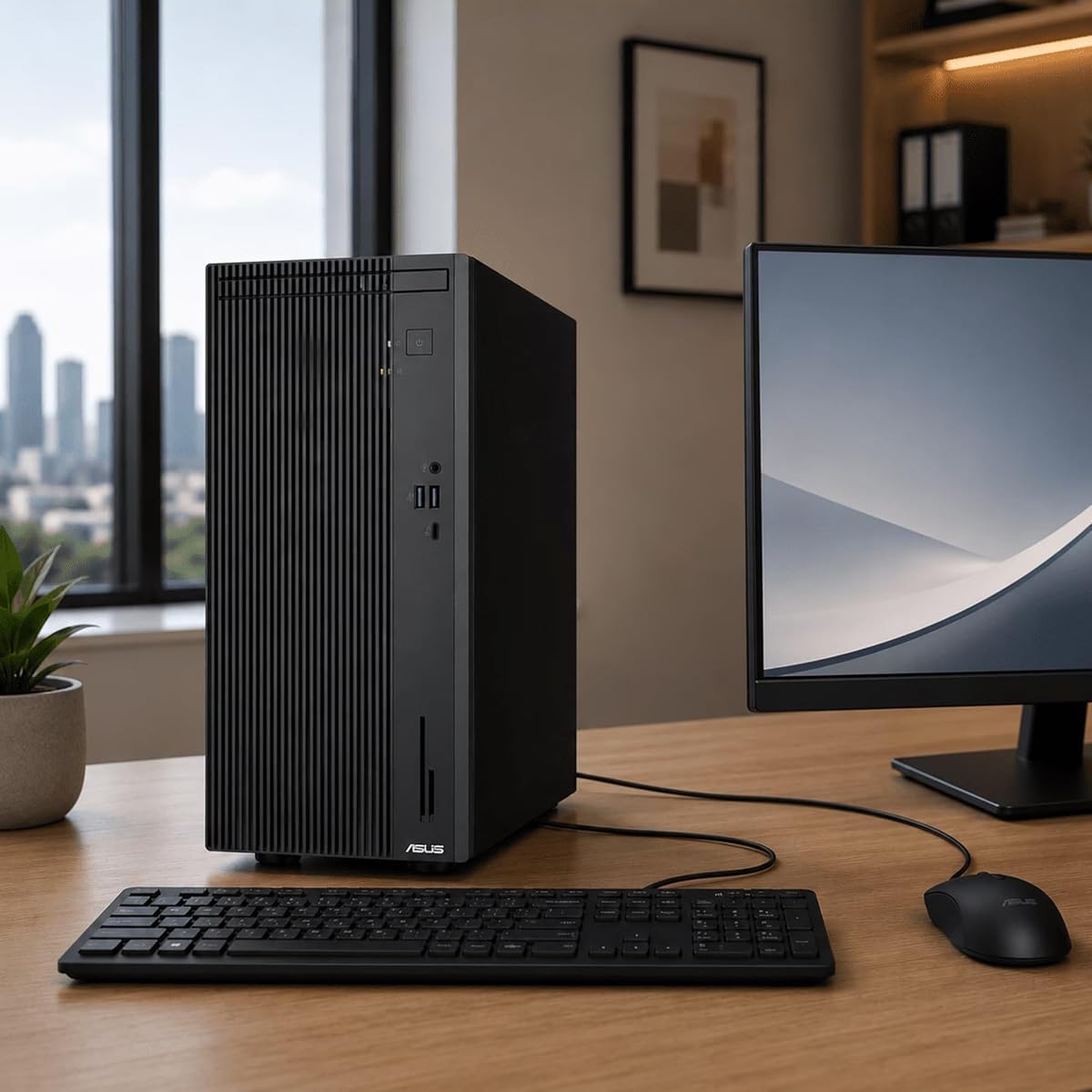
ASUS V500 Business Tower Desktop Computer
5.0Editor score
Intel Core i7-13620H Processor
16GB DDR5 RAM Included
Windows 11 Home Preloaded
Explore the top ASUS Desktop PC models compared by performance, value, and features to help you choose the right system for your needs today.
ASUS Desktop PC systems offer reliable performance for work and play. Whether you need a compact tower for an office or a powerful rig for gaming, ASUS provides diverse options tailored to different budgets and demands.
We compared ten real ASUS Desktop PC models using official specs and user feedback. This list covers business towers, gaming rigs, and versatile all-in-one solutions to ensure you find the perfect match for your workflow.
Each pick highlights key strengths like processor speed, memory capacity, and connectivity. Prices and availability change often, so verify the latest details before purchasing to secure the best deal for your specific setup.
5.0Editor score

4.7Editor score

4.2Editor score
This side-by-side comparison evaluates ten ASUS Desktop PC models across performance metrics, storage options, and connectivity features to highlight the strengths of each system.


The ASUS V500 Business Tower Desktop Computer stands out with its solid 5.0 rating and reliable Core i7 processor. It delivers lightning-fast multitasking and seamless content creation for daily and power-hungry tasks.
We may earn a commission when you buy through this link, at no additional cost to you.
Its 16GB DDR5 RAM ensures ultra-smooth multitasking without lag when juggling tabs and apps. The 1TB storage combines an internal SSD with an external drive to provide ample space for files and media.
While the internal SSD is paired with an external drive which may confuse some, the system remains fast. The included ergonomic keyboard and mouse bundle are durable and responsive right out of the box.
This tower is ideal for professionals seeking a compact yet powerful workstation. If you need consistent performance for office work and light creative projects, this model is a strong recommendation.
The 10-core processor handles demanding business applications and entertainment with ease for a smooth user experience.
With seven USB ports and dual monitor support via HDMI plus DisplayPort, connecting peripherals and expanding your workspace is straightforward.
We may earn a commission when you buy through this link, at no additional cost to you.
The ASUS ROG G700 Gaming Desktop PC earned a 4.7 rating thanks to its Next Gen Intel Core Ultra 7 performance. It provides exceptional multitasking and streaming capabilities alongside high frame rate gaming for competitive titles.
We may earn a commission when you buy through this link, at no additional cost to you.
Equipped with an NVIDIA GeForce RTX 5060 graphics card, users enjoy smooth 1080p and 1440p gaming with ray tracing and AI powered DLSS technology. The massive 32GB DDR5 RAM ensures seamless multitasking and faster load times.
Its advanced cooling and 600W Gold PSU maintain stable performance under heavy loads while keeping temperatures in check. The built-in WiFi 6 and modern connectivity support stable connections for online gaming and downloads.
Gamers who want a complete out-of-the-box solution will appreciate the bundled RGB keyboard and mouse. With a 12 Month CPS protection plan, this desktop offers added peace of mind against mechanical failures.
The Core Ultra 7 265F processor delivers speeds up to 5.3GHz for exceptional multitasking and high frame rate gaming performance.
The RTX 5060 provides realistic lighting and shadows for immersive visual detail in AAA titles and creative workflows.
We may earn a commission when you buy through this link, at no additional cost to you.
The ASUS S501MER Desktop PC features a 14th Gen Intel Core i7-14700 processor that offers up to 5.3GHz speeds. This system combines fast storage and memory with seamless connectivity for a balanced desktop experience.
We may earn a commission when you buy through this link, at no additional cost to you.
Users benefit from 16GB DDR5 RAM and a 1TB M.2 NVMe PCIe 4.0 SSD for instant boot-ups and rapid file transfers. The system supports expansion up to 64GB RAM and includes extensive front and rear ports.
While the rating is slightly lower than other top picks, the hardware remains robust for office and light creative work. The front I/O includes a USB 3.2 Gen 2 Type-C for quick device charging and data transfer.
This desktop suits users prioritizing the latest Intel generations and modern connectivity like Bluetooth 5.3. It offers a solid foundation for productivity with ample room for future upgrades in storage and memory.
The 14th Gen Core i7-14700 with Intel B760 chipset provides powerful multitasking and performance for demanding workflows.
With Dual-Band Wi-Fi 6E and multiple USB ports including Type-C, the S501MER offers extensive ways to connect devices.
We may earn a commission when you buy through this link, at no additional cost to you.
This ASUS V500 Home & Business Desktop Computer boasts a 5.0 rating and a powerful 13th Gen Intel Core i7 processor. It handles demanding tasks with ease and delivers fast, efficient performance for multitasking and entertainment.
We may earn a commission when you buy through this link, at no additional cost to you.
A standout feature is the 32GB high-speed DDR5 memory which allows running multiple applications simultaneously without lag. The 512GB PCIe NVMe M.2 SSD ensures seamless multitasking and reliable storage for your files.
While the product data mentions a 1TB PCIe SSD in the title, the detailed specs note a 512GB drive. Regardless, the integrated Intel UHD graphics support smooth 4K streaming and crisp visuals for everyday computing needs.
This system is perfect for home offices needing high memory capacity and reliable storage. Its comprehensive connectivity options including USB-C and HDMI ensure seamless integration with various peripherals and external devices.
Running multiple apps simultaneously is smooth with 32GB DDR5 memory ensuring zero lag during heavy workloads.
A variety of ports including USB 3.2 and DisplayPort ensure seamless integration with your favorite peripherals.
We may earn a commission when you buy through this link, at no additional cost to you.
The ASUS ROG G700 (2026) Gaming Desktop PC features a fearless ROG design with iconic styling and Aura Sync RGB lighting. It houses an Intel Core Ultra 7 265KF processor and a powerful NVIDIA GeForce RTX 5070 GPU.
We may earn a commission when you buy through this link, at no additional cost to you.
Its 58L capacity supports triple-slot GPUs and stays cool with a quad-fan system and 240mm liquid cooler. This optimized thermal design ensures long-term reliability and stable performance under heavy gaming loads.
The desktop includes advanced connectivity like 2.5Gbps Ethernet and WiFi 6 to game without lag. Users will appreciate the plug and play setup with an included RGB keyboard and mouse for out-of-the-box performance.
Designed with tool-less access, this system is ready for upgrades to ensure future-proof performance for years. While it lacks an initial rating, its high-end specs make it a strong contender for serious gamers.
The dual-glass chassis showcases iconic ROG design with the ROG Slash and Aura Sync RGB lighting for aesthetics.
Tool-less access allows easy component swaps to ensure the system remains powerful for years to come.
We may earn a commission when you buy through this link, at no additional cost to you.
The ASUS ROG GM700 (2025) Gaming Desktop PC unleashes next-gen power with an AMD Ryzen 7 9800X3D processor. It delivers seamless multitasking and blazing-fast performance for gaming, streaming, and content creation tasks.
We may earn a commission when you buy through this link, at no additional cost to you.
Visuals are elevated with an AMD Radeon RX 9070 XT PRIME OC GPU that supports advanced ray tracing and AV1 encoding. The system includes 32GB DDR5 RAM for seamless multitasking without breaking a sweat.
Storage is handled by a massive 2TB of PCIe Gen 4.0 SSD storage which ensures lightning-fast load times and ample space for libraries. This keeps you playing and creating rather than waiting for files to load.
This model is ideal for those invested in the AMD ecosystem who need top-tier performance. With Windows 11 Home preinstalled, it offers an intuitive interface designed for gaming and productivity workflows.
The Ryzen 7 9800X3D processor delivers blazing-fast performance for streaming and editing demanding workloads.
The Radeon RX 9070 XT GPU delivers stunning visuals and incredible performance with enhanced ray tracing.
We may earn a commission when you buy through this link, at no additional cost to you.
The ASUS V500 Home & Business Tower Desktop is powered by a 10-core Intel Core i7-13620H processor to deliver responsive performance for productivity software. It features 16GB DDR5 memory and a 1TB SSD for smooth system performance.
We may earn a commission when you buy through this link, at no additional cost to you.
This bundle includes an A-DATA 64GB USB Flash Drive for convenient high-speed data transfer and extra storage. The system supports flexible multi-display workspace with HDMI and DisplayPort outputs for organized office productivity.
Security is a priority with Windows 11 Pro offering advanced features and professional-grade productivity support. However note that upgraded components may have a separate warranty from the original manufacturer components.
Ideal for small businesses needing Windows Pro features and reliable hardware, this desktop offers a comprehensive performance bundle. Its dual-display support helps create an efficient workstation for daily business operations.
Windows 11 Pro offers advanced security features and system management tools for modern business environments.
HDMI and DisplayPort outputs enable connection to multiple monitors helping create an organized and efficient workstation.
We may earn a commission when you buy through this link, at no additional cost to you.
The ASUS ROG Strix G700 Desktop pushes boundaries with an extreme Intel Core Ultra 9 285K processor turboing to 6.00GHz. It offers 128GB of DDR5 RAM and a massive 11TB storage total for extreme performance needs.
We may earn a commission when you buy through this link, at no additional cost to you.
Despite a 5.0 rating, the GPU is listed as RTX 4060 Ti which may be a limiting factor for future gaming. However the system offers extensive connectivity including multiple Displayports and USB ports for various peripherals.
Wi-Fi 6E and Bluetooth 5.3 ensure triple-band wireless speeds while the rear and front ports provide abundant access. This machine is built for workloads requiring immense memory and storage capacity above all else.
This desktop is for professionals who need to run complex simulations or handle huge datasets locally. If you prioritize RAM and storage over the latest GPU, this system delivers premium performance for demanding tasks.
128 GB of DDR5 RAM ensures PREMIUM performance for the most memory-intensive professional applications.
With 11 TB Storage you have ample space for extensive media libraries and professional project files.
We may earn a commission when you buy through this link, at no additional cost to you.
The ASUS V500 Home & Business Desktop Computer offers an extreme configuration with 64GB of RAM for maximum multitasking. It is powered by a 13th Gen Intel Core i7-13620H processor delivering fast efficient performance for multitasking and entertainment.
We may earn a commission when you buy through this link, at no additional cost to you.
With 64GB of high-speed DDR5 memory running multiple applications simultaneously is seamless without lag. The 512GB PCIe NVMe M.2 SSD ensures seamless multitasking and reliable storage for your files documents and multimedia.
Integrated Intel UHD graphics support smooth 4K streaming and clear visuals for everyday computing needs. Comprehensive connectivity options including USB 3.2 and DisplayPort ensure seamless integration with peripherals and external devices.
This model is for those requiring maximum memory capacity for virtual machines or heavy editing. While it lacks a rating, the hardware specs suggest it can handle intensive workflows with ease for business use.
The 64GB RAM configuration allows for heavy multitasking without any system lag during complex operations.
Enjoy smooth 4K streaming and efficient content creation with integrated Intel UHD graphics technology.
We may earn a commission when you buy through this link, at no additional cost to you.
The ASUS Business Desktop Computer PC features a 13th Gen Intel Core i7-13620H processor delivering fast multitasking performance for office productivity. It comes with 16GB DDR5 5600 MT/s memory and a 1TB SSD for quick file access.
We may earn a commission when you buy through this link, at no additional cost to you.
It boasts a 5.0 rating reflecting strong user satisfaction with its reliable performance. The rich connectivity options include USB-C and Ethernet for flexible connectivity for peripherals networks and external devices.
Pre-installed Windows 11 Pro enhances security and productivity making it ready for corporate environments. The compact tower design balances performance and space efficiency ideal for modern office setups.
This is a solid choice for businesses prioritizing stability and speed over graphical power. If you need a dependable workstation that handles daily business tasks efficiently this desktop fits the bill perfectly.
Windows 11 Pro offers enhanced security and productivity tools designed specifically for business environments.
The compact tower design balances performance and space efficiency making it perfect for modern office spaces.
We may earn a commission when you buy through this link, at no additional cost to you.
Choosing the right ASUS Desktop PC requires understanding your needs for processor speed, memory, and connectivity.
The processor is the brain of your desktop. Look for Core i7 or Ultra series CPUs for multitasking and gaming. Higher thread counts allow for smoother performance when running heavy applications.
For office work a Core i5 may suffice but power users should aim for i7 or higher to ensure longevity.
DDR5 RAM is standard on new models. 16GB is good for general use but 32GB or 64GB is better for content creation. More memory prevents lag when switching between apps.
Check if the RAM is upgradeable so you can expand storage later without buying a new machine.
SSDs provide fast boot times and load speeds. PCIe NVMe drives are preferred over SATA. Look for at least 1TB of storage for modern game libraries and projects.
Systems with both SSD and HDD options offer speed and bulk storage efficiently.
Integrated graphics are fine for office tasks. Dedicated GPUs like RTX series are essential for gaming and video editing. Check the GPU model to ensure it meets your software requirements.
Gaming PCs often include dedicated cards while business towers rely on integrated solutions.
Modern desktops should have USB-C HDMI and DisplayPort. Check the number of USB ports to connect all your peripherals. Ethernet ports ensure stable internet connections for gaming.
Dual monitor support expands productivity significantly for multitasking workflows.
Proper cooling prevents overheating during heavy loads. Look for systems with efficient fans or liquid cooling. A Gold rated power supply ensures stable power delivery and energy efficiency.
Good airflow design helps maintain performance over years of use.
Windows 11 Home is standard for most users. Windows 11 Pro offers extra security and management tools for businesses. Ensure the OS matches your licensing and security needs.
Some bundles include office software trials which can be useful for work.
Check if the chassis allows tool-less access for upgrades. Extended protection plans offer peace of mind for expensive hardware. Verify warranty terms before purchasing to understand coverage.
Select models with accessible slots for future RAM or storage upgrades.
Place your desktop in a well-ventilated area to ensure proper airflow. Avoid blocking vents with walls or furniture. Use a surge protector to shield components from power fluctuations.
Keep the system clean by dusting vents every few months. Use compressed air to blow out debris from fans. Overheating can lead to performance throttling so regular maintenance is vital.
Update drivers and Windows regularly for security and performance. Back up important data to an external drive or cloud service. Reboot the system weekly to clear temporary files and keep it running smoothly.
Yes 16GB RAM is sufficient for most office tasks web browsing and light multitasking. If you run virtual machines or heavy video editing consider upgrading to 32GB for smoother performance.
For gaming Intel Core Ultra 7 or AMD Ryzen 7 processors deliver excellent frame rates. Look for models with dedicated NVIDIA or AMD GPUs to handle modern AAA titles smoothly.
Most ASUS Desktop PC models support dual monitors via HDMI and DisplayPort. This allows for an expanded workspace which is ideal for productivity and multitasking workflows.
Many models include expansion slots for additional storage. Check the specific product specs to confirm free M.2 or SATA ports for adding more drives as your storage needs grow.
Windows 11 Pro includes advanced security features and remote management tools. For business environments Pro is recommended while Home works well for general home use and entertainment.
Most bundles include a wired keyboard and mouse for immediate use. Verify the product details as some models may require separate purchases of peripherals for a complete setup.
We explored ten top options from budget business towers to high-end gaming rigs. The ASUS V500 Business offers great value while the ROG G700 delivers premium performance for gamers.
Prioritize your needs when selecting a model. If you require speed choose high RAM and SSD storage. For gaming focus on dedicated graphics cards and cooling systems.
Prices and availability fluctuate often so verify current stock before purchasing. Check the official links to ensure you are buying the correct specifications for your requirements.