
Creality Ender 3 V3 SE
3.8Editor score
CR Touch auto leveling
Sprite direct extruder
Quick 3-step assembly
This guide compares the top auto bed leveling 3D printers for beginners, evaluating speed, build quality, and ease of use to help you choose the right model
Starting your 3D printing journey can feel overwhelming with so many options available. Auto bed leveling technology simplifies the process by ensuring the print bed is perfectly flat before every job. This feature removes the guesswork and manual adjustments that often frustrate new users when trying to get the first layer right.
We have analyzed ten distinct models that prioritize user-friendly features and reliable performance. Our comparison looks at build volume, printing speed, extrusion systems, and the specific implementation of auto leveling. Each product was selected to represent a different balance of cost, capability, and ease of setup for newcomers to the hobby.
Every pick in this list highlights key strengths and potential limitations you should consider. We focus on what matters most for beginners, such as setup time and print reliability. Please note that product availability and pricing can change frequently, so verify the current details before making your final purchase decision.
3.8Editor score

4.3Editor score

4.3Editor score
This section provides a side-by-side look at the core specifications and features of each printer to help you quickly identify which model fits your specific needs and workspace constraints.


The FLASHFORGE Adventurer 5M stands out as a top choice for beginners due to its robust build and intuitive auto leveling system. With a 4.3 rating, users appreciate how quickly it moves from box to print while maintaining high fidelity.
We may earn a commission when you buy through this link, at no additional cost to you.
Its Core XY motion system supports speeds up to 600mm/s, which is significantly faster than entry-level printers. The vibration compensation technology ensures that even at high speeds, prints remain sharp and free from ghosting artifacts.
While it lacks a fully enclosed chamber, the open design allows for better ventilation when printing standard materials like PLA. The direct drive extruder handles flexible filaments well, expanding your creative options without requiring complex upgrades.
This printer is ideal for hobbyists who want reliability and speed without spending hours tuning settings. It delivers consistent results right out of the box, making it a strong recommendation for anyone starting their journey into 3D printing.
The one-click leveling calibrates the bed accurately for every print, eliminating the need for manual adjustments and ensuring a perfect first layer every time.
High acceleration and speed settings reduce print times significantly while maintaining a low noise profile suitable for home or office environments.
We may earn a commission when you buy through this link, at no additional cost to you.
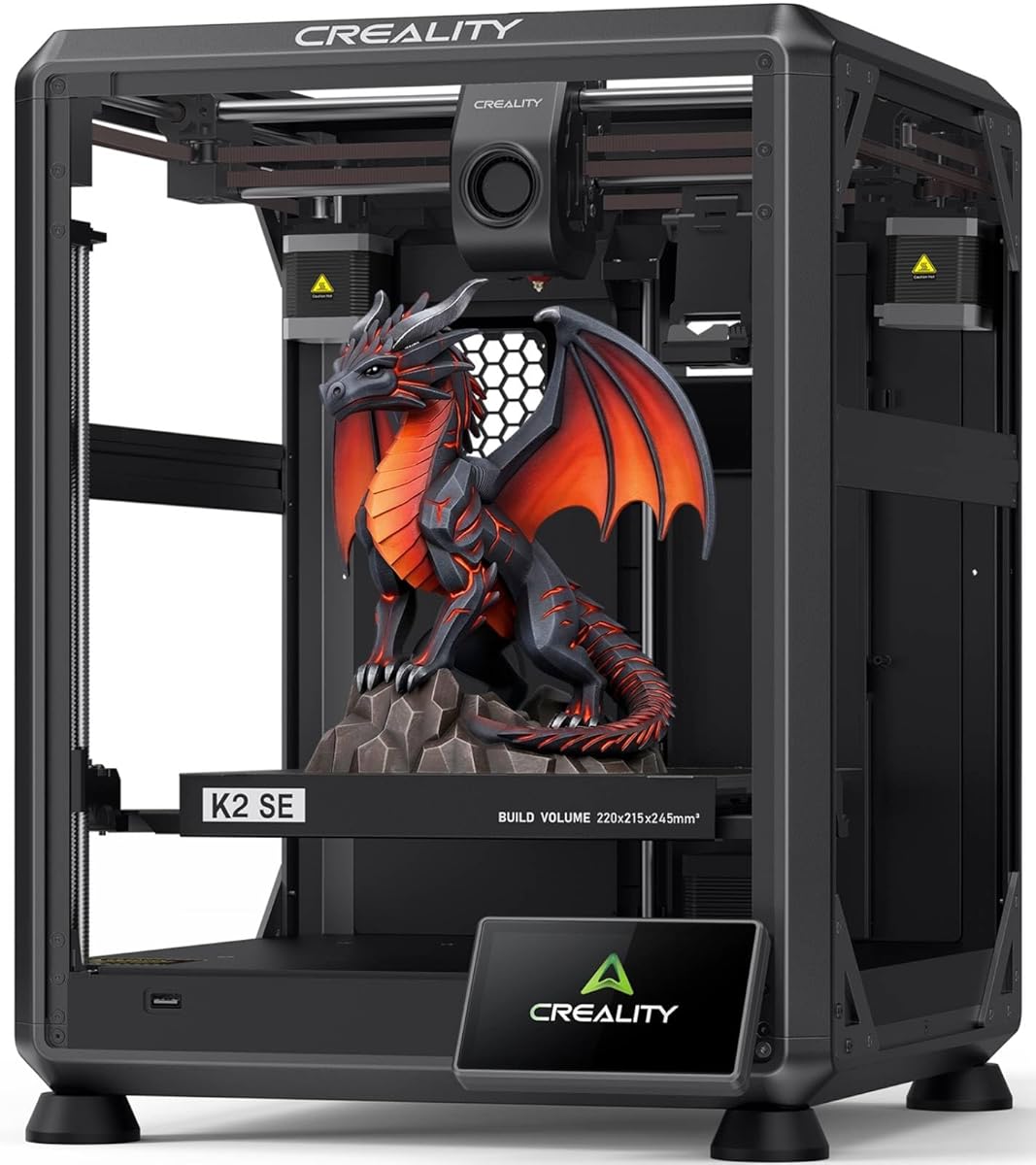
The Creality K2 SE offers a solid foundation for those who plan to grow their printing capabilities over time. It features a robust metal build and a speed of 500mm/s, making it competitive with more expensive machines.
We may earn a commission when you buy through this link, at no additional cost to you.
Its design allows for future expansion with the Creality CFS system, which supports multicolor printing. This scalability is valuable for users who might want to experiment with complex designs later without buying a new printer.
Setup involves some assembly, but the touchscreen guide simplifies the process. The leveling system is automatic, reducing the risk of human error during calibration. This helps beginners achieve reliable prints even if they are new to mechanical adjustments.
While it may require a bit more initial effort than plug-and-play models, the performance and flexibility justify the learning curve. It is a great option for tech-savvy beginners who value long-term potential over immediate simplicity.
Compatible with the Creality CFS system to unlock advanced multicolor 3D printing capabilities for future projects.
Core XY motion and input shaping algorithms ensure high-speed prints remain precise and free from ringing.
We may earn a commission when you buy through this link, at no additional cost to you.
For printers that require manual leveling, the E-Leveler 2 provides a precise and simple solution to ensure a flat bed. It uses an LED to indicate when the nozzle is at the correct height, making the process much more intuitive than using paper.
We may earn a commission when you buy through this link, at no additional cost to you.
This tool is designed to work with almost any printer that has a manually adjustable bed. It does not require firmware updates or complex installation, making it accessible for anyone who wants better first layers without buying a new machine.
While it is not a printer itself, it serves as a critical accessory for maintaining print quality. The improved battery holder and simplified target make daily checks quick and easy. It is a reliable investment for those maintaining older or budget-friendly models.
If your printer lacks built-in auto leveling, this device bridges the gap effectively. It ensures consistent results by removing the guesswork from manual adjustments, which is vital for beginners learning how bed leveling affects print success.
LED indicators provide clear visual feedback while you adjust the bed, ensuring perfect level without complex measurements.
We may earn a commission when you buy through this link, at no additional cost to you.
The FLASHFORGE AD5M focuses on user convenience with features that make maintenance and setup straightforward. Its all-metal CoreXY structure provides stability for high-speed prints, ensuring consistent quality across different projects.
We may earn a commission when you buy through this link, at no additional cost to you.
One standout feature is the patent quick-release nozzle, which can be swapped in just seconds. This reduces downtime significantly when switching between materials that require different nozzle types or when dealing with clogs.
The auto leveling system is reliable and accurate, measuring the nozzle-to-plate distance precisely. This ensures that every print starts on a solid foundation. The printer also includes power loss recovery, which protects your work if electricity fails.
This model is suitable for users who value efficiency and durability. The combination of speed, precision, and easy maintenance makes it a solid choice for both beginners and more experienced hobbyists looking for a workhorse machine.
Swapping nozzles takes only three seconds with the tool-free design, making maintenance simple for novices and experts alike.
Fully automatic leveling system measures offsets accurately to ensure flawless first layers without manual interference.
We may earn a commission when you buy through this link, at no additional cost to you.
The QIDI Q2 redefines entry-level performance by including features usually reserved for industrial machines. Its heated chamber and high-temperature nozzle unlock the ability to print with advanced materials like PPS and carbon fiber composites.
We may earn a commission when you buy through this link, at no additional cost to you.
This capability is rare for beginners but essential for those needing functional parts with high strength. The chamber stays at 65C to prevent warping, while the nozzle reaches 370C to melt tough filaments cleanly and consistently.
Safety is also a priority with a triple filtration system that captures odors and particles. This makes the printer safer for indoor environments. The smart monitoring features and power-loss recovery add peace of mind for longer prints.
While it comes at a premium price, the Q2 offers professional results from day one. It is perfect for users who want to explore high-performance materials without needing to upgrade or modify their machine later.
The 370C nozzle and heated chamber allow printing of tough engineering materials like PPS and carbon fiber composites.
G3, HEPA, and activated carbon filters effectively reduce odors and harmful particles for safe indoor use.
We may earn a commission when you buy through this link, at no additional cost to you.
The FLASHFORGE 5M Pro builds on the success of the Adventurer 5M by adding features focused on comfort and cleanliness. It is designed to be unobtrusive, with low noise levels that make it suitable for shared living spaces.
We may earn a commission when you buy through this link, at no additional cost to you.
Quiet mode allows users to focus without distraction during work or study. The dual filtration system further enhances the environment by blocking particulate matter, which is especially helpful if printing in a bedroom or office.
Auto leveling is precise and automatic, ensuring first layers are consistent every time. The printer supports a variety of materials, including flexible filaments, thanks to its robust direct drive extruder.
This model is ideal for users who prioritize a clean and quiet workspace. It combines performance with environmental considerations, making it a responsible choice for home users who care about air quality and noise.
Operates at 50dB with a silent mode option, ensuring quiet printing that does not disturb nearby activities.
We may earn a commission when you buy through this link, at no additional cost to you.
The Creality Ender 3 V3 SE is a classic choice for beginners due to its balance of affordability and capability. It includes CR Touch auto leveling, which makes getting started much easier compared to older manual leveling models.
We may earn a commission when you buy through this link, at no additional cost to you.
Its Sprite direct extruder provides reliable feeding for various filaments, from standard PLA to more flexible TPU. Assembly is quick, often taking less than 20 minutes, allowing new users to start printing almost immediately.
While it is not the fastest printer on this list, its speed of 250mm/s is sufficient for most hobbyist projects. The focus on stability and simplicity ensures that users spend less time fixing errors and more time creating.
This model represents the best entry point for those on a budget. It offers essential features without unnecessary complexity, making it a practical starting point for anyone wanting to enter the world of 3D printing.
Preassembly reduces the steps needed to build the printer, getting you to your first print in minutes.
We may earn a commission when you buy through this link, at no additional cost to you.
For owners of older printers who want to add auto leveling, the CR Touch kit is a cost-effective solution. It adds multi-point detection and compensation without needing to replace the entire machine.
We may earn a commission when you buy through this link, at no additional cost to you.
Installation involves updating the firmware, which may seem daunting to beginners but is well documented. The kit works with specific motherboard versions, so checking compatibility is essential before purchasing.
Once installed, the sensor maps the bed surface to ensure accurate first layers. This significantly improves print reliability and extends the life of older machines. It is a great option for those who enjoy tinkering with their gear.
This upgrade path is ideal for users who already have a printer they trust but need better reliability. It demonstrates how small changes can dramatically improve performance, making it a smart choice for budget-conscious hobbyists.
The system calculates tilt angles and compensates for unevenness across the print surface automatically.
We may earn a commission when you buy through this link, at no additional cost to you.
The FLASHFORGE AD5X introduces multi-color capability in an entry-friendly form. Its Intelligent Filament System manages multiple spools automatically, allowing users to create vibrant designs without manual intervention.
We may earn a commission when you buy through this link, at no additional cost to you.
This feature is particularly exciting for beginners who want to explore creative projects without needing expensive external systems. The printer supports high speeds and maintains stability, thanks to its all-metal Core XY structure.
Auto leveling ensures that even complex multi-color jobs start correctly. The large printing size accommodates various project scales, from detailed models to larger functional parts. This versatility makes it a compelling option for creative users.
While managing multi-color prints adds some complexity, the results are worth the effort. It bridges the gap between standard printing and professional multi-material workflows, making it a forward-thinking choice for hobbyists.
Automatically detects and refills filament to minimize downtime and enhance productivity during multi-color prints.
We may earn a commission when you buy through this link, at no additional cost to you.
The Creality Ender 3 V3 SE is marketed specifically as a beginner-friendly machine, and its features reflect that focus. CR Touch leveling and automatic Z-offset calibration reduce the technical hurdles often faced by new users.
We may earn a commission when you buy through this link, at no additional cost to you.
The silent mainboard ensures a quiet experience, which is a nice bonus for home environments. Flexible build plates make removing prints easy, preventing frustration when trying to detach models that stick well to the bed.
Despite its simple design, it delivers consistent quality. The direct drive extruder supports a wide range of filaments, and the motion system minimizes vibration for smoother layers. It is a solid machine for learning the basics.
For those just starting out, this printer removes the barriers to entry effectively. It allows users to focus on learning design and slicing rather than machine tuning, making it a strong recommendation for absolute beginners.
CR Touch auto leveling and automatic Z-offset calibration help achieve reliable first layers without manual adjustments.
We may earn a commission when you buy through this link, at no additional cost to you.
Choosing the right printer involves considering several factors beyond just price. This guide outlines the key features to look for to ensure a smooth start to your printing journey.
Auto leveling simplifies the setup process by ensuring the bed is perfectly flat before printing. Look for models with one-click calibration or reliable sensor-based systems like CR Touch. These features reduce the risk of failed prints due to poor bed adhesion.
Prioritize printers that handle calibration automatically to save time and frustration during your early projects.
The size of the build volume determines the maximum size of the objects you can print in one piece. Beginners should consider what they want to make and whether a standard 220mm volume is sufficient. Ensure your workspace can accommodate the printer's dimensions and ventilation requirements.
Select a build size that matches your project goals without taking up too much room in your workspace.
Direct drive extruders are generally better for beginners as they handle flexible filaments more easily than Bowden systems. They provide precise control over material flow, which is critical for high-quality prints. Check if the extruder allows for quick changes to maintain ease of use.
A reliable direct drive extruder ensures consistent feeding for a variety of materials without complex setups.
Higher speeds can reduce wait times, but they often require better mechanics to maintain quality. Beginners might not need ultra-fast speeds immediately, but having headroom for future projects is beneficial. Balance speed with stability to avoid ghosting or ringing artifacts.
Choose a speed that matches your patience level while ensuring the printer can maintain precision during fast moves.
Standard nozzles handle basic materials well, but heated chambers allow for tougher plastics like ABS without warping. If you plan to print only PLA, a simple setup is fine. However, for functional parts, consider models with higher temperature capabilities.
Assess your material needs to decide if a heated chamber is necessary for your specific project requirements.
Modern printers come with intuitive software and cloud features that simplify file management. Remote monitoring and control can be very useful for troubleshooting without being physically present. Check if the printer supports your preferred slicer software easily.
Look for software that is user-friendly to streamline the workflow from design to printed object.
A strong community and active support channels are vital for beginners who may encounter issues. Brands with large user bases offer more tutorials and troubleshooting resources online. Good customer service can also save time when dealing with hardware problems.
Choose a brand with a robust community and responsive support to help you resolve issues quickly.
Start by setting up your printer in a well-ventilated area with a flat surface. Use the auto leveling feature to calibrate the bed, ensuring the first layer adheres properly. Check the filament spool for tangles and load it according to the manufacturer's instructions.
During printing, monitor the process for any signs of issues like layer shifting or clogs. Use the provided software to manage print jobs and track progress remotely. Keep the environment free of dust to prevent debris from affecting print quality.
Regular maintenance includes cleaning the build plate and checking nozzle wear. Lubricate moving parts as recommended to ensure smooth motion. Store filament in a dry place to avoid moisture absorption which can lead to poor print quality.
Auto leveling measures the height of the print bed at multiple points to ensure it is flat. The printer then adjusts the Z-axis height automatically during printing to maintain consistent distance between the nozzle and bed.
Yes, most modern auto leveling systems are very reliable and simplify the setup process significantly. They remove the need for manual paper tests, which can be difficult for new users to get right.
Most printers handle calibration automatically, but you might need to adjust offsets occasionally if the bed shifts. Generally, the system maintains accuracy without frequent manual intervention.
Many beginner printers include power loss recovery features that save your progress. When power is restored, the printer resumes from where it left off rather than starting over.
PLA is the easiest for beginners due to its low warping risk and wide availability. Most auto-leveling printers also handle PETG and TPU well with proper settings and extruder types.
Regular checks every few months ensure consistent performance. Clean the build plate, check belt tension, and lubricate rails to keep the printer running smoothly.
Yes, kits like the CR Touch allow you to add auto leveling to older models. However, upgrading firmware and hardware requires some technical knowledge and compatibility checks.
Enclosures help with warping on materials like ABS, but open printers work fine for PLA. Choose based on the materials you plan to use and your comfort with ventilation.
Selecting the right printer depends on your specific goals and how much you want to tweak settings. The models highlighted in this guide offer a range of features from simple auto leveling to advanced multi-color capabilities.
Prioritize ease of use and reliability if you are new to 3D printing. Auto leveling is a feature that pays off in time saved and higher success rates for your first layers.
Always check the current availability and features before finalizing your choice. Technology evolves quickly, and staying informed ensures you get the best value for your investment.