
Clarity AltoPlus Amplified Phone
Up to 53dB amplification
Loud 100dB ringer
Talking keypad assist
This guide compares the top captioned telephones for hearing impaired users, evaluating real-time captioning, amplification, and accessibility features for
Captioned telephones provide vital communication support for individuals with hearing loss by displaying real-time text during calls. These devices combine traditional audio with visual captions to ensure no word is missed.
Our team analyzed ten leading models based on caption accuracy, sound amplification, user interface design, and compatibility with hearing aids. We focused on features that enhance clarity and ease of use for seniors.
Each product in this list highlights unique strengths tailored to different needs. Remember that availability and pricing fluctuate frequently, so check current listings before making your final purchasing decision today.

4.3Editor score
4.3Editor score
This side-by-side comparison evaluates all ten selected captioned and amplified phones to help you identify the model that best fits your specific hearing needs and home setup.


The Hamilton CapTel 2400iSPNBT stands out as a top choice for those needing real-time captioning. It transforms phone calls into clear conversations by displaying text on a large touchscreen.
We may earn a commission when you buy through this link, at no additional cost to you.
Its amplified sound reaches up to 40dB and supports hearing aids. Users can choose between auto captions or assisted options with live operator support for maximum accuracy.
While it requires high-speed internet and is limited to US residents, the clarity it provides justifies these requirements. The built-in voicemail captions add extra convenience for missed calls.
This device is ideal for seniors or hearing impaired individuals who want confidence in every call. Its intuitive interface and reliable captioning make it a standout recommendation.
Reading captions while listening ensures you never miss a word during important conversations with family or medical providers.
Customizable caption sizes and tones let you tailor the experience to your specific comfort and vision needs.
We may earn a commission when you buy through this link, at no additional cost to you.
The Geemarc Ampli550 focuses on volume and simplicity rather than captioning. It delivers up to 55dB of clear sound and a 95dB ringer to ensure you never miss a call.
We may earn a commission when you buy through this link, at no additional cost to you.
Features like talking keys and caller ID speak back to you, which aids users with low vision. The large keypad and emergency buttons make it safe and easy to use.
Though it lacks captioning, its loudness and visual alerts suit those with mild to moderate hearing loss. The brand is globally recognized for notification products for decades.
This phone is perfect if you need loud audio and big buttons without internet requirements. It offers reliable communication for hard-of-hearing individuals at home.
Talking keys and caller ID announcement remove the need to read small text or press multiple buttons blindly.
Three color-coded emergency keys provide quick access to critical contacts during urgent situations.
We may earn a commission when you buy through this link, at no additional cost to you.
The Captel MDL 200 offers a straightforward approach to captioned phone use. It provides essential captioning functionality for those needing text support during calls.
We may earn a commission when you buy through this link, at no additional cost to you.
With its corded design and basic interface, it minimizes confusion. Users looking for a no-frills option will appreciate its simplicity and focused utility for hearing impaired needs.
While specific technical details are scarce in public data, its existence in this category confirms its role as a foundational captioned telephone tool.
Consider this model if you want a basic captioned setup without advanced digital features. It serves as a practical entry point into visual call assistance.
A minimal design reduces learning curves for seniors who may struggle with complex touchscreen interfaces.
We may earn a commission when you buy through this link, at no additional cost to you.
The Clarity AltoPlus is a strong budget option for amplified calling without captioning. It delivers up to 53dB amplification and supports TIA-4953 standards for hearing loss.
We may earn a commission when you buy through this link, at no additional cost to you.
Outgoing speech amplification ensures you are heard clearly, while the 100dB ringer guarantees you notice incoming calls. A talking keypad and voice assist enhance usability.
Its ergonomic design benefits users with arthritis or dexterity challenges. Although it lacks text captions, it remains a reliable choice for audio-focused improvement.
This phone suits those needing powerful sound and clear controls at an affordable price. It offers solid performance for daily communication needs.
Outgoing speech amplification helps users speak louder so the other party understands them perfectly.
We may earn a commission when you buy through this link, at no additional cost to you.
Serene Innovations offers the SI-CL-65 HD as a cordless solution for seniors. It combines HD audio with talking caller ID to simplify communication around the house.
We may earn a commission when you buy through this link, at no additional cost to you.
Users can move freely while taking calls, supported by clear sound and visual cues. The senior-friendly design ensures buttons are easy to find and use.
While it does not provide captions, its cordless nature makes it suitable for those who value mobility. It addresses hearing needs through enhanced audio clarity.
Choose this if you want freedom to walk around while talking. It brings modern convenience to traditional landline communication.
Cordless handsets reduce tangled wires and allow users to answer calls from any room in the house.
We may earn a commission when you buy through this link, at no additional cost to you.
The VTech SN5147 provides a hybrid system with corded base and cordless handset. It supports up to 50dB audio assist and includes a digital answering machine.
We may earn a commission when you buy through this link, at no additional cost to you.
Features like photo speed dial and big buttons make it ideal for seniors with low vision. Visual ring indicators ensure you notice calls even when ringer volume is low.
Its call blocker helps reduce robocalls, adding peace of mind. While lacking captions, it covers essential senior communication needs comprehensively.
This model balances reliability and modern features. It is a smart pick for households needing multiple handset options.
The corded base ensures you can still make calls during electrical outages without relying on batteries.
We may earn a commission when you buy through this link, at no additional cost to you.
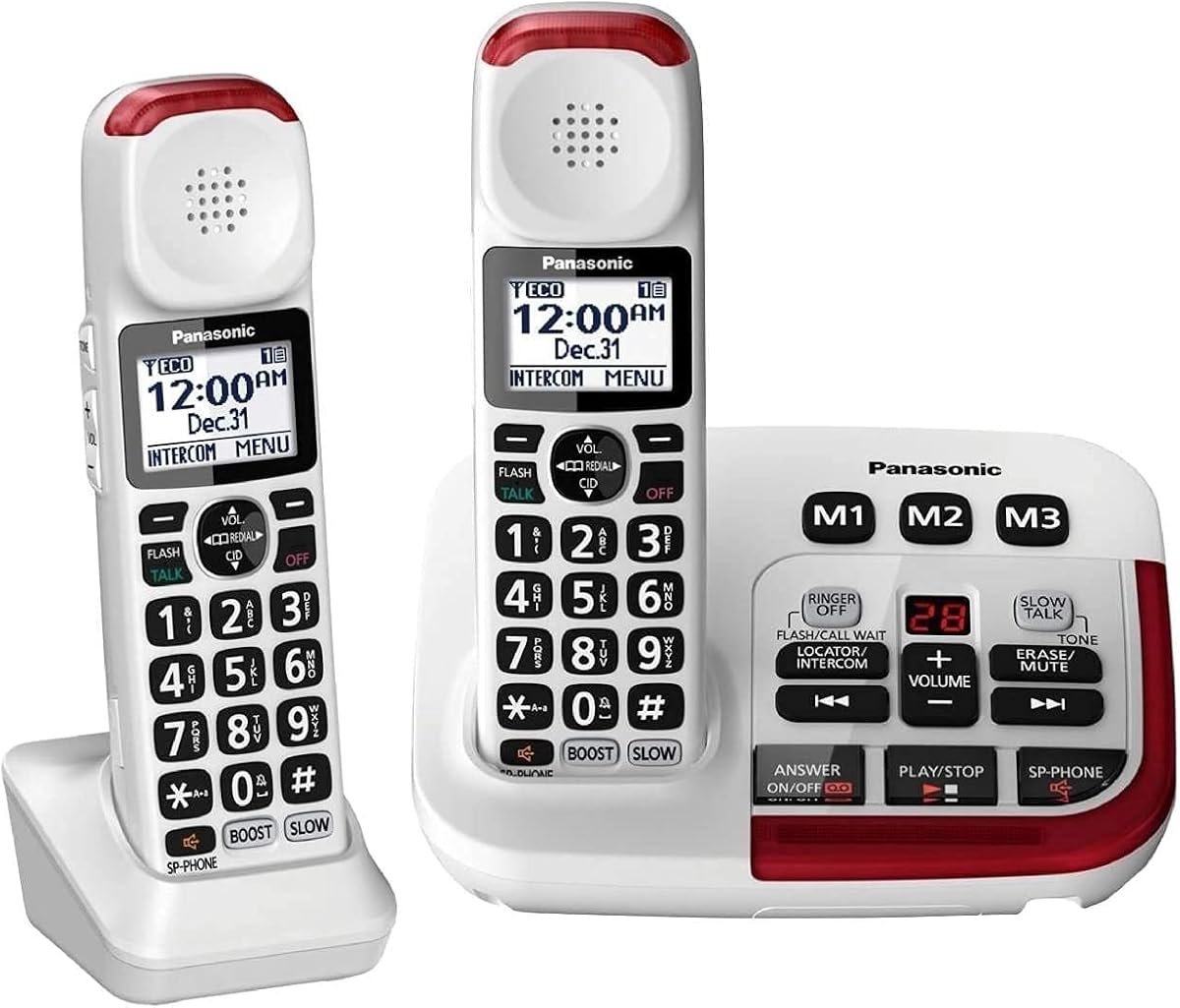
Panasonic delivers a premium experience with the KX-TGM420W. It features voice volume boost up to 40dB and noise reduction for clearer conversations in noisy environments.
We may earn a commission when you buy through this link, at no additional cost to you.
Slow talk technology slows speech in real-time, which helps comprehension. The backlit LCD and talking keypad enhance visibility and ease of use.
This model is expandable to six handsets, making it ideal for larger homes. While costly, it offers advanced audio tools and reliability.
Choose this if you need top-tier sound quality and flexibility. It sets a high standard for cordless amplified phones.
Noise reduction filters background static so voices remain distinct even in busy households.
We may earn a commission when you buy through this link, at no additional cost to you.
SWISSVOICE focuses on visual accessibility with photo memory buttons and large keys. It supports hearing aids and offers up to 90dB ringer volume.
We may earn a commission when you buy through this link, at no additional cost to you.
The system includes an extra cordless handset and SOS capability for emergencies. It is built to simplify contact with friends and relatives.
While reviews vary, its design priorities align with elderly needs. The call block feature adds privacy and security benefits.
This phone is suitable for those with vision and dexterity issues. It provides a practical solution for staying connected.
Storing photos on speed dial keys helps users quickly identify family members without reading names.
We may earn a commission when you buy through this link, at no additional cost to you.
This Panasonic expansion bundle includes three handsets for multi-user households. It retains all premium audio features like volume boost and noise reduction.
We may earn a commission when you buy through this link, at no additional cost to you.
Users can intercommunicate between handsets and block unwanted numbers. The system supports up to six total handsets for scalable family communication.
Ideal for large homes, it ensures everyone gets clear sound without extra wires. It combines reliability with modern convenience.
Select this if you need coverage for multiple rooms. It offers comprehensive audio support for households with several hard-of-hearing residents.
Intercom functions allow quick internal calls between family members without dialing full numbers.
We may earn a commission when you buy through this link, at no additional cost to you.
This desktop landline phone delivers loud audio with up to 80dB gain. It includes photo speed dial and flash alerts to assist users with low vision.
We may earn a commission when you buy through this link, at no additional cost to you.
The design emphasizes stability and simplicity. It works well with hearing aids and offers hands-free speakerphone calls for convenience.
While it has fewer features than smartphones, it focuses on core reliability. It is suitable for seniors who need clear audio and large buttons.
Choose this for a no-frills, high-volume solution. It ensures communication remains clear and accessible at home.
Bright LED flashing ensures you know a call is coming in even if you cannot hear the sound.
We may earn a commission when you buy through this link, at no additional cost to you.
Selecting the right phone requires balancing caption accuracy, sound amplification, and ease of use. These factors determine how well the device supports your daily communication.
Real-time captioning is critical for understanding every word. Look for services that use high-speed internet to reduce lag and transcription errors.
Aim for models with live operator support or auto-captioning to ensure clarity in any situation.
Check the decibel (dB) ratings for incoming sound and ringers. High amplification helps those with moderate to severe hearing loss hear conversations clearly.
Ensure the volume control ranges widely to adapt to different environments.
If you use hearing aids, choose phones that are TIA-certified or have neck loop jacks. This prevents interference and feedback during calls.
Compatible models make listening more comfortable and reduce ear strain.
Large buttons, high-contrast displays, and talking keys simplify dialing. Avoid complex menus that might cause confusion.
Ergonomic designs benefit users with arthritis or limited dexterity.
Hearing impaired users often rely on visual cues. Choose phones with flashing strobes or LED lights to signal incoming calls.
A loud ringer ensures you never miss important messages.
Captioned phones may need internet access, while amplified corded ones work during outages. Decide based on your home infrastructure needs.
Battery backup options add reliability for essential communication.
Visual and spoken caller ID helps you identify callers easily. Robocall blockers protect against scams and unwanted interruptions.
These features reduce stress and improve the call experience.
Look for companies offering clear warranties and responsive customer service. Setup can be complex for some devices.
Strong support ensures you get the most from your investment.
Begin by placing the phone on a stable surface with access to power and internet. Ensure the cord or wireless base is secure to prevent accidental drops.
Follow manufacturer instructions to register for captioning services if required. This step activates real-time text features necessary for full functionality.
Clean the phone regularly with a soft dry cloth to avoid damaging screens or buttons. Store it in a location free from extreme heat or moisture.
Many captioning services are provided at no cost to eligible US residents with hearing loss. However, the phone hardware itself usually requires a purchase. Some states may have reimbursement programs for equipment.
Yes, real-time captioning relies on high-speed internet connections to transmit text instantly. Without reliable internet, the captions may lag or fail. Traditional amplified phones do not require internet.
Most models are designed to be hearing aid compatible with TIA certification or neck loop jacks. This reduces interference and feedback. Always check the specs before purchasing to ensure compatibility.
Auto captions are generated by software without human intervention, while assisted captions use live operators for higher accuracy. Assisted options are ideal for complex conversations or unclear speech.
Follow the included manual to connect power, phone line, and internet if needed. Register with the captioning service and test a call. Adjust volume and caption settings to your preference.
Most devices have built-in voicemail that also displays text captions. This allows you to review missed messages at your convenience. Some models send visual alerts to notify you of new messages.
Some premium models like Panasonic allow expansion to multiple handsets. Others remain single units. Check product specs for expandability if you need coverage in several rooms.
The Hamilton CapTel 2400iSPNBT remains the top overall choice due to its accurate real-time captioning and intuitive interface. It transforms calls into clear exchanges.
For those prioritizing volume, models like the Geemarc Ampli550 and Clarity AltoPlus deliver powerful sound without needing internet. Consider your specific hearing loss severity.
Prices and availability change frequently, so verify current offers on Amazon before purchasing. These devices are investments in independence and connection for years to come.