
NGHTMRE for NES Classic Edition/Mini Controller
3.7Editor score
Extended 10ft cable included
Sensitive buttons for precision
Compatible with NES Classic Mini
This guide compares the best Classic NES Controller Replacement options for retro gaming on modern systems, focusing on compatibility and build quality.
Finding the right Classic NES Controller Replacement can transform your retro gaming experience. Whether you lost the original or want more comfort, modern options offer improved ergonomics and connectivity without sacrificing that nostalgic feel.
We compared ten top-rated controllers based on compatibility, build quality, cable length, and user feedback. Our analysis covers wired and wireless options suitable for PC, Mac, and specific console setups like the NES Classic Edition.
Each pick highlights key features, pros, and cons to help you decide quickly. Note that availability and pricing may change over time, so always verify current details before making your final purchase decision today.
3.7Editor score

4.5Editor score

4.8Editor score
Here is a side-by-side comparison of all ten controllers we reviewed, highlighting their key specifications to help you find the perfect match for your gaming setup.


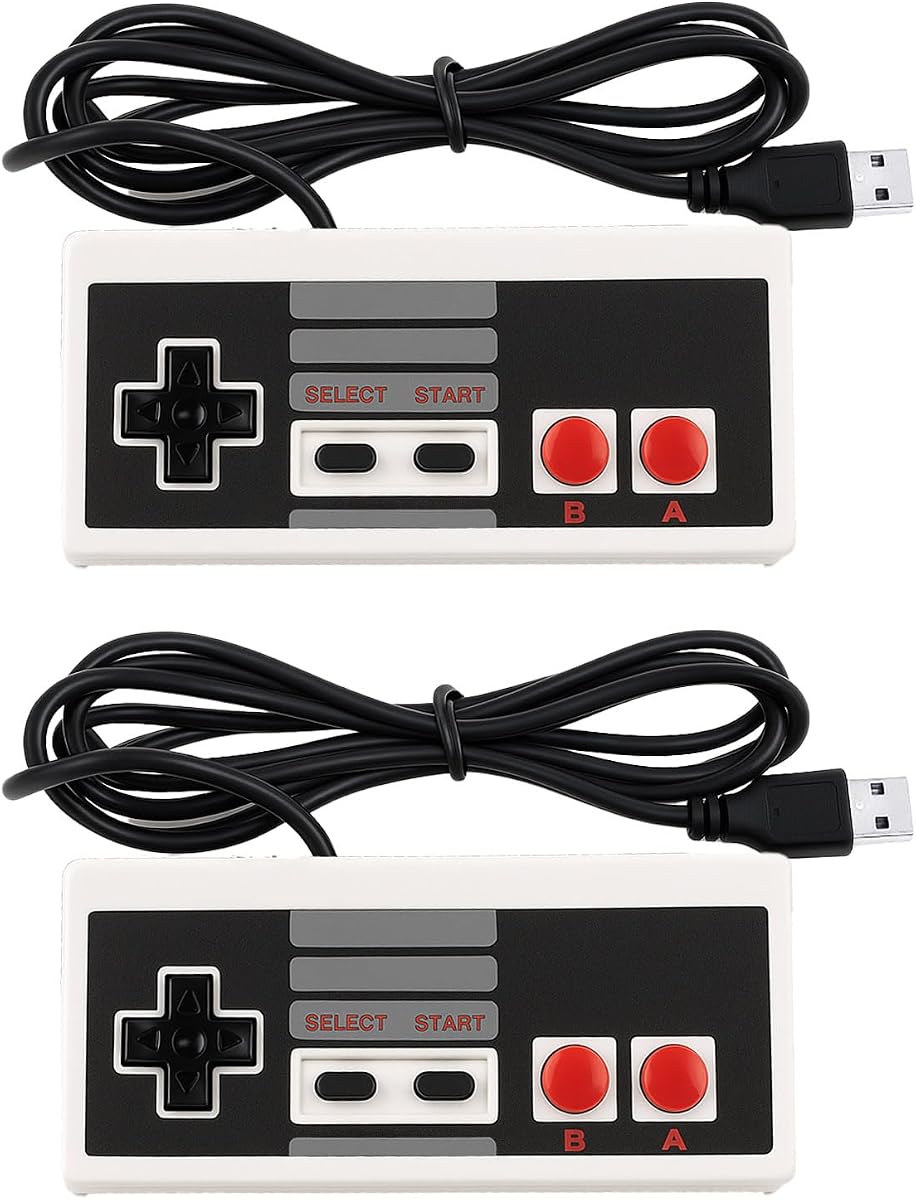


This NGHTMRE pack offers a practical solution for anyone needing Classic NES Controller Replacement options at a budget friendly price point. With a 3.7 rating from users, it delivers solid performance for casual gaming sessions without breaking the bank.
We may earn a commission when you buy through this link, at no additional cost to you.
The standout feature is the extended 10ft cable which allows players to sit further back from the screen. The buttons are designed to be sensitive for precision control, ensuring a nostalgic feel that mimics the original hardware closely.
While the build quality is sturdy, the rating suggests some variability in user satisfaction. It is important to note that this is specifically designed for the NES Classic Edition Mini model and not the original 1985 hardware.
If you need a second controller or a replacement without spending too much, this pack is a reliable choice. It is best suited for those who prioritize cable length and affordability over premium tactile feedback.
The 10ft cable reduces strain on eyes and allows comfortable seating positions during long gaming marathons.
Sensitive buttons ensure you do not miss inputs during fast paced retro platforming action.
We may earn a commission when you buy through this link, at no additional cost to you.
The ZAMPAM controllers provide a modern twist on retro gaming with wireless connectivity. While they do not work with the NES Classic Mini directly, they are excellent for PC emulators and Linux setups, earning a 4.0 rating from users.
We may earn a commission when you buy through this link, at no additional cost to you.
Users appreciate the 2.4GHz wireless range which provides up to 10 meters of freedom. The rechargeable lithium ion battery lasts around 100 hours, meaning you rarely need to plug them in for a charge.
A notable feature is the turbo function which allows for rapid fire inputs. However, users must download software to configure keys, which can be a hurdle for those seeking a truly plug and play experience.
If you play on PC or Mac and want to cut the cord, these are a strong contender. Just ensure your setup supports USB wireless adapters before purchasing to avoid compatibility issues.
Forget tangled wires while gaming on emulators with the reliable 2.4GHz connection range.
The built in battery offers over 100 hours of play time on a single charge.
We may earn a commission when you buy through this link, at no additional cost to you.
The XYAB controller aims to bring retro gaming to modern PCs with a straightforward USB connection. Designed for NES style play, it promises an ergonomic experience, though the 1.0 rating indicates significant user dissatisfaction.
We may earn a commission when you buy through this link, at no additional cost to you.
The design is classic and includes a six foot cable for reasonable reach. It works with major operating systems like Windows and macOS without requiring extra drivers, which is a plus for ease of use.
Despite the ergonomic claims, the low rating suggests potential issues with responsiveness or build consistency. Buyers should be cautious and check return policies before committing to this option for serious gaming.
This option is best for those seeking a quick plug and play solution on Mac or PC systems. Verify compatibility with your specific emulator or game before purchasing to ensure it meets your needs.
Plug into your USB port and start playing immediately without installing any drivers.
The ergonomic design fits well in hands for long retro gaming sessions.
We may earn a commission when you buy through this link, at no additional cost to you.
With a 4.8 rating, the happymaxplus controller is a top choice for owners of AV 620 and HD 621 retro consoles. It uses a 9 Pin plug design which ensures compatibility with these specific game consoles rather than the NES Classic.
We may earn a commission when you buy through this link, at no additional cost to you.
The continuous fire function is a significant upgrade over standard controllers, giving players an edge in rapid fire games. This feature is highly valued by enthusiasts who play challenging titles that require quick inputs.
Users receive two controllers in one pack which is great for multiplayer sessions. The build quality is praised as high quality, though it is important to confirm your console model before buying to ensure the port matches.
If you own one of the supported retro consoles, this controller is highly recommended. It brings modern features to classic setups while maintaining the simplicity of a wired connection.
The continuous fire button provides an edge in rapid fire action games.
Get two high quality controllers in one pack for shared gaming experiences.
We may earn a commission when you buy through this link, at no additional cost to you.
The ZENANBiBi controllers are designed for broad compatibility with PC, Mac, and Linux systems. With a 3.8 rating, they offer a solid entry level option for emulating classic games on modern hardware.
We may earn a commission when you buy through this link, at no additional cost to you.
They connect via USB 2.0 and work instantly without needing extra drivers. The five point six foot cable gives you enough room to play from a comfortable distance while staying connected to your device.
While they do not work with the NES Classic Mini or Wii, they are perfect for Raspberry Pi or Retropie setups. The classic design replicates the feel of the original controller closely.
For those building a retro gaming PC, this 2 pack is a practical choice. Verify your emulator compatibility before purchase to ensure the button mapping works correctly for your games.
Works with Windows Mac and Linux systems effortlessly for retro emulation.
Replicates the classic NES controller feel for nostalgic gaming sessions.
We may earn a commission when you buy through this link, at no additional cost to you.
The MAYFLASH adapter allows you to use your existing NES or SNES controllers on the NES Classic Edition. With a 3.9 rating, it is a useful tool for retro collectors who already have a collection of controllers.
We may earn a commission when you buy through this link, at no additional cost to you.
It requires no extra drivers and features built in turbo support. You can even exchange the D-pad and left stick functionality for customized control schemes on compatible systems.
While the concept is great, user feedback indicates some variability in performance. It is a niche product that solves a specific problem for those who want to reuse old controllers.
If you are looking to expand your controller options on a Wii U or NES Classic, this adapter is worth considering. Ensure you have the right cables before purchasing.
Plug in your old NES or SNES controllers to use with the NES Classic.
Enjoy built in turbo support for better control in action games.
We may earn a commission when you buy through this link, at no additional cost to you.
This eXtremeRate housing allows you to customize your Switch Joycons with a retro NES look. It includes a D-pad version which greatly improves the Joycon for games requiring precise directional inputs.
We may earn a commission when you buy through this link, at no additional cost to you.
The soft touch material provides a comfortable grip for long sessions. It includes a full set of buttons and screwdrivers, though you will need moderate installation experience to complete the swap.
While the rating is good at 4.4, it is not a controller itself but a shell replacement. This makes it a unique option for those who want to customize their hardware visually.
If you are comfortable with electronics installation and want a retro look, this is a great choice. Watch the installation guide carefully before starting the process.
The ergonomic D-pad design enhances directional control for Switch games.
Add personality to your Joycons with this unique retro replacement case.
We may earn a commission when you buy through this link, at no additional cost to you.
This bundle offers essential accessories for the NES Classic including a controller and extension cables. With a 2.4 rating, it addresses specific needs for console owners looking to extend reach and power options.
We may earn a commission when you buy through this link, at no additional cost to you.
The inclusion of two long 6FT extension cables is a major selling point for multiplayer setups. It also comes with a power supply which may be useful if your original is damaged.
However the low rating suggests potential issues with build quality or compatibility. Users should weigh the convenience of the bundle against the risks of third party accessories.
If you need to replace a power supply or want extra cables, this bundle may be useful. Proceed with caution given the mixed feedback from other consumers.
The two long extension cables help you play from further away.
Includes a power supply which can replace damaged units for the console.
We may earn a commission when you buy through this link, at no additional cost to you.
The RDS controller stands out as a licensed option for the NES Classic. With a 4.5 rating, it is trusted by users for its comfort and quality. The textured silicone material provides a secure grip during intense play.
We may earn a commission when you buy through this link, at no additional cost to you.
As an official licensed product, it ensures compatibility and reliability. The design extends your control to improve precision which is critical for classic platforming games.
While it is a single controller and comes in red, the build quality makes up for the simplicity. It is a safe choice for those who want assurance of fit and finish.
If you value official licensing and comfort, this is a top recommendation. The grip design helps prevent slipping during long gaming sessions.
Officially licensed by Nintendo to ensure perfect fit and function.
Textured silicone material provides a comfortable and secure hold.
We may earn a commission when you buy through this link, at no additional cost to you.
The KIWITATA controllers offer a SNES style experience on modern PC and Mac systems. With a 4.3 rating, they are popular among emulators. The two pack is great for local multiplayer on computers.
We may earn a commission when you buy through this link, at no additional cost to you.
The ergonomic design fits comfortably in hands with a frosted concave cross key to reduce slipping. However, you will need to manually set buttons within your emulator which adds a setup step.
They are not compatible with the original SNES console but work well with systems like Raspberry Pi. This makes them a solid choice for PC based retro gaming setups.
If you prefer the shape of the SNES controller, this is a strong option. Ensure you download an emulator before purchasing to make use of these controllers effectively.
The shape fits the contour of your hands for long play sessions.
Get two controllers in one pack for local multiplayer gaming on PC.
We may earn a commission when you buy through this link, at no additional cost to you.
Selecting the right controller requires considering compatibility and build quality. Here are the key factors to evaluate before making your decision.
Always check if the controller works with your specific console. Some options are designed for PC emulation while others target the NES Classic Mini directly. Using a mismatched controller can lead to functionality issues.
Verify the required ports and system support before purchasing to ensure a seamless connection.
Longer cables provide more comfort by allowing you to sit further from the screen. Look for lengths that suit your seating arrangement. Standard cables may feel restrictive during long sessions.
A longer cable ensures you can relax without straining your neck or eyes during play.
The tactile feel of the buttons impacts your ability to play fast games. Responsive buttons reduce input delay and improve precision. Some controllers offer enhanced features like continuous fire for advantage.
Prioritize controllers with sensitive buttons to maintain that authentic retro gaming precision.
Durability ensures your controller lasts through many gaming sessions. Check user reviews for feedback on material quality. Sturdy construction prevents premature failure during active play.
Invest in models with strong materials to avoid frequent replacements over time.
Wireless controllers offer freedom from cords but require batteries and adapters. Wired controllers provide reliability without charging needs. Choose based on your preference for mobility versus simplicity.
Wired options generally offer more consistent performance for competitive retro gaming.
Comfort is critical for long gaming sessions. Look for controllers with textured grips and ergonomic shapes. A comfortable design reduces hand fatigue during extended use.
Choose a controller that feels good in your hands to enhance your overall experience.
Some controllers include turbo functions or customizable button mapping. These features can enhance gameplay and adapt to specific needs. Consider if you need extra functionality beyond basic inputs.
Extra features like turbo buttons provide a strategic advantage in classic platformers.
Balance the cost against the features and durability offered. A higher price does not always mean better quality but often includes licensed assurance. Consider bundles for better value if you need multiple units.
Compare different packs to find the best deal that meets your specific needs.
Connect your controller to the console or PC using the appropriate cable. Ensure the connection is secure to avoid signal dropouts during gameplay.
Keep the controller clean by wiping it down regularly. Dust accumulation can affect button performance so a soft cloth is sufficient for maintenance.
Store the controller in a dry place when not in use. Avoid exposing it to direct sunlight or extreme heat to prevent material degradation over time.
Most modern replacements are designed for PC emulation or the NES Classic Mini rather than modern consoles like the Switch. Always verify compatibility with your specific system before purchasing to ensure functionality.
Choosing a controller with sensitive buttons and a comfortable grip can significantly improve precision. Some options also offer turbo features which help in rapid fire scenarios during gameplay.
A cable length of at least 6 feet is recommended for comfortable play. Longer cables allow you to sit further from the screen which reduces eye strain during extended sessions.
Most wired USB controllers are plug and play and do not require drivers. However some may need software configuration for specific emulator button mapping on PC systems.
Most replacements listed are designed for the NES Classic Mini or PC systems not the original 1985 NES. Check the product specifications to confirm if they support vintage hardware.
SNES controllers typically have shoulder buttons and a different layout compared to the simple NES design. Choose the style that matches your preferred games and comfort needs.
Licensed controllers ensure better compatibility and build quality as they meet manufacturer standards. While third-party options may be cheaper, licensed ones offer more assurance of performance and durability.
We highlighted ten top options including budget and premium picks to suit different needs. The RDS licensed controller and happymaxplus model stand out for quality and specific console support respectively.
Prioritize compatibility and comfort when making your selection. Whether you need wireless freedom or a simple wired solution there is a great choice for everyone.
Remember to check current availability and prices before purchasing. This guide aims to help you make an informed decision for your retro gaming setup.