
Omada AX3000 Wireless Access Point
4.5Editor score
True Wi-Fi 6 Speeds
Free Cloud Management
5 Years Warranty
This guide compares the top commercial wireless routers for 2026, evaluating speed, security, and scalability for small and medium-sized businesses seeking
Finding the right commercial wireless router is critical for maintaining productivity in modern business environments. A robust solution ensures stable connectivity for employees, customers, and IoT devices without compromising on security or speed.
We analyzed leading models based on throughput capacity, network management features, and security protocols. Our selection includes options ranging from budget-friendly access points to high-end mesh systems designed for demanding enterprise needs.
Each product entry details specific capabilities, pros, and cons to help you match hardware to your infrastructure. Please note that pricing fluctuates frequently, so verify current costs before making a final purchasing decision for your office.
4.5Editor score

4.2Editor score

4.6Editor score
The following table provides a side-by-side comparison of the top ten commercial wireless routers. Review these specifications to identify which model aligns best with your network topology and performance requirements.





The ASUS ExpertWiFi EBR63 is a robust WiFi 6 router designed specifically for small commercial environments. With a solid 4.2 rating, it offers essential business features like separate SSIDs and a customizable guest portal.
We may earn a commission when you buy through this link, at no additional cost to you.
Its standout quality is the integrated portal customization, allowing businesses to tailor the login page to their brand. Additionally, free commercial-grade security via AiProtection Pro ensures network safety without extra subscription costs.
While it provides reliable connectivity for up to five distinct device groups, users might find its range limited for sprawling offices. However, the ability to use a USB port as a backup WAN adds significant value for reliability.
This router is ideal for small shops needing secure, segmented networks. We recommend it for businesses prioritizing ease of management and guest access control over raw throughput capacity.
The customizable guest portal lets you align network access with your branding, offering a professional first impression to visitors and clients.
Included free subscription to AiProtection Pro provides enterprise-level threat protection and safe browsing features for all connected devices.
We may earn a commission when you buy through this link, at no additional cost to you.
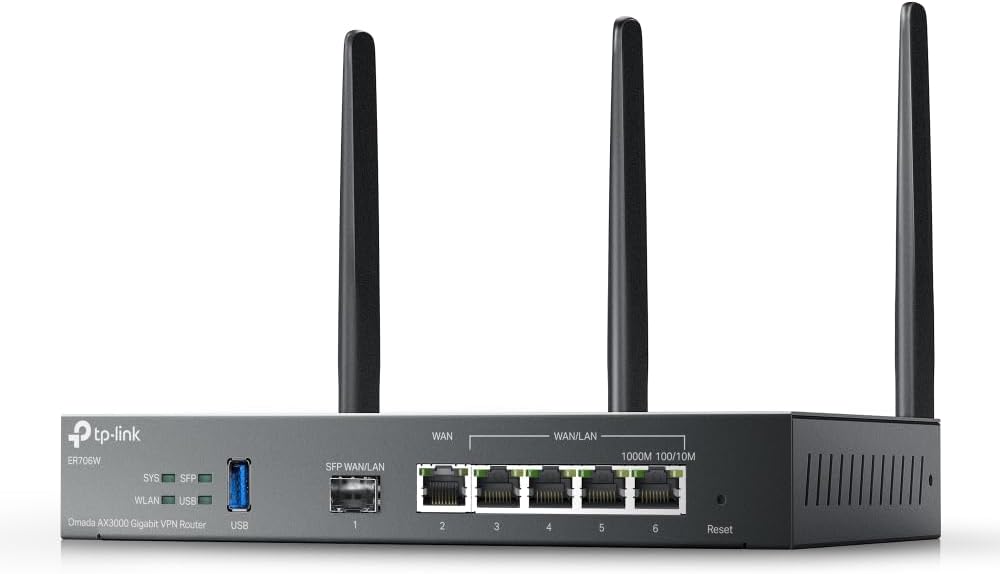
The Omada ER706W is a versatile gigabit router tailored for businesses needing robust multi-line internet connections. It supports up to five WAN ports, enabling load balancing and failover capabilities crucial for uptime.
We may earn a commission when you buy through this link, at no additional cost to you.
Key strengths include the SFP slot for direct fiber connection and support for diverse VPN protocols like WireGuard and OpenVPN. This ensures secure remote access and flexible networking options for modern workflows.
However, fully unlocking its mesh and SDN capabilities often requires an Omada controller hardware or software. This dependency might add complexity for very small setups but is standard for enterprise-grade scalability.
This router is excellent for office environments requiring high availability and secure remote access. Choose it if you need to aggregate multiple internet lines for better performance and redundancy.
The SFP slot allows direct fiber connectivity, bypassing unnecessary hardware and ensuring high-speed access to internet service providers.
Support for multiple VPN types ensures you can securely connect remote employees or branch offices without compromising data integrity.
We may earn a commission when you buy through this link, at no additional cost to you.
The Ruckus R750 is a high-performance WiFi 6 access point built specifically for ultra-dense environments like conference centers or busy retail floors. It delivers reliable connectivity even when hundreds of devices connect simultaneously.
We may earn a commission when you buy through this link, at no additional cost to you.
Its primary strength lies in its ability to manage high device density without performance degradation. The hardware is designed to maximize throughput and minimize interference in crowded wireless spaces.
While it offers exceptional performance, it typically requires a controller for management which adds to the initial setup complexity. However, this centralized control is often necessary for large-scale commercial deployments.
This access point is ideal for venues where many clients connect to WiFi at once. It ensures stable connections during peak hours, making it a solid choice for professional event spaces.
Engineered to handle high user density, ensuring consistent performance even when dozens of clients connect to the network simultaneously.
Provides reliable signal penetration through standard office walls, ensuring connectivity across meeting rooms and workstations.
We may earn a commission when you buy through this link, at no additional cost to you.
The Ruckus R670 represents the pinnacle of current commercial wireless technology with its WiFi 7 capabilities. It offers exceptional speeds and capacity suitable for future-proofing high-end corporate networks.
We may earn a commission when you buy through this link, at no additional cost to you.
Its key strength is the BeamFlex+ adaptive antenna technology which dynamically optimizes signal coverage and throughput. This ensures that even in complex environments, clients receive optimal bandwidth without interruptions.
The high cost reflects its advanced specs, but it may be overkill for basic office needs. However, for environments demanding maximum speed and minimal latency like creative studios, it is unmatched.
We recommend this for forward-thinking enterprises ready to adopt next-generation standards. It provides the best performance available today, ensuring your network stays relevant as devices evolve.
WiFi 7 technology delivers combined data rates exceeding 9 Gbps, supporting 8K streaming and demanding VR applications effortlessly.
BeamFlex+ technology maximizes signal delivery by adjusting antenna patterns in real-time for the best connection possible.
We may earn a commission when you buy through this link, at no additional cost to you.
The NETGEAR Orbi 970 is a flagship mesh system featuring WiFi 7 technology designed to cover massive commercial or large residential spaces. It delivers exceptional speed and capacity for up to 200 devices.
We may earn a commission when you buy through this link, at no additional cost to you.
Its standout features include a dedicated quad-band backhaul and 10 Gig Ethernet ports. These ensure that even with heavy usage, data moves without latency bottlenecks across the entire system.
The main trade-off is the high price point, which may not fit smaller budgets. However, the reliability and speed offered are hard to match for any environment needing extensive coverage and high performance.
This system is ideal for large offices or campuses needing blanket coverage. If budget allows, it provides the most comprehensive wireless solution currently available on the market.
The dedicated band for satellite traffic ensures that wireless connections between nodes never slow down your client devices.
Incorporating 10 Gig ports future-proofs your network against emerging high-speed internet plans and data-intensive applications.
We may earn a commission when you buy through this link, at no additional cost to you.
The Omada EAP650 offers an accessible entry point for businesses seeking reliable WiFi 6 connectivity without high costs. It balances performance and cost effectively for small to medium deployments.
We may earn a commission when you buy through this link, at no additional cost to you.
Its key strength is the free cloud management which eliminates the need for expensive hardware controllers. This simplifies setup and ongoing management significantly for IT teams with limited resources.
While it lacks the raw power of enterprise-grade units, its 2976 Mbps speed is sufficient for most standard office tasks. The slim design also ensures it blends neatly into modern office aesthetics.
We recommend this for startups or small businesses needing scalable wireless. It offers excellent value and reliability without the complexity of enterprise controller systems.
Free cloud management allows you to manage multiple access points without paying for additional controller hardware.
Backed by a 5-year warranty, this unit offers peace of mind and longevity for your business infrastructure investment.
We may earn a commission when you buy through this link, at no additional cost to you.
The Ubiquiti U6+ is a reliable dual-band access point known for its seamless integration into UniFi networks. It offers a balance of speed and physical design that suits professional environments.
We may earn a commission when you buy through this link, at no additional cost to you.
Its standout feature is the ease of installation via PoE+, allowing power and data through a single cable. This simplifies wiring significantly in ceilings or walls where outlets are scarce.
While it requires the UniFi controller for management, the software provides excellent visualization of network health. This makes it a favorite for installers who value clean interfaces and robust tools.
This access point is perfect for offices needing professional-grade wireless. It ensures stable connections and high throughput while maintaining a clean, unobtrusive physical presence.
PoE+ capability removes the need for separate power adapters, keeping installation areas tidy and reducing cable clutter.
Built-in encryption features actively protect your sensitive business data from unauthorized access attempts on the network.
We may earn a commission when you buy through this link, at no additional cost to you.
The TP-Link BE6500 brings the latest WiFi 7 technology to the commercial market at a competitive price point. It is designed to support high-speed applications like 8K streaming and VR.
We may earn a commission when you buy through this link, at no additional cost to you.
Its primary strength is the Multi-Link Operation which allows devices to use multiple frequency bands simultaneously for lower latency. This ensures faster and more reliable connections for demanding workloads.
While it supports EasyMesh expansion, it lacks compatibility with specific proprietary mesh systems. However, for a standalone router in a standard office, it offers incredible raw performance per dollar.
This router is suitable for offices needing future-proof speeds without enterprise complexity. It provides the benefits of next-gen wireless for businesses ready to upgrade their connectivity.
Simultaneous data transfer across bands delivers higher throughput and lower latency compared to standard WiFi 6 devices.
TP-Link adheres to CISA Secure-by-Design pledges ensuring advanced security is built into the device from the start.
We may earn a commission when you buy through this link, at no additional cost to you.
The NETGEAR Nighthawk WiFi 7 router offers a powerful balance of speed and coverage for medium-sized offices. It supports a third high-speed band to manage multiple devices without congestion.
We may earn a commission when you buy through this link, at no additional cost to you.
Its standout feature is the dedicated 6 GHz band which ensures fast devices do not get slowed down by legacy traffic. This separation maintains high performance even during busy work hours.
While it covers up to 2500 sq ft effectively, larger spaces might require additional mesh satellites. However, the setup is straightforward and allows for future expansion if needed.
This router is ideal for offices needing robust speeds in a standalone form. It provides excellent performance for daily tasks and ensures your network keeps pace with modern devices.
The 6 GHz band offers a dedicated lane for fast devices, ensuring uninterrupted performance during peak usage times.
2.5 Gigabit ports prepare your network for ultra-fast internet plans and high-speed wired connections.
We may earn a commission when you buy through this link, at no additional cost to you.
The ASUS RT-BE88U is a powerhouse router designed for high-performance networks requiring maximum wired and wireless speeds. It features dual 10G ports and cutting-edge WiFi 7 technology.
We may earn a commission when you buy through this link, at no additional cost to you.
Its key strength is the massive 34G wired capacity and fast 7.2 Gbps wireless throughput. This makes it ideal for environments handling large data transfers or heavy media editing tasks.
While the features are extensive, they may require some technical knowledge to optimize fully. The AI WAN detection helps maintain stability but understanding the settings is beneficial for best results.
This router is perfect for power users needing top-tier performance. It combines high-speed connectivity with advanced management features for a complete enterprise-level experience.
Dual 10G ports ensure your network does not bottleneck when transferring large files between internal servers.
AI WAN detection automatically optimizes your connection for stability and speed based on real-time network conditions.
We may earn a commission when you buy through this link, at no additional cost to you.
Selecting the right commercial wireless router involves evaluating several critical factors to ensure reliability and performance. This guide outlines the key aspects to consider before making a purchase.
Throughput capacity determines how much data the router can handle simultaneously. For businesses with many devices, look for models supporting WiFi 6 or WiFi 7 standards which offer higher bandwidth.
Prioritize routers with higher aggregate speeds to prevent bottlenecks during peak business hours.
Commercial networks require robust security to protect sensitive data. Look for built-in firewalls, intrusion detection, and guest network isolation capabilities.
Ensure the router supports the latest encryption standards like WPA3 to safeguard against unauthorized access.
The ease of managing your network is crucial for operational efficiency. Options include cloud-based management, local apps, or enterprise controllers.
Choose a system that aligns with your technical expertise and IT infrastructure requirements.
Businesses often grow, requiring network expansion. Ensure the router supports mesh capabilities or multiple access point connections.
Verify that the system allows adding new nodes without significant reconfiguration of existing hardware.
Separating guest traffic from internal networks is essential for security. Look for routers that allow customizable guest portals and independent SSIDs.
Features like captive portals help control access and reduce security risks from public user devices.
Physical ports are vital for connecting wired devices like printers and servers. Ensure there are enough Gigabit ports or consider models with multi-gigabit ports.
Check for specific ports like SFP slots if your ISP provides fiber internet connections directly.
Downtime can cost businesses money, so reliability is paramount. Look for features like dual WAN support for failover and backup capabilities.
Read user reviews regarding stability to ensure the hardware performs consistently under load.
While premium models offer advanced features, evaluate the total cost of ownership including licenses and maintenance.
Balance performance needs against your budget to find the best value for your specific business size.
Begin by placing the router in a central, elevated location to maximize coverage. Avoid placing it near metal objects or microwaves which can interfere with signal strength.
Keep the firmware updated through the manufacturer's app or web interface. Updates often include critical security patches and performance improvements for your network.
Regularly monitor connected devices and usage through your management dashboard. This helps identify anomalies early and ensures optimal network performance over time.
Commercial routers are designed for higher concurrent connections, robust security, and better management tools. They support VLANs, guest portals, and have more reliable hardware components compared to consumer home models.
Not always. Some models like Omada EAP650 offer free cloud management without controllers. However, enterprise setups often benefit from hardware or software controllers for centralized control.
Yes, WiFi 7 routers are available now but require compatible client devices to maximize speed. They offer future-proofing and lower latency which benefits high-bandwidth applications immediately.
This varies by model but commercial routers typically support hundreds of simultaneous connections. Always check the specific device limit mentioned in the product specifications before purchasing.
Yes, mesh systems like Orbi are excellent for covering large office spaces without extensive cabling. They ensure seamless roaming between nodes for continuous connectivity.
Isolation prevents guest devices from accessing internal company servers and files. This reduces the risk of malware spreading from public devices to your private network infrastructure.
Dual WAN ports allow you to connect two internet providers. If one line fails, the router automatically switches to the other ensuring your business stays connected during outages.
Check for updates monthly or enable automatic updates if available. Regular updates ensure you have the latest security patches and performance optimizations.
We reviewed ten top commercial routers ranging from budget-friendly access points to high-end mesh systems. Each offers unique strengths in speed, security, and scalability.
Prioritize security features and management ease when selecting hardware for your business. A stable network is foundational to modern productivity and customer satisfaction.
Check current prices and availability before finalizing your purchase to ensure the best value for your infrastructure needs.