
BENFEI 4in1 USB 3.0 and USB-C Card Reader
4.5Editor score
Reads 4 cards simultaneously
USB-C and USB 3.0 ports
Affordable multi-format solution
This guide compares the top ten Compact Flash Card Reader models for speed compatibility and build quality helping photographers choose the best tool for their
Finding the right Compact Flash Card Reader is essential for professionals who rely on high-speed data transfer and reliable connectivity. A good reader supports multiple formats like SD, CF, and Micro SD while offering fast USB 3.0 speeds. Whether you are archiving footage or moving photos to a laptop speed compatibility matters.
We evaluated ten leading models based on transfer speeds, build quality, and compatibility with modern devices like MacBooks and iPhones. Each product was analyzed for its ability to handle simultaneous card reads and its resistance to heat during prolonged use. This list covers options from budget-friendly hubs to premium aluminum enclosures.
Each pick shows key strengths and ideal use cases so you can match a reader to your specific camera gear and computer setup. Prices and availability change frequently so always check the latest details before purchasing. Our goal is to help you find a reliable tool that speeds up your creative process without breaking the bank.
4.5Editor score

4.7Editor score

4.3Editor score
This side-by-side comparison highlights the key specifications and strengths of each Compact Flash Card Reader to help you decide which model fits your needs best.



The Lexar Multi-Card 3-in-1 Card Reader stands out as a top choice for users who need high-speed performance and reliability. With a rating of 4.7 stars this device is praised for its ability to handle SD Micro SD and CF cards efficiently. It is particularly well-suited for photographers and videographers who require quick offloading of large files.
We may earn a commission when you buy through this link, at no additional cost to you.
Its standout quality lies in its transfer speeds which reach up to 312MB/s for SD and Micro SD cards and up to 160MB/s for CompactFlash cards. This performance is backed by USB 3.1 technology which ensures that you can move high-resolution photos and videos in seconds rather than minutes. The reader also supports UHS-I cards for even faster data access on compatible hardware.
While the Lexar reader excels in speed it does not support CFast cards which are used in some professional cinema cameras. Additionally the price is higher than budget options so it may not be the first choice for casual users. However these trade-offs are acceptable for professionals who value time and data integrity over cost savings.
This device is ideal for anyone who works with SD Micro SD or CF cards and needs a fast reliable reader. Whether you are editing video on a desktop or reviewing photos on a laptop this reader will streamline your workflow. Its durable build and strong warranty make it a solid investment for creative professionals.
The Lexar reader delivers transfer speeds up to 312MB/s ensuring that you can offload large files quickly without waiting.
It supports SD Micro SD and CF cards making it a versatile solution for users with mixed camera gear.
We may earn a commission when you buy through this link, at no additional cost to you.
The BENFEI 4in1 USB 3.0 Card Reader is an excellent budget-friendly option for users who need versatile connectivity without spending a lot. With a 4.5-star rating it is popular for its ability to read SD Micro SD MS and CF cards all at once. It is designed for modern setups including MacBooks and iPhones with USB-C ports.
We may earn a commission when you buy through this link, at no additional cost to you.
Its integrated design allows you to connect via USB 3.0 or USB-C making it flexible for both older and newer computers. The reader supports transfer rates up to 160MB/sec in UHS-I mode which is sufficient for most photo and video workflows. You can browse and view photos instantly on your devices without needing multiple adapters.
The main trade-off is the plastic build which may feel less premium than aluminum alternatives. It also does not support CF Type I cards which limits compatibility with some older professional cameras. However for most users these issues are minor compared to the cost savings and the convenience of simultaneous card reading.
This reader is perfect for travelers students or casual photographers who need a reliable and affordable solution. It works well with iPhone 15 Series and MacBooks making it a great choice for Apple users. With an 18-month warranty and friendly customer service it offers good value for money.
With both USB-C and USB 3.0 ports this reader works with a wide range of computers and mobile devices.
It reads up to four cards at the same time eliminating the need to swap cards frequently.
We may earn a commission when you buy through this link, at no additional cost to you.
The 6-in-1 CF/SD/TF/MS/XD/CFast Adapter is a premium solution designed for professionals who need to handle diverse and legacy card formats. With a 4.3-star rating it is praised for its ability to read up to six cards simultaneously and its robust aluminum construction. It is ideal for users who work with CFast cards alongside standard SD and Micro SD cards.
We may earn a commission when you buy through this link, at no additional cost to you.
Its standout feature is the inclusion of a CFast 2.0 slot which is rare in consumer readers. This makes it a perfect archive solution for photographers and videographers who need to access old camera data. The aluminum alloy chassis not only looks professional but also dissipates heat during long transfers ensuring stable performance.
The main downsides are the higher price and the slightly heavier build compared to plastic models. However for users who need CFast support and simultaneous reading the trade-off is worth it. It supports USB-C and USB-A connectors making it compatible with both modern and older computers without needing extra cables.
This reader is best for professional workflows where reliability and compatibility are critical. It handles high-capacity cards well and reduces the need for multiple devices. If you have a mix of new and old camera cards this device will streamline your data transfer process significantly.
The dedicated CFast 2.0 slot allows you to read high-speed professional cards that other readers cannot handle.
The aluminum alloy chassis is durable and helps dissipate heat during prolonged data transfers.
We may earn a commission when you buy through this link, at no additional cost to you.
The UGREEN SD Card Reader is a versatile hub that supports SD Micro SD CF and Memory Stick cards. With a 4.6-star rating it is highly rated for its ability to read four cards simultaneously without needing to swap them. It is a great choice for users who have multiple devices and want to manage all their data from one spot.
We may earn a commission when you buy through this link, at no additional cost to you.
Its key strength is the USB 3.0 port which delivers transfer speeds up to 5Gbps. This ensures that large files like 4K videos can be moved quickly. The reader supports cards up to 2TB which means it will work with the latest high-capacity memory cards. It is plug and play ready for Windows Mac and Linux.
The only drawback is that it uses a USB-A connection which may require an adapter for newer MacBooks or iPhones. Additionally the cable length of 1.7 feet may be restrictive depending on where you plug it in. However these issues are minor compared to the convenience of simultaneous card access.
This reader is ideal for travelers and professionals who need to manage multiple cards efficiently. Its compact design makes it easy to carry in a bag. With a 2TB capacity limit it future-proofs your setup for upcoming high-capacity storage needs.
Supports up to 2TB cards ensuring compatibility with the latest high-capacity memory cards.
Reads 4 cards at the same time saving you time from swapping cards manually.
We may earn a commission when you buy through this link, at no additional cost to you.
The ZIYUETEK CF Card Reader is a robust option that offers high-speed transfer capabilities for multiple card types. With a 4.5-star rating it is appreciated for its aluminum cover which adds durability and helps with heat dissipation. It supports up to five cards simultaneously including SD CF and Micro SD formats.
We may earn a commission when you buy through this link, at no additional cost to you.
Its standout quality is the USB 3.0 port which enables transfer rates up to 5Gbps. This speed is crucial for professionals who need to offload large batches of images quickly. The reader also includes intelligent protection against over-current and voltage spikes safeguarding your data and connected devices.
The main limitations are the lack of a USB-C port and the lower brand recognition compared to some competitors. However the build quality and protection features make up for these drawbacks. The slim design makes it easy to carry and the plug-and-play setup ensures it works with any computer without drivers.
This reader is suitable for users who need a reliable and fast tool for data management. It is especially good for those who work with CF and SD cards regularly. The built-in protection adds peace of mind against electrical issues during transfers.
Intelligent protection against over-current and voltage spikes protects your connected equipment.
The slim aluminum alloy cover offers durability and helps dissipate heat during use.
We may earn a commission when you buy through this link, at no additional cost to you.
The UGREEN USB C SD Card Reader is tailored for users with modern USB-C devices such as MacBooks and iPhones. With a 4.5-star rating it is praised for its native USB-C connector which eliminates the need for adapters. It supports up to four cards simultaneously including CF SD and Micro SD types.
We may earn a commission when you buy through this link, at no additional cost to you.
Its key strength is the 5Gbps transfer speed which ensures fast data movement. The reader is compatible with iPhone 15 Pro and other USB-C phones making it versatile for mobile workflows. It also works with Windows Mac and Linux without needing any driver installation.
The main limitation is that it lacks a USB-A connector which may be inconvenient if you also have older devices. Additionally it does not support XD-Picture cards which are used in some legacy Olympus cameras. However for most modern users these are minor concerns.
This reader is ideal for Apple users and anyone who works primarily with USB-C laptops. Its compact design makes it easy to carry. With strong compatibility and fast speeds it is a reliable choice for everyday data transfers.
The USB-C connector fits directly into modern laptops and phones without needing adapters.
Works seamlessly with iPhone 15 Pro and other USB-C devices for mobile workflows.
We may earn a commission when you buy through this link, at no additional cost to you.
The SmartQ C368 USB 3.0 Card Reader is a simple and effective tool for users who need reliable card reading with clear status feedback. With a 4.6-star rating it is popular for its blue LED indicator which shows when the device is powered on. It supports SD Micro SD MS and CF cards with transfer speeds up to 5GB per second.
We may earn a commission when you buy through this link, at no additional cost to you.
Its standout feature is the LED light which provides a clear visual cue for connectivity. This is helpful for ensuring your cards are properly connected before transferring files. The reader is plug and play ready and comes with a cable organizer to keep your workspace tidy.
The main trade-off is the plastic build which is less durable than aluminum options. It also reads cards independently rather than simultaneously which may slow down workflows with multiple cards. However for single-card users the simplicity and clear feedback are valuable.
This reader is best for casual users and travelers who need a straightforward solution. The included cable organizer adds practical value. With strong compatibility and reliable performance it is a solid choice for everyday use.
The blue LED indicator lights up when powered on so you know the device is active.
Comes with a cable organizer to help keep your cables tidy and organized.
We may earn a commission when you buy through this link, at no additional cost to you.
The CFast 2.0 Card Reader is a specialized tool for professional videographers and photographers who work with CFast cards. With a 4.4-star rating it is recognized for its ability to support CFast 2.0 alongside standard SD CF and XD cards. It supports transfers up to 5Gbps which is essential for high-resolution video footage.
We may earn a commission when you buy through this link, at no additional cost to you.
Its key strength is the CFast 2.0 slot which allows access to high-speed cards used in cinema cameras. The aluminum body helps dissipate heat during large transfers ensuring stable performance. It also reads up to five cards at once which is efficient for multi-camera workflows.
The main limitation is the higher price and the focus on CFast which may not be needed for casual users. However for professionals who need this specific capability it is an essential tool. The included USB-A to USB-C cable ensures compatibility with a wide range of computers.
This reader is ideal for content creators who need to offload 4K or 8K video footage. Its compatibility with both modern and legacy cards makes it a versatile archive solution. If you use CFast cards regularly this is one of the few reliable options available.
Supports CFast 2.0 cards for high-speed transfers essential for professional video production.
Reads up to five cards simultaneously to streamline data offloading from multiple sources.
We may earn a commission when you buy through this link, at no additional cost to you.
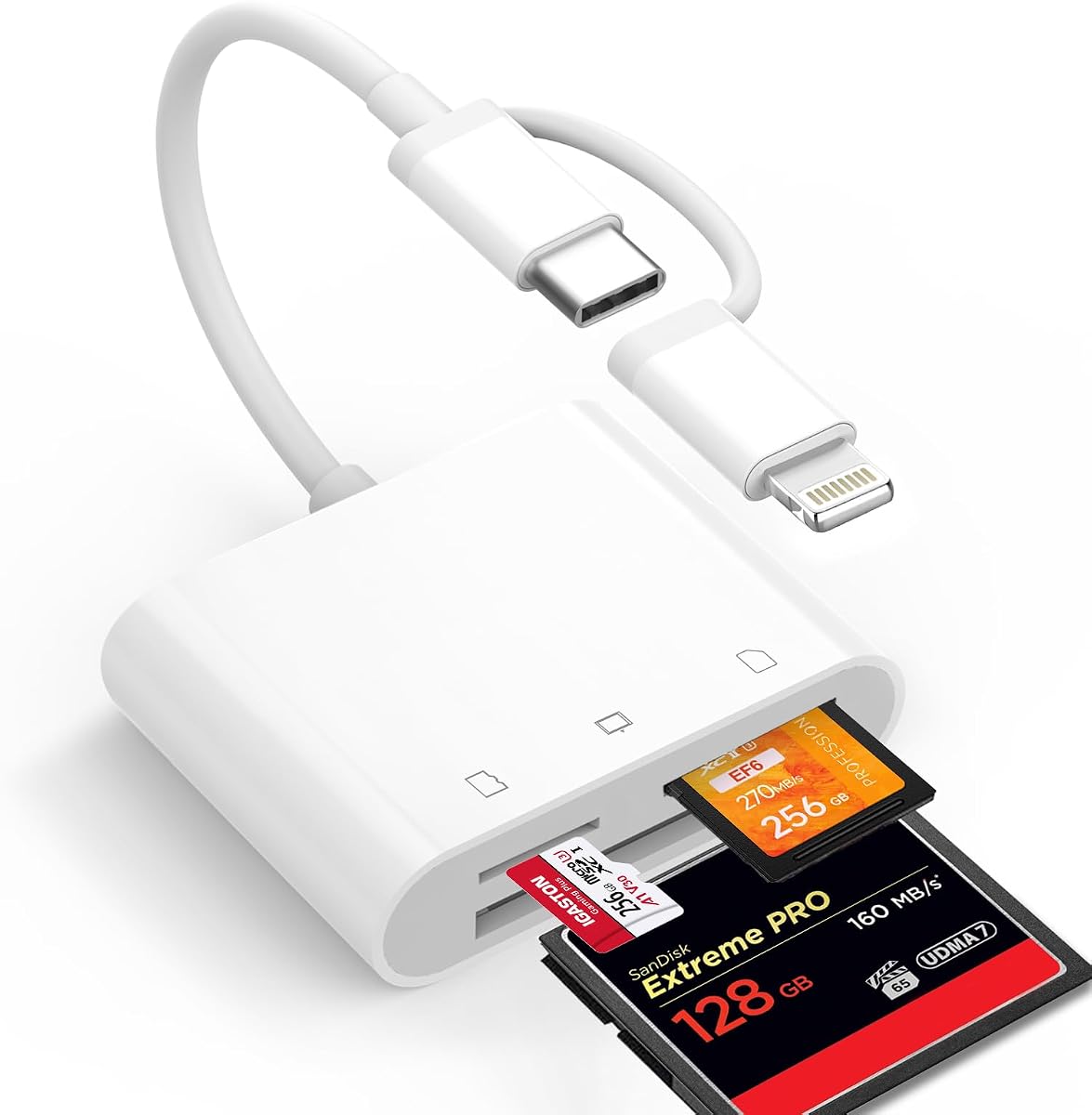
The Denlane CF SD Card Reader is designed for users who switch between Lightning and USB-C devices such as iPhones and MacBooks. With a 4.3-star rating it is praised for its dual connector design which allows direct connection without adapters. It supports up to three cards simultaneously including CF SD and Micro SD.
We may earn a commission when you buy through this link, at no additional cost to you.
Its standout feature is the dual connector design which includes both Lightning and USB-C ends. This versatility is unmatched for users who own multiple Apple devices. The reader is MFi certified ensuring stable transmission speeds. It also supports bi-directional transfers so you can move files from your phone to the card.
The main limitation is that you cannot use both connectors simultaneously which may limit some workflows. Additionally the fixed connectors may wear out over time compared to detachable cables. However the convenience of direct connection outweighs these issues for many Apple users.
This reader is best for travelers and creators who need to view photos on iPhones or iPads. It is also useful for backing up photos directly to a memory card. With strong compatibility and ease of use it is a great tool for Apple ecosystems.
Includes both Lightning and USB-C connectors to work with a wide range of Apple devices.
Allows you to transfer files from your phone to the memory card to free up storage.
We may earn a commission when you buy through this link, at no additional cost to you.
The ChiaoPio USB C SD Card Reader is a compact solution designed for modern devices with USB-C ports. With a 4.5-star rating it is appreciated for its built-in USB-C cord which does not block other ports when plugged in. It supports CF SD and Micro SD cards making it versatile for many users.
We may earn a commission when you buy through this link, at no additional cost to you.
Its key strength is the design which allows it to plug directly into a USB-C port without an adapter. This setup is compatible with iPad Pro 2023 and other USB-C devices. The reader is plug and play so you do not need to install any drivers. This simplicity makes it easy to use for anyone.
The main limitation is the fixed USB-C cord which may not be removable if it gets damaged. It also lacks USB-A support which limits compatibility with older computers. However for users with modern USB-C devices the design is practical and efficient.
This reader is ideal for iPad users and anyone who needs a simple reliable tool for data transfers. It is affordable and easy to carry. If you need to access SD or CF cards on a modern computer this is a straightforward and effective choice.
The built-in USB-C cord plugs directly into devices without needing an adapter.
The compact design does not block other ports on your laptop or tablet.
We may earn a commission when you buy through this link, at no additional cost to you.
Choosing the right Compact Flash Card Reader depends on your specific card formats device compatibility and speed requirements.
The most important factor is ensuring the reader supports all the card types you own. Check if it includes Compact Flash SD Micro SD and any legacy formats like XD or CFast. A reader that supports multiple formats simultaneously can save you time and money.
Look for models that support the latest card specifications to ensure future compatibility with higher capacity cards.
Transfer speed is critical for moving large files efficiently. Look for readers with USB 3.0 or USB 3.1 capabilities which offer speeds up to 5Gbps. For Compact Flash cards ensure the reader supports high-speed modes to avoid long wait times.
Faster speeds reduce the time spent offloading photos and videos so prioritize models with high-rated transfer rates.
Modern computers often use USB-C ports while older devices may still have USB-A. Choose a reader with dual connectors or a suitable adapter to ensure compatibility with all your devices. This flexibility is essential for users with mixed setups.
A USB-C connector is future-proof for newer laptops and phones but having both options adds versatility.
Build quality affects the durability and heat dissipation of the reader. Aluminum housings are more durable and handle heat better than plastic which is important for prolonged data transfers. A solid build ensures the reader lasts longer.
Invest in a reader with a metal body if you frequently transfer large files to ensure reliable performance.
Readers that allow multiple cards to be read at the same time improve workflow efficiency. This feature is useful if you manage files from several cameras or devices. Look for hubs that support at least four slots.
Simultaneous reading eliminates the need to constantly swap cards saving you time and effort.
Ensure the reader works with your operating system without needing drivers. Most modern readers are plug and play for Windows Mac and Linux but verify this before purchasing. Compatibility issues can delay your work.
Choose a reader labeled as universally compatible to avoid installation hassles on different systems.
A good warranty indicates manufacturer confidence and protects your investment. Look for readers with at least a one-year warranty and accessible customer support. This ensures you can get help if issues arise.
Prioritize brands known for reliable customer service to ensure a smooth experience with your purchase.
If you travel frequently a compact and lightweight design is essential. Consider the size and whether the cable is integrated or separate. A small reader fits easily in a pocket or camera bag.
Choose a slim model if you need to carry it daily to avoid adding bulk to your gear.
To use your Compact Flash Card Reader simply plug the appropriate connector into your computer or device. Insert your memory card into the corresponding slot ensuring it is oriented correctly. The system should recognize the card immediately if the reader is plug and play.
For optimal performance transfer large files using a USB 3.0 or higher port. Avoid removing the card while data is being transferred to prevent corruption. Always eject the device safely through the operating system before unplugging.
Keep the reader in a clean dry place to prevent dust and moisture from damaging the contacts. Store it in a protective case when traveling to avoid scratches or physical damage. Regularly check the connectors for any debris and clean gently if needed.
Yes many modern readers support both Compact Flash and SD cards simultaneously. Look for multi-slot hubs that include both formats for maximum versatility. This allows you to manage different camera cards without needing separate adapters.
Most modern readers are plug and play and do not require additional drivers. They should be recognized automatically by Windows Mac and Linux. However check the product description for any specific requirements for your operating system.
Compact Flash cards are still used in many professional DSLRs and older camera systems. While newer cameras use SD or CFast many professionals still need CF support for archiving and legacy equipment. A reader with CF support ensures these cards remain accessible.
Transfer speed depends on the card speed and the reader port. Modern USB 3.0 readers can achieve up to 160MB/s for high-speed CF cards. Check the card rating to ensure you get the best possible speed from your hardware.
Yes many readers support simultaneous reading of multiple cards. Look for models that specify multi-card support to save time swapping cards. This is especially useful if you manage files from multiple cameras.
USB-C readers are better for modern laptops and phones without adapters. They offer future-proof connectivity and often support faster speeds. However if you have older devices a dual-connector reader may be more versatile.
The Lexar Multi-Card 3-in-1 offers the best overall performance with high speeds and reliable compatibility. For budget-conscious users the BENFEI 4in1 provides excellent value with dual USB connectivity. Professionals needing CFast support should consider the premium 6-in-1 adapter.
When choosing a reader prioritize transfer speed and card format support to match your workflow needs. Ensure compatibility with your current devices and consider future-proofing with USB-C options.
Prices and availability change frequently so always check the latest listings before making a purchase. Reviewing current user feedback can also provide insights into recent product updates or issues.