
CORSAIR Vengeance SODIMM 16GB
4.8Editor score
16GB single module
Up to 5600MHz
Easy installation process
This comprehensive guide compares the top DDR5 Laptop RAM options for 2026, evaluating speed, capacity, compatibility, and reliability to help you choose the
Upgrading your laptop memory is one of the most effective ways to boost performance and multitasking capabilities. Modern systems demand faster speeds and higher capacities to handle demanding applications, games, and professional workloads without bottlenecking your processor or graphics card.
We have carefully evaluated ten leading DDR5 Laptop RAM modules based on performance specifications, compatibility with Intel and AMD platforms, build quality, and user reliability. Our analysis focuses on real-world usage scenarios to ensure these picks meet the needs of gamers, creators, and power users alike.
Each selection in this list highlights key strengths, potential trade-offs, and specific use cases to guide your purchase decision. Please note that availability and pricing fluctuate frequently, so verify current stock and rates before finalizing your order to ensure you get the best value available.
4.8Editor score

4.8Editor score

4.6Editor score
This side-by-side comparison highlights the critical specifications and features of each selected memory module to help you distinguish between performance tiers and compatibility requirements.




The Crucial 32GB DDR5 RAM Kit stands out as the top recommendation for users seeking a balance of speed, capacity, and reliability. With a rating of 4.8 stars, this kit is designed to boost system performance significantly for both gaming and professional workloads.
We may earn a commission when you buy through this link, at no additional cost to you.
Its standout qualities include support for speeds up to 5600MHz, ensuring your laptop handles heavy multitasking with ease. The kit is optimized for 12th Gen Intel Core and AMD Ryzen 7000 Series processors, offering robust compatibility. Users can benefit from Intel XMP 3.0 and AMD EXPO support on the same module, providing flexible performance tuning.
While the performance is exceptional, potential buyers should ensure their system supports DDR5 SODIMM modules. Some laptops may require BIOS adjustments to reach maximum advertised speeds. These trade-offs are acceptable given the substantial performance gains and the trusted Micron quality that backs this memory kit.
This memory kit is ideal for power users, content creators, and gamers who need fast and stable memory. If you prioritize reliability and performance in equal measure, the Crucial 32GB DDR5 RAM Kit is the most recommended choice for upgrading your system.
The 32GB capacity allows for seamless switching between heavy applications, reducing lag and improving workflow efficiency.
Backed by 42 years of memory expertise, this kit undergoes testing at component and module levels for maximum reliability.
We may earn a commission when you buy through this link, at no additional cost to you.
The CORSAIR Vengeance SODIMM DDR5 RAM offers a budget-friendly entry point into high-speed memory upgrades without compromising on performance potential. With a rating of 4.8 stars, it is tailored for users looking to enhance gaming or performance laptops efficiently.
We may earn a commission when you buy through this link, at no additional cost to you.
This 16GB module delivers faster frequencies and lower power consumption, ideal for demanding tasks and games. The industry-standard SODIMM form factor ensures compatibility with a wide range of Intel and AMD laptops and small-form-factor PCs. Installation is straightforward, typically requiring only a screwdriver.
However, achieving maximum speeds may require overclocking or BIOS adjustments depending on your system components. Additionally, using a single module might limit dual-channel performance compared to matched kits. These factors are minor trade-offs given the module's reliability and seamless integration with compatible hardware.
This product is best for users seeking an easy and effective upgrade to increase workload capacity and load times. If you want a high-quality DDR5 module that simplifies the upgrade process, the CORSAIR Vengeance SODIMM 16GB is an excellent choice.
Lower power consumption helps extend battery life while maintaining high performance levels during intensive tasks.
Designed to work with nearly any Intel and AMD system, including laptops, PCs, and NUC kits.
We may earn a commission when you buy through this link, at no additional cost to you.
The TEAMGROUP Elite SODIMM DDR5 32GB kit is a premium option designed for users who demand top-tier performance and reliability. With a rating of 4.6 stars, it introduces a new structural composition aimed at delivering faster speeds and energy efficiency.
We may earn a commission when you buy through this link, at no additional cost to you.
Its key strengths include a 5600MHz frequency and energy-efficient 1.1V working voltage, which conserves power while maintaining performance. The support for on-die ECC ensures more stable systems, crucial for professional workloads. The kit offers upgraded capacity to handle powerful multitasking tasks with ease.
Potential trade-offs involve ensuring your system supports the specific DDR5 configurations and checking warranty terms on the official website. These considerations are standard for high-performance memory upgrades and do not outweigh the benefits of stability and speed this kit provides.
This kit is ideal for power users and professionals who need reliable, high-capacity memory for complex workflows. If you prioritize speed, stability, and warranty support, the TEAMGROUP Elite SODIMM 32GB is a top-tier recommendation.
On-die ECC support helps prevent data errors and system crashes during heavy multitasking sessions.
The 1.1V voltage reduces power consumption, which can contribute to longer battery life.
We may earn a commission when you buy through this link, at no additional cost to you.
The GIGASTONE 32GB Kit offers a specialized DDR5 memory upgrade tailored specifically for notebooks and all-in-one computers. With a rating of 4.7 stars, it focuses on providing high performance and power efficiency for compatible systems.
We may earn a commission when you buy through this link, at no additional cost to you.
This kit includes a power management integrated circuit (PMIC), which ensures better power efficiency and stable voltage delivery to the memory modules. The 5600MHz speed and PC5-44800 rating deliver fast data transfer rates, enhancing overall system responsiveness. The unbuffered Non-ECC design is standard for consumer laptops.
One consideration is that this kit is explicitly for DDR5 laptops, so compatibility checks are essential before purchase. While the brand may be less known than others, the specifications and user ratings suggest solid performance. The PMIC feature is a notable advantage for stability.
This product is best for users with compatible DDR5 systems looking for a reliable 32GB upgrade. If you value power efficiency and specific notebook compatibility, the GIGASTONE 32GB Kit is a strong contender.
The integrated PMIC provides stable power delivery which can improve system reliability during use.
Designed specifically for laptops and all-in-one computers to ensure seamless integration.
We may earn a commission when you buy through this link, at no additional cost to you.
The G.SKILL Ripjaws DDR5 SO-DIMM Series provides a high-performance memory kit tailored for laptops that need extra speed and capacity. With a rating of 4.5 stars, this kit is designed to handle demanding gaming and professional tasks effectively.
We may earn a commission when you buy through this link, at no additional cost to you.
It supports speeds up to 5600MT/s with Intel XMP 3.0 memory overclock profiles, allowing users to push performance limits. The kit includes a JEDEC default profile for stable operation at BIOS defaults. Its 1.10V voltage ensures efficiency while reducing power consumption and heat generation.
To achieve maximum speeds, overclocking or BIOS adjustments may be required. Additionally, mixing memory kits can lead to stability issues, so using matched sets is crucial. These considerations are typical for high-performance kits and ensure the hardware remains stable.
This kit is ideal for gamers and power users who want to optimize their laptop's memory potential. If you need fast, reliable, and efficient DDR5 memory, the G.SKILL Ripjaws DDR5 SO-DIMM is a recommended option.
Intel XMP 3.0 profiles allow users to easily tune memory speeds for better performance.
Running at 1.10V helps keep power usage low and extends battery life.
We may earn a commission when you buy through this link, at no additional cost to you.
The CORSAIR Vengeance DDR5 SODIMM 32GB kit is a versatile choice that supports a wide range of Intel and AMD systems. With a rating of 4.7 stars, it is designed to enhance gaming and performance laptops with significant speed and capacity improvements.
We may earn a commission when you buy through this link, at no additional cost to you.
This kit features faster frequencies and lower power consumption, which helps tackle demanding tasks without draining battery life. Installation is simple for most laptops, typically requiring just a screwdriver. The XMP 3.0 compatibility ensures optimized performance on supported systems.
Achieving maximum speeds may require BIOS adjustments depending on your motherboard and CPU. The black design is standard but can show dust over time. These minor factors do not detract from the overall reliability and performance benefits offered by the kit.
This memory is best for users who want a reliable, high-capacity upgrade that works with many systems. If you need faster load times and improved multitasking, the CORSAIR Vengeance DDR5 SODIMM is a solid choice.
Compatible with nearly any Intel and AMD system, making it a flexible choice.
Delivers faster load times and multitasking capabilities for smoother gaming experiences.
We may earn a commission when you buy through this link, at no additional cost to you.
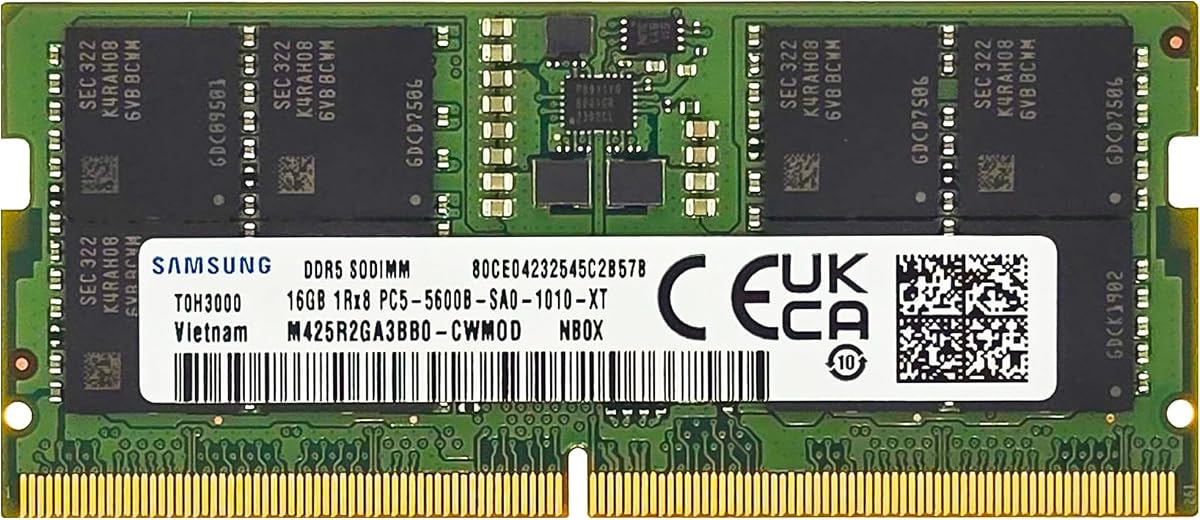
The Samsung 16GB DDR5 5600MHz module is a single-rank memory option designed for select laptops and notebook computers. With a rating of 4.5 stars, it offers high speeds and efficient power usage for compatible systems.
We may earn a commission when you buy through this link, at no additional cost to you.
This module adheres to the JEDEC DDR5 standard with a 1.1V voltage and a 1Rx8 Single Rank configuration. These design choices ensure compatibility with specific hardware while delivering fast data transfer rates. Expanding your system memory improves performance and reduces bottlenecks.
Single rank configurations may not be optimal for dual-channel performance compared to matched kits. Additionally, it is crucial to verify laptop compatibility before purchase. These are standard technical considerations for DDR5 modules and do not affect reliability.
This product is suitable for users needing a single module to expand memory capacity. If your system supports this configuration and you value Samsung's quality, the Samsung 16GB DDR5 5600MHz is a good option.
The Single Rank design ensures broad compatibility with various laptop memory controllers.
Adhering to JEDEC standards guarantees reliability and consistent performance.
We may earn a commission when you buy through this link, at no additional cost to you.
The Samsung 32GB DDR5 5600MHz kit is a dual-module solution designed for select laptop and notebook computers. While user ratings are not available, the product follows Samsung's strict manufacturing standards for reliability.
We may earn a commission when you buy through this link, at no additional cost to you.
This kit offers 5600MHz speeds and PC5-44800 ratings in a 1Rx8 Single Rank configuration. It is designed to expand system resources efficiently and reduce bottlenecks during heavy workloads. The 1.1V voltage ensures low power consumption for mobile systems.
As a single rank kit, it may behave differently than dual rank kits on some motherboards. The limited user review data means more reliance on Samsung's reputation. Still, the high-speed capabilities make it a strong choice for capacity-focused upgrades.
This kit is best for users looking to maximize memory capacity without exceeding 32GB limits. If you trust Samsung quality and need a matched dual module set, this product is a recommended option.
A dual module set ensures balanced performance and stability in dual-channel systems.
Energy efficient voltage design helps maintain battery life while delivering high speeds.
We may earn a commission when you buy through this link, at no additional cost to you.
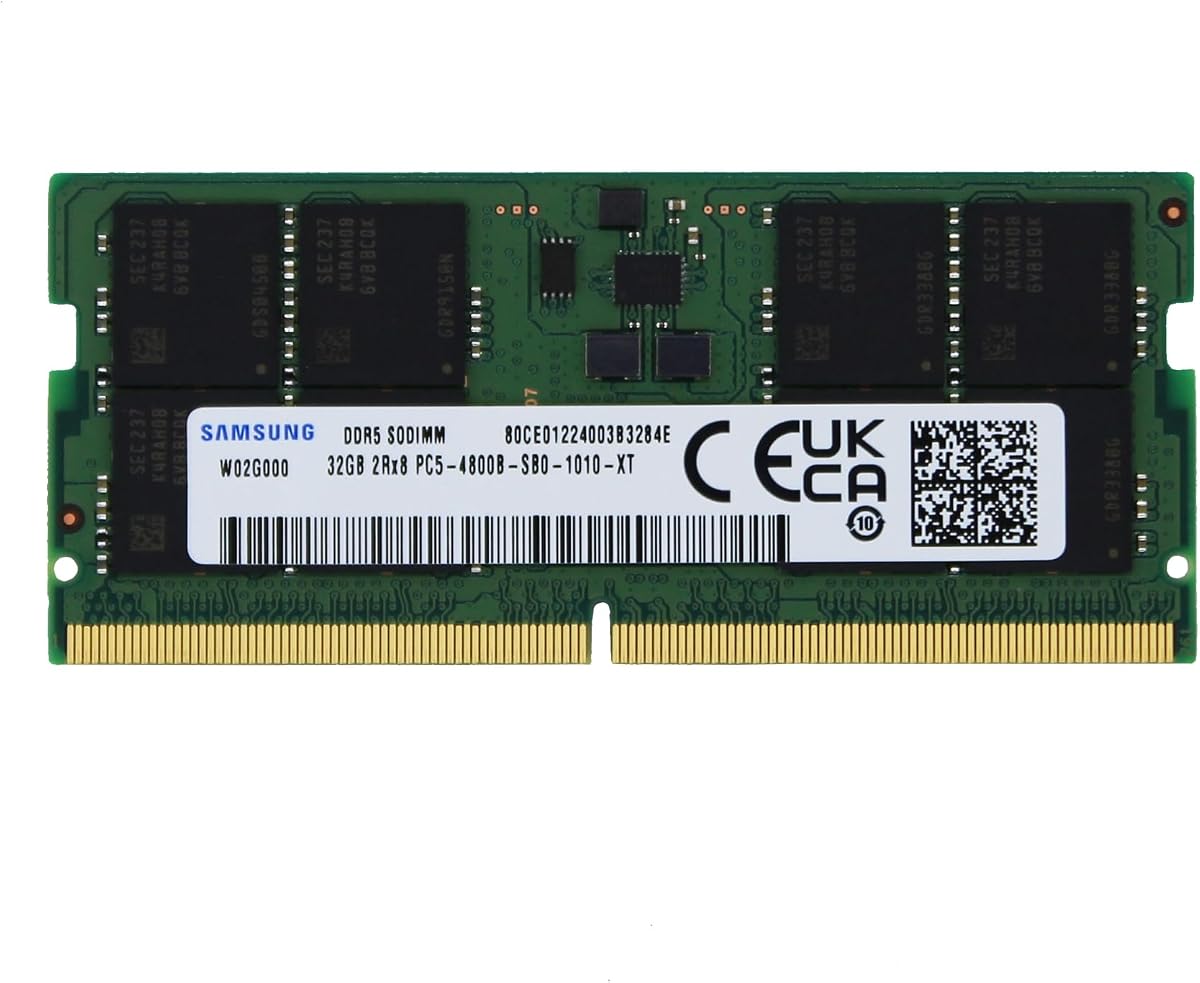
The Samsung 32GB DDR5 4800MHz module is a high-capacity option featuring a 2Rx8 Dual Rank configuration. With a 5.0 rating, this single module provides substantial capacity for demanding workloads and multitasking.
We may earn a commission when you buy through this link, at no additional cost to you.
Its 2Rx8 Dual Rank design can offer improved bandwidth in specific systems compared to single rank modules. The CL40 latency ensures efficient data access for everyday tasks and professional apps. The 1.1V voltage supports low power consumption during extended use.
While slower than 5600MHz models, the capacity and rank design make it suitable for systems prioritizing memory over peak speed. As a single module, it may not maximize dual-channel benefits. These are acceptable trade-offs for users needing reliable 32GB capacity.
This product is ideal for users needing massive capacity in a single module. If you require high storage for virtualization or heavy workloads, the Samsung 32GB DDR5 4800MHz is a top choice.
The Dual Rank design can offer better performance in certain high-bandwidth scenarios.
A single 32GB module simplifies installation while providing significant memory space.
We may earn a commission when you buy through this link, at no additional cost to you.
The Samsung 16GB DDR5 5600MHz Kit provides a dual-slot memory solution for select DDR5 laptop and notebook systems. While user ratings are not available, the product reflects Samsung's high manufacturing standards.
We may earn a commission when you buy through this link, at no additional cost to you.
This kit offers 5600MHz speeds with a 1Rx16 Single Rank x16 configuration. It supports broad compatibility with DDR5 laptops and ensures low power consumption at 1.1V. The dual module design enables flexible dual-channel performance upgrades.
The Single Rank x16 configuration is a specific design that may behave differently on some motherboards. Limited user reviews mean relying on Samsung's reputation. Still, the high speed and flexibility make it a solid choice for system expansion.
This kit is suitable for users needing a matched dual module set for their 16GB upgrade. If you want high speeds and trusted quality, the Samsung 16GB DDR5 5600MHz Kit is a strong contender.
A dual module kit helps enable dual-channel operation for better performance.
Fast speeds ensure your laptop can handle modern games and applications efficiently.
We may earn a commission when you buy through this link, at no additional cost to you.
Selecting the right DDR5 Laptop RAM involves understanding several technical factors that affect compatibility, performance, and stability for your specific system.
Capacity dictates how much data your system can store at once for active applications. For most modern users, 16GB is the minimum for smooth multitasking, while 32GB or higher is recommended for content creation or heavy gaming.
Choose a capacity that matches your typical workload to avoid bottlenecks or overspending on unused resources.
DDR5 RAM comes in speeds like 4800MHz, 5200MHz, and 5600MHz. Higher frequencies generally mean faster data transfer and better system responsiveness, but only if your laptop supports them.
Ensure your motherboard and CPU support the speed you choose to avoid compatibility issues or throttling.
Latency, measured as CL (CAS Latency), indicates how quickly the RAM can access data. Lower CL numbers usually mean faster response times, which can improve gaming and system speeds.
Balance speed and latency; a faster kit with slightly higher latency often outperforms slower kits.
Laptops use SODIMM modules instead of standard desktop DIMMs. Verify that the kit is explicitly labeled as SODIMM to ensure it fits your slot.
Using the wrong form factor can damage hardware or prevent booting entirely.
Dual rank kits typically offer better bandwidth and performance than single rank kits because they allow more simultaneous operations. This is critical for high-end workloads.
Check your motherboard manual to see if it supports dual rank modules without conflicts.
Intel and AMD have specific requirements for DDR5 RAM. Some chips support XMP or EXPO profiles for overclocking, while others rely on JEDEC defaults for stability.
Confirm your platform supports the memory profile you want to achieve target speeds reliably.
DDR5 typically operates at lower voltages than DDR4, which helps conserve battery life in laptops. Standard voltage is often around 1.1V to 1.2V.
Selecting a kit with efficient power management helps prolong your laptop's battery life during mobile use.
Memory kits from reputable brands undergo rigorous testing to ensure reliability. Look for options that offer strong warranties, such as limited lifetime coverage.
A solid warranty provides peace of mind in case of defects or compatibility issues.
When installing DDR5 RAM, power down your laptop completely and disconnect the battery if possible to avoid electrical damage. Use an anti-static wrist strap or touch a grounded metal surface to discharge static electricity before handling modules.
Align the notch on the RAM module with the slot key to ensure correct orientation. Gently press the module until the retention clips click into place, confirming it is fully seated without applying excessive force.
After installation, restart your system and enter the BIOS to verify the memory speed and capacity. Enable XMP or EXPO profiles if available, and run a memory test to confirm stability before normal use.
No, DDR5 RAM is not backward compatible with DDR4 laptops. The physical slots, pin counts, and electrical requirements differ significantly between the two generations. You must ensure your laptop supports DDR5 before purchasing.
While some systems might run mixed kits, stability issues are common. Using mismatched speeds, timings, or capacities can lead to errors or reduced performance. It is best to use matched pairs or kits.
Check your laptop's user manual or manufacturer website for supported RAM types and maximum capacity. Look for SODIMM 262-pin modules with compatible speeds to ensure a perfect fit.
Yes, faster DDR5 RAM reduces bottlenecks and improves load times, especially in memory-intensive games. However, the GPU and CPU still play major roles in frame rates and overall gaming experience.
For casual browsing and office work, 16GB DDR5 RAM is sufficient. This provides enough headroom for multiple tabs and apps without needing the higher cost of 32GB modules.
Not all kits require configuration. Many will run at default JEDEC speeds automatically. However, reaching maximum advertised speeds often requires enabling XMP or EXPO profiles in BIOS.
Upgrading to DDR5 RAM can dramatically enhance your laptop's performance, offering faster speeds and improved multitasking capabilities. Our top picks include the Crucial 32GB DDR5 RAM Kit for overall value, the CORSAIR Vengeance for budget buyers, and the TEAMGROUP Elite for premium reliability.
When selecting a kit, prioritize compatibility with your specific system and balance speed against capacity needs. A well-matched upgrade ensures your hardware runs smoothly without unnecessary bottlenecks or wasted resources.
Prices and availability change frequently, so always verify current specs and stock before making your purchase. Stay informed about your laptop's memory limits to maximize your investment in these powerful upgrades.