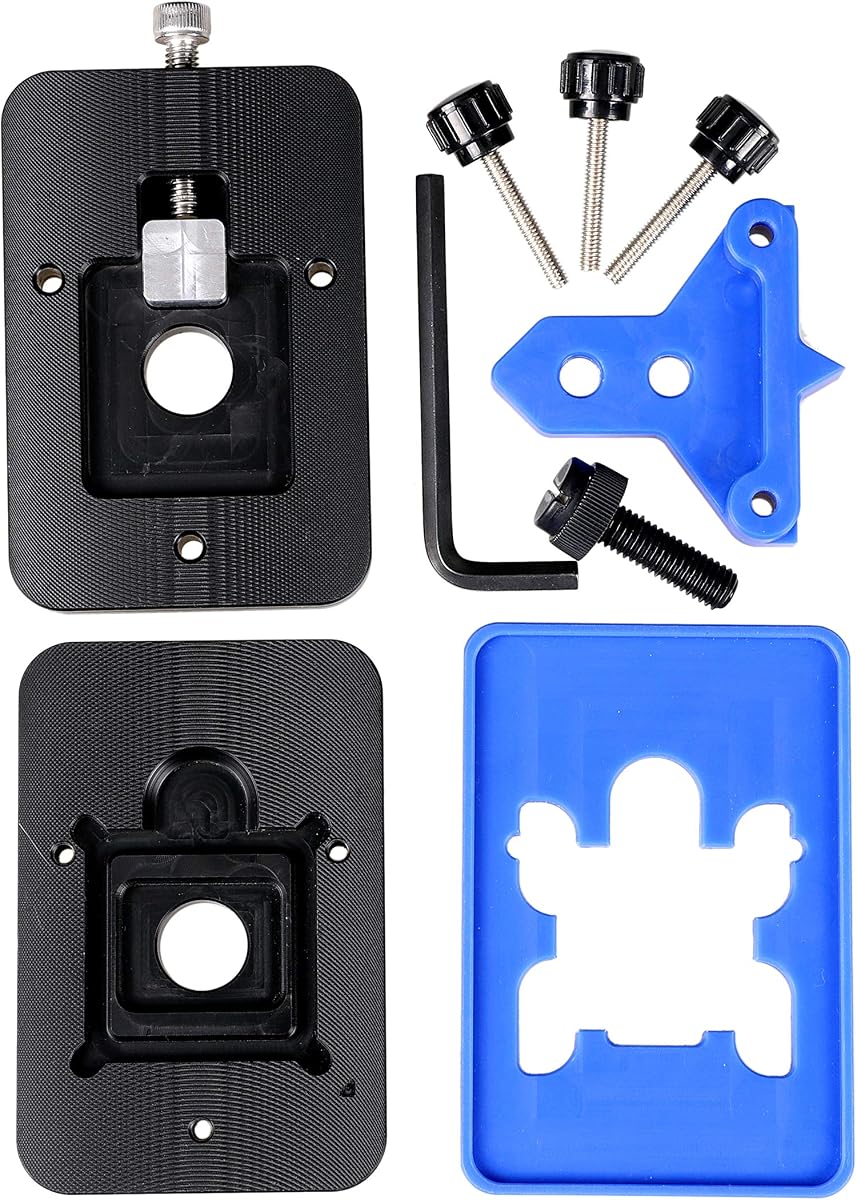
EG Starts Kaby Intel CPU Delid
4.6Editor score
Safe aluminum block design
Compatible with Kaby Lake
Includes relid tool
This comprehensive guide compares the top delidding kits available in October 2026 to help you choose the right tool for safely removing CPU heat spreaders and
Delidding kits are essential tools for enthusiasts looking to enhance their computer hardware performance by removing the integrated heat spreader from processors. These specialized tools allow for direct die cooling, which can significantly reduce operating temperatures and improve overclocking potential for high-end systems.
We have carefully evaluated ten top-rated delidding kits based on build quality, compatibility, ease of use, and user feedback. Our analysis covers a wide range of options from budget-friendly solutions to professional-grade tools designed for specific CPU generations and console repairs.
Each selection in this guide highlights key features, pros, cons, and ideal use cases to help you make an informed decision. Please note that product availability and pricing can change frequently, so verify current details before making your final purchase decision.
4.6Editor score

4.5Editor score

4.1Editor score
The following comparison table provides a side-by-side overview of all ten delidding kits featured in this guide. Review the specifications and features to find the tool that best matches your specific hardware and repair needs.


The Thermal Grizzly Delid-Die-Mate stands out as the top choice for users seeking a reliable tool to unlock CPU cooling potential. With a strong rating from users, this kit is engineered specifically for modern Intel Core processors to facilitate safe and effective removal of the integrated heatspreader.
We may earn a commission when you buy through this link, at no additional cost to you.
Its key strengths lie in the professional-grade design that ensures durability and precision during the delidding process. The tool is built from anodized aluminum which provides a robust feel while protecting your expensive components. By enabling direct die cooling, it helps lower CPU temperatures significantly which is crucial for high-performance overclocking scenarios.
While the tool offers exceptional performance it does have some limitations regarding compatibility as it is tailored for specific Intel socket generations. Users with older or AMD processors will need to consider alternative options. However for those targeting 12th or 13th Gen Intel CPUs the trade-off is well worth the investment in quality.
This kit is ideal for enthusiasts and professionals who demand precision and reliability in their hardware maintenance routine. If you want to maximize your system cooling performance while minimizing risk this tool represents the best balance of price and quality available today.
Direct die cooling removes the thermal barrier of the heatspreader allowing heat to transfer more efficiently to your cooler.
Crafted in Germany with strict quality control this tool ensures consistent results and reduces the risk of damage to the CPU die.
We may earn a commission when you buy through this link, at no additional cost to you.
The EG Starts Kaby Intel CPU Delid tool offers an exceptional value proposition for budget-conscious enthusiasts looking to improve CPU thermals. With a high rating from satisfied users it provides a safe and effective way to remove heat spreaders across a wide range of older Intel sockets without breaking the bank.
We may earn a commission when you buy through this link, at no additional cost to you.
This tool distinguishes itself through its compatibility with numerous legacy platforms including Kaby Lake and Coffee Lake processors. The design includes a square aluminum block that helps protect the CPU board during the opening process ensuring that you do not accidentally damage your silicon when prying the lid.
While the build materials may not be as premium as high-end options the functionality remains robust for the price. Users should exercise caution to ensure the block is placed correctly to avoid board damage. The inclusion of a relid tool adds significant value allowing you to reassemble the CPU if needed.
For anyone working with older Intel systems who wants to save money while achieving great thermal results this kit is the clear winner. It balances cost and capability effectively making it accessible to a wider audience of DIY PC builders.
Supports a broad range of Intel sockets from LGA 775 up to 1151 ensuring you can use it on many existing platforms.
The kit includes a tool to put the lid back on giving you flexibility to reverse the process if necessary.
We may earn a commission when you buy through this link, at no additional cost to you.
The der8auer Delid-Die-Mate X represents the gold standard for premium CPU delidding tools designed for those who demand the highest quality. Created by Roman der8auer Hartung a renowned expert in the field this tool combines durability with a sleek professional appearance that fits well in any high-end workshop.
We may earn a commission when you buy through this link, at no additional cost to you.
Its primary strength is the robust construction made from aluminium and stainless steel which ensures longevity and resistance to bending or wear over time. The anodised black finish not only looks great but also provides additional corrosion protection. It is engineered specifically for high-end socket 2066 processors to ensure perfect alignment and safe removal.
The main trade-off is the limited compatibility with only specific high-end Intel sockets which restricts its utility for general use. Additionally the higher price point may not appeal to casual users. However for professionals targeting these specific platforms the investment in such a durable tool is justified.
If you are working with Skylake-X or Kaby Lake-X processors and want a tool that stands the test of time this premium kit is the optimal choice. It delivers peace of mind through its superior build quality and reputation among the enthusiast community.
Developed by der8auer one of the leading figures in CPU modification this tool reflects years of research and practical experience.
Constructed from metal materials this tool is built to last through countless uses without compromising on precision or safety.
We may earn a commission when you buy through this link, at no additional cost to you.
The Delid Tool V3 is a specialized solution for owners of PlayStation 3 consoles who are experiencing overheating issues due to degraded thermal paste. This tool is specifically engineered to address the unique challenges of delidding PS3 components ensuring a clean and accurate process that protects the console hardware.
We may earn a commission when you buy through this link, at no additional cost to you.
Its standout feature is the precision-engineered thin blade designed for durability and longevity. Version 3 of this tool includes a replaceable blade system which means you can maintain consistent performance without needing to buy a new tool if the edge dulls. This makes it a cost-effective choice for long-term maintenance.
While it is an excellent tool for its intended purpose it is not designed for general PC CPU work which limits its utility to console repair. The price point is moderate but the value comes from the specific fit for PS3 hardware. Users should follow instructions carefully to avoid damaging the sensitive console parts.
This tool is perfect for hobbyists repairing older gaming consoles to extend their lifespan and performance. If you need to address overheating in your PS3 this is the most reliable and safe option available for that specific task.
The tool includes a replacement blade ensuring that you can continue to use the handle and mechanism for years to come.
Tailored for the PS3 this tool removes the guesswork and risk associated with using generic tools on gaming console hardware.
We may earn a commission when you buy through this link, at no additional cost to you.
This Knife Repair Kit offers a versatile solution for technicians dealing with complex board repairs including BGA chip removal and CPU adhesive scraping. It features ultra-thin blades that allow for precise maneuvering between components on tight circuit boards which is essential for high-density electronics work.
We may earn a commission when you buy through this link, at no additional cost to you.
The blades are made from SK5 steel which provides excellent hardness and heat tolerance ensuring they remain sharp through extended repair sessions. The ergonomic handle design helps reduce hand fatigue and the non-slip grip adds a layer of safety during delicate operations. It is well suited for removing adhesive and cutting bonding strips.
While it is a capable tool for general board repair it received lower ratings compared to specialized CPU delidding tools. This suggests it may not be as optimized for the specific tasks of delidding a standard desktop CPU. Users should rely on their technical skill when using this for CPU tasks.
For those who repair motherboards and smartphones this kit provides a solid set of tools to handle adhesive and chips. It is a good secondary option if you need a multi-purpose repair tool but might need a dedicated delid tool for specific CPU models.
The 0.38mm blade thickness allows access to spaces where standard tools cannot fit preventing damage to surrounding components.
SK5 steel construction offers high heat tolerance and oxidation resistance keeping your tools sharp and functional for longer.
We may earn a commission when you buy through this link, at no additional cost to you.
The Thermal Grizzly TG Scraper is an essential companion for anyone who has already removed the CPU lid and needs to clean off residue. Made from premium acrylic this tool safely removes silicone adhesive and indium solder residue without scratching the delicate die or the package surfaces.
We may earn a commission when you buy through this link, at no additional cost to you.
Its narrow tip is specifically designed for accessing tight corners and edges where solder remnants can hide. The ergonomic grip ensures you have full control during the cleaning process reducing the risk of slips that could damage the CPU. Since it comes in a 3-pack you always have a fresh tool available for multiple projects.
While it is not designed to remove the heat spreader itself it is a critical part of the overall delidding workflow. Using a metal tool for cleaning can lead to scratches so this acrylic scraper offers a safe alternative that professionals rely on for a clean surface.
If you are performing delidding operations this scraper is a must-have accessory to ensure your CPU is ready for liquid metal application. The low price and high user satisfaction make it an obvious addition to any enthusiast's toolkit.
The acrylic material is softer than metal ensuring that you can clean the die and package without risking scratches or gouges.
The tip design allows you to scrape away tough silicone adhesive and solder residue efficiently without damaging the components.
We may earn a commission when you buy through this link, at no additional cost to you.
The QianLi ToolPlus 009 is a comprehensive repair kit that includes a variety of blades for handling delicate tasks on circuit boards and mobile devices. It features a sturdy metal handle that provides a secure grip and balances well in the hand for precision work on sensitive electronics.
We may earn a commission when you buy through this link, at no additional cost to you.
This kit is particularly useful for technicians who need to remove adhesive cut glue, or lift chips from motherboards. The blades are designed for surgical precision ensuring that you can slide under components without damaging the underlying traces. It is often used for phone repairs but can adapt to CPU cleaning tasks.
Although it lacks specific ratings in this listing its construction and features suggest a professional grade product. The variety of blade shapes gives you flexibility to choose the right tip for your specific repair stage. It is a strong choice if you need a multi-tool for various electronics maintenance.
For those who run a repair business or handle various electronics this set offers great value and versatility. It helps streamline your workflow by providing multiple solutions in one kit reducing the need to switch between different tools during a project.
With 12 different blades you can handle everything from fine-point scraping to angled cutting without needing extra tools.
The metal handle is designed to reduce hand fatigue and provide a non-slip grip for stability during intricate tasks.
We may earn a commission when you buy through this link, at no additional cost to you.
The RSX GPU Delid Tool is designed to assist with the maintenance of the PlayStation 3 RSX graphics chip. It allows users to safely remove the integrated heat spreader to access the thermal interface material for replacement or inspection. This is crucial for maintaining cooling performance in older consoles.
We may earn a commission when you buy through this link, at no additional cost to you.
Its design helps keep the working edge positioned away from the main board during delidding to reduce the risk of damage to the PCB. While it is intended for the RSX GPU only it is a specialized tool that simplifies the process for console repair technicians and hobbyists.
It is important to note that this tool does not remove the CELL CPU lid so you will need other tools if you plan to delid both chips. It is also not compatible with the Super Slim model which lacks the RSX lid. Users should verify their console model before purchasing.
If you are repairing a PS3 Fat or Slim and need to address GPU overheating this tool provides the necessary precision. It is a practical choice for those looking to refresh the cooling system of their console.
The tool is shaped to minimize contact with the board during removal which lowers the chance of accidental damage to the PCB.
By removing the IHS you gain access to the old paste allowing you to replace it with high performance thermal interface material.
We may earn a commission when you buy through this link, at no additional cost to you.
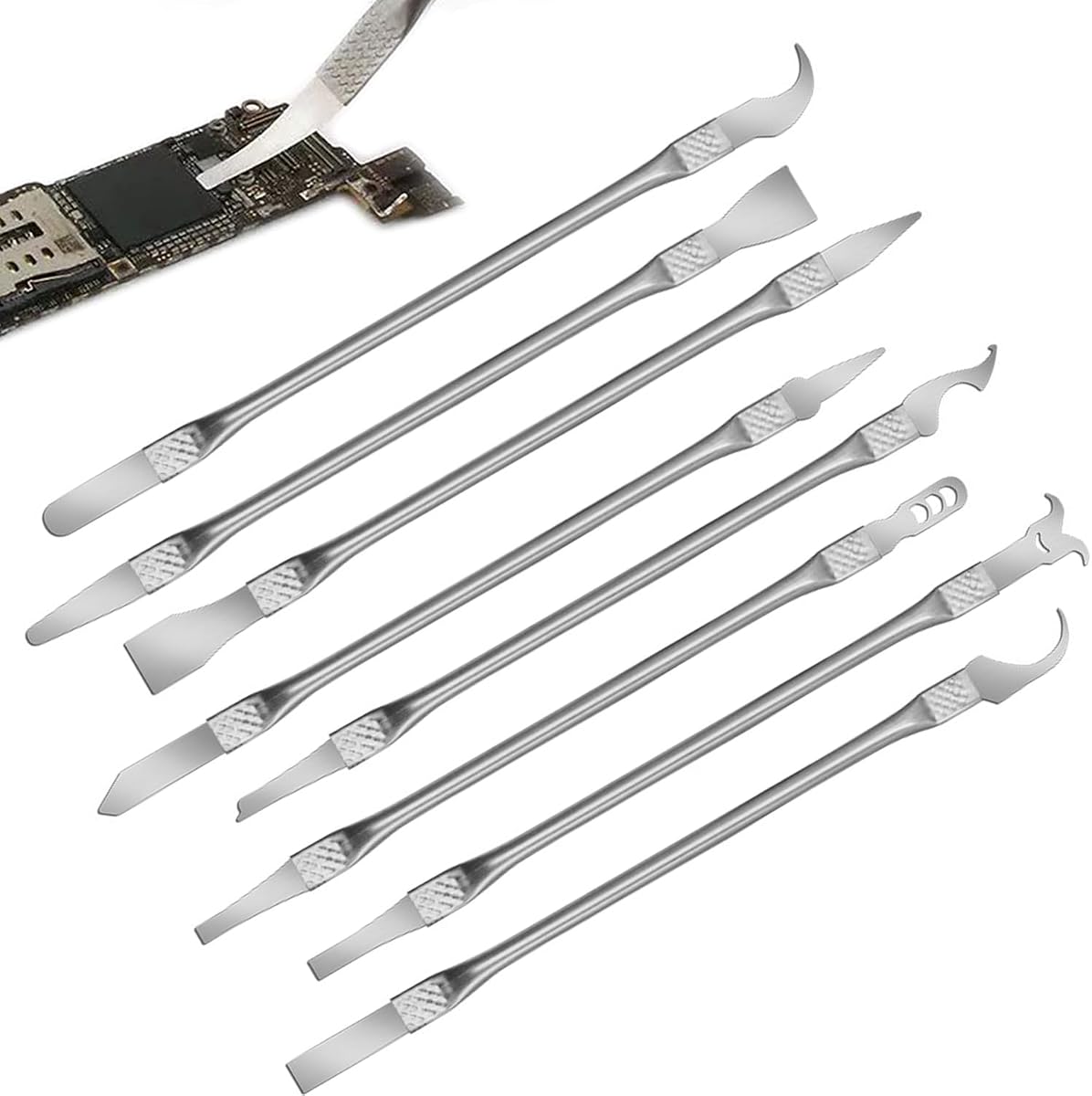
This 8 Piece Set offers a versatile range of tools suitable for removing BGA chips and CPUs from both smartphones and computer motherboards. The tools are made from high-quality alloy which resists corrosion and bending ensuring they remain durable through repeated use in repair scenarios.
We may earn a commission when you buy through this link, at no additional cost to you.
The integrated blade and handle design eliminates the need for assembly saving you time during repair tasks. The ergonomic shape ensures a comfortable grip allowing you to work for extended periods without hand fatigue. It is well suited for general maintenance tasks involving small electronic components.
While the kit is affordable and practical it may not offer the same precision as dedicated CPU delidding tools for high-end desktop processors. It serves best as a general-purpose repair set for hobbyists and technicians working on consumer electronics. It is a solid option if you need a budget-friendly solution.
For those who perform a variety of repairs on phones and PCs this set provides useful tools for component removal. It is a practical addition to any repair bench where versatility and ease of use are priorities.
The tools come ready to use with no assembly required allowing you to start your repair work immediately upon opening the box.
Made from high-quality alloy these tools resist corrosion and bending providing a long service life in various environments.
We may earn a commission when you buy through this link, at no additional cost to you.
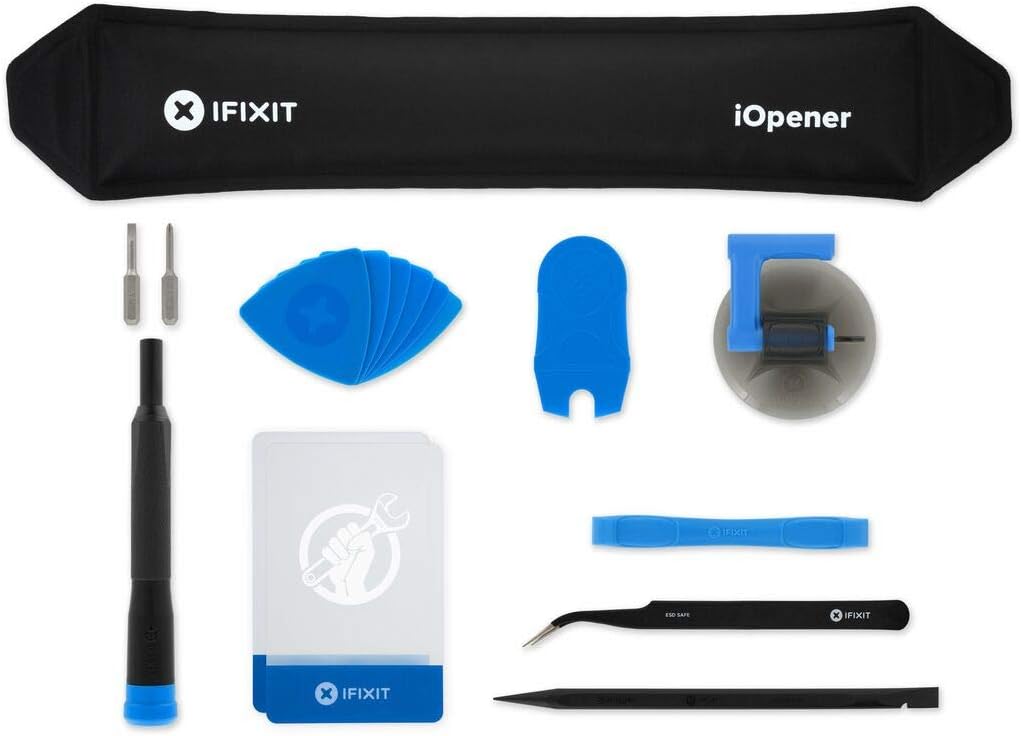
The iFixit iOpener is a heat pad designed to loosen adhesive during electronics disassembly. While it is not a delidding tool for CPUs it is a valuable companion for removing cases or screens on laptops and phones which can be part of a broader maintenance workflow.
We may earn a commission when you buy through this link, at no additional cost to you.
It applies heat evenly and evenly to targeted areas without risking damage to internal components. The tool is made from non-toxic and food-safe materials ensuring safe use during repair tasks. It comes with a complete kit of tools that are commonly used in conjunction with heat application.
For delidding specifically you may need a dedicated metal tool but the iOpener can help in scenarios where adhesive needs to be softened on devices. It is a reliable and trusted option among technicians for general repair work that involves heat sensitive adhesives.
If you work with laptops or phones alongside PC hardware this tool adds versatility to your repair station. It ensures you can safely open enclosures to access internal components like heatsinks or CPUs when disassembly is required.
The iOpener applies gentle heat to soften adhesives reducing the risk of cracking screens or damaging internal components.
It works across a wide range of devices from iPads to Android phones making it a staple for any multi-device repair setup.
We may earn a commission when you buy through this link, at no additional cost to you.
Selecting the right delidding kit depends on your specific hardware needs your skill level and your budget. Consider these factors to ensure you choose a tool that delivers safe and effective results.
The most critical factor is ensuring the tool is designed for your specific CPU socket and generation. Different tools support different ranges from legacy Intel sockets to modern Ryzen or high-end desktop platforms. Using an incompatible tool can lead to damage or an inability to properly remove the heatspreader.
Always verify the manufacturer specifications match your processor model before purchasing any delidding kit.
Tools made from high-quality materials like anodized aluminum or stainless steel offer better durability and resistance to corrosion. Cheap plastic tools may bend under pressure or fail to provide the necessary force for removing stubborn heat spreaders. A sturdy handle also improves comfort and safety during the process.
Prioritize tools with metal construction and ergonomic designs for consistent performance and long-term use.
A good delidding tool should be intuitive and straightforward to operate to minimize the risk of human error. Look for features like clear guides secure grips and replaceable blades that make the process efficient. Tools that require excessive force or complex assembly may increase the likelihood of damaging your hardware.
Choose a design that allows you to apply even pressure easily and confidently.
Some kits come with additional items like scrapers cleaning tools or replacement blades that add value to the purchase. Having these accessories on hand means you do not need to buy separate items to clean the CPU after delidding. It saves time and ensures you have the right tools ready for the entire job.
Look for bundles that include scrapers and replacement parts to maximize the utility of your purchase.
Delidding kits range from affordable multi-use sets to premium tools designed for specific high-end processors. Determine your budget based on how often you will use the tool and the value of the hardware you are working on. A more expensive tool may be worth it for frequent users or those working with valuable CPUs.
Balance cost with quality to ensure you get a reliable tool that fits your financial constraints.
Selecting a tool from a reputable brand with a history of quality products can provide peace of mind. Trusted manufacturers often back their products with support and have proven track records in the enthusiast community. Reading reviews from other users can highlight potential issues and confirm the tool performance.
Stick to well-known brands to reduce the risk of receiving a defective or poorly made product.
Safety should always be a priority when working with delicate electronic components. Look for tools that are designed to minimize contact with the motherboard or circuit board during use. Features like insulated handles or protective guides help prevent accidental shorts or physical damage to the CPU or motherboard.
Ensure the tool has features that protect your components from accidental contact during the delidding process.
Examining feedback from other buyers provides insight into how the tool performs in real-world scenarios. High ratings and positive comments often indicate reliability and ease of use while common complaints highlight potential flaws. Use this data to validate the manufacturer claims before making your decision.
Consult multiple sources for reviews to get a balanced view of the tool performance and durability.
To begin the delidding process ensure your CPU is removed from the motherboard and placed on a clean flat surface. Use the tool to carefully apply even pressure around the edges of the integrated heat spreader to avoid warping the package or cracking the die. Take your time and work slowly to ensure a clean break of the adhesive.
Once the heat spreader is removed use a plastic scraper or similar safe tool to clean any remaining adhesive or solder residue from the CPU package. This step is crucial for ensuring optimal contact with your new thermal paste or liquid metal. Avoid using metal tools on the die surface to prevent scratches.
After completing the delid clean your tools with is wipes to remove any residue that could affect future use. Store the tool in a dry cool place away from direct sunlight to prevent corrosion or warping of plastic parts. Regular maintenance will keep your kit in good condition for years.
A delidding kit is a set of tools designed to safely remove the integrated heat spreader from a CPU. This process allows for direct cooling of the CPU die which can significantly lower temperatures and improve overclocking headroom for high-performance systems.
While delidding can provide thermal benefits it does carry a risk of damaging the CPU if done incorrectly. Using a quality tool and following proper procedures minimizes this risk but be aware that voiding your warranty is a standard consequence of this modification.
No not all tools are compatible with every CPU generation or socket. You must choose a tool that matches your specific processor model to ensure safe and effective removal. Check the compatibility list provided by the manufacturer before purchasing.
Temperature reductions vary based on the CPU model and the quality of your cooling setup. Enthusiasts often report drops of 10 to 20 degrees Celsius when using liquid metal instead of traditional thermal paste after delidding.
Relidding is optional but recommended if you plan to install the CPU back into a standard cooler that requires a flat surface. It helps maintain structural integrity and protects the die from potential contact damage during normal use.
Acrylic or plastic scrapers are best for cleaning adhesive from the CPU package. Metal tools can scratch the surface which may compromise thermal conductivity or damage the die. Always use gentle pressure and non-abrasive materials.
Choosing the right delidding kit can significantly improve your CPU cooling performance and extend the life of your hardware. Our top picks for November 2026 include the Thermal Grizzly Delid-Die-Mate for premium quality the EG Starts Kaby Intel for budget value and the der8auer Delid-Die-Mate X for professional use.
When selecting a tool prioritize compatibility with your specific processor and the build quality that ensures safety and durability. A well-designed kit reduces the risks associated with delidding and makes the process more accessible for both beginners and experienced technicians.
We recommend checking current prices and availability before finalizing your purchase as market conditions may change. Investing in a reliable delidding kit today can unlock better performance from your CPU and keep your system running cooler under load.