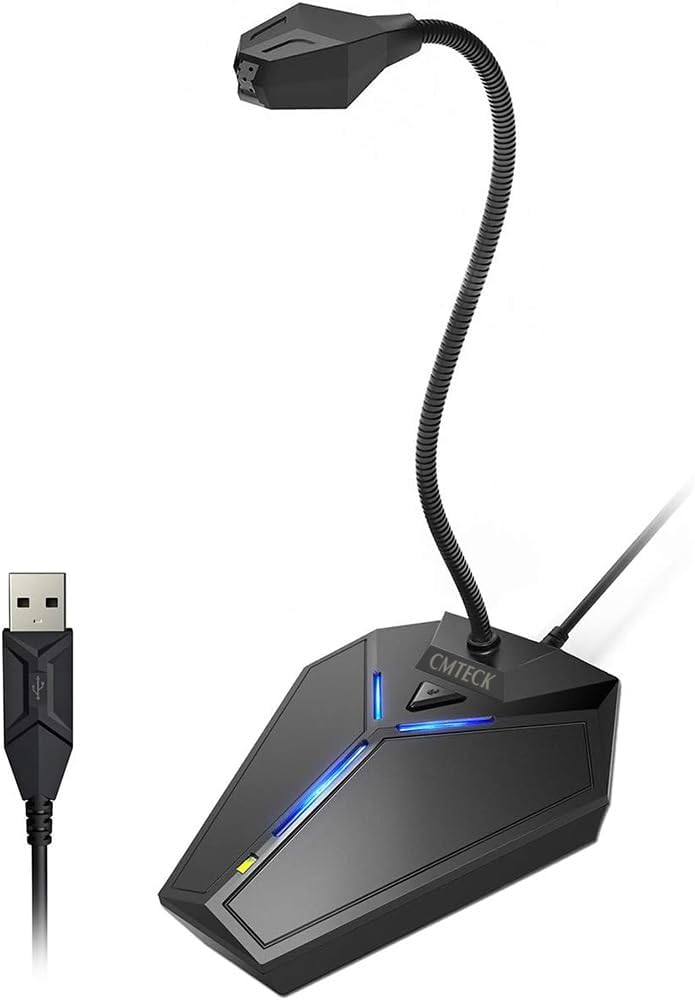
CMTECK USB Computer Microphone
4.4Editor score
Smart chip noise suppression
Flexible metal gooseneck
Instant mute with LED
This guide compares the top 10 dictation microphones for computers to help you find the best USB mic for speech recognition and clear voice recording.
Finding the right dictation microphone for computer use is essential for professionals and students who rely on speech-to-text software. A quality mic ensures accurate transcription and reduces strain during long typing sessions.
We evaluated ten top-rated USB microphones based on sound clarity, noise cancellation, and compatibility with major dictation software. Our analysis focuses on build quality, ease of use, and value for money across different budgets.
Each pick highlights specific strengths like gooseneck flexibility or premium controls. Prices and availability change often, so check current listings before purchasing to ensure you get the best deal available today.
4.4Editor score

4.6Editor score

4.2Editor score
This side-by-side comparison highlights key specifications and features of the top 10 dictation microphones for computers. Use this table to quickly identify which model fits your workflow needs.



The Logitech Blue Yeti stands out as the top choice for dictation due to its professional-grade sound and versatility. With a 4.6 rating, users praise its ability to capture clear vocals while minimizing noise.
We may earn a commission when you buy through this link, at no additional cost to you.
Its custom three-capsule array supports four pickup patterns, making it ideal for various environments. The Blue VO!CE software adds advanced modulation and HD audio samples for enhanced recording quality.
While the price is higher than budget options, the build quality and features justify the investment for serious users. The adjustable stand allows for precise positioning to optimize your voice capture.
If you need a microphone that grows with your needs from dictation to streaming, this is the best option. It offers unmatched control and clarity for professional and casual users alike.
Choose from cardioid, omni, bidirectional, or stereo to match your recording environment perfectly.
Adjust gain and mute instantly with onboard controls for a seamless workflow experience.
We may earn a commission when you buy through this link, at no additional cost to you.
Designed specifically for Dragon users, the Nuance PowerMic III combines dictation and mouse control for unmatched productivity. Its 4.2 rating reflects satisfaction among professional transcriptionists and legal professionals.
We may earn a commission when you buy through this link, at no additional cost to you.
The thumb control allows you to switch between dictation and cursor movement without reaching for a keyboard. The unidirectional microphone ensures high accuracy even in noisy office environments.
The premium price is a trade-off for specialized features that boost workflow efficiency. If you use Dragon software daily, the ergonomic design and voice control justify the cost.
Consider this microphone if you need a tool that goes beyond audio to control your PC directly. It is a powerful solution for those focused on maximizing dictation speed.
Avoid constant switching by controlling your PC with voice commands directly from the microphone.
Ensure higher accuracy even in the noisiest environments with advanced filtering.
We may earn a commission when you buy through this link, at no additional cost to you.
The Philips LFH3500 SpeechMike Premium is a top-tier choice for users requiring precision and control in their workflow. Its 4.2 rating highlights its effectiveness in professional dictation settings.
We may earn a commission when you buy through this link, at no additional cost to you.
The free-floating, decoupled microphone design ensures precise recordings by reducing vibrations. The motion sensor allows for device control through gestures, adding a layer of convenience.
While the price is substantial, the build quality and advanced features offer long-term value for professionals. The function keys can be configured to suit your specific personal workflow needs.
This microphone is ideal for those who demand high accuracy and control over their recording environment. It represents a professional standard in dictation technology.
The free-floating microphone reduces vibrations for precise and stable recordings.
Built-in motion sensors enable device control through simple gestures for a seamless experience.
We may earn a commission when you buy through this link, at no additional cost to you.
The CMTECK USB Microphone offers exceptional value for users seeking reliable dictation without a high price tag. With a 4.4 rating, it stands out for its smart chip and ease of use.
We may earn a commission when you buy through this link, at no additional cost to you.
Its SMART CHIP effectively suppresses background noise, ensuring your voice comes through crisp and clear. The metal gooseneck allows you to position the mic exactly where you need it for optimal sound.
As a true plug-and-play device, you can skip complex setup and start dictating immediately. The LED indicators provide clear status updates for mute and connection states.
This is the ideal pick for students or casual users who need clear audio at an affordable price. It delivers studio-quality results without breaking the bank.
The high-performance smart chip suppresses background noise for crystal-clear voice capture.
Metal gooseneck design allows precise positioning to suit any desk setup or user height.
We may earn a commission when you buy through this link, at no additional cost to you.
The ZealSound K66 delivers studio-quality sound suitable for dictation and creative work alike. Its 4.4 rating reflects user satisfaction with its noise reduction and monitoring features.
We may earn a commission when you buy through this link, at no additional cost to you.
Press and hold the mute button to enable intelligent noise reduction that filters out clicks and hum. The zero-latency monitoring lets you hear your voice in real time to adjust levels instantly.
Hands-on knobs for gain and echo allow for creative control without software. The cardioid pattern focuses on your voice while reducing unwanted background noise effectively.
Consider this microphone if you want a versatile tool for both work and play. It is a great choice for creators who need professional audio without complex setups.
Press and hold the mute button to enable noise reduction mode for cleaner audio.
Zero-latency monitoring through the headphone jack helps identify distortion before recording.
We may earn a commission when you buy through this link, at no additional cost to you.
The Philips LFH3200 SpeechMike III Pro is a reliable choice for those using Dragon Naturally Speaking software. Its 4.3 rating highlights its consistent performance in professional dictation tasks.
We may earn a commission when you buy through this link, at no additional cost to you.
Noise-canceling technology delivers accurate speech recognition results even in busy environments. The advanced speaker design provides crystal-clear playback for reviewing your dictations.
Designed for professional use, the push button operation streamlines your workflow. It is energy Star compliant, making it an efficient choice for office environments.
If you work in a legal or medical setting requiring high accuracy, this is a solid pick. It is tailored to integrate seamlessly with Dragon software for efficient document control.
Noise-canceling technology ensures accurate results for Dragon Naturally Speaking users.
Energy Star compliance makes it an efficient choice for long daily use.
We may earn a commission when you buy through this link, at no additional cost to you.
This USB Microphone with a 360-degree adjustable gooseneck offers flexibility for any workspace. Its 4.4 rating points to its reliability for gaming, dictation, and general communication.
We may earn a commission when you buy through this link, at no additional cost to you.
The premium metal pipe and heavy-duty ABS stand ensure durability. Intelligent noise-canceling technology picks up your clear voice and reduces background noise effectively.
Plug and play simplicity means no drivers are required to start recording. The mute button with LED indicator gives you clear status updates at a glance.
This is a practical choice for those needing a flexible mic at a reasonable price. It is well-suited for desktop users who need reliable dictation capabilities.
The 360-degree adjustable gooseneck design places the mic in the best sound location.
Premium metal pipe and heavy-duty ABS stand provide long-lasting durability.
We may earn a commission when you buy through this link, at no additional cost to you.
The FIFINE Mini Gooseneck is perfect for users who need a portable mic that takes up minimal space. Its 4.3 rating reflects satisfaction with its flexibility and durability.
We may earn a commission when you buy through this link, at no additional cost to you.
This portable mini computer mic is tiny enough for travel and small desks. The 5.7-inch flexible neck can be adjusted to any horizontal direction and vertical comfort level.
A sturdy metal base keeps the mic firmly on the desk during use. It includes a windscreen to reduce background noise and improve overall sound quality.
Ideal for busy broadcast environments or limited desk spaces, this is a great budget option. It is perfect for everyday use in both professional and casual settings.
Tiny enough to take up only minimal desk space for clean work setups.
Flexible 5.7 inch gooseneck adjusts effortlessly to suit your comfort level.
We may earn a commission when you buy through this link, at no additional cost to you.
The TONOR G11 is designed for small or medium meetings and dictation tasks requiring wide coverage. Its 4.3 rating highlights its ability to capture sound clearly from all directions.
We may earn a commission when you buy through this link, at no additional cost to you.
With an omnidirectional pickup pattern and 11.5 ft range, participants can hear each other without raising voices. The mute button allows quick control during active conversations.
The sturdy metal material and anti-slip mat ensure stability during use. It is compact and convenient, making it easy to use in various office settings.
For users needing a mic that captures multiple speakers equally, this is an excellent choice. It works seamlessly with Skype, Zoom, and other conferencing tools.
Pickup distance of 11.5 ft captures sounds from 360 degrees equally.
Compatible with all operating systems without drivers for instant setup.
We may earn a commission when you buy through this link, at no additional cost to you.
The OLYMPUS RecMic II is a specialized microphone tailored for speech recognition and dictation tasks. Its 4.0 rating reflects its utility for professionals needing trackball integration.
We may earn a commission when you buy through this link, at no additional cost to you.
The trackball with improved functionality allows precise cursor control without a mouse. Push button assignment for Dragon software streamlines the dictation workflow efficiently.
Smooth UV coating and silent keys minimize annoying contact noise during recording. Two microphone systems ensure recording quality even in noisy environments.
If you work with Dragon or need a dedicated tool for speech recognition, this is a reliable choice. It offers unique control features not found in standard USB mics.
Trackball with improved functionality allows precise cursor control without a mouse.
Smooth UV coating and silent keys minimize contact noise during recording.
We may earn a commission when you buy through this link, at no additional cost to you.
Selecting the best dictation microphone for computer requires considering several key factors to ensure compatibility and performance. This guide breaks down what to look for to make an informed decision.
Ensure your microphone supports your operating system, whether it is Windows, macOS, or Linux. Most modern USB mics offer plug-and-play functionality, eliminating the need for complex driver installations.
Look for compatibility with your preferred speech recognition software such as Dragon NaturallySpeaking or PowerDict. This ensures seamless integration and accurate transcription.
The pickup pattern determines how the mic captures sound. A cardioid pattern focuses on your voice from the front, reducing background noise, while omnidirectional mics capture sound from all directions.
For dictation, a cardioid or unidirectional pattern is generally preferred to isolate your voice. This helps improve transcription accuracy in noisy environments.
Advanced noise cancellation helps filter out background sounds like keyboard clicks or fans. This ensures your voice is captured clearly without distractions.
Look for models with intelligent noise reduction or filtering technology. This is especially important for accuracy in shared spaces or home offices.
A comfortable mic design reduces fatigue during long dictation sessions. Look for adjustable goosenecks or stands that allow you to position the mic optimally.
Solid construction with metal or heavy-duty materials ensures durability. A stable base prevents the mic from sliding during use, maintaining consistent sound quality.
Instant mute buttons and clear LED indicators provide quick control over your recording status. Some premium models include trackballs or mouse controls for increased productivity.
Additional features like gain knobs or echo control allow for tailored sound settings. These physical controls help you fine-tune audio without complex software.
A longer cable offers flexibility in positioning the mic relative to your computer. Short cables may limit movement, while excessively long ones can clutter the desk.
If you travel often, choose a portable model with a compact design. Smaller microphones are easier to transport and require less desk space.
Check if the microphone includes dedicated software for configuring function keys or presets. This streamlines your workflow and enhances dictation speed.
Models compatible with Dragon or other tools often come with preset buttons. These allow you to assign commands for navigation and text formatting easily.
Set a budget based on your needs. Professional models cost more but offer specialized features, while budget options provide basic functionality for casual use.
Consider long-term value. Investing in a durable microphone with good support can save money in the long run by reducing replacements.
To set up your microphone, simply plug it into an available USB port on your computer. Ensure your system recognizes the device and select it as the default input in sound settings.
Position the microphone close to your mouth but not directly in front to avoid plosive sounds. Adjust the angle and height using the gooseneck or stand for optimal sound capture.
Regularly clean the mesh and body with a soft cloth to prevent dust buildup. Store it in a dry place when not in use to protect it from moisture and damage.
Most USB dictation microphones work with any software that supports standard audio inputs. However, specialized models like the Nuance PowerMic III are optimized for Dragon and may not support other tools fully. Always check compatibility before purchasing to ensure seamless integration with your workflow.
Yes, a cardioid pattern is generally better for dictation because it focuses on your voice from the front. This reduces background noise from other directions, improving transcription accuracy. Omnidirectional mics are better for capturing group discussions rather than single-user dictation.
Most USB dictation microphones come with cables ranging from 5 to 10 feet. This length provides flexibility in positioning the mic on your desk while maintaining a connection to your computer. If you need more length, consider using a USB extension cable.
Most modern USB microphones are plug-and-play and do not require driver installation. They work immediately when connected to your computer. However, some advanced models may offer optional software for configuring custom keys or features.
Yes, you can use a standard USB mic for professional dictation if it offers clear audio and noise cancellation. Specialized models provide additional features like mouse control and optimized sensitivity for speech recognition. Your choice depends on your budget and specific workflow needs.
Use a microphone with noise cancellation technology and position it closer to your mouth. Enable quiet modes on your software or adjust the gain settings to focus on your voice. Recording in a quiet environment also significantly improves accuracy.
We have reviewed the top 10 dictation microphones for computers, highlighting the Logitech Blue Yeti as the overall choice and the CMTECK as the best budget pick. Each model offers unique features tailored to different needs.
When choosing, prioritize noise cancellation and ergonomic design to ensure comfort and accuracy. Whether you need specialized controls or versatile performance, there is a model suited to your specific workflow.
Remember to check current prices and availability before purchasing as deals may change frequently. By selecting the right tool, you can significantly improve your productivity and transcription accuracy.