
Digital Calendar 10.1" Touchscreen
4.4Editor score
No subscription fees
Weekly meal planning
Touch control interface
Finding the right digital touchscreen organizer can transform how your household manages daily schedules and tasks. These smart devices replace cluttered paper planners with interactive displays that sync seamlessly with your favorite calendar apps. A good organizer offers intuitive controls, clear visibility, and features that engage the whole family in staying organized.
We evaluated ten leading models based on screen quality, sync reliability, ease of use, and value. Each product was assessed for its ability to handle complex family schedules while providing additional utilities like chore charts and photo displays. Our analysis focuses on practical features that deliver real organizational benefits without hidden costs.
Each pick in this guide highlights specific strengths for different household needs. Whether you need a large wall display or a compact desk option, our selections cover various sizes and functionalities. Note that availability and pricing may change, so verify current details before making your purchase decision.
4.4Editor score

4.4Editor score

4.6Editor score
As an Amazon Associate we earn from qualifying purchases.
This side-by-side comparison highlights key specifications across all ten models to help you identify the best fit for your household needs. Each entry lists essential details including screen size, sync options, and unique features.


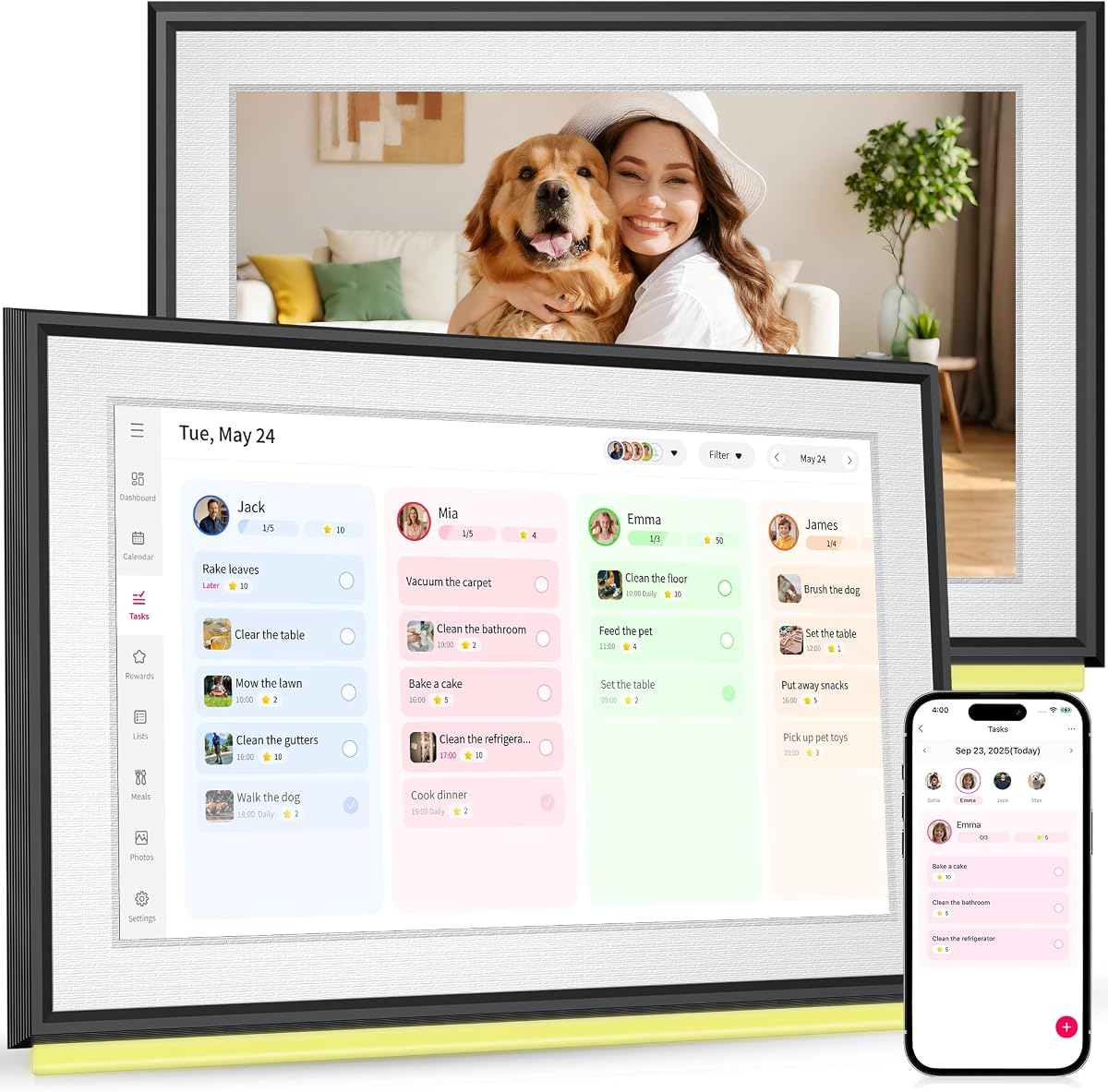

This 15.6 inch digital touchscreen organizer ranks as our top choice for households seeking a comprehensive command center. With a 4.4 rating from verified users, it delivers seamless real-time sync with major calendar platforms while offering robust chore management. Its large display ensures visibility across busy kitchens or family rooms.
We may earn a commission when you buy through this link, at no additional cost to you.
The standout feature is its ability to integrate meal planning, chore charts, and photo displays into one cohesive hub. Families can assign tasks with color coding and track progress using an interactive reward system that motivates children. The photo mode cycles through memories with AI restoration for enhanced quality.
Users note that initial setup requires patience to configure all connected accounts correctly. Once running, the device operates reliably without recurring costs. While it offers flexible mounting, achieving the full command center experience often means wall installation.
This organizer suits busy households needing coordination across multiple members. Its balance of features, screen quality, and cost effectiveness makes it a top recommendation for those upgrading from paper systems.
Real-time sync ensures everyone sees schedule updates instantly on the device or via app.
Gamified chore tracking encourages children to complete tasks independently with visible progress rewards.
We may earn a commission when you buy through this link, at no additional cost to you.
The Skylight Calendar offers a sleek 15.4 inch touchscreen designed for busy families needing instant access to shared schedules. Its high rating reflects user satisfaction with its intuitive design and reliable syncing across Google iCloud and Outlook platforms.
We may earn a commission when you buy through this link, at no additional cost to you.
Key strengths include customizable wall placement and interactive chore charts that support meal planning. The optional Premium Plus Plan unlocks advanced features like Magic Import and animated screensavers for family engagement.
The main trade-off is reliance on subscriptions for full functionality. While basic scheduling works without fees, advanced customization options require ongoing payments that may deter budget-conscious buyers.
Ideal for families prioritizing visual appeal and ease of use, this model balances premium design with practical household management tools.
Disney mode and animated avatars create an engaging experience for children using the device.
Mounts securely on walls or sits on countertops to fit various room layouts.
We may earn a commission when you buy through this link, at no additional cost to you.
This 10.1 inch organizer provides essential household management tools without hidden fees. Rated highly for value, it combines calendar syncing with chore lists and meal planners in a compact design suitable for small spaces.
We may earn a commission when you buy through this link, at no additional cost to you.
The device supports Google iCloud and Outlook syncs freely. Families can track tasks and grocery lists while displaying favorite photos during idle times. Its sleep mode conserves energy efficiently.
Smaller screen real estate limits multi-tasking compared to larger models. Storage constraints may restrict extensive media libraries but remain sufficient for core functions.
Perfect for smaller households or secondary rooms, this budget-friendly unit delivers core organization without recurring costs.
No subscription locks essential tools like meal planning and task tracking behind paywalls.
Compact 10 inch size fits desks or shelves without dominating countertops.
We may earn a commission when you buy through this link, at no additional cost to you.
This smart organizer combines a 1080P HD display with AI-powered import tools to streamline scheduling tasks. Users appreciate its ability to store thousands of photos while maintaining crisp visual output for calendars and lists.
We may earn a commission when you buy through this link, at no additional cost to you.
The device supports Google iCloud Outlook and Yahoo syncing via phone or direct touch input. Family chores and meal plans appear alongside to-do lists for consolidated management.
AI features enhance photo uploads but require internet access. The compact screen suits individuals or small families better than large households needing broad visibility.
A solid choice for tech-savvy users wanting AI enhancements in a portable package.
Smart algorithms improve imported images for clearer display on the HD screen.
Includes hardware for wall mounting or stable placement on flat surfaces.
We may earn a commission when you buy through this link, at no additional cost to you.
This 15.6 inch model earns perfect user scores for its intuitive interface and reliable performance. It combines scheduling with meal planning and photo displays without recurring fees.
We may earn a commission when you buy through this link, at no additional cost to you.
Color coding helps distinguish tasks across family members while weather data appears alongside daily agendas. Setup involves standard plug-and-play steps with Wi-Fi connectivity.
While the interface is simple, advanced automation options remain limited compared to premium rivals. The display size is optimal for shared spaces.
Highly recommended for families seeking clarity and simplicity in household organization.
Color-coded assignments reduce confusion when multiple members share the same screen.
Sleep wake modes ensure the device conserves power while staying ready for updates.
We may earn a commission when you buy through this link, at no additional cost to you.
This compact organizer focuses on family bonding through photo sharing and recipe management. Users highlight its responsive touchscreen and seamless sync with major calendar platforms.
We may earn a commission when you buy through this link, at no additional cost to you.
Color-coded chores and reward systems help parents guide children toward responsibility. The Wanmine app supports remote uploads for instant memory sharing.
Installation requires app guidance which may slow initial setup. However, the sleek design complements various decor styles effectively.
Best for families valuing photo integration alongside scheduling tasks.
Built-in recipe saving simplifies meal planning by storing favorite meals directly on device.
Upload photos from anywhere to keep distant family members updated instantly.
We may earn a commission when you buy through this link, at no additional cost to you.
This 21.5 inch model stands out with Android Mode allowing full app customization. Users praise its voice assistant integration and vibrant display for large shared spaces.
We may earn a commission when you buy through this link, at no additional cost to you.
The dual-mode switch balances simple scheduling with smart home control. Google Play downloads extend functionality beyond standard calendar needs.
Setup complexity may deter non-tech users despite helpful guides. The premium price reflects its advanced capabilities.
Ideal for tech-oriented households needing a fully connected smart dashboard.
Gemini assistant enables hands-free schedule checks and smart device management.
Install third-party apps to tailor the dashboard to unique household requirements.
We may earn a commission when you buy through this link, at no additional cost to you.
The 15.6 inch variant offers similar premium features in a smaller package. It includes a sturdy stand for desk or countertop use alongside wall mounting options.
We may earn a commission when you buy through this link, at no additional cost to you.
Voice commands simplify daily checks while custom layouts adapt to different needs. Users find the HD clarity excellent for viewing details from across the room.
Setup remains detailed but manageable with provided guides. The device serves both tech enthusiasts and traditional planners.
Best for those wanting Android flexibility without maximum screen size.
Included stand provides stable placement without drilling holes in walls.
Gemini assistant manages tasks hands-free for busy mornings.
We may earn a commission when you buy through this link, at no additional cost to you.
This model focuses on core weekly planning with straightforward navigation. Users appreciate auto time sync and free app integration for remote updates.
We may earn a commission when you buy through this link, at no additional cost to you.
Chore charts and meal planning appear clearly on the display during idle moments it Photos can be shared directly via mobile app.
Limited wall mounting options reduce flexibility for central placement. The interface suits those preferring simplicity over advanced features.
Ideal for small homes needing basic coordination without complex tools.
No subscription fees needed for mobile app connectivity and updates.
System syncs with time servers to ensure precise schedule tracking.
We may earn a commission when you buy through this link, at no additional cost to you.
This 21.5 inch display offers high-resolution viewing suitable for large kitchens or offices. It includes hardware for wall mounting and desk standing.
We may earn a commission when you buy through this link, at no additional cost to you.
Custom themes and font sizes help users tailor visibility. Chore rewards and photo modes complement scheduling tasks.
Some users report setup challenges despite available support. The large size suits centralized locations.
Best for households needing a visible command center for many users.
IPS technology ensures wide viewing angles without color distortion.
Adjust fonts and themes to match personal style or accessibility needs.
We may earn a commission when you buy through this link, at no additional cost to you.
Selecting the right digital touchscreen organizer requires balancing screen size, features, and budget to match your household needs.
Larger screens between 15 to 21 inches offer better visibility across rooms but need wall mounting. Smaller 10 inch models suit desks or shelves. Look for HD or 1080P resolution to ensure text remains sharp from a distance.
Prioritize larger displays for kitchens and smaller ones for offices.
Ensure the organizer syncs with calendar apps your family already uses like Google iCloud or Outlook. Real-time syncing prevents missed appointments and reduces manual entry work. Some models also support Yahoo and Cozi for broader compatibility.
Check supported platforms before purchase to avoid integration issues.
Effective organizers include color coding reward systems and progress tracking to engage children. These tools turn chores into games which fosters independence. Look for interactive elements like stars or points that motivate consistent task completion.
Choose models with clear visual rewards for family motivation.
Built-in meal planners help reduce decision fatigue by organizing weekly menus and grocery lists. Some models even support recipe uploads to streamline cooking. This feature saves time during busy evenings when quick dinner ideas are needed.
Prioritize units with dedicated meal planning tools if this is a priority.
Many digital organizers operate without monthly fees but some lock advanced features behind subscriptions. Basic syncing usually remains free while animations or cloud storage may require paid plans. Confirm which features need ongoing payments before buying.
Opt for fully unlocked devices to avoid recurring costs.
Simple plug-and-play setups save time and frustration. Intuitive interfaces help all age groups navigate schedules. Look for responsive touchscreens that register input accurately without delays. Clear instructions or app guidance also improve initial configuration.
Choose devices with straightforward setup processes to ensure adoption.
Dual-function units switch to photo frame mode when idle. This adds warmth to spaces using cherished family memories. Look for auto-slideshow features and storage capacity to hold many photos. Some models support AI enhancements for better image quality.
Select models with high storage if photo display matters.
Wall mounting places the device centrally but requires hardware and drilling. Stand-included models offer flexible countertop placement. Consider where you need visibility most. Some units support both orientations for versatile positioning in different rooms.
Verify mounting hardware is included before purchase.
Begin by connecting the device to power and Wi-Fi through the setup prompts. Download the companion app to sync calendars remotely. Follow on-screen instructions to link Google iCloud or Outlook accounts for automatic updates.
Customize task colors and assign chores to specific family members. Use meal planners to input weekly menus and grocery items. Encourage kids to check off tasks daily to earn visible rewards.
Clean the screen with a soft dry cloth to avoid scratches. Avoid harsh chemicals. Use sleep modes to preserve energy. Check for system updates regularly to access new features and performance improvements.
Most models do not require subscriptions for basic calendar sync and chore tracking. Some brands offer optional premium plans for extra features like animations or advanced photo tools. Always verify which features are free before purchasing.
Yes, most organizers support syncing with multiple accounts from Google iCloud Outlook and others. This allows different family members to view their own schedules on one shared device. Ensure you grant permissions during the linking process.
Upload photos through the companion app using your phone or computer. The organizer stores these locally or via cloud sync for slideshow use. Look for models with ample storage or expandable memory for larger libraries.
Modern organizers use sensitive touchscreens that register light taps suitable for kids. Interactive features like reward buttons are designed for simple operation. Parental controls allow supervision of usage levels.
Most devices store local schedules so they display existing data offline. Syncing resumes when connectivity returns. Some models include battery backups or power-saving modes to maintain function briefly during outages.
Many units include mounting hardware for wall installation. Check product specs for wall vs desk options. Ensure your surface is sturdy and accessible for daily updates by all family members.
The ten models compared here offer diverse solutions from budget 10 inch units to premium 21 inch smart displays. Top picks like the 15.6 inch organizer balance screen size with affordable features making them ideal for most households.
Prioritize needs like calendar sync chore rewards and meal planning over extra features. Larger screens improve visibility but require more space. Subscription-free models provide long-term savings for families on tight budgets.
Verify current availability and support details before buying as product specs can change. Selecting the right organizer will streamline your home coordination for years ahead.