
Selore USB C Docking Station Dual Monitor
4.4Editor score
Affordable dual HDMI connectivity
100W PD charging port
Multiple USB 3.0 ports
Discover the top 10 docking stations with 2 HDMI ports for 2026. Our guide compares features, compatibility, and performance to help you choose the right dual
In today's digital workspace, having multiple monitors significantly boosts productivity and workflow efficiency. A docking station with 2 HDMI ports allows you to connect two external displays seamlessly, transforming your laptop into a powerful desktop workstation without complex setups.
We evaluated the leading models on the market based on build quality, connectivity options, video resolution support, and overall reliability. Our analysis focuses on real-world performance, compatibility with various operating systems, and the ability to handle demanding professional tasks alongside daily use.
Each pick in this list highlights specific strengths, whether it is budget-friendly versatility, premium performance, or specialized features like ethernet and card readers. Please note that product availability and pricing can change rapidly, so verify current details before making your final purchasing decision today.
4.4Editor score

4.5Editor score

4.5Editor score
This comparison table outlines the key specifications and capabilities of each docking station, helping you quickly identify which model meets your specific connectivity and display requirements for your workstation setup.


The Anker Laptop Docking Station Dual Monitor stands out as a top-tier choice for professionals seeking reliable dual display connectivity. With a strong rating of 4.5 stars, it consistently delivers on its promise of expanding your laptop capabilities through a single USB-C connection.
We may earn a commission when you buy through this link, at no additional cost to you.
Its standout feature is the ability to drive two 4K displays simultaneously, making it perfect for content creators and multitaskers. The inclusion of a 100W Power Delivery port ensures your laptop stays charged even under heavy workloads, while the Ethernet port provides stable network connectivity when Wi-Fi is unreliable.
While the build quality is exceptional, users should note that it does not include a power brick, requiring a separate 100W charger for full performance. Additionally, compatibility with Linux systems is limited, which may be a drawback for open-source enthusiasts.
If you need a robust, fast, and well-supported hub that transforms your laptop into a desktop, this Anker model is the clear winner. It balances price and performance better than most competitors, making it the ideal recommendation for general office and creative use.
The dual HDMI ports allow you to extend your desktop to two 4K monitors at 30Hz or mirror content on one 4K screen at 60Hz, enhancing multitasking efficiency significantly.
With up to 100W pass-through charging, this hub can power high-performance laptops while in use, eliminating the need for a separate charging cable on your desk.
We may earn a commission when you buy through this link, at no additional cost to you.
The Acer 13-in-1 Laptop Docking Station is a powerhouse designed for users who need maximum connectivity. Rated 4.5 stars, it offers an extensive array of ports including dual HDMI, a DisplayPort, and USB-C, making it suitable for complex workstation setups.
We may earn a commission when you buy through this link, at no additional cost to you.
Its premium value lies in the included 110W power adapter, which ensures your laptop receives ample power even when driving three displays. The aluminum body helps manage heat effectively during prolonged use, and the security lock slot adds a layer of physical protection in shared office environments.
However, the higher cost may not be justified for casual users, and macOS support is limited to mirroring only, which restricts its utility for Mac professionals needing extended displays. Additionally, the sheer number of cables required might clutter a smaller desk.
For power users needing triple monitor capability and robust connectivity in a secure package, this Acer dock is the top premium choice. Its included high-wattage adapter and security features make it a comprehensive solution for demanding professional environments.
With support for three independent screens via HDMI and DisplayPort, you can organize workflows across multiple monitors, drastically reducing window switching time.
The integrated security slot allows you to lock the dock and laptop to your desk, protecting valuable hardware from theft in public or shared workspaces.
We may earn a commission when you buy through this link, at no additional cost to you.
The Selore USB C Docking Station Dual Monitor is an exceptional value for budget-conscious buyers. With a solid 4.4-star rating, it offers dual 4K output capabilities that are typically found in much more expensive hubs, making it a standout in its category.
We may earn a commission when you buy through this link, at no additional cost to you.
Its key strength is the combination of high-resolution support and fast charging. You can connect two monitors at 60Hz while simultaneously charging your laptop via the 100W Power Delivery port. The added SD card reader is also a practical touch for photographers and media creators.
On the downside, it lacks an Ethernet port, which means you rely solely on Wi-Fi for internet connectivity. Additionally, like many hubs, it mirrors displays on Mac systems rather than extending them, which limits flexibility for Apple users.
If you prioritize dual screen functionality and fast charging without breaking the bank, this Selore model is the best budget option available. It delivers impressive performance for its price point and is ideal for students or home office workers.
This hub provides dual 4K display support at a fraction of the cost of competitors, making high-end productivity accessible to everyone.
The dedicated PD input supports up to 100W input and delivers 85W output, keeping your laptop charged while you work on external monitors.
We may earn a commission when you buy through this link, at no additional cost to you.
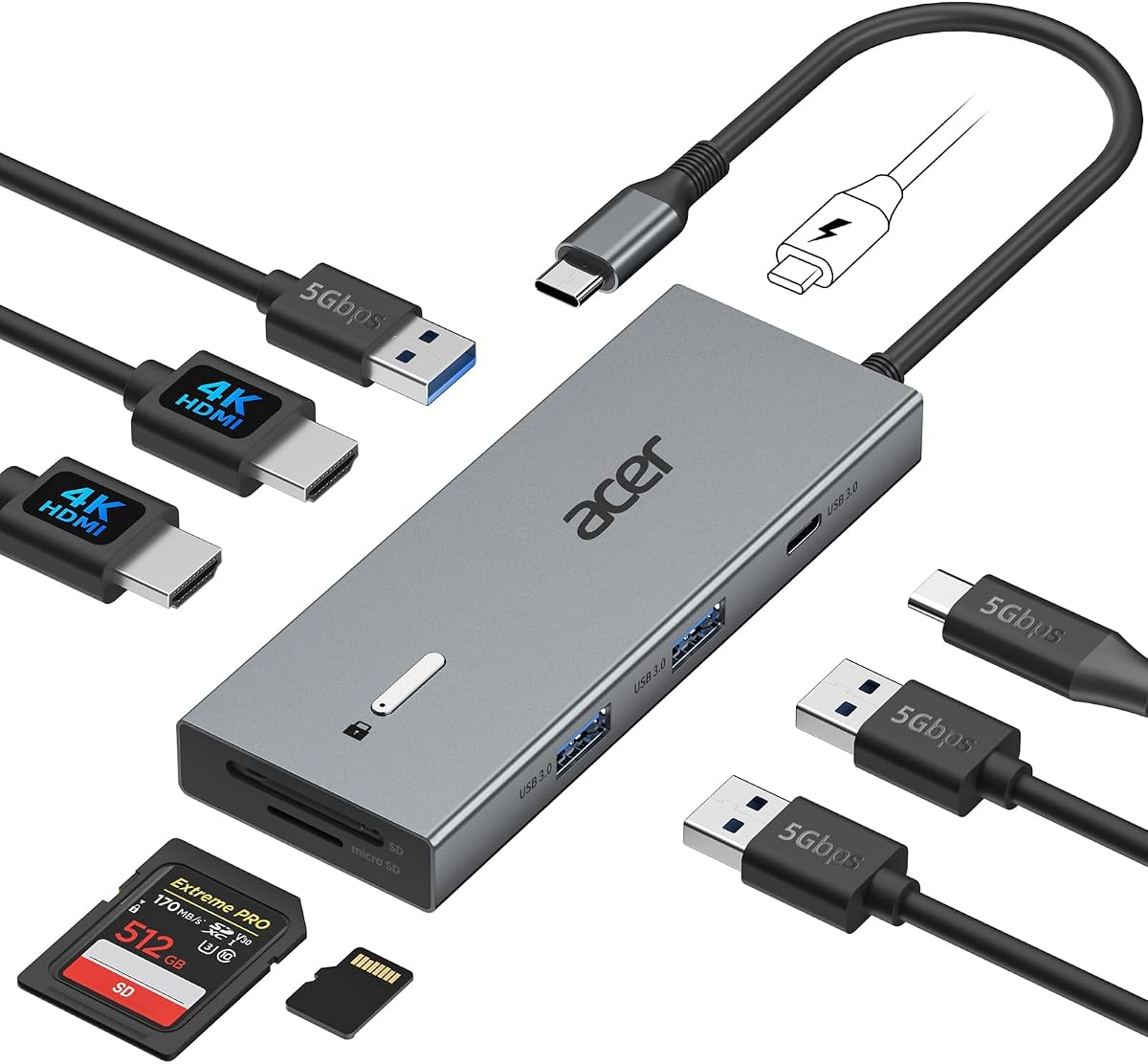
The Acer 9-in-1 Laptop Dock offers a balanced mix of features for the mid-range market. Rated 4.2 stars, it provides reliable dual 4K connectivity and strong charging capabilities, making it a versatile tool for daily work tasks.
We may earn a commission when you buy through this link, at no additional cost to you.
One of its unique features is the security lock button, which helps protect your laptop in public spaces. The aluminum body ensures durability and heat dissipation, while the multiple USB ports support a variety of peripherals without clutter.
However, it requires a separate power adapter for full functionality, which adds to the setup cost. Also, Mac users may find the display options limited to mirroring, which restricts its utility for those needing extended screens on Apple devices.
For those seeking a reliable, secure, and portable docking solution, this Acer model is a solid choice. It bridges the gap between budget and premium options with robust build quality and essential connectivity features.
The built-in security lock button allows you to secure your laptop to the dock, adding a layer of protection against theft or accidental disconnection.
The aluminum alloy body helps dissipate heat effectively, ensuring stable performance even during long work sessions or video conferences.
We may earn a commission when you buy through this link, at no additional cost to you.
The Dell D3100 is a classic docking station designed specifically for Dell laptop users. With a 4.2-star rating, it offers triple display capabilities including two HDMI ports and a DisplayPort, catering to those who need multi-monitor setups on a budget.
We may earn a commission when you buy through this link, at no additional cost to you.
It excels in providing multiple USB 3.0 ports for peripherals, ensuring you have plenty of connections for mice, keyboards, and storage. The included audio jack adds convenience for headsets, making it suitable for office environments with call centers.
However, it relies on USB 3.0 rather than the newer USB-C standard, which means it requires specific cables and lacks modern high-speed charging capabilities. The design is also more bulky and dated compared to newer sleek options on the market.
For Dell users looking for a cost-effective way to triple their screen real estate, this dock remains a viable option. Its legacy support and multiple USB ports make it a practical choice for traditional office setups.
Designed for older Dell Latitude and Inspiron models, this dock ensures you can upgrade connectivity without replacing your existing laptop hardware immediately.
The integrated 3.5mm audio port allows you to connect headphones or speakers directly to the dock, simplifying your audio setup for calls and media.
We may earn a commission when you buy through this link, at no additional cost to you.
The Anker 7-in-1 USB-C Hub is designed for users who need portability without sacrificing performance. Rated 4.2 stars, it offers dual 1080p HDMI output, which is sufficient for most daily tasks while keeping the footprint small and travel-friendly.
We may earn a commission when you buy through this link, at no additional cost to you.
Its standout feature is the 10Gbps data transfer port, which ensures fast file transfers between devices. The 100W Power Delivery support keeps your laptop charged, making it ideal for travelers who want to set up a temporary workspace in cafes or hotels.
The main drawback is the lack of an Ethernet port, limiting wired connectivity options. Additionally, the 1080p resolution output is lower than what some competitors offer, so it may not suit high-end video editing workflows requiring 4K.
If you prioritize portability and speed over maximum resolution, this compact hub is the perfect travel companion. It brings Anker's reliable quality in a small form factor that fits easily in a laptop bag.
Weighing very little and fitting in a pocket, this hub allows you to extend your workspace anywhere without adding bulk to your carry-on bag.
The 10Gbps USB-C port ensures that large files are moved quickly, reducing wait times when backing up data or transferring media.
We may earn a commission when you buy through this link, at no additional cost to you.
The MOKiN USB C Docking Station offers an impressive array of ports for a compact device. With a 4.3-star rating, it provides dual HDMI, Ethernet, and multiple USB-C and USB-A connections, making it a versatile hub for laptops from Dell, HP, and Lenovo.
We may earn a commission when you buy through this link, at no additional cost to you.
Its privacy lock button is a unique feature that allows you to quickly turn off screens to protect sensitive information in shared spaces. The Ethernet port ensures a stable internet connection for video calls, while the 100W Power Delivery keeps your laptop charged.
However, the power adapter is not included, so you must source your own. Also, like many hubs, Mac users are limited to mirroring mode, which may not suit those needing multiple independent displays on macOS.
For users seeking broad connectivity and privacy features in a single device, this MOKiN hub is a strong contender. Its wide range of ports and stable network connection make it ideal for professional office environments.
The screen lock button instantly disables connected displays, protecting sensitive data from prying eyes in public or shared workspaces.
The RJ45 Ethernet port ensures a stable internet connection, reducing latency during video conferences and large file downloads.
We may earn a commission when you buy through this link, at no additional cost to you.
The Selore 10-in-1 USB C Hub is designed for users needing triple display support with legacy connectivity. Rated 4.5 stars, it features dual HDMI, DisplayPort, and even a VGA port, allowing you to connect older projectors or monitors alongside modern screens.
We may earn a commission when you buy through this link, at no additional cost to you.
Its dedicated monitor control button adds convenience, allowing you to cycle through display modes or turn off screens instantly. The Gigabit Ethernet port ensures fast and stable internet, which is crucial for high-demand professional tasks like video editing or streaming.
However, setting up triple displays on Windows requires compatible hardware and drivers, which can be complex. Additionally, Mac users are limited to mirroring, which restricts the utility of this multi-screen capability on Apple systems.
For professionals needing to connect multiple types of monitors simultaneously, this Selore hub is an excellent choice. Its combination of modern and legacy ports makes it a versatile tool for diverse office setups.
The dedicated button allows you to switch between display modes or turn off screens with a single click, streamlining your workflow.
The inclusion of a VGA port ensures you can connect older projectors or monitors, making this hub suitable for older equipment in office settings.
We may earn a commission when you buy through this link, at no additional cost to you.
The Anker 13-in-1 USB C Dock is a comprehensive solution for those replacing a desktop entirely. Rated 4.0 stars, it includes dual HDMI, DisplayPort, USB-C, and SD card readers, making it a true all-in-one workstation upgrade.
We may earn a commission when you buy through this link, at no additional cost to you.
Its standout feature is the included 135W power adapter, which delivers desktop-grade power to your laptop and peripherals. This ensures stable performance even when running triple displays and multiple devices simultaneously without power drops.
The downside is its large size, which occupies significant desk space compared to smaller hubs. Also, Mac users are limited to mirroring mode, which reduces its effectiveness for macOS-based multitasking workflows.
For users wanting a full desktop replacement with robust power and connectivity, this Anker dock is ideal. The included adapter and comprehensive port selection make it a hassle-free solution for home offices.
The included 135W adapter ensures you can power a laptop and multiple accessories simultaneously, providing a true desktop workstation experience.
With 13 ports including HDMI, DisplayPort, and multiple USB options, this hub eliminates the need for additional adapters or dongles in your setup.
We may earn a commission when you buy through this link, at no additional cost to you.
The Generic N/A Product listed in our comparison lacks detailed specifications or verified data. This makes it difficult to evaluate its performance or suitability compared to other well-documented options on the market.
We may earn a commission when you buy through this link, at no additional cost to you.
Without clear information on resolution support, charging speed, or build quality, potential buyers face uncertainty. It is generally recommended to choose a verified brand with transparent specifications to ensure reliability and compatibility with your hardware.
While it might offer low cost, the lack of support and undefined capabilities makes it a risky choice for professional use. Users seeking stability and performance should avoid products with incomplete data sheets or unknown origins.
To ensure a smooth experience and maximize productivity, we recommend selecting a verified model from a reputable brand. These products offer clear specifications and support guarantees that provide peace of mind for daily workstation needs.
Choosing a dock with clear specifications ensures compatibility with your laptop and monitors, preventing issues like poor resolution or insufficient power delivery.
Reputable brands provide warranty support and customer service, which are critical for resolving technical issues quickly and maintaining uninterrupted workflow.
We may earn a commission when you buy through this link, at no additional cost to you.
Selecting the right docking station requires understanding your specific hardware needs and desired workflow capabilities. Below are the critical factors to consider to ensure compatibility and performance.
Check the maximum resolution supported by each HDMI port. Some docks offer 4K at 60Hz for sharp visuals, while others may limit you to 30Hz or 1080p. Ensure the dock supports the resolution of your monitors to avoid performance bottlenecks.
Always verify the refresh rate specifications in the product details to ensure smooth motion for video or gaming tasks.
The power delivery wattage is crucial for keeping your laptop charged while connected. Look for docks that provide at least 65W to 100W pass-through charging, as this ensures your battery does not drain during heavy workloads.
Higher wattage is recommended for larger laptops or high-performance devices to maintain optimal system performance.
MacOS has specific limitations regarding multiple displays, often supporting mirroring instead of extended displays on certain hardware. Verify that the dock supports your operating system's display protocols like MST or SST.
For Windows users, ensure the dock supports DisplayPort Alt Mode to enable extended desktop functionality across multiple monitors.
Beyond HDMI, consider the additional ports you need such as USB-A, USB-C, Ethernet, or card readers. A diverse selection ensures you can connect all peripherals without needing extra adapters.
Prioritize docks with USB 3.0 or higher for faster data transfer speeds when handling large files regularly.
Aluminum bodies are preferred for better heat dissipation and durability. A sturdy build ensures the dock withstands regular plugging and unplugging of cables without damage.
Look for quality connectors that fit snugly to prevent accidental disconnections during work sessions.
A Gigabit Ethernet port provides a stable and fast internet connection, which is essential for video calls or cloud work. This avoids Wi-Fi instability and ensures consistent network performance.
Docks with Ethernet allow you to work efficiently in environments with weak wireless signals.
If you travel frequently, choose a compact dock that fits easily in a laptop bag. Heavy docks may be cumbersome to carry but offer more connectivity options for stationary setups.
Balancing size with functionality ensures you have the right tool for both home office and travel scenarios.
Determine your budget and compare value across different models. Higher prices often reflect better build quality and longer warranties. Always check the warranty period and customer support reputation.
Investing in a dock with strong support ensures you are covered if technical issues arise in the future.
Begin by connecting the USB-C cable to your laptop's Thunderbolt or USB-C port that supports display output. Ensure the dock is plugged into a power source if it requires external power, then connect your monitors to the HDMI ports.
Once connected, your computer should automatically recognize the external displays. Adjust display settings in your system preferences to choose between extending your desktop or mirroring content across screens.
To maintain optimal performance, avoid bending the cables sharply and keep the dock in a well-ventilated area. Regularly update your laptop drivers and dock firmware to ensure compatibility with future operating system updates.
Yes, but Macs often support only mirroring on external monitors unless using specific high-end models. Check your Mac model and the dock's compatibility before purchasing to ensure you get the desired display mode.
Yes, you need a USB-C cable that supports video and data, often referred to as Thunderbolt or full-featured USB-C. Ensure the cable is rated for the required speed and power delivery to avoid connection issues.
Most modern docks support Power Delivery pass-through charging. Ensure the dock supports a wattage sufficient for your laptop to keep it charged while connected and running heavy applications.
Some docks offer additional DisplayPort or USB-C video output to support three or more screens. Check the specific model's capabilities and your laptop's hardware support to determine if triple displays are possible.
Ensure both monitors are properly connected and the dock is recognized by the system. Adjust display settings in your OS to detect and extend or duplicate the second monitor screen.
Ethernet provides a stable internet connection faster than Wi-Fi. If you need reliable connectivity for calls or data transfers, a dock with an Ethernet port is recommended.
Choosing the right docking station depends on balancing your connectivity needs with your budget and device limitations. Our top picks offer a range of options from portable hubs to robust workstations suitable for any professional environment.
Prioritize features like resolution support, charging speed, and build quality to ensure your dock meets your daily workflow requirements. Matching the dock to your laptop specifications is critical to avoiding performance bottlenecks.
Prices and availability change frequently, so verify the latest details and support terms on the official product page before finalizing your purchase decision today.