
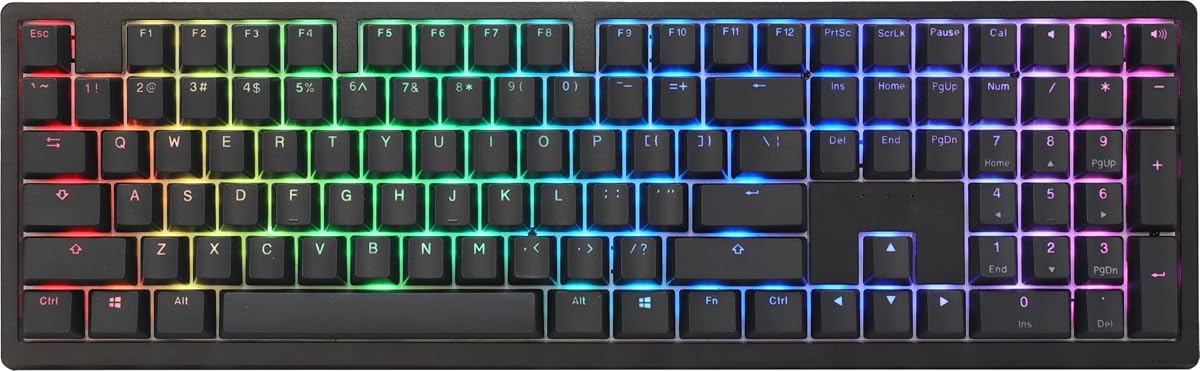
Ducky Origin Mechanical Gaming Keyboard, Cherry MX Blue, Black
4.5Editor score
Hotswap sockets on stabilizers
Detachable braided USB-C cable
Slim narrow bezel design
Explore our detailed guide comparing the top Ducky Keyboard models for gaming and typing in October 2026. Find the perfect match for your needs.
Finding the right mechanical keyboard can transform your daily computing experience. A good Ducky Keyboard offers durability, tactile feedback, and customizable features that appeal to gamers and professionals alike. Understanding the nuances of switch types and build quality helps narrow down your choices significantly.
We evaluated ten distinct models based on build quality, switch performance, connectivity options, and overall value. Our analysis focuses on real-world usage scenarios ranging from intense gaming sessions to long typing marathons. Each product brings unique strengths that cater to different user preferences and desk setups.
Each pick below highlights specific strengths like wireless flexibility or premium materials. Keep in mind that pricing fluctuates based on sales and availability. Check current listings before making your final decision to ensure you get the best deal available at this moment.
4.5Editor score

4.7Editor score

3.8Editor score
This side-by-side comparison breaks down the core specifications of every model we reviewed. We focus on layout size, connectivity, switch type, and unique features to help you decide quickly.




The Ducky OK-M brings a premium gasket-mounted feel to a budget-friendly price point. With a solid 4.4 rating, it appeals to users wanting wireless flexibility without breaking the bank. The five-layer acoustic dampening ensures typing remains quiet and comfortable even during long sessions.
We may earn a commission when you buy through this link, at no additional cost to you.
Its versatility stands out with USB-C, Bluetooth, and 2.4GHz wireless support allowing easy device switching. The hot-swappable switches let you experiment with different tactile feelings easily. VIA support unlocks extensive key and macro customization for those who love tailoring their experience.
While the Baby Switch may require specific drivers or setup steps, it does not hinder general functionality. The side RGB provides a unique aesthetic touch without overwhelming your desk space. These trade-offs are minor considering the robust feature set and build quality on offer.
This keyboard is perfect for budget-conscious gamers or remote workers needing multi-device support. Its blend of style and function makes it a top contender in the mid-range market. We recommend checking current availability to secure this versatile tool for your setup.
The ability to switch between wired, Bluetooth, and 2.4GHz wireless ensures you stay connected across multiple devices seamlessly. This is crucial for users managing both work and personal setups on one desk.
VIA software support allows deep customization of macros and key mappings. Combined with five-layer dampening, the keyboard delivers a thocky and satisfying sound profile that rivals much more expensive boards.
We may earn a commission when you buy through this link, at no additional cost to you.
The Ducky Origin earns our Editor's Choice award for its exceptional build quality and thoughtful engineering. With a 4.6 rating it proves consistent satisfaction among users. The vintage aesthetic combined with modern features makes it a standout choice for enthusiasts seeking style.
We may earn a commission when you buy through this link, at no additional cost to you.
Key features include Kailh yellow hotswap sockets on stabilizer keys which ensures smooth operation of larger keys. The detachable braided USB-C cable adds durability and convenience for portability. OEM profile Double Shot PBT keycaps guarantee long-lasting legends and a textured feel.
While the bonus enter key comes in a random color which might not match everyone's taste it adds a fun element to the package. The slim bezel design maximizes desk space without compromising key layout. These minor points do not detract from the overall high-quality experience.
Ideal for typists who value tactile feedback and durability over flashy RGB lighting. The Origin balances classic aesthetics with modern usability effectively. It remains a reliable daily driver for those who prioritize function and form equally.
Incorporating hotswap sockets on stabilizer keys is rare and allows for easy tuning or replacement of space bars and enter keys. This reduces rattling and improves the overall typing consistency significantly.
Double Shot PBT keycaps resist shine and wear over time better than ABS alternatives. This ensures your keyboard looks fresh and professional even after years of heavy daily use.
We may earn a commission when you buy through this link, at no additional cost to you.
For those who love a crisp click, the Ducky Origin Black with Cherry MX Blue switches delivers that distinct auditory feedback. Its 4.5 rating reflects strong approval from users who enjoy the tactile bump and audible confirmation of every keystroke. It brings a retro charm to modern setups.
We may earn a commission when you buy through this link, at no additional cost to you.
The inclusion of hotswap sockets on stabilizers enhances the user experience by allowing modifications to reduce rattling. The detachable braided USB-C cable ensures a secure connection and easy transport. OEM Double Shot PBT keycaps provide a durable surface that resists shine over time.
The loud nature of blue switches might be disruptive in shared office spaces. However, for home users who enjoy the sound, it creates a satisfying typing environment. The slim bezel keeps the footprint small while maintaining a full layout feel.
This model is best suited for home office enthusiasts or gamers who prefer tactile clicks. Its construction quality matches the higher-end models in the lineup. If you seek that classic mechanical sound, this is a solid investment.
Cherry MX Blue switches provide a sharp click that confirms every keypress. This auditory feedback can increase typing speed and satisfaction for users who enjoy the classic mechanical keyboard experience.
The slim and narrow bezel design maximizes typing area without increasing desk footprint. This is particularly useful for users with limited desk space or those who prefer a cleaner aesthetic.
We may earn a commission when you buy through this link, at no additional cost to you.
The Ducky Zero 6108 is a compact option that packs serious power into a smaller footprint. With tri-mode connectivity you can switch between wired USB 2.4GHz wireless and Bluetooth effortlessly. Its 4.1 rating indicates good functionality though it may not satisfy everyone immediately.
We may earn a commission when you buy through this link, at no additional cost to you.
The Cherry MX2A Red switches offer a smooth linear action with a low 45g actuation force. This reduces finger fatigue during rapid gaming sessions or long typing marathons. The vibrant RGB lighting adds a customizable flair to match any gaming setup aesthetic.
Users accustomed to full layouts might need time to adjust to the compact size. Additionally the lower rating suggests some variability in user experience or specific feature expectations. However the build quality and PBT keycaps ensure longevity and durability.
Best for gamers seeking a wireless solution with fast response times. The linear switches and rollover support make it ideal for competitive play. Check compatibility with your software before purchasing to ensure full feature access.
Seamless switching between wired USB 2.4GHz and Bluetooth offers maximum flexibility for multi-device setups. This ensures you can connect to multiple computers or mobile devices without physical cable swapping.
The 45g actuation force and N-Key rollover ensure rapid key presses register accurately without ghosting. This combination is critical for competitive gaming where split-second reactions determine success.
We may earn a commission when you buy through this link, at no additional cost to you.
The Ducky Origin Vintage blends a classic look with modern mechanical performance. It shares many features with the standard Origin model but emphasizes sound and tactile quality. With a 4.5 rating users appreciate the satisfying click and smooth typing action.
We may earn a commission when you buy through this link, at no additional cost to you.
Kailh yellow hotswap sockets on stabilizer keys allow for easier tuning and maintenance. The detachable braided USB-C cable enhances portability and protects the internal connection points. Bonus enter key in a random color adds a unique personal touch to your build.
Lack of wireless connectivity limits mobility compared to newer models. However for a stationary setup this is not a significant drawback. The slim bezel design keeps the keyboard compact and visually appealing on any desk surface.
Ideal for users who prefer a stationary workstation with strong tactile feedback. The vintage styling pairs well with retro or minimalist desk themes. It stands as a reliable choice for those prioritizing key feel over wireless features.
PBT keycaps provide a textured surface that feels superior to standard plastic. This reduces slipperiness and ensures a comfortable grip during extended typing sessions regardless of hand size.
Hotswap sockets on stabilizers enable users to swap out parts to reduce rattle. This level of tuning is rare at this price point and adds significant value for enthusiasts.
We may earn a commission when you buy through this link, at no additional cost to you.
The Ducky One 2 Pro Mini offers a clean white aesthetic that appeals to minimalist desk setups. With a strong 4.6 rating users praise its build quality and tactile feedback. The compact size saves space while maintaining essential function for daily tasks.
We may earn a commission when you buy through this link, at no additional cost to you.
Key features include true PBT keycaps that offer superior durability and texture compared to ABS. Cherry Brown switches provide a tactile bump without excessive noise making them suitable for office environments. The RGB LED lighting allows subtle customization of your workspace vibe.
The mini layout means learning new key combinations for function keys and media controls. This may take time for users transitioning from larger keyboards. However the space savings are substantial for those with limited desk real estate.
Best for users who value aesthetics and portability over a full numpad. The white finish stays looking clean longer than darker options. Consider your workflow needs before downsizing to this compact edition.
The mini layout removes the numpad and arrow cluster to free up space. This allows more room for mouse movement which is critical for many gamers and designers.
The white case and keycaps create a pristine look that elevates any desk setup. It pairs well with modern monitors and accessories for a cohesive professional appearance.
We may earn a commission when you buy through this link, at no additional cost to you.
The Ducky One X Wireless introduces next-gen analog switches for unmatched accuracy and efficiency. With a 3.8 rating it brings cutting-edge tech like rapid trigger to the market. This premium choice suits users demanding high precision in competitive gaming environments.
We may earn a commission when you buy through this link, at no additional cost to you.
Features like gasket-mount design and seven-layer dampening provide a sublime typing feel and sound. The web-based software ensures intuitive settings adjustments without consuming local computer resources. High-density PBT doubleshot keycaps offer unrivalled resistance to shine over time.
The premium price is a significant investment compared to standard mechanical boards. Some users report connectivity quirks that lower overall satisfaction scores. However for those needing rapid trigger and analog precision this remains a top option.
Ideal for competitive esports athletes or tech enthusiasts seeking future-proof features. The combination of inductive switches and wireless freedom offers a unique experience. We recommend testing the software compatibility before purchasing to ensure smooth operation.
Inductive switches detect key presses magnetically rather than mechanically for higher consistency. This eliminates physical contact points which wear out over time in traditional switches.
Rapid trigger allows keys to reset immediately upon release without needing a full reset press. This responsiveness is vital for high-speed competitive gaming where reaction time matters.
We may earn a commission when you buy through this link, at no additional cost to you.
The Ducky One 3 Matcha stands out with the highest 4.7 rating among all reviewed options. It features Ducky's QUACK Mechanics design philosophy ensuring superior acoustic performance. The vibrant Matcha aesthetic combined with blue switches creates a unique visual and tactile experience.
We may earn a commission when you buy through this link, at no additional cost to you.
It includes a dual layer hotswap PCB with exclusive Kailh yellow sockets for maximum customization. Dual-layer silicone and EVA foam sound dampeners eliminate hollow noise effectively. Thick PBT seamless keycaps prevent gaps and ensure a smooth surface for typing comfort.
While the price is higher than entry models the build quality justifies the cost. Some users might find the color scheme limiting compared to neutral options. However the typing feel is consistently praised across various user feedback channels.
Best for users prioritizing typing comfort and acoustic dampening. The improved stabilizers and macro layout cater to professionals and gamers alike. If budget allows this model delivers an exceptional premium experience.
Dual-layer high-grade silicone and EVA foam sound dampeners significantly reduce hollow resonance. This creates a denser and more solid sound profile that mimics custom-built keyboards.
Exclusive Kailh yellow hotswap sockets allow for reliable and frequent switch changes. This future-proofs your investment by letting you adapt the board to different preferences easily.
We may earn a commission when you buy through this link, at no additional cost to you.
The Ducky One 3 TKL Matcha brings premium features to a compact TKL form factor. With a 4.3 rating users enjoy the balance between size and full functionality. The brown switches offer a tactile bump that suits both typing and gaming effectively.
We may earn a commission when you buy through this link, at no additional cost to you.
It features a dual layer PCB with hotswap sockets for switch customization. Dual-layer high-grade silicone and EVA foam dampeners maintain the acoustic quality seen in larger models. V2 stabilizers and improved macro layout enhance the overall usability of the device.
Removing the numpad saves space but may hinder numerical data entry workflows. The detachable braided USB-C cable ensures durability and portability for travel. Adjustable feet allow for personalized typing angles to reduce wrist strain.
Ideal for gamers and typists who prefer a compact layout without sacrificing quality. The TKL format leaves more room for mouse movement while keeping essential keys. Consider your reliance on a numpad before choosing this version.
The Tenkeyless design saves desk space while retaining the arrow keys and essential modifiers. This layout is preferred by many gamers who need room for wide mouse movements.
Three-level adjustable feet let you customize the typing angle to suit your wrist preference. This flexibility helps reduce fatigue during long sessions and promotes better posture.
We may earn a commission when you buy through this link, at no additional cost to you.
The Ducky One 2 80% remains a reliable classic in the mechanical keyboard lineup. With a 4.3 rating it offers consistent performance for users seeking simple linear feedback. The compact 80% layout saves space while maintaining arrow keys for efficiency.
We may earn a commission when you buy through this link, at no additional cost to you.
Features include a dual layer PCB for stability and software support for RGB customization. The detachable 1.5 meter USB-C cable ensures flexibility during use. PBT Double Shot colorful keycaps come in random colors adding a playful element to your setup.
While it lacks some newer features like hotswap it remains a solid daily driver. The RGB software support is functional but less extensive than modern web-based alternatives. This makes it a good choice for users who prefer simplicity.
Best for users who want a dependable linear keyboard with a standard layout. The red switches offer smooth travel ideal for rapid gaming inputs. It stands as a practical option for those prioritizing function over advanced features.
Cherry MX Red switches provide a smooth linear action without tactile bumps. This allows for quick repeated key presses without resistance fatigue during gaming.
Ducky's RGB software allows basic lighting patterns and brightness adjustments. This lets you match your desk theme without complex configuration steps or tools.
We may earn a commission when you buy through this link, at no additional cost to you.
Selecting the right mechanical keyboard depends on your specific workflow and preferences. We break down the most critical factors to consider before making a purchase.
Mechanical switches define how your keyboard feels and sounds. Linear switches like Red are smooth and quiet while tactile Brown switches offer a bump and clicky Blue switches provide audible feedback. Consider whether you prefer silence or feedback when typing.
Choose the switch type that matches your environment and preference for sound or tactile feedback.
Layouts range from full size with a numpad to compact TKL or mini formats. Larger keyboards offer more keys but take up desk space while smaller ones save room for mouse movement. Assess your desk size and workflow needs carefully.
Prioritize layout size based on your space availability and need for specific keys like a numpad.
Modern keyboards offer wired USB-C Bluetooth and 2.4GHz wireless options. Wired ensures stability while wireless provides flexibility for multiple devices. Decide how you connect to your system and if mobility is required.
Select a connectivity type that aligns with your device setup and need for freedom of movement.
Keycap material and case construction impact durability and typing feel. PBT keycaps resist shine and wear better than ABS. Gasket mount designs offer better acoustic dampening and a more premium feel.
Look for high-quality materials like PBT and gasket mounting for long-term durability and comfort.
Hot-swap sockets let you change switches without soldering which is great for experimentation. RGB lighting and macro software allow further personalization of your typing experience. Check if the software supports your operating system easily.
Ensure the keyboard supports hot-swapping and software customization if you plan to modify it later.
Acoustic dampening layers reduce hollow sound and ping from the case. This is vital for shared offices or quiet spaces. Some models include foam or silicone layers specifically for this purpose.
Choose models with multiple dampening layers if you prioritize a quiet and solid typing experience.
Budget options offer solid features while premium models include advanced tech like inductive switches. Determine how much you are willing to spend for specific benefits. Compare features against the price to ensure value.
Balance your budget against the features you truly need to avoid overpaying for unnecessary technology.
The look of your keyboard should match your setup style. Options range from minimalist white to vibrant Matcha or vintage styles. RGB lighting adds color while neutral cases offer subtlety.
Pick a design that enhances your workspace visually while meeting your functional requirements.
Keep your keyboard clean by gently brushing dust off the keys with a soft brush. Avoid harsh chemicals that might damage the keycap surface or internal components. Regular maintenance ensures smooth operation and longevity.
Use the detachable cable correctly to avoid damaging the port. Do not pull the cable forcefully when unplugging it from your device. Proper handling prevents wear and tear on the connection points over time.
Store your keyboard in a dry and cool environment when not in use. Exposure to moisture or extreme heat can degrade materials and electronic components. Proper storage protects your investment from environmental damage.
Yes Ducky keyboards are highly rated for gaming due to their durability and fast response times. Models with Cherry MX Red or Blue switches provide smooth and precise keystrokes for competitive play. The N-key rollover ensures every press registers accurately during intense sessions.
Most Ducky keyboards are compatible with both Mac and Windows systems out of the box. Some models include specific layouts or software support to optimize functionality for either OS. Always check the product description for OS-specific features before buying.
Hotswap keyboards allow you to change switches without soldering which makes customization easy. Soldered boards require physical soldering to change switches which is harder for most users. Hotswap options offer more flexibility for future upgrades and repairs.
Many modern wireless models include low-latency modes suitable for competitive gaming. Look for 2.4GHz wireless support which offers faster speeds than standard Bluetooth. Wired USB remains the safest option for absolute lowest latency but wireless is often sufficient.
Remove keycaps and wash them gently in warm soapy water then let them dry completely. Use a damp cloth to wipe the case and PCB to remove dirt. Avoid getting water inside the electrical components to prevent damage.
Many models include onboard memory for macro recording and storage. You can save custom key mappings directly to the keyboard for use across different computers. Check the product specifications for specific macro support details.
Basic typing and lighting functions work without any software installed on your computer. Advanced customization like macros or complex RGB patterns may require the specific software. Many models allow you to use it without constant software dependency.
A gasket mount uses rubber strips between the case and PCB to isolate vibrations. This design provides a softer and more flexible typing feel compared to rigid mounting. It also helps dampen sound for a more premium acoustic experience.
Choosing the best Ducky Keyboard comes down to your specific needs and preferences. Whether you want the budget-friendly Origin or the premium One X Wireless each option offers unique strengths. Evaluate your priorities for sound and size to find the perfect fit.
For most users the Ducky Origin offers an excellent balance of build quality and price. Gamers might prefer the wireless capabilities of the Zero 6108 or the precision of the One X. Consider your budget and desired features before making your final choice.
Remember that prices and availability change frequently so check current listings before buying. Investing time in comparing features ensures you get the best value for your specific setup. A good keyboard will enhance your daily computing experience significantly.