
GE BigEZ OneTouch Big Button Universal TV Remote for Seniors, Easy to Use
4.3Editor score
Extra large white remote control
Backlit buttons for low light
Preset for five major TV brands
This guide compares the top easy to use TV remote for seniors, evaluating button size, setup ease, compatibility, and design to help you choose the right model
Finding the right television control can be a challenge for older adults who struggle with small buttons or complex menus. A well designed remote simplifies daily entertainment and restores independence for those with limited vision or dexterity.
We have carefully selected ten highly rated options based on user feedback and manufacturer specifications. Each product offers unique features like large buttons, backlit keys, or simplified layouts to meet different needs.
Below you will find detailed reviews and a comparison table to help you decide. Please note that availability and pricing may change over time so check the current listing before purchasing.
4.3Editor score
4.2Editor score

4.4Editor score
The following table provides a side by side look at the features of each selected remote to help you find the perfect match for your setup and preferences.


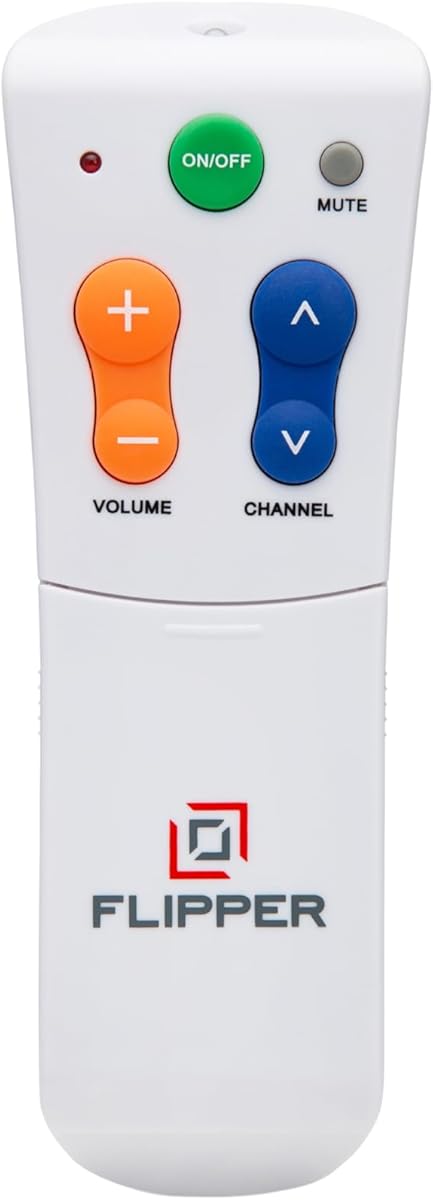
The Flipper Big Button TV Remote is an exceptional choice designed with seniors and those suffering from dementia or Alzheimer's in mind. It holds a solid 4.2 out of 5 star rating based on numerous user reviews praising its simplicity and effectiveness.
We may earn a commission when you buy through this link, at no additional cost to you.
Its most notable feature is the simplified face which includes only four large buttons for everyday use. These buttons are color coded with green for power, orange for volume, blue for channels, and gray for mute to minimize confusion. The remote also includes a unique feature allowing caregivers to customize up to twenty five favorite channels so seniors can cycle through them easily without needing to remember numbers or navigate complex menus.
While it excels in simplicity, it is important to note that the Flipper does not work with streaming apps like Netflix or YouTube. It is designed for traditional broadcast cable and satellite setups. This trade-off is acceptable for users who primarily watch linear television and want to avoid the complexity of smart interfaces.
We recommend this remote for caregivers who want to restore independence to their loved ones without sacrificing ease of use. It is particularly valuable for those with low vision or dexterity challenges who find standard remotes overwhelming.
The remote was born from a founder's personal mission to help his father access his favorite content without confusion and frustration.
Caregivers can set it once and let their loved ones cycle through favorite channels without needing to navigate hundreds of unwanted options.
We may earn a commission when you buy through this link, at no additional cost to you.
The GE BigEZ OneTouch Universal TV Remote stands out as an incredibly affordable option that does not compromise on accessibility. It carries a 4.3 out of 5 star rating making it one of the highest rated budget options available for seniors.
We may earn a commission when you buy through this link, at no additional cost to you.
Its design features an extra large white remote control that is easy to see and hard to lose in a dimly lit room. The buttons are fully backlit which is a crucial feature for night time viewing when finding controls on a dark remote can be frustrating. It includes a blue volume button and an orange channel button specifically designed to be colorblind friendly ensuring everyone can operate it easily.
This remote simplifies setup by presetting buttons for five major TV brands including Samsung LG Vizio Sony and Roku. While this limits brand compatibility compared to fully universal models it is sufficient for many households. Users should note that batteries are not included in the package.
We recommend this remote for families on a tight budget who still require high accessibility features. It is an excellent choice for seniors who need a simple replacement remote without extra complexity or high cost.
The white body and backlit keys ensure seniors can find and use the remote even in low light conditions without straining their eyes.
GE provides free U.S. based technical support and online step-by-step programming videos to assist with any setup questions.
We may earn a commission when you buy through this link, at no additional cost to you.
This Backlit Big Button TV Remote Replacement offers a premium experience with features designed to maximize ease of use for those with poor vision or conditions like Parkinson's disease. It holds an impressive 4.4 out of 5 star rating reflecting high customer satisfaction.
We may earn a commission when you buy through this link, at no additional cost to you.
Its standout feature is the backlit button design where large print oversized buttons stay lit for thirty seconds after being pressed. This ensures that seniors can see the buttons clearly even if they press them in the dark. The package is comprehensive as it includes a soft silicone protective cover and a mount hook to keep the remote off the couch and within reach.
While this remote is optimized for Samsung Smart TVs it requires no setup at all. You simply insert batteries and start controlling your screen immediately. This lack of configuration is a huge plus for elderly users who may find programming difficult. The soft silicone buttons feel gentle under the fingers making it easier for those with stiffness.
We recommend this remote specifically for Samsung owners who want a turnkey solution with extra care features. The inclusion of a protective cover is a thoughtful touch for users with clumsy hands or busy living rooms where accidents can happen.
The thirty second backlight gives users ample time to see and press the buttons without squinting or fumbling in the dark.
The silicone cover prevents cracks and spills while the wall hook ensures the remote is never lost under furniture.
We may earn a commission when you buy through this link, at no additional cost to you.
The EZclicker Big Button Universal TV Remote offers a comfortable and accessible user experience tailored for seniors and those with limited dexterity. It holds a 4.2 out of 5 star rating showing solid performance across various user groups.
We may earn a commission when you buy through this link, at no additional cost to you.
This remote features specialized controls including an extra large enter button and tactile feedback to ensure buttons are pressed correctly. Its compact size measures 7 by 2 inches making it easy to hold and store compared to bulkier models. The design aims to reduce frustration by simplifying the interface to only essential controls.
Programming is straightforward as you can pair it by pressing the mute and volume buttons together until the remote recognizes the TV. It is important to note that this remote works only with TVs and not with cable boxes or streaming sticks. This limitation is acceptable for those with simple setups.
We recommend this remote for seniors who want a lightweight simple device that fits comfortably in the hand. Its compact nature makes it ideal for those with limited grip strength who find heavy remotes difficult to manage.
Measuring only 7 inches long this remote is designed to be easy to handle and store in tight spaces.
Setup involves holding two buttons together until the remote syncs with the TV requiring no complex code entry.
We may earn a commission when you buy through this link, at no additional cost to you.
The Flipper Big Button TV Remote is explicitly created to help seniors and elderly loved ones with dementia regain independence and full control over their entertainment. It holds a 4.2 out of 5 star rating reflecting its reliability in caregiving environments.
We may earn a commission when you buy through this link, at no additional cost to you.
This device simplifies life by offering a four button design for basic functions and hidden buttons that slide to reveal for customizing favorites. It works with most major TV brands and cable providers to eliminate remote clutter. The ability to set up to twenty five favorite channels is a game changer for those who struggle with memory or navigation.
While it is an excellent tool for traditional TV viewing it cannot navigate streaming apps. This limitation ensures the user is not faced with complex menus that might cause anxiety. The price is higher than budget models but the value for caregivers is significant.
We recommend this remote for families managing dementia care who need a device that promotes independence without sacrificing simplicity. It offers peace of mind knowing the TV can be controlled without assistance.
Hidden buttons allow caregivers to set favorites without adding complexity to the main face of the remote.
It works with most major TV brands and providers making it a versatile choice for most households.
We may earn a commission when you buy through this link, at no additional cost to you.
The GE BigEZ OneTouch Big Button Universal TV Remote is highly regarded for its vision friendly features including fully backlit buttons and color coded keys. It holds a 4.3 out of 5 star rating for its ease of use and reliability.
We may earn a commission when you buy through this link, at no additional cost to you.
The remote features a blue volume button and an orange channel button which are specifically designed to be colorblind friendly. It is also fully backlit to ensure visibility in low light conditions. Setup is simplified by allowing users to press a button for their TV brand before pressing power.
This model can control up to two devices including a TV and a cable box. While the preset brands are limited to five major ones the setup is intuitive. U.S. based technical support is available to help with any questions.
We recommend this remote for seniors who need visual aids to operate a device comfortably. The combination of color coding and backlighting makes it a top choice for accessibility.
The blue and orange buttons provide clear visual distinction helping users identify controls instantly.
Brand selection simplifies the pairing process making it quick to get the remote working.
We may earn a commission when you buy through this link, at no additional cost to you.
The EZclicker TV Remote for Seniors offers a simple big button experience tailored to those with limited dexterity or vision. It holds a 4.2 out of 5 star rating for its ease of use and practical design.
We may earn a commission when you buy through this link, at no additional cost to you.
This remote is compact and lightweight measuring 6 inches in length making it easier to handle than bulkier models. It features tactile feedback to help users feel when a button is pressed successfully. The setup process involves pressing two buttons together until the remote recognizes the TV.
It is designed to work with most major TV brands but does not support streaming devices. This focus on core functions keeps the layout simple. The affordable price makes it an accessible choice for many households.
We recommend this remote for seniors who struggle with larger or heavier remotes. Its compact size is particularly useful for those with limited hand strength.
Measuring 6 inches this remote is designed to be easy to hold and store in tight spaces.
The buttons provide tactile feedback to confirm presses which is helpful for users with reduced sensation.
We may earn a commission when you buy through this link, at no additional cost to you.
The Big Button Universal Remote is an excellent choice for seniors who want a simple replacement remote without the hassle of programming. It holds a 4.4 out of 5 star rating for its reliability and ease of setup.
We may earn a commission when you buy through this link, at no additional cost to you.
This remote works right out of the box for compatible TVs so you simply insert batteries and start using it. It supports a wide range of brands including Samsung LG Vizio Sony Hisense Philips and Panasonic. The large enter button provides tactile feedback to ensure correct presses.
While it does not work with streaming devices it is perfect for traditional TV setups. The manufacturer offers free replacement within a 90 day warranty which adds peace of mind to the purchase.
We recommend this remote for households looking for a quick and simple solution without any technical setup. Its high compatibility makes it a versatile option for many users.
The remote works immediately without pairing ensuring no frustration during setup.
It supports most major brands making it a likely fit for most households.
We may earn a commission when you buy through this link, at no additional cost to you.
This Large Button TV Remote Control offers a straightforward design focused on reducing complexity for elderly users and low vision individuals. It holds a 4.4 out of 5 star rating for its dependability and ease of use.
We may earn a commission when you buy through this link, at no additional cost to you.
The remote features extra large buttons and a clear layout to make channel and volume adjustments easy to see and press. Its ergonomic lightweight body provides a comfortable grip for extended use. It is designed for traditional TV compatibility ensuring dependable performance with major brands.
While it does not support streaming apps it is a robust replacement for standard remotes. The large buttons reduce misclicks and stress for users with limited dexterity. This focus on core functions makes it a reliable choice.
We recommend this remote for seniors who want a simple effective replacement remote. Its lightweight design ensures comfortable handling throughout the day.
The large buttons reduce misclicks which lowers frustration and increases confidence when using the TV.
An ergonomic design with a lightweight body ensures comfort during extended viewing sessions.
We may earn a commission when you buy through this link, at no additional cost to you.
The Anderic RR1004 is a universal TV remote designed for seniors and care facilities with extra large glow in the dark keys. It holds a 4.0 out of 5 star rating for its utility in low light environments.
We may earn a commission when you buy through this link, at no additional cost to you.
This remote features a minimalist design with only essential controls like power volume channel mute and closed captioning. It can be pre programmed for LG TVs out of the box or programmed for other brands using a setup guide. It includes a learning function to copy signals from an existing IR remote.
While it does not work with Bluetooth systems it is effective for standard IR TVs. The glow in the dark keys ensure usability without needing to find light. It is a practical choice for healthcare or hospitality environments.
We recommend this remote for care facilities or low light home environments. Its simplicity ensures that users are not overwhelmed by unnecessary buttons.
Glow in the dark keys ensure seniors can find the remote even when the lights are off.
Reducing buttons to essential controls lowers confusion for those with cognitive challenges.
We may earn a commission when you buy through this link, at no additional cost to you.
Choosing the right remote for a senior involves considering their specific physical and cognitive needs along with the type of TV setup they have at home.
Large buttons make it easier for seniors with arthritis or limited dexterity to press the correct control without missing or double tapping. Tactile feedback adds a physical sensation when a button is pressed which confirms the action without looking.
Always choose remotes with extra large buttons that feel distinct under the fingers to prevent frustration during daily use.
Many seniors watch television in dim light so having a remote with backlit buttons or glow in the dark keys is essential. This prevents squinting or struggling to find controls in the dark.
Look for remotes that light up when touched or have high contrast key labels for best visibility.
Complex pairing procedures can be a barrier so look for remotes that offer one touch setup or brand preset buttons. The easier the initial setup the more likely the user will successfully use it long term.
Remotes with pre programmed brand buttons reduce the need to enter long code sequences.
Check whether the remote needs to work with just the TV or also with cable boxes and streaming devices. Some simplified remotes do not work with streaming apps which may be a limitation if the user wants to watch Netflix.
Ensure the remote covers all devices you need to control to avoid clutter with multiple remotes.
A lightweight remote with a comfortable grip reduces strain on hands and wrists during daily use. Heavy remotes can be difficult for seniors with weak grip strength to handle effectively.
Look for ergonomically shaped bodies that fit naturally in the hand.
Seniors may be more prone to dropping the remote so models with protective cases or sturdy build quality are preferable. Durability ensures the device lasts longer and withstands regular handling.
Consider remotes that include protective covers or are built from high strength materials.
Having access to technical support can be a huge help when setting up a universal remote. A good warranty protects your investment if the remote malfunctions.
Check for U.S. based technical support and generous return policies.
Some remotes require specific batteries like AAA or AA and having a simple battery compartment makes maintenance easier. Look for models that are easy to open for seniors with vision challenges.
Ensure the remote has accessible battery compartments that do not require tools to open.
Always insert fresh batteries into the remote before setup to ensure consistent power during pairing. Check the battery compartment orientation carefully to avoid installation errors.
Keep the remote away from direct sunlight and moisture to prevent button degradation. Store it in a designated spot like a side table tray to avoid losing it.
If the remote does not respond try cleaning the sensors on the remote and TV with a soft dry cloth. This simple maintenance keeps the connection strong over time.
Most simplified remotes in this list work only with standard IR TVs and do not navigate streaming app interfaces. Some models like the Philips BigEZ may have extra buttons for basic media control but you should verify specific compatibility before purchasing.
Each product listing specifies whether it requires AA or AAA batteries. Most universal remotes in this list use either AA or AAA standard batteries which are easy to find at local stores.
Yes several options like the Flipper remote are specifically designed with color coding and simplified layouts to reduce confusion for users with dementia or Alzheimer's.
Try replacing the batteries and resetting the remote. Most products include a support guide or video tutorials to help resolve common setup issues.
Many models can control two devices but you will need to set up the secondary code. Always check the product specs to confirm it supports both your TV and cable provider.
Yes the Backlit Big Button Remote Replacement is designed specifically for Samsung TVs and comes with a protective cover and wall hook included in the package.
Most setup processes take less than five minutes with brand preset buttons. Some models require pairing by pressing two buttons together which is also very quick.
Yes most remotes in this list are designed to be lightweight and ergonomic. Compact models like the EZclicker are specifically built to be easy to handle.
Choosing the right remote for a senior can dramatically improve their daily entertainment experience by reducing frustration and confusion. The top options like the Flipper and GE BigEZ offer excellent balance between simplicity and functionality for most households.
When making your decision consider the specific needs of the user such as vision impairment or cognitive challenges. Prioritize features like backlighting and large buttons if the user spends a lot of time watching TV in the dark.
Always verify compatibility with your current TV setup before purchasing to ensure the remote will work as expected. Prices and availability may change so check the current listings on Amazon for the most up to date information.