
Arteck Split Ergonomic Keyboard with Palm Rest, 2.4G USB Wireless Keyboard
4.3Editor score
Split ergonomic design
Cushioned wrist rest
Long battery life
Programming often requires hours of continuous typing, which can lead to significant wrist strain and discomfort over time. Investing in an ergonomic keyboard designed specifically for developers can greatly improve posture and reduce the risk of repetitive strain injuries during long coding sessions.
We evaluated ten leading ergonomic keyboards based on their split designs, wrist support features, connectivity options, and overall typing comfort. Our analysis focuses on how each model addresses the unique needs of programmers, including key layout, adjustability, and compatibility with various operating systems.
Each pick in this list highlights specific benefits and potential trade-offs to help you find the right tool for your workspace. Keep in mind that prices and availability can change, so we recommend checking the latest offers before making your final purchase decision today.
4.3Editor score

4.4Editor score

4.1Editor score
As an Amazon Associate we earn from qualifying purchases.
The following comparison table details the key specifications and features of each model to help you quickly identify which ergonomic keyboard best suits your specific typing style and workspace requirements.




The Logitech Ergo K860 stands out as a top choice for developers seeking relief from wrist strain. With a 4.4 rating, it combines a curved split keyframe with a memory foam wrist rest to promote natural hand positioning.
We may earn a commission when you buy through this link, at no additional cost to you.
Its sloping design reduces muscle strain on forearms while the pillowed wrist rest offers 54 percent more support than standard keyboards. The quiet keys and full-size layout ensure productivity without compromising on comfort during long coding sessions.
While the price is higher than budget options, the ergonomic benefits justify the investment. Some users might find the split layout requires a short adjustment period, but the long-term health benefits are significant.
If you prioritize comfort and ergonomic certification, this keyboard is a reliable investment. It is ideal for programmers who type frequently and need a sturdy, well-designed tool to support their workflow daily.
The curved split design and sloping angle work together to lower stress on wrists and forearms during extended use.
Adjustable tilt legs allow you to customize the keyboard angle whether you are seated or standing for optimal posture.
We may earn a commission when you buy through this link, at no additional cost to you.
The KINESIS Freestyle2 offers unmatched flexibility with its modular split design. Rated 4.3 stars, this keyboard allows you to separate key modules up to 9 inches to fit your specific body type and preferences.
We may earn a commission when you buy through this link, at no additional cost to you.
Pre-assembled with the VIP3 tenting accessory, it enables adjustable tenting up to 15 degrees while keeping forearms neutral. The low-force membrane switches reduce finger fatigue and strain during intensive typing tasks.
Some users may need to purchase the pivot tether separately for maximum splay adjustment. The lack of backlighting might be a drawback for low-light environments compared to other modern ergonomic models.
Programmers who need precise control over their keyboard layout will appreciate this device. It is best for those who want a customizable setup without relying on complex software configurations.
The ability to rotate and separate key modules ensures your hands and wrists stay in a comfortable natural position.
Included VIP3 lifters offer 5 10 or 15 degrees of tenting to support optimal wrist posture.
We may earn a commission when you buy through this link, at no additional cost to you.
The Logitech Wave Keys is designed to help workdays go easier with its compact wavy shape. It has a 4.2 rating and places hands wrists and forearms in a natural typing position for all-day comfort.
We may earn a commission when you buy through this link, at no additional cost to you.
A cushioned palm rest with memory foam provides ample support while the Logi Options+ App allows you to customize shortcuts for efficiency. It connects via Bluetooth or Logi Bolt receiver for versatile device switching.
Some users might find the compact layout less comfortable for those who use the number pad frequently. The design prioritizes space savings over full-size functionality which may not suit every workspace.
If you have limited desk space or prefer a sleek setup, this keyboard is a great fit. It is ideal for portable use or environments where a smaller footprint is essential without sacrificing ergonomic benefits.
The wavy design naturally aligns your hands and wrists to reduce bending and strain during daily typing.
Enjoy up to three years of battery life while maintaining ergonomic support through efficient wireless connectivity.
We may earn a commission when you buy through this link, at no additional cost to you.
The Arteck Split Ergonomic Keyboard offers an affordable entry point into ergonomic typing. With a 4.3 rating, it helps position wrists and forearms in a natural relaxed position to reduce strain.
We may earn a commission when you buy through this link, at no additional cost to you.
A soft cushioned wrist rest provides support while typing and the rechargeable lithium battery lasts up to six months on a single charge. Setup is simple with a nano USB receiver stored at the back of the keyboard.
Build quality is basic compared to premium models and it lacks Bluetooth connectivity for multi-device use. However for its price point it delivers solid ergonomic support without breaking the budget.
Programmers on a tight budget will find this keyboard a practical choice. It is best for those who want essential ergonomic features without spending too much on advanced customization.
This keyboard provides essential ergonomic benefits like split design and wrist rest at a very accessible price.
The rechargeable battery ensures minimal downtime and continuous comfortable typing throughout the work week.
We may earn a commission when you buy through this link, at no additional cost to you.
The ProtoArc EK01 Plus features a unique curved split-frame design with adjustable backlighting for flexible typing environments. It holds a 4.3 rating and promotes proper posture to reduce strain on wrists and forearms.
We may earn a commission when you buy through this link, at no additional cost to you.
Soft white LED backlighting offers three brightness levels to conserve power with a 2000mAh battery providing up to 100 days of use without lighting. The full-size layout ensures all keys are within reach for efficient work.
It cannot be connected via wire which limits flexibility for some setups. The full-size design occupies more desk space which might not suit compact workstations or dual monitor setups.
This keyboard is ideal for programmers who work in low light and prefer a full-size layout. The backlighting and battery life make it a versatile choice for varied lighting conditions.
Adjustable backlighting allows you to customize comfort in any lighting environment while conserving battery life.
With a 2000mAh battery this keyboard offers significantly longer operating time compared to standard models.
We may earn a commission when you buy through this link, at no additional cost to you.
The Logitech Ergo K860 for Business is designed for IT departments needing secure wireless connections. With a 4.1 rating, it offers high-performance ergonomics for day-long comfort and productivity in professional environments.
We may earn a commission when you buy through this link, at no additional cost to you.
Logi Bolt wireless technology exceeds security needs with fully encrypted connections and supports remote mass deployment. The full-size numpad and two-year battery life ensure you do not compromise performance for ergonomics.
The build is similar to the consumer K860 but may cost more due to enterprise features. For individual users the consumer version might offer similar comfort without the enterprise-specific security tools.
This keyboard is best for businesses requiring secure and scalable ergonomic solutions. It is ideal for corporate settings where deployment and security are top priorities.
Logi Bolt wireless technology provides encrypted connections meeting enterprise security needs for sensitive work.
Support for remote mass deploy and manage DFUs simplifies IT administration and user setup.
We may earn a commission when you buy through this link, at no additional cost to you.
The KINESIS Advantage360 offers a premium contoured ergonomic shape with split key wells and thumb keys. Rated 4.1 stars, it is designed to increase comfort and productivity through its unique concave layout.
We may earn a commission when you buy through this link, at no additional cost to you.
Quiet mechanical switches provide a premium typing experience with incredible durability. The keyboard is fully programmable via GitHub or a web-based GUI allowing power users to customize the layout extensively.
The price is high and the learning curve is steep for those new to split keyboards. The premium palm pads are sold separately which adds to the overall cost of ownership.
Programmers who want total control over their typing experience will love this keyboard. It is ideal for users who prioritize customization and long-term comfort over budget constraints.
Re-configure the base layout using GitHub or a web-based GUI for ultimate control over key functions.
Quiet mechanical switches deliver a tactile feel with incredible durability for daily heavy use.
We may earn a commission when you buy through this link, at no additional cost to you.
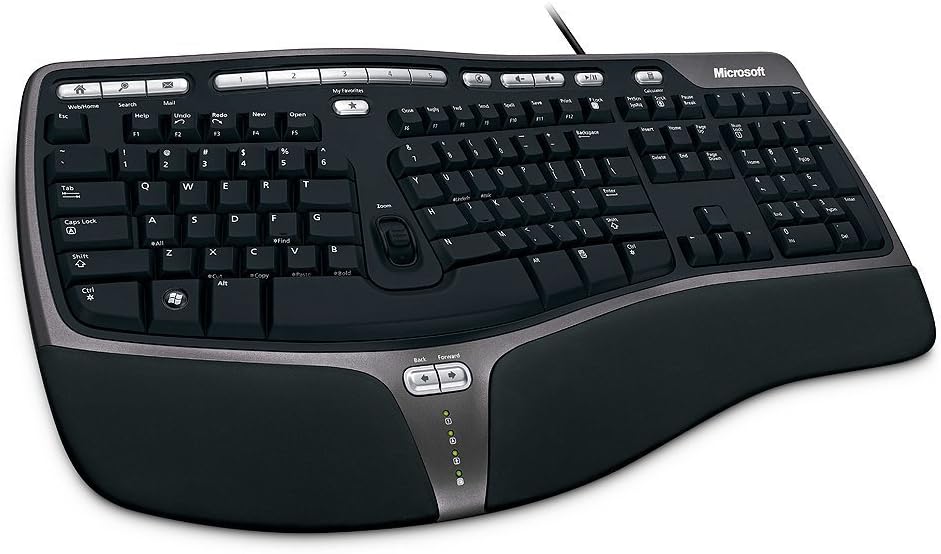
The Microsoft Wired Natural Ergonomic Keyboard 4000 is a classic model with a split ergonomic design. It holds a 4.4 rating and encourages natural hand wrist and forearm positions for long comfort.
We may earn a commission when you buy through this link, at no additional cost to you.
A cushioned palm rest promotes a neutral wrist position while media keys provide easy access to music and video control. The palm lift promotes a relaxed natural angle for your wrist during typing.
As a wired keyboard it lacks wireless flexibility and the design is older compared to modern options. The higher price for a wired model may be hard to justify given newer alternatives.
This keyboard is suitable for users who prefer a wired connection and classic layout. It is best for those who value reliability over modern features like wireless connectivity.
A trusted split design has supported ergonomic typing for years with reliable performance and comfort.
Dedicated media keys allow quick control of entertainment without interrupting your workflow.
We may earn a commission when you buy through this link, at no additional cost to you.
The Microsoft Natural Keyboard Elite features an ergonomic design aimed at comfort and productivity. With a 4.3 rating, it includes multimedia controls and enhanced F-key commands for customizable shortcuts.
We may earn a commission when you buy through this link, at no additional cost to you.
It connects to PC via USB or PS/2 ports offering flexibility for older systems. The attractive white finish looks clean in professional environments and supports efficient workflow management.
The keyboard uses older connectivity standards and is bulkier than modern wireless options. For users with modern setups the PS/2 port might not be useful and the design feels dated.
This keyboard is a good choice for those who need multimedia controls and a traditional feel. It is best for legacy systems or users who prefer a standard ergonomic layout.
Access music and video files easily with dedicated controls integrated directly into the keyboard.
Enhanced F-key commands allow you to create custom shortcuts for frequent tasks.
We may earn a commission when you buy through this link, at no additional cost to you.
The Microsoft 5QH-00001 is a business-focused ergonomic keyboard with split design and improved numpad. It has a 4.4 rating and promotes a more natural hand wrist and forearm position for comfort.
We may earn a commission when you buy through this link, at no additional cost to you.
The improved number pad places common numeric functions where you need them most. Taskbar Favorites keys allow easy access to programs which boosts productivity in Windows environments.
Mac users need to install IntelliType software and it is wired which limits flexibility. The higher price might not be worth it compared to newer wireless ergonomic options available today.
This keyboard is best for business environments needing robust ergonomic support. It is suitable for users who prefer a wired setup and enhanced numpad functionality.
Common numeric functions like equals and backspace are placed where you need them most.
Taskbar favorites and improved keys help you manage workflow efficiently across programs.
We may earn a commission when you buy through this link, at no additional cost to you.
Choosing the right ergonomic keyboard involves evaluating several factors to ensure comfort and productivity for your specific needs.
Split designs separate the keys into two halves allowing you to position them shoulder-width apart for natural hand alignment. Look for adjustable separation or a fixed split that suits your desk space.
A split layout reduces shoulder strain and encourages a neutral wrist position during typing.
A quality ergonomic keyboard includes a cushioned palm rest or wrist rest to support your hands. Memory foam or gel padding helps reduce pressure points on your wrists.
Ensure the wrist rest is soft and stable to maintain comfort during long coding sessions.
Decide between wired and wireless connectivity based on your setup. Wireless options with Bluetooth or USB receivers reduce cable clutter but may require battery management.
Choose wireless for a clean desk or wired for zero-latency reliability and consistent power.
Full-size keyboards include a number pad which is useful for data entry while compact models save space. Consider if you need a numeric keypad or prefer a smaller footprint for more mouse room.
Match the layout size to your desk space and personal typing preferences.
Mechanical switches offer tactile feedback and durability while membrane switches are quieter and softer. Look for low-force switches to reduce finger fatigue during repetitive typing.
Select switch types that balance comfort with noise levels suitable for your environment.
Adjustable tilt legs or tenting options allow you to customize the keyboard angle. This helps find the most comfortable position for your wrists and forearms.
More adjustability gives you greater control over ergonomic posture throughout the day.
For wireless models, battery life determines how often you need to recharge. Rechargeable lithium batteries are convenient while replaceable batteries may offer longer standby time.
Prioritize keyboards with long battery life to avoid interruptions in your workflow.
Some keyboards allow you to remap keys or create macros through companion software. This can streamline frequent commands and improve efficiency.
Check if the keyboard supports customization features if you want to optimize your setup.
Position the keyboard at elbow height with your wrists straight and relaxed to maximize ergonomic benefits. Use the adjustable tilt legs to find the angle that feels most comfortable for your posture.
Clean the keyboard regularly with compressed air to remove dust and debris from the keys. Wipe the wrist rest and surface with a soft damp cloth to maintain hygiene and prevent buildup.
Adjust the wrist rest and tilt legs whenever your seating position changes to maintain proper posture. Rotate your wrists and stretch your hands during breaks to further reduce strain and fatigue.
Yes, ergonomic keyboards help reduce wrist and forearm strain which is common among developers who type extensively. Using a split design and wrist rest promotes a natural hand position that can prevent repetitive strain injuries over time.
The Logitech Ergo K860 is highly rated for its comfort and ergonomic certification. It offers a curved split design and memory foam wrist rest that supports healthy posture during long coding sessions.
Split keyboards may require an adjustment period but many users report increased comfort and fewer errors. Typing speed depends on practice but ergonomic benefits often lead to more consistent and efficient typing over time.
Most modern ergonomic keyboards support macOS via Bluetooth or USB. Ensure compatibility by checking the product details for macOS support before purchasing for seamless integration with your system.
Position your keyboard so your elbows are at a 90-degree angle and wrists are straight. Use tilt legs to reduce wrist bending and ensure the keyboard surface is level or slightly negative.
Low-force mechanical switches can reduce finger fatigue while providing tactile feedback. Look for ergonomic models with quieter switches that minimize impact and strain during prolonged use.
Wireless keyboards reduce cable clutter and offer more flexibility in placement. Wired models provide consistent power and zero latency which is important for sensitive workflows or setups with limited charging access.
Ergonomic keyboards often require more desk width than standard ones. Measure your workspace before purchasing to ensure enough room for the split layout and wrist rest without clutter.
We reviewed ten top ergonomic keyboards ranging from budget-friendly options to premium customizable models. Each option offers unique features designed to support comfort and productivity for developers.
Prioritize split designs, wrist support, and connectivity that match your workspace and workflow. Investing in quality ergonomic tools is a long-term investment in your health and coding efficiency.
Prices and availability change frequently so check current offers before buying. Choosing the right keyboard today can make your daily coding experience more comfortable and enjoyable.