
Nulea M501 Wireless Trackball Mouse
4.4Editor score
Rechargeable battery included
Adjustable DPI levels
Wireless connectivity option
This guide compares the top ergonomic trackball mice for comfort and precision. Find the best wireless option for your hand size and workspace needs today.
Finding the right ergonomic trackball mouse can transform your daily computing experience. These devices reduce wrist strain by allowing thumb control instead of hand movement. A good model offers precise tracking, comfortable grip, and reliable connectivity for all-day use.
We evaluated ten top-rated models based on design, comfort, features, and user feedback. Our analysis covers wireless connectivity, battery life, and ergonomic angles. Each product was selected for its ability to minimize fatigue during long work sessions.
Each pick highlights specific strengths like tilt angles, button customization, and build quality. Note that prices change frequently so check current listings before buying. This guide helps you choose the right tool for your specific setup and hand size.
4.4Editor score
4.5Editor score

4.4Editor score
This side-by-side comparison highlights the key specifications and features of each model to help you make an informed decision based on your specific workflow requirements.




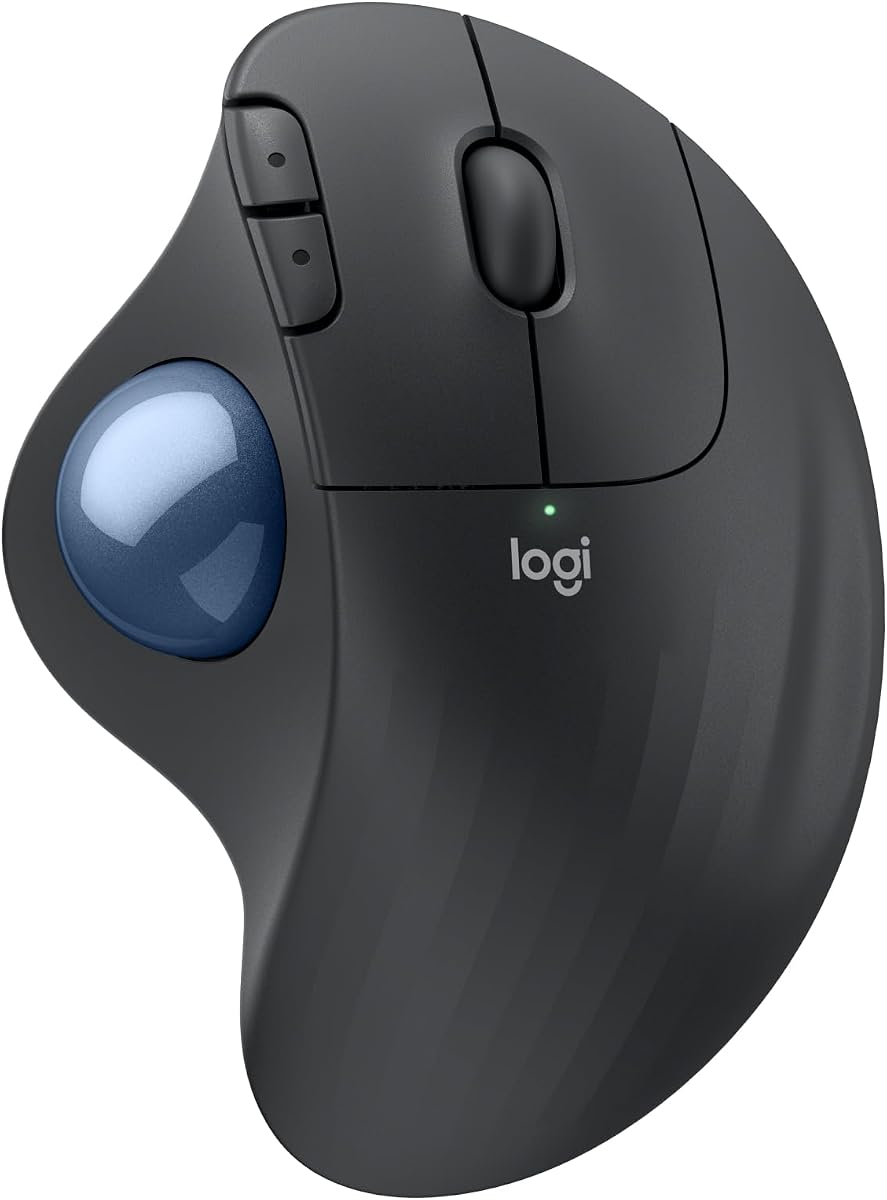
This Logitech model stands out as a top choice for ergonomic comfort and precision. With a rating of 4.5 stars it reflects strong user satisfaction. Its sculpted shape and thumb control design minimize muscle strain effectively.
We may earn a commission when you buy through this link, at no additional cost to you.
The M575S reduces forearm muscle strain by 25 percent according to testing. It features quiet clicks which are ideal for shared workspaces. The adjustable cursor speed allows customization through the Logi Options plus App.
While it offers excellent comfort some users may find the lack of programmable buttons limiting. The reliance on AA batteries means replacements are needed over time. However these trade-offs are acceptable for most general office users.
Buyers seeking reliable ergonomic comfort should prioritize this model. It fits most hand sizes and offers smooth tracking. The extended battery life ensures minimal interruptions during daily workflows.
The mouse was developed with Logi Ergo Lab experts to ensure posture support.
Quiet clicks reduce noise pollution in collaborative or home office environments.
We may earn a commission when you buy through this link, at no additional cost to you.
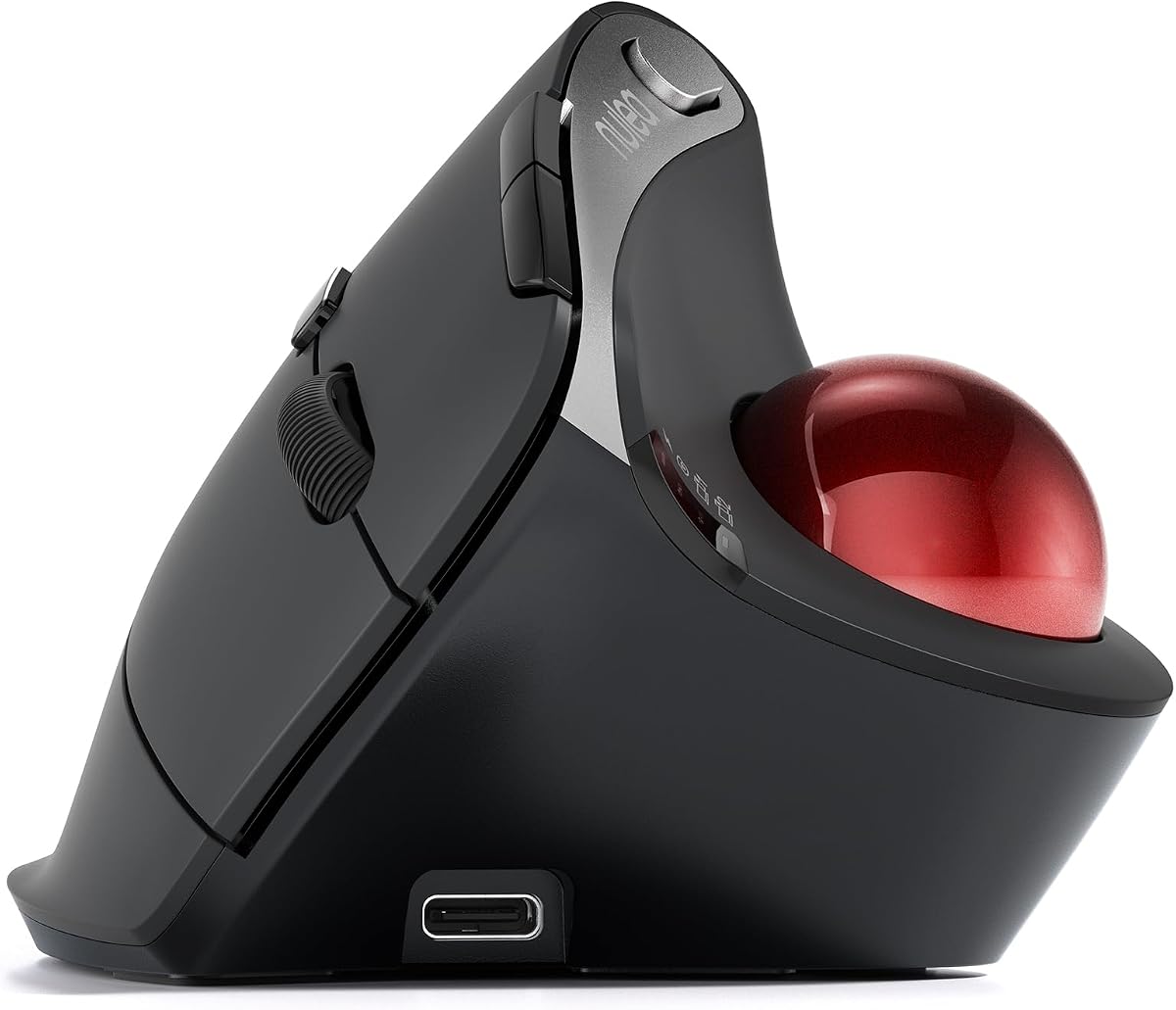
The Nulea M501 offers exceptional value with a 4.4 star rating. Its rechargeable battery eliminates the need for disposable cells. The thumb control design helps reduce wrist and arm movement significantly.
We may earn a commission when you buy through this link, at no additional cost to you.
Users benefit from four DPI levels for precise cursor movement. It supports up to three devices with quick switching capabilities. The ergonomic curved shape promotes natural palm positioning all day.
A limitation is that all buttons remain non-programmable. The USB receiver storage inside the base requires careful handling. Despite this the battery life and comfort features justify the cost.
This model is ideal for budget conscious buyers needing wireless freedom. It suits users working on small desks or couches. The rechargeable design adds long term convenience for daily use.
The built-in rechargeable cell reduces waste and eliminates frequent battery swaps.
Switching between devices seamlessly boosts productivity across different platforms.
We may earn a commission when you buy through this link, at no additional cost to you.
This black variant holds a 4.6 star rating reflecting high user approval. It emphasizes improved forearm posture and easy connectivity. Thumb control allows cursor movement without hand displacement.
We may earn a commission when you buy through this link, at no additional cost to you.
The sculpted ergonomic shape ensures comfort over extended periods. Long battery life supports uninterrupted daily work sessions. Bluetooth and USB options provide flexible connection choices.
Users may prefer the standard graphite color over the black. The AA battery requirement remains a consideration compared to rechargeable units. These points do not detract from overall performance.
Buyers should choose this for its proven comfort and reliability. It fits most hand sizes and workspace configurations. The high rating suggests it meets ergonomic needs effectively.
The design aligns the forearm into a better position to reduce fatigue.
Multiple connection methods ensure compatibility with various devices.
We may earn a commission when you buy through this link, at no additional cost to you.
The MX Ergo S is a premium advanced trackball with a 4.4 rating. It offers a 20-degree tilt and fast USB-C charging. Silent clicks and programmable buttons enhance productivity.
We may earn a commission when you buy through this link, at no additional cost to you.
The ergonomic design reduces muscle strain by 27 percent. Quick charging provides hours of use from a short charge. Six customizable buttons and Smart Actions save time daily.
The high cost may deter budget buyers. The lack of an included cable is a minor inconvenience. However these factors are outweighed by the advanced features.
This model is for professionals needing maximum control and comfort. It suits larger hands and complex workflows. The premium features justify the investment for power users.
The 20-degree tilt promotes a natural wrist and forearm position.
A one-minute charge delivers up to 24 hours of usage.
We may earn a commission when you buy through this link, at no additional cost to you.
TECKNET offers a unique 16-degree vertical angle for reduced strain. A 4.5 star rating indicates strong satisfaction. The silent clicks and rechargeable battery are key benefits.
We may earn a commission when you buy through this link, at no additional cost to you.
Five DPI levels provide precise control for various tasks. A 500mAh battery offers quick charging and lasting use. The design suits medium to large hand sizes well.
New users need time to adapt to the vertical angle. The focus on larger hands may limit fit for some buyers. Still the comfort gains are significant for many.
This mouse fits those prioritizing quiet operation and angles. It is ideal for long desk hours. The ergonomic design helps prevent fatigue effectively.
The 16-degree vertical angle helps reduce muscle strain by up to 50 percent.
Silent buttons prevent distractions in quiet office environments.
We may earn a commission when you buy through this link, at no additional cost to you.
With a 4.7 star rating this model leads in user satisfaction. The detachable trackball allows easy cleaning for hygiene. Its 54-degree vertical design reduces wrist burden.
We may earn a commission when you buy through this link, at no additional cost to you.
It supports seamless workflow with three-device switching. The battery lasts up to 21 days per charge. Four DPI levels cover speed and precision needs.
Some users may find the vertical angle requires adaptation. Non-programmable buttons limit customization. However the comfort and maintenance features are strong.
Buyers wanting top rated comfort should consider this. It suits users with wrist discomfort. The easy maintenance adds long-term value to daily use.
Removing the trackball quickly clears dust and dirt without tools.
The 21-day battery life reduces the need for frequent charging.
We may earn a commission when you buy through this link, at no additional cost to you.
This mouse features a 65-degree angle and infinite scroll wheel. A 4.3 rating shows solid performance. Silent operation helps maintain focus in shared spaces.
We may earn a commission when you buy through this link, at no additional cost to you.
The scroll wheel switches between precise and fast modes. Multi-device connectivity supports seamless workflow across devices. The sculpted shape offers a comfortable grip.
The vertical design may take time to master. Lower rating indicates some users face minor issues. Still the scroll feature is a unique advantage.
This model suits those needing long page navigation. It fits quiet office environments. The ergonomic shape helps minimize strain effectively.
The wheel automatically switches between precise and fast modes based on speed.
Completely noise-free operation prevents distractions during late work.
We may earn a commission when you buy through this link, at no additional cost to you.
This mouse includes a 21.7-degree tilt stand for natural wrist position. A 4.4 rating reflects reliable performance. Silent buttons and 6 performance features enhance usability.
We may earn a commission when you buy through this link, at no additional cost to you.
The tilt stand delivers a comfortable effortless grip. Multi-device switching allows seamless workflow. Four DPI levels suit various precision needs.
Non-programmable buttons limit customization options. The tilt angle might not suit every preference. Yet the ergonomic stand remains a strong benefit.
Buyers seeking a tilted grip should choose this. It fits long desk hours well. The silent operation helps in shared spaces.
The 21.7-degree tilt stand supports a more natural wrist position.
Six buttons enable easier navigation and added comfort for tasks.
We may earn a commission when you buy through this link, at no additional cost to you.
This business version is designed for scale with a 4.4 rating. Logitech Sync enables remote deployment. The battery lasts up to 18 months for efficiency.
We may earn a commission when you buy through this link, at no additional cost to you.
It reduces muscle activity by 25 percent for comfort. The trackball design fits tight workspaces well. Shortcuts via Logi Options+ save time.
Features are tailored for business deployment which may not suit home users. The standard battery is standard. The ergonomics remain reliable.
This mouse suits office environments needing scale. It fits employees wanting all-day comfort. The deployment tools are a key benefit for IT.
Logitech Sync helps IT deploy and monitor devices remotely across teams.
The trackball design is perfect for tight workspaces and busy desks.
We may earn a commission when you buy through this link, at no additional cost to you.
This model emphasizes secure connectivity with an encrypted dongle. A 4.5 rating supports its advanced features. The 20-degree tilt and USB-C charging are key.
We may earn a commission when you buy through this link, at no additional cost to you.
Programmable buttons increase productivity daily. The tilt angle improves posture and reduces strain. Fast charging offers hours of use quickly.
A separate cable may be a minor downside. The cost is higher but features justify it. Security is a major advantage for sensitive work.
Buyers prioritizing security should select this version. It fits professional workflows needing protection. The ergonomic features ensure lasting comfort.
The encrypted dongle adds a layer of security for sensitive data tasks.
Six customizable buttons streamline daily tasks with time-saving shortcuts.
We may earn a commission when you buy through this link, at no additional cost to you.
Selecting the right ergonomic trackball mouse involves evaluating several factors including design, connectivity, and features to ensure comfort and productivity.
The ergonomic shape and angle are crucial for reducing wrist strain. Look for models with vertical or tilted designs that keep your hand in a natural position. A good angle minimizes forearm and hand movement throughout the day.
Choose a tilt or vertical angle that matches your hand size and comfort preference to prevent fatigue.
Most ergonomic trackball mice use thumb control for precise cursor movement. This reduces arm motion and allows for smooth tracking. Ensure the ball size fits your thumb comfortably for all-day use.
Thumb control models are generally more effective for minimizing wrist and arm strain during long work hours.
Wireless connectivity is essential for reducing desk clutter. Look for Bluetooth or USB receiver options. Multi-device switching allows seamless transition between computers or laptops.
Prioritize wireless options that support multiple devices if you work across different platforms.
Battery life determines how often you need to replace or recharge. Some models offer 18 months on AA batteries while others use rechargeable cells. Fast charging is a valuable feature for uninterrupted use.
Rechargeable models reduce waste and cost over time compared to disposable battery options.
Programmable buttons can significantly boost productivity. Check if the mouse supports customization through an app. This allows you to assign shortcuts for frequent tasks.
Look for models with programmable buttons if you need time-saving shortcuts for your workflow.
Adjustable DPI levels allow you to control cursor sensitivity. Higher DPI offers faster movement while lower DPI ensures precision for detailed work. Good tracking works on various surfaces.
Select a model with adjustable DPI to switch between speed and accuracy as needed.
Quiet clicks are important for shared or quiet environments. Silent models prevent distractions and maintain focus. Look for explicit mentions of quiet operation in product details.
Choose a silent model if you work in a shared space or late at night.
Not all trackball mice fit every hand size. Larger designs suit medium to large hands while smaller ones fit compact hands. Check dimensions to ensure a comfortable grip.
Ensure the mouse dimensions align with your hand size for maximum ergonomic benefit.
Start by connecting the mouse via Bluetooth or USB receiver to your device. Install any companion software to enable customization features like button mapping and DPI settings. Allow a few days for your hand to adjust to the thumb control mechanism.
Keep the trackball clean by removing it periodically to clear dust and dirt. Wipe the interior and exterior with a soft cloth to maintain smooth tracking. Proper cleaning ensures precise cursor control over time.
For best battery life, recharge the device before it fully depletes. Store the mouse in a dry place when not in use to prevent wear. Adjust DPI settings based on your specific tasks for optimal performance.
An ergonomic trackball mouse is designed to reduce wrist strain by using thumb control to move the cursor. It keeps your hand stationary while allowing precise tracking. This design minimizes forearm movement and supports better posture during long use.
Yes, trackball mice can help reduce carpal tunnel symptoms by limiting wrist and arm movement. The ergonomic design supports a natural hand position. Many users report reduced pain and fatigue after switching to a trackball mouse.
To clean a trackball mouse, eject the ball from the cage carefully. Wipe the ball and interior with a damp cloth to remove dust. Allow the mouse to dry completely before reassembling to ensure smooth operation.
Most trackball mice work on any surface since the ball movement does not depend on the desk. They are ideal for small or irregular workspaces. Ensure the ball remains clean for consistent tracking on any surface.
Battery life varies by model and usage but ranges from 18 months on AA batteries to rechargeable options. Rechargeable models often offer days of use per charge. Always check specific battery details before purchasing.
Yes, trackball mice are suitable for laptops and connect via Bluetooth or USB. They save space and allow cursor control without a mousepad. This makes them ideal for travel or compact work setups.
The Logitech Ergo M575S and MX Ergo S lead the list for comfort and advanced features. Nulea models offer excellent value for those seeking budget-friendly options with rechargeable batteries. Each choice addresses specific ergonomic needs.
Prioritize tilt angles, battery life, and button customization based on your workflow. Ensure the mouse fits your hand size for maximum comfort. Silent operation may be key if you share workspace environments.
Prices and availability change frequently so verify current details before purchasing. This guide provides a comprehensive overview to help you select the right ergonomic trackball mouse. Choose the model that best aligns with your daily computing needs.