
MEKO Stylus Pen for Touchscreen 3-in-1 Universal iPad Stylus Stylists
4.6Editor score
Includes protective cap
Dual-sized rubber tips
Replaceable parts included
This guide compares the top fine point stylus options for iPad iPhone and Android to help you find precise touch input for writing and drawing.
Finding the right fine point stylus can transform how you interact with your touchscreen devices. Whether you are taking notes or sketching designs precision matters greatly.
We evaluated ten top rated options based on tip accuracy compatibility and ease of use. Our list covers capacitive and active pens suitable for various budgets.
Each pick highlights key strengths and ideal use cases for students and professionals. Please note that prices and availability may change over time.
4.6Editor score

4.5Editor score

4.4Editor score
This side-by-side comparison highlights key specifications and features across all ten selected stylus models to help you make an informed decision.



This versatile stylus offers three different tips in one pen making it ideal for various tasks. With a 4.5 star rating users appreciate its flexibility for writing gaming and browsing.
We may earn a commission when you buy through this link, at no additional cost to you.
The transparent disc tip allows you to see exactly where your mark is being made. This feature enhances accuracy significantly compared to standard rubber tips. The rubber tips come in two sizes for scrolling or selecting small icons.
While it lacks palm rejection the design helps avoid accidental touches better than fingers. The replaceable tips extend the life of the pen. It works across almost any capacitive touchscreen.
This pen is perfect for anyone needing one tool for multiple devices. Students and professionals will find the range of tips useful. We recommend it as the top choice for general use.
The disc tip provides clear visibility of the contact point for accurate work.
Switch between rubber and disc tips to suit different app needs.
We may earn a commission when you buy through this link, at no additional cost to you.
MEKO offers a highly rated budget option with a 4.6 star score. It includes a protective cap and extra tips making it great value. The design is simple but effective for daily tasks.
We may earn a commission when you buy through this link, at no additional cost to you.
The dual rubber tips are made of high quality silicone that resists wear. The disc tip is transparent for precise navigation. Users note the smooth experience without screen scratching.
This stylus does not require batteries or charging. It is ready to use immediately. The cap protects the disc tip when not in use. Extra tips ensure you can swap them easily.
For those on a tight budget this pen delivers solid performance. It is ideal for browsing note taking and casual drawing. We highly recommend it for cost conscious buyers.
The set comes with multiple replacement tips to extend usability.
A cap keeps the sensitive disc tip safe from damage.
We may earn a commission when you buy through this link, at no additional cost to you.
This active pen stands out with magnetic adsorption design. It charges quickly and lasts for long sessions. With a 4.4 star rating it appeals to users wanting premium features.
We may earn a commission when you buy through this link, at no additional cost to you.
The magnetic feature ensures it stays within reach on supported iPad Pro models. One touch switch allows easy on off control. It writes without delay and includes extra nibs for precision.
While it needs charging the battery life is impressive. The design prevents loss by attaching securely. Note that it works best with specific iPad Pro versions.
If you have a compatible device this pen offers advanced utility. It is great for artists and writers needing reliability. We suggest it for those who value convenience.
Securely attaches to the side of your iPad for easy access.
Provides digital pen features beyond simple capacitive touch.
We may earn a commission when you buy through this link, at no additional cost to you.
This active stylus features a 1.5mm tip for realistic drawing. It is rechargeable and turns on quickly. With a 4.0 rating it offers basic digital pen functions.
We may earn a commission when you buy through this link, at no additional cost to you.
The tip provides a natural feel for creation. It does not support pressure sensitivity but lines are consistent. The battery lasts up to 12 hours on a charge.
Auto off saves power after inactivity. It works on many tablets and phones. The design is sturdy and easy to handle.
Ideal for sketching without needing complex features. It is suitable for hobbyists and students. We recommend it for those wanting active pen basics.
The 1.5mm tip allows for fine detail in artwork.
Long usage time between charges supports extended sessions.
We may earn a commission when you buy through this link, at no additional cost to you.
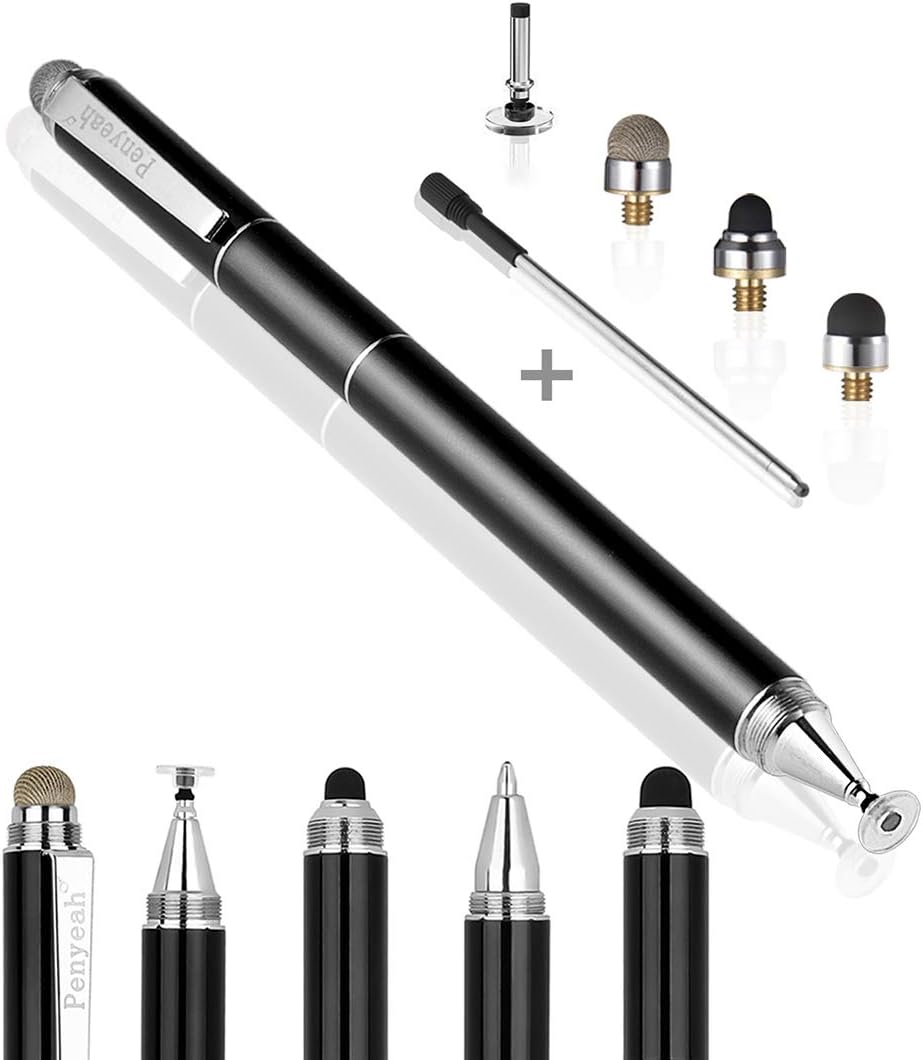
Penyeah offers a 4-in-1 design with unique tip variety. It includes a real ink pen alongside touch tips. The metal body feels sturdy with a 4.4 star rating.
We may earn a commission when you buy through this link, at no additional cost to you.
The clear disc tip is excellent for precision. Mesh fiber and rubber tips add versatility. Users can write on paper using the ball point refill.
This pen is built to last with corrosion resistance. The clip makes it easy to carry. It works on most touchscreens including laptops.
Great for professionals who need one tool for everything. It is perfect for mixed media workflows. We suggest it for users wanting physical and digital writing.
Includes a standard ink pen for paper use.
Glides easily on screens for smooth digital touch.
We may earn a commission when you buy through this link, at no additional cost to you.
This pen is exceptionally light at 13.3 grams. It has a buffer unit tip for better control. With a 4.2 rating it is popular among students.
We may earn a commission when you buy through this link, at no additional cost to you.
The design is stylish and brief. It works on iPads and Android tablets. The tip allows writing without resistance like a real pen.
It charges via Micro USB in 60 minutes. Do not use fast chargers to avoid damage. Auto shutdown occurs after 30 minutes.
Best for those who want a light active pen. It is good for journaling and note taking. We recommend it for everyday students.
Light weight reduces hand fatigue during use.
Enhances accuracy and control on the screen.
We may earn a commission when you buy through this link, at no additional cost to you.
This 6 pack provides enough pens for multiple users. It has a 4.6 rating for reliability. The clips help keep them organized.
We may earn a commission when you buy through this link, at no additional cost to you.
Each pen works immediately without setup. The rubber tips are sensitive and smooth. It is perfect for offices or classrooms.
No Bluetooth or apps are required. Just pick it up and start. The bundle offers excellent value.
Ideal for households needing many pens. It is great for sharing among family. We recommend it for group use.
Six pens allow sharing across multiple people.
Built-in clip keeps pen secure in pockets.
We may earn a commission when you buy through this link, at no additional cost to you.
MEKO offers a 4-pack with 12 extra tips. The aluminum barrel feels premium. It holds a 4.5 star rating.
We may earn a commission when you buy through this link, at no additional cost to you.
Disc and rubber tips allow different uses. The package provides long term value with many spares. It works on all touch screens.
Replacement is easy without tools. The design is sleek and modern. Users appreciate the extra accessories.
Best for buying in bulk for a team. It is great for schools or offices. We suggest it for shared environments.
Includes plenty of replacements for years of use.
Aluminum barrel offers durability and comfort.
We may earn a commission when you buy through this link, at no additional cost to you.
This 10-piece set has a 4.7 star rating. It includes 20 rubber replacement tips. The alloy body ensures durability.
We may earn a commission when you buy through this link, at no additional cost to you.
Tips come in two sizes for different tasks. Colors help distinguish pens for users. It works on all capacitive screens.
Swapping nibs is quick and easy. The bundle is cost effective for large groups. Quality rubber protects screens.
Ideal for classrooms needing many pens. It is great for offices with many staff. We recommend it for bulk buyers.
Ten pens and twenty tips offer unmatched value.
Vibrant colors allow easy identification by user.
We may earn a commission when you buy through this link, at no additional cost to you.
This set offers 10 pens with high precision. It has a 4.6 rating. The aluminum body looks sleek.
We may earn a commission when you buy through this link, at no additional cost to you.
Dual tips allow flexible use for browsing and writing. The tips protect screens from scratches. Setup is not required.
It works across many devices without issues. Replacement is easy without tools. The bundle is great for teams.
Best for large groups needing simple tools. It is reliable for daily office work. We suggest it for shared use.
Soft tips protect devices from scratches.
Compatible with most capacitive touch screens.
We may earn a commission when you buy through this link, at no additional cost to you.
Choosing the right stylus involves understanding key features like tip type and compatibility.
Tip type determines precision and feel. Disc tips offer better visibility while rubber tips are durable.
Choose disc for precision work and rubber for general navigation.
Ensure the stylus works with your specific devices. Capacitive pens work on most screens.
Check device lists before purchasing to avoid issues.
Replacement tips extend the pen life. Some kits include extra tips.
Look for bundles with spares to save money later.
Active pens need batteries. Check charge time and usage hours.
Passive pens are ready instantly but active ones offer features.
Metal bodies are more durable than plastic. A good grip helps during long sessions.
Prioritize sturdy build quality for daily use.
Palm rejection allows resting your hand on screen. Not all pens have this.
Look for active pens with rejection for drawing comfort.
Higher price often means active features. Budget pens are great for basic tasks.
Decide if you need advanced features for your needs.
Read user feedback for real-world performance. High ratings indicate satisfaction.
Check reviews for any recurring issues before buying.
Always keep the tip clean from dust and oils to ensure smooth operation.
Replace tips when they become worn or rough to protect your screen.
Store active pens in a safe place to avoid battery drain or damage.
Most capacitive styluses work on iPhones since they use touchscreens. However active pens may require specific support. Check compatibility before buying.
A disc tip has a transparent round tip allowing you to see the touch point. This improves precision significantly. It is great for detailed work.
Passive styluses do not need batteries as they rely on touch. Active pens need batteries for extra features. Choose based on your needs.
Tips typically last weeks or months depending on use. Replace them when they feel rough. Extra tips help extend the pen life.
Yes most styluses work fine with screen protectors. Ensure the tip is smooth to avoid scratching. Check product details for confirmation.
Palm rejection lets you rest your hand on the screen while writing. It prevents accidental touches. Only active pens usually support this.
Our top picks cover various needs from budget bundles to active pens.
Consider tip type and compatibility for the best fit.
Check current availability before purchasing your next stylus.