
RedThunder One Handed Gaming Keyboard
4.4Editor score
35 anti-ghosting keys
Macro recording support
Portable ergonomic design
This guide compares the best gaming keypads for MMO, MOBA, and FPS games, highlighting features like macro keys, thumbsticks, and ergonomic designs.
Gaming keypads offer specialized control for complex games by freeing up mouse space and streamlining access to essential commands. These devices are designed to enhance performance and comfort during extended play sessions.
We evaluated ten top models based on switch type, key count, customization options, and build quality. Our analysis focuses on how well each device supports specific gaming genres and user preferences.
Each pick highlights standout features and ideal use cases to help you find the right tool. Note that availability and offers may change, so verify details before purchasing.
4.4Editor score

4.3Editor score

4.3Editor score
The table below presents a side-by-side comparison of all ten products to help you evaluate their core specifications and features at a glance.




The Razer Tartarus V2 offers a robust solution for gamers seeking customizable control. With 32 programmable keys and a unique thumbpad, it excels in MMOs and complex games.
We may earn a commission when you buy through this link, at no additional cost to you.
Its Mecha-Membrane switches provide tactile feedback similar to mechanical keys. The included wrist rest ensures comfort during long sessions.
Razer Hypershift allows for deep customization across all keys. However, it is designed primarily for left-handed use.
This keypad is ideal for those wanting a premium experience. It balances functionality and ergonomics effectively.
Programmable keys enable rapid execution of complex commands without moving your hand.
The wrist rest and ergonomic design reduce strain during extended gaming periods.
We may earn a commission when you buy through this link, at no additional cost to you.
The Redragon K585 provides a versatile setup with 42 keys and macro support. Its USB pass-through keeps desks tidy.
We may earn a commission when you buy through this link, at no additional cost to you.
Swappable switches allow you to customize the tactile feel without soldering. This adds significant value.
While it lacks wireless connectivity, the benefits include convenience. The wrist rest is easily removable.
This device suits gamers needing reliable connectivity and customization. It is a strong contender for budget-conscious buyers.
Upgraded sockets accept various switch types for personalized feedback.
Seven onboard macro keys streamline ability rotations in games.
We may earn a commission when you buy through this link, at no additional cost to you.
The Redragon K585 PRO brings wireless freedom to one-handed gaming. It maintains the 42-key layout of its wired counterpart.
We may earn a commission when you buy through this link, at no additional cost to you.
With BT and 2.4GHz options, it offers flexible connection methods. Battery life supports all-day use on a single charge.
Switch swapping remains possible, adding versatility. The magnetic wrist rest is easy to detach.
This model is perfect for clutter-free setups. It combines portability with robust feature sets.
Multiple connectivity modes ensure stable performance on any desk.
A compact design and wireless capability make it easy to transport.
We may earn a commission when you buy through this link, at no additional cost to you.
The AZERON Gaming Keypad stands out with its Hall Effect thumbstick. It offers unique control akin to a joystick.
We may earn a commission when you buy through this link, at no additional cost to you.
Its adjustable parts ensure a perfect fit for various hand sizes. The software provides deep customization options.
While expensive, the ergonomic benefits are significant. The thumbstick eliminates drift effectively.
This keypad is for serious gamers prioritizing comfort. It redefines one-handed interaction.
The thumbstick supports 360-degree analog movement in compatible games.
Future software updates and enhancements keep the device relevant.
We may earn a commission when you buy through this link, at no additional cost to you.
The RedThunder One Handed delivers value with 35 anti-ghosting keys. It supports quick macro recording for efficiency.
We may earn a commission when you buy through this link, at no additional cost to you.
Its portable design saves space and is easy to carry. RGB modes add visual flair.
Driver-free setup ensures immediate usability. The wrist rest aids comfort.
Ideal for entry-level buyers. It provides essential features at a low cost.
Built-in chips ensure fast response times for competitive games.
No installation is required to start using the keypad.
We may earn a commission when you buy through this link, at no additional cost to you.
The Keychron C0 HE offers competitive-grade performance with 8K polling. It targets FPS players needing speed.
We may earn a commission when you buy through this link, at no additional cost to you.
Rapid Trigger switches reset instantly for rapid movement. Web-based configuration simplifies setup.
It also serves creators well with editing shortcuts. Compatibility spans Windows and macOS.
This keypad suits competitive gamers. Its technical specs set it apart.
Rapid Trigger enables finer control and faster response times.
Support for both systems enhances versatility for multi-user setups.
We may earn a commission when you buy through this link, at no additional cost to you.
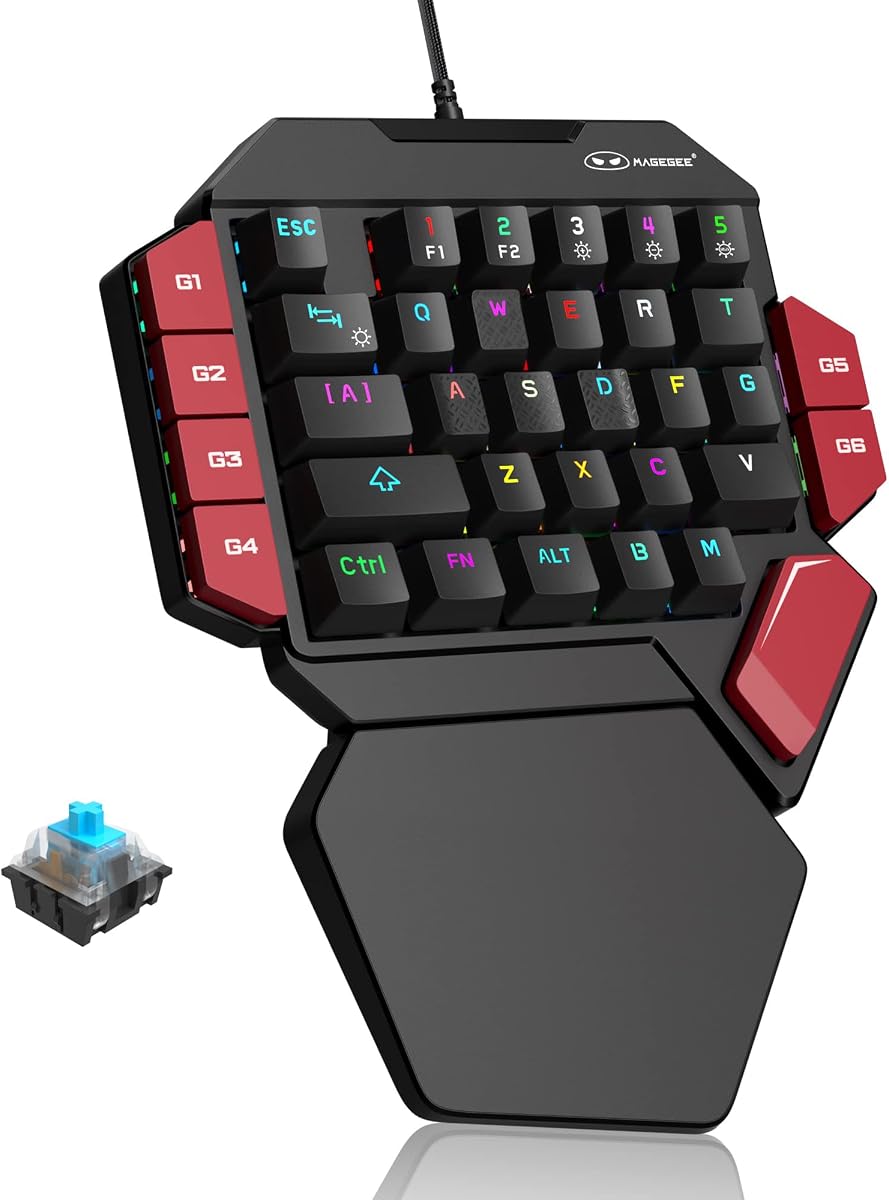
The MageGee One Handed features mechanical blue switches for distinct feedback. It supports 6 macro keys for quick tasks.
We may earn a commission when you buy through this link, at no additional cost to you.
RGB lighting includes static and dynamic effects. Anti-ghosting ensures accuracy.
Its design includes a large palm rest for support. Plug and play simplifies use.
This option appeals to mechanical switch fans. It offers solid durability.
Blue switches provide a crisp paragraph feeling for typing and gaming.
Recording macros is straightforward with dedicated function keys.
We may earn a commission when you buy through this link, at no additional cost to you.
The AJAZZ AK029 is ultra-compact yet powerful with Hall Effect technology. It saves significant desk space.
We may earn a commission when you buy through this link, at no additional cost to you.
Rapid Trigger and 8KHz polling enhance competitive edge. Web drivers allow quick customization.
Aluminum reinforcement ensures stability. Its layout suits focused gaming.
This model is great for minimalists. It delivers high performance in a small frame.
High polling rates deliver near-instant response for competitive play.
A rigid aluminum plate ensures stability during intense use.
We may earn a commission when you buy through this link, at no additional cost to you.
This variant of the Tartarus V2 focuses on core programmability. It offers the familiar Mecha-Membrane feel.
We may earn a commission when you buy through this link, at no additional cost to you.
Razer software provides robust customization. It fits well into existing Razer setups.
It includes standard RGB support for immersion. The compact size saves space.
Good for Razer loyalists. It maintains quality and consistency.
Syncs seamlessly with other Razer hardware for unified lighting.
A proven design ensures consistent performance across genres.
We may earn a commission when you buy through this link, at no additional cost to you.
The Redragon RM104 offers a wireless option with a smart control knob. It bridges keyboards and keypads.
We may earn a commission when you buy through this link, at no additional cost to you.
Tri-Mode connectivity ensures flexible connections. The large battery supports prolonged use.
Software allows deep macro customization. RGB modes add visual appeal.
This device suits those needing versatility. It brings wireless convenience to one-handed needs.
Adjust volume and lighting instantly with an intelligent control knob.
Switch between Bluetooth and 2.4GHz for optimal performance.
We may earn a commission when you buy through this link, at no additional cost to you.
Selecting the right gaming keypad involves considering switch type, key count, and connectivity. Each factor impacts performance and comfort.
Switch type determines tactile feedback and durability. Mechanical switches offer precision, while membrane ones provide quiet operation.
Choose based on your preference for noise and feel.
The number of keys affects complexity. Higher counts allow more macros, while fewer suit minimalists.
Assess your game requirements to find a balance.
Wired connections ensure zero latency, while wireless offers flexibility. Consider your desk setup preferences.
Prioritize stability if you play competitive games.
Ergonomic design reduces strain during long sessions. Look for wrist rests and adjustable parts.
Comfort is crucial for extended play.
Software depth varies by brand. Macros and RGB settings enhance control.
Verify compatibility with your favorite games.
Materials impact durability and weight. Aluminum or reinforced plastics add longevity.
Check user reviews for reliability insights.
Thumbpads enable faster movement in MMOs. They are rare but useful.
Include this if you need analog control.
Prices range widely. Balance features with cost to find value.
Avoid overspending on unnecessary extras.
Connect your keypad via USB or Bluetooth and allow drivers to install. Test all keys to ensure they register correctly.
Use software to map keys for specific games. Save layouts to onboard memory for quick switching.
Keep the keypad clean by avoiding crumbs and liquids. Store in a cool, dry place when not in use.
Most gaming keypads work with Mac, but software support varies. Check product specs for macOS compatibility before buying.
Yes, you can map keys for shortcuts like video editing. They are versatile tools for productivity workflows.
Use the companion software to record key sequences. Save them to a specific key for instant access.
No, they function offline once configured. Some features may need occasional online updates.
Most models last 5 to 10 years. Proper care and avoiding spills extend their durability.
Wireless models can match wired performance. Choose 2.4GHz over Bluetooth for lower latency.
The best keypad depends on your specific gaming needs. Whether you prioritize macros or ergonomics, there is a model for you.
Focus on switch type and software compatibility when making your decision. These factors heavily influence performance.
Review the prices and availability before purchasing. Features and costs may vary over time.