
ACEMAGICIAN S3A Gaming Mini PC
4.6Editor score
Ryzen 7 H 255
Radeon 780M Graphics
Triple 4K Display Support
Discover the top Gaming Mini PC for Cyberpunk models comparing performance, graphics, and cooling to help you choose the right compact rig for immersive gaming.
Choosing the right Gaming Mini PC for Cyberpunk requires balancing raw power with compact design. You need a system that handles demanding graphics without overheating while fitting into modern setups.
We compared ten leading models based on processor speed, graphics capabilities, and thermal efficiency. Each option offers unique strengths for gamers seeking portable high-performance desktop replacements.
Every pick highlights key specs, pros, and cons to guide your decision. Prices fluctuate frequently, so check current listings before purchasing to ensure you get the best value available today.
4.6Editor score

4.6Editor score

3.5Editor score
This side-by-side comparison highlights the core specifications of each model to help you quickly identify which unit meets your specific gaming and performance requirements.


The MINISFORUM G1 Pro stands out as the top Gaming Mini PC for Cyberpunk due to its RTX 5060 graphics and Ryzen 9 processor. It delivers desktop-level performance in a compact chassis suitable for modern gaming needs.
We may earn a commission when you buy through this link, at no additional cost to you.
Its RTX 5060 GPU handles ray tracing and AI acceleration effectively. The 32GB DDR5 RAM ensures smooth multitasking and rapid asset loading during intensive gaming sessions.
While the price is higher than budget options, the performance justifies the cost for serious gamers. Thermal management remains stable even under sustained heavy workloads without excessive noise.
Recommend this unit for users needing high FPS and future-proofing. It is ideal for competitive gaming and creative tasks requiring significant computational power.
The RTX 5060 delivers 25% better performance than previous gen cards ensuring smooth visuals.
The Glacier Cooling System uses five copper heat pipes to maintain low temperatures.
We may earn a commission when you buy through this link, at no additional cost to you.
The ACEMAGICIAN S3A offers excellent value for gamers on a budget. With Radeon 780M graphics, it handles casual and older titles well while providing solid productivity features.
We may earn a commission when you buy through this link, at no additional cost to you.
Its Ryzen 7 H 255 CPU ensures quick app launches and responsive multitasking. The LPDDR5 RAM contributes to high bandwidth speeds essential for smooth performance.
Users may face limitations in demanding AAA titles compared to dedicated GPUs. However, FSR upscaling helps maintain playable frame rates on many modern games.
Select this model for entry-level gaming and home office tasks. It fits perfectly into tight spaces and offers robust connectivity for various peripherals.
Dual-fan cooling keeps noise low at 35dB in Silent Mode for quiet environments.
Supports three 4K displays via HDMI DP and USB-C for enhanced productivity.
We may earn a commission when you buy through this link, at no additional cost to you.
The ROG NUC (2025) is a premium powerhouse featuring the RTX 5070 Mobile GPU. It brings next-gen graphics to a compact form factor ideal for high-fidelity gaming.
We may earn a commission when you buy through this link, at no additional cost to you.
Intel Core Ultra 9 processing ensures efficient task handling and AI acceleration. The 2TB SSD provides ample space for large game libraries and creative files.
While performance is top-tier, the cost is significantly higher than alternatives. Users should weigh the benefits of Thunderbolt 4 against the price premium carefully.
This unit suits enthusiasts who demand the best visuals and connectivity. It is a reliable choice for those prioritizing cutting-edge tech in a small chassis.
The RTX 5070 leverages DLSS 4 Multi Frame Generation for realistic visuals.
Up to 200+ Platform TOPS deliver seamless AI-driven gaming experiences.
We may earn a commission when you buy through this link, at no additional cost to you.
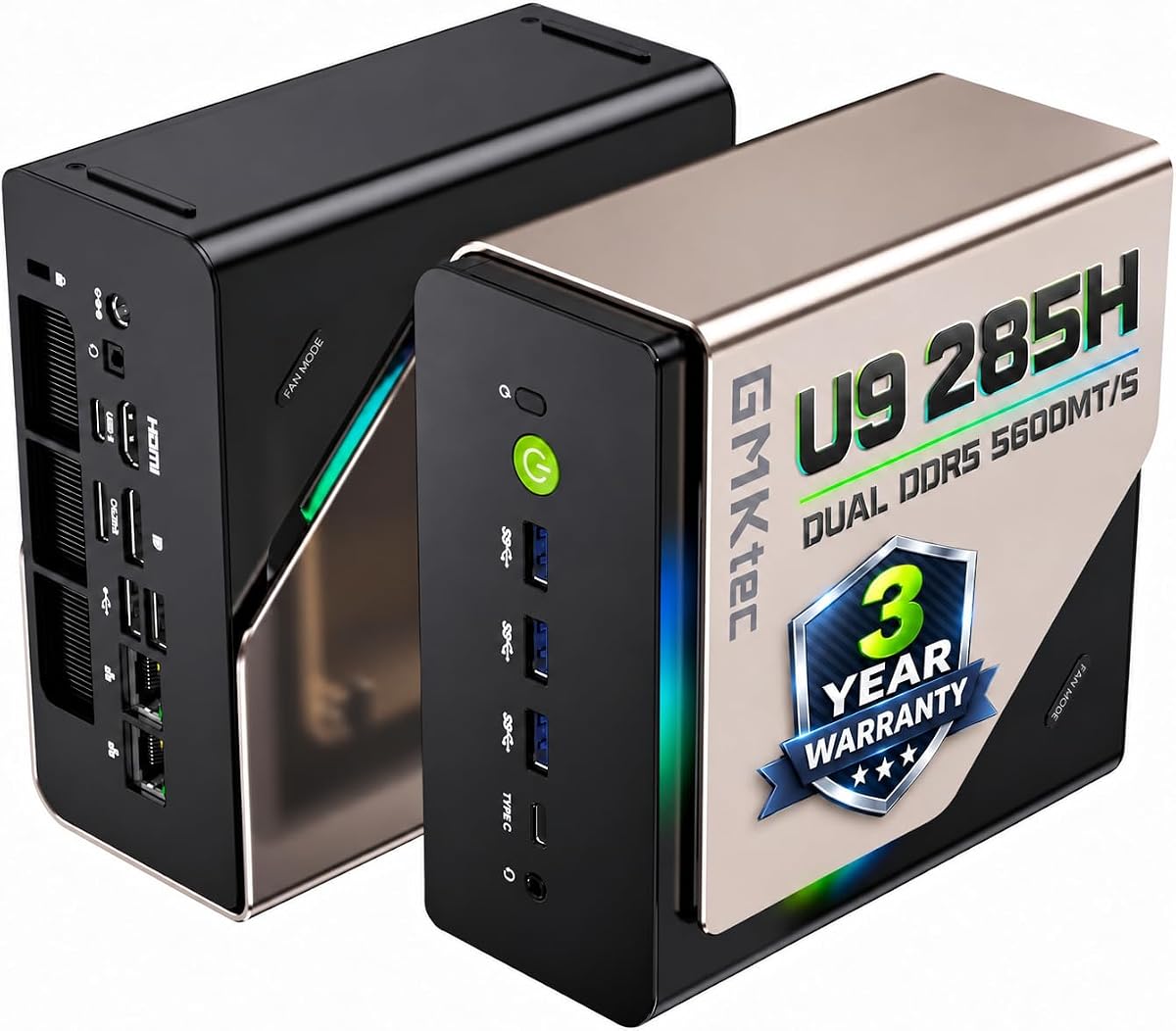
The GMKtec T1 AI Mini PC is designed for creators and gamers needing AI acceleration. Its Intel AI Boost NPU handles INT8 calculations effectively for diverse workloads.
We may earn a commission when you buy through this link, at no additional cost to you.
With Arc 140T GPU, it supports modern games and creative apps efficiently. The Quad 8K display support is perfect for multi-screen productivity setups.
Users might encounter occasional driver updates for Arc graphics. However the hardware capabilities remain robust for general computing and light gaming needs.
Choose this for AI-centric workflows and high-resolution multitasking. It offers exceptional value for users needing NPU power in a compact device.
13 TOPS NPU accelerates AI tasks for faster creative workflows.
Oculink port supports eGPU setups for enhanced graphics performance.
We may earn a commission when you buy through this link, at no additional cost to you.
The GMKtec K12 focuses on expandability with Oculink and triple M.2 slots. Its Radeon 780M graphics provide solid entry-level performance for casual gaming.
We may earn a commission when you buy through this link, at no additional cost to you.
With 32GB DDR5 RAM and dual NICs, it excels in multitasking and networking tasks. The 24TB max storage capacity is a major advantage for media libraries.
Users may find fan noise noticeable under full load despite cooling design. Still, the customization options and connectivity make it a versatile workstation.
This device fits users needing high connectivity and storage flexibility. It is ideal for home labs and light gaming setups requiring extensive data access.
32GB DDR5 at 5600MHz delivers massive bandwidth for rapid asset loading.
Dual 2.5GbE ports support advanced networking and server setups.
We may earn a commission when you buy through this link, at no additional cost to you.
The ASUS ROG GR70 Mini PC targets gamers wanting elite performance in a small case. The Ryzen 9 9955HX3D with 3D V-Cache boosts gaming efficiency significantly.
We may earn a commission when you buy through this link, at no additional cost to you.
Its RTX 5070 Laptop GPU ensures smooth gameplay with high FPS and low latency. The thermal design keeps acoustics low even during intense gaming sessions.
Some users may face constraints on RAM upgrades due to limited slots. However the overall experience balances performance and portability well for serious gamers.
Select this model for high-end gaming without bulk. It suits travelers and desk-bound gamers needing powerful performance in a stylish compact unit.
The 3D V-Cache technology delivers unmatched gaming performance.
Silver chassis fits any setup while maintaining a high-end aesthetic.
We may earn a commission when you buy through this link, at no additional cost to you.
The BOSGAME P3 Pro Mini PC offers robust specs at a competitive price. It handles office work and gaming with efficiency thanks to its Ryzen 9 processor.
We may earn a commission when you buy through this link, at no additional cost to you.
Radeon 780M graphics support modern games on FSR settings. The Oculink port adds versatility for future GPU upgrades if needed.
Users may experience some noise during heavy loads due to compact fans. Yet the performance per dollar remains excellent for general usage and casual gaming.
This unit is perfect for students and budget-conscious gamers. It provides reliable computing power for daily tasks without breaking the bank.
Preinstalled Windows 11 Pro ensures immediate productivity and security.
Triple display support via HDMI DP and USB-C enhances workflow efficiency.
We may earn a commission when you buy through this link, at no additional cost to you.
The GMKtec M6 Ultra Mini PC delivers balanced performance for daily work and light gaming. It features a reliable Ryzen 5 processor and 16GB RAM.
We may earn a commission when you buy through this link, at no additional cost to you.
Dual 2.5G LAN ports make it excellent for network-heavy environments. The USB4 port supports up to 8K display output for high-resolution setups.
Gaming performance may be limited to 1080p casual titles. However its quiet operation and compact design suit office and home environments well.
Choose this for budget-friendly multitasking and connectivity. It is a solid pick for remote workers needing stable network and display options.
USB4 enables 8K output and high-speed data transfer for peripherals.
Dual LAN ports support advanced network configurations and server use.
We may earn a commission when you buy through this link, at no additional cost to you.
The GMKtec AI Mini PC EVO-T1 offers massive memory with 64GB DDR5 RAM. It is built for heavy multitasking and AI-enhanced creative workflows.
We may earn a commission when you buy through this link, at no additional cost to you.
With Intel Arc 140T GPU and NPU acceleration it handles modern games and creative apps. Quad screen 8K support is ideal for professional video editing.
Users may face limitations in high-end gaming due to integrated GPU. Still it remains a top choice for power users needing memory and processing speed.
This model suits developers and content creators seeking capacity. It provides reliable performance for complex projects requiring extensive data handling.
64GB DDR5 eliminates bottlenecks in rendering and large dataset processing.
AI NPU accelerates machine learning tasks for faster creative results.
We may earn a commission when you buy through this link, at no additional cost to you.
The GMKtec Gaming Mini PC K12 combines balanced specs with user-friendly features. Its Ryzen 7 H 255 CPU provides reliable performance for both work and gaming.
We may earn a commission when you buy through this link, at no additional cost to you.
Radeon 780M graphics support FSR settings for playable frames. The 32GB RAM and 1TB SSD handle large files and multitasking efficiently.
Users may notice fan noise during heavy usage but it is manageable. The Oculink port offers a path to upgrade graphics later if needed.
This is a versatile choice for mixed-use environments. It suits home users and professionals needing solid performance with expandability options.
32GB DDR5 RAM ensures smooth multitasking for demanding applications.
Oculink port supports future eGPU upgrades for enhanced graphics.
We may earn a commission when you buy through this link, at no additional cost to you.
Selecting the right mini PC requires balancing performance needs with physical constraints and budget considerations.
Modern games require fast CPUs to process physics and AI quickly. Look for Ryzen 9 or Intel Core Ultra 9 processors with high core counts for smooth multitasking.
Prioritize processors with high boost clocks to maintain stability during intensive gaming sessions.
Dedicated GPUs like RTX 5060 or 5070 deliver better visuals than integrated graphics. They handle ray tracing and high resolutions more effectively.
If budget allows, opt for models with dedicated GPUs to ensure longevity and better frame rates.
32GB RAM provides ample headroom for gaming while streaming or running background apps. SSDs with PCIe 4.0 speeds reduce loading times significantly.
Ensure there are expansion slots for adding more storage or memory as your needs grow over time.
Compact devices need efficient cooling to prevent throttling during long sessions. Look for dual-fan systems or advanced heat pipes that keep noise low.
Check reviews regarding fan noise levels to ensure the unit fits your environment without distraction.
Multiple display ports and fast USB ports are essential for connecting monitors and peripherals. Wi-Fi 7 ensures stable internet for online gaming.
Verify that the ports match your monitor types and peripheral needs to avoid unnecessary adapters.
Oculink ports allow external GPU upgrades if internal graphics become limiting over time. M.2 slots should support large capacities for extensive game libraries.
Choose a model that allows easy upgrades to protect your investment against future software demands.
Windows 11 Pro offers advanced features for networking and security useful for home labs. Ensure the system supports the latest drivers for optimal performance.
Check pre-installed software to avoid unnecessary bloat that slows down your system.
A solid warranty covers unexpected hardware failures. Look for brands offering lifetime technical support to assist with complex issues.
Verify warranty terms carefully to ensure you get reliable service in case of defects.
Set up your mini PC on a stable surface with at least two inches of clearance for air intake. Place it on a nonflammable surface to ensure cooling works efficiently without heat buildup.
Connect your monitor via HDMI or DisplayPort and ensure all cables are secure. Update drivers immediately after setup to maximize performance and prevent compatibility issues.
Clean dust regularly from vents using compressed air to maintain cooling efficiency. Perform software updates monthly to keep the system secure and running smoothly.
Many modern mini PCs use advanced cooling systems to manage heat efficiently. However they may get warm during intense gaming. Ensure proper ventilation and avoid placing them in enclosed spaces to keep temperatures stable.
Most mini PCs have integrated graphics or soldered GPUs. Some models support external GPUs via Oculink or Thunderbolt ports. Check the specific connectivity options before purchasing to ensure upgrade potential.
Mini PCs often have smaller fans that spin faster to dissipate heat. While generally quiet, they may produce more noise than larger desktops under load. Look for models with dual-fan or noise reduction features if quiet operation is essential.
Most mini PCs come with the required power adapter in the box. High-performance models may need higher wattage units so check specifications before use. Ensure the outlet provides stable voltage to avoid damage.
Most models support triple or quad 4K displays via HDMI and USB-C ports. Verify the port types match your monitors to enable multi-screen setups. Some units allow up to three 4K displays for enhanced productivity.
Current AAA titles require large amounts of space. Aim for at least 1TB storage to fit several games comfortably. Models with expansion slots allow adding more storage as your library grows.
We highlighted ten top models ranging from budget-friendly options to premium high-performance units. The MINISFORUM G1 Pro offers the best balance for serious gamers while the ACEMAGICIAN S3A suits those seeking affordability.
Consider your specific gaming and productivity needs when selecting a unit. Performance factors like GPU type and RAM capacity should guide your decision alongside thermal management features.
Prices fluctuate regularly so check current listings before purchasing to ensure you get the best value available today.