
ASUS Dual GeForce RTX 5060 Ti 16GB GDDR7 OC Edition Gaming Graphics Card
4.7Editor score
767 AI TOPS
Compact 2.5-slot design
Dual BIOS profiles
This guide compares the top 10 GPUs for DaVinci Resolve to help you choose the best graphics card for editing and rendering needs.
Choosing the right GPU for DaVinci Resolve is critical for smooth playback and fast rendering. Professional editors need powerful hardware to handle high-resolution timelines and complex effects without lag.
We evaluated ten top-rated graphics cards based on architecture, memory capacity, and real-world performance in Resolve. Our analysis covers consumer and workstation options to suit different budgets and workflows.
Each pick highlights key features, pros, and cons to help you decide. Note that prices change frequently, so verify current costs before purchasing to ensure you get the best value.
4.7Editor score
4.9Editor score

4.3Editor score
The following table provides a side-by-side comparison of all ten graphics cards. Review the specifications to find the model that matches your specific resolution and rendering requirements.




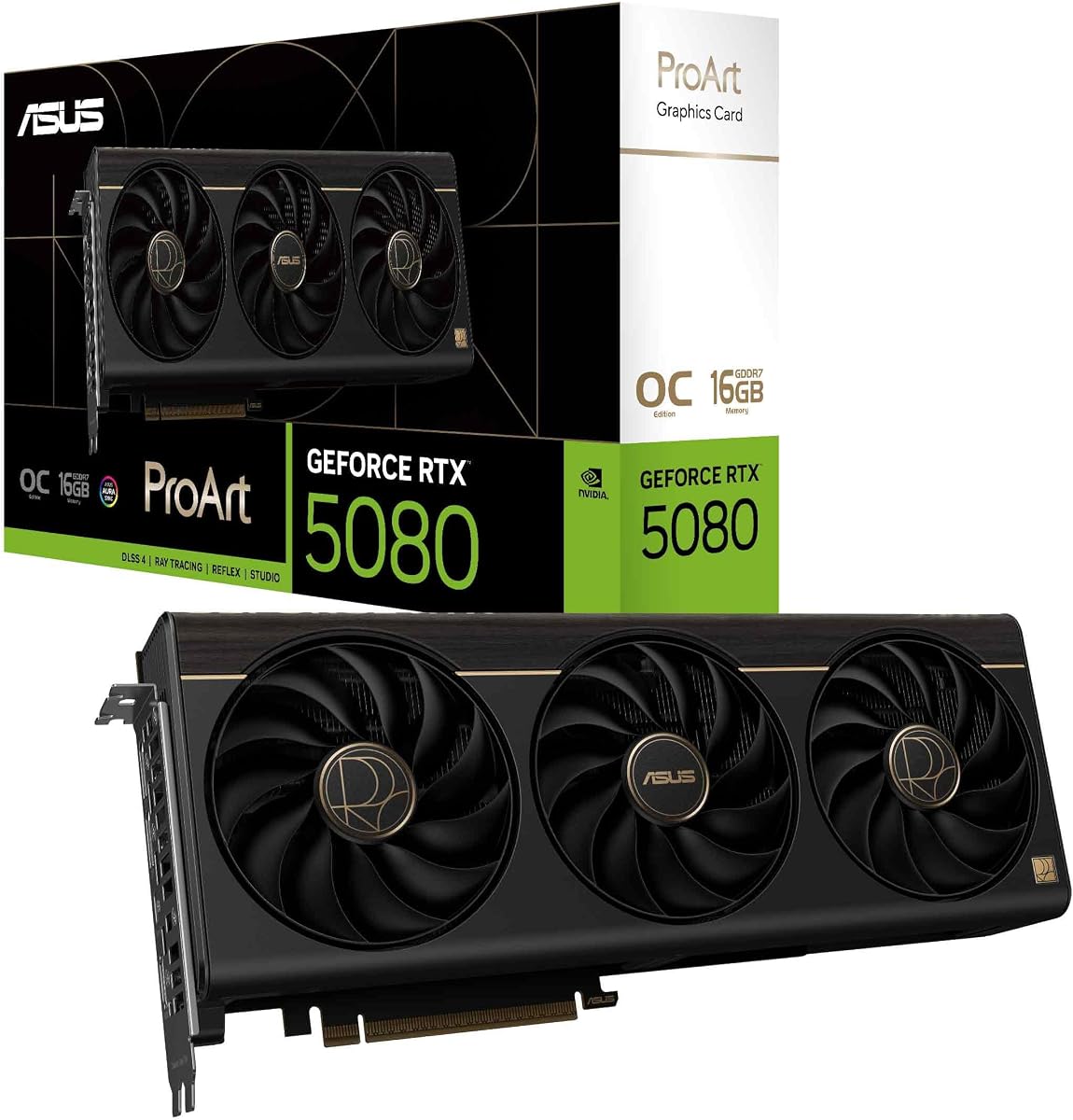
This card tops our list with a 4.9 rating, making it the standout choice for professional editors. Its NVIDIA Blackwell architecture ensures future-proof performance for complex Resolve projects.
We may earn a commission when you buy through this link, at no additional cost to you.
The standout quality is the 1858 AI TOPS, which accelerates neural effects and upscaling significantly. The MaxContact heatsink with vapor chamber keeps temperatures low even during long exports.
While the price is higher, the 16GB GDDR7 memory provides ample bandwidth for 8K timelines. The only trade-off is the power requirement, which demands a robust system.
This card is ideal for high-end studios needing reliability and speed. We recommend it for those prioritizing performance over budget constraints for DaVinci Resolve.
The 1858 AI TOPS enable faster processing of neural network effects within DaVinci Resolve.
Phase-change thermal pads and MaxContact heatsink ensure stable performance under heavy loads.
We may earn a commission when you buy through this link, at no additional cost to you.
Rated 4.7 stars, this card offers excellent value for those needing solid performance without the high cost. It supports 16GB of GDDR7 memory which is key for modern editing.
We may earn a commission when you buy through this link, at no additional cost to you.
The 767 AI TOPS provides decent acceleration for basic AI features in Resolve. The compact design fits into smaller chassis, making it versatile for custom builds.
Trade-offs include less raw power compared to higher-end cards. However, the 16GB buffer ensures smooth playback for most 4K projects without stuttering or crashes.
Ideal for freelancers or beginners, this card balances cost and capability. It is our top budget pick for users focused on efficient editing workflows.
The 2.5-slot design allows installation in smaller cases without sacrificing thermal efficiency.
0dB technology stops fans during light loads for a quiet editing environment.
We may earn a commission when you buy through this link, at no additional cost to you.
With a 4.3 rating, this professional card stands out for its massive 96GB memory capacity. It is designed for users handling extreme data loads and complex simulations.
We may earn a commission when you buy through this link, at no additional cost to you.
The 5th Gen Tensor Cores offer unmatched AI processing speeds. The 96GB buffer allows for uncompressed 8K or even 12K editing directly on the GPU.
The main drawback is the cost, which may be excessive for average users. Additionally, OEM packaging means no retail box or standard warranty support from manufacturers.
Best for large production houses or AI studios, this card provides ultimate power. Choose this if budget is secondary to maximum possible resolution and speed.
96GB DDR7 memory handles massive datasets and multi-layer timelines effortlessly.
ECC memory ensures data integrity during long rendering sessions critical for professional output.
We may earn a commission when you buy through this link, at no additional cost to you.
This 4.6-rated card brings the latest Blackwell architecture to the market. It offers 16GB GDDR7 memory, matching the performance of higher-end professional cards.
We may earn a commission when you buy through this link, at no additional cost to you.
Its primary strength is the balance between gaming speed and creative application support. The WINDFORCE cooling system ensures thermal stability during long video exports.
While not designed specifically for professional ISV certification, it runs Resolve well. The gaming aesthetic may not fit a professional studio environment however.
Recommended for mixed-use workstations where gaming is also a priority. It delivers high frame rates and smooth rendering at a competitive price.
WINDFORCE system uses three fans to dissipate heat effectively during sustained loads.
Gaming OC model offers higher clock speeds than standard reference designs.
We may earn a commission when you buy through this link, at no additional cost to you.
Rated 4.7, this AMD option proves to be a strong competitor in the mid-range market. It supports 16GB of GDDR6 memory for handling complex video files.
We may earn a commission when you buy through this link, at no additional cost to you.
Its strength lies in its PCIe 5.0 interface and robust cooling. The server-grade thermal gel ensures the card stays cool under heavy rendering loads.
The main trade-off is fewer optimized AI tools compared to NVIDIA counterparts. However, for pure raster performance and basic effects, it delivers solid results.
Ideal for those preferring AMD or seeking a cost-effective alternative. It handles most editing tasks efficiently without the NVIDIA tax.
Server-grade thermal conductive gel improves heat transfer from the GPU die.
PCIe 5.0 support ensures future compatibility with fast motherboard standards.
We may earn a commission when you buy through this link, at no additional cost to you.
With a 4.6 rating, the TUF series is known for its rugged build quality. It features 16GB GDDR7 memory and supports high-performance computing tasks.
We may earn a commission when you buy through this link, at no additional cost to you.
Its standout feature is the military-grade component selection, ensuring long-term reliability. The phase-change thermal pad provides excellent heat dissipation for sustained use.
The card is heavy and requires significant clearance, which may be a drawback. Power draw is high, so an 850W PSU is mandatory for safe operation.
Best for users prioritizing longevity and build strength. It is a reliable choice for workstations that run daily and require minimal downtime.
Military-grade components provide rock-solid power delivery and extended lifespan.
Phase-change thermal pads last longer than traditional paste under heavy loads.
We may earn a commission when you buy through this link, at no additional cost to you.
Rated 4.4, the Titan RTX remains a powerful option with its 24GB memory. This makes it suitable for editors working with larger datasets and VR projects.
We may earn a commission when you buy through this link, at no additional cost to you.
Its 4609 CUDA cores ensure smooth handling of complex effects. The 577 Tensor Cores provide decent acceleration for machine learning tasks within the software.
Since it is older than current RTX 50 series models, it lacks newer features. However, its memory capacity keeps it relevant for certain specialized workflows.
Ideal for those who found a great deal on the used market. It balances memory and performance for users who do not need the latest architecture.
24GB memory allows for complex textures and large 4K timelines without swapping.
72 RT cores enable real-time ray tracing for immersive VR content.
We may earn a commission when you buy through this link, at no additional cost to you.
This card scores a 4.4 rating and brings 32GB of memory to the professional market. It targets developers and creators who need large memory buffers.
We may earn a commission when you buy through this link, at no additional cost to you.
Its primary strength is the 32GB GDDR6 capacity, which helps with 8K editing. The dedicated AI Accelerators improve performance in tasks requiring neural computation.
The blower cooler is efficient for multi-GPU setups but can be loud. Drivers may need updates to match NVIDIA's stability in all professional applications.
Best for workstation builds requiring high memory density. It is a solid choice for users preferring AMD's latest architecture for professional work.
32GB GDDR6 ensures ample capacity for large projects and multitasking workflows.
DisplayPort 2.1a supports high-resolution displays for detailed color grading.
We may earn a commission when you buy through this link, at no additional cost to you.
Rated 4.4, this card offers professional ISV certification and real-time ray tracing. It was one of the first to bring RTX to professional workflows.
We may earn a commission when you buy through this link, at no additional cost to you.
Its strength is reliability and optimized drivers for professional software. The 36 RT cores deliver strong performance for visualization tasks.
The 8GB memory limit is a significant constraint for modern 8K workflows. It is best suited for lower-resolution projects or secondary rendering tasks.
Ideal for legacy setups or budget-conscious professionals. It remains a stable choice for users with existing workstations needing reliable performance.
Drivers optimized for professional apps ensure stability during long sessions.
RTX technology enables immediate visualization of lighting in professional scenes.
We may earn a commission when you buy through this link, at no additional cost to you.
This card scores 3.9 and offers a massive 24GB memory at a competitive price. It brings Intel's Xe2-HPG architecture to professional workloads.
We may earn a commission when you buy through this link, at no additional cost to you.
Its strength is the twin media transcoders that support AV1, H.264, and HEVC. This helps in exporting videos quickly in high-res formats efficiently.
The lower rating reflects less mature driver support compared to established brands. It may struggle with specific professional features or optimization.
Best for those needing high memory on a strict budget. It is an experimental option for users willing to troubleshoot occasional driver issues.
24GB memory provides ample space for large files without high cost.
Dedicated encoders support next-gen video formats for faster exports.
We may earn a commission when you buy through this link, at no additional cost to you.
Selecting the right graphics card requires balancing memory, architecture, and budget. This guide outlines the key factors to consider.
VRAM determines how much data the card can store for active frames. High-resolution projects like 4K or 8K require at least 16GB to avoid stuttering.
Aim for 16GB or more for future-proofing and complex workflows.
Newer architectures offer better efficiency and support for latest features like AI acceleration. Look for Blackwell or RDNA 4 for top performance.
Check compatibility with your software version before purchasing older models.
NVIDIA Tensor Cores and AMD AI Accelerators speed up tasks like upscaling and noise reduction. These features are vital for modern video editing.
Prioritize cards with dedicated AI hardware for faster processing times.
PCIe 5.0 provides double the bandwidth of PCIe 4.0, allowing faster data transfer between CPU and GPU. This helps in high-throughput workloads.
Ensure your motherboard supports PCIe 5.0 to utilize the full bandwidth.
Editing often requires multiple monitors for timelines and scopes. Ensure the card supports the resolution and refresh rate of your display setup.
Check for DisplayPort 2.1 or HDMI 2.1 for 4K high-refresh capabilities.
High-performance GPUs often require significant wattage and specific connectors. An 850W PSU is recommended for cards with Blackwell or RDNA 4 architectures.
Verify your case has enough space for the card's length and cooling.
Professional cards offer ISV certification for stable drivers, while gaming cards offer better performance per dollar. Choose based on your reliability needs.
Gamers and enthusiasts often benefit from the cost-efficiency of high-end gaming cards.
Install the latest drivers from the manufacturer's website to ensure optimal compatibility with DaVinci Resolve updates.
Clean dust from fans and heatsinks regularly to maintain thermal efficiency and prevent overheating during long render jobs.
Use the GPU settings in Resolve to force specific rendering tasks to the card, ensuring you utilize its full power.
Yes, 16GB is generally sufficient for 4K and moderate 8K editing. For complex color grading or multiple streams, more memory helps prevent buffering.
Not necessarily. High-end gaming cards often outperform workstation cards in raw speed. Choose professional cards only if ISV certification is critical.
Yes, DaVinci Resolve supports AMD GPUs with OpenCL. However, CUDA on NVIDIA cards offers broader feature support and better optimization.
PCIe 5.0 offers higher bandwidth for data transfer, which can reduce latency in data-heavy tasks like AI processing or multi-stream rendering.
Yes, but software support is limited. It is generally better to use a single powerful card than multiple lower-end cards.
The ASUS RTX 5060 Ti offers 16GB VRAM at a low price, making it ideal for users who need capacity without paying premium rates.
The GPU affects rendering speed more than color accuracy. However, higher-end cards support wider color spaces and HDR workflows better.
Update drivers monthly or whenever Resolve releases a major version. This ensures bug fixes and performance improvements are available.
Our top picks include the ASUS ProArt RTX 5080 for overall performance and the RTX 5060 Ti for budget efficiency. The RTX PRO 6000 stands out for professional workstation needs.
Prioritize memory capacity and architecture to ensure your system handles future video standards. Balancing power and budget is key to a smooth editing experience.
Prices and availability change frequently, so always check current costs before making a purchase. Investing in the right hardware now ensures long-term productivity.