
H10 Android Terminal
4.2Editor score
Android 14 OS
Integrated thermal printer
Long battery life
Handheld pos systems have revolutionized how modern businesses accept payments and manage inventory on the go. These compact devices combine payment processing, barcode scanning, and receipt printing into a single portable unit. Choosing the right one depends heavily on your specific industry needs, connectivity requirements, and desired software integration.
We evaluated ten leading models based on performance, durability, battery life, and user feedback from real business owners. Our comparison includes budget-friendly options for startups and advanced terminals for high-volume retail environments. Each product was assessed for its ability to handle daily operational demands reliably.
This guide shows the key strengths and limitations of every device to help you make an informed decision for your business. While prices and availability can change quickly, the core features remain consistent across these top contenders. Check current listings before purchasing to ensure you get the best deal available today.
4.2Editor score

4.7Editor score

5.0Editor score
As an Amazon Associate we earn from qualifying purchases.
The following table provides a side-by-side comparison of all ten products to highlight their key specifications and unique selling points. Use this overview to quickly identify which device matches your operational needs and budget constraints.




The Square Handheld stands out as a top choice for businesses that need to accept payments anywhere with minimal friction. Its slim design fits easily in a pocket, making it ideal for tableside service in restaurants or on-floor sales in retail environments. The device accepts all major credit and debit cards without hidden fees.
We may earn a commission when you buy through this link, at no additional cost to you.
A key strength is its ability to function offline, allowing you to keep selling even when internet connectivity is spotty. The built-in barcode scanner helps manage inventory quickly without needing extra hardware. Battery life is robust enough to power through a full shift without frequent recharging.
While the device is durable against water splashes, accidental drops may require an optional protective case for full safety. The simplicity of the interface might limit users needing advanced customization or complex reporting tools directly on the unit. However, for most small businesses, this trade-off ensures ease of use.
This handheld is perfect for service providers, food trucks, or retail staff who need a reliable tool to move around freely. Its seamless integration with the broader Square ecosystem makes it a solid long-term investment. We recommend it for anyone prioritizing portability and straightforward payment processing.
The lightweight form factor ensures staff can carry it comfortably for hours without fatigue during busy shifts.
Offline payments ensure business continuity even in areas with poor cellular or Wi-Fi signal strength.
We may earn a commission when you buy through this link, at no additional cost to you.
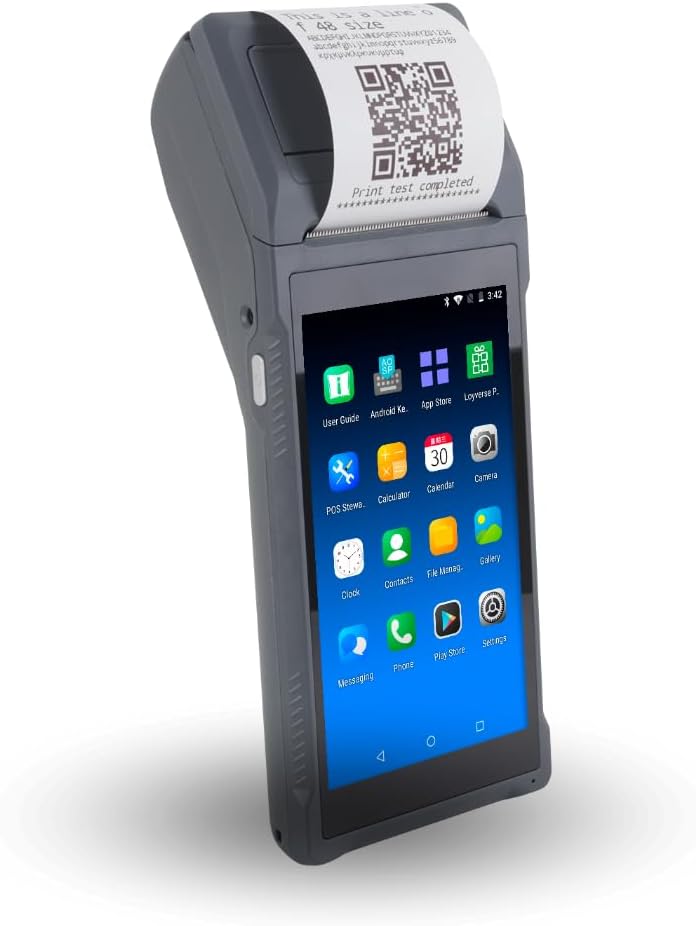
The H10 Android Terminal offers exceptional value by combining a modern operating system with essential hardware like a built-in printer. Running on Android 14, it supports a wide range of business applications from the Play Store. The integrated thermal printer eliminates the need for separate devices, saving space and setup time.
We may earn a commission when you buy through this link, at no additional cost to you.
Its all-day battery life makes it suitable for mobile vendors or delivery services that operate for extended periods without charging access. The NFC reader enables quick contactless payments, which customers increasingly prefer for speed and hygiene. Dual-band Wi-Fi and 4G LTE ensure you stay connected in most locations.
While the thermal printing is cost-effective, you must manage paper rolls carefully to avoid running out mid-transaction. The rear camera doubles as a barcode scanner but may not be as fast as dedicated scanning modules in high-volume settings. These limitations are minor given the competitive price and feature set.
This terminal is ideal for small businesses that need a versatile device for both sales and inventory management. Its compatibility with various POS software gives you flexibility in choosing the right app. We suggest it for budget-conscious buyers needing a full-featured handheld solution.
Android 14 allows you to install and update diverse business apps to match your specific workflow needs.
The integrated printer streamlines checkout by issuing receipts immediately without needing external hardware.
We may earn a commission when you buy through this link, at no additional cost to you.
The Alacrity Handheld POS represents a premium option for businesses that demand high performance and large displays. Its 6.5-inch screen offers ample space for complex data entry or detailed product views. The 8-core processor ensures that applications run smoothly even under heavy load during peak hours.
We may earn a commission when you buy through this link, at no additional cost to you.
One standout feature is the adjustable printer width, which supports both 58mm and 80mm paper. This flexibility is crucial for warehouses or logistics firms that need to print shipping labels or larger receipts. The massive 6400mAh battery provides extended runtime, reducing downtime significantly.
While the price is higher than budget models, the added processing power and screen real estate justify the investment for power users. The weight is noticeable compared to slimmer units, which might be a factor for staff carrying it for long periods. However, the robust build handles industrial environments well.
This device is best suited for large retail stores, logistics centers, or enterprises needing extensive scanning and printing capabilities. The comprehensive connectivity options ensure you never lose connection during critical transactions. We recommend it for operations where speed and reliability are paramount.
The advanced processor minimizes lag when running multiple background apps or processing large datasets.
Adjustable print widths accommodate diverse needs from receipts to shipping labels without extra devices.
We may earn a commission when you buy through this link, at no additional cost to you.
This Bisofice device focuses on providing a straightforward mobile point of sale solution with essential printing capabilities. The Android 8.1 OS ensures compatibility with many legacy apps that businesses might already rely on. Its compact design makes it easy to carry around a warehouse or shop floor.
We may earn a commission when you buy through this link, at no additional cost to you.
The 58mm thermal printer operates quietly and quickly, which helps maintain a pleasant environment for customers and staff alike. Connectivity is solid with 3G and WiFi support, ensuring you can process transactions even in areas with limited infrastructure. The battery supports long working hours effectively.
While the operating system is not the latest, it remains stable and sufficient for basic POS tasks. The camera is functional for scanning but lacks the advanced autofocus found in newer models. These trade-offs are acceptable for those seeking a reliable tool without advanced features.
We suggest this terminal for small boutiques, cafeterias, or bookstores needing an affordable and functional system. It handles the core tasks of sales and receipt issuance without complications. It is a practical choice for businesses with straightforward operational requirements.
The slim profile allows staff to carry it effortlessly while managing customers or stocking shelves.
Quiet and efficient printing keeps the environment professional during busy customer interactions.
We may earn a commission when you buy through this link, at no additional cost to you.
The 4G Handheld PDA brings modern connectivity and operating system features to a compact handheld form factor. Running Android 13, it supports current apps and security updates, ensuring a secure environment for transactions. The HD touchscreen offers vibrant visuals for easy navigation during busy shifts.
We may earn a commission when you buy through this link, at no additional cost to you.
Connectivity is a major highlight with full 4G and LTE support alongside WiFi and Bluetooth. This ensures you can operate from remote locations or busy warehouses without connection drops. The device includes a roll of paper so you can start printing immediately upon arrival.
Battery life is decent for standard shifts but may require a recharge during double shifts or extended outdoor use. The 2GB RAM is sufficient for basic tasks but might slow down if you run multiple heavy apps simultaneously. These factors are worth considering for high-intensity environments.
This model is well suited for logistics teams or field workers who need constant connectivity and reliable scanning. The full network compatibility ensures business continuity in diverse locations. We recommend it for operations that prioritize connection stability over heavy processing power.
Multiple network options guarantee you stay online for transactions regardless of your location.
Included paper rolls let you start selling right away without additional procurement steps.
We may earn a commission when you buy through this link, at no additional cost to you.
The Square Terminal is a robust countertop device designed to handle all payment types efficiently. It accepts chip cards, swipes, and contactless payments with speed and security. The built-in printer provides physical receipts instantly, which is often required for accounting or customer records.
We may earn a commission when you buy through this link, at no additional cost to you.
With a battery that lasts all day, you can use it cordlessly during power outages or relocations. The interface is intuitive for both staff and customers, reducing training time and transaction errors. Funds are accessible the next business day, helping with cash flow management.
While not as portable as the handheld unit, it offers stability for fixed checkout locations like retail counters. Its weight can be a minor drawback if you need to move it frequently throughout the day. However, the durability ensures it withstands the demands of daily use.
This terminal is ideal for brick-and-mortar stores that need a reliable primary register. Its seamless integration with Square software simplifies inventory and sales tracking. We recommend it for businesses prioritizing speed and reliability at a fixed point of sale.
Accepts chip, tap, and swipe methods to accommodate any customer preference.
Next business day payouts ensure funds are available quickly for operational needs.
We may earn a commission when you buy through this link, at no additional cost to you.
The Q2i Mobile POS combines a large touchscreen with a compact form factor for mobile checkout scenarios. It runs on Android 11 and supports major POS apps, giving you flexibility in software selection. The included kit provides everything needed to start processing transactions immediately.
We may earn a commission when you buy through this link, at no additional cost to you.
Its scanner handles standard 1D barcodes efficiently, making it useful for retail environments without complex 2D needs. The dual-band WiFi ensures stable connections in crowded areas where interference might occur. Printing speeds are fast enough to keep lines moving smoothly during rush hours.
Users should note that QR code scanning is not supported on the built-in scanner, which limits use for certain promotions. The battery life is adequate but may need charging if shifts exceed standard hours without access to outlets. These limitations are acceptable for basic retail operations.
This unit is best for retail staff or food vendors needing a portable system without complex features. Its compatibility with various systems makes it adaptable to different business models. We suggest it for those needing a straightforward and reliable mobile solution.
Compatible with popular apps like Square and Stripe to fit your existing workflows.
Includes power adapter, cable, and paper roll for immediate use upon delivery.
We may earn a commission when you buy through this link, at no additional cost to you.
The P1 terminal emphasizes reliability and connectivity with both Ethernet and WiFi capabilities to prevent downtime. Its hybrid setup ensures that even if one network fails, the other maintains transaction processing. The secure merchant account onboarding provides a trustworthy foundation for handling payments.
We may earn a commission when you buy through this link, at no additional cost to you.
Staff will appreciate the combination of a touchscreen and physical keypad, which can speed up data entry and reduce errors. The high-speed printer keeps the line moving by producing receipts quickly. Customer support is noted as dedicated and reliable by users.
While designed primarily for countertop use, its robust build handles frequent daily transactions well. The interface might feel less mobile-centric than pocketable units but offers stability for fixed spots. Users benefit from the transparency in processing fees and support services.
This model suits retail stores or salons that value consistent connectivity and security. The hybrid network support is a significant advantage for busy environments. We recommend it for businesses prioritizing uptime and reliable customer service.
Hybrid network ensures transactions process smoothly even if one signal source is interrupted.
Keypad keys offer tactile feedback for faster and more accurate data entry.
We may earn a commission when you buy through this link, at no additional cost to you.
This Alacrity terminal excels in scanning performance with a dedicated 2D engine capable of reading damaged codes. It is optimized for high-traffic environments like queue management or takeaway orders where speed matters. The large display ensures all transaction details are clear for staff and customers.
We may earn a commission when you buy through this link, at no additional cost to you.
While it is not a dedicated payment terminal, it pairs well with third-party readers for secure transactions. This modular approach allows flexibility in choosing payment processors. The fast print speed keeps the workflow moving efficiently during peak times without delays.
Users should note that you need to pair it with a separate card reader to accept encrypted credit cards directly. This adds a step to setup but allows for customized payment solutions. The battery and connectivity options support continuous mobile usage effectively.
Ideal for cafes or quick service restaurants where scanning tickets and managing queues is a priority. The scanning module handles various code types including QR and PDF417 with ease. We recommend it for operations focused on speed and data capture accuracy.
Professional engine reads damaged codes quickly to reduce errors and improve efficiency.
Fast printing keeps lines short during rush periods by reducing wait times.
We may earn a commission when you buy through this link, at no additional cost to you.
The Clover GO acts as a powerful add-on to transform your smartphone into a mobile POS system. It connects via Bluetooth and supports custom tax rates and tips for flexible business operations. The device emphasizes security, ensuring data is protected from card acceptance to transaction completion.
We may earn a commission when you buy through this link, at no additional cost to you.
Customers appreciate the ability to receive receipts via email or text, reducing paper waste. Employee permissions allow you to control who can view specific data, maintaining security. The compact size means it fits easily in a drawer or pocket when not in use.
It does require processing through SwyftPAY which may limit flexibility if you already have a different processor. You also need a compatible smartphone to run the interface, adding a dependency to the setup. However, the speed and reliability of transactions make it a strong choice.
This device is best for mobile professionals who already own a smartphone and want a lightweight solution. It simplifies payments without needing a bulky standalone terminal. We recommend it for users wanting a simple and secure mobile payment extension.
Sending receipts via text or email reduces paper usage and keeps customers happy.
Manage permissions to ensure only staff access sensitive business data.
We may earn a commission when you buy through this link, at no additional cost to you.
Selecting the right handheld POS system requires evaluating several technical and operational factors. This guide outlines the key aspects to consider before making a purchase.
The operating system determines which software applications you can run. Most handhelds use Android versions ranging from 8.1 to 14. Ensure the OS supports your preferred POS software and business tools. Newer versions offer better security but may require more powerful hardware.
Always verify that your chosen software is compatible with the device OS before buying.
Reliable connectivity is vital for processing payments in real time. Look for devices offering 4G LTE, Wi-Fi, and Bluetooth to stay connected in various environments. Some models also support Ethernet or SIM cards for dedicated mobile data.
Prioritize dual-band Wi-Fi and cellular support for maximum uptime in busy locations.
Battery capacity varies widely among handhelds, ranging from 3000mAh to over 6000mAh. Consider your typical shift length and access to charging points during the day. Longer battery life is crucial for mobile vendors or field workers.
Check charging speed and capacity to ensure the device lasts through your busiest hours.
Built-in thermal printers are common but vary in speed and paper width. Standard 58mm printers work for receipts, while 80mm models handle labels. Check if the printer supports cutting or adjustable widths for your needs.
Confirm the printer handles your required paper type and speed expectations.
Scanning capabilities can range from camera-based solutions to dedicated laser modules. Dedicated modules offer faster and more reliable scanning for inventory management. Check if it supports both 1D and 2D codes if needed for your products.
Invest in a dedicated scanner module if you process many items daily.
Devices used in demanding environments should have ruggedized features. Look for water and dust resistance ratings to protect against spills and debris. Optional protective cases can add drop protection for high-risk areas.
Select a device with a durable build if it will be used outdoors or in active warehouses.
Ensure the device meets PCI compliance standards to protect customer data. Encryption of card data is critical for preventing fraud during transactions. Some devices are payment-ready while others need third-party card readers.
Always choose hardware with robust security features to safeguard financial information.
Price includes the hardware cost but consider long-term expenses like paper, cards, and transaction fees. Some devices are cheaper upfront but may need accessories to function fully. Compare the total value provided by the bundle.
Plan your budget around the total cost of ownership rather than just the initial price.
To get started, charge your device fully and download your POS software from the app store. Pair any necessary card readers via Bluetooth and test a transaction before going live. Ensure you have enough thermal paper rolls stocked for daily use.
Keep your device clean by wiping the screen and ports regularly with a soft, dry cloth. Avoid exposing the device to extreme temperatures or direct sunlight which can damage the battery. Store it in a dry place when not in use to prevent moisture damage.
Update your operating system and apps regularly to maintain security and performance. Monitor battery health and replace the battery if you notice significant degradation over time. Regularly check connection settings to ensure stability during peak business hours.
Many modern handheld POS systems include offline capabilities that store transactions locally until a connection is restored. This feature ensures you can continue selling during internet outages. Always check the specific model specifications to confirm offline functionality.
Thermal printers in these devices use heat-sensitive rolls typically 58mm or 80mm wide. They do not require ink or ribbons, making them cost-effective. Ensure you buy rolls that match the device dimensions for proper fitting.
Yes, reputable models comply with PCI DSS standards and use end-to-end encryption to protect card data. However, you should still keep the device secure and avoid public Wi-Fi without protection. Always update software to patch any security vulnerabilities.
Most Android-based handhelds allow you to install third-party POS apps from the Google Play Store. Check compatibility lists to ensure your chosen software runs smoothly. Some devices may restrict certain system-level functions.
Battery life varies by model, ranging from 8 hours to over 14 hours on a single charge. Usage patterns like screen brightness and printing frequency impact runtime. Consider buying a spare battery if you operate shifts longer than the device capacity.
Models with 80mm printing support can print standard shipping labels effectively. Devices limited to 58mm are generally for receipts only. Check the printer specifications carefully if label printing is a requirement for your business.
Most handheld systems integrate with payment processors that handle the merchant account setup. Some require a specific processor while others allow multiple choices. Ensure you understand the processing fees before selecting a device.
Use a protective case and screen protector designed for your specific handheld model. Avoid dropping the device and keep it away from liquids. Regular cleaning helps prevent dust from clogging ports and affecting performance.
Choosing the right handheld POS system depends on balancing portability, features, and budget. The Square Handheld offers a great balance for many businesses while the H10 provides excellent value for startups. The Alacrity PDA stands out for those needing advanced performance and printing versatility.
Prioritize connectivity and battery life if you operate in mobile or remote environments. Security and compatibility with your existing software should also guide your final decision. A device that fits your workflow will pay for itself in efficiency and reliability.
Remember to check current prices and availability as deals and stock can change quickly. We recommend comparing features against your specific needs before making a purchase. With the right system, your business can process transactions smoothly anywhere you go.