
HDMI Tester Portable High Definition Network Cable Tester Checker
4.4Editor score
Tests HDMI and RJ45 cables
Compact main and remote unit
Battery or USB power supply
This guide compares the top ten HDMI cable and port testers for continuity, signal analysis, and fault detection to help you choose the right tool for your
Finding a reliable HDMI cable and port tester is essential for technicians and enthusiasts who need to verify signal integrity and troubleshoot connection issues efficiently.
We evaluated ten top-rated models based on their testing accuracy, ease of use, port compatibility, and durability to bring you a comprehensive list of the best options available today.
Each pick highlights specific strengths and ideal use cases so you can select the right device for your budget and requirements while noting that availability may vary over time.
4.4Editor score

4.8Editor score

4.5Editor score
The following table provides a side by side overview of key specifications and capabilities for each of the ten tested HDMI cable and port testers.


The UT681 HDMI Cable Tester stands out as the top choice for professionals needing reliable continuity and fault detection without excessive bulk or cost.
We may earn a commission when you buy through this link, at no additional cost to you.
Its rapid analysis feature scans all 19 wires to identify shorts, opens, or cross connections while LED zones highlight specific faults for quick troubleshooting.
While it does not generate video signals, its intelligent power management and portable design make it ideal for field technicians and home users alike.
Anyone seeking a precise and user friendly tool for verifying HDMI cable integrity should consider this model for its consistent performance and value.
The device quickly scans the 19 wires to identify shorts, opens, or misordered pins with clear LED indicators.
Weighing about 175 grams, this tester is light enough for one person to carry and operate efficiently in the field.
We may earn a commission when you buy through this link, at no additional cost to you.
This compact tester offers an affordable entry point for users needing to verify HDMI and network cable continuity without breaking the bank.
We may earn a commission when you buy through this link, at no additional cost to you.
It supports both HDMI 1.2 to 2.0 and RJ45 cables, allowing a single device to handle multiple connectivity verification tasks efficiently.
While it lacks advanced video signal features, its quick scan mode and dual power options make it practical for basic diagnostics and installation checks.
Budget conscious buyers or casual users who need a simple tool for checking cable integrity will find this model well suited to their needs.
The device tests both HDMI cables for video signals and RJ45 network cables ensuring versatility for various connectivity needs.
It can run on a single AAA battery or USB power supply from a phone charger for convenience in different settings.
We may earn a commission when you buy through this link, at no additional cost to you.
This premium handheld unit provides a full HD LCD display with audio so technicians can verify set top box outputs without needing a separate TV.
We may earn a commission when you buy through this link, at no additional cost to you.
Its rugged design resists dust, water, and shock, making it ideal for harsh installation environments while the built in battery supports hours of field use.
Although it comes at a higher price point, the ability to view full color audio and video directly on the device justifies the investment for pros.
Installers and technicians who need to confirm video signals on site without carrying extra displays should prioritize this robust and self contained solution.
The HD LCD screen displays full color audio and video to confirm set top box installation without an external monitor.
With a tempered glass display and shock proof housing, this unit withstands drops and environmental exposure during field work.
We may earn a commission when you buy through this link, at no additional cost to you.
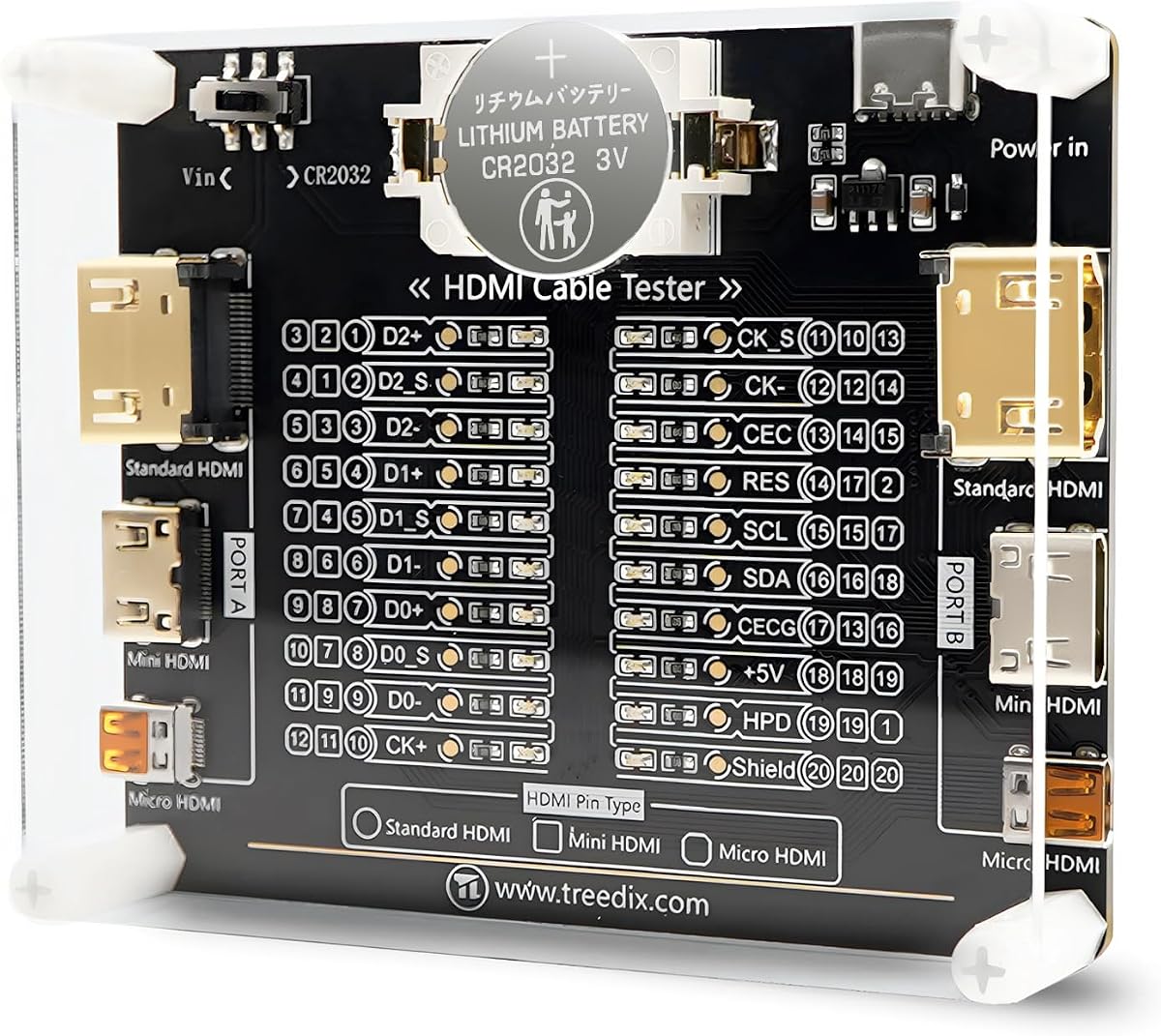
The Treedix tester board is specifically designed for detailed pin by pin continuity checks with 20 LED indicators that map to each HDMI connector pin.
We may earn a commission when you buy through this link, at no additional cost to you.
It supports HDMI versions from 1.0 to 2.1 and offers flexible power options including battery or external input which makes it versatile for bench or field use.
The acrylic housing protects the internal components while the small size allows it to fit easily in a toolkit alongside other testing instruments and adapters.
Technicians who need precise pin level diagnostics for cable repair or custom cable building will appreciate this board's clarity and wide version compatibility.
Each of the 20 LEDs corresponds to a specific pin allowing users to see exactly which connection is active or faulty.
The board accommodates HDMI versions from 1.0 to 2.1 ensuring compatibility with older and newer devices and cables.
We may earn a commission when you buy through this link, at no additional cost to you.
Jonard Tools HDMI-100 is built for verifying long HDMI cable runs with a detachable remote that allows testing when one end is inaccessible.
We may earn a commission when you buy through this link, at no additional cost to you.
It evaluates shorts and open circuits on HDMI and Mini HDMI cables up to 500 meters in length making it ideal for building infrastructure and AV systems.
The full display mode shows all connections at once while scan mode lets you see each pin test sequentially for detailed troubleshooting of signal issues.
Installers working on large venues or distributed video systems will benefit from the remote unit's ability to verify continuity over extended distances easily.
The detachable remote unit enables testing of cables up to 500 meters even when one end is hard to reach.
Users can choose between full display for overview or scan mode for sequential pin by pin continuity verification.
We may earn a commission when you buy through this link, at no additional cost to you.
This portable tester features an auto shut down function that conserves battery life by powering off after ten minutes of inactivity for energy efficiency.
We may earn a commission when you buy through this link, at no additional cost to you.
It supports HDMI 1.1 to 2.0 and RJ45 network cables offering dual functionality for verifying both video and network connectivity with simple LED indicators.
While its rating is slightly lower than some rivals, its ease of use and automatic power saving features make it a practical tool for occasional checks.
Casual users or IT staff needing a straightforward device for quick cable verification will find its auto shut down and dual cable support convenient.
The device automatically powers down after ten minutes of inactivity to preserve battery life during periods of non use.
It verifies both HDMI and RJ45 cables allowing a single tool to handle mixed media and network connectivity tasks.
We may earn a commission when you buy through this link, at no additional cost to you.
This professional tester supports audio video and network cables including HDMI XLR USB and RCA making it a versatile tool for mixed media systems.
We may earn a commission when you buy through this link, at no additional cost to you.
The detachable design allows split testing across different locations while the metal housing provides durability and the clear labels reduce confusion during complex setups.
LED indicators give instant visual feedback on connectivity and pin status so technicians can quickly identify faults without relying on software screens.
Installers handling complex AV and audio environments will appreciate the multi interface support and robust design that streamline cable diagnostics and setup.
The device supports HDMI USB RCA BNC and TRS inputs allowing it to test a broad range of cable types and media.
The main unit separates from the remote enabling testing of cables when access points are far apart or in separate rooms.
We may earn a commission when you buy through this link, at no additional cost to you.
The Monoprice unit serves as both a signal generator and display emulator allowing users to test cable integrity without needing a source device or monitor.
We may earn a commission when you buy through this link, at no additional cost to you.
It supports 4K video at 60Hz and various HDCP versions making it suitable for verifying high bandwidth HDMI and HDR capable AV system setups.
Four different test patterns and resolution settings give technicians precise control over signal output to diagnose display compatibility issues effectively.
Engineers and installers who need to validate signal generation and HDCP handshake compatibility will find this analyzer a valuable tool for high end systems.
The device acts as a standalone signal source so you can test cables without needing a set top box or computer.
It supports 4K video and multiple HDCP versions ensuring compatibility with modern high definition content protection requirements.
We may earn a commission when you buy through this link, at no additional cost to you.
This compact tester diagnoses common HDMI issues like color shifts or missing pictures by displaying the status of each signal component directly.
We may earn a commission when you buy through this link, at no additional cost to you.
It accepts both HDMI and DVI inputs offering flexibility for older setups while its small size makes it easy to carry in a tool pouch or bag.
The simple plug and play operation means users can quickly determine if a cable or connection is causing display problems without complex setup steps.
Technicians who need a lightweight and straightforward tool for verifying HDMI signal quality and diagnosing color or picture issues will find it practical.
The tester accepts both HDMI and DVI inputs making it suitable for older systems or mixed interface setups.
It identifies causes of color shift or missing pictures by showing the status of individual signal components clearly.
We may earn a commission when you buy through this link, at no additional cost to you.
This tool stands out with a perfect user rating and supports the latest HDMI 2.1 versions alongside comprehensive RJ45 LAN cable continuity verification.
We may earn a commission when you buy through this link, at no additional cost to you.
The main and remote units make it easy to test long or installed cables while rotating LEDs clearly indicate proper wiring or specific faults.
Users can power the device with a 9V battery or USB phone charger offering flexibility for both indoor and outdoor testing scenarios effectively.
Network technicians who need to verify HDMI and Ethernet connectivity in one package will appreciate its high reliability and clear visual feedback.
The tester supports HDMI versions from 1.2 to 2.1 ensuring compatibility with high bandwidth modern display standards.
LED lights flash in rotation for correct connections or remain off for faulty wires making faults easy to identify.
We may earn a commission when you buy through this link, at no additional cost to you.
Selecting the right tester requires understanding the specific features that match your use case whether it is simple continuity checking or full signal analysis.
Ensure the tester supports the HDMI versions you work with such as 1.4 2.0 or 2.1 especially if you test high bandwidth cables for 4K or HDR.
Higher version support future proofs your tool and ensures compatibility with modern displays and media sources.
Look for testers that offer full 19 pin continuity checks to identify shorts opens or misordered wires accurately.
Pin level indicators help you pinpoint exact faults instead of just knowing a cable fails.
If you also test Ethernet cables choose a tester that includes RJ45 LAN continuity checks alongside HDMI verification.
Dual functionality reduces the number of tools you need to carry for mixed media network tasks.
Consider whether the device supports Mini HDMI Micro HDMI Type C or other connectors you encounter regularly.
Broader port support increases versatility across different devices and cable types.
Testers that run on batteries and USB power offer flexibility for field work where wall outlets are not available.
Auto shut off features help conserve power during periods of inactivity.
Advanced users may need a device that generates HDMI signals and tests HDCP compliance without requiring a source device.
Signal generators save time and eliminate dependency on external equipment during installation verification.
Choose models with rugged housing and shock resistant screens if you work in demanding environments.
Compact designs with protective cases help keep testers portable and safe during transport.
Clear LED displays or LCD screens improve readability and reduce errors during testing especially in low light conditions.
Multiple display modes like scan and full view offer flexibility for quick checks or detailed analysis.
Connect one end of the HDMI or network cable to the main unit and the other end to the remote unit ensuring all pins align correctly for accurate readings.
Power on the device using the appropriate battery or USB supply then select the desired test mode such as scan or full display to begin analysis.
After testing store the unit in its protective case and keep the connectors clean from dust or debris to maintain long term performance and accuracy.
An HDMI tester cannot physically repair faults but it identifies shorts opens or miswired pins so you can replace the cable or reterminate it properly.
Many modern testers include RJ45 network cable checks so you can verify both HDMI and Ethernet continuity with a single device.
Check the product specifications for listed versions like 1.4 2.0 or 2.1 to ensure compatibility with your cables and displays.
Signal generators are better for advanced diagnostics since they produce video signals without needing a source device whereas simple testers only verify continuity.
Most use standard AAA or 9V batteries while some can run on USB power so choose based on your availability and preference.
Only models explicitly supporting HDMI 2.1 should be used for high bandwidth 2.1 cables to ensure accurate testing results.
Keep the ports clean store the device in a protective case and replace batteries promptly to prevent corrosion or poor connections.
Portable models with detachable units and rugged designs are ideal for field work as they allow testing without needing a monitor or power outlet.
The UT681 HDMI Cable Tester offers the best balance of accuracy and portability while the STEREN Handheld unit provides premium full screen verification without a TV.
Prioritize HDMI version support and pin level visibility based on whether you need basic checks or advanced diagnostics for complex installations.
Always check current availability and compatibility with your specific cables before purchasing since model offerings may evolve over time.